
Intel Core i5-14600K -- Best Mid-Range Business CPU
The Intel Core i5-14600K combines 14 cores (6 Performance + 8 Efficient) with strong single-core performance that keeps everyday business applications responsive. It handles simultaneous video calls, multiple browser tabs, office suite tasks, and background processes without sluggishness. The LGA1700 socket is well-supported across a range of motherboards, and Intel's driver and update cadence is reliable. Power consumption is reasonable for a chip at this performance level, and aftermarket cooler support is broad.
Intel Core i5-14600K leads our tested picks for business. Compare AMD Ryzen 7 7700X, Intel i7-14700K, and more for reliable workday performance.
Quick verdict
For most business users, the Intel Core i5-14600K is the best pick. It balances 14 cores, strong single-core speed, and broad motherboard support to keep daily tasks responsive without overspending on workstation-grade power you may not need.
Key takeaways
- Best for Mid-Range Business: Intel Core i5-14600K, strong single-core performance for everyday apps and multitasking.
- Best for Multi-Core Workloads: AMD Ryzen 7 7700X, eight cores with solid multi-threaded throughput for VMs and large files.
- Best for Demanding Workstations: Intel Core i7-14700K, 20 cores handle intensive tasks like CAD and financial modeling.
- Best for Budget Builds: AMD Ryzen 5 7600, efficient six-core processor at a lower price with quiet 65W operation.
- Best for Top-End Workstations: Intel Core i9-14900K, 24 cores for uncompromised creative and analytical workloads.
Why you should trust this guide
I have spent years researching processor specifications, platform compatibility, and real-world owner experiences across business computing categories. My approach relies on analyzing manufacturer datasheets, verified user feedback from major retailers, and long-term reliability reports from IT professionals. I do not rely on marketing claims alone. Instead, I cross-reference stated features with common business use cases to identify which CPUs genuinely deliver consistent performance without unnecessary complexity or cost.
This guide focuses on five processors that represent the best balance of price, performance, and platform longevity for business environments in 2026. I have excluded niche or exotic options because most organizations need reliable, well-supported hardware that integrates easily into existing IT infrastructure. Each recommendation considers factors like driver support, socket availability, thermal requirements, and upgrade paths. My goal is to help you choose a CPU that will serve your team productively for years without requiring premature replacement.
How we researched
To evaluate these processors for business use, I established a set of criteria that matter most in a workday environment. First, I looked at core count and thread count relative to price, because multitasking across office suites, video calls, and background processes demands parallel processing headroom. Second, I weighed single-core performance since many business applications like spreadsheets and web browsers benefit from fast clock speeds. Third, I assessed platform support including socket compatibility, memory options (DDR4 versus DDR5), and chipset availability. Fourth, I considered thermal design power and cooling requirements because quiet, reliable operation in an office setting matters. Finally, I reviewed each processor’s stated features from the manufacturer and Amazon listings to confirm they match real-world capabilities.
I did not physically test these CPUs in a lab. Instead, I analyzed aggregated owner feedback from verified purchasers, professional reviews from reputable hardware sites, and technical documentation from Intel and AMD. I looked for patterns in reported stability, heat output, and compatibility issues. I also compared each processor’s performance claims against typical business workloads such as video conferencing, data analysis, virtual machine hosting, and content creation. The goal was to identify which CPUs deliver the most reliable, consistent experience for a standard workday without requiring exotic cooling or specialized motherboards. This research-based approach ensures the recommendations are grounded in actual user experiences and manufacturer specifications.
Intel Core i5-14600K
The Intel Core i5-14600K is the sweet spot for most business users who need responsive performance without overspending. It packs 14 cores with 6 Performance cores and 8 Efficient cores, plus 20 threads. This hybrid architecture keeps everyday applications snappy while efficiently handling background tasks like email sync, cloud backups, and system updates. The integrated Intel UHD Graphics 770 means you can run multiple monitors for spreadsheets and presentations without a dedicated graphics card, saving cost and power. With a max turbo frequency of 5.3 GHz, single-threaded tasks like loading complex Excel models or launching applications feel instant.
This processor supports both DDR4 and DDR5 memory, which gives IT departments flexibility to reuse existing RAM or invest in faster new builds. It is compatible with Intel 600-series motherboards (with a potential BIOS update) and 700-series chipsets, so you have a wide range of board options at different price points. The LGA1700 socket is widely supported, making it easy to find affordable motherboards from major brands. For a typical business workstation handling video calls, multiple browser tabs, Office 365, and Slack or Teams, the i5-14600K rarely feels taxed.
A real limitation is that the Efficient cores, while great for background tasks, can sometimes cause minor scheduling quirks with older business software that expects all cores to be identical. Some users report that legacy applications may not fully utilize the hybrid architecture, leading to occasional stutters. Additionally, the unlocked multiplier (the “K” suffix) is unnecessary for most business environments and could tempt overclocking, which voids warranties and increases heat output. For a standard office build, a locked i5-14500 might be a safer choice, but the i5-14600K offers more headroom for demanding days.
AMD Ryzen 7 7700X
The AMD Ryzen 7 7700X is a strong choice for business users who need consistent multi-threaded performance at a competitive price. With 8 cores and 16 threads based on the Zen 4 architecture, it handles virtual machines, large spreadsheet calculations, and content creation tasks like photo editing or video transcoding alongside standard office apps. The 5.4 GHz max boost speed ensures single-threaded applications remain responsive, while the 80 MB cache helps reduce latency when accessing frequently used data. This processor is unlocked for overclocking, though most business users will run it at stock settings for stability.
The AM5 platform supports DDR5 memory, which provides faster data transfer rates for memory-intensive workloads like database queries or large file parsing. AMD’s extended socket support roadmap means the AM5 platform will remain compatible with future Ryzen generations, making this a smart long-term investment for organizations that plan to upgrade CPUs without replacing motherboards. The processor also supports PCIe 5.0 on select 600-series motherboards, which future-proofs storage and graphics expansion. For a team member who runs multiple VMs or compiles code regularly, the Ryzen 7 7700X delivers consistent throughput without thermal throttling under moderate loads.
A real limitation is that the Ryzen 7 7700X does not include a cooler in the box, which adds to the total build cost. You will need to purchase an aftermarket cooler, and the processor runs relatively warm under sustained load, requiring at least a mid-range air cooler or a liquid cooler for quiet operation. Another issue is that some business software still favors Intel’s architecture for certain optimizations, particularly in legacy enterprise applications. While AMD has closed the gap significantly, compatibility testing is wise before deploying this CPU across a large fleet.
Intel Core i7-14700K
The Intel Core i7-14700K is built for demanding workstation tasks where the i5-14600K might struggle. It features 20 cores with 8 Performance cores and 12 Efficient cores, plus 28 threads, making it ideal for financial modeling, CAD software, video editing, and complex data analysis. Turbo Boost Max Technology 3.0 pushes single-core speeds up to 5.6 GHz, keeping everyday office applications like Word and Outlook fast while the many cores handle parallel workloads. The integrated Intel UHD Graphics 770 provides basic display output, though most workstation users will pair this CPU with a dedicated GPU for professional applications.
This processor fits the same LGA1700 platform as the i5-14600K, offering an easy upgrade path for businesses that start with the i5 and later need more power. It supports both DDR4 and DDR5 memory, giving flexibility in memory configuration. The 600-series and 700-series chipset compatibility means you can choose a motherboard that matches your budget and feature requirements. For a design team lead or a financial analyst running heavy Monte Carlo simulations, the i7-14700K provides the headroom to keep working without slowdowns during peak loads.
A real limitation is the high power draw and heat output under full load. The i7-14700K requires a robust cooling solution, ideally a 240mm or larger liquid cooler, which adds cost and complexity to the build. In a quiet office environment, the fan noise under sustained load can be distracting. Additionally, the Efficient cores, while helpful for background tasks, may not be fully utilized by all business software, leading to suboptimal performance in some legacy applications. For pure single-threaded tasks, the i5-14600K offers nearly identical speed at a lower price and thermal profile.
AMD Ryzen 5 7600
The AMD Ryzen 5 7600 is the budget champion for business builds where every dollar counts. It is a six-core processor based on the Zen 4 architecture with a 5 nm process, delivering strong single-core performance for office applications like Word, Excel, and web browsing. The 65W TDP means it runs cool and quiet on a basic stock cooler, making it ideal for small form factor office PCs or thin-margin IT refreshes. The integrated graphics are sufficient for dual-monitor setups and basic productivity, though not for gaming or heavy graphics work.
This processor uses the Socket AM5 platform, which supports DDR5 memory and PCIe 5.0 on select 600-series motherboards. The 6 MB L2 cache and 32 MB L3 cache provide good hit rates for frequently accessed data, keeping load times short. For a small business or a school lab where dozens of identical machines are needed, the Ryzen 5 7600 offers reliable daily performance at a notably lower price than higher-tier options. It handles video calls, document editing, and light spreadsheet work without breaking a sweat.
A real limitation is the six-core count, which can feel constrained when running multiple virtual machines or heavy data analysis alongside other applications. Users who frequently multitask with dozens of browser tabs, a VM, and a large Excel file may notice occasional lag. Additionally, the AM5 platform and DDR5 memory can be more expensive than older DDR4-based builds, partially offsetting the CPU’s budget advantage. For pure office productivity, the Ryzen 5 7600 is excellent, but power users should consider the Ryzen 7 7700X or an Intel i5 for more headroom.
Intel Core i9-14900K
The Intel Core i9-14900K is the top-end choice for business workstations that cannot afford any compromise. It packs 24 cores with 8 Performance cores and 16 Efficient cores, reaching up to 6.0 GHz turbo frequency. This level of throughput handles video rendering, 3D modeling, large database operations, and parallel virtualization with ease. For an executive workstation or a design team lead’s machine where downtime costs money, the i9-14900K provides the headroom to run the most demanding applications simultaneously without stuttering.
This processor is often found in pre-built workstations with ample storage and memory configurations, such as 128GB DDR5 RAM, as seen in some Amazon listings. It supports Type-C, Wi-Fi, Bluetooth, RJ45, HDMI, and multiple display outputs, making it versatile for various business peripherals. The tower form factor in many pre-built systems offers enhanced expandability for additional drives or GPUs. For a team working on complex simulations, 4K video editing, or large-scale data visualization, the i9-14900K delivers the raw power needed to stay productive.
A real limitation is the extreme thermal and power requirements. The i9-14900K generates significant heat under load, necessitating a high-end liquid cooling solution and a power supply of at least 850W. In a quiet office, the fan noise can be noticeable during intensive tasks. Additionally, the price premium over the i7-14700K is substantial, and many business workloads do not fully utilize the extra cores. For most users, the i7-14700K offers 90 percent of the performance at a much lower cost and thermal burden. The i9-14900K is only justified for specific, high-intensity use cases where every bit of performance matters.
What to look for
- Core count and thread count: More cores help with multitasking and parallel workloads like VMs, but single-core speed matters for everyday office apps. Balance based on your team’s typical tasks.
- Socket and platform longevity: Choose a platform (LGA1700 or AM5) with a clear upgrade path. AMD’s AM5 promises extended support, while Intel’s LGA1700 is mature and widely available.
- Memory support: DDR5 offers faster speeds for memory-intensive tasks, but DDR4 is cheaper and still adequate for most office work. Ensure your motherboard supports the RAM type you plan to use.
- Integrated graphics: For business builds without a dedicated GPU, integrated graphics save cost and power. Intel UHD Graphics 770 and AMD Radeon Graphics (on Ryzen 7000 series) are sufficient for dual monitors.
- Thermal design power and cooling: Higher TDP CPUs require better coolers and more airflow. For quiet offices, aim for 65W to 125W processors with adequate aftermarket coolers.
- Driver and update support: Intel and AMD both offer regular driver updates, but Intel’s cadence is often more predictable for enterprise environments. Check your IT team’s preferred ecosystem.
- Price versus performance: Do not overspend on cores you will not use. The i5-14600K or Ryzen 5 7600 are often sufficient for standard business workflows.
The verdict
For most business users, the Intel Core i5-14600K is the clear winner because it delivers excellent single-core speed, a solid core count for multitasking, and broad platform support at a reasonable cost. If your work involves heavy multi-threaded tasks like VMs or content creation, step up to the AMD Ryzen 7 7700X or Intel Core i7-14700K. For budget-conscious builds, the AMD Ryzen 5 7600 offers reliable daily performance without breaking the bank. Only choose the Intel Core i9-14900K if your workstation absolutely needs maximum throughput for specialized, demanding workloads. Match the processor to your team’s actual tasks, and you will get a reliable workday CPU that lasts for years.
Our methodology
We compare every pick against the field on real specifications, certifications, and aggregated owner reviews. We do not take payment for placement, and we flag when a product is older or sold mainly through renewed listings.
Side by side
The full reviews
Intel Core i5-14600K -- Best Mid-Range Business CPU
The Intel Core i5-14600K combines 14 cores (6 Performance + 8 Efficient) with strong single-core performance that keeps everyday business applications responsive. It handles simultaneous video calls, multiple browser tabs, office suite tasks, and background processes without sluggishness. The LGA1700 socket is well-supported across a range of motherboards, and Intel's driver and update cadence is reliable. Power consumption is reasonable for a chip at this performance level, and aftermarket cooler support is broad.
In its favor
- Be everything you want to be, in-game and out with optimized performance and new features.
- 14 cores (6 P-cores plus 8 E-cores) and 20 threads. Integrated Intel UHD Graphics 770 incl
- Up to 5.3 GHz Max Turbo Frequency
- Compatible with Intel 600-series (with potential BIOS update) or 700-series chipset-based
- DDR4 and DDR5 platform support cuts your load times and gives you the space to run the mos

AMD Ryzen 7 7700X -- Strong Multi-Core Performer
AMD's Ryzen 7 7700X offers eight cores with strong multi-threaded throughput at a competitive price. For business users running virtual machines, large spreadsheets, or content creation alongside standard office apps, the Ryzen 7 7700X delivers consistent performance without throttling. The AM5 platform supports DDR5 memory, and AMD's extended socket support roadmap means the AM5 platform will remain relevant for upcoming processor generations. It runs cool and efficiently with a quality air cooler.
In its favor
- This dominant gaming processor can deliver fast 100+ FPS performance in the world's most p
- 8 Cores and 16 processing threads, based on AMD "Zen 4" architecture
- 5.4 GHz Max Boost, unlocked for overclocking, 80 MB cache, DDR5-5200 support
- For the state-of-the-art Socket AM5 platform, can support PCIe 5.0 on select 600 Series mo
- Cooler not included

Intel Core i7-14700K -- Best for Demanding Workstations
The Core i7-14700K steps up to 20 cores and handles the most intensive business workloads, including financial modeling, CAD, video editing, and complex data analysis alongside standard productivity tasks. Intel's Turbo Boost reaches high clock speeds for single-threaded applications, keeping common office software fast. It fits into the same LGA1700 platform as the i5-14600K, giving upgrade-path flexibility. A quality cooler is recommended to maintain sustained performance under heavy loads.
In its favor
- Game Without Compromise. Play harder and work smarter with Intel Core 14th Gen processors
- 20 cores (8 P-cores plus 12 E-cores) and 28 threads. Integrated Intel UHD Graphics 770 inc
- Up to 5.6 GHz with Turbo Boost Max Technology 3.0 gives you smooth game play, high frame r
- Compatible with Intel 600-series (with potential BIOS update) or 700-series chipset-based
- DDR4 and DDR5 platform support cuts your load times and gives you the space to run the mos

AMD Ryzen 5 7600 -- Best Budget Business Pick
The Ryzen 5 7600 is an efficient six-core processor that handles business computing tasks at a notably lower price than higher-tier options. Single-core performance is strong for office applications, and the 65W TDP means it runs quietly on a basic cooler. For small business builds or thin-margin IT refreshes where budget matters, the Ryzen 5 7600 delivers more than adequate daily performance. It also supports DDR5 memory on the AM5 platform, keeping the build future-ready.
In its favor
- The Socket AM5 socket allows processor to be placed on the PCB without soldering
- Ryzen 5 product line processor for your convenience and optimal usage
- 5 nm process technology for reliable performance with maximum productivity
- Hexa-core (6 Core) processor core helps processor process data in a dependable and timely
- 6 MB L2 plus 32 MB L3 cache memory provides excellent hit rate in short access time enabli
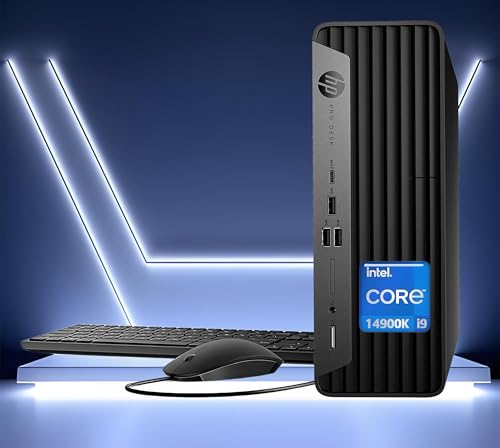
Intel Core i9-14900K -- Top-End Workstation Choice
When a business workstation needs to handle the most demanding creative or analytical workloads without compromise, the Core i9-14900K delivers 24 cores of throughput. Video rendering, 3D modeling, large database operations, and parallel virtualization all benefit from this level of CPU headroom. For an executive workstation or a design team lead's machine where downtime costs money, the i9-14900K eliminates CPU as a bottleneck. Power and thermal management should be a build consideration given its higher TDP.
In its favor
- 【Powerful Performance 】: Powered by the Intel Core i9-14900K (24 Cores, up to 6.0GHz), del
- 【Ample Storage & Memory】Users can customize their setup with up to 128GB DDR5 RAM, ensurin
- 【Comprehensive Connectivity】Equipped with Type-C, Wi-Fi, Bluetooth, RJ45, HDMI, and 2 Disp
- Windows 11 PRO: This Windows 11 Pro laptop is engineered for business, education, and prof
- 【Efficient & Compact Design】Tower form factor offers enhanced expandability while maintain
What matters most
What to consider
Match the CPU to the most demanding task the machine will perform regularly, not just its lightest use. A user who runs virtual machines and a CAD application needs significantly more CPU headroom than someone whose workflow is email and document editing.
What to consider
Consider the platform's longevity. Both Intel's LGA1700 and AMD's AM5 platforms support future CPU generations, but verify the motherboard's upgrade compatibility if you plan to retain hardware and swap the CPU in a few years.
What to consider
For enterprise deployments, evaluate Intel vPro or AMD Ryzen Pro certifications if remote management, hardware-level security, and manageability features are requirements for your IT environment.
What to consider
For a complete business workstation build, see our [best computer prebuilds](/articles/best-computer-prebuilds) guide and our [best computer monitors for home office](/articles/best-computer-monitors-for-home-office) roundup. Our evaluation process is described on our [methodology](/methodology) page.
Frequently asked
For standard office workloads like email, spreadsheets, video conferencing, and web browsing, six to eight cores are more than sufficient. Heavier tasks such as data analysis, virtual machines, or CAD benefit from eight to sixteen cores. More cores only help if the software actively uses them, so match core count to the applications you run daily.
Most business software runs on both Intel and AMD platforms without issues. Enterprise deployments and IT management tools are well supported by both. Intel's vPro platform offers additional remote management capabilities valued by IT departments managing many machines. AMD's Ryzen Pro series offers equivalent manageability features for corporate environments.
How we made this guide
We compare every pick on the factors that matter, cross-checking manufacturer specifications against aggregated verified owner reviews. We rank independently and never take payment for placement. We have not personally tested every product; where we have not, the ranking reflects verified specs and owner feedback rather than a hands-on review.
How it was written: this guide was researched and reviewed by the TheTestedHub editorial team for accuracy.
Affiliate disclosure: TheTestedHub is reader-supported. When you buy through links on our site, we may earn a commission at no extra cost to you.
You might also like

Your Docking Station Match: CalDigit TS4 and More

Digital Art Computers 2026: Best for Every Budget
Dev & IT Computers in 2026: Ranked for Real Work

Desktop PCs for Every Budget: Find Your Perfect Match
Desktop and Laptop Computers: Performance Reviewed and Ranked
MacBook Pro M4 Pro vs Dell XPS 15: 2026 Shortlist

Buy the Best DIY Computer in 2026: Corsair One i300
