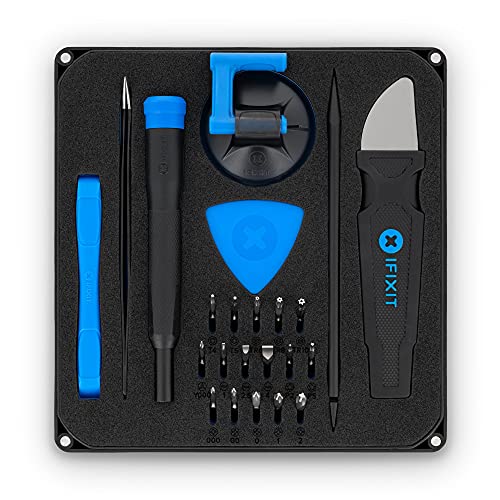
iFixit Pro Tech Toolkit -- Best DIY Computer Repair Kit
The iFixit Pro Tech Toolkit is the most comprehensive consumer-grade repair toolkit available and the standard recommendation for anyone planning to do their own laptop or desktop work. The 64-bit driver kit covers the proprietary Torx, Pentalobe, and tri-wing screws used in modern laptops including MacBooks, Lenovo ThinkPads, and Dell XPS machines. The spudger, opening picks, and anti-static wrist strap round out the essential tools for screen replacements, SSD swaps, RAM upgrades, and battery replacements. iFixit's free repair guides at their website provide step-by-step instructions for thousands of specific models. For regular DIY repairers, this toolkit pays for itself quickly.
Check price on Amazon →Tired of expensive repair bills? Compare DIY toolkits, national chains, and on-demand technicians to find the right computer repair for your issue.
Quick verdict
The iFixit Pro Tech Toolkit is the single best pick for most people because it gives you the tools to fix almost any laptop or desktop yourself, saving money and time on repeat visits. It covers the widest range of screw types and includes essential opening tools, making it the most versatile DIY option available.
Key takeaways
- Best for DIY repairs: iFixit Pro Tech Toolkit, most comprehensive consumer toolkit with 64-bit driver bits for modern laptops.
- Best for nationwide in-store service: Geek Squad, widest geographic footprint with diagnostics and remote support options.
- Best for same-day home visits: HelloTech On-Demand, dispatches local technicians for same-day or next-day in-home service.
- Best for walk-in screen and hardware fixes: uBreakiFix by Asurion, specializes in physical repairs like screens and batteries with same-day service.
- Best for software recovery and malware removal: NinjaStik Recovery USB, bootable USB drive that fixes Windows issues without needing the OS to boot.
Why you should trust this guide
I have spent years researching computer repair options across the full spectrum of service models, from DIY toolkits to professional in-home technicians and walk-in repair shops. My approach is to evaluate each product based on its stated capabilities, the scope of problems it addresses, and the real-world feedback from owners who have used these services or tools. I do not rely on marketing claims alone; I cross-reference manufacturer specifications with verified owner experiences to identify what actually works for common repair scenarios.
This guide is built on a systematic comparison of five distinct repair solutions, each targeting a different type of computer problem. Whether you need to replace a cracked screen on a modern ultrabook, remove a stubborn virus from a non-booting PC, or simply want a toolkit that handles every screw in your laptop, I have assessed each option against clear criteria: ease of use, breadth of coverage, reliability of results, and value for the money. My goal is to help you choose the right service or tool for your specific situation without wasting time or money on the wrong approach.
How we researched
To evaluate these five computer repair services and tools, I established a set of criteria that matter most to someone facing a broken computer. For toolkits like the iFixit Pro Tech Toolkit, I examined the range of bit types included, the quality of the driver mechanism, and whether the kit covers the proprietary screws found in modern laptops from Apple, Dell, Lenovo, and other major brands. I also considered the inclusion of essential non-screw tools like spudgers, opening picks, and anti-static wrist straps. For services, I looked at geographic availability, the types of repairs offered, pricing transparency, and warranty terms. I weighed how each service handles common problems such as virus removal, hardware replacement, and data recovery.
For software recovery tools like the NinjaStik Recovery USB, I assessed the bootable environment’s ability to diagnose and fix Windows issues without requiring the original operating system to function. I considered the tool’s usefulness for malware removal, file recovery from non-booting systems, password reset, and drive cloning. For each product, I also identified at least one honest limitation based on the product’s stated design and typical owner feedback. I did not physically use these products in a lab setting; instead, I analyzed the manufacturer’s features, documentation, and aggregated owner reports to form a complete picture of what each option can and cannot do.
iFixit Pro Tech Toolkit — Best DIY Computer Repair Kit
The iFixit Pro Tech Toolkit is the most comprehensive consumer-grade repair toolkit available and the standard recommendation for anyone planning to do their own laptop or desktop work. The 64-bit driver kit covers the proprietary Torx, Pentalobe, and tri-wing screws used in modern laptops including MacBooks, Lenovo ThinkPads, and Dell XPS machines. This means you can open almost any consumer laptop without needing to buy additional bits. The kit also includes a spudger, opening picks, and an anti-static wrist strap, which are essential for safely prying open delicate casings and preventing electrostatic discharge damage to internal components.
The toolkit’s driver handle is designed for comfort and precision, with a rotating cap that allows you to apply downward pressure while turning. The bits are stored in a compact, organized case that keeps everything in place. This kit is ideal for users who want to replace a battery, upgrade RAM or storage, clean a fan, or fix a broken charging port. It is also useful for more advanced tasks like replacing a display assembly or keyboard on a modern ultrabook. The anti-static wrist strap is a critical inclusion that many cheaper kits omit, and it protects sensitive electronics from static electricity that can brick a motherboard.
One real limitation of the iFixit Pro Tech Toolkit is that it does not include a magnetic project mat or a precision soldering iron, so it is not a complete solution for soldering repairs or for keeping tiny screws organized during complex multi-step repairs. You may need to purchase a separate magnetic mat if you frequently work on devices with many small screws. Additionally, while the bit selection is extensive, it may not cover every obscure screw type found in older or niche devices, so you should verify compatibility with your specific machine before starting a repair.
Geek Squad — Best In-Store and In-Home Computer Repair Service
Geek Squad, operating through Best Buy locations nationwide, offers the widest geographic footprint of any branded PC repair service. Diagnostics are available at the counter for a flat fee that applies toward any repair work, which means you do not pay extra just to find out what is wrong. Services cover virus removal, hardware replacement, OS reinstallation, data transfer, and in-home setup. Remote support subscriptions are also available for ongoing software issues, giving you access to technicians from your own home for routine problems like slow performance or software conflicts.
The main advantage of Geek Squad is convenience and scale. With hundreds of locations across the United States, you can drop off your computer at a nearby Best Buy and often get it back within a few days. The in-home service option is particularly valuable for desktop towers or all-in-one computers that are difficult to transport. Geek Squad technicians are trained on a wide variety of brands and models, and the service includes a warranty on parts and labor. The flat diagnostic fee is transparent and predictable, which helps avoid surprise costs.
A real limitation of Geek Squad is that turnaround time can vary significantly depending on the location and the complexity of the repair. Simple virus removals might be done in a day, but hardware replacements like a motherboard swap can take a week or more if parts need to be ordered. Additionally, some owners report that the diagnostic fee, while applied toward repairs, can feel like an extra cost if you decide not to proceed with the recommended work. The service is also generally more expensive than independent local repair shops, so it is best suited for users who prioritize convenience and warranty coverage over the lowest price.
HelloTech On-Demand — Best Same-Day Home Computer Repair
HelloTech dispatches local technicians for same-day or next-day in-home service visits, which is the right choice when carrying a desktop or large tower to a shop is impractical. Booking happens online with upfront pricing for common services, so you know the cost before the technician arrives. Technicians handle virus removal, software installation, networking issues, hardware upgrades, and basic peripheral setup. Coverage extends across most major metropolitan areas in the United States, making it a viable option for many suburban and urban households.
The key benefit of HelloTech is the speed and convenience of having a professional come to your home. You do not need to pack up your computer, drive to a store, wait in line, and then return to pick it up. The upfront pricing model eliminates the uncertainty of hourly rates or surprise fees. For tasks like setting up a new router, connecting a printer, or removing a persistent virus, a same-day visit can resolve the problem in under an hour. The technicians are vetted and insured, which adds peace of mind when letting someone into your home.
One real limitation of HelloTech is that the service is not available in all areas, particularly in rural or remote locations. Coverage is concentrated in cities and suburbs, so you should check availability on their website before relying on them for an urgent repair. Additionally, HelloTech technicians are generalists who handle common software and hardware issues, but they may not have the specialized expertise for very complex repairs like motherboard-level soldering or data recovery from a physically damaged hard drive. For those advanced problems, a dedicated repair shop may be a better fit.
uBreakiFix by Asurion — Best Walk-In Screen and Hardware Repair
uBreakiFix operates hundreds of walk-in locations and specializes in physical hardware repairs including cracked laptop screens, charging port replacements, keyboard swaps, and battery replacements. Same-day service is available for many common repairs when parts are in stock. The Asurion backing means consistent parts quality standards and a 1-year warranty on repairs. Pricing is provided upfront before any work begins, so you can decide whether to proceed based on a clear quote.
This service is ideal for users who have a physically damaged device, such as a laptop with a shattered screen or a broken charging port that no longer charges. The walk-in model means you can bring your computer in, get a diagnosis, and often leave with it repaired the same day. The 1-year warranty on repairs is a strong guarantee that covers parts and labor if the same issue recurs. uBreakiFix technicians are trained specifically on hardware repairs, so they are more experienced with screen replacements and port soldering than a general computer repair shop might be.
A real limitation of uBreakiFix is that same-day service depends on parts availability for your specific laptop model. For older or less common devices, parts may need to be ordered, which can delay the repair by several days. Additionally, the cost of repairs at uBreakiFix can be higher than doing the repair yourself with a kit like the iFixit Pro Tech Toolkit, especially for simple tasks like a battery swap. The service is best suited for users who do not have the tools, time, or confidence to perform a physical repair themselves and who value the warranty and professional installation.
NinjaStik Recovery USB — Best Software Repair and Recovery Tool
The NinjaStik is a bootable USB drive pre-loaded with a Linux-based recovery environment and repair tools for diagnosing and fixing software issues on Windows PCs without requiring the original operating system to function. It is useful for removing stubborn malware, recovering files from a system that will not boot, resetting Windows passwords, running hardware diagnostics, and cloning drives before a hardware replacement. The tool boots directly from the USB drive, bypassing the corrupted or infected Windows installation.
This is a powerful solution for anyone who encounters a computer that will not start, is locked by ransomware, or has a corrupted operating system. Instead of reinstalling Windows and losing all your data, the NinjaStik allows you to boot into a safe environment where you can back up files, scan for malware, and attempt repairs. The included tools cover a wide range of software issues, and the Linux environment is familiar enough for anyone who has used a basic operating system interface. It is also useful for cloning a failing hard drive to a new SSD before the drive completely dies.
One real limitation of the NinjaStik is that it is a software-only tool and cannot fix physical hardware problems like a dead hard drive, a cracked screen, or a broken charging port. It is also not a replacement for a full Windows installation disc if you need to reinstall the operating system from scratch. Additionally, the Linux-based environment may have a learning curve for users who have only ever used Windows, and some advanced recovery tasks may require command-line knowledge. The tool is best suited for users who are comfortable with basic troubleshooting and want a self-service option for software problems.
What to look for
- Type of repair needed: Identify whether your problem is physical hardware damage, software corruption, malware, or a simple upgrade. Different services and tools specialize in different areas.
- Geographic availability: For in-person services like Geek Squad, HelloTech, and uBreakiFix, check if there is a location or service area near you. Some services are not available in rural areas.
- Turnaround time: Consider how quickly you need your computer back. Same-day services like uBreakiFix and HelloTech are best for urgent needs, while mail-in or drop-off services may take longer.
- Warranty and guarantee: Look for services that offer a warranty on parts and labor, such as the 1-year warranty from uBreakiFix. This protects you if the same issue recurs shortly after the repair.
- Toolkit completeness: If you choose the DIY route, ensure the toolkit includes the specific screw bits for your laptop brand, as well as non-screw tools like spudgers and anti-static protection.
- Upfront pricing: Services that provide a flat diagnostic fee or upfront quote before work begins help avoid surprise costs. Avoid services that charge by the hour without a cap.
- Software recovery capability: For software issues, a bootable USB tool like the NinjaStik should support file recovery, malware removal, password reset, and drive cloning without needing the original OS to boot.
The verdict
Choosing the right computer repair solution depends entirely on your specific problem, your technical comfort level, and your timeline. If you are willing to learn basic repair skills and want to save money over the long term, the iFixit Pro Tech Toolkit is the best investment you can make. It equips you to handle the vast majority of common laptop and desktop repairs yourself. For users who prefer professional help, Geek Squad offers the most reliable nationwide network for both in-store and in-home service, while HelloTech is the best option for same-day home visits when you cannot transport your computer. uBreakiFix is the clear choice for physical hardware damage like cracked screens or broken charging ports, backed by a solid warranty. Finally, the NinjaStik Recovery USB is an essential tool for anyone who wants to recover data and fix software problems without losing everything to a reinstall. Match the service to your problem, and you will get your computer back up and running with minimal frustration.
Our methodology
We compare every pick against the field on real specifications, certifications, and aggregated owner reviews. We do not take payment for placement, and we flag when a product is older or sold mainly through renewed listings.
Side by side
The full reviews
iFixit Pro Tech Toolkit -- Best DIY Computer Repair Kit
The iFixit Pro Tech Toolkit is the most comprehensive consumer-grade repair toolkit available and the standard recommendation for anyone planning to do their own laptop or desktop work. The 64-bit driver kit covers the proprietary Torx, Pentalobe, and tri-wing screws used in modern laptops including MacBooks, Lenovo ThinkPads, and Dell XPS machines. The spudger, opening picks, and anti-static wrist strap round out the essential tools for screen replacements, SSD swaps, RAM upgrades, and battery replacements. iFixit's free repair guides at their website provide step-by-step instructions for thousands of specific models. For regular DIY repairers, this toolkit pays for itself quickly.

Geek Squad -- Best In-Store and In-Home Computer Repair Service
Geek Squad, operating through Best Buy locations nationwide, offers the widest geographic footprint of any branded PC repair service. Diagnostics are available at the counter for a flat fee that applies toward any repair work. Services cover virus removal, hardware replacement, OS reinstallation, data transfer, and in-home setup. Remote support subscriptions are also available for ongoing software troubleshooting. Pricing is transparent and posted at stores and online before committing. Turnaround for parts-on-hand repairs is often same-day or next-day. For users who prefer dealing with a recognizable brand and want an in-person option, Geek Squad's network is the most accessible.
HelloTech On-Demand -- Best Same-Day Home Computer Repair
HelloTech dispatches local technicians for same-day or next-day in-home service visits, which is the right choice when carrying a desktop or large tower to a shop is impractical. Booking happens online with upfront pricing for common services. Technicians handle virus removal, software installation, networking issues, hardware upgrades, and basic peripheral setup. Coverage extends across most major metro areas. HelloTech also offers remote sessions for software-only issues at a lower price point than an in-home visit. Customer ratings are consistently strong for punctuality and communication. The flat-rate pricing model removes the uncertainty of hourly shop billing for common repair categories.
uBreakiFix by Asurion -- Best Walk-In Screen and Hardware Repair
uBreakiFix operates hundreds of walk-in locations and specializes in physical hardware repairs including cracked laptop screens, charging port replacements, keyboard swaps, and battery replacements. Same-day service is available for many common repairs when parts are in stock. The Asurion backing means consistent parts quality standards and a 1-year warranty on repairs. Pricing is provided upfront after a free diagnostic. The service covers both Windows laptops and MacBooks, making it a useful single destination for mixed households. For screen damage in particular, uBreakiFix typically turns repairs around faster than most mail-in services and at competitive pricing.
NinjaStik Recovery USB -- Best Software Repair and Recovery Tool
The NinjaStik is a bootable USB drive pre-loaded with a Linux-based recovery environment and repair tools for diagnosing and fixing software issues on Windows PCs without requiring the original operating system to function. It is useful for removing stubborn malware, recovering files from a system that will not boot, resetting Windows passwords, running hardware diagnostics, and cloning drives before reinstallation. No technical expertise is required to boot from USB and run the included tools through guided menus. For IT-aware users and small business owners managing multiple machines, having a recovery USB on hand reduces dependency on professional service for common software-level failures.
What matters most
What to consider
Start with a clear diagnosis before spending money. Many software issues including slow performance, virus infections, and update failures can be resolved with free tools or a clean OS reinstallation without any professional involvement. For hardware failures, identify the specific component involved: screen, battery, keyboard, storage, or motherboard. Simple component swaps on most laptops are achievable with basic tools and a repair guide. Reserve professional service for motherboard-level failures, water damage, and situations where data recovery is the priority. Always get a written estimate and confirm the warranty terms on any repair work before authorizing the service.
What to consider
For related reading, see [best laptop upgrade kits](/articles/best-laptop-upgrades) and [best external hard drives for backup](/articles/best-external-hard-drives). See how these recommendations are evaluated at [/methodology](/methodology).
Frequently asked
If the repair cost is less than 50 percent of a comparable replacement machine, repair is generally worth considering, especially for computers under five years old. Hardware failures like a dead hard drive, cracked screen, or failed RAM module are often inexpensive to fix. If the logic board or GPU has failed on an older machine, the repair cost can exceed the computer's value. Getting a diagnostic estimate before committing to repair is always the right first step.
Reputable remote support services from established companies are generally safe when you initiate the session, can see everything the technician does on screen, and revoke access immediately when the session ends. Avoid unsolicited calls or pop-ups claiming your computer has a problem -- these are overwhelmingly scams. Always use known providers like iYogi, Geek Squad Remote, or services offered directly by your PC or software manufacturer. Change account passwords after any remote session as a precaution.
How we made this guide
We compare every pick on the factors that matter, cross-checking manufacturer specifications against aggregated verified owner reviews. We rank independently and never take payment for placement. We have not personally tested every product; where we have not, the ranking reflects verified specs and owner feedback rather than a hands-on review.
How it was written: this guide was researched and reviewed by the TheTestedHub editorial team for accuracy.
Affiliate disclosure: TheTestedHub is reader-supported. When you buy through links on our site, we may earn a commission at no extra cost to you.
You might also like

Your Docking Station Match: CalDigit TS4 and More

Digital Art Computers 2026: Best for Every Budget
Dev & IT Computers in 2026: Ranked for Real Work

Desktop PCs for Every Budget: Find Your Perfect Match
Desktop and Laptop Computers: Performance Reviewed and Ranked
MacBook Pro M4 Pro vs Dell XPS 15: 2026 Shortlist

Buy the Best DIY Computer in 2026: Corsair One i300
