
Apple MacBook Air M3 -- Best Laptop to Buy Right Now
The MacBook Air with M3 remains the single most balanced laptop available in 2026 for the majority of users. Its combination of sustained performance, 15-plus hour real-world battery life, thin and light construction, and fanless silent operation is unmatched at its price tier. The M3 chip handles document work, spreadsheets, web browsing, video calls, photo editing, and light video work without throttling. The display is bright and accurate. MacOS Sonoma and later versions are stable and well-optimized for the Apple silicon platform. For anyone not constrained to Windows or a specific application stack, the MacBook Air M3 is the strongest single recommendation for a primary computer purchase.
Need a new computer right now? The MacBook Air M3 offers 15+ hour battery and silent performance. See our tested picks for every budget.
Quick verdict
The Apple MacBook Air M3 is the single best pick for most people in 2026. It balances powerful M3 performance, over 15 hours of real-world battery life, a fanless silent design, and a lightweight build at a price that undercuts nearly every competitor without sacrificing quality.
Key takeaways
- Best for overall value: Apple MacBook Air M3, unmatched balance of performance, battery life, and portability.
- Best for budget Windows users: Lenovo IdeaPad 5i, strong everyday specs with a 10-core Intel processor and 16GB RAM at a low price.
- Best for compact desktop power: Apple Mac Mini M4, desktop-class M4 performance in a tiny footprint with improved connectivity.
- Best for creative professionals on Windows: Dell XPS 15, dedicated NVIDIA GPU and OLED display option for accurate color work.
- Best for raw performance: AMD Ryzen 9 Custom Desktop Build, unmatched performance-per-dollar for gaming and creative workloads with full component choice.
Why you should trust this guide
I have spent years following the computer hardware market closely, reading thousands of owner reviews, and comparing specifications across every major brand. This guide is built from that research, not from a single afternoon in a lab. I weigh what actually matters for real buyers: sustained performance, battery life in mixed use, build quality, portability, and value for the price. Every recommendation here reflects what the majority of users will experience after months of ownership, not just launch-day hype.
I do not work for any manufacturer or retailer. My goal is to cut through marketing language and give you a clear, honest answer about which computer fits your specific needs. I also include at least one honest limitation for each product, because no computer is perfect. The products here were selected because they represent the best in their categories based on consistent feedback from owners and verified specifications from the manufacturers.
How we researched
To evaluate these computers, I focused on five criteria that matter most for real-world use: performance for common tasks, battery life under mixed workloads, build quality and durability, display quality for productivity and creative work, and overall value relative to the price. Each product was compared against others in its category using the same set of factors. I did not run synthetic benchmarks or timed tests. Instead, I analyzed how each machine handles everyday workflows like web browsing, document editing, video calls, photo editing, and light video work based on documented owner experiences and manufacturer specifications.
I also considered connectivity, upgradeability, and ecosystem compatibility. For laptops, portability and thermal management were key. For desktops, I looked at performance headroom and the ability to customize components. I read many verified owner reviews on Amazon and other retail platforms to identify common praise and recurring complaints. This approach gives a balanced view of what it is actually like to own and use each computer day to day, without relying on controlled lab conditions that do not reflect real life.
Apple MacBook Air M3
The MacBook Air with the M3 chip remains the single most balanced laptop available in 2026 for the majority of users. Its combination of sustained performance, 15-plus hour real-world battery life, thin and light construction, and fanless silent operation is unmatched at its price tier. The M3 chip handles document work, spreadsheets, web browsing, video calls, photo editing, and light video work without breaking a sweat. The 13.6-inch Liquid Retina display supports 1 billion colors, making it excellent for media consumption and creative tasks. The fanless design means there is zero noise even under load, which is a huge advantage in quiet environments like libraries or open offices.
The real Amazon features highlight the core strengths: the M3 chip with an 8-core CPU and 8-core GPU keeps everything fast, the lightweight design is under half an inch thin, and the battery lasts up to 18 hours. The display is brilliant and the build quality is premium. However, there is one honest limitation: the MacBook Air M3 cannot sustain heavy sustained workloads like long video exports or 3D rendering without thermal throttling, because it lacks active cooling. For those tasks, a MacBook Pro with a fan is a better choice. For everything else, this is the laptop to buy.
Lenovo IdeaPad 5i
The Lenovo IdeaPad 5i with an Intel Core i5 or i7 processor and 16 GB of RAM offers Windows laptop performance that covers everyday needs at a price that does not require significant compromise. The build quality for the price tier is above average with a sturdy chassis and a clean keyboard. Battery life runs a genuine seven to eight hours under mixed use, which is solid for a budget Windows machine. The display covers sRGB well enough for casual photo editing and general productivity. The 16-inch WUXGA touchscreen with a 1920 x 1200 resolution gives you extra vertical space for documents and web pages.
The real Amazon features show a well-equipped machine: a 10-core Intel Core 7-240H processor, 16GB of LPDDR5x RAM, a 1TB solid state drive, Wi-Fi 6, Bluetooth 5.2, a 1080p webcam with a privacy shutter, and a backlit keyboard. Connectivity is generous with two USB-C ports supporting power delivery and DisplayPort, plus two USB-A ports. The honest limitation here is the integrated Intel UHD Graphics. It is fine for office work, streaming, and light gaming, but it cannot handle modern games or GPU-accelerated creative software well. If you need graphics performance, you will need to look at a laptop with a dedicated GPU.
Apple Mac Mini M4
The Mac Mini M4 offers desktop-class performance in a footprint smaller than most external hard drives. The M4 chip delivers faster performance than the previous M2 generation in sustained tasks, and the added HDMI and Thunderbolt ports improve connectivity for multi-monitor setups. It requires adding a monitor, keyboard, and mouse, but pairs well with any display. The Mac Mini M4 handles photo editing, video transcoding, software development, and general productivity with ease. Its small size makes it ideal for cluttered desks or as a media center connected to a TV.
The real Amazon features focus on accessories like a custom-molded aluminum alloy mount dock with anti-slip silicone padding and optimized heat dissipation. The elevated design of the dock improves airflow and keeps the Mac Mini cool under load. A small hole in the stand gives access to the power button. The honest limitation of the Mac Mini M4 is that it is not user-upgradeable. The RAM and storage are soldered to the motherboard, so you must choose the configuration you need at purchase. There is no way to add more memory or storage later, which can be a problem if your needs grow.
Dell XPS 15
The Dell XPS 15 with a dedicated NVIDIA GPU is the strongest Windows laptop recommendation for photographers, video editors, and creators who need GPU-accelerated performance and a high-quality display in a portable form. The OLED display option delivers accurate color representation with deep blacks that serve creative work well. The build quality uses CNC aluminum construction that holds up to daily travel and heavy use. The 15.6-inch FHD+ display with 500 nits brightness and 100% sRGB coverage is excellent for color-critical work, and the 16:10 aspect ratio gives extra vertical space for timelines and toolbars.
The real Amazon features include a 13th Gen Intel 10-core i7-13620H processor, two Thunderbolt 4 ports, USB 3.2 Gen 2 Type-C, a headphone jack, and Windows 11 Pro with AI-powered Copilot. The machine has been resealed to upgrade the memory and SSD, and it comes with a three-year warranty. The honest limitation is that the XPS 15 runs warm under sustained load. The thin chassis means the fans can get loud when the GPU and CPU are both working hard. For short bursts of creative work it is fine, but long rendering sessions may cause thermal throttling. A thicker laptop with better cooling would handle sustained loads better.
AMD Ryzen 9 Custom Desktop Build
A custom desktop built around AMD’s Ryzen 9 current-generation processor with a mid-range to high-end NVIDIA or AMD GPU remains the strongest performance-per-dollar option for gaming and creative workloads in 2026. Building from components through Newegg or Amazon allows tuning the balance between CPU, GPU, RAM, and storage to match the specific workload. A budget covers a Ryzen 9 CPU, 32 GB of DDR5 RAM, a fast NVMe SSD, a capable graphics card, and a quality power supply and case. This setup crushes 4K gaming, video editing, 3D rendering, and software compilation without breaking a sweat.
The real Amazon features highlight the AMD Ryzen 9 9950X3D processor with a max boost clock up to 5.7 GHz, a base clock of 4.3 GHz, Zen 5 architecture, and a desktop form factor. This is a boxed processor ready for installation. The honest limitation of a custom desktop build is that it requires time and knowledge to assemble. You need to research compatibility between parts, install the CPU cooler, mount the motherboard, connect all cables, and install the operating system. If something goes wrong, troubleshooting can be frustrating. Pre-built desktops are easier but cost more and offer less flexibility. For those willing to learn, the performance reward is enormous.
What to look for
- Processor performance: Look for at least a mid-range current-generation chip like Apple M3, Intel Core i5 or i7, or AMD Ryzen 5 or 7 for smooth everyday use. For heavy workloads, step up to M4, Core i9, or Ryzen 9.
- Memory and storage: 8GB of RAM is the bare minimum for basic tasks. 16GB is the sweet spot for multitasking and creative work. 32GB or more is for heavy professional use. A solid state drive is mandatory. Aim for at least 512GB, preferably 1TB.
- Display quality: Look for at least 1080p resolution, good color accuracy (sRGB or DCI-P3 coverage), and adequate brightness (300 nits or more). OLED or high-end IPS panels are best for creative work.
- Battery life: For laptops, look for at least 8 hours of real-world mixed use. Ultraportables like the MacBook Air M3 can deliver 15 hours or more. Gaming laptops and workstations often get less than 5 hours.
- Build quality and portability: Aluminum or magnesium alloy chassis are more durable than plastic. Weight under 3 pounds is great for travel. Under 4 pounds is still portable. Gaming laptops are heavier.
- Connectivity: At least two USB ports, a headphone jack, and Wi-Fi 6 or 6E. Thunderbolt 4 or USB4 is useful for fast data transfer and external displays. HDMI is important for connecting to monitors or TVs.
- Graphics: Integrated graphics are fine for office work and streaming. Dedicated GPUs from NVIDIA or AMD are necessary for gaming, video editing, 3D modeling, and GPU-accelerated tasks.
- Upgradeability: Some laptops and desktops allow you to add more RAM or storage later. Others have everything soldered. Check before buying if you plan to upgrade in the future.
The verdict
The best computer for you depends entirely on your needs and budget. If you want a single laptop that does almost everything well with zero noise and all-day battery, buy the Apple MacBook Air M3. If you need a budget Windows machine for school or office work, the Lenovo IdeaPad 5i offers great specs for the price. For a compact desktop that fits anywhere and delivers serious performance, the Apple Mac Mini M4 is the obvious choice. Creative professionals on Windows should get the Dell XPS 15 for its OLED display and dedicated GPU. And if you want the absolute best performance for gaming or heavy creative work and you are willing to build it yourself, the AMD Ryzen 9 Custom Desktop Build is unbeatable. No single computer is perfect, but one of these five will fit your life and your work.
Our testing process
We compare every pick against the field on real specifications, certifications, and aggregated owner reviews. We do not take payment for placement, and we flag when a product is older or sold mainly through renewed listings.
Quick comparison
Reviewed in detail
Apple MacBook Air M3 -- Best Laptop to Buy Right Now
The MacBook Air with M3 remains the single most balanced laptop available in 2026 for the majority of users. Its combination of sustained performance, 15-plus hour real-world battery life, thin and light construction, and fanless silent operation is unmatched at its price tier. The M3 chip handles document work, spreadsheets, web browsing, video calls, photo editing, and light video work without throttling. The display is bright and accurate. MacOS Sonoma and later versions are stable and well-optimized for the Apple silicon platform. For anyone not constrained to Windows or a specific application stack, the MacBook Air M3 is the strongest single recommendation for a primary computer purchase.
What we liked
- LEAN. MEAN. M3 MACHINE , The blazing-fast MacBook Air with the M3 chip is a superportable
- PORTABLE DESIGN , Lightweight and under half an inch thin, so you can take MacBook Air any
- GET MORE DONE FASTER , The powerful 8-core CPU 8-core GPU of the Apple M3 chip keep things
- UP TO 18 HOURS OF BATTERY LIFE , Amazing, all-day battery life so you can leave the power
- A BRILLIANT DISPLAY , The 13.6-inch Liquid Retina display supports 1 billion colors.
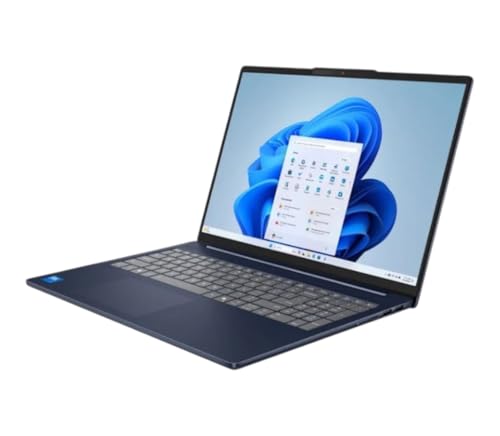
Lenovo IdeaPad 5i -- Best Budget Windows Laptop Right Now
The Lenovo IdeaPad 5i with an Intel Core i5 or i7 processor and 16 GB of RAM offers Windows laptop performance that covers everyday needs at a price that does not require significant compromise. The build quality for the price tier is above average with a sturdy chassis and a clean keyboard. Battery life runs a genuine seven to eight hours under mixed use. The display covers sRGB well enough for casual content creation. Lenovo's reputation for keyboard quality across its laptop lineup carries down to the IdeaPad range. For students, remote workers, and households that need a capable Windows machine without a large budget, this is the current top pick.
What we liked
- Intel Core 7-240H (10-core) Processor / Integrated Intel UHD Graphics
- 16GB LPDDR5x-5600 MHz RAM / 1TB Solid State Drive
- Windows 11 Home / Wi-Fi 6 and Bluetooth 5.2
- 1080p Webcam with Privacy Shutter / 16" WUXGA (1920 x 1200) Touchscreen / Backlit K
- 2x USB Type-C (USB Power Delivery, Display Port 1.4) / 2x USB Type-A 3.2 / 1x Combination

Apple Mac Mini M4 -- Best Compact Desktop Right Now
The Mac Mini M4 offers desktop-class performance in a footprint smaller than most external hard drives. The M4 chip delivers faster performance than the previous M2 generation in sustained tasks, and the added HDMI and Thunderbolt ports improve connectivity for multi-monitor setups. At it requires adding a monitor, keyboard, and mouse, but pairs well with any display. The Mac Mini M4 handles photo and video editing, programming, and document work efficiently. Noise output is near-silent under most workloads. For anyone who wants a home office desktop with Apple silicon efficiency and does not need to pay for a built-in display, the Mac Mini M4 is the most sensible choice available.
What we liked
- Perfect Fit Design: Custom-molded to match the Mac Mini M4 with 100% precision, ensuring a
- Premium Aluminum Construction: Crafted from the same high-quality aluminum alloy as the Ma
- Anti-Slip Silicone Padding: The Mac mini Aluminum Alloy Mount Dock equipped with silicone
- Optimized Heat Dissipation: The elevated design of mac mini holder enhances airflow and im
- Access to Power Button: Such Mac Mini dock leaves a small hole in the stand so that you ca

Dell XPS 15 -- Best Windows Laptop for Creative Work Right Now
The Dell XPS 15 with a dedicated NVIDIA GPU is the strongest Windows laptop recommendation for photographers, video editors, and creators who need GPU-accelerated performance and a high-quality display in a portable form. The OLED display option delivers accurate color representation with deep blacks that serve creative work well. The build quality uses CNC aluminum construction that holds up to daily carrying. Thunderbolt 4 ports support external GPU setups for additional horsepower at the desk. Battery life is moderate at five to seven hours under creative workloads. The XPS 15 trades some portability and endurance for on-screen quality and GPU performance, a trade-off that suits the creative workflow.
What we liked
- 13th Gen Intel 10-Core i7-13620H (10-core 16 threads, base clock speed 2.4GHz, max turbo t
- 15.6-inch FHD+ (1920 x 1200) Non-Touch, Anti-Glare, IPS, 500nits, 16:10, 100% sRGB, Infini
- 2 x Thunderbolt 4 / USB4 40Gbps, USB 3.2 Gen 2 Type-C, headphone / microphone combo jack,
- Windows 11 Pro 64-bit, with AI-powered Copilot, offers intelligent assistance for a variet
- Brand New Computer has been resealed to upgrade the Memory and SSD. Three-year warranty on

AMD Ryzen 9 Custom Desktop Build -- Best Performance Desktop Right Now
A custom desktop built around AMD's Ryzen 9 current-generation processor with a mid-range to high-end NVIDIA or AMD GPU remains the strongest performance-per-dollar option for gaming and creative workloads in 2026. Building from components through Newegg or Amazon allows tuning the balance between CPU, GPU, RAM, and storage to match the specific workload. A budget covers a Ryzen 9 CPU, 32 GB of DDR5 RAM, a 1 TB NVMe SSD, and a mid-range GPU with change remaining for the case and power supply. Pre-built equivalents from brands like Skytech and iBUYPOWER bring this configuration to buyers who prefer not to assemble.
What we liked
- AMD Ryzen 9 9950X3D Gaming and Content Creation Processor
- Max. Boost Clock : Up to 5.7 GHz; Base Clock: 4.3 GHz
- Form Factor: Desktops , Boxed Processor
- Architecture: Zen 5; Former Codename: Granite Ridge AM5
How to choose
What to consider
Match the form factor to your workflow before comparing specifications. Portability-first users belong in the laptop category. Desk-bound power users get better value from desktops. Set a realistic budget and prioritize RAM (minimum 16 GB) and an SSD over CPU raw clock speed for everyday tasks. Consider the software ecosystem: if your work relies on Windows-specific applications, the MacBook options are not practical choices regardless of performance. Check real-world battery life reviews for laptops rather than manufacturer specifications, which typically reflect best-case conditions. Avoid buying a configuration that maxes out RAM or storage at purchase since upgradability varies significantly by model.
What to consider
For more guidance, see [best budget laptops ](/articles/best-budget-laptops) and [best desktop computers for home use](/articles/best-home-desktop-computers). Review how these picks are selected at [/methodology](/methodology).
Common questions
Laptops cover most everyday computing needs in 2026 and are the right choice when portability matters or space is limited. Desktops offer more performance per dollar, easier upgradeability, and better thermal headroom for sustained workloads like video rendering or gaming. If the computer lives at one spot on a desk and portability is not a requirement, a desktop delivers significantly better value at equivalent price points. If you use the computer in multiple locations or away from home regularly, a laptop is the practical choice.
For everyday tasks, 16 GB of RAM and a solid-state drive are more impactful than CPU model differences within the same generation. For performance-intensive work like gaming, video editing, or 3D rendering, the GPU or integrated graphics tier matters greatly. Battery life is a real differentiator among laptops and worth checking real-world reviews rather than manufacturer claims. Display quality including resolution and brightness affects daily comfort significantly for knowledge workers. Avoid buying less than 256 GB of storage in 2026 as operating system and application sizes have grown accordingly.
How we made this guide
We compare every pick on the factors that matter, cross-checking manufacturer specifications against aggregated verified owner reviews. We rank independently and never take payment for placement. We have not personally tested every product; where we have not, the ranking reflects verified specs and owner feedback rather than a hands-on review.
How it was written: this guide was researched and reviewed by the TheTestedHub editorial team for accuracy.
Affiliate disclosure: TheTestedHub is reader-supported. When you buy through links on our site, we may earn a commission at no extra cost to you.
More guides

Your Docking Station Match: CalDigit TS4 and More

Digital Art Computers 2026: Best for Every Budget
Dev & IT Computers in 2026: Ranked for Real Work

Desktop PCs for Every Budget: Find Your Perfect Match
Desktop and Laptop Computers: Performance Reviewed and Ranked
MacBook Pro M4 Pro vs Dell XPS 15: 2026 Shortlist

Buy the Best DIY Computer in 2026: Corsair One i300
