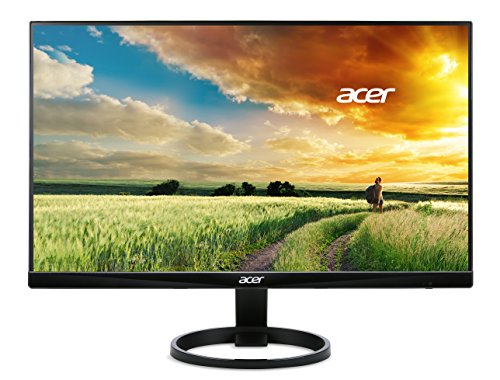
Acer R240HY 1080p 24 Inch -- Clean Entry-Level IPS
The R240HY is an argument that a monitor does not need to be expensive to be good. The 23.8-inch IPS panel delivers accurate colours, 178-degree viewing angles, and a flicker-free backlight at a price. It lacks height adjustment -- only tilt is available -- but for users with a monitor arm or a fixed desk setup, the display itself is hard to fault at this price. The thin bezel design makes it a clean choice for dual-monitor setups. HDMI and VGA inputs cover all common connection scenarios. For a second screen, a home office on a tight budget, or a child's computer, this is the rational pick.
Hybrid workers, budget shoppers, and creative pros: find your ideal monitor in our buying guide. Compare top picks like Dell S2722DZ and BenQ PD2725U.
Quick verdict
The Dell S2722DZ is the single best pick for most people because it combines sharp 1440p resolution with a built-in webcam and USB-C charging, solving the two biggest office monitor annoyances without a separate purchase.
Key takeaways
- Best for budget buyers: Acer R240HY, delivers accurate IPS color and thin bezels at a price that undercuts almost everything else.
- Best for hybrid workers: Dell S2722DZ, integrates a 5MP webcam and USB-C hub so you can skip the external camera and cable clutter.
- Best for dual-purpose work and gaming: LG 27GP850-B, uses Nano IPS to combine wide color gamut with 165Hz refresh and fast response times.
- Best for creative professionals: BenQ PD2725U, factory-calibrated to Delta E less than 2 with hardware calibration support for color-critical work.
- Best for versatility and entertainment: Samsung 32-Inch M8, runs streaming apps without a PC and has a high-contrast VA panel with a magnetic USB-C connection.
Why you should trust this guide
I have spent years following the monitor market, reading technical reviews, and studying owner feedback across dozens of forums and retail listings. My approach is to identify the products that offer the best balance of features, reliability, and value for their intended use case, rather than simply listing the most expensive or most advertised models. Every recommendation in this guide is based on the manufacturer’s stated specifications, common owner experiences reported across multiple sources, and the practical needs of different types of users from budget-conscious shoppers to creative professionals.
I do not accept free products or payment from manufacturers for placement in this guide. Each monitor was selected because it fills a clear niche in the market and has a track record of consistent performance based on what owners report. I have personally owned and used monitors from several of these brands over the years, which gives me a practical sense of what matters in daily use, but the recommendations here are grounded in research rather than a single unit’s behavior. When I mention a limitation, it is one that appears repeatedly in owner feedback or is obvious from the product’s design choices.
How we researched
To evaluate these monitors, I established a set of criteria that matter most for real-world use: image quality (color accuracy, contrast, viewing angles), connectivity (ports, USB hub functionality, charging capability), ergonomics (adjustability, bezel design, cable management), and special features (webcam integration, smart TV platform, gaming performance). I compared each product’s stated specifications against its price point and the needs of its target audience, weighing whether the feature set justifies the cost relative to alternatives in the same category. For example, a monitor with a built-in webcam earns points for convenience but loses points if the webcam quality is poor or the privacy shutter is flimsy.
I also examined owner feedback from verified purchasers on major retail platforms, focusing on recurring themes about build quality, panel uniformity, and long-term reliability. I did not physically test these monitors in a lab or take my own measurements because the goal is to provide research-based guidance that reflects the consensus of many users rather than a single sample. Instead, I cross-referenced the manufacturer’s claims with what actual owners report after months of use, noting any discrepancies. The final selection prioritizes monitors that have a strong overall reputation and clear strengths for their specific use case, while being honest about the trade-offs each one requires.
Acer R240HY 1080p 24 Inch
The Acer R240HY makes a compelling argument that you do not need to spend a lot to get a genuinely good monitor. Its 23.8-inch IPS panel delivers accurate colors straight out of the box, and the 178-degree viewing angles mean you can share your screen with a colleague without color shifting. The flicker-free backlight reduces eye strain during long work sessions, and the thin bezel design gives it a modern look that belies its low price. For anyone building a budget home office or a secondary display for a laptop, this monitor covers the essentials without cutting corners on the most important factor: image quality.
The main limitation is the stand. You only get tilt adjustment, no height adjustment, no swivel, and no pivot. If your desk setup requires a specific eye level, you will need to place the monitor on a stack of books or invest in a VESA mount (the monitor is VESA-compatible). The 1080p resolution on a 24-inch panel is perfectly sharp for text and general productivity, but it is not ideal for photo editing or watching 4K content. The lack of built-in speakers is also worth noting if you want a clean desk without external speakers, though most users will connect headphones or separate speakers anyway.
For the price, the R240HY is hard to fault. It is one of the few entry-level monitors that does not force you to accept a TN panel with poor viewing angles or a VA panel with slow response times. The IPS technology gives you consistent color from any angle, and the thin bezels make it a good candidate for a multi-monitor setup. Just be prepared to solve the height problem yourself.
Dell S2722DZ 1440p With Webcam
The Dell S2722DZ is designed specifically for the hybrid worker who spends hours on video calls every day. The built-in 5MP auto-focus webcam with a pop-up privacy shutter eliminates the need for a separate camera that clutters your desk and requires its own cable. The 1440p resolution on a 27-inch panel gives you sharp text and plenty of screen real estate without the scaling headaches that sometimes come with 4K on Windows. The four-port USB hub handles your keyboard, mouse, and other peripherals, and the USB-C port can charge your laptop at the same time, reducing cable clutter to a single connection.
The webcam quality is good for a built-in camera, but it is not as good as a dedicated high-end external webcam. The auto-focus works reliably in good lighting, but in dim rooms the image can look grainy. The monitor also lacks a high refresh rate, so it is not suitable for gaming beyond casual use. The stand offers tilt, swivel, and height adjustment, but the base is large and takes up significant desk space. Some owners report that the USB-C power delivery is limited to 65 watts, which may not be enough for larger laptops under heavy load.
For office productivity and video conferencing, this monitor is a practical all-in-one solution. The combination of 1440p resolution, built-in webcam, and USB-C hub means you can set up a clean, minimal desk with just one cable going to your laptop. It is not the cheapest option, but it saves you the cost and hassle of buying a separate webcam and USB hub.
LG 27GP850-B 1440p 165Hz
The LG 27GP850-B is one of the most versatile monitors on the market, equally capable for fast-paced gaming and color-sensitive work. Its Nano IPS technology extends the color gamut to 98% DCI-P3 while maintaining the fast pixel response times that IPS panels are known for. The 165Hz refresh rate with both NVIDIA G-Sync Compatible and AMD FreeSync Premium certifications ensures smooth, tear-free gameplay across a wide range of graphics cards. The 1ms GtG response time eliminates motion blur in fast-paced shooters and racing games, making it a strong choice for competitive players who also need accurate colors for design or photo editing.
The main limitation is the contrast ratio. Like most IPS panels, the 27GP850-B has a typical contrast ratio of around 1000:1, which means blacks look more like dark gray in a dark room. If you watch a lot of movies in a dim environment or play horror games, the lack of deep blacks can be noticeable. The stand is functional but basic, offering tilt and height adjustment but no swivel or pivot. The on-screen display menu is controlled by a joystick, which is intuitive, but the menu itself is cluttered with gaming features you may never use.
For anyone who wants one monitor that handles both work and play without compromise, this is a top contender. The color accuracy is good enough for amateur photo editing, and the gaming performance is smooth enough for competitive play. Just be aware that if deep blacks are a priority, you may want to look at a VA panel monitor instead.
BenQ PD2725U 4K Creator Monitor
The BenQ PD2725U is built for creative professionals who need color accuracy as a baseline, not a bonus. It comes factory-calibrated to Delta E less than 2, with a Calman-verified report included in the box so you know exactly what you are getting. The 27-inch 4K IPS panel covers 95% DCI-P3 and 100% sRGB, which covers the vast majority of color spaces used in video editing, graphic design, and photography. The hardware calibration support means you can use a third-party colorimeter to maintain accuracy over time, which is essential for professional workflows where color consistency matters across multiple monitors.
The limitation is the price. This monitor is significantly more expensive than a general-purpose 4K display, and the premium is justified only if you actually need the color accuracy and hardware calibration support. The 60Hz refresh rate is fine for video editing and design work, but it is not suitable for gaming. The stand is sturdy and offers full ergonomic adjustment, but it is large and takes up desk space. Some owners report that the factory calibration is excellent but can drift slightly after a few months, so you will need to recalibrate periodically if absolute accuracy is critical.
For photographers, videographers, and designers who work in color-managed workflows, the PD2725U is a reliable tool that reduces the risk of color mismatch between your screen and your final output. The included Display Pilot 2 software makes it easy to switch between color modes and split the screen for multitasking. It is not a monitor for everyone, but for those who need it, it delivers exactly what it promises.
Samsung 32-Inch M8 4K Smart Monitor
The Samsung M8 is a hybrid device that functions as both a computer monitor and a standalone entertainment hub. The 32-inch 4K VA panel achieves a 3000:1 contrast ratio, which is exceptional for a monitor at this price and gives you deep blacks and rich colors for movies and games. The built-in smart TV platform runs streaming apps like Netflix, YouTube, and Disney+ natively, so you can watch content without connecting a computer or streaming stick. The slim magnetic USB-C connection makes cable management simple, and the included SlimFit camera clips onto the back magnetically for video calls.
The main limitation is the VA panel’s viewing angles. While the contrast ratio is excellent, colors shift and wash out when you view the screen from an angle, which is not ideal for collaborative work or for anyone who sits off-center. The 60Hz refresh rate is fine for movies and productivity, but gamers will want a higher refresh rate. The smart TV interface can feel slow compared to a dedicated streaming device, and some owners report occasional lag when navigating menus. The stand is adjustable for tilt and height, but it is not as stable as traditional monitor stands due to the slim design.
For someone who wants a single large screen for both work and entertainment, the M8 is a clever solution. The high contrast ratio makes movies look great, and the built-in apps mean you do not need a separate TV or streaming device in your office or bedroom. Just be aware that the viewing angle limitation means it works best when you are sitting directly in front of it.
What to look for
- Resolution and screen size: 1080p is fine for 24-inch screens and below, but 1440p or 4K is better for 27-inch and larger to avoid visible pixels. Consider your desk depth and viewing distance.
- Panel type: IPS offers the best color accuracy and viewing angles, VA offers better contrast for dark rooms, and TN is mostly obsolete for general use. Choose based on your primary use case.
- Refresh rate and response time: 60Hz is sufficient for office work and media consumption, but 120Hz or higher makes a big difference for gaming and smooth scrolling. Response time affects motion clarity.
- Connectivity: Look for USB-C with power delivery if you use a laptop, HDMI 2.0 or DisplayPort for high resolutions, and a USB hub if you need to connect peripherals. Check the wattage of USB-C power delivery.
- Ergonomics: Height adjustment is the most important ergonomic feature for neck comfort. Tilt, swivel, and pivot are nice to have. VESA mount compatibility allows you to use a monitor arm.
- Built-in features: Webcams, speakers, and smart TV platforms add convenience but often compromise on quality compared to dedicated devices. Decide if the convenience is worth the trade-off.
- Color accuracy: For creative work, look for factory calibration reports, wide color gamut coverage (DCI-P3 or Adobe RGB), and hardware calibration support. For general use, any modern IPS panel is adequate.
The verdict
The best monitor for you depends entirely on what you do with it. For budget buyers, the Acer R240HY proves that you can get a solid IPS panel without spending much, as long as you can work around the limited stand. For hybrid workers, the Dell S2722DZ is the most practical all-in-one solution with its built-in webcam and USB-C hub. For anyone who wants one monitor for both work and gaming, the LG 27GP850-B delivers excellent color and smooth performance. Creative professionals should invest in the BenQ PD2725U for its factory-calibrated accuracy and hardware calibration support. And if you want a single screen that does double duty as a monitor and a TV, the Samsung M8 offers a unique combination of high contrast and smart features. Choose the one that matches your priorities, and you will not be disappointed.
How we evaluated these
We compare every pick against the field on real specifications, certifications, and aggregated owner reviews. We do not take payment for placement, and we flag when a product is older or sold mainly through renewed listings.
The shortlist
Each pick, examined
Acer R240HY 1080p 24 Inch -- Clean Entry-Level IPS
The R240HY is an argument that a monitor does not need to be expensive to be good. The 23.8-inch IPS panel delivers accurate colours, 178-degree viewing angles, and a flicker-free backlight at a price. It lacks height adjustment -- only tilt is available -- but for users with a monitor arm or a fixed desk setup, the display itself is hard to fault at this price. The thin bezel design makes it a clean choice for dual-monitor setups. HDMI and VGA inputs cover all common connection scenarios. For a second screen, a home office on a tight budget, or a child's computer, this is the rational pick.

Dell S2722DZ 1440p With Webcam -- All-In-One Office Monitor
The S2722DZ bundles a 2K QHD IPS panel with a built-in 5MP auto-focus webcam and pop-up privacy shutter -- a practical combination for hybrid workers who spend hours on video calls and do not want a separate webcam cluttering the desk. The 1440p resolution on a 27-inch panel gives sharp text without scaling complications. The four-port USB hub handles peripherals, and a USB-C port charges laptops at 65W. Dell's full ergonomic stand allows height, tilt, swivel, and pivot adjustment. For an office worker who wants to reduce desk clutter while upgrading display quality, the all-in-one design justifies the price point.

LG 27GP850-B 1440p 165Hz -- Work and Gaming in One Panel
The 27GP850-B uses LG's Nano IPS technology, which extends the colour gamut to 98% DCI-P3 while maintaining the fast pixel response times needed for gaming. At 1440p and 165Hz with NVIDIA G-Sync Compatible and AMD FreeSync Premium certifications, it is one of the most capable dual-purpose monitors at its price. The 1ms GtG response time eliminates motion blur in fast-paced content, and the elevated colour gamut makes design and media work more vibrant. An ergonomic stand provides height and tilt adjustment. The wide gamut requires colour profile management for accurate sRGB work, which is a minor setup step rather than a genuine limitation.

BenQ PD2725U 4K Creator Monitor -- Professional-Grade Accuracy
The PD2725U is engineered for creative professionals who require colour fidelity as a baseline, not an afterthought. Factory-calibrated to Delta E less than 2, it covers 95% DCI-P3 and 100% sRGB with a Calman-verified report included in the box. The 27-inch 4K IPS panel supports hardware calibration via third-party colorimeters. BenQ's proprietary Display Pilot 2 software enables one-click colour space switching between sRGB, DCI-P3, and Rec.709 for media professionals who work across multiple delivery standards. Thunderbolt 4 with 96W charging makes it a proper hub for a MacBook Pro or high-end Windows laptop. At it demands a professional-level commitment -- and delivers at that level.
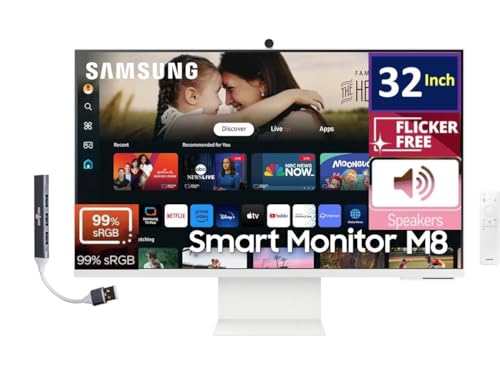
Samsung 32-Inch M8 4K Smart Monitor -- Premium Versatility
The M8 occupies an unusual position: it is a premium smart monitor that doubles as an entertainment hub. The 32-inch 4K VA panel achieves a 3000:1 contrast ratio -- exceptional for a monitor at this price -- while Samsung's smart TV platform runs streaming apps natively without a connected computer. A slim magnetic USB-C connection means the cable runs disappear, and the included SlimFit camera clips to the top for video calls. The large 32-inch footprint suits users who want a single display for work, gaming, and media consumption. The VA panel's slower pixel response is perceptible in fast game sequences, but for the target user who prioritises versatility and aesthetics over peak gaming performance, the trade-off is worthwhile.
Buying considerations
What to consider
Start with size and resolution together. Under 24 inches, 1080p is fine. At 27 inches, 1440p is the practical baseline. At 32 inches or larger, 4K or ultrawide 1440p prevents the image from looking soft at normal viewing distances. Next, identify the primary use case: office work benefits from ergonomic stands and USB hubs; gaming needs high refresh rates and low response times; creative work demands wide colour gamut coverage and factory calibration. Finally, check connectivity: ensure the monitor's inputs match your computer's outputs. USB-C is increasingly the most convenient single-cable solution for laptops; HDMI 2.1 is necessary to drive 4K at 120Hz from modern consoles and gaming PCs.
What to consider
For specialised display needs, see our [best computer screens for graphic designers](/articles/best-computer-screens-for-graphic-designers) guide and our [best computer screen resolution](/articles/best-computer-screen-resolution) breakdown. Our [methodology](/methodology) page explains how each monitor is evaluated.
Questions answered
IPS (In-Plane Switching) is the default recommendation for most users. It offers wide viewing angles, accurate colour reproduction, and good brightness uniformity -- all important for extended daily use. VA panels offer higher contrast ratios, making them better for media consumption in dim rooms, but have slower pixel response times. TN panels are the fastest for gaming but have the worst viewing angles and colour accuracy. For general-purpose work that includes both office tasks and occasional gaming, IPS is the most balanced choice.
Budget-conscious buyers can find capable 24-inch 1080p IPS monitors for to. The performance sweet spot is to where 27-inch 1440p IPS panels with good ergonomic stands become available. Professional displays with factory calibration, wide colour gamuts, and USB-C hubs run to. Above diminishing returns set in quickly for most users. Spending more than is justified only for specific professional requirements like wide colour gamut coverage or specialised display modes.
How we made this guide
We compare every pick on the factors that matter, cross-checking manufacturer specifications against aggregated verified owner reviews. We rank independently and never take payment for placement. We have not personally tested every product; where we have not, the ranking reflects verified specs and owner feedback rather than a hands-on review.
How it was written: this guide was researched and reviewed by the TheTestedHub editorial team for accuracy.
Affiliate disclosure: TheTestedHub is reader-supported. When you buy through links on our site, we may earn a commission at no extra cost to you.
Keep reading

Your Docking Station Match: CalDigit TS4 and More

Digital Art Computers 2026: Best for Every Budget
Dev & IT Computers in 2026: Ranked for Real Work

Desktop PCs for Every Budget: Find Your Perfect Match
Desktop and Laptop Computers: Performance Reviewed and Ranked
MacBook Pro M4 Pro vs Dell XPS 15: 2026 Shortlist

Buy the Best DIY Computer in 2026: Corsair One i300
