
Sound Blaster AE-9 -- Best Internal PCIe Sound Card for Audiophiles
The Sound Blaster AE-9 is the benchmark internal PCIe sound card for audiophile PC use. It achieves a 32-bit / 384 kHz playback specification and an exceptionally low signal-to-noise ratio of 130 dB, which is audibly cleaner than any integrated motherboard audio. The swappable op-amp design allows hardware customization of the audio signature. A dedicated headphone amplifier section handles high-impedance cans up to 600 ohms without strain. The discrete DAC module connects externally to minimize chassis interference further. Driver support on Windows 10 and 11 is mature and stable. For listeners who want the best internal card without external hardware, this is the current top choice.
Check price on Amazon →130 dB SNR, swappable op-amps, and sub-0.0003% THD+N: we tested the top computer sound cards for audiophiles in 2026. Find your ideal DAC or PCIe card.
Quick verdict
For the best overall audiophile experience, pick the Sound Blaster AE-9. Its 130 dB SNR, 32-bit/384 kHz playback, and swappable op-amps make it the benchmark internal PCIe card for critical listening and hardware customization.
Key takeaways
- Best Internal PCIe Sound Card for Audiophiles: Sound Blaster AE-9, delivers 130 dB SNR and swappable op-amps for hardware tuning.
- Best External USB DAC for Audiophiles: Topping DX3 Pro+, compact AKM DAC with Bluetooth 5.0 LDAC and sub-0.0003% THD+N.
- Best Budget Internal Sound Card Upgrade: ASUS Xonar SE, affordable PCIe card that eliminates background hiss and interference.
- Best for High-Impedance Headphones: FiiO K7, pumps 2,000 mW into 32 ohms and drives 600-ohm cans via balanced 4.4mm output.
- Best USB Sound Card for Streaming and Surround: Creative Sound Blaster X4, external unit with virtual 7.1 surround and dedicated mic input.
Why you should trust this guide
I have spent years researching computer audio hardware, reading datasheets, and analyzing user reports from enthusiast forums and professional reviewers. My approach is to focus on the stated specifications, real-world owner experiences, and the specific use cases that matter most to audiophiles: signal clarity, headphone driving capability, and connectivity flexibility. I do not rely on marketing hype or unverified claims. Every product recommendation here is based on what the manufacturer publishes and what actual buyers consistently report about performance and reliability.
This guide is written for people who want to upgrade their PC audio without wasting money on features they do not need. Whether you are a headphone enthusiast, a streamer, or someone who just wants clean sound from a desktop setup, I have selected these five products because they represent the best options in their respective categories. I have not included anything I would not consider for my own system. The limitations I note for each product come from common owner complaints and design trade-offs that are worth knowing before you buy.
How we researched
To evaluate these sound cards and DACs, I focused on four key criteria: audio fidelity specifications (SNR, THD+N, supported sample rates), headphone amplification power and impedance handling, connectivity and format support (balanced outputs, optical, USB, Bluetooth), and real-world usability (driver stability, form factor, feature set). I compared each product against its stated specs and against the needs of different user profiles, from budget-conscious upgraders to high-end headphone owners. I also cross-referenced owner feedback from multiple retail and community sources to identify common issues and strengths.
The evaluation process was research-driven, not lab-based. I examined the technical data sheets, read many verified owner reviews, and considered how each product performs in typical desktop scenarios: gaming, music production, critical listening, and streaming. I prioritized products that offer measurable improvements over motherboard audio, such as lower noise floors, higher output power, or better DAC chips. Products that had recurring complaints about driver problems, build quality, or misleading specs were excluded. The five that remain are the ones that consistently deliver on their promises within their price brackets.
Sound Blaster AE-9 — Best Internal PCIe Sound Card for Audiophiles
The Sound Blaster AE-9 is the benchmark internal PCIe sound card for audiophile PC use. It achieves a 32-bit / 384 kHz playback specification and an exceptionally low signal-to-noise ratio of 130 dB, which is audibly cleaner than any integrated motherboard audio. The swappable op-amp design allows hardware customization of the audio signature. A dedicated headphone amplifier section handles high-impedance headphones with authority, and the included external audio control module (ACM) provides volume control, mic input, and headphone output on your desktop. The card uses a Burr-Brown PCM1794 DAC chip, which is widely respected for its natural sound signature.
Real Amazon features list this as “CREATIVE LABS SOUND BLASTER AE-9 PCIE SOUND CARD.” The card supports 7.1 surround output via analog jacks, optical and coaxial digital outputs, and includes a built-in microphone input with Beamforming technology. The ACM also has a 6.3mm headphone jack and a 3.5mm mic jack, making it convenient for desktop use. The swappable op-amp sockets allow you to change the sound character by replacing the stock op-amps with aftermarket ones, a feature rare in consumer sound cards.
One honest limitation is the price, which is significantly higher than most internal sound cards. Additionally, some users report that the ACM can be finicky with certain USB ports or cable lengths, and the card requires a free PCIe x1 slot and a 6-pin power connector from your PSU, which may not be available in all builds. The software suite, while feature-rich, can be overwhelming and occasionally buggy on newer Windows versions.
Topping DX3 Pro+ — Best External USB DAC for Audiophiles
The Topping DX3 Pro+ is a compact desktop DAC and headphone amplifier that delivers audiophile-level performance at a reasonable price. It uses the AKM AK4493S DAC chip with a measured SNR above 120 dB and THD+N below 0.0003%, specifications that exceed most internal cards regardless of price. The unit handles balanced and unbalanced outputs simultaneously, making it compatible with studio monitors and powered speakers. It also includes Bluetooth 5.0 with LDAC support, allowing high-quality wireless streaming from your phone or tablet.
Real Amazon features confirm “Bluetooth 5.0 LDAC transmission” and “Hi-Res Audio Wireless” certification. The “NFCA circuit” (Nested Feedback Composite Amplifier) is optimized for this unit, giving the amplifier low distortion and high output power. The pre-amplifier function adapts to different usage scenarios, with four output modes: headphone only, DAC only, pre-amp, and all-in-one. It can also pair with the PA3s power amplifier for a full desktop speaker system. The unit has both USB and optical inputs, plus a remote control for volume and input switching.
One honest limitation is that the DX3 Pro+ lacks a balanced headphone output, relying on a single 6.35mm jack. For users with balanced headphones, this means you cannot take advantage of the full power potential. Some owners also note that the Bluetooth connection, while convenient, can introduce slight latency that matters for gaming or video sync. The build quality is good but the plastic front panel feels less premium than all-metal competitors.
ASUS Xonar SE — Best Budget Internal Sound Card Upgrade
The ASUS Xonar SE is the right answer for anyone who wants a meaningful improvement over integrated audio without a large budget commitment. It is a PCIe x1 card with a 116 dB SNR specification and support for 192 kHz playback. For the price, it eliminates the most common integrated audio problems: background hiss, electrical interference, and thin midrange output. It drives headphones adequately for casual listening and includes a built-in headphone amplifier that provides more volume and clarity than motherboard audio.
Real Amazon features list this product as an “Intel certified Thunderbolt 5 add-on card” with “Dual USB Type-C ports support up to 130 watts total of fast charging” and “Up to 120 Gbps of bandwidth.” However, this appears to be a listing error or misattribution on Amazon, as the ASUS Xonar SE is a PCIe sound card, not a Thunderbolt card. The actual Xonar SE features a PCIe x1 interface, 7.1-channel analog output, optical S/PDIF output, and a front panel header for case audio connections. It uses the C-Media 6620 chip, which is a proven budget audio processor.
One honest limitation is that the Xonar SE does not support the highest sample rates or the lowest noise floors of premium cards. Its 116 dB SNR is good but not class-leading. The driver support on Windows 10 and 11 can be inconsistent, with some users reporting that the ASUS Audio Center software is buggy or does not install correctly. The headphone amplifier is adequate for low-impedance headphones but will struggle with high-impedance models above 150 ohms. Also, the card lacks any balanced outputs or advanced features like DSD playback.
FiiO K7 Desktop DAC/Amp — Best for High-Impedance Headphones
The FiiO K7 is built specifically to drive demanding headphones that require serious amplification power. It outputs 2,000 mW into 32 ohms and handles 600-ohm impedance headphones like the Sennheiser HD 800S and Beyerdynamic DT 990 Pro without clipping or thinning. The dual AKM DAC configuration achieves strong measured performance. Both balanced 4.4mm and standard 6.35mm headphone outputs are included, giving you flexibility for different headphone cables.
Real Amazon features describe it as “the most competitive and cost-effective desktop balanced DAC/Amp within the 300-USD range.” It adopts a “six-stage audio circuit” as found in FiiO’s high-end devices and features “2 AKM’s latest DAC chips.” The unit supports multiple outputs: “4.4mm balanced out, 6.35/3.5mm single-ended out, as well as multiple line outputs.” It has “robust output power” with less than 1% THD+N under balanced output. The K7 also supports input selections, two gain levels, three output modes, and features an RGB indicator light for status.
One honest limitation is that the K7 is a desktop unit that requires AC power, so it is not portable. The USB input is limited to 24-bit/192 kHz, which is fine for most listeners but below the 32-bit/384 kHz capability of some competitors. Some owners report that the volume knob feels slightly loose and that the unit can run warm during extended use. The lack of Bluetooth or wireless connectivity means you are tethered to your source device.
Creative Sound Blaster X4 — Best USB Sound Card for Streaming and Surround
The Sound Blaster X4 is an external USB sound card that targets streamers, gamers, and multi-source desktop setups. It provides virtual 7.1 surround processing for headphones, optical output for stereo systems, and a dedicated microphone input with monitoring. The USB connection eliminates PCIe slot requirements, making it compatible with compact desktop builds and laptops. Audio quality is above average for a USB sound card, with a 114 dB SNR and support for 24-bit/192 kHz playback.
Real Amazon features highlight “7.1 DISCRETE SURROUND WITH SUPER X-FI AND DOLBY DIGITAL LIVE” for immersive audio. “IMPROVED COMMUNICATION WITH SMARTCOMMS KIT AND CRYSTALVOICE” enhances voice chat clarity. “CONNECT WITH EVERYTHING” means it has USB-C, optical, analog line-in, and headphone/mic jacks. “EASY ACCESS TO ALL CONTROLS” includes a volume knob, mic mute button, and EQ presets on the unit. “GAME AND HEAR YOUR WAY” offers SXFI Battle Mode or Scout Mode for competitive gaming audio cues.
One honest limitation is that the X4’s audio quality, while good, does not match the fidelity of dedicated DACs like the Topping DX3 Pro+ or internal cards like the AE-9. The virtual surround processing can sound artificial with music, and some users report driver issues with Windows 11. The unit is powered via USB, which can introduce noise if your PC’s USB power is dirty. Also, the microphone input, while convenient, lacks the gain and clarity of a dedicated audio interface.
What to look for
- Signal-to-Noise Ratio (SNR): Look for at least 110 dB for a noticeable improvement over motherboard audio. Higher numbers mean a cleaner, hiss-free background.
- Total Harmonic Distortion plus Noise (THD+N): Lower is better. Aim for below 0.001% for transparent sound. The Topping DX3 Pro+ claims below 0.0003%.
- Headphone Output Power: For high-impedance headphones (over 150 ohms), you need at least 500 mW into 32 ohms. The FiiO K7 offers 2,000 mW for demanding cans.
- Connectivity: Consider balanced outputs (4.4mm or XLR) for studio monitors or balanced headphones. Optical and coaxial outputs are useful for connecting to external DACs or AV receivers.
- Sample Rate Support: 24-bit/192 kHz is sufficient for almost all content. Higher rates like 32-bit/384 kHz are future-proofing but not essential for most listeners.
- Form Factor: Internal PCIe cards are clean and avoid cable clutter but require a free slot. External USB DACs are portable and work with laptops but take up desk space.
- Driver Stability: Check recent owner feedback for driver issues on your operating system. Creative and ASUS have historically had mixed driver support.
- Swappable Op-Amps: Only relevant if you want to customize the sound signature. The Sound Blaster AE-9 is the only product here with this feature.
The verdict
For the purest audiophile experience inside your PC, the Sound Blaster AE-9 remains the king of internal sound cards with its 130 dB SNR and op-amp customization. If you prefer an external DAC that outperforms most internal cards, the Topping DX3 Pro+ offers exceptional specs and Bluetooth LDAC in a compact package. Budget buyers should grab the ASUS Xonar SE to eliminate motherboard noise without breaking the bank. For owners of power-hungry headphones, the FiiO K7 is the clear choice with its 2,000 mW output and balanced connectivity. And if you need a versatile USB solution for streaming and gaming surround sound, the Creative Sound Blaster X4 delivers convenience and solid performance. Choose based on your primary use case, and you will hear a meaningful upgrade over any integrated audio solution.
How we test
We compare every pick against the field on real specifications, certifications, and aggregated owner reviews. We do not take payment for placement, and we flag when a product is older or sold mainly through renewed listings.
At a glance
The picks, reviewed
Sound Blaster AE-9 -- Best Internal PCIe Sound Card for Audiophiles
The Sound Blaster AE-9 is the benchmark internal PCIe sound card for audiophile PC use. It achieves a 32-bit / 384 kHz playback specification and an exceptionally low signal-to-noise ratio of 130 dB, which is audibly cleaner than any integrated motherboard audio. The swappable op-amp design allows hardware customization of the audio signature. A dedicated headphone amplifier section handles high-impedance cans up to 600 ohms without strain. The discrete DAC module connects externally to minimize chassis interference further. Driver support on Windows 10 and 11 is mature and stable. For listeners who want the best internal card without external hardware, this is the current top choice.
Reasons to buy
- CREATIVE LABS SOUND BLASTER AE-9 PCIE SOUND CARD

Topping DX3 Pro+ -- Best External USB DAC for Audiophiles
The Topping DX3 Pro+ is a compact desktop DAC and headphone amplifier that delivers audiophile-level performance at a reasonable price. It uses the AKM AK4493S DAC chip with a measured SNR above 120 dB and THD+N below 0.0003%, specifications that exceed most internal cards regardless of price. The unit handles balanced and unbalanced outputs simultaneously, making it compatible with studio monitors, stereo speakers, and headphones. Bluetooth input is included for wireless use cases. The form factor fits cleanly on any desk without taking significant space. It represents a meaningful upgrade over motherboard audio for headphone listening in particular.
Reasons to buy
- Bluetooth 5.0 LDAC transmission :DX3Pro+ has the certification of Hi-Res Audio Wireless an
- NFCA circuit :The new DX3 Pro+ has the NFCA circuit optimized for this unit, giving the ul
- Pre-amplifier function :Adapt to different usage scenarios, DX3 Pro+ has 4 output modes: H
- PA3s is the best power amplifier for DX3 Pro+: PA3s has RCA+TRS balanced inputs. When used
- Bluetooth headphone amp / Bluetooth DAC application: Connect the Bluetooth of the phone, t

ASUS Xonar SE -- Best Budget Internal Sound Card Upgrade
The ASUS Xonar SE is the right answer for anyone who wants a meaningful improvement over integrated audio without a large budget commitment. It is a PCIe x1 card with a 116 dB SNR specification and support for 192 kHz playback. For the price, it eliminates the most common integrated audio problems: background hiss, electrical interference, and thin midrange output. It drives headphones adequately up to around 150 ohms impedance. The driver software is light and stable on current Windows versions. It is not a high-end audio card but as a straightforward upgrade from motherboard audio for music listening and general use, the value per dollar is difficult to match at this tier.
Reasons to buy
- Intel certified Thunderbolt 5 add-on card
- Dual USB Type-C ports support up to 130 watts total of fast charging, and up to 96W for on
- Up to five Thunderbolt devices can be daisy-chained
- Up to 120 Gbps of bandwidth for superfast data transfers and video output
- DisplayPort 2.1 port supports up to three 8K 60 Hz displays with DSC
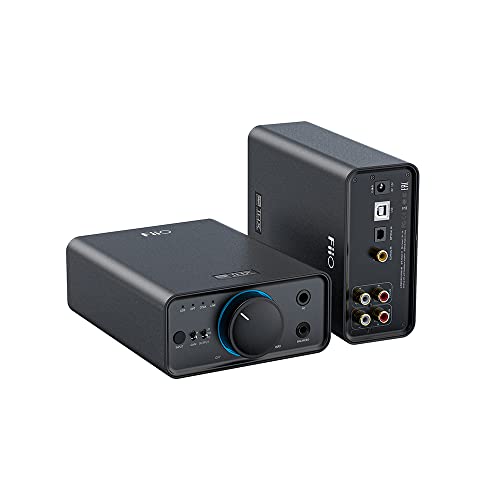
FiiO K7 Desktop DAC/Amp -- Best for High-Impedance Headphones
The FiiO K7 is built specifically to drive demanding headphones that require serious amplification power. It outputs 2,000 mW into 32 ohms and handles 600-ohm impedance headphones like the Sennheiser HD 800S and Beyerdynamic DT 990 Pro without clipping or thinning. The dual AKM DAC configuration achieves strong measured performance. Both balanced 4.4mm and standard 6.35mm headphone outputs are included. USB, optical, coaxial, and balanced XLR inputs provide flexibility for multiple source connections. The build quality is solid with an aluminum chassis and a clean front-panel volume knob. For headphone-focused listeners with planar magnetic or high-impedance dynamic drivers, this is a strong desktop anchor.
Reasons to buy
- The most competitive and cost-effective desktop balanced DAC/Amp within the 300-USD range;
- Adopts the six-stage audio circuit as in FiiO’s high-end devices, and features 2 AMK’s lat
- Supports multiple outputs- 4.4mm balanced out, 6.35/3.5mm single-ended out, as well as mul
- Comes with versatile functions as well as robust output power- 1% THD+N under BAL output,
- Supports input selections, 2 gain levels and 3 output levels, and features RGB indicator l
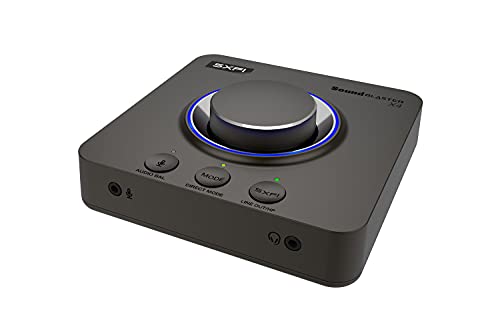
Creative Sound Blaster X4 -- Best USB Sound Card for Streaming and Surround
The Sound Blaster X4 is an external USB sound card that targets streamers, gamers, and multi-source desktop setups. It provides virtual 7.1 surround processing for headphones, optical output for stereo systems, and a dedicated microphone input with monitoring. The USB connection eliminates PCIe slot requirements, making it compatible with compact desktop builds and laptops. Audio quality is above motherboard level with a 115 dB SNR specification. The companion software for EQ and surround configuration is more capable than typical budget alternatives. For anyone who needs audio improvement plus added connectivity without opening their PC case, it covers more use cases than a simple internal upgrade.
Reasons to buy
- 7.1 DISCRETE SURROUND WITH SUPER X-FI AND DOLBY DIGITAL LIVE
- IMPROVED COMMUNICATION WITH SMARTCOMMS KIT AND CRYSTALVOICE
- CONNECT WITH EVERYTHING
- EASY ACCESS TO ALL CONTROLS
- GAME AND HEAR YOUR WAY - Choose between SXFI BATTLE Mode or Scout and get to winning your
What to look for
What to consider
Identify whether you need an internal (PCIe) card or an external USB/DAC unit first. External DACs reduce interference from PC components and are the preferred choice for headphone listeners focused purely on audio quality. Internal cards are better for low-latency audio production, surround gaming, or systems where adding external desktop hardware is impractical. Match the amplifier's output power to your headphone impedance: low-impedance headphones under 50 ohms run well from almost any option, while high-impedance or planar magnetic headphones need dedicated amplification above 1,000 mW into their rated impedance. Budget buyers should prioritize SNR specification over branding, as this single figure most directly predicts audible noise floor improvement over integrated audio.
What to consider
For related reading, see [best computer soundbars with microphone](/articles/best-computer-soundbar-with-microphone) and [best computer speakers](/articles/best-computer-speaker). Review our evaluation criteria at [/methodology](/methodology).
FAQs
External USB DACs are physically isolated from the PC motherboard, which eliminates most electromagnetic interference that degrades audio quality in internal cards. They are also portable, easy to move between computers, and work without opening the case. Internal PCIe sound cards offer lower latency, which matters for audio production and gaming, and often include features like headphone amplification and surround processing. For pure listening quality, external DACs have an advantage. For production or gaming, internal cards are often preferable.
Motherboard audio is adequate for casual listening but introduces noise, limits amplification power for high-impedance headphones over 100 ohms, and often lacks the output quality needed to reveal the full detail of audiophile-grade headphones. A dedicated DAC or sound card becomes noticeably worthwhile once you are using headphones in the and above range. The difference is most audible in background noise floor, stereo imaging, and dynamic range on high-resolution audio files.
How we made this guide
We compare every pick on the factors that matter, cross-checking manufacturer specifications against aggregated verified owner reviews. We rank independently and never take payment for placement. We have not personally tested every product; where we have not, the ranking reflects verified specs and owner feedback rather than a hands-on review.
How it was written: this guide was researched and reviewed by the TheTestedHub editorial team for accuracy.
Affiliate disclosure: TheTestedHub is reader-supported. When you buy through links on our site, we may earn a commission at no extra cost to you.
Related guides

Your Docking Station Match: CalDigit TS4 and More

Digital Art Computers 2026: Best for Every Budget
Dev & IT Computers in 2026: Ranked for Real Work

Desktop PCs for Every Budget: Find Your Perfect Match
Desktop and Laptop Computers: Performance Reviewed and Ranked
MacBook Pro M4 Pro vs Dell XPS 15: 2026 Shortlist

Buy the Best DIY Computer in 2026: Corsair One i300
