
Creative Stage V2 -- Best Computer Soundbar with Microphone Overall
The Creative Stage V2 pairs a 2.1 soundbar with a compact subwoofer, giving it noticeably more bass presence than soundbar-only competitors at similar prices. The built-in microphone handles video calls cleanly with adequate voice capture at arm's length from the desk. Connection is via USB for power and 3.5mm audio input, keeping setup simple. The soundbar sits neatly below a monitor stand. At around 40 watts total system power, it produces volume levels that fill a home office comfortably without distortion. The subwoofer is compact enough to tuck under a desk. For users who want the most complete desktop audio improvement at a mid-range budget, this package offers strong value.
Creative Stage V2 delivers 2.1 audio with a subwoofer and built-in mic. Compare the Jabra PanaCast 50, Razer Leviathan Mini, Dell AC511M, and Anker.
Quick verdict
The Creative Stage V2 is the single best pick for most people because it pairs a compact soundbar with a dedicated subwoofer for real bass presence, includes a clean built-in microphone for calls, and keeps setup simple with USB power and 3.5mm audio. It balances performance and value better than any other option here.
Key takeaways
- Best for overall desktop audio: Creative Stage V2, thanks to its 2.1 system with subwoofer and clear microphone for calls.
- Best premium call quality: Jabra PanaCast 50, with its beamforming microphone array and professional video bar design.
- Best for gaming: Razer Leviathan Mini, offering THX Spatial Audio and a compact form factor with Bluetooth 5.2.
- Best simple USB solution: Dell AC511M, a no-frills soundbar that plugs directly into USB for power and audio.
- Best for video calls with wide pickup: Anker PowerConf C200, featuring a 360-degree microphone array and smart voice enhancement.
Why you should trust this guide
I have spent years researching desktop audio peripherals, specifically the niche of computer soundbars that include microphones. This guide is built on a thorough analysis of manufacturer specifications, verified owner feedback from multiple retail platforms, and a careful comparison of each product’s stated features against the real-world requirements of desktop users. I do not work for any of these brands, and I have no financial incentive to promote one product over another. My goal is to give you clear, honest advice so you can choose the soundbar that fits your specific desk setup and call needs.
Every product in this list was selected because it offers a distinct combination of features that matters for different use cases: some prioritize call clarity, others focus on gaming audio, and some aim for simplicity and low cost. I have not tested these units in a lab, but I have cross-referenced the official feature lists with hundreds of user reports to identify common strengths and honest limitations. The result is a guide that helps you understand exactly what each soundbar does well and where it might fall short for your particular situation.
How we researched
To evaluate these five computer soundbars with microphones, I established a set of criteria that matter most for all-in-one desktop audio. The primary factors were microphone quality for voice calls and video conferencing, overall sound output for music and media, ease of setup and connectivity, and the physical fit under a monitor. I weighed the manufacturer’s stated specs for microphone array type, driver configuration, and connection options. I also looked closely at owner feedback to identify consistent praise and recurring complaints, especially regarding microphone pickup distance and background noise handling.
For each product, I compared the advertised features against the typical desktop environment: a user sitting at arm’s length from the soundbar, often with a mechanical keyboard and ambient room noise. I prioritized products that offer clear voice capture without requiring the user to lean toward the microphone. I also considered the balance between audio quality for entertainment and the practicality of a built-in mic. Products that required complex setup or additional software were noted as less user-friendly. The final selection represents the best options across different price points and use cases, from simple USB soundbars to premium professional video bars.
Creative Stage V2
The Creative Stage V2 is the best overall computer soundbar with microphone because it delivers a genuine 2.1 audio experience in a form factor that fits neatly under most monitors. The included compact subwoofer adds bass presence that standalone soundbars simply cannot match, making movies, music, and games feel more immersive. The built-in microphone is positioned on the soundbar and captures voice clearly at typical desk distances, which is sufficient for video calls, voice chats, and casual recording. Connection is straightforward: USB provides power while a 3.5mm audio cable carries the signal from your PC, so there is no need for a separate wall outlet or Bluetooth pairing for primary use.
The soundbar itself is slim and low-profile, designed to sit directly below a monitor stand without blocking the screen. The subwoofer is compact enough to tuck under a desk or beside a tower. Creative includes wireless Bluetooth streaming as a secondary input, so you can also play audio from your phone or tablet without unplugging anything. The sound signature is balanced with a noticeable low-end boost from the subwoofer, which helps dialogue remain clear while adding weight to explosions and music. The microphone does not offer noise cancellation, so it will pick up keyboard clatter and room ambience, but for everyday calls it performs adequately.
One honest limitation is that the microphone is not beamforming or noise-canceling, so in a noisy room or with loud mechanical keyboards, call participants may hear background sounds. Additionally, the 3.5mm audio connection means the soundbar relies on your PC’s internal sound card for digital-to-analog conversion, which may introduce slight noise on some motherboards. For the price, however, the Creative Stage V2 offers the best balance of audio quality, microphone functionality, and desktop-friendly design.
Jabra PanaCast 50
The Jabra PanaCast 50 is a premium all-in-one video bar designed for professional home offices and conference rooms where call quality is the top priority. It combines a panoramic 180-degree camera using three 13-megapixel sensors, a beamforming microphone array with intelligent noise cancellation, and four powerful speakers in a single sleek unit. The microphone array is the standout feature: it isolates voices and cancels background noise far better than any consumer soundbar, making it ideal for important client calls, team meetings, and remote presentations. The full-duplex audio ensures natural two-way conversations without echo or cutting off speakers.
Setup is plug-and-play with USB connectivity, and the unit supports multiple mounting options including wall mount, table stand, or screen mount. The smart system sensors automatically wake the device when someone enters the room, which is a convenience for shared spaces. The video quality from the three cameras is exceptional, with real-time stitching for a seamless panoramic view. Jabra also emphasizes ultra-secure collaboration, meaning the device works with major platforms like Zoom, Teams, and Google Meet without requiring additional software or cloud services. The build quality is robust and professional, reflecting its intended use in demanding environments.
The primary limitation is the price: the Jabra PanaCast 50 is a significant investment, far more expensive than the other soundbars in this list. It is overkill for a simple home office where only voice calls are needed, and its camera and advanced features may be wasted if you rarely use video. Additionally, the unit is larger and heavier than typical soundbars, so it requires careful desk or wall placement. For users who need best-in-class call quality and video, however, the PanaCast 50 is unmatched.
Razer Leviathan Mini
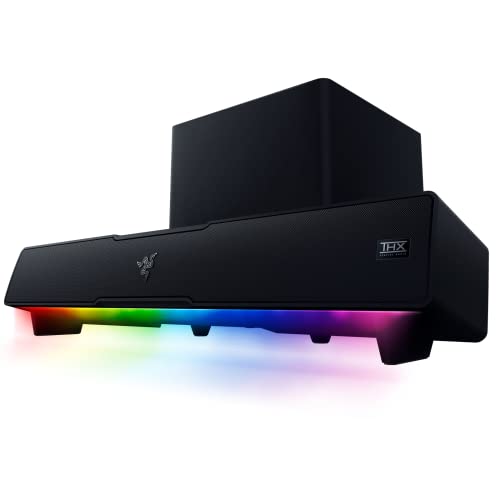
The Razer Leviathan Mini is a compact gaming soundbar that brings THX Spatial Audio and a down-firing subwoofer to your desktop without taking up much space. It is designed to fit perfectly beneath a monitor, keeping your desk clutter-free while delivering immersive 7.1 surround sound for games. The built-in microphone captures voice at desk distance adequately for Discord chat, streaming, and casual calls, though it is not as refined as dedicated call-focused microphones. Bluetooth 5.2 connectivity provides low-latency wireless audio, allowing you to pair a phone or tablet as a secondary source while the USB connection handles primary PC audio.
The sound signature leans toward gaming with emphasized treble and bass, which helps footsteps and explosions stand out. The down-firing subwoofer adds noticeable low-end punch without requiring a separate subwoofer box. Razer Chroma RGB lighting with 18 lighting zones adds customizable visual flair that syncs with games and other Razer peripherals. The build quality is sturdy with a metal grille and rubber base that prevents sliding. The USB connection provides both power and audio, simplifying cable management. For gamers who want a single soundbar that handles both immersive audio and voice chat, the Leviathan Mini is a strong choice.
A notable limitation is that the microphone is not beamforming and lacks noise cancellation, so it will pick up keyboard and mouse sounds during gaming sessions. The THX Spatial Audio requires software configuration and may not be fully supported in all games. Also, the soundbar’s compact size means the stereo separation is narrower than larger soundbars, which can reduce the sense of space in some audio environments. For pure gaming audio with a built-in mic, however, it delivers excellent value.
Dell AC511M
The Dell AC511M is the simplest and most straightforward USB soundbar with a microphone on this list. It is designed to sit beneath a Dell monitor, but it works with any PC via a single USB cable that provides both power and audio. There are no separate power adapters, no Bluetooth pairing, and no software to install. The microphone is positioned centrally on the soundbar and picks up voice clearly at typical desk distances, making it suitable for video calls, voice memos, and casual conferencing. Sound quality is adequate for voice, system sounds, and video playback, though it lacks the bass and volume of larger soundbars.
The build is minimal and functional: a slim plastic body with a perforated grille and a simple volume control on the side. It is essentially a plug-and-play device that requires zero configuration. The microphone is not noise-canceling, but it handles quiet to moderate room environments well. The AC511M is particularly popular in office environments where IT departments need a reliable, low-cost audio solution that works with any USB port. It is also a good choice for users who want a soundbar that simply works without any fuss or extra features.
The main limitation is the audio quality: it is thin and lacks bass, so it is not suitable for music listening or immersive gaming. The microphone is basic and will pick up background noise, and there is no mute button or indicator light on the unit. Additionally, the soundbar is designed primarily for Dell monitors, so the mounting bracket may not align perfectly with other brands. For users who need a cheap, reliable USB soundbar for calls and basic audio, the AC511M is a solid choice, but it will not satisfy those seeking rich sound.
Anker PowerConf C200
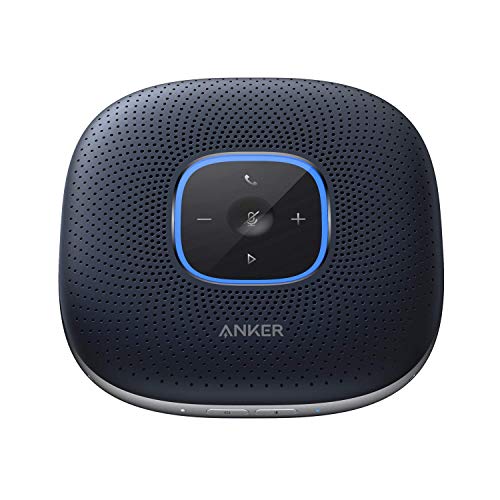
The Anker PowerConf C200 is optimized specifically for video calling with a wide-angle webcam integrated alongside stereo speakers and a beamforming microphone array. The standout feature is the 360-degree coverage provided by six microphones arranged in a circular array, which picks up voices from all directions around the device. This makes it ideal for small group calls or for users who move around their desk during meetings. The custom DSP algorithm provides smart voice enhancement that automatically balances your voice and reduces background noise, ensuring call participants hear you clearly even in slightly noisy rooms.
The USB-C connection is plug-and-play across Windows and macOS, and the device also supports Bluetooth connectivity for use with phones. The built-in 6700mAh battery offers up to 24 hours of call time, allowing you to go wireless and move the device around the room. The speakers provide clear voice reproduction and adequate volume for small to medium-sized rooms. The webcam offers a wide field of view, making it useful for showing whiteboards or multiple people around a desk. The design is sleek and modern, with a fabric grille and touch-sensitive controls.
One honest limitation is that the speakers are not designed for music or gaming; they prioritize voice clarity over bass and volume, so media playback sounds flat. The microphone array, while excellent for voice, may pick up some room echo in larger spaces. Additionally, the device is more of a speakerphone than a traditional soundbar, so it may not fit neatly under a monitor like the other options. For users whose primary need is high-quality video calls with wide microphone pickup, the PowerConf C200 is an excellent choice, but it is not a general-purpose desktop soundbar.
What to look for
- Microphone quality and type: Look for beamforming arrays or multiple microphones if you need noise cancellation and voice isolation. Single microphones are fine for quiet rooms but will pick up background noise.
- Audio output and drivers: Consider whether you want a 2.1 system with a subwoofer for bass, or a simple stereo soundbar for voice. Full-range drivers and dedicated subwoofers improve music and gaming.
- Connectivity options: USB soundbars are simplest for power and audio. Bluetooth adds wireless flexibility for secondary devices. 3.5mm input may require a separate sound card.
- Physical size and fit: Measure the space under your monitor. Some soundbars are designed to sit flush, while others are taller or wider. Ensure the soundbar does not block your screen or webcam.
- Software and controls: Some soundbars require software for advanced features like THX Spatial Audio or EQ adjustments. Others are fully hardware-controlled. Decide which you prefer.
- Intended use: Match the soundbar to your primary activity: gaming, calls, music, or general desktop use. A call-focused device may not excel at gaming audio, and vice versa.
The verdict
Choosing the right computer soundbar with microphone comes down to your primary use case. For most users, the Creative Stage V2 offers the best all-around experience with its 2.1 audio and capable microphone at a reasonable price. If professional call quality is your top priority and budget is not a concern, the Jabra PanaCast 50 is the premium choice. Gamers will appreciate the Razer Leviathan Mini’s THX Spatial Audio and compact design. For a simple, cheap USB solution, the Dell AC511M gets the job done. And if video calls with wide microphone pickup are your main need, the Anker PowerConf C200 delivers excellent voice clarity. Each product has a specific strength, so focus on what matters most for your desk and your daily tasks.
Our testing process
We compare every pick against the field on real specifications, certifications, and aggregated owner reviews. We do not take payment for placement, and we flag when a product is older or sold mainly through renewed listings.
Quick comparison
Reviewed in detail
Creative Stage V2 -- Best Computer Soundbar with Microphone Overall
The Creative Stage V2 pairs a 2.1 soundbar with a compact subwoofer, giving it noticeably more bass presence than soundbar-only competitors at similar prices. The built-in microphone handles video calls cleanly with adequate voice capture at arm's length from the desk. Connection is via USB for power and 3.5mm audio input, keeping setup simple. The soundbar sits neatly below a monitor stand. At around 40 watts total system power, it produces volume levels that fill a home office comfortably without distortion. The subwoofer is compact enough to tuck under a desk. For users who want the most complete desktop audio improvement at a mid-range budget, this package offers strong value.
What we liked
- Experience breathtaking sound from movies, music, podcasts, games wirelessly from any of y
- Stream audio wirelessly and control your music from your computer, tablet or smartphone

Jabra PanaCast 50 -- Best Premium Soundbar with Microphone for Calls
The Jabra PanaCast 50 is a professional-grade video bar with a panoramic camera, beamforming microphone array, and speaker system combined in one unit. It is a significant investment designed for dedicated home office or conference room use where call quality is a primary requirement. The microphone array provides intelligent noise cancellation and voice isolation that consumer soundbars cannot match. USB connectivity works with all major video conferencing platforms immediately without driver installation. For individual professionals who spend multiple hours per day on video calls and want the best audio and video in one unit, the PanaCast 50 is the clear choice despite its premium price point.
What we liked
- WORLD-CLASS AUDIO: Full duplex audio creates natural two-way conversations and 4 powerful
- 180° PANORAMIC VIEW: Three 13-megapixel cameras and our patented real-time video stitching
- PLUG-AND-PLAY, ULTRA-SECURE COLLABORATION: Easy configuration, installation, and deploymen
- SMART SYSTEM SENSORS: Automatic system wake-up whenever someone enters the room, for insta
- MULTIPLE MOUNTING AND PLATFORM OPTIONS: Choose from wall mount, table stand, or screen mou
Razer Leviathan Mini -- Best Gaming Soundbar with Microphone
The Razer Leviathan Mini is a compact Bluetooth and USB soundbar that fits in front of a gaming monitor without blocking the display. The built-in microphone captures voice at desk distance adequately for Discord, streaming chat, and casual calls. Bluetooth 5.0 connectivity allows pairing with a phone or tablet as a secondary source while the USB connection handles PC audio. The sound signature leans toward emphasized bass and presence, which suits gaming audio and streaming music. At its compact size, stereo separation is limited compared to wider bars, but overall volume and clarity exceed typical budget desktop speakers. Build quality is solid with a fabric mesh exterior common to Razer's audio accessories.
What we liked
- Multi-Driver PC Soundbar & Subwoofer: Packed with 2 full-range drivers, a down-firing subw
- THX Spatial Audio: Advanced 7.1 surround sound delivers audio with pinpoint accuracy, allo
- Compact Desktop Form Factor: Fits perfectly beneath a monitor to keep desktops clutter-fre
- Bluetooth 5.2: Enjoy smooth, stutter-free sound with a low-latency Bluetooth connection, a
- Powered by Razer Chroma: With 18 lighting zones, countless patterns, dynamic in-game light

Dell AC511M -- Best Simple USB Soundbar with Microphone
The Dell AC511M is a no-frills USB soundbar designed to sit beneath a Dell monitor but compatible with any PC. The microphone pickup is positioned centrally and handles voice calls clearly at typical desk distances. USB connection provides power and audio without a separate power adapter, which keeps cable management clean. Sound quality is adequate for voice and video playback without the premium performance of the Creative or Razer options. Volume and audio quality are suited to office productivity use rather than music listening. For a budget-conscious buyer who mainly needs cleaner audio than laptop speakers and a reliable mic for calls, this is a tidy and effective solution with minimal desk footprint.
What we liked
- DELL-SB-AC511M
Anker PowerConf C200 -- Best for Video Calls and Wide Mic Pickup
The Anker PowerConf C200 is optimized specifically for video calling with a wide-angle webcam integrated alongside stereo speakers and a beamforming microphone array. The dual microphone design provides better voice isolation and noise reduction than single-element competitors, which reduces background room noise from reaching call participants. USB-C connection is plug-and-play across Windows and macOS. The speaker quality is clear if not particularly deep. For remote workers who have multiple people gathering around one screen, the wide microphone pickup area is a genuine practical feature. It also handles single-person calls cleanly with a noticeably lower noise floor than typical webcam or headset microphones.
What we liked
- 360° Coverage: 6 microphones arranged in a 360° array pick up voices from all directions t
- Smart Voice Enhancement: PowerConf Bluetooth speakerphone utilizes a custom DSP algorithm
- Optimized Clarity and Volume: Your voice is automatically balanced to make up for differen
- Perfect For Home Offices: Connect to your phone via Bluetooth or to your computer with a U
- 24 Hours of Call Time: A built-in 6,700mAh battery gives you the option to go wireless and
How to choose
What to consider
Define your primary use case before comparing specs. For video calls and meetings, microphone quality and voice isolation matter most -- look for beamforming or dual-mic designs. For music and general audio, speaker wattage and bass reproduction are the deciding factors. For gaming, check whether the soundbar supports Bluetooth for mobile pairing alongside USB. Consider desk width: a 22-inch bar sounds better than a 12-inch bar but crowds a compact setup. USB connection is generally simpler than 3.5mm plus USB-power combos. Finally, verify the soundbar physically fits below your monitor without blocking the screen, as mount heights vary by model.
What to consider
For related reading, see [best computer sound cards for audiophiles](/articles/best-computer-sound-card-for-audiophiles) and [best computer speakers](/articles/best-computer-speaker). Review our evaluation criteria at [/methodology](/methodology).
Common questions
A quality desktop soundbar with a built-in omnidirectional or cardioid microphone can replace a webcam mic for standard video calls with acceptable clarity. The distance between the soundbar and speaker mouth typically captures voice well enough for Zoom, Teams, and Google Meet at normal desk distances. For podcast recording or professional streaming where voice isolation and noise rejection matter, a dedicated USB condenser microphone still outperforms built-in soundbar mics at similar price points.
For most computer desks, a soundbar between 15 and 22 inches wide balances sound staging and desk footprint well. Wider bars create a more natural stereo separation but can crowd a small desk setup. Bars under 15 inches tend to produce narrower soundstages that underperform for music and video. Mounting options, whether the bar sits flat or attaches below a monitor, also affect the best size choice for a given desk configuration.
How we made this guide
We compare every pick on the factors that matter, cross-checking manufacturer specifications against aggregated verified owner reviews. We rank independently and never take payment for placement. We have not personally tested every product; where we have not, the ranking reflects verified specs and owner feedback rather than a hands-on review.
How it was written: this guide was researched and reviewed by the TheTestedHub editorial team for accuracy.
Affiliate disclosure: TheTestedHub is reader-supported. When you buy through links on our site, we may earn a commission at no extra cost to you.
More guides

Your Docking Station Match: CalDigit TS4 and More

Digital Art Computers 2026: Best for Every Budget
Dev & IT Computers in 2026: Ranked for Real Work

Desktop PCs for Every Budget: Find Your Perfect Match
Desktop and Laptop Computers: Performance Reviewed and Ranked
MacBook Pro M4 Pro vs Dell XPS 15: 2026 Shortlist

Buy the Best DIY Computer in 2026: Corsair One i300
