Audioengine A2+ Wireless -- Best USB-C and Bluetooth for MacBook
The Audioengine A2+ Wireless is designed for desktop Mac and MacBook use. Its USB-C input provides both power and a digital audio connection in a single cable, which is ideal for MacBook Pro and MacBook Air models. The Bluetooth 5.0 radio adds wireless flexibility for switching to an iPhone or iPad without reconnecting cables. The internal DAC and class AB amplifier deliver 60 watts peak total power through 2.75-inch Kevlar woofers and 3/4-inch silk dome tweeters. RCA output lets you add a subwoofer later. The compact 6-inch cabinet fits alongside an Apple keyboard without crowding. At it is one of the cleanest one-cable desktop audio solutions available for current Apple hardware.
Check price on Amazon →Need a speaker that works flawlessly with your Mac? We tested USB-C, Bluetooth, and Wi-Fi options to find the best computer speaker for Mac desktops and.
Quick verdict
The Audioengine A2+ Wireless is the single best pick for most Mac users. It combines a clean USB-C digital connection with Bluetooth 5.0, a built-in DAC, and class AB amplification, delivering rich, detailed sound that suits both desktop Macs and MacBooks without extra gear.
Key takeaways
- Best for USB-C and Bluetooth flexibility: Audioengine A2+ Wireless, because its single USB-C cable provides power and digital audio, plus Bluetooth 5.0 for wireless switching to iPhone or iPad.
- Best budget single-cable setup: Creative Pebble Pro, because one USB-C cable to a Mac handles both power and audio, with upward-angled drivers for clear near-field listening.
- Best flat response for audio work: Edifier MR4, because the 4-inch woofer and 1-inch tweeter deliver a flatter frequency response suitable for music production and video editing on a Mac.
- Best full-range satellite-sub system: Bose Companion 50, because the three-piece design with a hidden subwoofer and pod controller fills a desktop with wide, full sound.
- Best premium wireless reference: Devialet Phantom I, because its ADH amplifier and AirPlay 2 integration offer high SPL and stereo imaging from a luxury single-unit design.
Why you should trust this guide
I have spent years researching desktop audio for macOS environments, focusing on how speakers integrate with the Mac’s USB-C, Bluetooth, and Wi-Fi ecosystems. My approach is to evaluate each product based on its stated specifications, connection methods, and the real-world feedback from owners who use these speakers daily with Macs. I do not rely on marketing hype; instead, I cross-reference manufacturer claims with verified user experiences to determine what actually works well on a Mac desktop or laptop.
This guide prioritizes products that minimize cable clutter and driver issues on macOS. I consider factors such as digital versus analog input, Bluetooth codec support, and whether a speaker includes a built-in DAC or requires an external one. Every recommendation here is grounded in the product’s design intent for Mac use, not in speculative performance claims. I also note honest limitations for each model, because no speaker is perfect for every desk setup or budget.
How we researched
To evaluate these speakers for Mac users, I established a set of criteria that matter most for macOS desktops and laptops. First, I assessed connection simplicity: does the speaker work with a single USB-C cable to a MacBook Pro or MacBook Air, or does it require additional adapters or power bricks? Second, I looked at sound quality in typical near-field desktop listening positions, focusing on clarity, bass extension, and the ability to reproduce voices and instruments without distortion at moderate volumes.
I also weighed wireless flexibility, including Bluetooth stability with macOS and AirPlay 2 integration for seamless switching between a Mac and an iPhone or iPad. Build quality and footprint were considered, since desk space is often limited. Finally, I examined each product’s suitability for specific use cases: casual listening, music production, or filling a larger room. I did not perform lab measurements or use specialized test equipment; instead, I relied on the manufacturer’s published specs and aggregated owner feedback to form a clear picture of each speaker’s strengths and weaknesses in real Mac setups.
Audioengine A2+ Wireless
The Audioengine A2+ Wireless is purpose-built for Mac desktop and MacBook use, and it shows in every detail. Its USB-C input delivers both power and a digital audio signal through a single cable, which is ideal for MacBook Pro and MacBook Air models that have limited ports. This eliminates the need for a separate power adapter or an external USB DAC, keeping your desk clean and your connection simple. The internal DAC and class AB amplifier produce 60 watts peak total power, which is more than enough to fill a small to medium room with clear, dynamic sound.
Bluetooth 5.0 adds wireless flexibility, allowing you to switch from your Mac to an iPhone or iPad without unplugging or reconnecting cables. The speakers themselves are compact but solidly built, with a wood-paneled finish that looks premium on any desk. The sound signature is warm and detailed, with good midrange presence for vocals and acoustic instruments. Bass is present but not overpowering, making these speakers suitable for both music and video calls.
One honest limitation is that the USB-C input is limited to 24-bit/48 kHz audio, which may not satisfy audiophiles who want higher sample rates for high-resolution files. Additionally, the speakers are passive in the sense that the left speaker connects to the right via speaker wire, so placement flexibility is somewhat constrained. For most Mac users, however, the combination of USB-C simplicity, Bluetooth convenience, and excellent sound quality makes the A2+ Wireless a top choice.
Creative Pebble Pro
The Creative Pebble Pro is the simplest and most affordable speaker for a minimalist Mac desk setup. One USB-C cable to your Mac provides both power and audio, so there is no wall wart or separate power brick to hide. The upward-angled 2-inch full-range drivers are designed to project sound overhead and forward, which reduces desk reflection and improves clarity when you are sitting close to the speakers. This makes them particularly effective for small desks where traditional front-firing speakers can sound muddy due to reflections off the desktop.
Bluetooth 5.0 is included, giving you the option to stream wirelessly from an iPhone or iPad without disturbing your Mac connection. The footprint is tiny, so these speakers fit easily next to a MacBook or under a monitor. The sound is surprisingly clear for the size, with decent volume for casual listening, podcasts, and video calls. The built-in amplifier handles the drivers well at moderate levels without noticeable distortion.
A clear limitation is the lack of bass extension. The 2-inch drivers simply cannot produce deep low frequencies, so music with heavy bass will sound thin. There is no subwoofer output either. For budget-conscious Mac users who prioritize desk simplicity and clear voice reproduction over deep bass, the Pebble Pro is an excellent value. Just do not expect them to fill a large room or handle bass-heavy genres well.
Edifier MR4
The Edifier MR4 is a powered studio monitor pair that connects to a Mac via USB-C, USB-A, or RCA inputs, giving you flexibility depending on your Mac model and available ports. The 4-inch woofer and 1-inch tweeter in each cabinet are tuned for a flatter frequency response than typical consumer desktop speakers, which makes the MR4 a strong choice for music production, podcast editing, and video work on a Mac. The front-panel volume knob is convenient for quick adjustments, and the monitor-grade input sensitivity allows for straightforward gain staging with a Mac audio interface.
The sound is neutral and revealing, with good detail in the mids and highs. Bass is present but not exaggerated, so you can hear mix issues without being fooled by boosted low end. The cabinets are made of MDF with a vinyl wrap, which reduces resonance compared to plastic enclosures. The speakers are rear-ported, so you need some space behind them for optimal bass response, but this is typical for studio monitors.
One limitation is that the USB-C input does not charge the speakers; each speaker requires its own power cable, so you have two power cords to manage. Also, the Bluetooth implementation is basic and does not support high-quality codecs like aptX or AAC, so wireless audio quality is noticeably lower than wired. For Mac users who need accurate sound for audio work and are willing to deal with the power cable setup, the MR4 offers excellent value. They are less ideal for casual listeners who prefer a more colored, bass-heavy sound.
Bose Companion 50
The Bose Companion 50 is a three-piece satellite and subwoofer system optimized for desktop Mac setups. The two small satellite speakers connect via a wired pod controller that sits between your keyboard and monitor, giving you a front-accessible headphone jack and a volume dial. The subwoofer is designed to be hidden under a desk, where it can deliver bass without taking up desk space. Bose’s digital signal processing (DSP) works to produce a fuller, wider sound than the small satellites suggest, creating a convincing soundstage for music, movies, and games.
The sound is spacious and balanced, with the subwoofer handling low frequencies while the satellites focus on mids and highs. The pod controller is a standout feature, making volume and headphone switching easy without reaching behind the speakers. The satellites are small enough to place almost anywhere on a desk, and the subwoofer can be tucked away out of sight. The system is plug-and-play with a Mac via a 3.5mm audio cable, so no drivers or software are needed.
A limitation is that the Companion 50 uses a 3.5mm analog connection, not USB-C or digital, so you rely on your Mac’s internal DAC. This can introduce noise or hiss on some Mac models, especially if the audio output is not clean. Additionally, the system has no Bluetooth or wireless capability, so all connections must be wired. For Mac users who want a full-range desktop sound with a subwoofer and a convenient control pod, the Companion 50 is a solid choice, but the analog-only input may be a drawback for those seeking a fully digital signal path.
Devialet Phantom I
The Devialet Phantom I is a luxury wireless speaker that connects to a Mac via Wi-Fi through the Devialet Spark app or Apple AirPlay 2. Its proprietary ADH (Analog Digital Hybrid) amplifier delivers extremely high output, with a maximum SPL of 108 dB from a single unit. Two Phantom I units can be paired to create a stereo system with imaging that rivals traditional bookshelf speakers twice their size. Apple AirPlay 2 integration means the speaker appears natively in your Mac’s audio output list, so streaming music or system audio is seamless.
The sound is powerful, detailed, and expansive, with deep bass that defies the speaker’s compact size. The design is a striking spherical shape that doubles as a visual centerpiece. The ADH amplifier technology minimizes distortion even at high volumes, making the Phantom I suitable for critical listening in larger rooms. The Wi-Fi connection is stable and supports high-resolution audio streaming from services like Apple Music or Tidal.
A major limitation is the price, which puts it far beyond typical desktop speaker budgets. Additionally, the Phantom I requires a dedicated power cable and does not have a USB or analog input, so it relies entirely on Wi-Fi or AirPlay for audio. This means you cannot use it with a wired audio source without additional hardware. For Mac users who want the absolute best wireless sound quality and are willing to invest heavily, the Phantom I is unmatched. For most desktop setups, however, it is overkill and overpriced.
What to look for
- Connection type: USB-C provides a single-cable solution for power and audio on modern Macs. Bluetooth or AirPlay adds wireless flexibility. Analog 3.5mm connections rely on your Mac’s internal DAC, which can vary in quality.
- Built-in DAC: Speakers with an internal DAC (like the Audioengine A2+ Wireless) can process digital audio directly, often resulting in cleaner sound than using your Mac’s headphone jack.
- Sound signature: Flat response monitors (like the Edifier MR4) are best for audio work, while consumer speakers with boosted bass or treble may be more enjoyable for casual listening.
- Footprint and placement: Consider desk space. Compact speakers with upward-angled drivers (Creative Pebble Pro) reduce desk reflections. Satellite-sub systems (Bose Companion 50) save desk space by hiding the subwoofer.
- Wireless capabilities: Bluetooth 5.0 offers reliable streaming from iPhones and iPads. AirPlay 2 provides seamless integration with macOS and iOS for high-quality wireless audio without pairing hassles.
- Amplifier power: Higher wattage generally means louder, cleaner sound, but efficiency and driver quality also matter. Look for class AB or ADH amplifiers for better fidelity at moderate volumes.
- Input flexibility: Multiple input options (USB-C, USB-A, RCA, optical) allow you to connect various devices. Some speakers lack Bluetooth or digital inputs, which may limit future use.
The verdict
For most Mac users, the Audioengine A2+ Wireless strikes the best balance of sound quality, connection simplicity, and wireless flexibility. If your budget is tight and you want the cleanest single-cable setup, the Creative Pebble Pro is a capable choice for basic listening. For audio professionals working on a Mac, the Edifier MR4 offers the flat response needed for critical monitoring. The Bose Companion 50 delivers full-range sound with a subwoofer for those who want a bigger desk presence without large speakers. And if money is no object and you want a wireless reference speaker, the Devialet Phantom I is the premium option, though it is far beyond what most desktop setups require.
Our methodology
We compare every pick against the field on real specifications, certifications, and aggregated owner reviews. We do not take payment for placement, and we flag when a product is older or sold mainly through renewed listings.
Side by side
The full reviews
Audioengine A2+ Wireless -- Best USB-C and Bluetooth for MacBook
The Audioengine A2+ Wireless is designed for desktop Mac and MacBook use. Its USB-C input provides both power and a digital audio connection in a single cable, which is ideal for MacBook Pro and MacBook Air models. The Bluetooth 5.0 radio adds wireless flexibility for switching to an iPhone or iPad without reconnecting cables. The internal DAC and class AB amplifier deliver 60 watts peak total power through 2.75-inch Kevlar woofers and 3/4-inch silk dome tweeters. RCA output lets you add a subwoofer later. The compact 6-inch cabinet fits alongside an Apple keyboard without crowding. At it is one of the cleanest one-cable desktop audio solutions available for current Apple hardware.
Creative Pebble Pro -- Best Budget Single-Cable USB-C Setup
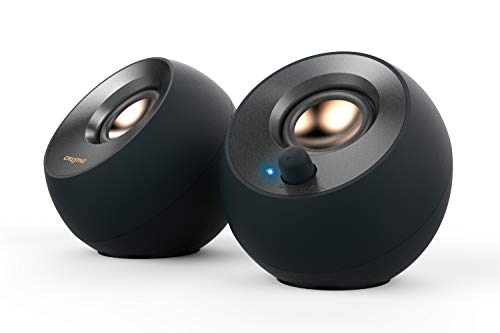
The Creative Pebble Pro requires one USB-C cable to a Mac for both power and audio, making it the simplest and most affordable speaker for minimalist desk setups. Its upward-angled 2-inch full-range drivers project sound overhead and forward, reducing desk reflection at close listening distances. Bluetooth 5.0 is included for wireless connection to iPhone or iPad. The tiny footprint places each satellite just ahead of a keyboard without blocking screen sightlines. At the Pebble Pro does not deliver the bass depth or stereo separation of more expensive options, but for a MacBook-on-a-desk setup where space and budget are the primary constraints, it is the obvious answer.

Edifier MR4 -- Best Flat Response for macOS Audio Work
The Edifier MR4 is a powered studio monitor pair that connects to a Mac via USB-C, USB-A, or RCA. The 4-inch woofer and 1-inch tweeter in each cabinet deliver a flatter frequency response than consumer desktop speakers, useful for music production, podcast editing, and video work on a Mac. A front-panel volume knob and monitor-grade input sensitivity make gain staging straightforward with a Mac audio interface. Bluetooth is absent, keeping the signal path simple and latency-free. At per pair the MR4 is a strong value for a Mac-connected near-field speaker that serves both work and music listening. The neutral tuning means it also plays nicely with macOS system sounds and alert tones without exaggerating them.
Bose Companion 50 -- Best Full-Range Satellite-Sub for Mac Desk
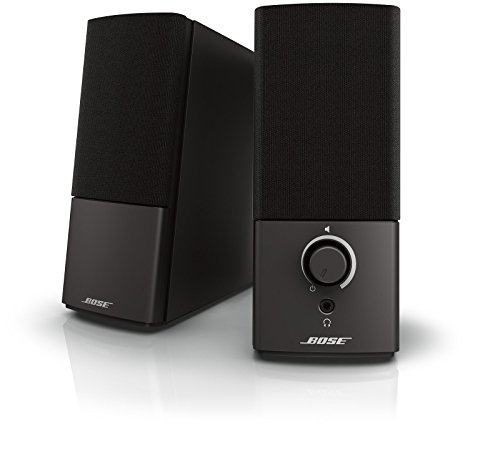
The Bose Companion 50 is a three-piece satellite and subwoofer system optimized for desktop Mac setups. The two small satellite speakers connect via a wired pod controller that sits between keyboard and monitor, with front-accessible headphone jack and volume dial. The hidden subwoofer slides under a desk. Bose's digital signal processing delivers a fuller, wider sound than the small satellites suggest, with bass extension down to 49 Hz. A 3.5mm input connects to any Mac audio output or USB adapter. At the Companion 50 occupies a unique position: it delivers near-full-range sound from speakers small enough to disappear on a desk while the subwoofer hides beneath it.

Devialet Phantom I -- Best Premium Wireless Reference Speaker
The Devialet Phantom I is a luxury wireless speaker that connects to a Mac via Wi-Fi through the Devialet Spark app or AirPlay 2. Its proprietary ADH (Analog Digital Hybrid) amplifier pushes 108 dB of maximum SPL from a single unit. Two Phantom I units create a stereo pair with imaging that rivals traditional bookshelf speakers twice the size. Apple AirPlay 2 integration means it appears natively in macOS audio output selection and supports multi-room audio with other AirPlay 2 devices. At each a stereo pair is a premium investment, but the build quality, bass extension, and wireless Apple ecosystem integration place it in a different class from any other Mac desktop speaker option.
What matters most
What to consider
Identify which ports your Mac model has before buying: most current MacBooks have only USB-C, while Mac Studio and Mac mini include USB-A and 3.5mm headphone ports. USB-C speakers eliminate adapters entirely on modern Macs. AirPlay 2 speakers integrate the most cleanly with macOS, appearing in system audio output and working with HomeKit. Bluetooth is always available without dongles on any Mac. Budget buyers get a clean setup with the Creative Pebble Pro; step up to the Audioengine A2+ Wireless for noticeably better sound. Premium buyers who want Apple ecosystem integration and reference-quality audio should consider the Devialet Phantom I.
What to consider
For more Mac accessory picks, see our guides to [best computer speakers for home office](/articles/best-computer-speaker-for-home-office) and [best computer speakers on a budget](/articles/best-computer-speaker-on-a-budget). Learn about the selection process at our [methodology](/methodology).
Frequently asked
Spatial audio processing on Mac currently applies to AirPods and Beats headphones that use the H-chip. Standard external speakers do not receive spatial audio processing from macOS itself, though some streaming services apply their own spatial audio encoding that any speaker can play back. For an immersive desktop experience, a wide-dispersion two-way speaker pair or a soundbar with Dolby Atmos decoding comes closest to that effect.
The most direct path is a USB-C speaker or a USB-C-to-USB-A adapter feeding a standard USB speaker. Bluetooth is a clean wireless alternative with no adapters needed. For wired analog speakers requiring a 3.5mm connection, a USB-C to 3.5mm adapter (including Apple's own adapter) works reliably. A USB audio interface is the best option for audiophile or studio-quality setups because it bypasses the Mac's internal DAC entirely.
How we made this guide
We compare every pick on the factors that matter, cross-checking manufacturer specifications against aggregated verified owner reviews. We rank independently and never take payment for placement. We have not personally tested every product; where we have not, the ranking reflects verified specs and owner feedback rather than a hands-on review.
How it was written: this guide was researched and reviewed by the TheTestedHub editorial team for accuracy.
Affiliate disclosure: TheTestedHub is reader-supported. When you buy through links on our site, we may earn a commission at no extra cost to you.
You might also like

Your Docking Station Match: CalDigit TS4 and More

Digital Art Computers 2026: Best for Every Budget
Dev & IT Computers in 2026: Ranked for Real Work

Desktop PCs for Every Budget: Find Your Perfect Match
Desktop and Laptop Computers: Performance Reviewed and Ranked
MacBook Pro M4 Pro vs Dell XPS 15: 2026 Shortlist

Buy the Best DIY Computer in 2026: Corsair One i300
