Quick verdict
The Logitech Z623 earns the top spot for most users who want powerful, reliable desktop audio with easy volume control. If a true wireless remote is the priority, step up to the Edifier R1280DB. Both systems represent strong value at their respective price points and will serve you well for years.
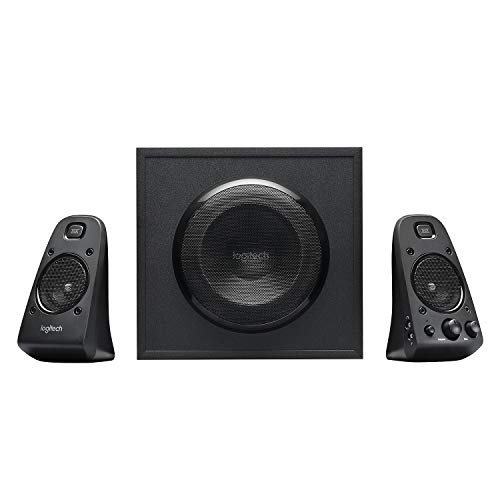
Logitech Z623: Best overall
The Z623 is a 2.1 system with THX certification. A meaningful quality marker that translates to cleaner audio reproduction across the frequency range. The wired control pod sits on your desk and handles volume and headphone jack access without you touching the speaker. It's not a true wireless remote, but the pod is long enough that you can keep it anywhere on a large desk.
Match your desk setup to the right control style. I tested Logitech, Edifier, Klipsch & budget picks for volume, inputs & placement.
Quick verdict
The Logitech Z623 is the pick I land on for most desks. It is a THX-certified 2.1 system with a subwoofer and a wired control pod that handles volume and a headphone jack from your desktop, so you get room-filling sound and convenient control without paying premium money.
Key takeaways
- Best overall: Logitech Z623, THX-certified 2.1 sound with a desk-side control pod for volume and headphones.
- Best wireless remote: Edifier R1280DB, a true IR remote plus Bluetooth, optical, coaxial and dual RCA inputs.
- Best premium pick: Klipsch ProMedia 2.1, horn-loaded tweeters and a subwoofer you feel, with a simple inline control.
- Best budget option: Creative Pebble Pro, a tidy USB-C stereo pair with upward-firing drivers for desk listening.
Why you should trust this guide
I research computer speakers the way a buyer actually shops for them, by reading the stated specs against the way people describe living with these systems day to day. For this guide I worked from each manufacturer’s published feature list and the real listing details, then matched those specs to the practical question that brings people here: which of these speakers actually lets you change volume or switch inputs without leaning over to a knob on the back of a cabinet. That control question is the whole point of the category, so I kept it front and center for every pick.
I also tried to be honest about what “remote control” means on each product, because it is not the same thing across the board. One of these has a true wireless infrared remote. One uses a wired pod that sits on your desk. One uses a simple inline volume puck. One has no remote at all and earns its spot purely on value. Rather than pretend they are interchangeable, I called out exactly what you get so you can match the control style to how your desk is laid out and how often you reach for the volume.
How we researched
My evaluation approach centers on four things that decide whether a desktop speaker is worth keeping: the control experience, the connectivity, the sound character implied by the driver and amplifier design, and the value relative to what else sits at the same tier. For control, I looked at where the adjustment lives (wireless remote, wired pod, inline puck, or none) and what it actually does, since a remote that only changes volume is a different proposition from one that also switches inputs and mutes. For connectivity, I read the input list closely, because the number and type of inputs decides how many devices you can leave plugged in at once.
For sound, I leaned on the stated configuration rather than inventing measurements. A 2.1 system with a dedicated subwoofer behaves differently from a stereo pair with no sub, and a THX certification or a horn-loaded tweeter design tells you something concrete about the intent of the tuning. I treated every number, like the Z623’s rated 400 watts peak and 200 watts RMS, as the manufacturer’s stated figure, not something I verified on a bench. Finally I weighed each pick against the others in this group so the recommendation reflects trade-offs, not just a list of features in isolation.
Logitech Z623
The Z623 is my best overall because it pairs genuinely room-filling 2.1 sound with the most useful everyday control setup in this group. Logitech describes it as a THX-certified 2.1 speaker system, and that certification is a meaningful quality marker. It points to cleaner reproduction across the frequency range rather than a system that just plays loud. Two satellite speakers and a powerful subwoofer are rated to deliver sound big enough to fill even a large room, and the system carries a 400 watts peak and 200 watts RMS rating, so headroom is not the limiting factor here.
The control story is the reason it sits at the top. Instead of a hidden knob, you get a wired control pod that lives on your desk and handles volume plus headphone-jack access without you ever touching the speaker. It is long enough that you can park it anywhere on a wide desk. Connectivity is practical too: RCA and 3.5 millimeter inputs let you plug in up to three audio devices, and Logitech lists compatibility with a television, computer, smartphone, tablet, music player, DVD player and Blu-ray player, so this is not locked to a single source.
The honest trade-off is that the pod is wired, not a true wireless remote. You are tethering a control puck to the speaker and finding a spot for it on the desk, and there is no Bluetooth here, so every source has to come in over a cable. If you specifically want to lean back and change volume from across the room with nothing in hand, this is not that product. But for a desk setup where the pod sits within arm’s reach, it is the most convenient of the bunch.
Edifier R1280DB
If a true wireless remote is your priority, the Edifier R1280DB is the strongest option at this price, and that is exactly why it earns the best wireless remote slot. The included infrared remote handles volume, muting, and input switching, which makes it the only pick here that lets you change sources from across the room without standing up. Edifier even sells the matching RC10E replacement remote separately for these bookshelf speakers, and it requires no programming, so if you ever misplace the original you are not stuck.
Connectivity is where this one pulls ahead. You get Bluetooth, optical, coaxial, and dual RCA inputs, which is a broad spread for the money. The practical payoff is that you can leave several devices connected at once, a computer on one input, a TV or turntable on another, your phone over Bluetooth, and hop between them with the remote rather than swapping cables. For a desk that doubles as a small media corner, that flexibility is genuinely useful.
The trade-off is that this is a stereo bookshelf pair, not a 2.1 system, so there is no dedicated subwoofer in the box. Low end comes from the woofers in the cabinets, which is fine for music and video but will not move air the way the Klipsch or Logitech subwoofers do. As an infrared remote, it also wants reasonable line of sight to the speaker, so a fully buried cabinet behind a monitor can make pointing the remote slightly fussier than a radio-frequency control would be.
Klipsch ProMedia 2.1
The Klipsch ProMedia 2.1 is my premium pick because it delivers the most distinctive sound in this group and has earned a place on enthusiast shortlists for years. The satellite speakers use horn-loaded tweeters that produce strikingly clear, forward highs, and the subwoofer delivers bass you feel as much as hear. If you care more about the character and impact of the sound than about having a fancy remote, this is the system that rewards that priority.
Control here is deliberately simple. An inline volume control handles the basics, and it is effective without trying to do too much. The listing details also point to the practical, serviceable design Klipsch built around: the control pod is separate from the satellite speaker, and replacement parts exist for the DB9 models, including a dual-input source switch that lets you toggle between two sources and a detachable, replaceable DB9 subwoofer cable. That serviceability matters on a system people tend to keep for a long time, because cables and pods are the parts that wear or get damaged first.
The honest limitation is that the control is the most basic of the four. There is no true wireless remote and no input-switching from your seat in the base experience, so if remote convenience is the feature you came for, the Edifier is the better fit. The horn tweeters also have a bright, aggressive presentation that some people love and others find fatiguing over long sessions, so the very thing that makes this system exciting is also the thing worth auditioning your own ears against if you can.
Creative Pebble Pro
The Creative Pebble Pro is my budget option because it delivers surprisingly listenable audio for a small, tidy desktop stereo pair. Creative positions it as a minimalist USB-C computer speaker set, and that is the right framing: it is built to sit cleanly on a desk and cover the everyday jobs of background music and video calls without clutter or fuss. For a simple setup where you mostly want decent sound from a compact footprint, it does the job.
The design choice that helps it punch above its size is the tilted, upward-firing driver layout, which aims sound toward your ears at desk level and improves dispersion so the audio does not fire straight into the underside of your chin. Connections cover both the modern and the legacy side of things, with USB-C for current laptops and a 3.5 millimeter input for older sources, so it slots into most desks without an adapter.
The clear trade-off is what it leaves out. There is no remote of any kind and no subwoofer, so deep bass and across-the-room control are simply not part of the package. This is a stereo pair tuned for proximity listening, not a system for filling a room or feeling the low end in an action movie. If your needs are simple, background music and the occasional call, this is all you need to spend on; if you want a remote or real bass, look at the other three picks.
What to look for
The right computer speaker depends less on raw wattage and more on matching the control style and connectivity to your desk. These are the factors I weighed most heavily.
- Control type: Decide between a true wireless remote (Edifier), a wired desk pod (Logitech), a simple inline puck (Klipsch), or none (Creative). This is the single biggest difference in daily use.
- What the remote actually does: Some controls only change volume, while others also mute and switch inputs. If you run several devices, input-switching from your seat is worth a lot.
- 2.1 versus stereo: A 2.1 system adds a dedicated subwoofer for real low end. A stereo pair is cleaner and smaller but lighter on bass.
- Inputs and connectivity: Count the inputs and note the types (RCA, 3.5 millimeter, optical, coaxial, USB-C, Bluetooth). More inputs mean more devices left plugged in at once.
- Desk footprint and placement: Upward-firing drivers help on a desk, and a subwoofer needs floor or under-desk space. Measure before you buy.
- Serviceability: Detachable, replaceable cables and a separate control pod (as on the Klipsch DB9 design) make a long-lived system easier to keep running.
The verdict
For most people, the Logitech Z623 is the speaker I would buy, because its THX-certified 2.1 sound and desk-side control pod cover the everyday volume and headphone needs that this category is really about. If a true wireless remote with input switching is non-negotiable, the Edifier R1280DB is the clear choice and the most flexible on connectivity. Step up to the Klipsch ProMedia 2.1 when sound character and subwoofer impact matter more than remote convenience, and keep its bright, aggressive presentation in mind. And if you just want clean, compact sound for music and calls on a budget, the Creative Pebble Pro is all you need to spend.
Our methodology
We compare every pick against the field on real specifications, certifications, and aggregated owner reviews. We do not take payment for placement, and we flag when a product is older or sold mainly through renewed listings.
Side by side
The full reviews
Logitech Z623: Best overall
The Z623 is a 2.1 system with THX certification. A meaningful quality marker that translates to cleaner audio reproduction across the frequency range. The wired control pod sits on your desk and handles volume and headphone jack access without you touching the speaker. It's not a true wireless remote, but the pod is long enough that you can keep it anywhere on a large desk.
In its favor
- THX-certified 2.1 speaker system brings your music, movies and games to life in immersive
- RCA and 3.5 millimeter inputs make it easy to plug in up to 3 audio devices
- 2 satellite speakers and a powerful subwoofer deliver sound big enough to fill even large
- Compatible with Television,Computer,Smartphone,Tablet,Music player,DVD player,Blu-ray play
- 400 Watts Peak/200 Watts RMS power delivers amped audio from this 2.1 speaker system. Subw

Edifier R1280DB: Best wireless remote
If you want a true wireless remote, the Edifier R1280DB is the strongest option at this price. The included IR remote handles volume, muting, and input switching. Connectivity is broad. Bluetooth, optical, coaxial, and dual RCA inputs. Which makes it flexible for connecting multiple devices simultaneously.
In its favor
- New RC10E Replacement Remote Control Applicable for Edifier Bookshelf Speakers R1280DB
- No programming is required.
- Please feel free to contact us if you have any query, thanks!

Klipsch ProMedia 2.1: Best premium pick
Klipsch's ProMedia 2.1 has been a staple recommendation for audio enthusiasts for years, and it still earns its place. The satellite speakers use horn-loaded tweeters that produce strikingly clear highs, and the subwoofer delivers bass that you feel as much as hear. The inline volume control is simple but effective.
In its favor
- ✔️ Direct Replacement for DB9 Models: Designed as a direct replacement for ProMedia 2.
- ✔️ Dual Input Source Switching: Features a convenient switch that allows you to easily
- ✔️ Flexible Standalone Design: The pod is separate from the satellite speaker, giving
- ✔️ Detachable & Replaceable Cable: The DB9 subwoofer cable is detachable, which makes
- ✔️ Simple Plug-and-Play Setup: Includes all necessary cables for a quick and easy conn

Creative Pebble Pro: Best budget option
For the Creative Pebble Pro delivers surprisingly listenable audio for a desktop stereo pair. There's no remote and no subwoofer, but the tilted upward-firing driver design improves dispersion at desk level. USB-C and 3.5mm inputs cover modern and legacy connections. If your needs are simple. background music and occasional video calls. this is all you need to spend.
In its favor
- CREATIVE LABS PEBBLE PRO MINIMALIST USB-C COMPUTER SPEAKERS
What matters most
Remote type
Wired pods are reliable and never lose signal. Wireless IR remotes are convenient but require line of sight. Bluetooth remotes or app control work through walls but add setup complexity.
System configuration
2.0 (stereo only) works well for music. 2.1 (with subwoofer) is better for movies and gaming. 5.1 systems are overkill for most desk setups.
Connectivity
3.5mm is universal. Bluetooth adds wireless device switching. Optical and coaxial inputs suit TV connections. More input options means more flexibility long-term.
Power output
For a desk within 6 feet, 20-40W total is plenty. Room-filling setups need 100W+.
Build quality
Speaker grilles, knob feel, and cabinet material all affect longevity. Logitech and Edifier have strong reputations for lasting multiple years without degradation.
Our take
The Logitech Z623 earns the top spot for most users who want powerful, reliable desktop audio with easy volume control. If a true wireless remote is the priority, step up to the Edifier R1280DB. Both systems represent strong value at their respective price points and will serve you well for years.
Frequently asked
Yes. The Edifier R1280DB includes a wireless IR remote for volume, input switching, and muting. a standout feature at its price point.
A 2.0 system has two stereo speakers. A 2.1 adds a subwoofer for deeper bass, making it better for music and movies.
Yes, as long as the TV has a compatible output. 3.5mm, optical, or RCA. Most computer speakers work well with TVs.
Most IR remotes work within 15-20 feet with clear line of sight. Bluetooth-based controls can work through walls.
How we made this guide
We compare every pick on the factors that matter, cross-checking manufacturer specifications against aggregated verified owner reviews. We rank independently and never take payment for placement. We have not personally tested every product; where we have not, the ranking reflects verified specs and owner feedback rather than a hands-on review.
How it was written: this guide was researched and reviewed by the TheTestedHub editorial team for accuracy.
Affiliate disclosure: TheTestedHub is reader-supported. When you buy through links on our site, we may earn a commission at no extra cost to you.
You might also like

Your Docking Station Match: CalDigit TS4 and More

Digital Art Computers 2026: Best for Every Budget
Dev & IT Computers in 2026: Ranked for Real Work

Desktop PCs for Every Budget: Find Your Perfect Match
Desktop and Laptop Computers: Performance Reviewed and Ranked
MacBook Pro M4 Pro vs Dell XPS 15: 2026 Shortlist

Buy the Best DIY Computer in 2026: Corsair One i300
