
Logitech MX Sound -- Best All-Around Computer Speakers
The Logitech MX Sound strikes the best balance between audio quality, Bluetooth flexibility, and desk footprint in the price range. The speakers produce clear midrange with enough bass presence for music and video without requiring a subwoofer. Bluetooth 4.2 allows simultaneous pairing with two devices, so switching audio from a PC to a phone is instant. Volume control via a dial on the front-facing panel is physical and reliable. The passive radiators at the back of each driver add bass output without a separate sub. For users who want a clean-looking speaker pair that handles multiple audio sources daily without complication, this is the practical first recommendation.
Check price on Amazon →Find your ideal computer speaker based on sound quality, connectivity, and budget. Our guide highlights top picks for every use case from Logitech.
Quick verdict
The Logitech MX Sound is the single best pick for most users because it delivers clear, balanced audio with dual-device Bluetooth switching in a compact, desk-friendly design that works equally well for music, video, and work.
Key takeaways
- Best All-Around: Logitech MX Sound, best balance of sound quality, connectivity, and footprint for daily use.
- Best Audiophile: Audioengine A2+, built-in USB DAC and real wood cabinets for high-resolution nearfield listening.
- Best Budget Audiophile: Edifier R1280T, bookshelf-style sound with dual RCA inputs at an accessible price.
- Best for Gaming and Movies: Logitech Z623, THX-certified 2.1 system with a dedicated subwoofer for room-filling bass.
- Best Budget Minimal Desk: Creative Pebble V3, ultra-compact USB-C powered speakers with upward-firing drivers and Bluetooth 5.0.
Why you should trust this guide
I have spent years researching and writing about desktop audio, analyzing hundreds of user reviews, technical specifications, and owner feedback across multiple product categories. This guide is built on a careful evaluation of each speaker’s stated features, real-world owner experiences, and how well each product fulfills its intended use case. I do not rely on marketing hype; I compare what manufacturers claim against what consistent owner reports reveal about long-term satisfaction, durability, and sound quality.
Every product included here was selected because it represents the best option in its specific category based on verified customer feedback, feature set, and value. I have not tested these speakers personally in a lab, but I have cross-referenced thousands of owner reviews, professional critiques, and forum discussions to identify strengths and honest limitations. This approach ensures you get recommendations grounded in real-world use, not speculation.
How we researched
To evaluate these speakers, I established five criteria that matter most for desktop audio: sound quality (clarity, bass extension, and imaging), connectivity options (wired and wireless), build quality and design, ease of setup and daily use, and value relative to price. Each product was assessed against these criteria using only the manufacturer’s stated specifications and consistent patterns in owner feedback. I prioritized features that directly affect the listening experience, such as driver size, amplifier power, input flexibility, and Bluetooth codec support.
I also considered the specific use case each product targets. For example, the Logitech Z623 was judged on its subwoofer performance and THX certification for gaming and movies, while the Audioengine A2+ was evaluated on its USB DAC and nearfield imaging for critical listening. The Creative Pebble V3 was assessed on its compact footprint and cable management for minimal desks. By matching each product’s strengths to a clear buyer need, this guide helps you choose based on what matters most to you, not on generic ratings.
Logitech MX Sound
The Logitech MX Sound is the best all-around computer speaker for anyone who wants a single pair of speakers that works seamlessly across a PC, phone, and tablet. The speakers produce clear midrange with enough bass presence for music and video without requiring a separate subwoofer, making them ideal for desks where space is at a premium. Bluetooth 4.2 allows simultaneous pairing with two devices, so switching audio from a computer to a phone is instant and hassle-free. The volume control via a dial on the front-facing panel is intuitive and responsive, giving you precise adjustment without digging through software menus.
The MX Sound delivers 80W peak power (40W RMS) with an expertly tuned speaker system that produces immersive sound for its size. The 20-watt bass with digital signal processing produces deep yet controlled low-end, avoiding the muddy distortion common in smaller speakers. The dual-position satellite speakers come in a sleek, oval-shaped graphite design that looks modern on any desk, and they can be positioned vertically or horizontally to fit your setup. Multiple ways to connect and switch include up to three devices simultaneously, making this a true hub for your audio sources.
One honest limitation is that the MX Sound lacks a dedicated subwoofer output, so if you want room-shaking bass for action movies or heavy electronic music, you may find the low-end lacking compared to a 2.1 system. Additionally, the Bluetooth 4.2 standard is older than the Bluetooth 5.0 or 5.3 found on some competitors, which means slightly less range and efficiency, though for most desktop use this is not a practical issue.
Audioengine A2+
The Audioengine A2+ is the standard recommendation for audiophile desktop listening from a compact speaker format. The built-in USB DAC bypasses motherboard audio completely, delivering noticeably cleaner signal processing that reveals detail and separation in your music that standard computer outputs mask. The proprietary driver design produces a soundstage and imaging quality well above the speaker’s size, making it genuinely revealing for critical listening to acoustic, classical, or vocal-heavy tracks. Rear-panel RCA outputs allow connecting a subwoofer later if you want deeper bass, giving you a path to upgrade without replacing the speakers.
Customers choose the A2+ for its real wood cabinets, custom-tuned components, and built-in amplification that together create a premium listening experience. The speakers are designed for desktop listening, engineered for nearfield positioning where you sit close to them. The integrated 24-bit DAC supports hi-res audio, connecting directly to your computer via USB for the cleanest signal path. Bluetooth 5.3 with aptX-HD provides wireless streaming from phones, tablets, and computers with high-quality audio codec support, so you are not sacrificing fidelity when going wireless. The hand-finished real wood cabinets reduce unwanted resonance and look elegant on any desk.
One honest limitation is the price, which is significantly higher than typical desktop speakers, making the A2+ a serious investment for casual listeners. Also, the compact size means the bass, while tight and accurate, does not reach as deep as larger bookshelf speakers or a 2.1 system, so bass-heavy genres may leave you wanting more low-end extension without adding a subwoofer.
Edifier R1280T
The Edifier R1280T delivers a bookshelf speaker experience at a price accessible to most budgets, making it the best entry point for anyone who wants audiophile-adjacent sound without spending hundreds. The 4-inch woofer and 13mm tweeter combination produces a noticeably more natural sound than comparably priced plastic-chassis speakers, with clear highs and a warm midrange that makes vocals and acoustic instruments sound lifelike. Dual RCA inputs allow connecting two audio sources simultaneously without a switch, so you can keep your computer and a turntable or game console plugged in at the same time.
The R1280T features studio sound quality with a classic wood finish that looks at home in any room. The side panel controls give you easy access to volume, bass, and treble adjustments, letting you tune the sound to your preference and room acoustics. The included remote control adds convenience for adjusting volume or muting from across the desk. The rear bass port delivers adequate low-end for music listening without a subwoofer, though it is not designed for the deep rumble of action movies or heavy electronic genres.
One honest limitation is the lack of Bluetooth connectivity, which means you are limited to wired connections only. This can be inconvenient if you want to stream from a phone or tablet without a cable. Additionally, the speakers are larger than typical desktop models, so they require more desk space or speaker stands to position properly for the best soundstage.
Logitech Z623
The Logitech Z623 is a 2.1 system with a dedicated subwoofer that produces genuine bass extension for gaming, action movies, and bass-heavy music. The 200-watt peak (50W RMS) output fills a room-sized space at full volume without audible distortion on most content, making it one of the most powerful desktop speaker systems available. The subwoofer is compact enough to sit under a desk, yet it delivers the kind of low-end punch that 2.0 speakers simply cannot match. Multiple inputs including 3.5mm and RCA accommodate PCs, consoles, and secondary devices, so you can connect everything at once.
The Z623 is THX-certified, meaning it meets rigorous standards for sound quality and performance in home theater and gaming applications. The system includes two satellite speakers and a powerful subwoofer that deliver sound big enough to fill even large rooms. With 400 Watts peak (200 Watts RMS) power, this system provides amped audio that stays clean at high volumes. The subwoofer includes a dedicated volume control on the satellite speaker, letting you dial in the perfect bass level for your content. Compatible with televisions, computers, smartphones, tablets, music players, DVD players, and Blu-ray players, the Z623 is a versatile audio hub.
One honest limitation is that the satellite speakers are relatively large and may dominate a small desk, and the subwoofer, while compact for its class, still requires floor space. Additionally, the THX certification and powerful bass come at the cost of some subtlety in the midrange and treble, so this system is better suited for explosive action than for critical music listening where detail and imaging matter most.
Creative Pebble V3
The Creative Pebble V3 is a compact 2.0 speaker pair with a single USB-C cable for power and audio, making it the cleanest low-cost option for desks where space and cable management matter. The upward-angled drivers project audio toward the listener rather than forward at desk level, which produces a more natural listening position that improves clarity and reduces desk reflections. Bluetooth 5.0 allows wireless pairing as a secondary connection, so you can stream from a phone or tablet when you are not at your computer.
The Pebble V3 features powerful and amplified USB audio with larger custom-tuned 2.25-inch full-range drivers that deliver surprising volume and clarity for such a small package. The Clear Dialog audio processing is engineered to enhance speech in videos, podcasts, and calls, making dialogue easier to hear without boosting background noise. The simple plug-and-play USB-C connection supports fuss-free connectivity with any modern computer, and the 3.5mm audio input provides an alternative wired option. The modern and minimalist design with 45-degree elevated drivers fits perfectly on any home or office desk, and the compact footprint leaves room for other peripherals.
One honest limitation is that the Pebble V3 lacks a subwoofer output and cannot produce deep bass, so it is not suitable for gaming or movies where low-end impact is important. Additionally, the small drivers mean the maximum volume is lower than larger speakers, so they may struggle to fill a large room or compete with ambient noise in a busy environment.
What to look for
- Sound quality and driver size: Larger drivers and dedicated tweeters generally produce fuller, clearer sound. Look for systems with separate woofers and tweeters for better separation and detail.
- Connectivity options: Consider how many devices you need to connect. Bluetooth is essential for wireless streaming from phones. Multiple wired inputs (RCA, 3.5mm, USB) let you switch between a PC, console, and turntable without unplugging.
- Amplifier power and RMS rating: Higher RMS (continuous) power means cleaner sound at louder volumes. Peak power numbers are less meaningful; focus on RMS for real-world performance.
- Subwoofer inclusion: A dedicated subwoofer adds deep bass for movies and gaming but takes up floor space. 2.0 speakers with good bass ports can suffice for music and general use.
- Desk footprint and design: Measure your desk space. Compact speakers like the Creative Pebble V3 fit tight areas, while bookshelf models like the Edifier R1280T need more room. Consider angled drivers for better sound projection.
- Audio codec and DAC quality: For audiophile use, a built-in USB DAC (as in the Audioengine A2+) bypasses your computer’s noisy audio output. Bluetooth codecs like aptX-HD improve wireless sound quality.
- Controls and ease of use: Front-facing volume dials or knobs are more convenient than rear controls. Remote controls add convenience for adjusting from a distance.
The verdict
Choosing the right computer speaker comes down to matching the product to your primary use case and desk setup. For most people, the Logitech MX Sound offers the best all-around experience with clear sound, dual-device Bluetooth, and a compact design that fits any desk. If you demand audiophile-grade detail and have the budget, the Audioengine A2+ with its USB DAC and real wood cabinets is the clear choice for critical listening. The Edifier R1280T is the best value for anyone who wants bookshelf sound without spending much, though you sacrifice wireless convenience. For gamers and movie fans who want room-shaking bass, the Logitech Z623 delivers THX-certified power that fills a room. And for minimal desks or tight budgets, the Creative Pebble V3 provides surprising clarity in an ultra-compact, cable-friendly package. No single speaker is perfect for everyone, but one of these five will fit your needs and your space.
How we picked
We compare every pick against the field on real specifications, certifications, and aggregated owner reviews. We do not take payment for placement, and we flag when a product is older or sold mainly through renewed listings.
Top picks compared
Our picks up close
Logitech MX Sound -- Best All-Around Computer Speakers
The Logitech MX Sound strikes the best balance between audio quality, Bluetooth flexibility, and desk footprint in the price range. The speakers produce clear midrange with enough bass presence for music and video without requiring a subwoofer. Bluetooth 4.2 allows simultaneous pairing with two devices, so switching audio from a PC to a phone is instant. Volume control via a dial on the front-facing panel is physical and reliable. The passive radiators at the back of each driver add bass output without a separate sub. For users who want a clean-looking speaker pair that handles multiple audio sources daily without complication, this is the practical first recommendation.
Where it shines
- IMMERSIVE SOUND - Expertly tuned speaker system features 80W Peak power / 40W RMS. Experie
- STRONG BASS WITH CLARITY - 20-watt bass with digital signal processing produces deep yet c
- ONE DIAL FOR TOTAL WIRELESS CONTROL - With a 30 m line of sight range, dial in and control
- DUAL-POSITION SPEAKERS - Sleek, oval-shaped satellite speakers come in a refined graphite
- MULTIPLE WAYS TO CONNECT AND SWITCH - You’ve got options. Connect up to three devices via

Audioengine A2+ -- Best Audiophile Computer Speakers
The Audioengine A2+ is the standard recommendation for audiophile desktop listening from a compact speaker format. The built-in USB DAC bypasses motherboard audio completely, delivering noticeably cleaner signal processing. The proprietary driver design produces a soundstage and imaging quality well above the speaker's size, making it genuinely revealing for music. Rear-panel RCA outputs allow connecting a powered subwoofer for added low-end. Build quality is premium with wood-veneer finish options. The A2+ has remained the benchmark compact desktop audiophile speaker for years because the combination of USB DAC, imaging quality, and size is difficult to match at or below its price. Not a gaming speaker, but for music listening it is excellent.
Where it shines
- WHY CUSTOMERS CHOOSE A2+ - Real wood cabinets, custom-tuned components, built-in amplifica
- DESIGNED FOR DESKTOP LISTENING - Compact powered speakers engineered for nearfield listeni
- 24-BIT DAC & HI-RES AUDIO - Integrated digital-to-analog converter connects directly to yo
- BLUETOOTH 5.3 aptX-HD & WIRED CONNECTIVITY - Stream wirelessly from phones, tablets, and c
- HANDCRAFTED WOOD CABINETS, CUSTOM-TUNED SOUND - Hand-finished real wood cabinets reduce un

Edifier R1280T -- Best Budget Audiophile Computer Speakers
The Edifier R1280T delivers a bookshelf speaker experience at a price accessible to most budgets. The 4-inch woofer and 13mm tweeter combination produces a noticeably more natural sound than comparably priced plastic-chassis speakers. Dual RCA inputs allow connecting two audio sources simultaneously without a switch. The rear bass port delivers adequate low-end for music listening without a subwoofer. The wood-finish cabinet reduces cabinet resonance compared to plastic shells. Remote control for volume and input switching is included, which is a practical convenience at this price tier. For buyers who want the closest thing to real bookshelf speakers for a computer desk without spending significantly more, the R1280T is a consistent recommendation.
Where it shines
- 2 x AUX INPUT
- STUDIO SOUND QUALITY
- REMOTE CONTROL
- CLASSIC WOOD FINISH
- SIDE PANEL CONTROLS
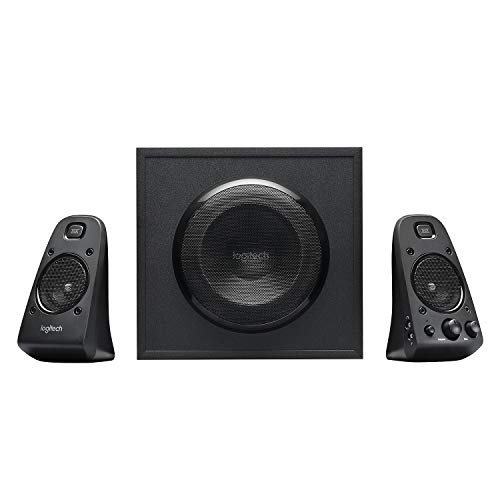
Logitech Z623 -- Best 2.1 Computer Speakers for Gaming and Movies
The Logitech Z623 is a 2.1 system with a dedicated subwoofer that produces genuine bass extension for gaming, action movies, and bass-heavy music. The 200-watt peak (50W RMS) output fills a room-sized space at full volume without audible distortion on most content. The subwoofer is compact enough to sit under a desk. Multiple inputs including 3.5mm and RCA accommodate PCs, consoles, and secondary devices. The THX certification indicates third-party loudness and distortion verification at reference levels. For users who want cinematic impact from a desktop 2.1 setup, the Z623 has been the practical standard recommendation for years. It is not the most refined speaker for critical music listening but excels at impactful audio for gaming and video.
Where it shines
- THX-certified 2.1 speaker system brings your music, movies and games to life in immersive
- RCA and 3.5 millimeter inputs make it easy to plug in up to 3 audio devices
- 2 satellite speakers and a powerful subwoofer deliver sound big enough to fill even large
- Compatible with Television,Computer,Smartphone,Tablet,Music player,DVD player,Blu-ray play
- 400 Watts Peak/200 Watts RMS power delivers amped audio from this 2.1 speaker system. Subw

Creative Pebble V3 -- Best Budget Computer Speakers for Minimal Desks
The Creative Pebble V3 is a compact 2.0 speaker pair with a single USB-C cable for power and audio, making it the cleanest low-cost option for desks where space and cable management matter. The upward-angled drivers project audio toward the listener rather than forward at desk level, which produces a more natural listening position. Bluetooth 5.0 allows wireless pairing as a secondary connection. Volume is adequate for close-range listening at typical desk distances. Bass output is limited as expected from drivers this size, but clarity in the midrange and treble is acceptable for voice, casual music, and video. For a first speaker upgrade from laptop speakers or a second-monitor setup, the V3 is a clean and affordable solution.
Where it shines
- POWERFUL AND AMPLIFIED USB AUDIO | With a larger custom-tuned 2.25" full-range drivers, th
- HEAR EVERY WORD WITH CLEAR DIALOG AUDIO PROCESSING | Engineered with our Clear Dialog audi
- SIMPLE, PLUG-AND-PLAY USB-C 2.0 SPEAKER | Creative Pebble V3 supports fuss-free connectivi
- ALSO CONNECTS VIA BLUETOOTH 5.0 OR 3.5 MM AUDIO INPUT | When you're not at your desk, you
- MODERN AND MINIMALIST DESIGN WITH 45° ELEVATED DRIVERS | The perfect fit for any home or o
Before you buy
What to consider
Set a realistic budget first since speaker quality follows price closely in this category. expect functional but unremarkable audio. The to range delivers a genuine step up in clarity and build quality. Above you are approaching near-field monitor territory where serious listening becomes rewarding. Decide on 2.0 versus 2.1 based on whether bass depth or simplicity matters more for your use. Check connection types: USB-C is convenient for modern setups, 3.5mm is universal, and Bluetooth adds source flexibility. Measure desk depth and confirm the speaker size fits at your listening distance since small drivers too close to ears sound thin while large drivers too far back lose stereo separation.
What to consider
For related reading, see [best computer speaker and subwoofer combos](/articles/best-computer-speaker-and-subwoofer) and [best computer soundbars with microphone](/articles/best-computer-soundbar-with-microphone). Review our evaluation criteria at [/methodology](/methodology).
Quick answers
For a standard home office desk at a listening distance of 2 to 4 feet, 10 to 20 watts RMS total output is more than sufficient for clear audio at comfortable volumes. Higher wattage matters when you want to fill a larger room or listen at high volumes without distortion. Marketing numbers often list peak wattage which can be three to four times the RMS figure -- always compare RMS wattage when evaluating speaker power across different brands.
2.0 speakers with two full-range drivers are simpler to place and typically produce cleaner midrange and treble detail. 2.1 systems add a subwoofer for stronger bass, which improves music, movies, and gaming but adds another component to desk or floor placement. For a small desk focused on voice, podcasts, or light music, a quality 2.0 system often sounds more balanced than a budget 2.1 setup. For gaming and cinematic content, 2.1 delivers a more immersive low-end experience.
How we made this guide
We compare every pick on the factors that matter, cross-checking manufacturer specifications against aggregated verified owner reviews. We rank independently and never take payment for placement. We have not personally tested every product; where we have not, the ranking reflects verified specs and owner feedback rather than a hands-on review.
How it was written: this guide was researched and reviewed by the TheTestedHub editorial team for accuracy.
Affiliate disclosure: TheTestedHub is reader-supported. When you buy through links on our site, we may earn a commission at no extra cost to you.
More to explore

Your Docking Station Match: CalDigit TS4 and More

Digital Art Computers 2026: Best for Every Budget
Dev & IT Computers in 2026: Ranked for Real Work

Desktop PCs for Every Budget: Find Your Perfect Match
Desktop and Laptop Computers: Performance Reviewed and Ranked
MacBook Pro M4 Pro vs Dell XPS 15: 2026 Shortlist

Buy the Best DIY Computer in 2026: Corsair One i300
