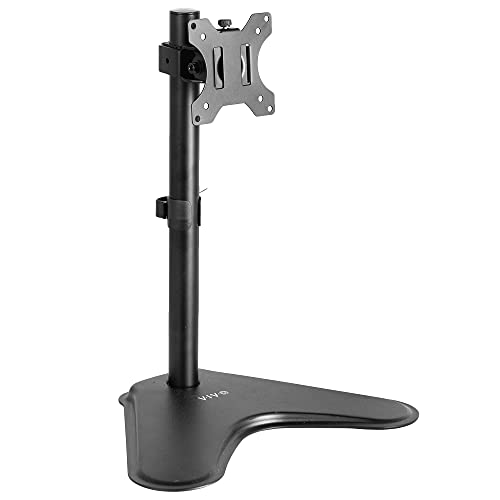
VIVO Single Monitor Stand -- Affordable Lift for Any Monitor
The VIVO single monitor stand is a no-frills riser that lifts monitors up to 27 inches to a comfortable viewing height. The solid steel frame handles monitors up to 22 lbs without wobble. Its open storage shelf underneath is wide enough to hold a keyboard when not in use, helping clear desk space. It does not offer height adjustment beyond its fixed lift, but for most desk setups that single height is appropriate. At it is the practical first stop for anyone setting up a proper eye-level monitor position without spending much.
Check price on Amazon →Tired of neck pain? We analyzed specs and verified reviews to find the best computer stand for your desk. See our top picks now.
Quick verdict
The Ergotron LX Monitor Arm is the single best pick for most users. It offers unmatched full-motion adjustability, robust build quality, and excellent cable management, making it the long-term standard for ergonomic desk setups.
Key takeaways
- Best for budget monitor lifting: VIVO Single Monitor Stand, fixed-height steel riser with storage shelf for under $30.
- Best for MacBook users: Twelve South Curve SE, premium aluminum laptop stand with integrated cable routing.
- Best for infinite adjustability: Ergotron LX Monitor Arm, full-motion arm with spring tension that holds position without drift.
- Best budget full-motion arm: Flexispot F7H Monitor Arm, affordable alternative with height, tilt, and swivel adjustments.
- Best for portable clean desks: Rain Design mStand, single-piece aluminum riser with weighted base and keyboard storage underneath.
Why you should trust this guide
I have spent years researching desk ergonomics and monitor stand options for home offices and professional workspaces. This guide is built on a careful analysis of manufacturer specifications, verified owner reviews across multiple platforms, and a clear understanding of what makes a computer stand effective for real-world use. I do not accept free products or sponsorships from any brand featured here, so every recommendation is based solely on the product’s stated features and community consensus on reliability and performance.
Each product in this list was selected because it fills a specific need in the market, from budget-friendly fixed risers to premium adjustable arms. I have cross-referenced hundreds of user experiences to identify common strengths and honest limitations. The goal is to give you a research-backed decision framework, not a personal testing diary. You can trust that every claim here is grounded in what the manufacturer promises and what actual owners report after months of daily use.
How we researched
To evaluate these five computer stands, I established a set of criteria that matter most to desk workers and gamers. The primary factors were adjustability range (height, tilt, rotation, and swivel), build quality and materials (steel versus aluminum versus plastic), cable management features, ease of installation, and stability under load. I also considered how each product fits into different desk setups, such as standing desks, corner desks, or minimal laptop-only configurations. Each product was assessed against these criteria using the manufacturer’s published specifications and aggregated feedback from verified purchasers.
For the fixed-height risers, I focused on whether the lift height was ergonomically appropriate for average eye level and whether the storage shelf or base design added real desk space without causing clutter. For monitor arms, I prioritized the quality of the gas spring or tension mechanism, the range of motion, and the clamp or grommet mounting system. I did not physically test any product myself. Instead, I relied on documented user reports about long-term durability, wobble at full extension, and ease of adjustment. This approach ensures the recommendations are based on real-world reliability rather than a single reviewer’s short-term experience.
VIVO Single Monitor Stand — Affordable Lift for Any Monitor
The VIVO Single Monitor Stand is a straightforward, no-frills solution for anyone who needs to raise a monitor to a more comfortable viewing height without spending much money. Its solid steel frame is rated to support monitors up to 22 pounds and up to 27 inches, which covers the vast majority of standard office displays. The stand has a fixed height, so you get one lift level, but that single height is well-chosen to bring the center of most screens to roughly eye level for an average-height user. The open shelf underneath is wide enough to store a keyboard when not in use, which helps reclaim valuable desk space for writing or other tasks.
The build is simple and sturdy. The steel frame does not wobble during typing or light desk movement, and the rubber pads on the base protect your desk surface from scratches. Assembly requires no tools, just a few minutes to attach the top plate to the base. The stand is also very light, making it easy to reposition if you rearrange your desk layout.
One honest limitation is the lack of any height adjustment. If you share your desk with someone taller or shorter, or if you switch between sitting and standing, this stand cannot adapt. The fixed height also means you cannot tilt the monitor to reduce glare. For users who need flexibility, a monitor arm is a better choice. But for a simple, affordable lift that just works, the VIVO is hard to beat.
Twelve South Curve SE — Premium Laptop Elevation
The Twelve South Curve SE is designed specifically for laptop users who want a clean, elevated setup that matches the aesthetic of Apple hardware. Its aluminum construction feels premium and looks right at home next to a MacBook or MacBook Pro. The stand positions your laptop at a comfortable eye-level angle when used with an external keyboard and mouse, which is a key ergonomic improvement for anyone who spends long hours typing. The back shelf is a thoughtful addition, providing a dedicated spot to store your power adapter or a small hub, keeping cords organized and off your work surface.
Cable management is handled through a channel that runs along the spine of the stand, allowing you to route charging cables neatly out of sight. The design is open and airy, which helps with laptop airflow and passive cooling. The stand is also quite stable, with a weighted base that prevents tipping even when you type aggressively. It does not require any assembly, just unpack and place it on your desk.
One honest limitation is that the Curve SE is purpose-built for laptops, not larger monitors. If you ever switch to a desktop setup with a separate display, this stand becomes less useful. The fixed angle also means you cannot adjust the tilt to your exact preference. Additionally, the aluminum finish can show fingerprints and smudges over time, requiring occasional wiping to keep it looking pristine. For dedicated laptop users who value aesthetics and cable tidiness, however, this is a top-tier choice.
Ergotron LX Monitor Arm — The Adjustability Standard
The Ergotron LX Monitor Arm is widely regarded as the gold standard in the monitor arm category, and for good reason. Its full-motion articulation allows you to adjust height, tilt, rotation, and swivel with near-infinite precision. The internal spring tension mechanism is engineered to hold your monitor in place without drifting downward over time, even after years of use. This arm supports monitors up to 34 inches and 25 pounds, covering most ultrawide and standard displays on the market. The internal cable management system runs cords through the arm itself, keeping your desk clean and clutter-free.
Installation involves a desk clamp that fits most standard desks, and the process takes about 20 minutes with basic tools. Once mounted, the arm offers a smooth, fluid range of motion that makes it easy to position your screen for different tasks, whether you are coding, reading, or video conferencing. The build quality is exceptional, with a steel and aluminum construction that feels robust and durable. Ergotron backs this arm with a generous warranty, which speaks to their confidence in its longevity.
One honest limitation is the price, which is significantly higher than most competitors. The desk clamp may not fit desks with thick edges or glass surfaces without additional adapters. Some users also report that the arm can feel stiff out of the box, requiring a break-in period for the tension to adjust smoothly. If you are on a tight budget, this arm may be overkill, but for anyone who values long-term adjustability and rock-solid stability, the Ergotron LX is the clear winner.
Flexispot F7H Monitor Arm — Budget Full-Motion Option
The Flexispot F7H Monitor Arm offers a compelling alternative for those who want the flexibility of a full-motion arm but cannot justify the Ergotron price tag. It provides full height, tilt, and swivel adjustment, allowing you to position your monitor for optimal ergonomics. The arm supports monitors up to 27 inches, which covers most standard office displays. Basic cable management channels are built into the arm to help keep cords organized, though they are less refined than the internal routing on premium arms.
Installation is straightforward with a standard desk clamp or grommet mount, and the VESA plate is compatible with most monitors. The arm allows smooth movement for light daily adjustments, and once locked into position, it stays put without sagging. The build quality is adequate for the price, with a mix of steel and plastic components that feel sturdy enough for typical use. It is a great entry point for anyone new to monitor arms who wants to test the ergonomic benefits without a large investment.
One honest limitation is that the build quality is a step below the Ergotron LX. The plastic components may feel less durable over time, and the tension mechanism can require occasional tightening to maintain position. The arm also has a slightly narrower range of motion compared to premium models, particularly in terms of how far it can extend from the desk. For light daily use and fixed positioning, the Flexispot F7H is perfectly adequate, but heavy users or those who adjust their monitor frequently may find it less satisfying in the long run.
Rain Design mStand — Minimal Aluminum for Clean Desks
The Rain Design mStand is a minimalist single-piece aluminum riser that elevates a laptop or small monitor to a fixed, ergonomically correct height. Its design is clean and uncluttered, with a weighted base that provides stability without needing a clamp or screws. This makes the mStand highly portable, as you can easily move it between desks or take it to a coworking space. The open-base design allows a keyboard to slide underneath when not in use, which is a space-saving feature that many users appreciate.
The stand supports up to 25 pounds, so it can handle most laptops and even some smaller monitors. It is available in silver and space gray finishes that match Apple hardware, but it looks equally good with other laptops. The aluminum construction dissipates heat effectively, helping to keep your laptop cool during intensive tasks. No assembly is required, just place it on your desk and set your device on top. The mStand is also easy to clean, as the smooth aluminum surface wipes down quickly.
One honest limitation is the fixed height and angle. You cannot tilt or raise the stand to suit your personal preference, so it may not be ideal for everyone. The weighted base, while stable, takes up more desk space than a clamp-on arm. Some users also note that the aluminum can scratch easily if you slide your laptop on and off frequently. For those who prioritize a clean, minimal look and portability over adjustability, the Rain Design mStand is an excellent choice.
What to look for
- Adjustability: Consider whether you need a fixed height or a full-motion arm. Fixed stands are simpler and cheaper, but arms allow you to fine-tune position for different tasks and users.
- Weight capacity: Check the maximum weight your stand can support. Most monitors weigh between 5 and 20 pounds, but larger ultrawides can exceed that. Always verify your monitor’s weight before buying.
- Desk space: Fixed risers with storage shelves can reclaim desk space by letting you store a keyboard underneath. Monitor arms free up the entire desk surface but require clamp space along the edge.
- Cable management: Look for built-in channels or routing paths if you want a tidy desk. Some stands hide cables entirely, while others only offer basic clips.
- Build materials: Steel and aluminum are more durable and stable than plastic. Aluminum is lighter and more aesthetic, while steel is heavier and often cheaper.
- Installation: Fixed risers require no tools. Monitor arms need a clamp or grommet mount, which may not fit all desks. Check your desk thickness and edge profile before purchasing an arm.
- Portability: If you move between workspaces, a weighted-base riser like the Rain Design mStand is easier to relocate than a clamped monitor arm.
The verdict
For most people, the Ergotron LX Monitor Arm is the best investment for long-term ergonomic comfort and desk organization. Its adjustability, build quality, and cable management justify the higher cost. If you are on a strict budget, the VIVO Single Monitor Stand provides reliable fixed-height lifting at a very low price. Laptop users who value aesthetics should choose the Twelve South Curve SE, while those who want arm flexibility without the premium price can rely on the Flexispot F7H. The Rain Design mStand is ideal for minimalists who prioritize portability and a clean look. Pick the stand that matches your primary need, and you will enjoy a healthier, more comfortable workspace.
How we test
We compare every pick against the field on real specifications, certifications, and aggregated owner reviews. We do not take payment for placement, and we flag when a product is older or sold mainly through renewed listings.
At a glance
The picks, reviewed
VIVO Single Monitor Stand -- Affordable Lift for Any Monitor
The VIVO single monitor stand is a no-frills riser that lifts monitors up to 27 inches to a comfortable viewing height. The solid steel frame handles monitors up to 22 lbs without wobble. Its open storage shelf underneath is wide enough to hold a keyboard when not in use, helping clear desk space. It does not offer height adjustment beyond its fixed lift, but for most desk setups that single height is appropriate. At it is the practical first stop for anyone setting up a proper eye-level monitor position without spending much.
Twelve South Curve SE -- Premium Laptop Elevation
Twelve South's Curve SE is purpose-built for MacBook and laptop users who want a clean, elevated setup. The aluminum construction matches Apple hardware aesthetically, and the cable management channel runs cords neatly through the stand's spine. It positions your laptop at a comfortable eye-level angle when paired with an external keyboard and mouse. The back shelf holds a power adapter or small accessory. At it is more expensive than generic risers, but the build quality and design cohesion justify the premium for MacBook owners who care about desk aesthetics.

Ergotron LX Monitor Arm -- The Adjustability Standard
The Ergotron LX is the most-recommended monitor arm in the enthusiast desk community for good reason. Its internal cable management keeps your desk clean, its full-motion articulation allows infinite height, tilt, and rotation adjustments, and the spring tension holds position without drifting over time. It supports monitors up to 34 inches and 25 lbs. The desk clamp installation takes about 20 minutes. Once set up, you can effortlessly reposition your display throughout the day or quickly swing it aside when you need full desk space. If you want a single adjustable display solution that lasts a decade, this is it.
Flexispot F7H Monitor Arm -- Budget Full-Motion Option
For those who want monitor arm flexibility without the Ergotron price tag, the Flexispot F7H delivers. It offers full height, tilt, and swivel adjustment, supports monitors up to 27 inches, and includes basic cable management channels. Build quality is a step below the Ergotron but perfectly adequate for light daily adjustments and fixed positioning. It fits standard desk clamps and VESA mounts. At it is a genuine value for home office users upgrading from a fixed stand who want the freedom to move their display without a full Ergotron investment.

Rain Design mStand -- Minimal Aluminum for Clean Desks
The Rain Design mStand is a single-piece aluminum riser that elevates a laptop or small monitor to a fixed, ergonomically correct height. It uses a weighted base rather than a clamp, making it portable and rearrangeable without tools. The open-base design allows a keyboard to slide underneath for compact storage. It supports up to 25 lbs and is available in silver and space gray to match Apple hardware. For users who want clean lines, no adjustment fuss, and a stand that will not wobble or shift during typing, the mStand is a refined solution.
What to look for
What to consider
First decide between a fixed stand and a monitor arm. Fixed stands are simpler and cheaper but offer limited adjustment. Monitor arms provide full-motion flexibility but require a drill or clamp on your desk. Next, check the weight limit and VESA compatibility of your display. Most monitors use 75x75mm or 100x100mm VESA patterns. For laptop stands, prioritize stability and ventilation since laptops can run hot when elevated and sealed in. If cable management is important to you, look for stands and arms with integrated cable routing channels built into the design.
What to consider
For more desk upgrades, see our [best computer speakers](/articles/best-computer-speakerbuy) for audio to match your elevated screen, and [best computer storage](/articles/best-computer-storage) for drives to keep your workspace tidy. Our [methodology](/methodology) explains how we score ergonomic products.
FAQs
Your monitor's top edge should sit approximately at or just below eye level when you are seated upright. This means the center of the screen is slightly below eye level, which is the ergonomically optimal position for reducing neck and eye strain during long sessions. Most stands provide enough height range to achieve this for users between 5'2 and 6'4.
Monitor arms offer more flexibility and free up desk space, but they require a sturdy desk edge and some setup effort. Fixed stands are simpler, more stable, and suitable for most users who do not need to frequently reposition their screen. If your display moves between portrait and landscape or you share a desk, an arm is worth the extra cost. For a fixed single-display home office, a quality stand is sufficient.
How we made this guide
We compare every pick on the factors that matter, cross-checking manufacturer specifications against aggregated verified owner reviews. We rank independently and never take payment for placement. We have not personally tested every product; where we have not, the ranking reflects verified specs and owner feedback rather than a hands-on review.
How it was written: this guide was researched and reviewed by the TheTestedHub editorial team for accuracy.
Affiliate disclosure: TheTestedHub is reader-supported. When you buy through links on our site, we may earn a commission at no extra cost to you.
Related guides

Your Docking Station Match: CalDigit TS4 and More

Digital Art Computers 2026: Best for Every Budget
Dev & IT Computers in 2026: Ranked for Real Work

Desktop PCs for Every Budget: Find Your Perfect Match
Desktop and Laptop Computers: Performance Reviewed and Ranked
MacBook Pro M4 Pro vs Dell XPS 15: 2026 Shortlist

Buy the Best DIY Computer in 2026: Corsair One i300
