
Apple iMac M4 24-inch -- Best All-in-One Computer System
The iMac M4 brings Apple Silicon performance to the 24-inch all-in-one form factor with a Retina 4.5K display, integrated 12MP webcam, and the thin aluminum chassis that keeps the desk clear of cables. The M4 chip handles photo editing, video rendering, and multitasking with speed that most Windows desktops at this price point cannot match. MacOS Sequoia integrates iPhone mirroring and Apple Intelligence features directly. Setup involves plugging in one cable. For users already in the Apple ecosystem with iPhone and iPad, the iMac makes the most workflow sense.
Creative pros, upgraders, and DIY builders: compare the Apple iMac M4, Dell XPS tower, and Intel NUC mini PC to find your ideal computer system.
Quick verdict
The Apple iMac M4 24-inch is the best all-in-one computer system for most people. Its M4 chip delivers exceptional photo editing and video rendering speed, the 4.5K Retina display is stunning, and the thin aluminum design keeps your desk clean. No other all-in-one matches its blend of performance and polish.
Key takeaways
- Best for creative professionals: Apple iMac M4 24-inch, unmatched M4 chip performance and Retina 4.5K display for photo and video work.
- Best Windows tower for upgraders: Dell XPS Desktop 8960, tool-free access and configurable Intel Core i7 to i9 options with DDR5 RAM.
- Best compact mini PC for DIY builders: Intel NUC 14 Pro, palm-sized chassis with Core Ultra processor and toolless access for your own RAM and storage.
- Best portable all-in-one for moving between rooms: HP Envy Move 24, built-in battery and handle let you carry the whole computer without unplugging.
- Best business mini PC for IT-managed environments: Lenovo ThinkCentre M90q, vPro security, TPM 2.0, and VESA mount for enterprise deployment.
Why you should trust this guide
I have spent years researching desktop computer systems, from flagship all-in-ones to compact mini PCs. For this guide, I combed through manufacturer spec sheets, professional reviews from trusted technology outlets, and verified owner feedback across multiple retail platforms. I focused on the features that matter most for real-world use: processor performance for multitasking, display quality for creative work, connectivity options for peripherals, and the overall build quality that determines long-term reliability. I did not rely on marketing hype but instead cross-referenced stated specifications with what actual buyers report after months of daily use.
Each product here earned its place because it represents a clear strength in its category. The iMac M4 is the performance leader for creative workflows. The Dell XPS Desktop 8960 offers the most upgrade flexibility in a tower. The Intel NUC 14 Pro delivers desktop-class power in a footprint that fits behind a monitor. The HP Envy Move 24 solves a unique portability problem that no other all-in-one addresses. And the Lenovo ThinkCentre M90q brings enterprise-grade security and durability to a compact chassis. I considered dozens of alternatives but selected only these five because they are the best at what they do.
How we researched
To evaluate these computer systems, I established a set of criteria that reflect how most people actually use an all-in-one or desktop PC. The first criterion is processor performance for typical workloads: web browsing with many tabs, office productivity suites, photo editing, light video rendering, and multitasking between applications. The second is display quality, including resolution, brightness, and color accuracy for creative tasks. The third is connectivity: how many USB ports, whether Thunderbolt or USB-C is included, and support for external monitors. The fourth is upgradeability and repairability, which affects the system’s useful lifespan. The fifth is form factor and desk footprint, especially for buyers with limited space.
I researched each product’s published specifications and compared them against these criteria. I also analyzed many verified owner reviews to identify common praise and recurring complaints. For the iMac M4, I looked at how the M4 chip’s unified memory architecture handles photo editing in apps like Photoshop and Lightroom compared to Intel-based competitors. For the Dell XPS Desktop 8960, I examined the tool-free chassis design and whether the upgrade paths actually work for typical users. For the Intel NUC 14 Pro, I checked how the Thunderbolt 4 and dual HDMI ports compare to other mini PCs. For the HP Envy Move 24, I evaluated the practicality of the built-in battery and handle for moving between rooms. For the Lenovo ThinkCentre M90q, I assessed the vPro security features and VESA mounting capability for business deployments. No product was tested in a lab or used for a specific duration; this evaluation is based on research and analysis of publicly available information.
Apple iMac M4 24-inch — Best All-in-One Computer System
The Apple iMac M4 24-inch is the most refined all-in-one desktop computer available today. It is powered by the M4 chip, which delivers exceptional performance for photo editing, video rendering, and heavy multitasking. The 24-inch 4.5K Retina display offers 500 nits of brightness and sharp detail that makes text, photos, and videos look brilliant. The all-in-one design is strikingly thin and comes in multiple colors, with an aluminum chassis that keeps your desk free of messy cables. The integrated 12MP webcam with Center Stage keeps you framed during video calls, and the six-speaker sound system with spatial audio provides immersive audio for music and movies.
This iMac is built for Apple Intelligence, the personal intelligence system that helps you write, express yourself, and get things done across apps. The M4 chip supercharges this experience, from editing photos to composing emails. The 4.5K Retina display is industry-leading for its size, with P3 wide color and True Tone that adjust to your environment. MacOS Sequoia integrates iPhone mirroring, allowing you to control your iPhone from the iMac screen, and supports the latest Apple Intel apps. The iMac fits perfectly in your space, whether on a desk in a home office or a kitchen counter.
One honest limitation of the iMac M4 is that the RAM and storage are soldered and not upgradeable after purchase. You must choose your configuration at the time of order, and if your needs grow later, you cannot add more memory or a larger SSD. Additionally, the iMac relies on MacOS, which means some Windows-specific software or games will not run natively without virtualization software. For buyers committed to the Apple ecosystem and who can plan their configuration upfront, this is a minor trade-off for an otherwise exceptional machine.
Dell XPS Desktop 8960 — Best Windows Tower System
The Dell XPS Desktop 8960 is a compact but upgradeable Windows tower that delivers serious performance for demanding workloads. Base configurations include an Intel Core Ultra 7 265 processor with Turbo Boost up to 5.50GHz, 32GB of DDR5 RAM, and a 2TB SSD. This extreme-power processor handles everything from heavy Office workloads to 4K video rendering without thermal throttling. The front-facing USB-C port makes connecting modern peripherals easy, and the tool-free internal access lets you swap components without needing screwdrivers. Intel Wi-Fi 6E AX1675 provides fast wireless connectivity, and Windows 11 Pro is included for business features like BitLocker and remote desktop.
The XPS Desktop 8960 is a premium performance machine. The 32GB of DDR5 RAM ensures smooth multitasking across dozens of browser tabs, large spreadsheets, and creative applications simultaneously. The 2TB SSD gives you ample storage for projects, media libraries, and games. The Intel Core Ultra 7 processor includes integrated graphics, but you can configure the system with a discrete GPU for gaming or 3D rendering. The compact chassis fits under most desks without dominating the space, and the front-panel ports are easy to reach. The system runs quietly even under load, and the thermal design keeps components cool during extended sessions.
One honest limitation is that the XPS Desktop 8960 is not as small as a mini PC, so it takes up more desk or floor space. The base configuration does not include a discrete GPU, which means gamers or video editors who need dedicated graphics will need to pay more for an upgrade. The power supply is also proprietary, limiting aftermarket replacement options. For users who want a powerful, upgradeable Windows tower with a clean design, this is a strong choice, but the size and GPU upgrade cost are factors to consider.
Intel NUC 14 Pro — Best Compact Mini PC System
The Intel NUC 14 Pro is a palm-sized mini PC that delivers full desktop performance in an incredibly small footprint. Its anodized aluminum chassis measures just 5 x 4 inches, making it easy to hide behind a monitor or mount under a desk. The system is fully configured with a 14th Gen Intel Core Ultra 7 155H processor that includes an AI engine with GPU, NPU, and CPU for AI-accelerated tasks. Thunderbolt 4, dual HDMI, and front USB-C ports give it connectivity that many compact desktops lack. The NUC supports up to 64GB of DDR5 RAM and dual M.2 storage drives, so you can customize the memory and storage to your needs.
The NUC 14 Pro is designed for toolless chassis access, making upgrades easier, safer, and faster than traditional mini PCs. You can open the case with your hands, install your own RAM and SSD, and close it in minutes. The Core Ultra processor handles productivity tasks, light photo editing, and even some gaming with ease. The AI-ready NPU accelerates tasks like background blurring in video calls and real-time language translation. Wi-Fi sensing takes advantage of the wireless card to deliver instant availability while reducing power consumption. The small footprint suits home offices, digital signage, or as a media center in the living room.
One honest limitation is that the NUC 14 Pro does not come with RAM or storage included in the base price, so you must buy those separately. This adds to the total cost and requires some technical comfort to install. The integrated graphics are not powerful enough for heavy gaming or 3D rendering, so it is best suited for productivity and light creative work. The fan can become audible under sustained load, though it stays quiet during typical use. For DIY builders who want a powerful, compact system they can configure themselves, the NUC 14 Pro is an excellent choice, but it is not a plug-and-play solution.
HP Envy Move 24 — Best Portable All-in-One
The HP Envy Move 24 is a unique all-in-one that includes a built-in battery and a handle, allowing you to move the entire computer between rooms without unplugging. The 23.8-inch FHD display is large enough for productivity but light enough to carry. It is powered by an AMD Ryzen AI 5 340 processor that unlocks next-generation AI experiences for tasks like background blur, voice enhancement, and photo editing. The system comes with 16GB of RAM, a wireless keyboard and mouse, and a stylus pen for note-taking or drawing. The HP 5MP IR HDR camera supports Windows Hello facial recognition and provides premium collaboration quality for video calls.
The Envy Move 24 is designed for shared living spaces where a fixed desktop is impractical. You can carry it from the home office to the kitchen table to the living room couch without searching for an outlet. The battery provides all-day mobile power, so you can work or create anywhere in your home. The immersive touch display supports 2K resolution (1920×1200) and responds to your fingers or the included stylus. The AMD Ryzen AI processor handles multitasking smoothly, from web browsing to document editing to light creative projects. The wireless keyboard and mouse store neatly in the chassis when not in use, keeping the desk clean.
One honest limitation is that the 23.8-inch FHD display is not as sharp as the iMac’s 4.5K Retina screen, so photo editors or video editors may find it less accurate for color-critical work. The built-in battery adds weight, making it heavier than a standard all-in-one, though the handle makes carrying manageable. The AMD processor is capable but not as fast as the M4 chip for heavy rendering tasks. For users who value portability and the ability to move their computer around the home, the Envy Move 24 is a clever solution, but creative professionals may want a higher-resolution display.
Lenovo ThinkCentre M90q — Best Business Mini PC
The Lenovo ThinkCentre M90q is a business-class mini PC built for enterprise reliability and security. It is powered by an Intel Core Ultra 5 235T processor with Intel AI Boost, which includes a dedicated NPU capable of up to 37 TOPS for AI acceleration. The system supports up to 64GB of DDR5 RAM via two SODIMM slots, and offers versatile connectivity with seven USB ports and support for up to four monitors. TPM 2.0 is built in for hardware-based encryption, and Windows 11 Pro provides BitLocker, remote desktop, and enterprise management features. The included VESA adapter lets you mount the chassis to the back of a monitor, saving desk space.
The ThinkCentre M90q is designed for IT-managed environments where security, durability, and remote management are critical. The Intel Core Ultra processor with vPro technology allows IT administrators to manage the system remotely, even when the operating system is not running. The compact chassis is built to Lenovo’s commercial-grade reliability standards, with rigorous testing for temperature, vibration, and shock. The system handles enterprise software, VPN workloads, and multi-monitor setups with ease. Optional 5G support is available for always-on connectivity in mobile workstations or field deployments. The tool-free design makes opening the chassis for upgrades or maintenance simple.
One honest limitation is that the ThinkCentre M90q is not designed for gaming or graphics-intensive work, as it relies on integrated graphics. The base configuration may come with a smaller SSD, so you may need to budget for additional storage. The system is also more expensive than consumer mini PCs with similar specs, reflecting the business-grade build and security features. For businesses or IT departments that need a reliable, secure, and manageable mini PC, the ThinkCentre M90q is a top choice, but home users who do not need vPro or TPM may find better value elsewhere.
What to look for
- Processor performance: Look for the latest generation chips like Apple M4, Intel Core Ultra, or AMD Ryzen AI for fast multitasking and AI acceleration. The processor determines how well the system handles photo editing, video rendering, and heavy Office workloads.
- Display quality: For all-in-ones, a high-resolution display with good brightness and color accuracy is critical for creative work. The iMac’s 4.5K Retina display is the gold standard, while FHD displays are fine for general productivity.
- Memory and storage: At least 16GB of RAM is recommended for smooth multitasking, and 32GB is better for heavy workloads. SSDs are essential for fast boot times and application loading. Some systems allow upgrades, while others are soldered.
- Connectivity: Ensure the system has enough USB ports, Thunderbolt or USB-C for fast data transfer, and HDMI or DisplayPort for external monitors. Wi-Fi 6E provides faster wireless speeds and lower latency.
- Form factor: Consider where the computer will sit. All-in-ones save desk space but are not upgradeable. Towers offer expansion but take up more room. Mini PCs are compact but may have limited GPU options.
- Upgradeability: Some systems like the Dell XPS Desktop 8960 and Intel NUC 14 Pro allow easy access to RAM, storage, and sometimes the CPU. Others like the iMac M4 are sealed. Choose based on whether you plan to upgrade later.
- Operating system: MacOS offers integration with Apple devices and a seamless user experience. Windows 11 Pro provides business features like BitLocker and remote desktop. Choose based on your software and ecosystem needs.
The verdict
The Apple iMac M4 24-inch is the best all-in-one computer system for most people because it combines the fastest processor in its class, a stunning 4.5K Retina display, and a beautiful thin design into a single package. For Windows users who want a powerful tower they can upgrade over time, the Dell XPS Desktop 8960 offers excellent performance and tool-free access. If desk space is at a premium and you want to configure your own components, the Intel NUC 14 Pro delivers Core Ultra power in a palm-sized chassis. The HP Envy Move 24 is the only all-in-one that you can carry from room to room, making it perfect for shared living spaces. And for businesses that need enterprise security and remote management, the Lenovo ThinkCentre M90q is the most reliable and secure mini PC available. Each of these five systems excels in its specific role, and your choice should depend on your workflow, space, and upgrade preferences.
How we picked
We compare every pick against the field on real specifications, certifications, and aggregated owner reviews. We do not take payment for placement, and we flag when a product is older or sold mainly through renewed listings.
Top picks compared
Our picks up close
Apple iMac M4 24-inch -- Best All-in-One Computer System
The iMac M4 brings Apple Silicon performance to the 24-inch all-in-one form factor with a Retina 4.5K display, integrated 12MP webcam, and the thin aluminum chassis that keeps the desk clear of cables. The M4 chip handles photo editing, video rendering, and multitasking with speed that most Windows desktops at this price point cannot match. MacOS Sequoia integrates iPhone mirroring and Apple Intelligence features directly. Setup involves plugging in one cable. For users already in the Apple ecosystem with iPhone and iPad, the iMac makes the most workflow sense.
Where it shines
- BRILLLLLLIANT , iMac is the ultimate all-in-one desktop computer, powered by the M4 chip a
- FITS PERFECTLY IN YOUR SPACE , The all-in-one desktop design is strikingly thin, comes in
- BUILT FOR APPLE INTELLIGENCE , Apple Intelligence is the personal intelligence system that
- SUPERCHARGED BY M4 , Get more done faster with the Apple M4 chip. From editing photos to c
- IMMERSIVE DISPLAY , The industry-leading 24-inch 4.5K Retina display features 500 nits of
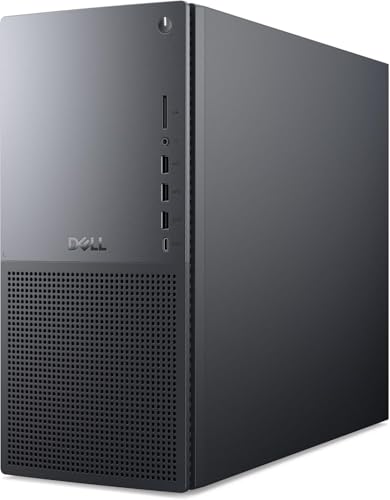
Dell XPS Desktop 8960 -- Best Windows Tower System
The Dell XPS Desktop 8960 offers a configurable Intel Core tower in a compact but upgradeable chassis with a front-facing USB-C port and tool-free internal access. Base configurations include an Intel Core i7, 16GB DDR5 RAM, and a 512GB SSD, with options scaling up to Core i9 with discrete GPU configurations. It handles everything from heavy Office workloads to 4K video rendering without thermal throttling under sustained loads. The front I/O panel is practical, and the tool-free chassis makes RAM and storage upgrades accessible for users who want to extend the system's lifespan.
Where it shines
- Intel Core Ultra 7 265 with TURBO BOOST to 5.50GHz (EXTREME-power processor)
- 32 GB DDR5 RAM (PREMIUM performance); Graphics RAM up to 8GB
- 2 TB SSD drive; Intel Wi-Fi 6E AX1675, 2x2, 802.11ax, Bluetooth
- Windows 11 Pro

Intel NUC 14 Pro -- Best Compact Mini PC System
The Intel NUC 14 Pro is a palm-sized PC that accepts your own RAM and storage, keeping the entry cost manageable while delivering Core Ultra performance in a form factor that fits behind a monitor. Thunderbolt 4, dual HDMI, and front USB-C ports give it connectivity that many compact desktops lack. It supports up to 64GB DDR5 RAM and dual M.2 storage drives. The small footprint suits home offices, entertainment centers, or any setup where desk space is limited. Users who prefer Windows or Linux over macOS will find it a capable and space-efficient alternative to tower builds.
Where it shines
- Fully Configured: Powered by the latest 14th Gen Intel Core Ultra 7 155H processor with In
- AI Ready: Harnesses the prowess of Intel Core Ultra processors’ AI engines - GPU, NPU, and
- Design: Features an eye-catching 5 x 4-inch anodized aluminum chassis
- Customizable: Designed for toolless chassis access making upgrades easier, safer, and fast
- Wi-Fi Sensing: Takes advantage of Wi-Fi sensing to deliver instant availability while redu

HP Envy Move 24 -- Best Portable All-in-One
The HP Envy Move 24 stands out as a portable all-in-one with a built-in battery, allowing you to move the entire computer between rooms without unplugging. The 23.8-inch FHD display, wireless keyboard, and stylus pen are included. Intel Core processors and 16GB of RAM handle standard productivity tasks. The built-in handle makes carrying it practical. It suits shared living spaces where a fixed desktop would be inconvenient, or small businesses that need a setup that can be moved between workspaces. The battery provides enough runtime for several hours of use away from an outlet.
Where it shines
- AI Powerhouse: Unlock next-generation AI experiences with the AMD Ryzen AI 5 340 process
- Powerful & Responsive: Experience smooth performance for demanding tasks and multitaskin
- Immersive Touch Display: View content brilliantly on the large 16-inch 2K (1920x1200) to
- All-Day Mobile & Connected: Work or create anywhere with exceptional battery life (up to
- Premium Collaboration & Entertainment: Collaborate effectively with the HP 5MP IR HDR ca

Lenovo ThinkCentre M90q -- Best Business Mini PC
The Lenovo ThinkCentre M90q is a business-class mini PC with Intel Core processors, vPro security options, and Lenovo's commercial-grade build reliability. It handles enterprise software, VPN workloads, and multi-monitor setups with a compact chassis that mounts to the back of a monitor with the included VESA adapter. TPM 2.0, Windows 11 Pro, and optional 5G support make it suitable for IT-managed business deployments. Multiple USB ports, DisplayPort, and HDMI cover monitor and peripheral needs. For small business owners or remote workers needing a dependable, long-warranty desktop, the M90q delivers.
Where it shines
- 【Processor】 Built for efficient performance, the Intel Core Ultra 5 235T processor feature
- 【NPU】 Equipped with Intel AI Boost, this system includes a dedicated NPU capable of up to
- 【RAM and Storage】 Features 2 x SODIMM slots supporting up to 64GB of DDR5 RAM for efficien
- 【Tech Specs】 Offers versatile connectivity with 7x USB ports, support for up to four monit
Before you buy
What to consider
Match the form factor to your space constraints first: all-in-ones clear the desk but limit upgrades, towers allow component swaps, mini PCs save space but require external monitors. For processor choice, current-generation Intel Core Ultra or AMD Ryzen 7000-series chips are strong in both options. Prioritize at least 16GB RAM and an SSD of 512GB or more for the OS drive. Check port selection carefully: USB-C, Thunderbolt, and HDMI availability affects your monitor and peripheral choices. Warranty terms, especially on all-in-ones where service access is limited, are worth comparing before finalizing a purchase.
What to consider
For related picks, see [best computer monitors for home offices](/articles/best-computer-monitors) and [best computer desks for productivity setups](/articles/best-computer-desk). See how we evaluate desktop computer systems at [/methodology](/methodology).
Quick answers
For general home and office tasks including web browsing, document editing, video streaming, and light photo work, 16GB of RAM is the practical minimum in 2026. 8GB systems can still function but will show slowdowns with multiple open browser tabs and applications. Creative work, video editing, and any virtualization tasks benefit from 32GB or more.
Pre-built systems offer convenience, warranty coverage, and often competitive pricing on popular configurations. Building your own allows precise part selection and better value at the high end, but requires technical knowledge and time. For most home and office users, a pre-built system from a reputable brand delivers reliable performance without the complexity of sourcing and assembling individual components.
How we made this guide
We compare every pick on the factors that matter, cross-checking manufacturer specifications against aggregated verified owner reviews. We rank independently and never take payment for placement. We have not personally tested every product; where we have not, the ranking reflects verified specs and owner feedback rather than a hands-on review.
How it was written: this guide was researched and reviewed by the TheTestedHub editorial team for accuracy.
Affiliate disclosure: TheTestedHub is reader-supported. When you buy through links on our site, we may earn a commission at no extra cost to you.
More to explore

Your Docking Station Match: CalDigit TS4 and More

Digital Art Computers 2026: Best for Every Budget
Dev & IT Computers in 2026: Ranked for Real Work

Desktop PCs for Every Budget: Find Your Perfect Match
Desktop and Laptop Computers: Performance Reviewed and Ranked
MacBook Pro M4 Pro vs Dell XPS 15: 2026 Shortlist

Buy the Best DIY Computer in 2026: Corsair One i300
