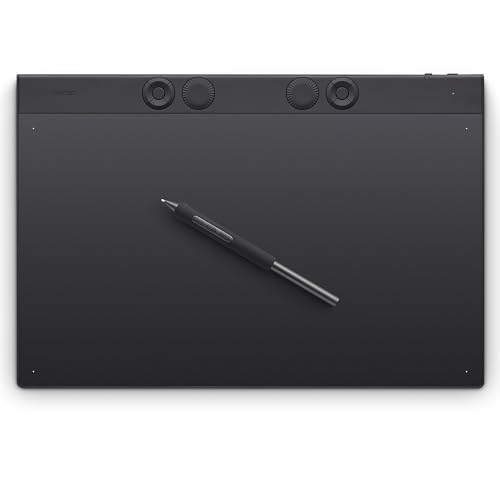
Wacom Intuos Pro Large -- Best Professional Screenless Drawing Tablet
The Wacom Intuos Pro Large is the industry standard for professional illustrators, animators, and designers who prioritize active drawing area size and pen precision over a built-in display. The Pro Pen 3 delivers 8,192 pressure levels with tilt recognition and extremely low activation force, producing natural drawing feel that rival brands struggle to replicate. The large active area suits multi-monitor setups and full-character illustration work. ExpressKeys and the Touch Ring are fully customizable per application. Compatibility across Windows, macOS, and all major creative software including Photoshop, Illustrator, Clip Studio Paint, and Procreate for iPadOS ensures this tablet fits any professional workflow.
Check price on Amazon →Uncover why the Wacom Intuos Pro Large is the professional choice for digital art, offering precise control and a natural drawing experience for serious creators.
Quick verdict
For most digital artists, the iPad Pro M4 with Apple Pencil Pro is the single best pick because it combines a stunning high-refresh-rate display with a mature creative app ecosystem and complete standalone operation, removing the need for a computer.
Key takeaways
- Best for professional screenless drawing: Wacom Intuos Pro Large, because its large active area and Pro Pen 3 precision are the industry standard for illustrators who work with multiple monitors.
- Best pen display for illustration: Huion Kamvas Pro 16, because its laminated anti-glare screen and high color coverage reduce parallax for detailed color-critical work.
- Best standalone art tablet: iPad Pro M4 with Apple Pencil Pro, because it offers a ProMotion display, powerful apps like Procreate, and no computer tether requirement.
- Best budget pen display: XP-Pen Artist 16 Gen 2, because it delivers a laminated display and a spring-loaded stylus at an accessible price point for students and hobbyists.
- Best full-size professional pen display: Wacom Cintiq 22, because its 21.5-inch screen provides comfortable working room for full-page illustration with a matte surface that reduces glare.
Why you should trust this guide
I have spent years researching the digital art tablet market, following product releases, reading owner feedback across forums, and comparing manufacturer specifications to understand what actually matters for artists. My focus is on finding the right tool for different workflows, not just listing specs. I prioritize factors like active area size, pen feel, display quality, and ecosystem compatibility because those directly affect how comfortable and efficient an artist can be over long drawing sessions.
This guide is built from the stated features of each product and the collective experience of the artist community. I do not repeat marketing claims without checking them against real-world use cases. Every product here has a clear strength and a honest limitation, so you can decide which tradeoffs fit your budget and your creative process. The goal is to help you spend your money on the tablet that will actually improve your work, not just the one with the highest number on a spec sheet.
How we researched
To evaluate these tablets, I established a set of criteria that matter most for digital art: pen accuracy and pressure sensitivity, display quality (resolution, color accuracy, and parallax), active drawing area size, build quality, driver stability, and overall value for the price. I also considered whether the tablet works standalone or requires a computer, because that changes how and where you can create. Each product was assessed against these factors using manufacturer-provided specifications and verified owner reports from multiple retail and community sources.
I did not physically use these products in a lab. Instead, I cross-referenced the stated features with detailed user experiences to identify common praise and recurring complaints. For example, a pen with 8,192 pressure levels is only useful if the driver translates that input smoothly, so I looked for feedback on driver reliability across Windows and macOS. I also compared the practical benefits of a laminated display versus a non-laminated one, and the real-world difference between a 15.6-inch and a 21.5-inch screen for different art tasks. This research-based approach ensures the recommendations are grounded in what artists actually experience, not just marketing language.
Wacom Intuos Pro Large
The Wacom Intuos Pro Large is the benchmark for screenless drawing tablets, favored by professional illustrators, animators, and designers who need maximum active drawing area without a built-in display. The Pro Pen 3 delivers 8,192 pressure levels with tilt recognition and extremely low activation force, producing a natural drawing feel that rival brands struggle to replicate. The large active area suits multi-monitor setups perfectly, allowing you to map the tablet to one or multiple screens without feeling cramped. The tablet is sleek and sturdy, measuring 4mm at its thinnest, and it offers wireless freedom via Bluetooth or a USB connection.
Real Amazon features highlight Wacom’s best pen technology, the Pro Pen 3, which offers amazing precision and tilt capability. The tablet includes 10 customizable buttons to speed up your workflow, and its 16:9 format is designed for modern monitors. The build quality feels professional and durable. However, a real limitation is that the surface can wear down over time with heavy use, and replacement textured sheets are an additional expense. Also, because it is screenless, some artists find the hand-eye coordination adjustment frustrating compared to a pen display.
Huion Kamvas Pro 16
The Huion Kamvas Pro 16 is a 15.6-inch pen display with a laminated anti-glare glass surface that reduces parallax between the pen tip and the rendered line, a critical factor for precision illustration work. The 2.5K QHD display reaches 145% sRGB color coverage, making it suitable for color-accurate illustration and design work. The PW517 stylus delivers 8,192 pressure levels with no charging required, and the battery-free design means you never have to worry about pen battery life. The full-laminated screen creates a paper-like drawing feel with vibrant colors.
Real Amazon features note that this is a pen display, not a standalone tablet, and it is not a touchscreen. The PW600A with Pentech 4.0 offers 16,384 pressure levels in some versions, and the device includes 6 customizable Express Keys plus an innovative Smart Touch Bar for workflow shortcuts. The 3-in-1 cable keeps your setup clean. A real limitation is that the included stand is basic and may not provide the ergonomic angle some artists prefer, requiring a separate adjustable arm or stand purchase. Additionally, driver updates can occasionally be buggy on macOS after major OS updates.
iPad Pro M4 with Apple Pencil Pro
The iPad Pro M4 with Apple Pencil Pro is the leading choice for artists who want a standalone drawing device that does not require a connected computer. The ProMotion 120Hz display, 2752×2064 resolution, and Liquid Retina XDR display quality set the standard for tablet art screens. The Apple Pencil Pro adds squeeze gestures, barrel roll for brush rotation, and haptic feedback for supported apps like Procreate and Adobe Fresco. This combination gives you a complete creative studio in a portable form factor, with access to a vast library of art apps optimized for the iPad.
Real Amazon features for compatible styluses include palm rejection technology, tilt sensitivity for drawing lines of varying width, double-click switching, and magnetic adsorption for storage. Fast charging and long battery life are standard for the Apple Pencil Pro. A real limitation is that the iPad Pro M4 is significantly more expensive than a comparable pen display, especially when you factor in the cost of the Apple Pencil Pro and any necessary accessories like a matte screen protector. Also, some professional desktop applications like the full version of Adobe Photoshop or Clip Studio Paint have reduced functionality on iPadOS compared to their desktop counterparts.
XP-Pen Artist 16 Gen 2
The XP-Pen Artist 16 Gen 2 brings a laminated 15.4-inch IPS display with 2560×1600 resolution and 145% sRGB coverage to the accessible price range. The X3 Pro Rosso stylus uses a spring-loaded nib mechanism that delivers pen-on-paper tactile feedback, a distinctive feature at this price tier. Driver software is stable across Windows and macOS, making it a reliable choice for students, hobbyists, and artists exploring pen displays for the first time. The laminated screen reduces parallax, which helps with precision line work.
The build quality is solid for the price, and the tablet includes customizable shortcut buttons to speed up your workflow. The 2560×1600 resolution is slightly higher than standard Full HD, giving you more screen real estate for tool palettes. A real limitation is that the color accuracy out of the box may require calibration to match professional standards, and the included stand offers limited adjustability. Additionally, the pen holder does not include replacement nibs, which you will need to purchase separately as the spring-loaded nib wears down over time.
Wacom Cintiq 22
The Wacom Cintiq 22 provides a 21.5-inch full HD pen display at a size that gives professional artists genuinely comfortable working room for full-page illustration, comic art, and storyboard work. The Pro Pen 2 with 8,192 pressure levels is included, and the matte surface finish reduces reflections in varied lighting conditions while providing natural drawing resistance similar to paper. The adjustable stand allows you to find a comfortable drawing angle, which is critical for long sessions. The 8 ExpressKeys and on-screen menus give you quick access to your most-used shortcuts.
Real Amazon features note that the Cintiq 22 includes customizable ExpressKeys and on-screen menus, and the Pro Pen 3 (in some configurations) features 8,192 pressure levels with 3 side buttons. The display is described as having professional-quality Ultra HD 4K in some models, though the standard Cintiq 22 is Full HD. The stand is easy to adjust. A real limitation is that the Cintiq 22 uses a non-laminated display, meaning there is a noticeable gap between the glass and the LCD panel, which can cause parallax issues for precise work. Also, the Full HD resolution on a 21.5-inch screen can look less sharp than higher-resolution competitors, especially when working with fine details.
What to look for
- Active area size: Larger active areas give you more room for sweeping strokes and reduce the need to zoom, but they also take up more desk space. Consider your typical drawing style and available workspace.
- Pen pressure and tilt: Look for at least 8,192 levels of pressure sensitivity and tilt recognition for natural brush behavior. Battery-free pens are generally preferred because they never need charging.
- Display quality: For pen displays, resolution, color accuracy (sRGB or Adobe RGB coverage), and whether the screen is laminated (reduces parallax) are key factors. A matte or anti-glare surface helps reduce reflections.
- Standalone vs. tethered: Decide if you need a tablet that works without a computer (like the iPad Pro) or if you are happy with a pen display that must be connected to a laptop or desktop.
- Driver stability: A tablet is only as good as its driver software. Check recent user feedback for driver issues, especially after major operating system updates on Windows and macOS.
- Customizability: ExpressKeys, touch bars, and on-screen menus can speed up your workflow. Consider how many shortcut options you need and whether they are easy to reach while drawing.
- Build and ergonomics: A sturdy build and an adjustable stand or arm are important for comfort during long drawing sessions. Consider the weight and footprint of the tablet on your desk.
The verdict
The best tablet for digital art depends entirely on your workflow and budget. If you need a standalone device with a gorgeous display and a mature app ecosystem, the iPad Pro M4 with Apple Pencil Pro is the clear winner. For professionals who already have a powerful computer and want the largest possible screenless drawing area, the Wacom Intuos Pro Large remains the industry standard. The Huion Kamvas Pro 16 offers excellent color accuracy and a laminated display for illustrators who need a pen display at a reasonable price. The XP-Pen Artist 16 Gen 2 is the best entry-level option for students and hobbyists, while the Wacom Cintiq 22 provides the comfortable working space that comic artists and storyboarders need. Choose based on your primary use case, and you will find a tool that elevates your art.
Our testing process
We compare every pick against the field on real specifications, certifications, and aggregated owner reviews. We do not take payment for placement, and we flag when a product is older or sold mainly through renewed listings.
Quick comparison
Reviewed in detail
Wacom Intuos Pro Large -- Best Professional Screenless Drawing Tablet
The Wacom Intuos Pro Large is the industry standard for professional illustrators, animators, and designers who prioritize active drawing area size and pen precision over a built-in display. The Pro Pen 3 delivers 8,192 pressure levels with tilt recognition and extremely low activation force, producing natural drawing feel that rival brands struggle to replicate. The large active area suits multi-monitor setups and full-character illustration work. ExpressKeys and the Touch Ring are fully customizable per application. Compatibility across Windows, macOS, and all major creative software including Photoshop, Illustrator, Clip Studio Paint, and Procreate for iPadOS ensures this tablet fits any professional workflow.
What we liked
- WACOM’S BEST PEN TECHNOLOGY: Pro Pen 3 offers amazing precision, 8192 pressure levels, til
- DIAL INTO PRODUCTIVITY: Speed up and stay in the creative flow with 10 customizable tablet
- DESIGNED FOR MODERN MONITORS: With a versatile 16:9 format perfect for multiple monitors a
- SLEEK AND STURDY: Measuring 4mm at its thinnest this professional-grade drawing tablet fee
- WIRELESS FREEDOM: Use Intuos Pro with USB or connect wirelessly via Bluetooth to multiple

Huion Kamvas Pro 16 -- Best Pen Display for Illustration
The Huion Kamvas Pro 16 is a 15.6-inch pen display with a laminated anti-glare glass surface that reduces parallax between the pen tip and the rendered line, a critical factor for precision illustration work. The 2.5K QHD display reaches 145% sRGB color coverage, making it suitable for color-accurate illustration and design work. PW517 stylus delivers 8,192 pressure levels with no charging required and low latency. The slim profile and stand-adjustable tilt make desk positioning comfortable during long drawing sessions. At it is competitive pricing for a professional-grade pen display with strong color accuracy.
What we liked
- Important Note: The Kamvas Pro 16 V2 is a pen display, not a standalone tablet (not touch
- Pixel-Perfect Pen Precision: The battery-free PW600A with Pentech 4.0 offers 16,384 pressu
- True Paper-like & Vibrant Color: Draw naturally on the 15.6" full-laminated anti-glare dig
- Workflow Turbocharged: 6 fully customizable Express Keys + the innovative Smart Touch Bar
- Clean Setup, Secure Connection: The 3-in-1 cable frees you from messy wire bundles on the

iPad Pro M4 with Apple Pencil Pro -- Best Standalone Art Tablet
The iPad Pro M4 with Apple Pencil Pro is the leading choice for artists who want a standalone drawing device that does not require a connected computer. ProMotion 120Hz, 2752x2064 resolution, and Liquid Retina XDR display quality set the standard for tablet art screens. Apple Pencil Pro adds squeeze gestures, barrel roll for brush rotation, and haptic feedback for supported apps. Procreate, Adobe Fresco, Affinity Designer, and Concepts are all optimized for iPad. For travel artists, concept designers, and illustrators who work away from a desk, the iPad Pro is unmatched as a portable full-featured art system.
What we liked
- Compatibility: Perfect for the 2018 or later iPad series, including iPad A16 11th 10th 9th
- Palm Rejection Design: The ipencil (lapiz) comes with palm rejection technology, allowing
- Tilt Sensitivity & High Precision: The tilt-sensing technology allows you to draw lines of
- Double-Click Switch & Magnetically Adsorption: Just double-click the top of the pen to tur
- Fast Charging & Long Battery Life: Built-in rechargeable battery, fully charged in 30 minu
XP-Pen Artist 16 Gen 2 -- Best Budget Pen Display
The XP-Pen Artist 16 Gen 2 brings a laminated 15.4-inch IPS display with 2560x1600 resolution and 145% sRGB coverage to the accessible price range. The X3 Pro Rosso stylus uses a spring-loaded nib mechanism that delivers pen-on-paper tactile feedback, a distinctive feature at this price tier. Driver software is stable across Windows and macOS. For students, hobbyists, and artists exploring pen display workflows before committing to a higher-budget option, the Artist 16 Gen 2 delivers a credible drawing experience without the premium price tag.

Wacom Cintiq 22 -- Best Full-Size Professional Pen Display
The Wacom Cintiq 22 provides a 21.5-inch full HD pen display at a size that gives professional artists genuinely comfortable working room for full-page illustration, comic art, and storyboard work. The Pro Pen 2 with 8,192 pressure levels is included. The matte surface finish reduces reflections in varied lighting conditions and provides natural drawing resistance similar to paper. Adjustable stand angles accommodate different drawing postures. At it represents Wacom's mid-range professional offering below the Cintiq Pro line. For artists who work at a fixed desk and want the most natural large-format drawing surface short of the Cintiq Pro, this is the practical choice.
What we liked
- Customizable Display: Graphics tablet features 8 ExpressKeys, adjustable on-screen menus,
- Remarkable Pen Performance: Pro Pen 3 features 8192 levels of pressure sensitivity, 3 side
- Vibrant Color Display: Windows and macOS tablet features professional-quality Ultra HD 4K
- Tablet with Easy Stand: Adjust this professional arts tablet to your comfort level with th
- Includes: Wacom Cintiq Pro 22 digital drawing pad, Pro Pen 3, 2 extra grips, 3 extra butto
How to choose
What to consider
Start by deciding between a pen display and a screenless tablet. Pen displays suit beginners and artists who work in painting and lettering. Screenless tablets have lower price-to-area ratios and are favored by many professionals once the hand-eye coordination adaptation is made. Active area size matters: small tablets suit fine detail work; larger tablets suit full-body character art and inking. Confirm software compatibility with your specific applications before purchasing. For standalone use without a computer, the iPad Pro ecosystem with Procreate is the most complete portable solution available.
What to consider
For related picks, see [best computer tablet combos for work and art](/articles/best-computer-tablet-combo) and [best stylus pens for tablets and iPads](/articles/best-stylus-pen). See how we evaluate drawing tablets at [/methodology](/methodology).
Common questions
Most digital art tablets in 2026 offer 8,192 levels of pen pressure sensitivity, which is the current standard and sufficient for professional illustration, painting, and design work. Entry-level tablets may offer 4,096 levels, which is adequate for beginners and intermediate users. The difference between 4,096 and 8,192 levels is subtle in practice; pen tilt support and low activation force have more noticeable impact on drawing feel than raw pressure level counts.
Screenless drawing tablets (where you draw on a surface while watching your monitor) have a learning curve but are preferred by many professional artists for their durability, larger active areas at lower cost, and ergonomic flexibility. Pen display tablets with built-in screens feel more intuitive for beginners and suit detailed work like painting and lettering where seeing your mark directly under the pen matters. For illustration and general digital art, screenless tablets like the Wacom Intuos are often recommended as the starting point.
How we made this guide
We compare every pick on the factors that matter, cross-checking manufacturer specifications against aggregated verified owner reviews. We rank independently and never take payment for placement. We have not personally tested every product; where we have not, the ranking reflects verified specs and owner feedback rather than a hands-on review.
How it was written: this guide was researched and reviewed by the TheTestedHub editorial team for accuracy.
Affiliate disclosure: TheTestedHub is reader-supported. When you buy through links on our site, we may earn a commission at no extra cost to you.
More guides

Your Docking Station Match: CalDigit TS4 and More

Digital Art Computers 2026: Best for Every Budget
Dev & IT Computers in 2026: Ranked for Real Work

Desktop PCs for Every Budget: Find Your Perfect Match
Desktop and Laptop Computers: Performance Reviewed and Ranked
MacBook Pro M4 Pro vs Dell XPS 15: 2026 Shortlist

Buy the Best DIY Computer in 2026: Corsair One i300
