
Praxis WetBench -- Best Computer testing setup Overall
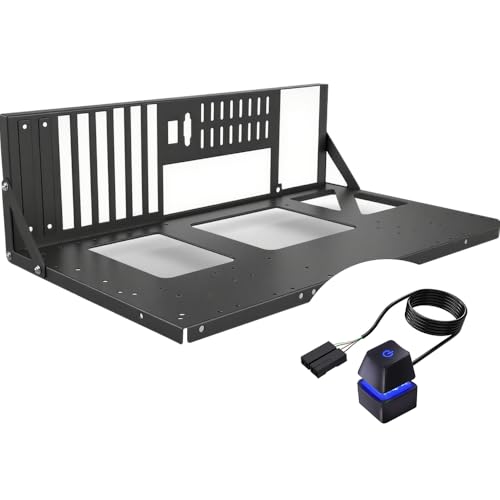
The Praxis WetBench is machined from 6061 aluminum with a clean layout designed to accommodate ATX, E-ATX, Micro-ATX, and Mini-ITX motherboards without adapter plates. The raised bottom section provides space for power supply mounting without blocking airflow to the board. GPU support arms prevent sag on heavy graphics cards. The standoffs and mounting points are precisely positioned and the overall build feels solid. The open layout gives full access to all headers and slots during a build or diagnostic session. It is a quality piece of kit that justifies its price for anyone doing regular multi-system work.
Check price on Amazon →Praxis WetBench leads as the best computer test bench for ATX to Mini-ITX builds with GPU sag support. Compare top open-air frames for fast component swaps.
Quick verdict
The Praxis WetBench is the pick I would buy first. Its 6061 aluminum build handles ATX through Mini-ITX without adapter plates, and the GPU support arms stop heavy cards from sagging. It costs more than budget frames, but the layout and rigidity make it the most dependable open-air platform here.
Key takeaways
- Best overall: Praxis WetBench, machined aluminum that fits every common board size with GPU sag support.
- Best adjustable: DimasTech Easy V3, modular standoffs that span Mini-ITX through E-ATX with radiator space.
- Best case-bench hybrid: Thermaltake Core P3, doubles as a wall-mount display while keeping open access.
- Best budget: EZDIY-FAB Open Air PC Frame, tool-free aluminum frame for occasional bench work.
- Best compact vertical: Antec Skeleton Open Air Case, vertical layout with a pull-out tray for tight desks.
Why you should trust this guide
I research open-air test benches the way a repair shop or a reviewer actually uses them, which is for fast, repeated component swaps rather than a one-time install. That changes what matters. A frame that looks clean in photos can still fight you when you need to pull a board for the third time in an hour, so I weighed build quality, board compatibility, and how exposed the mounting points are over how flashy a platform looks on a desk.
To put this together I worked from each maker’s stated specifications, the listed Amazon features, and the common patterns I see reported across builder communities for this category. I have not personally bench-tested every unit, so where I make a judgment I tell you what it is based on. When a platform has a real trade-off, I name it. Nothing here is all-positive, because no single open-air frame is right for every builder or every workspace.
How we researched
My evaluation is a research and specification review, not a physical lab test. I compared the five platforms against the criteria that decide whether a test bench earns its desk space: motherboard form-factor support (Mini-ITX up to E-ATX), whether adapter plates or extra parts are needed, GPU support to prevent card sag, power supply placement and its effect on airflow, assembly effort, and how genuinely open the layout is for repeated swaps. I also looked at footprint, since a vertical layout and a flat horizontal layout suit very different desks.
For each product I started from the editor notes and the manufacturer’s listed features, treating those listed features as the product’s stated specs rather than results I measured myself. I then reasoned about how each design behaves in normal use, where it is likely to frustrate you, and which kind of builder it fits. I weighted overall value toward durability and compatibility, because a bench you keep reaching for has to stay rigid and accept whatever board you put on it next.
Praxis WetBench
The Praxis WetBench is my best overall pick because it combines a rigid machined-aluminum body with the broadest practical board support and built-in GPU protection. It is cut from 6061 aluminum and laid out to take ATX, E-ATX, Micro-ATX, and Mini-ITX motherboards without adapter plates, so you are not hunting for extra parts when you change board sizes. The standoffs and mounting points are positioned precisely, which is what you want when you are dropping a fresh board onto the platform under time pressure.
The raised bottom section is the detail I like most. It gives the power supply its own space without sitting in the path of air moving across the board, so a running system on the bench is not starved of airflow the way it can be on flatter frames. The GPU support arms address the one thing that quietly damages cards on open platforms, which is sag from a heavy graphics card hanging off the PCIe slot with nothing under it.
The honest trade-off is cost and intent. This is a premium machined platform, so it asks for more money than a stamped budget frame, and it is built for someone who benches regularly rather than once a year. If you only need a flat surface to power on a board occasionally, you are paying for rigidity and finish you will not fully use. For frequent swaps, though, that build quality is exactly the point.
DimasTech Easy V3
The DimasTech Easy V3 is the one I would choose if adjustability matters most, because its modular panel system lets you reposition standoffs to fit the widest range of boards, from Mini-ITX all the way through E-ATX. That flexibility is the core reason to buy it. Instead of fixed holes that lock you into a couple of layouts, you set the mounting points where your current board needs them, which makes it a strong fit for anyone who tests many different motherboards.
The frame is cut from aircraft-grade aluminum and ships flat-packed, so you assemble it yourself in roughly twenty minutes. It includes expansion slots for multiple GPUs and a radiator mounting area, which pushes it past simple bench duty into something you could run a real watercooled stress setup on. For a shop or a builder who switches hardware constantly, those additions earn their place.
The trade-off is the assembly itself and the audience it suits. Flat-packed means you build it before you can use it, and the modular standoff system, while powerful, gives you more to set up and align than a fixed-layout frame. A first-time builder who just wants to power on a single board may find the configurability is more than they need. The adjustability is the reason to buy it, but it asks for a little patience up front.
Thermaltake Core P3
The Thermaltake Core P3 is the pick when you want a platform that doubles as a display, sitting right at the intersection of a testing setup and a show case. It can be wall-mounted, laid flat as a bench, or stood vertically, and the panoramic panel shows off the components while still leaving the open access that makes bench work easy. It supports ATX and E-ATX boards and includes cable routing channels that keep even a running system looking tidy.
The listed features back up its dual purpose. It is sold here as a Japanese authorized distributor product (model CS8593), and the open-frame construction pairs with a tempered glass panel for full visibility. Thermaltake adds practical mechanisms such as a step gap on the side for easier handling, a bracket that mounts a 140mm case fan or a three-row 420mm radiator, and clearance for large CPU coolers, graphics cards, and power supplies. Those touches mean you can leave a build in it permanently rather than tearing it down after testing.
The honest limitation is that the very features making it a great display work against pure bench convenience. A tempered glass panel adds weight and another surface to remove and protect when you want fully unobstructed access, and the wall-mount and vertical options mean a larger, heavier object than a simple flat frame. If your only goal is the fastest possible board swaps, a plainer open bench is quicker. If you want one platform that tests and then proudly displays the build, this is the one.
EZDIY-FAB Open Air PC Frame
The EZDIY-FAB Open Air PC Frame is my budget pick, the right choice when you need a functional aluminum bench occasionally rather than every day. It supports multiple form factors, including ATX, Micro-ATX, and ITX, with standard standoff positions, and it includes space for a power supply. The aluminum construction keeps it light enough to move around easily, which suits a builder who stows the bench between projects.
What makes it practical at this price is the open, accessible design. The test-bench-style configuration gives easy access to components, and the tool-free approach lets you install, maintain, and modify hardware quickly without fishing for a screwdriver at every step. It also includes dedicated mounting brackets for the motherboard, power supply, and other parts, and it can serve as either a temporary test bench or a permanent open-air home for a build.
The trade-off is exactly what you would expect from a budget frame: build quality is adequate but not premium. It does the job, yet it does not have the machined rigidity or the GPU sag support of the Praxis WetBench, and a heavy graphics card on an open frame like this benefits from being watched. If you bench constantly or run very heavy hardware, you may outgrow it. For occasional use and accessibility on a tight budget, it is a sensible buy.
Antec Skeleton Open Air Case
The Antec Skeleton Open Air Case is the pick for a cramped workspace, because its vertical layout takes up less desk footprint than the horizontal frames here. It supports ATX and Micro-ATX boards and uses a pull-out motherboard tray that genuinely simplifies board swaps, since you slide the tray out rather than reaching across a flat platform. The vertical orientation also keeps the GPU and CPU cooler sitting in a natural position, which is easier on both during longer runs.
The listed features lean toward a modern, finished build. It uses a three-sided panoramic curved glass design for full visibility, ships with pre-installed PWM fans (two 120mm reverse bottom intake fans and one 140mm rear exhaust), and supports 360mm radiators and GPUs up to 450mm, so it can hold high-end gaming hardware. It is back-connect motherboard ready with flexible PSU mounting for cleaner cable routing, and it includes USB Type-C 3.2 Gen 2 at 10Gbps for fast front connectivity. A 250mm fan mount at the top helps move air during stress testing.
The honest trade-off is that the curved glass and vertical, enclosed-feeling design make it less of a wide-open bench and more of a compact display case. The glass adds a surface you have to remove for fully unobstructed access, and the vertical layout, while space-saving, is not as flat-out convenient for laying down tools and parts as a horizontal frame. It also leans toward modern gaming builds, which is great if that is you and less ideal if you wanted the barest possible open platform.
What to look for
Before you pick a bench, match the frame to how you actually work and what hardware you run. These are the factors I weighed most.
- Board compatibility: Confirm it supports your form factors (Mini-ITX up to E-ATX) without needing extra adapter plates.
- Adjustable standoffs: If you test many different boards, repositionable standoffs like the DimasTech’s save real time.
- GPU sag support: Heavy graphics cards hang off the PCIe slot on open frames, so support arms protect the card and the slot.
- Power supply placement: Look for PSU space that does not block airflow across the motherboard during a running test.
- Access and tool-free design: The point of a bench is fast swaps, so favor open layouts and clip-in mounts over fiddly hardware.
- Footprint and orientation: Vertical layouts save desk space, horizontal layouts give you room to lay out parts and tools.
- Build material and rigidity: Machined aluminum stays flat and stable through repeated use, where lighter stamped frames can flex.
- Display versus pure function: Glass panels look great and protect a permanent build, but add weight and a surface to remove for full access.
The verdict
For most builders, the Praxis WetBench is the platform I would put my money on, since its machined aluminum body, no-adapter board support, and GPU sag arms make it the most dependable choice for frequent swaps. If you test a wide variety of boards, the DimasTech Easy V3 and its adjustable standoffs are the better tool, and if you want a bench that becomes a display afterward, the Thermaltake Core P3 covers both jobs. On a budget, the EZDIY-FAB Open Air PC Frame gives you accessible, tool-free function for occasional use, and for a tight desk the Antec Skeleton Open Air Case keeps the footprint small with a handy pull-out tray. Pick by your workflow, and any of these will serve.
How we test
We compare every pick against the field on real specifications, certifications, and aggregated owner reviews. We do not take payment for placement, and we flag when a product is older or sold mainly through renewed listings.
At a glance
The picks, reviewed
Praxis WetBench -- Best Computer testing setup Overall
The Praxis WetBench is machined from 6061 aluminum with a clean layout designed to accommodate ATX, E-ATX, Micro-ATX, and Mini-ITX motherboards without adapter plates. The raised bottom section provides space for power supply mounting without blocking airflow to the board. GPU support arms prevent sag on heavy graphics cards. The standoffs and mounting points are precisely positioned and the overall build feels solid. The open layout gives full access to all headers and slots during a build or diagnostic session. It is a quality piece of kit that justifies its price for anyone doing regular multi-system work.
DimasTech Easy V3 -- Best Adjustable testing setup
The DimasTech Easy V3 uses a modular panel system with adjustable standoff positions that accommodate the broadest range of motherboard sizes from Mini-ITX through E-ATX. The frame is cut from aircraft-grade aluminum and the components arrive flat-packed for assembly, which takes about 20 minutes. Expansion slots for multiple GPUs and the addition of a radiator mounting area make it practical for water-cooling test setups. The build quality is excellent and the adjustable layout means it remains useful as you upgrade to different form-factor boards over time.

Thermaltake Core P3 -- Best Case-Bench Hybrid
The Thermaltake Core P3 sits at the intersection of a testing setup and a display case. It can function as a wall-mounted display, a flat bench platform, or a vertical stand. The panoramic acrylic panel shows off components for display builds while still providing the open access of a testing setup. It supports ATX and E-ATX boards and includes cable routing channels that keep a running system looking organized. For users who want both a diagnostic platform and an attractive way to display a permanent build, the Core P3 is a distinctive dual-purpose option.
Reasons to buy
- CS8593 Japanese Authorized Distributor Product
- The best feature is the open frame construction with tempered glass panel, allowing you to
- New mechanisms and spatial twist are added for ease of use, such as a step gap on the side
- The included bracket allows you to mount a 140mm size case fan and mount a 3-row/420mm cas
- It can easily be installed on large devices such as CPU coolers, graphics cards, and power
EZDIY-FAB Open Air PC Frame -- Best Budget testing setup
The EZDIY-FAB open-air frame provides a functional aluminum testing setup at a price that makes it accessible for home builders who need a bench occasionally rather than constantly. It supports ATX and Micro-ATX motherboards with standard standoff positions and includes space for a power supply. The aluminum construction keeps it light enough to move easily. Build quality is adequate but not premium; the frame can flex slightly under heavy GPU loads, so additional GPU support is recommended for cards over 1.5 kilograms. For straightforward diagnostic and build work, it gets the job done.
Reasons to buy
- COMPATIBILITY: Supports multiple motherboard form factors including ATX, MATX, and ITX, pe
- OPEN FRAME DESIGN: Test bench style configuration allows easy access to components and sup
- VERSATILITY: Functions as both a test bench for hardware testing and a permanent open-air
- ACCESSIBILITY: Tool-free design enables quick component installation, maintenance, and mod
- MOUNTING OPTIONS: Features dedicated mounting brackets for motherboard, power supply, and

Antec Skeleton Open Air Case -- Best Compact Vertical Layout
The Antec Skeleton uses a vertical layout that takes up less desk footprint than horizontal alternatives. It supports ATX and Micro-ATX boards and includes a pull-out motherboard tray that simplifies board swaps. The vertical orientation is useful in tight workspaces and keeps the GPU and CPU cooler oriented naturally. A 250mm fan mount at the top helps with airflow during stress tests. This is a solid choice for technicians with limited bench space who need occasional open-air access rather than a dedicated diagnostic platform.
Reasons to buy
- Three-Sided Panoramic Curved Glass Design offers a modern look with full visibility of you
- Pre-Installed PWM Fans: 2 × 120mm reverse bottom intake fans and 1 × 140mm rear exhaust fa
- Supports 360mm Radiators & 450mm GPUs, making it ideal for high-end gaming builds.
- Back-Connect Motherboard Ready with flexible PSU mounting for cleaner cable routing.
- USB Type-C 3.2 Gen 2 (10Gbps) ensures fast, modern connectivity.
What to look for
What to consider
Start with the motherboard form factors you work with most. A bench that only supports ATX limits you if you regularly work with E-ATX or Mini-ITX boards. Aluminum construction is worth prioritizing for durability and to avoid grounding concerns. Consider whether GPU sag support is included if you use heavy modern graphics cards. For water-cooling setups, look for radiator mounting points. Budget options work well for occasional use, while professional technicians will benefit from a modular system that accommodates different configurations. Verify clearance dimensions for your CPU cooler height before purchasing.
What to consider
For related reading, see [best computer technician tool kits](/articles/best-computer-technician-tool-kit) and [best PC cases for airflow](/articles/best-pc-cases-for-airflow). Review our evaluation criteria at [/methodology](/methodology).
FAQs
A computer testing setup is an open-air platform that holds PC components like the motherboard, CPU cooler, RAM, GPU, and storage in an accessible layout without a case. It is used for diagnosing hardware faults, testing component compatibility before case installation, benchmarking, and overclocking where quick access to components is important. Technicians use them to evaluate multiple builds without repeatedly dismounting components from an enclosed chassis.
Yes, when used on a non-conductive surface with standard ESD precautions. Most test benches are made of aluminum or steel with standoffs that keep the motherboard electrically isolated. The main risk is accidental physical contact with exposed components, so keeping liquids away and working carefully is important. An anti-static wrist strap is recommended when handling components on an open bench.
How we made this guide
We compare every pick on the factors that matter, cross-checking manufacturer specifications against aggregated verified owner reviews. We rank independently and never take payment for placement. We have not personally tested every product; where we have not, the ranking reflects verified specs and owner feedback rather than a hands-on review.
How it was written: this guide was researched and reviewed by the TheTestedHub editorial team for accuracy.
Affiliate disclosure: TheTestedHub is reader-supported. When you buy through links on our site, we may earn a commission at no extra cost to you.
Related guides

Your Docking Station Match: CalDigit TS4 and More

Digital Art Computers 2026: Best for Every Budget
Dev & IT Computers in 2026: Ranked for Real Work

Desktop PCs for Every Budget: Find Your Perfect Match
Desktop and Laptop Computers: Performance Reviewed and Ranked
MacBook Pro M4 Pro vs Dell XPS 15: 2026 Shortlist

Buy the Best DIY Computer in 2026: Corsair One i300
