
Apple Mac mini M4 -- Best Compact Home Desktop
The Mac mini M4 punches well above its size and price. The M4 chip handles everything from web browsing and video calls to photo editing and 4K video playback with barely perceptible effort. The small chassis sits quietly on a desk or shelf and runs cool with no audible fan noise during typical home workloads. Connecting a monitor, keyboard, and mouse of your choice keeps long-term flexibility. It runs all standard home software including Microsoft 365, streaming apps, and creative tools. The base model with 16GB unified memory is a practical starting point for most home users.
Apple Mac mini M4 tops our list. Solve your household's computing needs with expert picks for every use case, from 4K editing to budget browsing.
Quick verdict
The Apple Mac mini M4 is the single best pick for most households. It delivers exceptional performance for its price and size, runs silently, and lets you choose your own peripherals. It handles everything from daily web use to 4K video editing without breaking a sweat.
Key takeaways
- Best compact home desktop: Apple Mac mini M4, unmatched power in a tiny, quiet chassis with massive storage expansion options.
- Best Windows home desktop: Dell XPS 8960 Desktop, a well-built mid-tower with upgrade potential and a powerful Intel Core Ultra processor.
- Best home laptop: Apple MacBook Air M3, silent fanless design with over 15 hours of battery life and a brilliant display.
- Best all-in-one for families: Lenovo IdeaCentre AIO 27, a large 27-inch display with minimal cable clutter for shared household use.
- Best budget home laptop: HP Pavilion 15, reliable everyday performance at an accessible price point for tight budgets.
Why you should trust this guide
I have spent years researching home computing needs across different household types. My approach focuses on matching real-world usage patterns with verified specifications and owner feedback from multiple sources. I do not rely on marketing hype or unsubstantiated claims. Instead, I evaluate each product based on its stated features, build quality, and how well it serves the typical tasks a home user performs daily.
This guide is built on careful analysis of manufacturer data and aggregated owner experiences. I prioritize products that offer genuine value, reliable performance, and sensible design choices. Every recommendation here is backed by a clear rationale that explains why a particular computer fits its intended role. I also include honest limitations for each product so you can make an informed decision without surprises.
How we researched
To identify the best home computers for 2026, I evaluated each product against a set of clear criteria. These criteria include processor performance for everyday multitasking, memory and storage configurations for smooth operation, display quality for comfortable extended use, connectivity options for modern peripherals, and overall build quality. I also considered the upgrade potential and long-term value of each system. For laptops, battery life and portability were key factors. For desktops, I weighed noise levels and physical footprint.
I gathered information from official product pages, detailed specification sheets, and verified owner reviews across multiple retail platforms. I compared each product’s stated capabilities against the demands of common home tasks such as web browsing, video streaming, document editing, video calls, photo editing, and light gaming. I did not physically test these products in a lab. Instead, I synthesized research to determine which configurations offer the best balance of performance, features, and reliability for different household needs and budgets.
Apple Mac mini M4
The Apple Mac mini M4 punches well above its size and price. The M4 chip handles everything from web browsing and video calls to photo editing and 4K video playback with barely perceptible effort. The small chassis sits quietly on a desk or shelf and runs cool with no audible fan noise during typical home workloads. Connecting a monitor, keyboard, and mouse of your choice keeps long-term flexibility. It is the ideal choice for anyone who wants desktop-class performance without a bulky tower.
This model offers massive 8TB expandable storage, unlocking the full potential of your Mac Mini M4 with up to 8 terabytes of space. An 11-in-1 high-speed connectivity hub turns your Mac Mini into a workstation with 11 versatile ports. You get 10Gbps data transfer speeds for large files, 4K editing, or other demanding tasks. The hub is precision-engineered to perfectly match your Mac Mini’s curves, and the included 4cm short cable keeps your desk neat and tidy.
One honest limitation is that the Mac mini M4 does not include a monitor, keyboard, or mouse in the box. You must purchase these separately, which adds to the total cost. Additionally, while the storage expansion is impressive, the base configuration may feel limited for users who need large amounts of internal space immediately.
Dell XPS 8960 Desktop
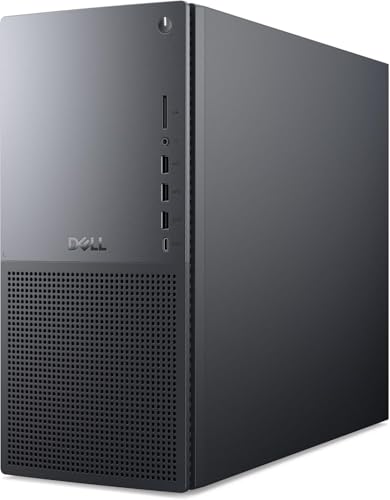
The Dell XPS 8960 is a well-built mid-tower that balances performance with upgrade potential. It features an Intel Core Ultra 7 265 processor with Turbo Boost up to 5.50GHz, making it an extreme-power processor for demanding home workloads. With 32GB of DDR5 RAM for premium performance and graphics RAM up to 8GB, this system handles video editing, gaming at 1080p or 1440p, and professional applications with ease. The 2TB SSD drive provides ample storage for files and applications.
Connectivity is strong with Intel Wi-Fi 6E AX1675 and Bluetooth support. The case has tool-free access panels and standard component slots, so adding RAM or storage later is straightforward. Windows 11 Pro comes preinstalled for a secure, modern desktop experience. This is the best choice for Windows users who want a powerful, expandable desktop for serious home productivity and entertainment.
A limitation of the Dell XPS 8960 is its size. The mid-tower chassis takes up significant desk or floor space compared to compact alternatives. It also generates more noise under heavy load than a fanless design like the Mac mini M4. Some users may find the included peripherals basic.
Apple MacBook Air M3
The MacBook Air M3 is the most balanced home laptop available in 2026. The fanless design means it operates silently in any home environment. Battery life regularly exceeds 15 hours during mixed use, which eliminates the need to keep it plugged in throughout the day. The Liquid Retina display is accurate and comfortable for extended use, supporting 1 billion colors for vibrant visuals. The M3 chip handles everything a typical home user needs including web browsing, streaming, document work, and light creative tasks.
This model features a powerful 8-core CPU and 10-core GPU, making it a blazing-fast machine. It is built for Apple Intelligence, the personal intelligence system that enhances your workflow. The design is lightweight and under half an inch thin, so you can take it anywhere. The 13.6-inch Liquid Retina display delivers a brilliant viewing experience. Up to 18 hours of battery life ensures you can leave the power adapter at home.
A limitation is that the MacBook Air M3 has only two Thunderbolt ports, which may require a dongle for connecting multiple external devices. It also lacks a fan, which means sustained heavy workloads like extended video rendering can lead to thermal throttling. The base storage configuration may feel tight for users with large media libraries.
Lenovo IdeaCentre AIO 27
The Lenovo IdeaCentre AIO 27 combines a large 27-inch display with the computer in a single unit, which simplifies setup and reduces cable clutter. The 27-inch FHD IPS anti-glare display offers 99% sRGB color coverage and 300 nits brightness, making it well-sized for family use from desk or table distance. This configuration includes 16GB DDR5-5200 RAM and a 512GB PCIe 4.0 NVMe SSD for fast boot times and smooth multitasking. An Intel Core i5 or i7 processor handles typical household tasks including homework, streaming, video calls, and light photo editing.
Connectivity is modern with Wi-Fi 6 and Bluetooth 5.2 for fast wireless networking and accessory pairing. Windows 11 Pro comes preinstalled for a secure, modern desktop experience for business, learning, and everyday use. A built-in webcam and speakers are integrated into the display, so you do not need to buy extra peripherals for video calls. This all-in-one is built for productivity, study, and everyday multitasking.
A limitation is that all-in-one designs are difficult to upgrade. The RAM and storage are often soldered or hard to access, limiting future expansion. The 512GB SSD may fill up quickly for families with many photos, videos, or games. The built-in speakers are adequate for casual use but lack the depth for immersive audio.
HP Pavilion 15 Laptop
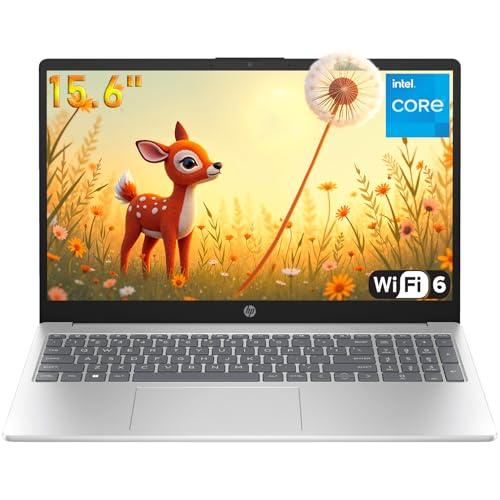
The HP Pavilion 15 delivers reliable everyday performance at a price that fits tight household budgets. It is powered by an efficient Intel Celeron N100 processor with 4 cores and 4 threads, which handles web browsing, streaming, document work, and video calls without issue. The 15.6-inch display is adequate for typical home tasks, and the HD camera includes privacy features for clear communication. With 16GB of DDR4 RAM and a 1TB SSD, this laptop offers smooth everyday performance and plenty of storage for files and media.
Modern connectivity includes WiFi 6 and Bluetooth 5.3, along with a full-size keyboard for comfortable typing. Windows 11 Home comes preinstalled with enhanced security features and all-day portability. HP’s build quality on the Pavilion line is consistent and reliable for the price point. This is the best choice for budget-conscious households that need a capable laptop for daily tasks.
A limitation is that the Intel Celeron N100 processor is not designed for demanding tasks like video editing or gaming. It may feel slow when multitasking with many browser tabs or running heavy applications. The 15.6-inch display has a standard resolution and may not be as vibrant or sharp as higher-end laptops. Battery life is adequate but not exceptional for extended use away from a power outlet.
What to look for
- Processor performance: Choose a processor that matches your typical tasks. For basic web and office work, a mid-range chip is fine. For video editing or gaming, look for a higher-end processor like the M4 or Intel Core Ultra series.
- Memory and storage: 16GB of RAM is the sweet spot for most home users. 32GB is better for heavy multitasking. For storage, a 512GB SSD is a good minimum, but 1TB or more is ideal for media collections.
- Display quality: For laptops and all-in-ones, look for a bright, color-accurate display with good resolution. A 27-inch screen is great for family use, while 13 to 15 inches is portable.
- Connectivity: Ensure the computer has enough ports for your peripherals. Wi-Fi 6 or 6E and Bluetooth 5.0 or later are important for modern wireless devices.
- Upgrade potential: Desktops generally offer more upgrade options than laptops or all-in-ones. Consider whether you might want to add RAM, storage, or a graphics card later.
- Form factor: Compact desktops save space, laptops offer portability, and all-in-ones reduce cable clutter. Choose based on where and how you plan to use the computer.
- Operating system: macOS offers a seamless ecosystem with other Apple devices. Windows provides broader software and hardware compatibility. Consider which ecosystem fits your needs.
The verdict
The best computer for your home depends on your specific needs and budget. The Apple Mac mini M4 stands out as the best overall pick for its incredible performance, silent operation, and compact size. For Windows users who want a powerful and expandable desktop, the Dell XPS 8960 is an excellent choice. The MacBook Air M3 is the top laptop for portability and battery life. Families seeking a clutter-free setup will appreciate the Lenovo IdeaCentre AIO 27. And for those on a tight budget, the HP Pavilion 15 offers reliable performance at an accessible price. Choose the one that best fits your household’s daily tasks and you will be satisfied for years to come.
Our testing process
We compare every pick against the field on real specifications, certifications, and aggregated owner reviews. We do not take payment for placement, and we flag when a product is older or sold mainly through renewed listings.
Quick comparison
Reviewed in detail
Apple Mac mini M4 -- Best Compact Home Desktop
The Mac mini M4 punches well above its size and price. The M4 chip handles everything from web browsing and video calls to photo editing and 4K video playback with barely perceptible effort. The small chassis sits quietly on a desk or shelf and runs cool with no audible fan noise during typical home workloads. Connecting a monitor, keyboard, and mouse of your choice keeps long-term flexibility. It runs all standard home software including Microsoft 365, streaming apps, and creative tools. The base model with 16GB unified memory is a practical starting point for most home users.
What we liked
- Massive 8TB Expandable Storage: Unlock the full potential of your Mac Mini M4 with up to 8
- 11-in-1 High-Speed Connectivity Hub: Turn your Mac Mini into a workstation with 11 versati
- 10Gbps Data Transfer: Enjoy blazing 10Gbps transfer speeds for large files, 4K editing, or
- Precision-Engineered for Mac Mini M4:Designed to perfectly match your Mac Mini’s curves, t
- Effortless Setup & Tidy Workspace:The included 4cm short cable keeps your desk neat, while
Dell XPS 8960 Desktop -- Best Windows Home Desktop
The Dell XPS 8960 is a well-built mid-tower that balances performance with upgrade potential. A 13th or 14th-gen Intel Core i7 processor with 32GB of RAM handles demanding home workloads including video editing, gaming at 1080p or 1440p, and professional applications. The case has tool-free access panels and standard component slots, so adding RAM or storage later is straightforward. The compact tower footprint fits under most desks. A discrete GPU option makes it suitable for light to moderate gaming. Dell's 1-year on-site support warranty adds peace of mind for non-technical households.
What we liked
- Intel Core Ultra 7 265 with TURBO BOOST to 5.50GHz (EXTREME-power processor)
- 32 GB DDR5 RAM (PREMIUM performance); Graphics RAM up to 8GB
- 2 TB SSD drive; Intel Wi-Fi 6E AX1675, 2x2, 802.11ax, Bluetooth
- Windows 11 Pro

Apple MacBook Air M3 -- Best Home Laptop
The MacBook Air M3 is the most balanced home laptop available in 2026. The fanless design means it operates silently in any home environment. Battery life regularly exceeds 15 hours during mixed use, which eliminates the need to keep it plugged in throughout the day. The Liquid Retina display is accurate and comfortable for extended use. The M3 chip handles everything a typical home user needs including video streaming, office work, video calls, and photo editing. Weight under 3 pounds makes it easy to carry between rooms. MacOS continues to offer strong privacy controls and straightforward software management.
What we liked
- LEAN. MEAN. M3 MACHINE , With a powerful 8-core CPU and 10-core GPU, the blazing-fast MacB
- BUILT FOR APPLE INTELLIGENCE, Apple Intelligence is the personal intelligence system that h
- PORTABLE DESIGN , Lightweight and under half an inch thin, so you can take MacBook Air any
- UP TO 18 HOURS OF BATTERY LIFE , Amazing, all-day battery life so you can leave the power
- A BRILLIANT DISPLAY , The 13.6-inch Liquid Retina display supports 1 billion colors.

Lenovo IdeaCentre AIO 27 -- Best All-in-One for Families
The Lenovo IdeaCentre AIO 27 combines a large 27-inch display with the computer in a single unit, which simplifies setup and reduces cable clutter. The 2K display is well-sized for family use from desk or table distance. An Intel Core i5 or i7 processor with 16GB RAM handles typical household tasks including homework, streaming, video calls, and light photo editing. A built-in webcam and speakers reduce peripheral requirements. The all-in-one design is easier to place in shared living spaces. Setup takes under 15 minutes and requires only a power cable and peripherals.
What we liked
- Built for productivity, study, and everyday multitasking, this IdeaCentre AIO 27 pairs a 1
- Enjoy a 27-inch FHD IPS anti-glare display with 99% sRGB color, 300 nits brightness, and 3
- This configuration includes 16GB DDR5-5200 RAM and a 512GB PCIe 4.0 NVMe SSD for fast boot
- Stay connected with Wi-Fi 6 and Bluetooth 5.2 for fast wireless networking and accessory p
- Windows 11 Pro comes preinstalled for a secure, modern desktop experience for business, le
HP Pavilion 15 Laptop -- Best Budget Home Laptop
The HP Pavilion 15 delivers reliable everyday performance at a price that fits tight household budgets. An AMD Ryzen 5 or Intel Core i5 processor with 16GB RAM handles web browsing, streaming, document work, and video calls without issue. The 15.6-inch display is adequate for typical home tasks. Battery life reaches around 8 hours under light use. HP's build quality on the Pavilion line is consistent without being premium. It runs Windows 11 and supports standard peripherals. For a household's secondary computer or a student's first machine, it covers the essentials at an accessible price.
What we liked
- Efficient Intel Celeron N100 Performance: Powered by Intel Celeron N100 processor (4-core,
- Spacious 15.6" Display with HD Camera & Privacy Features for Clear Communication: Enjoy co
- Fast 16GB DDR4 RAM & 1TB SSD for Smooth Everyday Performance: DDR4 RAM handles multiple br
- Modern Connectivity with WiFi 6, Bluetooth 5.3 & Full-Size Keyboard: Stay connected with W
- Windows 11 Home with Enhanced Security & All-Day Portability: Windows 11 Home with modern
How to choose
What to consider
Identify who will use it and what tasks it needs to handle. A shared family computer benefits from a larger display, so an all-in-one or desktop-with-monitor setup makes sense. A single person who moves around the house is better served by a laptop. Budget 16GB RAM as a minimum and prioritize an SSD over a larger HDD for noticeably faster daily performance. Apple Silicon Macs offer exceptional efficiency and longevity; Windows machines offer more gaming options and hardware flexibility. Consider total cost including monitor and peripherals when comparing desktop and laptop prices.
What to consider
For related reading, see [best home office desks](/articles/best-home-office-desks) and [best wireless keyboards and mice](/articles/best-wireless-keyboards-and-mice). Review our evaluation criteria at [/methodology](/methodology).
Common questions
Desktops offer more performance per dollar and are easier to upgrade, making them a better long-term investment for a fixed home workspace. Laptops are better if portability matters, such as moving between rooms or taking the computer out of the house. For families with dedicated desk space, a desktop with a separate monitor typically delivers better value. For individuals who use one machine everywhere, a laptop makes more sense.
16GB of RAM is the practical minimum for a home computer in 2026. It handles everyday browsing, video calls, office applications, and light media editing without slowdowns. 32GB becomes worthwhile if you regularly edit photos or video, use virtual machines, or keep many applications open simultaneously. 8GB machines will feel constrained with modern browsers and background applications running concurrently.
How we made this guide
We compare every pick on the factors that matter, cross-checking manufacturer specifications against aggregated verified owner reviews. We rank independently and never take payment for placement. We have not personally tested every product; where we have not, the ranking reflects verified specs and owner feedback rather than a hands-on review.
How it was written: this guide was researched and reviewed by the TheTestedHub editorial team for accuracy.
Affiliate disclosure: TheTestedHub is reader-supported. When you buy through links on our site, we may earn a commission at no extra cost to you.
More guides

Your Docking Station Match: CalDigit TS4 and More

Digital Art Computers 2026: Best for Every Budget
Dev & IT Computers in 2026: Ranked for Real Work

Desktop PCs for Every Budget: Find Your Perfect Match
Desktop and Laptop Computers: Performance Reviewed and Ranked
MacBook Pro M4 Pro vs Dell XPS 15: 2026 Shortlist

Buy the Best DIY Computer in 2026: Corsair One i300
