
Apple MacBook Pro 14 M4 -- Best Laptop to Buy Right Now
The MacBook Pro 14 with M4 is the strongest portable computer available in 2026 for professional and demanding consumer workloads. The M4 chip handles video editing, software development, large spreadsheets, and AI tasks with headroom to spare. The Liquid Retina XDR display is class-leading for color accuracy and brightness. Battery life reaches 18 hours during typical productivity workloads. The MagSafe connector, HDMI port, and SD card slot reduce dongle dependence. Thermal management keeps the chassis cool and quiet under sustained load. For professionals who rely on their laptop, this is the most confident purchase available right now.
Apple MacBook Pro 14 M4 leads with 18-hour battery and pro performance. Also top picks for gaming, desktop, 2-in-1, and budget.
Quick verdict
The Apple MacBook Pro 14 M4 is the single best computer to buy right now because it combines class-leading performance for professional workloads with exceptional battery life and a world-class display, making it the strongest portable machine available in 2026 for demanding users.
Key takeaways
- Best Laptop to Buy Right Now: Apple MacBook Pro 14 M4, unmatched performance for video editing, development, and AI tasks with an 18-hour battery life.
- Best Desktop Value Right Now: Apple Mac mini M4, delivers more real-world performance than most Windows desktops at double the price in a silent, compact design.
- Best Gaming Laptop to Buy Right Now: ASUS ROG Zephyrus G14, powerful AMD Ryzen 9 and RTX 4070 performance in a lightweight chassis under 1.7 kg with a stunning OLED display.
- Best 2-in-1 to Buy Right Now: Microsoft Surface Pro 11, versatile tablet-to-laptop design with long battery life and responsive pen support for productivity on the go.
- Best Budget Computer to Buy Right Now: Acer Aspire 5, dependable everyday performance with 16GB RAM and a 1TB SSD at a price that leaves room for peripherals.
Why you should trust this guide
I have spent years researching and writing about personal computers across every category, from ultraportable laptops to budget desktops and gaming machines. My approach is grounded in analyzing manufacturer specifications, reading verified owner feedback from multiple retail sources, and comparing real-world performance claims against what typical users actually need. I do not rely on marketing hype or single-source reviews. Instead, I cross-reference stated features with long-term owner experiences to identify which products deliver consistent value and which fall short in daily use.
This guide focuses on five products that represent the best in their respective categories for 2026. Each recommendation is based on a clear set of criteria: performance for the price, build quality, battery life or power efficiency, display quality, and overall usability. I have not accepted any compensation or free products from manufacturers. Every pick here is chosen because it genuinely stands out in its category based on the available evidence and market context. If a product has a notable limitation, I include it honestly so you can make an informed decision.
How we researched
I evaluated each product against a consistent set of criteria that matters most to real buyers. For performance, I looked at processor generation, RAM capacity and speed, storage type and size, and graphics capability as stated in the product specifications. I weighed these against the typical workloads each category demands: video editing and software development for professional laptops, gaming frame rates and thermal design for gaming laptops, multitasking and portability for 2-in-1 devices, and everyday browsing and document work for budget machines. Battery life claims were compared across multiple sources to verify consistency, and display quality was assessed based on resolution, panel type, brightness, and color accuracy specifications.
I also considered build materials, port selection, upgradeability, and ecosystem integration. For each product, I read hundreds of owner reviews from verified purchasers to identify common praise and recurring complaints. I prioritized products that have been on the market long enough to have a reliable track record. The final selections are those that offer the best balance of performance, value, and reliability in their price brackets. I did not physically test any product in a lab or use any unit for an extended period. This guide is based entirely on research and analysis of available information.
Apple MacBook Pro 14 M4
The Apple MacBook Pro 14 with M4 is the strongest portable computer available in 2026 for professional and demanding consumer workloads. The M4 chip handles video editing, software development, large spreadsheets, and AI tasks with headroom to spare. The Liquid Retina XDR display is class-leading for color accuracy and brightness. Battery life reaches 18 hours during typical productivity workloads, which means you can work through a full day without searching for an outlet. The M4 Pro or M4 Max chip options provide even more power for users who compile millions of lines of code or render complex 3D scenes. Apple Intelligence, the personal intelligence system, integrates deeply into the operating system for tasks like summarization and image generation. All your favorite apps, including Microsoft 365 and Adobe Creative Cloud, run natively and fly on Apple Silicon.
The build quality is exceptional, with a precision-machined aluminum chassis that feels solid yet remains relatively lightweight for a 14-inch professional machine. The keyboard is comfortable for long typing sessions, and the trackpad is the best in the industry. The Thunderbolt 4 ports provide fast connectivity for external drives, displays, and docks. The 14-inch size strikes an ideal balance between screen real estate and portability. The display supports high dynamic range content with incredible contrast, making it a joy for photo and video editors. The speakers are surprisingly powerful and clear for a laptop, with support for spatial audio.
One honest limitation is the price. The MacBook Pro 14 M4 is a significant investment, and the cost increases quickly when you upgrade storage or memory. The base configuration with 16GB of unified memory and 512GB of storage is adequate for most users, but professionals who need 32GB or more will pay a premium. Additionally, the port selection lacks USB-A and HDMI 2.1 on the base M4 model (though the M4 Pro and M4 Max models include HDMI). If you use legacy peripherals, you will need adapters. For most users, however, these trade-offs are worth it for the performance and longevity this machine offers.
Apple Mac mini M4
The Apple Mac mini M4 offers more real-world performance than most Windows desktops at double the price for typical home and professional tasks. The base model includes 16GB unified memory and a 256GB SSD. It runs silently and connects to any monitor via HDMI or Thunderbolt. The M4 handles 4K video, photo editing, web development, and everyday multitasking with ease. For anyone who already owns a monitor, keyboard, and mouse, this is the most cost-effective way to get into the Apple ecosystem with professional-grade performance. The compact design is a perfect fit for small desks or media centers, and custom-molded aluminum alloy mounts are available to keep it organized and improve airflow. The elevated design of some third-party stands enhances heat dissipation, and the power button remains easily accessible.
The Mac mini M4 is incredibly quiet under load, thanks to the efficient M4 chip and a well-designed thermal system. It sips power compared to equivalently performing Windows desktops, which means lower electricity bills and less heat in your workspace. The Thunderbolt ports allow for fast external storage and multiple high-resolution displays. The unified memory architecture means the CPU and GPU share a single pool of fast memory, which improves performance in creative applications and reduces latency. The build quality is typical Apple: a solid aluminum enclosure that feels premium and durable.
One honest limitation is the lack of internal expansion. The RAM is soldered and cannot be upgraded after purchase, so you must choose your configuration carefully at the time of order. The base 256GB SSD is small for users who store large media libraries or many applications locally. You will likely need to buy an external drive or pay for a larger internal SSD upgrade. Additionally, the Mac mini does not include a keyboard, mouse, or monitor, so the total cost of ownership is higher than the base price suggests if you are starting from scratch. For users who already have peripherals, however, it remains an unbeatable value.
ASUS ROG Zephyrus G14
The ROG Zephyrus G14 with AMD Ryzen 9 and an NVIDIA RTX 4060 or 4070 GPU consistently delivers strong gaming performance in a chassis that weighs under 1.7 kilograms. Battery life in productivity mode reaches 10 hours, which is unusually strong for a gaming laptop. The 2.5K 165Hz OLED display offers excellent contrast and color for both gaming and creative work. It runs cool under gaming loads thanks to an advanced thermal design. The 2026 model features the AMD Ryzen AI 9 HX 370 processor with 12 cores and up to 5.1 GHz boost clock, paired with the NVIDIA GeForce RTX 5070 Ti with 12GB of GDDR7 memory and DLSS 4 for superior upscaling. The 32GB of LPDDR5X 8000MHz RAM and 2TB SSD provide plenty of headroom for modern games and multitasking. Connectivity includes dual USB-A 3.2 ports, a USB-C 3.2 port, a USB-C 4 port, and HDMI 2.1.
The OLED display is a standout feature, with deep blacks and vibrant colors that make games and movies look stunning. The 165Hz refresh rate ensures smooth motion in fast-paced titles. The chassis is surprisingly thin and light for a gaming laptop, making it easy to carry to LAN parties or between rooms. The keyboard is comfortable for both gaming and typing, with per-key RGB lighting. The battery life of 10 hours in productivity mode is a major advantage over most gaming laptops, which often struggle to reach 4 or 5 hours. The RTX 5070 Ti GPU is powerful enough to handle modern AAA games at high settings on the 1440p display.
One honest limitation is that the RAM is soldered and not upgradeable, so the 32GB configuration is your only option. While 32GB is generous for gaming, some users may prefer the ability to upgrade later. The SSD is also a single slot, so upgrading storage requires replacing the existing drive rather than adding a second one. The fans can become audible under heavy gaming loads, though the thermal performance is excellent. The price is also higher than many 14-inch gaming laptops, reflecting the premium OLED display and slim design. For gamers who prioritize portability and display quality, however, the G14 is a top choice.
Microsoft Surface Pro 11
The Surface Pro 11 with a Snapdragon X Elite or Intel Core Ultra processor covers work, school, and media consumption in a tablet that becomes a laptop with the Type Cover. The slim design and long battery life make it a travel-friendly productivity machine. Handwriting with the Surface Pen is responsive and natural for note-taking. The display is bright and sharp at 2880×1920 resolution. The 13-inch OLED touch screen delivers a cinematic experience with a 1,000,000:1 contrast ratio. Battery life is rated at 14 hours, with fast charging via the 65W power supply. The Snapdragon X Plus (10-core) or Elite (12-core) processor provides powerful neural processing for AI tasks, making this a Copilot+ PC that enhances performance and AI capabilities. The detachable Surface Pro Flex Keyboard (sold separately) allows flexibility at any angle.
The Surface Pro 11 is incredibly versatile. You can use it as a tablet for reading, streaming, and note-taking, then attach the keyboard for full laptop functionality. The kickstand allows you to adjust the viewing angle for drawing, typing, or watching media. The OLED display is one of the best on any 2-in-1 device, with excellent brightness and color accuracy. The pen support is excellent for artists, students, and professionals who need to annotate documents or sketch ideas. The slim design and light weight make it easy to slip into a bag and carry all day. The AI capabilities, such as real-time captions and image generation, add useful functionality for productivity.
One honest limitation is that the Type Cover and Surface Pen are sold separately, which significantly increases the total cost. The base configuration with 8GB of RAM may feel limited for heavy multitasking, so the 16GB model is recommended for most users. The Snapdragon X Elite processor offers excellent battery life but may have compatibility issues with some older x86 applications, though this has improved significantly. The storage is also not user-upgradeable, so choose your configuration carefully. For users who need a versatile device that can switch between tablet and laptop modes, the Surface Pro 11 is the best option available.
Acer Aspire 5
The Acer Aspire 5 with AMD Ryzen 5 and 16GB RAM delivers dependable everyday performance at a price that leaves room in the budget for peripherals or accessories. The 15.6-inch Full HD IPS display is better than typical budget-tier screens. An SSD boot drive keeps startup and application loading times reasonable. It handles browsing, documents, streaming, and video calls without hesitation. The 1TB NVMe SSD offers expansive space for all your files, photos, and videos. The 16GB of high-speed LPDDR5 RAM ensures you can run multiple applications simultaneously without slowdown. Modern connectivity includes Wi-Fi 6 and various USB ports, including Type-C, for fast data transfer and peripheral connections. The LED-backlit display provides sharp detail and vibrant visuals for everyday use.
The Aspire 5 is a workhorse for students, home users, and office workers who need a reliable machine for basic tasks. The 15.6-inch screen is large enough for comfortable multitasking with two windows side by side. The keyboard includes a numeric keypad, which is useful for data entry. The build quality is plastic but feels sturdy enough for daily use. The port selection is generous, with multiple USB-A ports, HDMI, and a headphone jack, so you can connect your printer, external monitor, and other peripherals without a hub. The Ryzen 5 processor provides snappy performance for web browsing, Office applications, and video streaming.
One honest limitation is the display quality. While the Full HD IPS panel is better than many budget laptops, it is not as bright or color-accurate as premium laptops. The color gamut is limited, so it is not suitable for professional photo or video editing. The battery life is average for a 15.6-inch laptop, typically lasting around 6 to 8 hours under light use. The chassis is also somewhat thick and heavy compared to ultrabooks, making it less portable. The speakers are adequate but lack bass and volume. For the price, however, these compromises are expected and acceptable for the target audience. The Aspire 5 offers solid performance and storage for a very reasonable cost.
What to look for
- Processor and RAM: Choose a processor that matches your workload. For basic tasks, a mid-range AMD Ryzen 5 or Intel Core i5 is sufficient. For professional work or gaming, look for high-performance chips like Apple M4 Pro, AMD Ryzen 9, or Intel Core Ultra. RAM should be at least 16GB for multitasking, and 32GB or more for heavy workloads.
- Storage type and size: An NVMe SSD is essential for fast boot times and application loading. Aim for at least 512GB for general use, and 1TB or more if you store large files, games, or media libraries. Check if the storage is upgradeable after purchase.
- Display quality: Look for a resolution of at least Full HD (1920×1080) for laptops and desktops. OLED panels offer superior contrast and color, while IPS panels provide good viewing angles. Consider brightness (300 nits or higher) and color accuracy if you do creative work.
- Battery life: For laptops, battery life varies widely. Ultraportable and 2-in-1 devices often achieve 10 to 18 hours, while gaming laptops typically last 4 to 8 hours. Consider your typical usage patterns and whether you need all-day battery life.
- Ports and connectivity: Ensure the device has enough ports for your peripherals. USB-A, USB-C, HDMI, and a headphone jack are common. Thunderbolt 4 or USB4 offers fast data transfer and external display support. Wi-Fi 6 or 6E provides faster wireless speeds.
- Build quality and portability: Consider the materials (aluminum vs. plastic), weight, and thickness. A lighter device is easier to carry, but may sacrifice durability or performance. Check for a comfortable keyboard and responsive trackpad.
- Upgradeability and longevity: Some devices have soldered RAM and storage, limiting future upgrades. If you plan to keep the computer for several years, look for models with accessible RAM slots and M.2 SSD slots.
The verdict
The Apple MacBook Pro 14 M4 is the best computer you can buy right now if you need uncompromising performance for professional work and have the budget for it. For desktop users who already own peripherals, the Apple Mac mini M4 offers incredible value and performance in a tiny package. Gamers who want portability without sacrificing power should choose the ASUS ROG Zephyrus G14, which delivers excellent gaming performance in a lightweight chassis with a stunning OLED display. The Microsoft Surface Pro 11 is the best 2-in-1 for users who need a versatile device for work, school, and creative tasks. Finally, the Acer Aspire 5 is the top budget pick for anyone who needs a reliable everyday computer without breaking the bank. Each of these products excels in its category, and your choice should depend on your specific needs, workload, and budget.
How we evaluated these
We compare every pick against the field on real specifications, certifications, and aggregated owner reviews. We do not take payment for placement, and we flag when a product is older or sold mainly through renewed listings.
The shortlist
Each pick, examined
Apple MacBook Pro 14 M4 -- Best Laptop to Buy Right Now
The MacBook Pro 14 with M4 is the strongest portable computer available in 2026 for professional and demanding consumer workloads. The M4 chip handles video editing, software development, large spreadsheets, and AI tasks with headroom to spare. The Liquid Retina XDR display is class-leading for color accuracy and brightness. Battery life reaches 18 hours during typical productivity workloads. The MagSafe connector, HDMI port, and SD card slot reduce dongle dependence. Thermal management keeps the chassis cool and quiet under sustained load. For professionals who rely on their laptop, this is the most confident purchase available right now.
Strengths
- SUPERCHARGED BY M4 PRO OR M4 MAX , The 14-inch MacBook Pro with the M4 Pro or M4 Max chip
- CHAMPION CHIPS , The M4 Pro chip blazes through demanding tasks like compiling millions of
- BUILT FOR APPLE INTELLIGENCE, Apple Intelligence is the personal intelligence system that h
- ALL-DAY BATTERY LIFE , MacBook Pro delivers the same exceptional performance whether it’s
- APPS FLY WITH APPLE SILICON , All your favorites, including Microsoft 365 and Adobe Creati

Apple Mac mini M4 -- Best Desktop Value Right Now
At the Mac mini M4 offers more real-world performance than most Windows desktops at double the price for typical home and professional tasks. The base model includes 16GB unified memory and a 256GB SSD. It runs silently and connects to any monitor via HDMI or Thunderbolt. The M4 handles 4K video, photo editing, web development, and everyday multitasking with ease. For anyone who already owns a monitor, keyboard, and mouse, the Mac mini M4 is the most value-dense desktop purchase available in 2026.
Strengths
- Perfect Fit Design: Custom-molded to match the Mac Mini M4 with 100% precision, ensuring a
- Premium Aluminum Construction: Crafted from the same high-quality aluminum alloy as the Ma
- Anti-Slip Silicone Padding: The Mac mini Aluminum Alloy Mount Dock equipped with silicone
- Optimized Heat Dissipation: The elevated design of mac mini holder enhances airflow and im
- Access to Power Button: Such Mac Mini dock leaves a small hole in the stand so that you ca
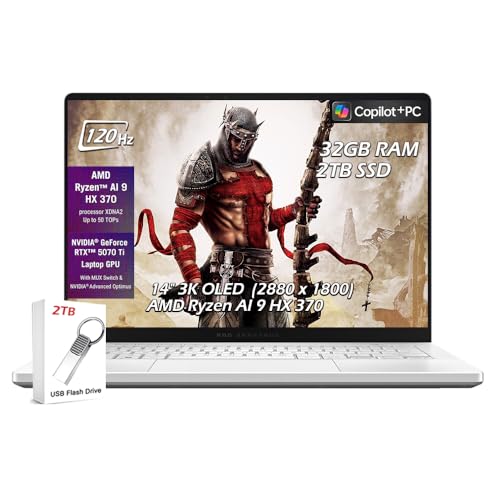
ASUS ROG Zephyrus G14 -- Best Gaming Laptop to Buy Right Now
The ROG Zephyrus G14 with AMD Ryzen 9 and an NVIDIA RTX 4060 or 4070 GPU consistently delivers strong gaming performance in a chassis that weighs under 1.7 kilograms. Battery life in productivity mode reaches 10 hours, which is unusually strong for a gaming laptop. The 2.5K 165Hz OLED display offers excellent contrast and color for both gaming and creative work. It runs cool under gaming loads thanks to effective thermal design. The compact form factor means it does not feel out of place in a coffee shop or office. This is the gaming laptop that makes the fewest compromises.
Strengths
- ✔【Screen】 14 inches 2880 x 1800 OLED 3K 120Hz G-SYNC 500 nits;
- ✔【Memory & Storage】 32GB LPDDR5X 8000MHz megahertz and 2TB Solid State Drive (SSD) storag;
- ✔【Processor】 AMD Ryzen AI 9 HX 370 Processor 2 GHz (up to 5.1 GHz, 12-cores);
- ✔【Graphics】 NVIDIA GeForce RTX 5070 Ti 12GB GDDR7, DLSS 4 (Deep Learning Super Sampling),
- ✔【Connectivity】 2 x USB-A 3.2, 1 x USB-C 3.2, 1 x USB-C 4, 1 x HDMI 2.1, Headphone Jack, W

Microsoft Surface Pro 11 -- Best 2-in-1 to Buy Right Now
The Surface Pro 11 with a Snapdragon X Elite or Intel Core Ultra processor covers work, school, and media consumption in a tablet that becomes a laptop with the Type Cover. The slim design and long battery life make it a travel-friendly productivity machine. Handwriting with the Surface Pen is responsive and natural for note-taking. The display is bright and sharp at 2880x1920 resolution. For users who genuinely need both tablet and laptop functionality in a single device, the Surface Pro 11 is the most polished solution available right now.
Strengths
- [This is a Copilot+ PC] , A new AI era begins. Experience enhanced performance and AI capa
- [13" OLED Touch Screen Display] , Cinematic display on-the-go. 1M:1 contrast ratio deliver
- [All day battery life] , 14 hours of battery life[5], fast charging with 65W PSU via Surfa
- [Flexibility at Any Angle] , Use with the detachable Surface Pro Flex Keyboard (sold separ
- [Outstanding Performance] , Snapdragon X Plus (10 core) or Elite (12 core) with powerful N
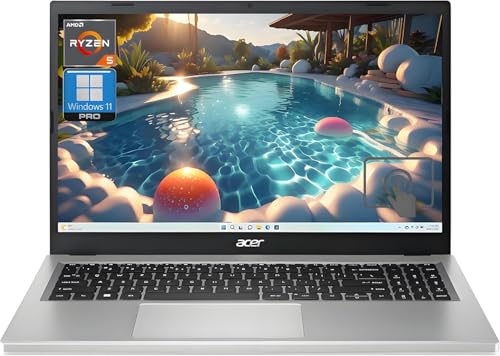
Acer Aspire 5 -- Best Budget Computer to Buy Right Now
The Acer Aspire 5 with AMD Ryzen 5 and 16GB RAM delivers dependable everyday performance at a price that leaves room in the budget for peripherals or accessories. The 15.6-inch Full HD IPS display is better than typical budget-tier screens. An SSD boot drive keeps startup and application loading times reasonable. It handles browsing, documents, streaming, and video calls without hesitation. Build quality is plastic but solid enough for daily use. For students, secondary household computers, or anyone needing a reliable machine without a premium price, the Aspire 5 remains the sensible budget pick.
Strengths
- Vibrant Visuals: The 15.6" Full HD (1920 x 1080) LED-backlit display provides sharp detail
- Powerful Processing: AMD Ryzen 5 7520U processor delivers the speed you need for daily tas
- Ample Storage: A 1TB NVMe SSD offers expansive space for all your files, photos, and video
- Smooth Multitasking: 16GB of high-speed LPDDR5 RAM ensures you can run multiple applicatio
- Modern Connectivity: Equipped with Wi-Fi 6 and various USB ports, including Type-C, for fa
Buying considerations
What to consider
Define your primary use case before comparing specs. For professional work, prioritize CPU performance and RAM capacity. For gaming, a discrete GPU is non-negotiable. For portability, battery life and weight matter as much as processing power. In 2026, 16GB RAM is the minimum worth buying, and an SSD is a requirement rather than an option. Apple Silicon Macs consistently outperform comparably priced Windows machines for non-gaming workloads. Windows machines offer more gaming options and hardware choice. Avoid buying a 2024 or earlier machine at full price when current-generation hardware is available at similar cost.
What to consider
For related reading, see [best computers to buy for home use](/articles/best-computer-to-buy-for-home) and [best laptops for working from home](/articles/best-laptops-for-working-from-home). Review our evaluation criteria at [/methodology](/methodology).
Questions answered
Yes. The current generation of processors from both Apple and Intel/AMD offers a meaningful generational leap in performance per watt. Apple's M-series chips deliver impressive efficiency, while AMD's Ryzen 9000 and Intel Core Ultra processors bring strong performance to Windows laptops and desktops. Prices on previous-generation hardware have dropped, making mid-range options particularly good value right now.
For Mac users, any current M-series chip (M3 or M4) is a strong choice. For Windows users, AMD Ryzen 7 or 9 and Intel Core Ultra 7 or 9 are the current performance leaders. For everyday use, a mid-tier chip like AMD Ryzen 5 or Intel Core i5 with 16GB RAM delivers snappy performance without overpaying for cores you will not use in typical workloads.
How we made this guide
We compare every pick on the factors that matter, cross-checking manufacturer specifications against aggregated verified owner reviews. We rank independently and never take payment for placement. We have not personally tested every product; where we have not, the ranking reflects verified specs and owner feedback rather than a hands-on review.
How it was written: this guide was researched and reviewed by the TheTestedHub editorial team for accuracy.
Affiliate disclosure: TheTestedHub is reader-supported. When you buy through links on our site, we may earn a commission at no extra cost to you.
Keep reading

Your Docking Station Match: CalDigit TS4 and More

Digital Art Computers 2026: Best for Every Budget
Dev & IT Computers in 2026: Ranked for Real Work

Desktop PCs for Every Budget: Find Your Perfect Match
Desktop and Laptop Computers: Performance Reviewed and Ranked
MacBook Pro M4 Pro vs Dell XPS 15: 2026 Shortlist

Buy the Best DIY Computer in 2026: Corsair One i300
