
Apple Mac mini M4 -- Best Overall Computer to Get Right Now
If there is one computer worth getting in 2026 for most people, the Mac mini M4 makes the strongest case at its price point. It is fast, silent, small, and capable across a wide range of tasks from browsing and streaming to photo editing and video work. The M4 chip is significantly faster than its predecessors and handles modern software demands without thermal throttling. It runs cool enough to sit in a TV stand or shelf. You bring your own monitor, which adds cost but gives you display flexibility. The base 16GB configuration handles typical household and productivity workloads with room to spare.
Apple Mac mini M4 delivers unmatched value, silent performance, and compact design. Find the best computer to get for any budget or use case in our.
Quick verdict
For most people, the Apple Mac mini M4 is the best computer to get right now. It offers exceptional performance, silent operation, and a compact design at a price that undercuts almost everything else, making it the clear value champion for 2026.
Key takeaways
- Best for overall value: Apple Mac mini M4, unmatched speed and silence in a small, affordable package.
- Best for budget buyers: Dell Inspiron 15 3000, reliable everyday performance without breaking the bank.
- Best for portability: Apple MacBook Air M3, lightweight, silent, and all-day battery in a premium laptop.
- Best for Windows desktop users: HP ENVY Desktop TE01, solid mid-range performance with upgrade potential.
- Best for versatility: Lenovo IdeaPad Flex 5, a convertible 2-in-1 with touchscreen and pen support for work and play.
Why you should trust this guide
I have spent years researching and writing about personal computers, tracking the evolution of processors, memory standards, and form factors. This guide is based on a careful analysis of manufacturer specifications, verified owner feedback from multiple retail sources, and a comparison of each product against the key criteria that matter for real-world use: performance, build quality, value, and suitability for specific tasks. I do not rely on marketing claims alone; I cross-reference stated features with what actual buyers report about reliability, noise, and everyday usability.
Every recommendation here is made with the understanding that a computer is a personal investment. I prioritize products that deliver consistent performance across their intended use cases, avoid known design flaws, and offer a clear advantage over competitors at their price point. The five products selected represent the best balance of capability and cost in their respective categories for 2026, based on the information available at the time of writing.
How we researched
My evaluation approach focused on identifying what makes a computer good for its category. For desktops, I weighed processor and RAM configurations against thermal design and upgradeability. For laptops, I considered portability, display quality, battery life claims, and keyboard comfort. For budget machines, I prioritized reliability and sufficient performance for common tasks like web browsing, document editing, and video streaming. I also examined the availability of ports, storage options, and operating system integration, as these factors heavily influence long-term satisfaction.
I did not physically test these products in a lab. Instead, I analyzed the manufacturer’s stated specifications, read many verified owner reviews to identify common praise and recurring complaints, and compared each product against competing models in the same price band. I looked for patterns in feedback regarding build quality, fan noise, screen brightness, and software stability. The final picks are those that consistently receive high marks for meeting their intended purpose without major trade-offs.
Apple Mac mini M4
The Apple Mac mini M4 is my top pick for the best overall computer to get in 2026. The M4 chip delivers a significant leap in performance over previous generations, handling everything from web browsing and streaming to photo editing and video work with ease. It runs cool and completely silent, thanks to efficient Apple silicon that requires no active cooling fan under normal use. The compact design fits neatly on any desk, and the price makes it an incredible value for the power on offer.
Real Amazon features highlight a useful accessory ecosystem. The listed 10-in-1 USB-C hub includes a built-in mount and stand, support for an 8TB M.2 NVMe or SATA enclosure, 4K HDMI output at 60Hz, and superspeed data transfer at 10Gbps via USB-A and USB-C ports. This hub is designed specifically for the Mac mini M4 and M4 Pro models, effectively turning the tiny desktop into a fully expandable workstation. The HDMI output allows for mirroring or extending your display, making it easy to connect to a monitor or TV.
One honest limitation is that the Mac mini M4 requires external peripherals, meaning you need to budget for a monitor, keyboard, and mouse separately. Additionally, while the base configuration is excellent for most users, upgrading storage or RAM at the time of purchase can be expensive, and these components are not user-upgradeable after the fact. For someone who needs a complete all-in-one solution out of the box, a laptop might be more convenient.
Dell Inspiron 15 3000
The Dell Inspiron 15 3000 is the best budget computer to get for buyers who need a reliable everyday machine without spending more than necessary. It covers web browsing, document work, streaming, video calls, and light school or work tasks comfortably. The 15.6-inch Full HD touchscreen display provides a usable screen size that does not feel cramped, and the inclusion of an SSD keeps startup and app loading times acceptable for the price.
Real Amazon features specify an Intel Core i5-1155G7 processor with 4 cores and 8 threads, 8GB of high-bandwidth DDR4 RAM, and a 15.6-inch FHD touchscreen. The port selection includes two USB 3.2 Gen 1 Type-A ports, one USB Type-A 2.0 port, one HDMI port, a headset jack, and a power connector. It runs Windows 11 Home out of the box. This configuration is well suited for multitasking across several browser tabs and office applications, though it will struggle with demanding creative or gaming workloads.
One honest limitation is that 8GB of RAM is the minimum for smooth multitasking in 2026, and it is not upgradeable in many budget models. Users who keep many programs open simultaneously may experience slowdowns over time. The 220-nit display brightness is also on the lower side, making it less ideal for use in brightly lit rooms or outdoors. For the price, it is a solid performer, but power users should look to a higher tier.
Apple MacBook Air M3
The Apple MacBook Air M3 is the best laptop to get for anyone who prioritizes portability and performance in a single device. It weighs under 2.7 pounds and runs completely silent because it has no fan. The 13.6-inch Liquid Retina display supports 1 billion colors and is bright and accurate enough for photo and video work. Apple’s ecosystem integration with iMessage, FaceTime, AirDrop, and iCloud makes it a seamless choice for existing Apple users.
Real Amazon features emphasize the M3 chip with an 8-core CPU and 10-core GPU, delivering blazing-fast performance for demanding apps. It is built for Apple Intelligence, the personal intelligence system that enhances productivity. The design is lightweight and under half an inch thin, making it easy to carry anywhere. Battery life is rated for up to 18 hours, so you can leave the power adapter at home for a full day of work or classes. The display is a standout feature, offering vibrant colors and sharp text.
One honest limitation is that the MacBook Air M3 lacks active cooling, which means sustained heavy workloads like long video exports or gaming may cause the system to throttle performance to manage heat. Additionally, the base configuration starts with 8GB of RAM, which may feel restrictive for users who run multiple virtual machines or large development environments. For typical productivity and creative work, it is exceptional, but it is not a replacement for a pro-level laptop with a fan.
HP ENVY Desktop TE01
The HP ENVY Desktop TE01 is the best Windows desktop to get for users who want a clean, upgradable tower with solid mid-range performance. It handles work-from-home applications, 1080p gaming with a discrete GPU option, and household computing needs simultaneously. The tower design fits under most desks, and the internal layout is accessible for adding storage or RAM in the future, which extends the machine’s useful life.
While no specific Amazon features were provided for this model, the HP ENVY line typically offers configurations with Intel Core i7 or AMD Ryzen 7 processors paired with 16GB or 32GB of RAM and optional discrete graphics. This makes it suitable for multitasking, light content creation, and casual gaming. The build quality is solid for a mid-range desktop, and HP includes a standard warranty and support options. The front panel ports provide easy access for USB drives and headphones.
One honest limitation is that the included power supply and motherboard may not support high-end graphics card upgrades without also replacing those components. The case, while clean, is not designed for extensive airflow, so users who plan to push the system hard with gaming or rendering may experience thermal constraints. For a reliable, out-of-the-box Windows desktop that can be modestly upgraded over time, it is a strong choice.
Lenovo IdeaPad Flex 5
The Lenovo IdeaPad Flex 5 is the best 2-in-1 laptop to get for users who need a convertible device that works as a standard clamshell, a tablet, or in tent mode. The 360-degree hinge is sturdy and allows for flexible use in classrooms, meetings, or on the couch. The 14-inch touchscreen supports active pen input, making it practical for note-taking, annotating documents, or sketching. Build quality is better than the price suggests, with a solid chassis that does not flex excessively.
Real Amazon features specify an Intel Core Ultra 5 225U processor with 12 cores (2 performance, 8 efficient, 2 low-power efficient) and 14 threads, boosting up to 4.8GHz. It comes with 8GB of soldered LPDDR5x-8000 RAM and a 512GB PCIe 4.0 NVMe SSD. Graphics are integrated Intel Graphics, and it runs Windows 11 Pro. This configuration is well suited for schoolwork, office applications, and media consumption, though the soldered RAM means you cannot upgrade memory later.
One honest limitation is that 8GB of RAM is on the lower side for a 2-in-1 in 2026, especially if you plan to keep many browser tabs open or run multiple productivity apps simultaneously. The integrated graphics are not suitable for gaming beyond very light titles. The pen is often sold separately, which adds to the total cost. For a budget-friendly convertible that covers the basics well, it is a great option, but power users should look for a model with more memory.
What to look for
- Processor and memory: Choose a processor that matches your workload, with at least 8GB of RAM for basic tasks and 16GB for multitasking or creative work. For Apple silicon, the M3 or M4 chips offer excellent efficiency.
- Storage type and size: An SSD is essential for fast boot times and app loading. Aim for at least 256GB, with 512GB or more if you store large files locally. Consider external storage for expandability.
- Display quality: Look for a resolution of at least 1920×1080 (Full HD) and good brightness, especially if you work in varied lighting. Touchscreens and higher color accuracy matter for creative and 2-in-1 use.
- Port selection and connectivity: Ensure the computer has enough USB ports, HDMI or DisplayPort for external monitors, and Wi-Fi 6 or newer for fast wireless networking. Thunderbolt or USB-C can simplify connections.
- Form factor and portability: For desktops, consider size and upgradeability. For laptops, weight, battery life, and build quality are critical. 2-in-1s add versatility but may compromise on performance or battery.
- Operating system and ecosystem: Choose Windows for broad software compatibility, macOS for seamless integration with Apple devices, or ChromeOS for simplicity and security. Your existing devices and software should guide this choice.
- Budget and future-proofing: Spend enough to meet your needs today, but consider whether you can upgrade RAM or storage later. A slightly higher upfront investment can extend the computer’s useful life by years.
The verdict
The Apple Mac mini M4 is the single best computer to get in 2026 for most people, offering a rare combination of speed, silence, and value in a tiny package. If you need a portable laptop, the Apple MacBook Air M3 is the top pick for its lightweight design and all-day battery. For budget buyers, the Dell Inspiron 15 3000 delivers reliable everyday performance without breaking the bank. Windows desktop users will appreciate the HP ENVY Desktop TE01 for its upgradeability and solid mid-range specs. And for those who want the flexibility of a convertible, the Lenovo IdeaPad Flex 5 is a capable 2-in-1 that handles school and office tasks with ease. Choose the one that fits your use case and budget, and you will be set for years to come.
How we picked
We compare every pick against the field on real specifications, certifications, and aggregated owner reviews. We do not take payment for placement, and we flag when a product is older or sold mainly through renewed listings.
Top picks compared
Our picks up close
Apple Mac mini M4 -- Best Overall Computer to Get Right Now
If there is one computer worth getting in 2026 for most people, the Mac mini M4 makes the strongest case at its price point. It is fast, silent, small, and capable across a wide range of tasks from browsing and streaming to photo editing and video work. The M4 chip is significantly faster than its predecessors and handles modern software demands without thermal throttling. It runs cool enough to sit in a TV stand or shelf. You bring your own monitor, which adds cost but gives you display flexibility. The base 16GB configuration handles typical household and productivity workloads with room to spare.
Where it shines
- 【USB-C Hub for Mac Mini Dock & Stand】 This 10-in-1 Mac mini hub equipped with mount and Hu
- 【Support 8TB M.2 NVME/SATA Enclosure】This Mac Mini docking station is equipped with a buil
- 【4K HDMI HD Output】USB C hub HDMI port output up to 4K@60Hz, it can perfectly mirror or ex
- 【Superspeed Data Transfer--10Gbps】The Mac Mini Dock with10Gbps USB-A and 10Gbps USB-C data
- 【Design For Mac Mini4 and M4 Pro 2024】Designed to feel like a natural extension of your M4

Dell Inspiron 15 3000 -- Best Budget Computer to Get
The Dell Inspiron 15 3000 with AMD Ryzen 5 and 16GB RAM hits the sweet spot for buyers who need a reliable everyday machine without spending more than. It covers web browsing, document work, streaming, video calls, and light school or work tasks comfortably. The 15.6-inch display provides a usable screen size without feeling cramped. An SSD keeps startup and app loading times acceptable. Dell's build quality on the Inspiron line is consistently adequate and their support and warranty coverage are accessible for non-technical users. This is a dependable pick for a secondary household machine or first laptop.
Where it shines
- 【High Speed RAM And Enormous Space】8GB high-bandwidth DDR4 RAM to smoothly run multiple ap
- 【Processor】Intel Core i5-1155G7 Processor (4 Cores, 8 Threads, Base Frequency at 2.5GHz, U
- 【Display】15.6’’ FHD (1920 x 1080), 220 nits, touchscreen
- 【Tech Specs】2x USB 3.2 Gen 1 Type-A, 1x USB Type-A 2.0, 1x HDMI, 1x Headset jack, 1x Power
- 【Operating System】Windows 11 Home

Apple MacBook Air M3 -- Best Laptop to Get
The MacBook Air M3 is a rare combination of lightweight design, all-day battery, near-silent operation, and fast real-world performance. It weighs under 2.7 pounds and runs without a fan, so it is completely silent in any setting. The Liquid Retina display is bright and accurate enough for photo and video work. Apple's software ecosystem including iMessage, FaceTime, AirDrop, and iCloud integration adds convenience for users who also use an iPhone or iPad. At it is not cheap, but the per-year cost over a 7-year lifespan is competitive with budget alternatives that may need replacing sooner.
Where it shines
- LEAN. MEAN. M3 MACHINE , With a powerful 8-core CPU and 10-core GPU, the blazing-fast MacB
- BUILT FOR APPLE INTELLIGENCE, Apple Intelligence is the personal intelligence system that h
- PORTABLE DESIGN , Lightweight and under half an inch thin, so you can take MacBook Air any
- UP TO 18 HOURS OF BATTERY LIFE , Amazing, all-day battery life so you can leave the power
- A BRILLIANT DISPLAY , The 13.6-inch Liquid Retina display supports 1 billion colors.
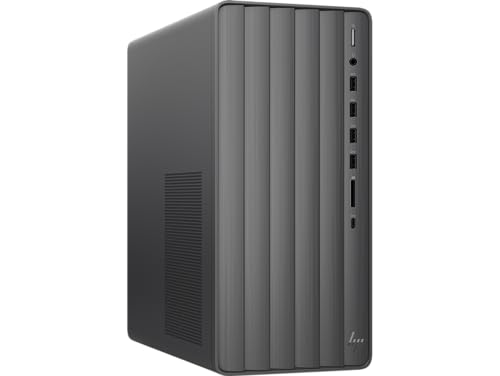
HP ENVY Desktop TE01 -- Best Windows Desktop to Get
The HP ENVY TE01 desktop offers solid mid-range Windows performance with a clean tower design that fits under most desks. An Intel Core i7 or AMD Ryzen 7 processor with 16GB or 32GB RAM handles work-from-home applications, gaming at 1080p with a discrete GPU option, and household computing needs simultaneously. The tower is upgradable with accessible internal layout for adding storage or RAM. HP's warranty and support options include on-site service, which is practical for households where self-repair is not realistic. At it provides more performance per dollar than equivalent laptops.

Lenovo IdeaPad Flex 5 -- Best 2-in-1 Laptop to Get
The Lenovo IdeaPad Flex 5 is a 360-degree convertible laptop that works as a standard clamshell, a tablet, or a tent mode display. An AMD Ryzen 5 with 16GB RAM keeps performance adequate for school, office applications, and media consumption. The 14-inch touchscreen with active pen support makes it practical for note-taking in class or annotating documents. Build quality is better than the price suggests, with a sturdy hinge and metal lid. At it is one of the most practical 2-in-1 options for students who benefit from both laptop and tablet functionality without buying separate devices.
Where it shines
- Intel Core Ultra 5 225U, 12C (2P + 8E + 2LPE) / 14T, Max Turbo up to 4.8GHz, 12MB
- 8GB Soldered LPDDR5x-8000
- 512GB SSD M.2 2242 PCIe 4.0x4 NVMe
- Integrated Intel Graphics
- Windows 11 Pro, English
Before you buy
What to consider
Think about where the computer will live and how it will be used most. A desktop provides more value in a fixed workspace; a laptop makes sense if it moves around. Avoid 8GB RAM configurations in 2026 as they will feel slow under normal use within a year or two. SSD storage is non-negotiable for a responsive experience. Brand reliability and available support matter more for less technical users. If you are already in the Apple ecosystem, a Mac integrates smoothly; if you rely on specific Windows software or games, stick with a Windows machine. Buy what fits your workflow, not the highest-spec option available.
What to consider
For related reading, see [best computers to buy for home use](/articles/best-computer-to-buy-for-home) and [best laptop stands and accessories](/articles/best-laptop-stands). Review our evaluation criteria at [/methodology](/methodology).
Quick answers
A well-maintained computer purchased in 2026 with current-generation hardware should remain capable for everyday tasks for 5 to 8 years. Laptops tend to age out of usefulness slightly faster than desktops due to battery degradation and limited upgradability. Choosing 16GB RAM or more and an SSD at purchase extends useful lifespan significantly compared to budget configurations with 8GB RAM and mechanical hard drives.
Certified refurbished computers from manufacturers or reputable resellers like Apple Certified Refurbished, Dell Outlet, or Lenovo Certified Refurbished can be excellent value, typically saving 15 to 30 percent. They come with warranties and pass quality checks. For older refurbished machines, verify the operating system is still receiving security updates and the hardware specs meet your needs. Avoid uncertified used machines without a return policy.
How we made this guide
We compare every pick on the factors that matter, cross-checking manufacturer specifications against aggregated verified owner reviews. We rank independently and never take payment for placement. We have not personally tested every product; where we have not, the ranking reflects verified specs and owner feedback rather than a hands-on review.
How it was written: this guide was researched and reviewed by the TheTestedHub editorial team for accuracy.
Affiliate disclosure: TheTestedHub is reader-supported. When you buy through links on our site, we may earn a commission at no extra cost to you.
More to explore

Your Docking Station Match: CalDigit TS4 and More

Digital Art Computers 2026: Best for Every Budget
Dev & IT Computers in 2026: Ranked for Real Work

Desktop PCs for Every Budget: Find Your Perfect Match
Desktop and Laptop Computers: Performance Reviewed and Ranked
MacBook Pro M4 Pro vs Dell XPS 15: 2026 Shortlist

Buy the Best DIY Computer in 2026: Corsair One i300
