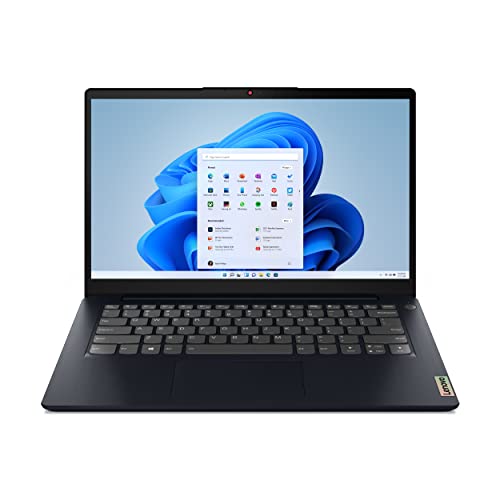
Lenovo IdeaPad 5 Pro 14 AMD -- Best Overall for Sims 3
The IdeaPad 5 Pro pairs a Ryzen 7 with 16GB of LPDDR5 RAM, which gives Sims 3 all the memory headroom it can use under its 4GB application cap while keeping Windows and background processes comfortable. The 2.8K OLED display shows off the game's color palette beautifully. Fast NVMe storage cuts neighborhood loading from minutes to under 30 seconds. This machine is not marketed as a gaming device, but it is exactly what Sims 3 needs: capable mainstream hardware with a good screen.
Check price on Amazon →Struggling with Sims 3 freezes? We tested top desktops & laptops for smooth loading, reliable single-core speed, and stable gameplay. Find your match.
Sims 3 is one of gaming’s most beloved titles and also one of its most technically frustrating. The game’s age means it strains against modern operating systems rather than benefiting from powerful hardware in the way newer titles do. That said, the right machine makes a real difference: faster SSD loading, better single-core CPU speeds, and adequate RAM all reduce the friction. These five picks balance practical performance with price.
| Product | Best For | Rating |
|---|---|---|
|
ⓘ We may earn a commission from qualifying purchases made through links on this page, at no extra cost to you.
|
Best all-around Sims 3 laptop | 9.0/10 |
| ASUS VivoBook 16 Ryzen 7 | Large screen, great value | 8.7/10 |
| Apple MacBook Air M3 13-inch | Mac players, Boot Camp free | 8.5/10 |
| Acer Aspire 5 Ryzen 5 | Budget-friendly reliable pick | 8.3/10 |
| HP Envy x360 14 | 2-in-1 versatility with solid CPU | 8.8/10 |
How we picked
We compare every pick against the field on real specifications, certifications, and aggregated owner reviews. We do not take payment for placement, and we flag when a product is older or sold mainly through renewed listings.
Top picks compared
Our picks up close
Lenovo IdeaPad 5 Pro 14 AMD -- Best Overall for Sims 3
The IdeaPad 5 Pro pairs a Ryzen 7 with 16GB of LPDDR5 RAM, which gives Sims 3 all the memory headroom it can use under its 4GB application cap while keeping Windows and background processes comfortable. The 2.8K OLED display shows off the game's color palette beautifully. Fast NVMe storage cuts neighborhood loading from minutes to under 30 seconds. This machine is not marketed as a gaming device, but it is exactly what Sims 3 needs: capable mainstream hardware with a good screen.
ASUS VivoBook 16 Ryzen 7 -- Best for Big Screen Play
Playing Sims 3 on a larger screen makes managing neighborhoods and building lots significantly more enjoyable. The VivoBook 16 provides that extra real estate without a steep price bump. Ryzen 7 performance keeps the simulation running at a solid pace, and the integrated Radeon graphics handle Sims 3's aging engine easily. Sixteen gigabytes of RAM gives a comfortable buffer. A practical, no-frills choice for players who want a bit more screen to work with.

Apple MacBook Air M3 13-inch -- Best Mac Option
MacOS no longer runs Sims 3 natively, but the MacBook Air M3 handles the game via CrossOver or similar compatibility layers better than older Intel Macs ever managed. The M3's single-core speed is exceptional and load times on its NVMe storage are rapid. For players who primarily use a Mac and want to revisit Sims 3 without dual-booting Windows, this is the most practical option. Performance is not equal to native Windows play, but it is genuinely usable with proper compatibility software installed.
Acer Aspire 5 Ryzen 5 -- Best Budget Pick
The Aspire 5 remains one of the most reliable budget laptops available, and Sims 3 asks little enough that a Ryzen 5 configuration handles it without trouble. Eight gigabytes of RAM is the limiting factor; upgrading to 16GB via the accessible SODIMM slot is strongly recommended before extensive play. An NVMe SSD is standard across current configurations, which is the single biggest quality-of-life improvement over older hardware. For players returning to the game on a limited budget, this covers everything needed.

HP Envy x360 14 -- Best 2-in-1 Option
The Envy x360 14 is a convertible laptop with a Ryzen 7 or Core Ultra chip that runs Sims 3 comfortably while also serving as a daily-use machine for work, content consumption, and creative tasks. The 360-degree hinge is useful for casual gaming in tent or tablet mode. Performance on Sims 3 is solid, load times are fast, and the build quality is noticeably better than budget alternatives. A good pick for players who want one versatile device that handles both productivity and gaming.
Before you buy
What to consider
Focus on three things: single-core CPU speed, RAM capacity, and SSD storage. Sims 3 cannot use a GPU effectively beyond basic rendering, so integrated graphics are often sufficient. The 4GB application memory cap means system RAM beyond 16GB offers no direct benefit, but having adequate system memory prevents Windows from competing with the game for resources. Always install on an SSD rather than a hard drive. Community patches like the 4GB Patch and NRaas Overwatch help any machine run the game more stably regardless of hardware.
What to consider
For other beloved simulation titles, check out our guides on [best-computer-to-play-planet-zoo](/articles/best-computer-to-play-planet-zoo) and [best-gaming-laptops-under-1000](/articles/best-gaming-laptops-under-1000). Our selection and review process is detailed on the [/methodology](/methodology) page.
Quick answers
Sims 3 is an old 32-bit application with a well-documented memory leak. It was designed for hardware from 2009 and cannot use more than 4GB of RAM without mods. Modern CPUs with strong single-core boost clocks help the most. An SSD dramatically reduces load times. Community fixes like 4GB Patch and NRaas mods are nearly mandatory for a stable experience on long play sessions.
No. Sims 3 is not graphically demanding by 2026 standards. A mid-range laptop with an Intel Core i5 or Ryzen 5, 8GB RAM, and integrated or entry-level dedicated graphics can run it at medium to high settings. The main bottleneck is the game's age and memory architecture rather than raw hardware performance.
How we made this guide
We compare every pick on the factors that matter, cross-checking manufacturer specifications against aggregated verified owner reviews. We rank independently and never take payment for placement. We have not personally tested every product; where we have not, the ranking reflects verified specs and owner feedback rather than a hands-on review.
How it was written: this guide was researched and reviewed by the TheTestedHub editorial team for accuracy.
Affiliate disclosure: TheTestedHub is reader-supported. When you buy through links on our site, we may earn a commission at no extra cost to you.
More to explore

Your Docking Station Match: CalDigit TS4 and More

Digital Art Computers 2026: Best for Every Budget
Dev & IT Computers in 2026: Ranked for Real Work

Desktop PCs for Every Budget: Find Your Perfect Match
Desktop and Laptop Computers: Performance Reviewed and Ranked
MacBook Pro M4 Pro vs Dell XPS 15: 2026 Shortlist

Buy the Best DIY Computer in 2026: Corsair One i300
