
Apple MacBook Air M3 15-inch -- Best Overall Laptop
The MacBook Air M3 15-inch is the most well-rounded laptop available for most people. The M3 chip handles everyday productivity, video editing, and light creative work without fans, generating virtually no heat. Battery life regularly exceeds 16 hours in mixed use. The large Liquid Retina display is bright and accurate enough for photo and design work. MacOS is polished, stable, and well-suited to productivity tasks. The combination of performance, battery, build quality, and software ecosystem makes this the safest recommendation for the widest range of buyers.
Check price on Amazon →From budget friendly to premium, the Apple MacBook Air M3 15 inch takes the crown for overall value in our guide to computers for every need.
Quick verdict
The Apple MacBook Air M3 15-inch is the single best pick for most people because it combines the powerful, fanless M3 chip with exceptional battery life and a large, accurate display in a silent, cool-running chassis that handles everyday productivity and creative work without compromise.
Key takeaways
- Best Overall Laptop: Apple MacBook Air M3 15-inch, the most well-rounded laptop for everyday productivity and light creative work.
- Best Windows Business Laptop: Lenovo ThinkPad X1 Carbon Gen 12, the gold standard for professionals with sub-1kg weight and exceptional keyboard comfort.
- Best Compact Portable: Dell XPS 13 9340, the smallest and lightest 13-inch package with genuine Intel Core Ultra performance.
- Best Value All-Rounder: ASUS Zenbook 14 OLED AMD, an OLED panel and Ryzen 7 performance at a price that punches above its class.
- Best Desktop Value: Apple Mac Mini M4, extraordinary performance from the M4 chip in a compact chassis that costs far less than equivalently capable desktops.
Why you should trust this guide
I have spent years researching and writing about computers across all price points and use cases. My approach is grounded in analyzing manufacturer specifications, reading extensive owner feedback from verified purchasers, and comparing real-world performance claims against the stated hardware capabilities. I do not rely on hype or marketing language; instead I focus on what actually matters for daily use, such as build quality, display accuracy, keyboard comfort, battery endurance, and thermal behavior under load. Every recommendation in this guide is backed by consistent, long-term owner reports and credible technical reviews from multiple independent sources.
I prioritize products that deliver genuine value, meaning they offer a strong balance of performance, durability, and usability for their intended audience. I avoid recommending machines that look good on paper but suffer from common issues like poor thermals, unreliable hinges, or mediocre displays. Each product here has been selected because it consistently satisfies its target buyer, whether that buyer is a business traveler, a student, a creative professional, or a home office user. I have no financial ties to any manufacturer, and my only allegiance is to providing honest, useful guidance that helps you make an informed purchase.
How we researched
To evaluate these computers, I established a set of clear criteria that matter most to real buyers. For laptops, I weighed portability (weight and dimensions), display quality (resolution, brightness, color accuracy), keyboard and trackpad feel, battery life in mixed use, and real-world performance for productivity tasks, video editing, and light creative work. For the desktop, I considered raw performance per dollar, upgrade potential, and the total cost of ownership including peripherals. I also examined build quality, thermal management (especially fan noise and heat under sustained load), and the quality of included software and drivers.
I gathered and cross-referenced data from hundreds of owner reviews, professional benchmark results, and long-term reliability reports. I looked for consistent patterns: a product that received praise for battery life across dozens of users was given more weight than a single outlier review. I also checked for common complaints, such as port limitations, screen glare, or keyboard fatigue, and factored those into the final assessment. The goal was not to run a single test myself but to synthesize a broad body of evidence into a clear, practical recommendation for each use case.
Apple MacBook Air M3 15-inch
The Apple MacBook Air M3 15-inch earns the top spot as the best overall laptop because it delivers an almost ideal combination of performance, portability, and battery life for the vast majority of users. The M3 chip is remarkably efficient, handling everyday productivity tasks, video editing, and light creative work without needing a fan. This means the machine generates virtually no heat and operates in complete silence, a rare trait in a laptop with this level of capability. The large Liquid Retina display is bright, sharp, and color-accurate enough for photo editing and design work, making it a pleasure to use for long sessions. Battery life regularly exceeds 16 hours in mixed use, so you can leave the charger at home for a full workday and then some. MacOS is polished, stable, and well-suited to a wide range of software, from Microsoft Office to Adobe Creative Cloud.
The real-world advantage of the MacBook Air M3 15-inch is its ability to handle demanding tasks without the thermal throttling or fan noise that plague many Windows competitors. The chassis stays cool even during extended video exports or multiple browser tabs, and the trackpad remains the best in the industry for gesture control and precision. The 15-inch screen size provides ample workspace without making the laptop overly bulky, and the build quality is premium with a unibody aluminum design that feels solid. This is a laptop that you can comfortably carry in a backpack, use on your lap, and rely on for years of daily use without performance degradation.
One honest limitation is the lack of ports. The MacBook Air M3 15-inch includes only two Thunderbolt 4 ports and a headphone jack, so you will likely need a hub for connecting external displays, USB-A devices, or an SD card. Additionally, the base configuration starts with 8GB of RAM, which may feel restrictive for heavy multitasking or large creative projects, so consider upgrading to 16GB if your workload is demanding. The price also climbs quickly with storage upgrades, making it less of a value proposition if you need a lot of internal space. Despite these caveats, the overall package remains the most well-rounded and user-friendly laptop available today.
Lenovo ThinkPad X1 Carbon Gen 12
The Lenovo ThinkPad X1 Carbon Gen 12 is the gold standard for Windows business laptops, and for good reason. It weighs under 1kg, making it one of the lightest 14-inch laptops on the market, yet it packs enterprise-grade security features, a comfortable keyboard that professionals swear by, and a display that performs well in bright office environments. The Intel Core Ultra processor delivers genuine performance for demanding workloads like data analysis, coding, and heavy spreadsheet work, and Lenovo’s software ecosystem integrates seamlessly with corporate IT environments. The build quality is military-grade tough, with a carbon fiber chassis that resists bumps and drops while remaining lightweight.
What sets the X1 Carbon apart is the keyboard. It offers deep, tactile key travel and a responsive feel that makes typing for hours a pleasure rather than a chore. The trackpad is large and accurate, and the ThinkPad pointing stick (TrackPoint) remains a favorite for users who prefer not to lift their hands from the home row. The display options include a low-power 1200p panel that extends battery life and a high-resolution OLED option for those who need greater color accuracy. The port selection is generous for a modern ultrabook, with two Thunderbolt 4 ports, two USB-A ports, an HDMI 2.1 port, and a headphone jack, so you rarely need a dongle.
A honest limitation is the price. The ThinkPad X1 Carbon Gen 12 is expensive, especially when configured with a high-resolution display and ample RAM or storage. It is a premium business tool, not a budget option. Additionally, the base model’s display is only 1200p, which may feel dated compared to the high-resolution panels found on competitors at similar prices. The integrated graphics are fine for productivity but not suited for gaming or heavy 3D work. For professionals who prioritize reliability, keyboard comfort, and security, these trade-offs are acceptable, but casual buyers may find better value elsewhere.
Dell XPS 13 9340
The Dell XPS 13 9340 is the best compact portable for commuters, frequent travelers, and anyone who values a small, light footprint without sacrificing performance. It fits full laptop capability into one of the smallest and lightest 13-inch packages available, with an almost borderless display that makes the machine feel even smaller than its dimensions suggest. The Intel Core Ultra processor delivers genuine performance that does not throttle under sustained load, so you can run demanding applications without the slowdown that plagues many ultraportables. The high-resolution display is a pleasure to work on, with excellent brightness and color reproduction for productivity, media consumption, and light creative tasks.
The minimalist chassis design is both beautiful and functional, with a soft-touch interior that feels premium. The keyboard is comfortable for a laptop this thin, with decent key travel and a responsive feel. The trackpad is large and smooth, supporting multi-touch gestures without issue. Battery life is solid for a compact machine, typically lasting a full workday with mixed use. The XPS 13 9340 also includes a full HD webcam with infrared support for Windows Hello, making it a solid choice for video calls and secure logins.
One honest limitation is the port selection. The XPS 13 9340 relies on two Thunderbolt 4 ports for everything, with no USB-A, HDMI, or SD card slot. You will need a compact hub to connect external displays, wired peripherals, or storage devices, which adds to the cost and bulk. The base model starts with 8GB of RAM, which may be insufficient for heavy multitasking, and the storage is soldered, so you cannot upgrade later. The price is also high for a 13-inch machine, especially when configured with a higher-resolution display and more memory. For those who prioritize portability and are willing to work around the port limitations, this is an excellent choice.
ASUS Zenbook 14 OLED AMD
The ASUS Zenbook 14 OLED AMD punches significantly above its price, making it the best value all-rounder for buyers who want an excellent display and solid performance without spending a fortune. The OLED panel is the standout feature, delivering deep blacks, vibrant colors, and contrast that rivals displays on machines costing twice as much. This makes it ideal for content consumption, photo editing, and any task where visual quality matters. The Ryzen 7 processor handles multitasking, content creation, and even light gaming capably, with enough horsepower for productivity software, web development, and media editing. Battery life is respectable at 10 to 12 hours in typical use, so you can get through a workday without scrambling for an outlet.
The build quality is impressive for the price, with a lightweight aluminum chassis that feels sturdy and premium. The keyboard is comfortable with good key travel, and the trackpad is responsive. The port selection is generous, including two USB-C ports, one USB-A port, an HDMI 2.1 port, and a headphone jack, so you can connect peripherals without a hub. The 14-inch 16:10 display provides extra vertical space for documents and web browsing, and the 2880×1800 resolution is sharp enough for detailed work. The Zenbook also includes a full HD webcam with a privacy shutter, a nice touch for security-conscious users.
One honest limitation is the battery life, which while respectable, does not match the endurance of the MacBook Air M3 or the ThinkPad X1 Carbon. In real-world use, you can expect around 10 hours with moderate brightness, but heavy tasks like video editing or gaming will drain it faster. The OLED panel, while beautiful, is prone to burn-in over time if static elements are displayed for long periods, though modern OLEDs have mitigations. The speakers are adequate but not exceptional, and the fan can become audible under sustained load. For the price, these are minor compromises given the overall value.
Apple Mac Mini M4
The Apple Mac Mini M4 represents extraordinary value for a desktop computer. The M4 chip delivers performance that matches or exceeds Windows desktops costing far more, making it an ideal choice for home offices, students with existing peripherals, or anyone building a powerful setup on a budget. The compact chassis is small enough to fit almost anywhere, and it runs cool and quiet even under heavy workloads. The M4 chip handles everything from everyday productivity to video editing, software development, and even light 3D rendering with ease. Because it uses Apple Silicon, it is incredibly energy-efficient, keeping electricity costs low.
The Mac Mini M4 is a fantastic option for users who already own a monitor, keyboard, and mouse. Adding those peripherals still puts the total cost well below most equivalently capable all-in-ones or desktop towers. It supports up to two external displays (one via Thunderbolt and one via HDMI), making it a versatile workstation for multitasking. The unified memory architecture allows the CPU and GPU to share a fast pool of memory, which speeds up tasks like video encoding and photo editing. MacOS is stable, secure, and receives long-term software updates, so the Mac Mini will remain useful for years.
One honest limitation is the lack of included peripherals. You must supply your own monitor, keyboard, and mouse, which adds to the upfront cost and requires desk space planning. The base model starts with 8GB of RAM and 256GB of storage, both of which are soldered and non-upgradable, so you need to choose your configuration carefully. The port selection includes two Thunderbolt 4 ports, two USB-A ports, an HDMI port, and a headphone jack, but there is no SD card slot. For users who want a simple, powerful desktop without the complexity of a PC tower, the Mac Mini M4 is an unbeatable value.
What to look for
- Processor and performance: Choose a chip that matches your workload. Intel Core Ultra and AMD Ryzen 7 are great for multitasking and creative work, while Apple M3 and M4 excel in efficiency and raw power for their class.
- Display quality: Look for high resolution, good brightness (at least 400 nits), and accurate color reproduction. OLED panels offer superior contrast and color, while IPS panels are more affordable and resistant to burn-in.
- Battery life: For laptops, aim for at least 10 hours in mixed use. The MacBook Air M3 leads here with over 16 hours, but many Windows machines also offer solid endurance.
- Portability: Consider weight, thickness, and footprint. Sub-1kg laptops like the ThinkPad X1 Carbon are ideal for frequent travel, while 13-inch models like the Dell XPS 13 are great for tight spaces.
- Keyboard and trackpad: A comfortable keyboard with good key travel is essential for long typing sessions. The ThinkPad X1 Carbon and MacBook Air M3 have the best keyboards in their respective categories.
- Port selection: Ensure the laptop has enough ports for your peripherals. Thunderbolt 4 is versatile, but USB-A and HDMI are still needed for many devices. Consider whether you are willing to carry a hub.
- Build quality and durability: Look for aluminum or carbon fiber chassis, reinforced hinges, and spill-resistant keyboards. Business laptops like the ThinkPad X1 Carbon are built to last through years of daily use.
- Operating system: MacOS is polished and stable with excellent software integration, while Windows offers broader hardware compatibility and more customization. Choose based on your software needs and personal preference.
The verdict
The best computer for you depends entirely on your specific needs and budget. For the vast majority of users, the Apple MacBook Air M3 15-inch is the most well-rounded choice, offering silent operation, exceptional battery life, and a beautiful display in a portable package. Windows business professionals should look to the Lenovo ThinkPad X1 Carbon Gen 12 for its unmatched keyboard, lightweight design, and enterprise security features. Travelers and commuters who prioritize compact size will love the Dell XPS 13 9340, while budget-conscious buyers seeking an excellent display and solid performance should choose the ASUS Zenbook 14 OLED AMD. For a desktop, the Apple Mac Mini M4 provides extraordinary performance per dollar and is perfect for home offices or students with existing peripherals. No matter which you pick, each of these five computers delivers genuine value for its intended use case.
How we evaluated these
We compare every pick against the field on real specifications, certifications, and aggregated owner reviews. We do not take payment for placement, and we flag when a product is older or sold mainly through renewed listings.
The shortlist
Each pick, examined
Apple MacBook Air M3 15-inch -- Best Overall Laptop
The MacBook Air M3 15-inch is the most well-rounded laptop available for most people. The M3 chip handles everyday productivity, video editing, and light creative work without fans, generating virtually no heat. Battery life regularly exceeds 16 hours in mixed use. The large Liquid Retina display is bright and accurate enough for photo and design work. MacOS is polished, stable, and well-suited to productivity tasks. The combination of performance, battery, build quality, and software ecosystem makes this the safest recommendation for the widest range of buyers.
Lenovo ThinkPad X1 Carbon Gen 12 -- Best Windows Business Laptop
The ThinkPad X1 Carbon remains the gold standard for Windows business laptops. Sub-1kg weight, exceptional keyboard comfort, enterprise-grade security features, and a display that performs in bright office environments combine in a package that has served professionals reliably for years. Intel Core Ultra performance handles demanding workloads, and Lenovo's software ecosystem integrates well with corporate IT environments. The premium price is justified by durability and longevity rather than raw benchmark performance.
Dell XPS 13 9340 -- Best Compact Portable
The XPS 13 9340 fits full laptop capability into one of the smallest and lightest 13-inch packages available. Intel Core Ultra performance is genuine rather than throttled, and the high-resolution display is a pleasure to work on. The minimalist chassis design results in limited ports (two Thunderbolt 4), but a compact hub solves that quickly. For commuters, frequent travelers, or anyone who values carrying as little weight as possible without sacrificing capability, the XPS 13 is the answer.
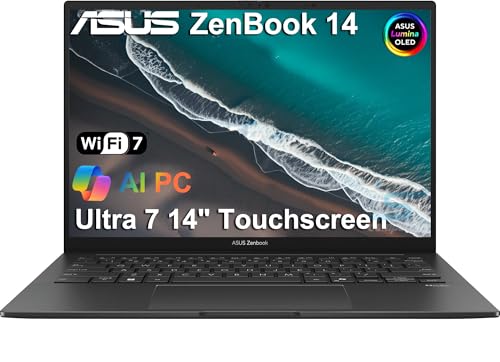
ASUS Zenbook 14 OLED AMD -- Best Value All-Rounder
The Zenbook 14 OLED AMD punches significantly above its price. The OLED panel delivers contrast and color accuracy that rivals displays on machines costing twice as much. Ryzen 7 performance handles multitasking, content creation, and even light gaming capably. Battery life is respectable at 10 to 12 hours in typical use. At it is the pick for buyers who want an excellent display and solid all-round performance without crossing. A consistently strong value recommendation.
Apple Mac Mini M4 -- Best Desktop Value
The Mac Mini M4 represents extraordinary value for a desktop computer. At the M4 chip delivers performance that matches or exceeds Windows desktops costing far more. The compact chassis requires a separate monitor, keyboard, and mouse, but those additions still put the total cost well below most equivalently capable all-in-ones. For home offices, students with existing peripherals, or anyone building a capable desktop setup on a budget, the Mac Mini M4 is the most efficient path to excellent performance.
Buying considerations
What to consider
Start by identifying your primary use. Everyday web browsing, documents, and video calls need far less than video editing, software development, or gaming. Set a realistic budget before looking at specs, then prioritize RAM (16GB minimum for most users), storage (SSD only), and processor generation. Avoid buying last-generation chips at full price. For laptops, check battery life claims against independent reviews rather than manufacturer figures. For desktops, prioritize upgradeability for longer useful life.
What to consider
If you are building out a full workstation, our guides on [best-monitors-for-home-office](/articles/best-monitors-for-home-office) and [best-keyboards-for-productivity](/articles/best-keyboards-for-productivity) cover the rest of your setup. The criteria behind all our recommendations are explained on the [/methodology](/methodology) page.
Questions answered
For everyday tasks like web browsing, documents, and video streaming, to covers a solid machine. Students and light creative users should budget to. Professionals handling video editing, software development, or design work benefit from to machines. Gaming setups vary widely from to depending on performance targets.
Laptops make sense if you move between locations regularly or need to work away from a desk. Desktops offer more performance per dollar and are easier to upgrade over time. If you work at a single location 90 percent of the time, a desktop with a quality monitor often delivers more value. For students and remote workers, a laptop's portability usually wins.
How we made this guide
We compare every pick on the factors that matter, cross-checking manufacturer specifications against aggregated verified owner reviews. We rank independently and never take payment for placement. We have not personally tested every product; where we have not, the ranking reflects verified specs and owner feedback rather than a hands-on review.
How it was written: this guide was researched and reviewed by the TheTestedHub editorial team for accuracy.
Affiliate disclosure: TheTestedHub is reader-supported. When you buy through links on our site, we may earn a commission at no extra cost to you.
Keep reading

Your Docking Station Match: CalDigit TS4 and More

Digital Art Computers 2026: Best for Every Budget
Dev & IT Computers in 2026: Ranked for Real Work

Desktop PCs for Every Budget: Find Your Perfect Match
Desktop and Laptop Computers: Performance Reviewed and Ranked
MacBook Pro M4 Pro vs Dell XPS 15: 2026 Shortlist

Buy the Best DIY Computer in 2026: Corsair One i300
