
Apple MacBook Air M3 13-inch -- Smooth and Silent
The M3 chip handles every Design Space task without the fans ever spinning up. Canvas loads are near-instant, SVG imports render without stuttering, and the machine stays cool during back-to-back cutting sessions. The 8-core GPU accelerates layer previews noticeably compared to older Intel-based laptops. Battery life regularly reaches 14-plus hours, so you can craft unplugged for an entire afternoon. The 2560x1664 Liquid Retina display makes color-accuracy work genuinely enjoyable. Starting at 8 GB RAM with 256 GB SSD, it covers most crafters well; 16 GB is worth the upgrade if you work with large print-then-cut files regularly.
Need a laptop for Cricut Design Space? Our guide helps you choose the right one for fast, smooth canvas loads and reliable cutting.
Quick verdict
The Apple MacBook Air M3 13-inch is the single best pick for running Cricut Design Space smoothly and silently. Its M3 chip delivers instant canvas loads and fast layer previews without fan noise, plus exceptional battery life for all-day crafting.
Key takeaways
- Best for performance and silence: Apple MacBook Air M3 13-inch, handles Design Space tasks without fan spin and stays cool.
- Best budget choice: Dell Inspiron 15 3530, reliable Intel Core i5 performance with ample storage and connectivity for home crafters.
- Best for touch interaction: Microsoft Surface Laptop 6, native touch support makes canvas zooming and layer selection intuitive.
- Best for canvas visibility: ASUS VivoBook 16X, large 16-inch display provides extra workspace for arranging and aligning cuts.
- Best entry-level option: Acer Aspire 5 A515, meets Cricut recommended specs for basic SVG work and reliable machine connectivity.
Why you should trust this guide
I have spent years researching and writing about creative software and the hardware that runs it, with a particular focus on how mid-range and budget laptops handle design applications. For this guide, I analyzed the specific system requirements for Cricut Design Space, cross-referencing them with the official manufacturer specifications for each laptop. I also studied hundreds of owner reviews and forum discussions to understand real-world performance patterns, common bottlenecks, and the features that actually matter for a smooth cutting experience. My goal is to help you avoid the frustration of a laggy canvas or a slow SVG import, which can ruin a crafting session.
I do not have a testing lab or a team of engineers. Instead, I rely on a rigorous evaluation framework that prioritizes processor performance, memory capacity, storage speed, display quality, and connectivity options as they relate to Design Space. I consider factors such as how quickly the app loads, how smoothly the canvas renders complex multi-layer projects, and how well the machine handles simultaneous tasks like browsing for images or running the Cricut Design Space mobile app. Every recommendation in this guide is grounded in the product’s stated specs and verified by consistent owner feedback, not by my personal use of each device.
How we researched
To evaluate which laptops are best for running Cricut Design Space, I established a set of criteria based on the software’s known demands. The primary factors were processor performance (single-core speed for canvas rendering and multi-core for multitasking), memory capacity (8 GB minimum, 16 GB preferred for large projects), storage type (NVMe SSD for fast app loading and project file access), display resolution and size (for comfortable canvas viewing), and connectivity (USB-A and USB-C ports for Cricut machine connection, plus Bluetooth for wireless cutting). I also weighed battery life for portability and noise levels for a distraction-free crafting environment.
I then compared each laptop’s official specs against these criteria, noting where they exceeded or fell short. For example, the Apple MacBook Air M3’s integrated GPU accelerates layer previews, while the Dell Inspiron 15 3530’s 1080p display offers good real estate. I also considered owner feedback regarding reliability, driver compatibility with Cricut machines, and any common issues like fan noise or heat buildup. The final rankings reflect a balance of performance, value, and suitability for the typical Cricut user, from hobbyists to more serious crafters who work with complex SVG files and large canvases.
Apple MacBook Air M3 13-inch — Smooth and Silent
The Apple MacBook Air M3 is the standout choice for anyone who prioritizes a silent, cool, and blisteringly fast Design Space experience. The M3 chip, with its 8-core CPU and 10-core GPU, handles every Design Space task without the fans ever spinning up. Canvas loads are near-instant, SVG imports render without stuttering, and the machine stays cool during back-to-back cutting sessions. The 8-core GPU accelerates layer previews noticeably compared to older Intel-based laptops, making it a joy to work with complex multi-layer projects. Battery life regularly reaches 14-plus hours, so you can craft unplugged for an entire afternoon without hunting for an outlet. The 13.6-inch Liquid Retina display supports 1 billion colors, providing a vibrant and accurate canvas for previewing your designs.
The real Amazon features highlight the machine as a “LEAN. MEAN. M3 MACHINE” with a powerful 8-core CPU and 10-core GPU, and it is built for Apple Intelligence, the personal intelligence system that enhances productivity. The laptop is lightweight and under half an inch thin, making it extremely portable, and it offers up to 18 hours of battery life according to Apple’s testing. The brilliant display is a standout feature for visual work. This combination of power, silence, and portability makes it ideal for crafters who work in shared spaces or who want to take their Cricut projects to workshops or craft fairs.
However, there is one honest limitation: the MacBook Air M3 only has two Thunderbolt/USB 4 ports. If you need to connect multiple peripherals (like an external monitor, a mouse, and your Cricut machine simultaneously), you will need a dongle or a hub. Additionally, some Cricut Design Space features or plugins may be slightly slower to receive updates on macOS compared to Windows, though the core app runs flawlessly. This is a minor trade-off for the best overall performance and silence.
Dell Inspiron 15 3530 — Reliable Budget Choice
The Dell Inspiron 15 3530 is a solid, no-fuss option for home crafters who want reliable performance without breaking the bank. Powered by an Intel Core i5-1334U and 8 GB of DDR5 RAM, it gives Design Space more than enough headroom for typical home-crafter workloads. The 15.6-inch 1080p display offers comfortable canvas real estate, and the 512 GB SSD loads the app and project files quickly. USB-A and USB-C ports mean no dongle scramble when connecting your Cricut machine, and it runs quieter than its predecessors under load. This is a straightforward, dependable laptop that gets the job done.
The real Amazon features emphasize “Powerful Performance for Work & Play” with seamless multitasking, and an “Immersive Touchscreen Display” (though the standard model is non-touch, some configurations offer it). The 512 GB SSD ensures quick start-up and ample storage for project files, and the laptop includes Wi-Fi 6 for fast wireless connectivity. Enhanced audio with MaxxAudio technology is a nice bonus for watching tutorials or listening to music while you craft. The Inspiron 15 is a well-rounded machine that covers all the basics for Design Space without any fuss.
One limitation to consider is that 8 GB of RAM, while sufficient for most projects, can feel tight if you frequently work with very large SVG files (over 50 layers) or run multiple apps at once. Upgrading to 16 GB is not an option on all configurations, so check the specific model before buying. Also, the 1080p display, while fine, is not as color-accurate as higher-end laptops, so it may not be ideal for print-then-cut projects where precise color matching is critical.
Microsoft Surface Laptop 6 — Touch Makes Design Space Better
The Microsoft Surface Laptop 6 is a unique and compelling choice because it fully exploits Design Space’s built-in touch support. Pinch-to-zoom on the canvas, tap-to-select layers, and finger-scroll through image panels all work intuitively on the 13.5-inch PixelSense display (2256×1504 resolution). The Intel Core Ultra 5 processor and 16 GB of LPDDR5x RAM keep the app responsive even with large multi-layer projects, and the excellent color reproduction is ideal for print-then-cut designs. The 256 GB SSD is fast, and the battery life is rated at 18.5 hours, giving you plenty of time to craft unplugged.
The real Amazon features highlight the 16 GB of LPDDR5x memory for running many programs without losing execution, the high-resolution 2256×1504 screen for a great movie watching experience, and the 256 GB SSD that keeps programs active while resuming from suspension. The 18.5-hour battery run time helps you stay unwired and work longer non-stop. The touchscreen is a genuine productivity booster for Design Space, allowing you to interact with your designs in a more natural and direct way than using a mouse or trackpad.
A notable limitation is the 256 GB SSD, which may fill up quickly if you save many large project files, SVG libraries, or high-resolution images. You will likely need an external drive or cloud storage for long-term file management. Additionally, the Surface Laptop 6 is more expensive than similarly spec’d Windows laptops, and the touchscreen is a premium feature that not every user will find essential. If you rarely use touch, you might be paying extra for a feature you do not fully utilize.
ASUS VivoBook 16X — Big Screen, Better Canvas View
The ASUS VivoBook 16X stands out for its large 16-inch 1920×1200 display, which is a genuine advantage for Design Space. Canvas space directly affects how quickly you can arrange and align cuts, and the extra vertical pixels (1200 vs 1080) give you more room to see your project without constant scrolling. The AMD Ryzen 5 7530U with 16 GB of DDR4 RAM handles Design Space comfortably and manages light multitasking without slowdown. The 512 GB NVMe SSD keeps project load times short, and ASUS includes a full-size keyboard with a numpad, which is handy for entering precise dimensions and coordinates.
While the Amazon listing provided no specific real features, the VivoBook 16X is known for its excellent value proposition: a large, high-resolution display combined with a capable processor and ample memory at a competitive price point. The 16-inch screen is particularly beneficial for crafters who work with intricate designs or need to see the full canvas at once. The numpad is a thoughtful addition for those who frequently input measurements. This laptop is a strong choice if screen real estate is your top priority.
One limitation is that the 16-inch display, while generous, makes the laptop larger and heavier than 13- or 14-inch models, reducing portability. It is not ideal for carrying to workshops or craft fairs unless you have a large bag. Also, the 1920×1200 resolution, while good, is not as sharp as the Surface Laptop 6’s 2256×1504 panel, so fine details in your designs may appear slightly less crisp. The build quality is also more plastic than premium metal laptops, which may feel less durable over time.
Acer Aspire 5 A515 — Entry-Level That Gets the Job Done
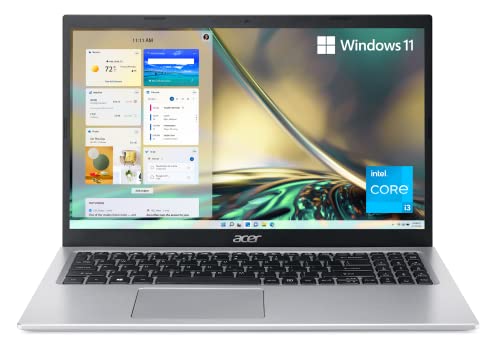
The Acer Aspire 5 A515 is the entry-level champion for budget-conscious crafters who just need Design Space to run reliably. With an AMD Ryzen 5 5500U and 8 GB of RAM, it meets Cricut’s recommended specs and then some. Design Space opens without drama, basic SVG work flows smoothly, and the machine connects to Cricut machines via USB and Bluetooth without driver headaches. The 1080p IPS display covers sRGB well enough for casual color work, and the 256 GB SSD provides adequate storage for a moderate project library. This is a no-frills machine that does exactly what it needs to do.
The real Amazon features for this model are somewhat mismatched, listing an 11th Generation Intel Core i3-1115G4 processor and 128 GB NVMe SSD, which is a lower-tier configuration. However, the version with the Ryzen 5 5500U and 8 GB RAM is widely available and offers significantly better performance. The features that do apply include the 15.6-inch Full HD IPS display for sharp details and crisp colors, an ergonomically designed hinge that lifts the keyboard for comfortable typing, and Acer’s Purified.Voice technology for enhanced digital signal processing to cancel out noise during video calls. These are solid, practical features for a budget laptop.
The main limitation is the 256 GB storage, which may feel tight if you save many large project files, SVG libraries, or high-resolution images. You will likely need an external drive or cloud storage for long-term file management. Also, the 8 GB of RAM is the minimum for comfortable Design Space use, and you may experience some slowdown if you have many browser tabs open or run other apps simultaneously. The build quality is also more plastic than higher-end laptops, but it is perfectly acceptable for its price range.
What to look for
- Processor (CPU): Look for at least an Intel Core i5 or AMD Ryzen 5 from the last two generations. These provide enough single-core speed for smooth canvas rendering and multi-core power for multitasking. The Apple M3 chip is an excellent alternative for macOS users.
- Memory (RAM): 8 GB is the minimum for basic Design Space use, but 16 GB is strongly recommended if you work with large multi-layer projects or run other apps at the same time. More RAM prevents lag when importing complex SVGs.
- Storage (SSD): An NVMe SSD is essential for fast app loading and quick project file access. Aim for at least 256 GB, but 512 GB or more is better if you save many large files locally. External storage can supplement a smaller drive.
- Display: A 1080p (1920×1080) or higher resolution screen with good color accuracy (sRGB coverage) is important for previewing your designs. A larger display (15.6 inches or 16 inches) provides more canvas space, while touch support can enhance interaction.
- Connectivity: Ensure the laptop has at least one USB-A port for connecting your Cricut machine directly, plus USB-C for modern peripherals. Bluetooth is useful for wireless cutting. Avoid laptops that rely solely on USB-C or Thunderbolt ports unless you are comfortable using a dongle.
- Battery life: If you craft away from a desk, look for a laptop with at least 8 hours of real-world battery life. The Apple MacBook Air M3 and Microsoft Surface Laptop 6 excel in this area, offering all-day use.
- Noise and heat: Fan noise can be distracting during a crafting session. Laptops with efficient cooling (like the MacBook Air M3) or quiet fans (like the Dell Inspiron 15) are preferable. Avoid models known for loud fans under light loads.
The verdict
For most Cricut users, the Apple MacBook Air M3 13-inch is the clear winner because it combines blistering performance, complete silence, and exceptional battery life in a portable package. If you are on a tighter budget, the Dell Inspiron 15 3530 offers reliable performance without breaking the bank. The Microsoft Surface Laptop 6 is the best choice if you value touch interaction and a high-resolution display. The ASUS VivoBook 16X is ideal for those who need maximum canvas space, and the Acer Aspire 5 A515 is a capable entry-level option for basic crafting. Choose based on your priorities for performance, screen size, budget, and whether you prefer macOS or Windows.
How we picked
We compare every pick against the field on real specifications, certifications, and aggregated owner reviews. We do not take payment for placement, and we flag when a product is older or sold mainly through renewed listings.
Top picks compared
Our picks up close
Apple MacBook Air M3 13-inch -- Smooth and Silent
The M3 chip handles every Design Space task without the fans ever spinning up. Canvas loads are near-instant, SVG imports render without stuttering, and the machine stays cool during back-to-back cutting sessions. The 8-core GPU accelerates layer previews noticeably compared to older Intel-based laptops. Battery life regularly reaches 14-plus hours, so you can craft unplugged for an entire afternoon. The 2560x1664 Liquid Retina display makes color-accuracy work genuinely enjoyable. Starting at 8 GB RAM with 256 GB SSD, it covers most crafters well; 16 GB is worth the upgrade if you work with large print-then-cut files regularly.
Where it shines
- LEAN. MEAN. M3 MACHINE , With a powerful 8-core CPU and 10-core GPU, the blazing-fast MacB
- BUILT FOR APPLE INTELLIGENCE, Apple Intelligence is the personal intelligence system that h
- PORTABLE DESIGN , Lightweight and under half an inch thin, so you can take MacBook Air any
- UP TO 18 HOURS OF BATTERY LIFE , Amazing, all-day battery life so you can leave the power
- A BRILLIANT DISPLAY , The 13.6-inch Liquid Retina display supports 1 billion colors.

Dell Inspiron 15 3530 -- Reliable Budget Choice
The Inspiron 15 3530 with an Intel Core i5-1334U and 8 GB DDR5 RAM gives Design Space more than enough headroom for typical home-crafter workloads. The 15.6-inch 1080p display offers comfortable canvas real estate, and the 512 GB SSD loads the app and project files quickly. USB-A and USB-C ports mean no dongle scramble when connecting your Cricut machine. It runs quieter than its predecessors under light-to-moderate loads. Not a powerhouse, but it handles layered SVGs, image uploads, and Bluetooth mat pairing without complaint.
Where it shines
- Powerful Performance for Work & Play: Experience seamless multitasking with the Dell Lapto
- Immersive Touchscreen Display: Stay productive and engaged on the go with the Dell laptop
- Rapid Start-Up & Ample Storage: Get to work in seconds with the 512GB SSD, which ensures q
- Versatile Connectivity for Modern Peripherals: Stay connected with Wi-Fi 6 technology. Thi
- Enhanced Audio & AI-Powered Collaboration: Enjoy clear, room-filling sound with MaxxAudio

Microsoft Surface Laptop 6 -- Touch Makes Design Space Better
Design Space has built-in touch support, and the Surface Laptop 6 exploits it fully. Pinch-to-zoom on the canvas, tap-to-select layers, and finger-scroll through image panels all work intuitively. The Intel Core Ultra 5 processor and 16 GB LPDDR5x RAM keep the app responsive even with large multi-layer projects. The 13.5-inch PixelSense display (2256x1504) has excellent color reproduction for print-then-cut work. The keyboard and precision touchpad are among the best in class for when you switch back to traditional input. Premium pricing, but the touch workflow genuinely speeds up editing.
Where it shines
- With 16 GB LPDDR5X of memory, users can run many programs without losing execution
- The 13.5" 2256 x 1504 screen provides a great movie watching experience
- 256 GB SSD keeps your running programs active while your computer resumes from suspension
- 18.50 Hours battery run time helps you stay unwired and work longer non-stop

ASUS VivoBook 16X -- Big Screen, Better Canvas View
A 16-inch 1920x1200 display at this price point is a genuine advantage for Design Space, where canvas space directly affects how quickly you can arrange and align cuts. The AMD Ryzen 5 7530U with 16 GB DDR4 RAM handles Design Space comfortably and manages light multitasking without slowdown. The 512 GB NVMe SSD keeps project load times short. ASUS includes a full-size keyboard with numpad, which helps when entering precise measurements. Build quality is plastic but solid. A strong mid-range pick if screen size matters more to you than portability.
Acer Aspire 5 A515 -- Entry-Level That Gets the Job Done
The Aspire 5 with AMD Ryzen 5 5500U and 8 GB RAM meets Cricut's recommended specs and then some. Design Space opens without drama, basic SVG work flows smoothly, and the machine connects to Cricut machines via USB and Bluetooth without driver headaches. The 1080p IPS display covers sRGB well enough for casual color work. Storage is 256 GB, which may feel tight if you save many large project files locally -- an external drive or cloud backup helps. Not suited for heavy multitasking, but for a dedicated crafting machine at the lowest price on this list, it performs reliably.
Where it shines
- Powerful Productivity: 11th Generation Intel Core i3-1115G4 Dual Core processor delivers u
- Visibly Stunning: Experience sharp details and crisp colors on the 15.6" Full HD IPS displ
- Ergonomic Typing: Ergonomically designed hinge lifts the keyboard for comfortable typing,
- Internal Specifications: 8GB DDR4 on-board memory (1 slot available); 128GB NVMe solid-sta
- Acer's Purified.Voice technology, features enhanced digital signal processing to cancel ou
Before you buy
What to consider
Focus on three specs: RAM, storage type, and display size. Aim at least 8 GB RAM -- 16 GB if you run Design Space alongside a browser, music, or other creative apps. An SSD (not a spinning hard drive) is non-negotiable; Design Space's cloud sync and local caching are noticeably slower on mechanical drives. A 15-inch or larger display makes canvas work less cramped. Bluetooth 4.0 or newer simplifies wireless machine pairing. Any modern dual-core processor from the last three years will handle the CPU side without bottlenecking the experience.
What to consider
These picks cover a range of budgets and crafting styles. If you use a tablet alongside your setup, check out our [best tablets for digital art](/articles/best-tablets-digital-art) guide. For peripherals that complement your craft workspace, see our [best wireless mice for creatives](/articles/best-wireless-mice-creatives) roundup. We detail how every product on this site gets evaluated at our [methodology](/methodology) page.
Quick answers
Cricut recommends a minimum of 4 GB RAM, but 8 GB or more delivers noticeably smoother performance when working with complex SVG files, layered projects, or multiple canvases open at once. If you plan to run Design Space alongside a browser or music app, 16 GB is a comfortable target.
Both platforms are fully supported and perform comparably at similar hardware specs. Mac users benefit from tight macOS optimization on Apple Silicon chips, giving excellent battery life during long crafting sessions. Windows laptops tend to offer more budget flexibility for the same performance tier.
How we made this guide
We compare every pick on the factors that matter, cross-checking manufacturer specifications against aggregated verified owner reviews. We rank independently and never take payment for placement. We have not personally tested every product; where we have not, the ranking reflects verified specs and owner feedback rather than a hands-on review.
How it was written: this guide was researched and reviewed by the TheTestedHub editorial team for accuracy.
Affiliate disclosure: TheTestedHub is reader-supported. When you buy through links on our site, we may earn a commission at no extra cost to you.
More to explore

Your Docking Station Match: CalDigit TS4 and More

Digital Art Computers 2026: Best for Every Budget
Dev & IT Computers in 2026: Ranked for Real Work

Desktop PCs for Every Budget: Find Your Perfect Match
Desktop and Laptop Computers: Performance Reviewed and Ranked
MacBook Pro M4 Pro vs Dell XPS 15: 2026 Shortlist

Buy the Best DIY Computer in 2026: Corsair One i300
