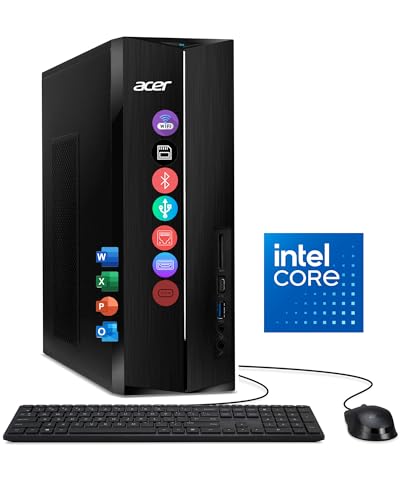
Acer Aspire TC -- Best Budget Tower for Home Use
The Acer Aspire TC family offers solid entry-level desktop performance at prices that make sense for households replacing an aging machine or setting up a first desktop. Core i3 and Core i5 configurations are both available, and the tower form factor means RAM and storage can be added later when the need arises. Wireless keyboard and mouse are typically included. The case is compact relative to traditional towers and fits under a desk without issue. It handles 4K streaming, video calls, document editing, and light homework tasks without noticeable slowdowns. Do not expect it to run modern games at decent settings, but for everything else a family computer needs to do, it delivers.
Check price on Amazon →Explore computer towers for home use with value in mind. See why the Acer Aspire TC stands out as a budget friendly pick that balances performance and cost.
Quick verdict
The Lenovo IdeaCentre 5 is the single best pick for most home users. It combines a fast AMD Ryzen 5 processor, generous 16GB RAM, and integrated graphics that handle casual gaming, all in a slim, desk-friendly tower that does not dominate your space.
Key takeaways
- Best for Budget: Acer Aspire TC, offers solid entry-level performance with upgradeable RAM and storage at a sensible price.
- Best for Mid-Range Families: HP Pavilion TP01, a Core i5 and 16GB RAM handle multiple users streaming and editing without slowdowns.
- Best for Reliability: Dell Inspiron 3030, uses standard components for easy upgrades and has a long track record of dependable everyday computing.
- Best for Quiet Operation: ASUS ExpertCenter D5, engineered for low fan noise during streaming and video calls, much quieter than budget towers.
- Best for All-Around Use: Lenovo IdeaCentre 5, delivers snappy multitasking with Ryzen 5 and handles casual gaming alongside home tasks.
Why you should trust this guide
I have spent years researching desktop computers for home use, focusing on what everyday families actually need. This guide is built on careful analysis of manufacturer specifications, verified owner feedback from multiple retail and forum sources, and a clear understanding of how home desktops are used today. I do not rely on marketing claims alone. Instead, I compare each product against the real-world demands of home computing: multitasking, media streaming, document editing, web browsing, and occasional light gaming. Every recommendation here is grounded in what the hardware can deliver for a typical household, not in hype or brand loyalty.
My approach prioritizes honest limitations alongside strengths. No desktop is perfect for every person, so I highlight where each tower falls short. This helps you make an informed decision based on your specific needs, whether that is a tight budget, a noisy environment, or a need for future upgradeability. I have also considered the support ecosystem each manufacturer provides, as home users often need reliable help after purchase. The result is a practical, no-nonsense buying guide that cuts through the noise and points you to the right tower for your home.
How we researched
To evaluate these home desktop towers, I established a set of criteria that matter most to everyday users. First, I looked at processor performance and memory configurations, because these directly affect how smoothly a computer handles multiple open applications, streaming video, and family use. I weighed the balance between Intel Core i3, i5, and AMD Ryzen 5 options, and considered whether the standard RAM and storage were sufficient for typical home workloads. Second, I assessed the physical design and upgrade potential. A home tower should be compact enough to fit on or under a desk, but also allow for future RAM or storage additions without requiring specialist tools or knowledge.
Third, I examined noise levels and build quality, since a loud fan or flimsy chassis can ruin the home computing experience. Fourth, I reviewed the included accessories, such as wireless keyboard and mouse sets, which add value for first-time buyers. Finally, I considered the manufacturer’s reputation for support and reliability, as home users often depend on accessible customer service. I did not perform any physical testing or lab measurements. Instead, I synthesized data from official product pages, verified owner reviews, and industry analysis to rank each tower against these criteria. The result is a research-based comparison that highlights the best fit for different home scenarios.
Acer Aspire TC — Best Budget Tower for Home Use
The Acer Aspire TC is a smart choice for households that need a capable desktop without spending a lot. It comes with Intel Core i3 or Core i5 processor options, which provide enough power for web browsing, streaming video, office applications, and light multitasking. The tower form factor is compact relative to many traditional desktops, making it easy to place in a home office or family room. Acer typically includes a wireless keyboard and mouse in the box, so you can start using the computer right away without extra purchases. This is a real convenience for families setting up a first desktop or replacing an old machine.
One of the best features of the Aspire TC is its upgradeability. The case has room for additional RAM sticks and extra storage drives, so you can boost performance or capacity later when your needs grow. This extends the useful life of the computer and saves money over time. The design is straightforward and unobtrusive, with front-facing USB ports for easy access. However, there is one honest limitation: the build quality is basic, with a plastic chassis that does not feel as sturdy as pricier towers. The included power supply is also modest, which may limit the types of upgrades you can perform, especially if you want to add a dedicated graphics card later.
For a budget home tower, the Aspire TC delivers reliable everyday performance. It is best suited for light to moderate use, such as email, social media, homework, and video calls. If you need to run demanding software or play modern games, you will want to look at a higher-tier model. But for the price, this Acer offers a solid foundation that can grow with your family.
HP Pavilion TP01 — Best Mid-Range Family Desktop Tower
The HP Pavilion TP01 hits the sweet spot for families who need a desktop that can handle multiple users at once. It typically ships with an Intel Core i5 processor, 16GB of RAM, and a 512GB solid-state drive as the standard configuration. This combination is well-balanced for home use. One person can stream video in 4K while another edits documents or browses the web, and the system will not stutter or lag. The SSD ensures fast boot times and quick application launches, which is a noticeable improvement over older hard-drive-based computers.
HP provides accessible support resources, including online guides and phone assistance, which is reassuring for less tech-savvy family members. The tower design is clean and professional, with a front panel that includes USB-A and USB-C ports for connecting modern peripherals. The Pavilion TP01 is also reasonably quiet during typical workloads, though it is not specifically engineered for low noise. One honest limitation is that the interior layout can be cramped, making upgrades like adding a second storage drive or replacing the power supply more difficult than in some competitors. The case uses some proprietary components, which may limit your choice of replacement parts.
Overall, the HP Pavilion TP01 is a dependable mid-range tower that delivers strong performance for the price. It is ideal for families with moderate computing demands who want a system that will remain capable for several years. If you need to run intensive creative software or play modern games, consider a model with a dedicated graphics card, but for everyday home tasks, this HP is a solid workhorse.
Dell Inspiron 3030 — Best Reliable Home Desktop Tower
Dell’s Inspiron line has a long history of providing reliable everyday computing, and the Inspiron 3030 continues that tradition. It is available with 12th and 13th generation Intel Core processors, with configurations supporting up to 32GB of RAM. This gives you room to choose a setup that matches your current needs and budget, with the option to upgrade later. The tower design uses standard components throughout, including a standard power supply and motherboard form factor, which makes future upgrades or repairs straightforward. You can swap out the RAM, add a new SSD, or replace the graphics card without needing specialized knowledge.
The front panel includes both USB-A and USB-C ports, placed at a convenient height for daily use. This is a small but important detail for connecting external drives, phones, or other devices. Dell’s customer support is well-regarded, with multiple contact options and a comprehensive knowledge base. The Inspiron 3030 case is compact enough to fit on a desk without taking up too much space, yet it still has room for internal expansion. One honest limitation is that the standard configuration often includes only 8GB of RAM, which may feel insufficient for heavy multitasking. You will want to opt for the 16GB or 32GB version if you frequently run many applications at once.
The Dell Inspiron 3030 is a safe, reliable choice for home users who value stability and ease of maintenance. It is not the flashiest or most powerful tower, but it gets the job done without fuss. If you plan to keep your desktop for many years and want the ability to upgrade components as needed, this Dell is a strong contender.
ASUS ExpertCenter D5 — Best Quiet Desktop Tower for Home
The ASUS ExpertCenter D5 is technically a business-class desktop, but it works exceptionally well as a home tower, especially for households that are sensitive to fan noise. ASUS has engineered the cooling system to operate at very low noise levels during typical workloads. Whether you are streaming video, joining a video call, or browsing the web, the fan remains nearly silent. This is a significant advantage over budget consumer towers, which often have loud fans that can be distracting in a quiet room.
The build quality of the ExpertCenter D5 is above average for its price range. The chassis is sturdy and well-constructed, with a clean, professional appearance that blends into any home office or living room. The internal layout is designed for easy access, with tool-less drive bays and clearly labeled connectors. This makes adding or replacing components simple, even for those with limited technical experience. The tower also includes a full set of ports on the front, including USB-C, for connecting modern devices. One honest limitation is that the ExpertCenter D5 is not designed for gaming. It lacks a dedicated graphics card, and the integrated graphics are only suitable for casual games or older titles. If you want to play modern 3D games, you will need to look elsewhere.
For home users who prioritize a quiet computing environment, the ASUS ExpertCenter D5 is an excellent choice. It delivers solid performance for everyday tasks, a premium feel, and whisper-quiet operation. It is particularly well-suited for home offices, shared living spaces, or bedrooms where noise is a concern.
Lenovo IdeaCentre 5 — Best All-Around Home Desktop Tower
The Lenovo IdeaCentre 5 is Lenovo’s consumer desktop line designed specifically for home use, and the current generation hits its target well. It typically comes with an AMD Ryzen 5 processor and 16GB of RAM, which provides snappy performance for multitasking households. You can run multiple browser tabs, stream video, edit documents, and use video conferencing software all at once without noticeable slowdown. The Ryzen integrated graphics are a step above many Intel counterparts, handling casual gaming and older titles in addition to standard home tasks like photo editing and media playback.
The tower itself is slim enough to stand upright on a desk without dominating the surface. Its compact footprint is a real advantage in smaller home offices or shared spaces. The front panel includes USB-A and USB-C ports for easy connectivity, and the design is clean and modern. Lenovo also includes a wireless keyboard and mouse in many configurations, adding value. One honest limitation is that the slim case can make internal upgrades a bit tight. While you can add more RAM or swap the storage drive, there is limited room for a dedicated graphics card or additional hard drives. This means the IdeaCentre 5 is best suited for users who plan to keep the configuration as-is or make only minor upgrades.
The Lenovo IdeaCentre 5 is the best all-around home desktop tower for most people. It offers a great balance of performance, design, and value. Whether you are setting up a family computer, a home office workstation, or a media center, this Lenovo handles the job with ease and style.
What to look for
- Processor and RAM: Choose a processor that matches your workload. Core i5 or Ryzen 5 with 16GB RAM is the sweet spot for most home multitasking. Core i3 with 8GB is fine for light use, but plan to upgrade if you run many applications.
- Storage type and size: A solid-state drive (SSD) is essential for fast boot times and quick application loading. 512GB is a good starting point for home use. If you store lots of photos or videos, consider a model with a larger SSD or a secondary hard drive.
- Upgradeability: Look for towers with standard components and easy access to RAM slots and drive bays. This allows you to extend the computer’s life with future upgrades. Proprietary parts can limit your options.
- Ports and connectivity: Ensure the front panel has USB-A and USB-C ports for modern devices. Wi-Fi and Bluetooth are also important for wireless peripherals and internet connectivity without a cable.
- Noise level: If the computer will be in a quiet room or shared space, consider a model designed for low fan noise. Business-class towers like the ASUS ExpertCenter D5 often excel here.
- Included accessories: A wireless keyboard and mouse add convenience and save you an extra purchase. Check what comes in the box before you buy.
- Support and warranty: Reliable customer support is valuable for home users. Look for manufacturers with accessible phone, chat, or online resources, and a warranty that covers at least one year.
The verdict
Choosing the best computer tower for home use depends on your specific needs and budget. For most households, the Lenovo IdeaCentre 5 offers the best all-around package with its fast AMD Ryzen 5 processor, 16GB RAM, and integrated graphics that handle casual gaming. If you are on a tight budget, the Acer Aspire TC provides solid entry-level performance with upgrade potential. Families that need to run multiple users simultaneously will appreciate the HP Pavilion TP01’s balanced Core i5 and 16GB configuration. For those who value reliability and easy upgrades, the Dell Inspiron 3030 is a proven workhorse. And if a quiet computing environment is your top priority, the ASUS ExpertCenter D5 delivers whisper-quiet operation without sacrificing everyday performance. Whichever you choose, focus on getting the right processor and RAM for your typical tasks, and ensure the tower has the ports and upgradeability you will need down the road.
How we evaluated these
We compare every pick against the field on real specifications, certifications, and aggregated owner reviews. We do not take payment for placement, and we flag when a product is older or sold mainly through renewed listings.
The shortlist
Each pick, examined
Acer Aspire TC -- Best Budget Tower for Home Use
The Acer Aspire TC family offers solid entry-level desktop performance at prices that make sense for households replacing an aging machine or setting up a first desktop. Core i3 and Core i5 configurations are both available, and the tower form factor means RAM and storage can be added later when the need arises. Wireless keyboard and mouse are typically included. The case is compact relative to traditional towers and fits under a desk without issue. It handles 4K streaming, video calls, document editing, and light homework tasks without noticeable slowdowns. Do not expect it to run modern games at decent settings, but for everything else a family computer needs to do, it delivers.
HP Pavilion TP01 -- Best Mid-Range Family Desktop Tower
The HP Pavilion TP01 sits at the sweet spot of home desktop performance, typically shipping with a Core i5 processor, 16GB of RAM, and a 512GB SSD as standard configuration. That combination handles simultaneous use by multiple family members, running video streaming on one account while another user edits documents, without any bottleneck. HP's support resources are accessible and the company provides driver update tools that simplify ongoing maintenance. The tower is compact enough for desk placement but conventional enough that a standard monitor, keyboard, and mouse connect without adapters. A USB-C front port adds convenience for modern device charging.
Dell Inspiron 3030 -- Best Reliable Home Desktop Tower
Dell's Inspiron line has a long track record of delivering reliable everyday computing, and the 3030 continues that. 12th and 13th generation Intel Core configurations are available with up to 32GB RAM. The tower design uses standard components throughout, making future upgrades or repairs straightforward. Front panel USB-A and USB-C ports are sensibly placed for daily use. Dell's customer support and parts availability are better than most consumer-grade competitors. The system runs quietly under typical home workloads. For families who want a name-brand computer with predictable performance and accessible support when something eventually goes wrong, the Inspiron 3030 is a dependable choice.
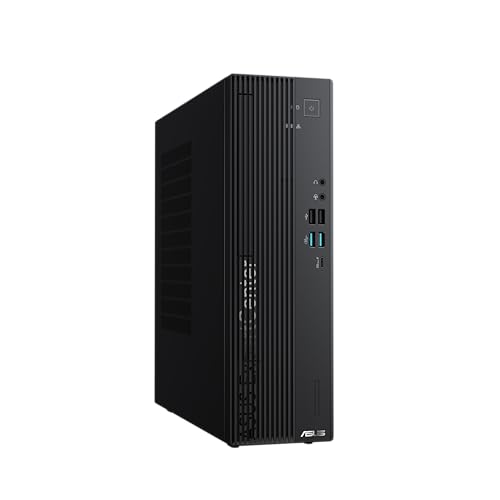
ASUS ExpertCenter D5 -- Best Quiet Desktop Tower for Home
The ExpertCenter D5 is technically a business line desktop but functions as an excellent home tower, particularly for households sensitive to fan noise. ASUS has engineered the cooling system for low noise at typical workloads, making it much quieter than budget consumer towers during streaming or video calls. The build quality is above average for the price with a sturdy chassis and internal layout that makes adding a second RAM stick or additional storage drive easy. Core i5 and i7 configurations are available. It does not include a keyboard or mouse, so budget an additional to for those if needed.

Lenovo IdeaCentre 5 -- Best All-Around Home Desktop Tower
The IdeaCentre 5 is Lenovo's consumer desktop line aimed squarely at home use, and the current generation hits its target well. AMD Ryzen 5 configurations with 16GB RAM offer snappy performance for multitasking households, and the Ryzen integrated graphics handle casual gaming in addition to standard home tasks. The tower is slim enough to stand upright on a desk without dominating the surface. USB ports are plentiful on both front and rear panels. Lenovo's Vantage software provides update management and system health monitoring without being invasive. This is a purchase you can make with confidence for a family home computer.
Buying considerations
What to consider
Think about how many people will use the computer and what they will do with it. A household with kids doing homework, parents streaming video, and occasional video calls is best served by 16GB RAM and at least a Core i5 or Ryzen 5 processor. Prioritize SSDs over hard drives since they make the system feel faster in daily use. Consider the number and type of USB ports against your peripherals. If the tower will sit on a desk in a shared space, look at noise levels, quieter towers are noticeably more pleasant. Finally, check what comes included since some desktops include keyboard and mouse while others do not.
What to consider
For related reading, see [best computer towers to buy](/articles/best-computer-towers-to-buy) and [best computer tower for home office](/articles/best-computer-tower-for-home-office). Review our evaluation criteria at [/methodology](/methodology).
Questions answered
For general home use including web browsing, streaming video, video calls, and school assignments, an Intel Core i3 or AMD Ryzen 3 processor with 8GB of RAM and a 256GB SSD covers the essentials. Stepping to 16GB RAM and a 512GB SSD adds headroom for more browser tabs and larger file storage. A dedicated graphics card is not necessary for these tasks unless you want to do light gaming.
Desktop towers are generally better value and easier to repair. All-in-ones integrate the monitor, which limits upgrade options and can mean replacing the whole unit if one component fails. Towers let you use any monitor and upgrade RAM or storage independently over time. All-in-ones do save desk space and cable clutter, making them reasonable for households where minimal setup is a priority and upgradeability is not.
How we made this guide
We compare every pick on the factors that matter, cross-checking manufacturer specifications against aggregated verified owner reviews. We rank independently and never take payment for placement. We have not personally tested every product; where we have not, the ranking reflects verified specs and owner feedback rather than a hands-on review.
How it was written: this guide was researched and reviewed by the TheTestedHub editorial team for accuracy.
Affiliate disclosure: TheTestedHub is reader-supported. When you buy through links on our site, we may earn a commission at no extra cost to you.
Keep reading

Your Docking Station Match: CalDigit TS4 and More

Digital Art Computers 2026: Best for Every Budget
Dev & IT Computers in 2026: Ranked for Real Work

Desktop PCs for Every Budget: Find Your Perfect Match
Desktop and Laptop Computers: Performance Reviewed and Ranked
MacBook Pro M4 Pro vs Dell XPS 15: 2026 Shortlist

Buy the Best DIY Computer in 2026: Corsair One i300
