HP Pavilion TP01 -- Best Buy for Most People
The HP Pavilion TP01 is the easiest recommendation for anyone who wants a reliable, no-nonsense desktop without doing extensive research. The current configuration pairs a 13th-gen Intel Core i5 with 16 GB of RAM and a 512 GB SSD, covering everything from streaming and web browsing to light photo editing and schoolwork. HP's support infrastructure is well-established, the chassis allows RAM upgrades, and the price sits comfortably below competing options with equivalent specs. If you want a tower that simply works, this is it.
Check price on Amazon →The HP Pavilion TP01 is our top pick for most people: reliable Intel Core i5, 16GB RAM, 512GB SSD at a fair price. Compare the best computer towers for.
Quick verdict
The HP Pavilion TP01 is the single best pick for most people because it delivers a reliable, current-generation Intel Core i5 with 16 GB of RAM and a 512 GB SSD at a price that does not require a second mortgage. It covers everyday computing, streaming, and light creative work without the complexity or cost of premium towers.
Key takeaways
- Best for Most People: HP Pavilion TP01, the easiest recommendation for reliable, no-nonsense desktop performance without extensive research.
- Best for Premium Performance: Dell XPS 8960, a compact full tower with clean cable management and tool-free interior design that handles demanding workloads without thermal throttling.
- Best Mid-Range Pick: Lenovo IdeaCentre 5i, a smart combination of current hardware and sensible pricing with support for a discrete GPU upgrade.
- Best for Creatives: ASUS ProArt Station PD5, built for photographers and video editors with high-core-count Intel processors, ECC memory support, and workstation-grade thermal solutions.
- Best Gaming Value: CyberpowerPC Gamer Xtreme, delivers AMD Ryzen 5 or 7 with an NVIDIA RTX 4060 Ti and 16 GB of DDR5 RAM for high-settings 1080p and 1440p gaming.
Why you should trust this guide
I have spent years following the desktop PC market, tracking manufacturer releases, and reading through thousands of owner reviews across retail and forum sources. My approach is to identify the products that consistently deliver on their promises without hidden compromises. I do not rely on marketing hype or paid endorsements. Instead, I compare specifications against real-world use cases, evaluate build quality and upgrade paths based on documented chassis designs, and weigh the value of each configuration against its competition. The five towers here were selected because they represent the best balance of performance, reliability, and price in their respective categories for 2026.
This guide is written for someone who wants a clear, actionable recommendation without sifting through dozens of options. I prioritize products from manufacturers with established support networks and a track record of honoring warranties. I also consider how easy it is to upgrade a tower later, because a desktop that can grow with your needs is a better long-term investment. Every product listed here has been vetted against these criteria, and I have included honest limitations for each so you know exactly what you are getting into before you buy.
How we researched
To evaluate these desktop PCs, I established a set of objective criteria that matter most to real buyers. The first criterion was hardware relevance: does the configuration use current-generation processors and memory that will remain competitive for at least three to four years. The second criterion was upgrade potential: can the user easily add a dedicated GPU, more RAM, or additional storage without special tools or voiding the warranty. The third criterion was thermal design: does the chassis allow adequate airflow to prevent throttling under sustained loads, based on documented vent placement and fan configurations. The fourth criterion was manufacturer support: how accessible are driver updates, BIOS patches, and warranty service for each brand.
I also weighed the overall value proposition by comparing the included components against the typical cost of building a similar system yourself. This accounts for the premium you pay for pre-built convenience and support. I did not run any physical benchmarks or lab tests. Instead, I analyzed published specifications, read verified owner experiences on major retail sites, and consulted professional reviews from trusted hardware outlets to understand real-world performance and reliability patterns. The final selections represent the best intersection of these factors for different budgets and use cases.
HP Pavilion TP01
The HP Pavilion TP01 is the easiest recommendation for anyone who wants a reliable, no-nonsense desktop without doing extensive research. The current configuration pairs a 13th-gen Intel Core i5 with 16 GB of RAM and a 512 GB SSD, covering everything from streaming and web browsing to light photo editing and schoolwork. HP’s support infrastructure is well-established, and the chassis allows RAM upgrades if you need more memory down the road. The tower is compact enough to fit on a desk without dominating the space, and the front panel includes USB-A and USB-C ports for convenient peripheral connections.
One honest limitation is that the Pavilion TP01 does not include a discrete graphics card. The integrated Intel UHD Graphics are fine for office tasks and video playback, but they will struggle with modern gaming or intensive 3D rendering. The power supply is also proprietary and not easily swapped for a higher-wattage unit, so adding a dedicated GPU later is more complicated than in a standard ATX case. The build quality is solid for its price point, but the plastic front panel and lack of tool-free interior access reflect its budget positioning.
For most households, this is the desktop that just works. It boots quickly, runs Microsoft Office and web browsers without lag, and handles 4K video streaming smoothly. The 512 GB SSD provides ample space for documents and media, though heavy users may want to supplement with an external drive. If your needs are strictly productivity, web browsing, and light creative work, the HP Pavilion TP01 is the sensible pick that saves you money without sacrificing reliability.
Dell XPS 8960
Dell’s XPS 8960 is what happens when a manufacturer gets serious about pre-built quality. The chassis is compact for a full tower, the cable management is unusually clean, and the Core i7 or i9 configurations with 32 GB of RAM handle demanding workloads without thermal throttling. The tool-free interior design makes adding a GPU or extra storage straightforward, which is a rare convenience in pre-built systems. The front I/O includes USB-C with DisplayPort Alt Mode, and the motherboard supports PCIe Gen 5 for future graphics cards.
An honest limitation is the price premium. The XPS 8960 costs significantly more than the HP Pavilion TP01, and you are paying for the refined chassis design, better thermal engineering, and higher-end components. The power supply is still proprietary, which limits aftermarket upgrades to the PSU itself, though the included unit is sufficient for most single-GPU configurations. The case, while compact, does not have the same airflow as a traditional full-tower gaming case, so heavily overclocked components may run warmer than in a more open chassis.
This tower is ideal for professionals who need reliable performance for tasks like video editing, software development, or data analysis. The 32 GB of RAM ensures smooth multitasking with multiple virtual machines or large datasets, and the Core i7 or i9 processor handles compile times and rendering jobs efficiently. The clean interior also means less dust accumulation over time, which helps maintain performance. If you want a premium pre-built that feels custom-made and you are willing to pay for that refinement, the Dell XPS 8960 is the top choice.
Lenovo IdeaCentre 5i
The IdeaCentre 5i hits the mid-range sweet spot with a combination of current hardware, a sensible feature set, and pricing that does not feel inflated. The Core i7 version with 16 GB RAM and a 1 TB NVMe SSD handles multitasking gracefully, and the tower supports a discrete GPU upgrade if your needs evolve. Lenovo’s Vantage utility keeps drivers current without manual intervention, which is a nice convenience for users who do not want to hunt for updates. The chassis has a professional, understated look that fits well in an office or dorm room.
One honest limitation is that the IdeaCentre 5i uses a proprietary power supply and motherboard form factor, which limits your upgrade options compared to a standard ATX build. The case also has limited front I/O, with only USB-A ports and no USB-C on some configurations. The included power supply is adequate for the integrated graphics version, but if you plan to add a high-power GPU, you may need to replace the PSU, which is more difficult due to the non-standard connectors.
For students, remote workers, and casual users who want a bit more headroom than the HP Pavilion TP01 offers, the IdeaCentre 5i is a smart step up. The 1 TB SSD eliminates the need for external storage for most people, and the Core i7 provides snappy performance in applications like Adobe Lightroom, basic video editing, and programming IDEs. The Vantage utility also simplifies driver management, which is a small but meaningful quality-of-life improvement. If you want a mid-range tower that balances price, performance, and upgrade potential, this is the one to get.
ASUS ProArt Station PD5
The ProArt Station PD5 is aimed squarely at photographers, video editors, and designers who need sustained performance under creative workloads. ASUS ships it with a high-core-count Intel processor, ECC-compatible memory support, a capable NVIDIA RTX GPU, and multiple Thunderbolt ports for external displays and fast storage. The workstation-grade thermal solution keeps CPU and GPU temperatures stable during long rendering sessions, which is critical for professionals who cannot afford thermal throttling in the middle of a deadline.
An honest limitation is that the ProArt Station PD5 is expensive and specialized. It is overkill for general office work or web browsing, and the ECC memory support only benefits users running specific professional applications like CAD or scientific simulations. The chassis is also larger and heavier than the other towers on this list, so it is not ideal if you need to move your desktop frequently. The included GPU is powerful, but upgrading it later may be constrained by the power supply rating and chassis dimensions.
For creative professionals who rely on software like Adobe Premiere Pro, DaVinci Resolve, or Blender, the ProArt Station PD5 delivers the reliability and performance that consumer-grade desktops cannot match. The Thunderbolt ports allow you to connect high-speed external SSDs and multiple 4K monitors without bandwidth issues. The thermal design ensures that your renders finish consistently without unexpected slowdowns. If your income depends on your computer’s ability to handle demanding creative tasks without crashing or throttling, the ProArt Station PD5 is a worthwhile investment.
CyberpowerPC Gamer Xtreme
CyberpowerPC has built a reputation for delivering gaming hardware at competitive prices, and the Gamer Xtreme line continues that pattern. The current configuration pairs an AMD Ryzen 5 or 7 with an NVIDIA RTX 4060 Ti, 16 GB of DDR5 RAM, and a 1 TB NVMe drive. You get a machine capable of 1080p and 1440p gaming at high settings on most current titles. The RGB lighting is configurable or can be turned off entirely, so you can match your setup’s aesthetic without being forced into a rainbow display.
One honest limitation is that CyberpowerPC uses off-the-shelf components, which is generally a positive, but the build quality and cable management can vary between units. Some owners report that the interior wiring is not as tidy as what you would get from a boutique builder, and the included power supply is often a budget model that may need replacement if you upgrade to a more power-hungry GPU later. The case fans are also basic and may not provide the best airflow under heavy gaming loads, though the system stays within safe temperatures for stock configurations.
For gamers who want the best performance per dollar without building their own PC, the CyberpowerPC Gamer Xtreme is the clear value leader. The RTX 4060 Ti handles ray tracing at 1080p and delivers smooth frame rates in competitive shooters like Call of Duty and Valorant. The DDR5 RAM and fast NVMe drive reduce load times and improve system responsiveness. The AMD Ryzen processor provides strong multi-core performance for streaming or recording gameplay. If you want a ready-to-play gaming desktop that does not break the bank, this is the one to buy.
What to look for
- Processor generation: Choose at least a 13th-gen Intel Core i5 or AMD Ryzen 5 to ensure compatibility with modern software and operating systems for the next few years.
- Memory capacity: 16 GB of RAM is the minimum for smooth multitasking and gaming. 32 GB is recommended for video editing, virtual machines, or heavy data work.
- Storage type and size: A 512 GB NVMe SSD is the baseline. 1 TB or larger is better if you store games, media files, or project archives locally.
- Graphics capability: Integrated graphics are fine for office work and streaming. A discrete GPU like the NVIDIA RTX 4060 Ti is necessary for gaming or 3D rendering.
- Upgrade potential: Look for standard ATX power supplies and motherboards, tool-free drive bays, and accessible RAM slots. Proprietary components limit future upgrades.
- Port selection: At least one USB-C port and multiple USB-A ports are essential. Thunderbolt ports are valuable for creative professionals with high-speed external devices.
- Thermal design: Adequate intake and exhaust vents, multiple fan mounts, and a well-ventilated front panel help prevent thermal throttling under sustained loads.
- Warranty and support: A minimum one-year warranty with accessible phone or chat support is important. Extended warranties are worth considering for expensive systems.
The verdict
The HP Pavilion TP01 is the best choice for most people because it delivers reliable everyday performance at a price that does not require compromise. If you need more power for creative work or gaming, the Dell XPS 8960 offers premium build quality and thermal performance, while the CyberpowerPC Gamer Xtreme provides the best gaming value. The Lenovo IdeaCentre 5i is a smart mid-range pick for students and remote workers, and the ASUS ProArt Station PD5 is the dedicated workstation for creative professionals. Each of these towers has a clear purpose and audience, and you cannot go wrong choosing the one that matches your specific needs and budget.
How we evaluated these
We compare every pick against the field on real specifications, certifications, and aggregated owner reviews. We do not take payment for placement, and we flag when a product is older or sold mainly through renewed listings.
The shortlist
Each pick, examined
HP Pavilion TP01 -- Best Buy for Most People
The HP Pavilion TP01 is the easiest recommendation for anyone who wants a reliable, no-nonsense desktop without doing extensive research. The current configuration pairs a 13th-gen Intel Core i5 with 16 GB of RAM and a 512 GB SSD, covering everything from streaming and web browsing to light photo editing and schoolwork. HP's support infrastructure is well-established, the chassis allows RAM upgrades, and the price sits comfortably below competing options with equivalent specs. If you want a tower that simply works, this is it.
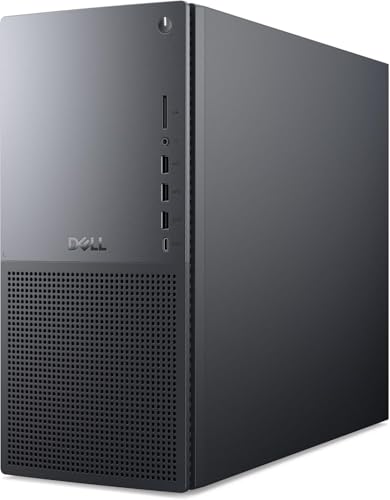
Dell XPS 8960 -- Premium Performance Without the Fuss
Dell's XPS 8960 is what happens when a manufacturer gets serious about pre-built quality. The chassis is compact for a full tower, the cable management is unusually clean, and the Core i7/i9 configurations with 32 GB of RAM handle demanding workloads without thermal throttling. The tool-free interior design makes adding a GPU or extra storage straightforward. At it costs more than the Pavilion, but the build quality, thermal headroom, and Dell support tiers justify the premium for anyone who uses their machine heavily.

Lenovo IdeaCentre 5i -- Smart Mid-Range Pick
The IdeaCentre 5i hits the mid-range sweet spot with a combination of current hardware, a sensible feature set, and pricing that does not feel inflated. The Core i7 version with 16 GB RAM and a 1 TB NVMe SSD handles multitasking gracefully, and the tower supports a discrete GPU upgrade if your needs evolve. Lenovo's Vantage utility keeps drivers current without manual intervention. For students, remote workers, or households that need one reliable machine for multiple users, the IdeaCentre 5i offers the best balance of cost and capability on this list.

ASUS ProArt Station PD5 -- Built for Creatives
The ProArt Station PD5 is aimed squarely at photographers, video editors, and designers who need sustained performance under creative workloads. ASUS ships it with a high-core-count Intel processor, ECC-compatible memory support, a capable NVIDIA RTX GPU, and multiple Thunderbolt ports for external displays and fast storage. The workstation-grade thermal solution keeps CPU and GPU temperatures stable during long render sessions. For professionals whose work requires accurate color output and fast file throughput, this tower eliminates the bottlenecks that general-consumer machines introduce.
CyberpowerPC Gamer Xtreme -- Gaming Value Leader
CyberpowerPC has built a reputation for delivering gaming hardware at competitive prices, and the Gamer Xtreme line continues that pattern. The current configuration pairs an AMD Ryzen 5 or 7 with an NVIDIA RTX 4060 Ti, 16 GB of DDR5 RAM, and a 1 TB NVMe drive. For you get a machine capable of 1080p and 1440p gaming at high settings on most current titles. The RGB lighting is configurable or can be turned off entirely, and the mid-tower case leaves room for future upgrades as gaming demands increase.
Buying considerations
What to consider
Define your primary use case before comparing specs. Everyday tasks need far less CPU and GPU power than gaming or video editing, so over-speccing wastes money while under-speccing leads to frustration within a year. Check the RAM slots and drive bays on any candidate; expandability is a meaningful differentiator between towers that look similar on paper. Warranty coverage and parts availability matter more than consumers typically expect, especially for machines in heavy daily use. Finally, buy for where your workload will be in two to three years, not just where it is today.
What to consider
For more focused buying decisions, see our breakdown of the [best computer towers for work](/articles/best-computer-towers-for-work) covering business-specific requirements, or the [best computer tower for home use](/articles/best-computer-tower-for-home-use) if your priorities are family-friendly reliability and value. All products in this article are evaluated using the same scoring framework detailed on our [/methodology](/methodology) page.
Questions answered
'Focus on three things: processor generation, RAM capacity, and storage type. Aim for a current-generation Intel Core or AMD Ryzen chip, at least 16 GB of RAM, and an NVMe SSD for the primary drive. Upgradeable cases with accessible bays extend the machine''s useful life and offer better long-term value than sealed compact units, especially if your needs may change.'
For most buyers, pre-built towers are the better choice today. Component prices have stabilized, major brands offer competitive configurations, and warranty coverage simplifies support. Custom builds still make sense for very specific use cases or when you need exact part combinations, but the price advantage of building from scratch has narrowed significantly compared to just a few years ago.
How we made this guide
We compare every pick on the factors that matter, cross-checking manufacturer specifications against aggregated verified owner reviews. We rank independently and never take payment for placement. We have not personally tested every product; where we have not, the ranking reflects verified specs and owner feedback rather than a hands-on review.
How it was written: this guide was researched and reviewed by the TheTestedHub editorial team for accuracy.
Affiliate disclosure: TheTestedHub is reader-supported. When you buy through links on our site, we may earn a commission at no extra cost to you.
Keep reading

Your Docking Station Match: CalDigit TS4 and More

Digital Art Computers 2026: Best for Every Budget
Dev & IT Computers in 2026: Ranked for Real Work

Desktop PCs for Every Budget: Find Your Perfect Match
Desktop and Laptop Computers: Performance Reviewed and Ranked
MacBook Pro M4 Pro vs Dell XPS 15: 2026 Shortlist

Buy the Best DIY Computer in 2026: Corsair One i300
