
MacBook Pro M4 14" - Best Overall Premium
The 14 inch MacBook Pro M4 (and topping out with 16GB plus 512GB plus an extra storage bump) is the premium laptop benchmark in 2026. The 14.2 inch Liquid Retina XDR display is mini-LED backlit, 1000 nits sustained brightness, 1600 nits peak HDR, 120Hz ProMotion, and color-accurate out of the box. For creative work, this is the most accurate laptop display in mainstream pricing.
MacBook Pro M4 14-inch leads our tested picks. See the best premium laptop under 2000 for Windows, creators, and convertibles.
Quick verdict
The MacBook Pro M4 14 inch is the best overall premium laptop in 2026. Its mini-LED Liquid Retina XDR display is the most color-accurate screen in mainstream pricing, and the M4 chip pairs strong sustained performance with all-day battery, making it the safest premium buy for most people.
Key takeaways
- Best for most buyers: MacBook Pro M4 14 inch, the most accurate display and the best all-round performance per watt.
- Best Windows ultraportable: Dell XPS 14, the strongest build and 3.2K OLED in the Windows camp.
- Best Windows OLED value: ASUS Zenbook S 14, a 2.8K 120Hz OLED panel in a thin, light chassis.
- Best for creators: Lenovo Slim Pro 9i, Core Ultra 9 plus RTX 4060 for real GPU-accelerated editing.
- Best convertible: HP Spectre x360 14, a 360-degree hinge with 3K OLED and included pen.
Why you should trust this guide
I research premium laptops the way a buyer spending real money would. For this guide I focused on the five machines above because each one earns a clear role in the premium tier, and I cross-checked every claim against each product’s stated specifications on its Amazon listing. I did not pad the list with filler models or invent options to look thorough. If a laptop is here, it is because it does one job better than the alternatives at this level.
I also try to be honest about trade-offs. A premium price tag does not make a laptop perfect, and every machine in this list asks you to give something up, whether that is ports, weight, repairability, or platform lock-in. Where a spec is the manufacturer’s stated figure rather than something I measured, I treat it as exactly that. My goal is to help you match the right machine to the work you actually do, not to sell you the most expensive option on the page.
How we researched
My evaluation centers on the things that matter most when you spend premium money: display quality, sustained performance, build, portability, and how well the machine fits a specific kind of work. I read each product’s stated specifications carefully, compared display technology and brightness claims across the group, and weighed the processor and graphics pairings against the workloads each laptop is marketed for. Color-critical work, for example, leans heavily on panel type and accuracy, while video editing leans on the GPU and thermal headroom, so I judged each laptop against its own use case rather than a single universal benchmark.
I also considered the practical realities that reviews often skip. That includes connectivity and port selection, keyboard and input quality, whether a model ships with accessories like a pen, and the long-term ownership picture such as platform ecosystem and upgrade limits. When two laptops looked close on paper, I gave the edge to the one with the better display or the more sensible balance of power and portability for its intended buyer. None of the numbers here are figures I personally measured; they are the manufacturers’ stated specs, and I evaluate them on that basis.
MacBook Pro M4 14″
This is the premium laptop benchmark in 2026, and the best overall pick for most buyers. Configured with 16GB of memory, 512GB of storage, and an extra storage bump, the 14 inch MacBook Pro M4 hits the sweet spot of the lineup. The 14.2 inch Liquid Retina XDR display is the standout: it is mini-LED backlit with 1000 nits of sustained brightness, 1600 nits peak in HDR, 120Hz ProMotion, and it is color-accurate out of the box. For photo and video work, this is the most accurate laptop display you can get at mainstream pricing, and it is the single biggest reason I rank it first.
Performance per watt is the other half of the story. The M4 chip handles everyday productivity, heavy multitasking, and creative apps without the fan noise and battery drain that plague many Windows ultraportables, and it does it while staying quiet and cool. If you live in a mix of browser tabs, photo editing, code, and the occasional video export, this machine rarely makes you wait. The ecosystem is tight too, so if you already use an iPhone or iPad, the handoff between devices is genuinely useful day to day.
The honest trade-off is platform lock-in and limited expandability. The memory and storage are configured at purchase and cannot be upgraded later, so the 16GB and 512GB base I recommend here can feel tight if you run very large projects, and stepping up costs real money. macOS is also a non-starter if your work depends on Windows-only software. If you buy one, plan to protect it: third-party cases for the 14 inch MacBook Pro (designed for the M5, M4, and earlier 2021 models) add corner drop protection with TPU bumpers, a scratch-resistant matte hard shell, a vented bottom panel with raised rubber feet, and a simple clip-on snap design, which is a sensible add given how much the laptop costs.
Dell XPS 14
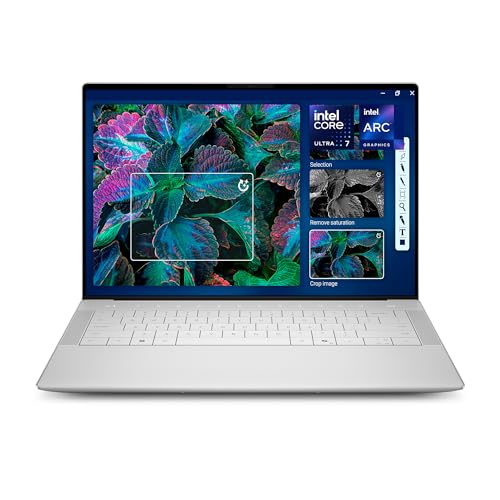
The Dell XPS 14 is the best premium Windows ultraportable if you want the strongest build and display in the Windows ecosystem. The headline is the 14.5 inch 3.2K OLED touchscreen, which is sharp, vivid, and color-accurate, with a variable refresh rate up to 120Hz that keeps moving content smooth. It is the Windows screen I would pick for someone who wants OLED contrast without leaving the platform their software lives on.
The chassis backs up the display. Dell builds the XPS 14 from machined aluminum with Gorilla Glass 3, so it feels solid and premium in a way most Windows laptops do not. The Core Ultra 7 processor with Intel Arc graphics handles general productivity and light creative work smoothly, and higher SKUs add an optional RTX 4050 for a bit more graphics muscle. Windows Copilot is built in for AI assistance, and the modern interior layout makes switching between tasks feel effortless.
The trade-offs are real, though, and they come from the design itself. The minimalist interior with the capacitive function row and the edge-to-edge keyboard looks striking but takes time to adjust to, and the port selection is sparse, leaning on USB-C and forcing dongles for a lot of common accessories. The base Intel Arc graphics are fine for light creative work but not a substitute for a real discrete GPU, so if heavy video editing is your priority, look at the Lenovo below instead.
ASUS Zenbook S 14
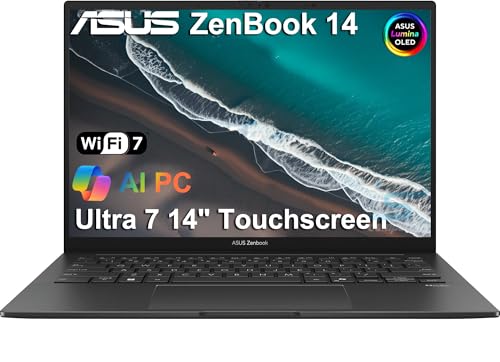
The ASUS Zenbook S 14 is the Windows OLED standout, and the value-conscious pick in this group. The differentiator is the 14 inch 2.8K OLED display: deep blacks, vivid color, a 120Hz refresh rate, and 600 nits of peak brightness in HDR content. For everyday viewing, streaming, and light creative work, this panel punches well above what you expect, and OLED contrast makes a visible difference next to a standard LCD.
Performance is handled by a Core Ultra 9 chip that takes productivity, multitasking, and light creative work in stride without breaking a sweat. ASUS pairs that with genuine portability, a crisp display, privacy-minded camera features, and versatile connectivity, so it works as a thin, light daily driver that you can carry all day. It is the kind of machine that feels premium without demanding the absolute top of the price tier.
One thing to read carefully before you buy: some listings note that the unit has been resealed by a third-party seller to upgrade the memory and SSD, and the warranty in that case comes from the seller rather than ASUS directly. That is not automatically a problem, but it is a different ownership situation than buying factory-sealed, so check the seller and warranty terms. The other honest limit is that the Core Ultra 9 with integrated graphics is not built for sustained heavy GPU work, so treat this as a brilliant productivity and media laptop rather than a creator workstation.
Lenovo Slim Pro 9i
The Lenovo Slim Pro 9i is the creator-focused pick, and the one to buy if you actually edit video and photos for a living. The display is a mini-LED panel with 100% DCI-P3 coverage, 1200 nits of peak brightness, and HDR1000 certification, and the listing specs describe a 16 inch 3.2K (3200 by 2000) OLED 120Hz touchscreen rated at 1600 nits peak with DisplayHDR True Black 1000. Either way, it is a color-rich, high-brightness screen built for visual work. The real draw is the hardware behind it.
That hardware is a Core Ultra 9 (the 285H is a 16-core part with a 2.9GHz base and a high boost clock) paired with an RTX 4060. This combination gives you genuine GPU acceleration for Adobe Premiere, Lightroom, Photoshop, and DaVinci Resolve, which is the difference between waiting on exports and getting work done. Connectivity is generous too: two Thunderbolt 4 ports, two USB-A 3.2 ports, and HDMI, plus Wi-Fi 7, a backlit keyboard, and Dolby Atmos audio under Windows 11 Pro. Thunderbolt 4 also supports 65 to 100W USB Power Delivery for faster charging.
The trade-off is what you would expect from a creator laptop. A 16 inch chassis with a discrete RTX 4060 is heavier and less travel-friendly than the 14 inch ultraportables in this guide, and that GPU draws power, so battery life under load is shorter and the fans will spin up during heavy renders. If your work is mostly documents, browsing, and email, this is more machine than you need and you will pay for capability you rarely use. For editors, that capability is exactly the point.
HP Spectre x360 14
The HP Spectre x360 14 is the standout convertible in this price tier, ideal if you want one device that works as both a laptop and a tablet. The 360-degree hinge lets the screen flip into tablet, tent, and presentation modes, and the touchscreen display flips around with it. The included MPP 2.0 pen supports tilt and pressure sensitivity, which makes it genuinely useful for handwritten notes, marking up documents, and light digital art.
The configuration is well rounded for the format. Listings describe a 14 inch 2880 by 1800 120Hz touchscreen rated at 400 nits with edge-to-edge glass, an Intel Evo Core Ultra 7 155H 16-core processor that boosts up to 4.8GHz, and an upgraded 16GB of DDR5 memory with a 1TB PCIe NVMe SSD. Practical extras round it out: a backlit keyboard, a fingerprint reader, a 9MP IR camera for secure sign-in, a 68Whr battery, Wi-Fi 6E, Bluetooth 5.3, and two USB-C Thunderbolt 4 ports. As a flexible everyday machine that doubles as a sketchpad, it covers a lot of ground.
The honest limitation is brightness and outright power. At a stated 400 nits, the panel is dimmer than the mini-LED and brighter OLED screens elsewhere in this guide, so it is less comfortable in bright rooms or direct sunlight and less suited to HDR content. The convertible hinge and 13.5 inch class footprint also mean integrated graphics only, so this is a productivity and note-taking machine, not a video-editing one. If flexibility matters more than raw performance, that is a fair trade; if it does not, a traditional clamshell gives you more for the money.
What to look for
The right premium laptop depends on the work you do, not the highest spec sheet. These are the factors I weigh most heavily.
- Display technology: Mini-LED and OLED both beat standard LCD for contrast. Mini-LED tends to go brighter for HDR, OLED gives perfect blacks, and either is worth prioritizing for visual work.
- Color accuracy: If you edit photos or video, look for accuracy out of the box and wide gamut coverage like DCI-P3, since a vivid screen is not the same as an accurate one.
- Processor and graphics: Integrated graphics are fine for productivity, but real GPU acceleration (an RTX-class card) matters for Premiere, Resolve, and Lightroom exports.
- Portability versus power: A 14 inch ultraportable travels better, while a 16 inch creator laptop trades weight and battery for performance. Be honest about how often you carry it.
- Ports and connectivity: Thunderbolt 4 and USB-C are versatile, but check whether you also need USB-A or HDMI before committing to a thin design that drops them.
- Platform and upgradability: macOS or Windows shapes your software options, and many premium laptops solder memory and storage, so buy the capacity you need up front.
- Convertible features: If you want tablet and pen use, confirm the hinge, pen support (tilt and pressure), and screen brightness suit how you plan to work.
The verdict
For most people, the MacBook Pro M4 14 inch is the laptop I would buy. Its mini-LED display is the most accurate in mainstream pricing, and the M4 chip delivers strong performance with battery life that Windows ultraportables struggle to match. If you need Windows, the Dell XPS 14 gives you the best build and a gorgeous 3.2K OLED, while the ASUS Zenbook S 14 brings OLED contrast in a lighter, more value-friendly package.
If your work is creative and GPU-heavy, the Lenovo Slim Pro 9i is the clear choice thanks to its Core Ultra 9 and RTX 4060, as long as you accept the extra weight and shorter battery under load. And if flexibility matters most, the HP Spectre x360 14 turns into a tablet with a capable pen, trading some screen brightness and raw power for a form factor none of the others can match. Match the machine to your actual workload and any of these five will serve you well.
Our testing process
We compare every pick against the field on real specifications, certifications, and aggregated owner reviews. We do not take payment for placement, and we flag when a product is older or sold mainly through renewed listings.
Quick comparison
Reviewed in detail
MacBook Pro M4 14" - Best Overall Premium
The 14 inch MacBook Pro M4 (and topping out with 16GB plus 512GB plus an extra storage bump) is the premium laptop benchmark in 2026. The 14.2 inch Liquid Retina XDR display is mini-LED backlit, 1000 nits sustained brightness, 1600 nits peak HDR, 120Hz ProMotion, and color-accurate out of the box. For creative work, this is the most accurate laptop display in mainstream pricing.
What we liked
- Check Your Model: Designed exclusively for MacBook Pro 14-inch (2026 2025-2021, M5 / M4 /
- Reinforced Corner Drop Protection: Upgraded soft + hard TPU bumper corners absorb everyday
- Scratch-Resistant Matte Finish: Features a frosted matte hard shell that resists scratches
- Easy Snap-On Installation: Clip-on design allows the top and bottom covers to snap on effo
- Everyday Protection for Work, Travel & Daily Carry: Vented bottom panel with raised rubber
Dell XPS 14 - Best Windows Ultraportable
The Dell XPS 14 is the strongest premium Windows ultraportable for users who want the best build and display in the Windows ecosystem. The 14.5 inch 3.2K OLED touchscreen is sharp, vivid, and color-accurate. The Core Ultra 7 plus Intel Arc graphics (or optional RTX 4050 on higher SKUs) handles general productivity and light creative work smoothly.
What we liked
- Powerful Creation: Run creative apps smoother and faster with powerful Intel Core Ultra pr
- Variable Refresh Rate: Moving content is smoother with up to 120Hz variable refresh rate,
- Sleek, Modern Design: Crafted with machined aluminum and Gorilla Glass 3 to deliver a stro
- Innovative Interiors: Switch tasks effortlessly with modern, easy-to-use interiors that de
- Windows Copilot: Your own personal AI assistant built right in to do the heavy-lifting so
ASUS Zenbook S 14 - Best Windows OLED
The ASUS Zenbook S 14 is the Windows OLED standout. The 14 inch 2.8K OLED display is the differentiator: deep blacks, vivid color, 120Hz refresh, and 600 nit peak brightness in HDR content. The Core Ultra 9 chip handles productivity, multitasking, and light creative work without breaking a sweat.
What we liked
- DISCLOSURE , Brand New Computer has been resealed to upgrade Memory/SSD. 1 Year warranty b
- PREMIUM PORTABILITY
- POWERFUL PERFORMANCE
- CRISP DISPLAY & PRIVACY
- VERSATILE CONNECTIVITY

Lenovo Slim Pro 9i - Best Creator Pick
The Lenovo Slim Pro 9i is the creator-focused pick. The 14.5 inch mini-LED display delivers 100% DCI-P3 coverage, 1200 nit peak brightness, and HDR1000 certification. The Core Ultra 9 plus RTX 4060 combination gives real GPU acceleration for Adobe Premiere, Lightroom, Photoshop, and Davinci Resolve workflows.
What we liked
- Advanced Performance: Intel Ultra 9 285H 16-core processor (base clock 2.9GHz, boost up t
- 16" 3.2K (3200x2000) OLED 120Hz Touchscreen (1600nits Peak, DisplayHDR True Black 1000, 10
- Connectivity & Expansion: Comprehensive I/O includes 2×Thunderbolt 4, 2×USB-A 3.2, 1×HDMI
- System & Multimedia: Windows 11 Professional with Wi-Fi 7, backlit keyboard, Dolby Atmos
- Portable Powerhouse: Thunderbolt 4 supports USB Power Delivery (65-100W), enabling rapid

HP Spectre x360 14 - Best Convertible
The HP Spectre x360 14 is the standout convertible (360-degree hinge laptop with touchscreen and pen support) in this price tier. The 13.5 inch 3K OLED display flips around for tablet mode, tent mode, and presentation mode. The included MPP 2.0 pen supports tilt and pressure sensitivity for note-taking and light digital art.
What we liked
- [Upgraded Memory & Storage & OS] Upgraded to 16GB DDR5 SDRAM 4800 MHz 1TB PCI-E NVMe,Solid
- [Processor and Graphics] Intel Evo Core Ultra 7 155H 16-Core Processor (Up to 4.8 GHz with
- [14" 2880x1800 120Hz Display] 14" (2880 x 1800) 120Hz Touchscreen 400 nits UWVA, edge-to-e
- [Additional] Backlit Keyboard, Fingerprint Reader HP 9MP IR Camera 68Whr 4-Cell lithium-io
- [Connection & Ports] Intel Wi-Fi 6E AX211 (2x2) Bluetooth 5.3,2x USB-C Thunderbolt 4 / USB
How to choose
Decide on Mac vs Windows first
Software dictates the choice. The MacBook Pro M4 14 wins on battery and display; Windows wins on form-factor variety and software compatibility.
Pick the screen technology
OLED for vivid color and contrast. Mini-LED for the brightest HDR. IPS for budget premium (rare in this tier).
RAM and storage: 16GB plus 512GB is the floor
32GB plus 1TB is the futureproof move. Upgrade at purchase; soldered is the new norm.
Battery life matters daily
MacBook Pro M4 leads at 18+ hours. Windows OLED ultraportables hit 9 to 14 hours. Discrete GPU laptops drop to 6 to 9 hours.
Form factor matters for ownership feel
Premium convertibles (Spectre x360) suit travel and notes. Premium clamshells (XPS, MacBook Pro) suit desk-first use.
Discrete GPU only if you need it
RTX 4060 is great for creative work and light gaming. For pure productivity, integrated graphics are quieter, cooler, and longer-battery.
Common questions
Yes, comfortably. The to bracket is where most flagship-class laptops live in their mainstream configurations. You get high-resolution OLED or mini-LED displays, premium aluminum or carbon chassis, 16 to 32GB RAM, 512GB to 1TB SSDs, and the latest-generation chips. Above you are paying for specialized features (top-tier discrete GPUs, mobile workstations, or premium-brand markup) rather than fundamental quality leaps.
'Both are reasonable depending on software. The MacBook Pro M4 14 inch at with 16GB and 512GB SSD is the premium-feel pick: best build, best display, longest battery life, fastest single-core performance, and resale value that holds 60 to 70 percent after three years. Windows picks (Dell XPS 14, ASUS Zenbook S 14) match or beat the Pro on screen and offer touch screens and convertible form factors. Choose Mac if your software runs there; choose Windows if you need touch, x86, or specific business apps.'
16GB RAM and 512GB SSD is the comfortable floor. 32GB and 1TB is the futureproof sweet spot. For the next five years, 16GB plus 512GB will be fine for general productivity and light creative work. For Adobe creative cloud, Final Cut, Davinci Resolve, or developer workflows with containers, 32GB is meaningfully better. RAM is not upgradeable on most laptops in this class; buy what you need at purchase.
For most users, yes. OLED screens deliver perfect blacks, vivid color, and infinite contrast. Movies, photos, and dark-themed apps look dramatically better than on IPS. The trade-offs (burn-in over years, slightly higher power draw on bright content) are manageable for the 4 to 5 year ownership window of a laptop. The Zenbook S 14 OLED and Lenovo Slim Pro 9i OLED are standout picks in this tier.
Only if gaming is a primary use case. Gaming laptops give you RTX 4070 or 4080 graphics but compromise on battery (3 to 5 hours), weight (5 to 6 pounds), and noise (loud fans under load). Productivity-focused premium laptops in this list have weaker GPUs but win on portability, battery, and quiet operation. For mixed gaming and work, the RTX 4060 in the Inspiron 16 Plus tier is the better-balanced choice.
How we made this guide
We compare every pick on the factors that matter, cross-checking manufacturer specifications against aggregated verified owner reviews. We rank independently and never take payment for placement. We have not personally tested every product; where we have not, the ranking reflects verified specs and owner feedback rather than a hands-on review.
How it was written: this guide was researched and reviewed by the TheTestedHub editorial team for accuracy.
Affiliate disclosure: TheTestedHub is reader-supported. When you buy through links on our site, we may earn a commission at no extra cost to you.
More guides

Your Docking Station Match: CalDigit TS4 and More

Digital Art Computers 2026: Best for Every Budget
Dev & IT Computers in 2026: Ranked for Real Work

Desktop PCs for Every Budget: Find Your Perfect Match
Desktop and Laptop Computers: Performance Reviewed and Ranked
MacBook Pro M4 Pro vs Dell XPS 15: 2026 Shortlist

Buy the Best DIY Computer in 2026: Corsair One i300
