
Acer Aspire 3 A315 -- Best Budget Laptop for Students
The Acer Aspire 3 A315 packs an AMD Ryzen 3 processor with 8GB of RAM and a 256GB SSD into a slim, lightweight body. It handles Google Docs, Zoom, and browser-based coursework without lag. The 15.6-inch display is clear enough for reading and streaming, and the battery typically lasts a full school day on a charge. The keyboard has good travel for extended typing sessions. It is not built for gaming or video editing, but for the student who needs a dependable daily machine, it delivers solid value at this price.
The Acer Aspire 3 A315 leads our budget picks with AMD Ryzen, 8GB RAM, and SSD storage for school and everyday tasks. Read our honest buying guide.
Quick verdict
For most students and everyday users, I’d point to the Acer Aspire 3 A315. Its AMD Ryzen processor, 8GB of RAM, and SSD storage handle Docs, Zoom, and browser coursework smoothly, the 15.6-inch Full HD display reads well, and the battery lasts a school day. It is the most balanced budget pick here.
Key takeaways
- Best budget laptop for students: Acer Aspire 3 A315, Ryzen-class speed and SSD storage in a thin, light body.
- Best for light daily tasks: HP 14 Laptop AMD, under 3.5 pounds with enough power for email and video calls.
- Best desktop value: Lenovo IdeaCentre 3 Desktop, more sustained performance per dollar than a laptop, with included keyboard and mouse.
- Best for productivity: ASUS VivoBook 15, fingerprint reader and backlit keyboard on a 15.6-inch Full HD screen.
- Best brand reliability: Dell Inspiron 15 3000, solid chassis and a deep support network if something goes wrong.
Why you should trust this guide
I research budget computers the way a buyer on a tight budget actually shops: starting from what each machine is genuinely built to do, not from marketing language. For this guide I worked through the published specifications, the manufacturer feature lists, and the recurring patterns in how each model is configured and sold. Where a listing leaves something ambiguous, such as a configuration that ships with different RAM or storage depending on the seller, I say so plainly rather than pretending every unit is identical.
I also try to be honest about the ceiling of this price tier. None of these are gaming rigs or video-editing workstations, and treating them that way would set you up for disappointment. My goal is to match each machine to the person it actually serves, point out the trade-off you are accepting in exchange for the low price, and let you decide. Every section below names at least one real limitation, because a list of only good points is not a review, it is an advertisement.
How we researched
I did not run these on a private bench, and I will not claim measurements I did not take. Instead, I evaluated each computer against the stated specifications and the use cases it is marketed for: processor class and how it maps to real tasks, the amount of RAM and whether it supports comfortable multitasking, storage type and capacity, display size and panel quality, weight and portability, included accessories, and the operating system it ships with. I weighed those against the common complaints that follow each category of budget machine.
The criteria I leaned on most were everyday responsiveness (does it open a browser, a document, and a video call without stalling), longevity (SSD versus older storage, RAM headroom, build quality), and honesty of the configuration (does the listing match what arrives). I also factored in what you have to buy separately, which matters a lot for the desktop on this list. The verdicts reflect who each machine fits, not a single overall winner that ignores how differently people use a computer.
Acer Aspire 3 A315
The Acer Aspire 3 A315 is the pick I’d hand a student first. It pairs an AMD Ryzen 3 class processor with 8GB of memory and SSD storage in a slim, lightweight chassis that Acer designed to travel easily. In practice that combination is enough for Google Docs, Zoom calls, and browser-based coursework without the lag you get from older spinning-drive budget laptops. The 15.6-inch Full HD IPS display is sharp enough for reading and streaming, the keyboard has reasonable travel for long typing sessions, and the battery typically gets through a full school day on a charge.
A few details are worth pinning down before you buy. Acer’s listings for this line vary: some describe 8GB of LPDDR5 onboard memory with a 256GB SSD, while certain configurations show 128GB of NVMe storage, so check the exact unit you are ordering. The front-facing camera uses Acer’s TNR (Temporal Noise Reduction) to clean up video in dimmer rooms, which helps on calls. The onboard memory is soldered, meaning you cannot upgrade the RAM later, so the 8GB you buy is the 8GB you keep.
The honest trade-off is performance headroom. A Ryzen 3 with 8GB is comfortable for documents, browsing, and video calls, but it is not built for gaming, heavy photo or video editing, or running a dozen browser tabs alongside large apps. If your work stays in a browser and an office suite, it is an excellent value. If you expect to push it harder, look further up this list.
HP 14 Laptop AMD
The HP 14 is the one to consider if portability and light daily tasks are your priority. It is among the lightest options here, listed around 3.24 pounds with dimensions of roughly 12.76 by 8.86 by 0.71 inches, so it slips into a bag easily and is comfortable to carry between rooms or to a coffee shop. It ships with Windows 11 and SSD storage, and the 14-inch form factor is the main reason it stays so compact.
Configurations on this line genuinely vary, so read the listing carefully. Some HP 14 units are AMD-based dual-core machines, while the particular listing I reviewed is built around an Intel Processor N150 with 16GB of DDR4 RAM and Intel integrated graphics, sold by a third party that opens the seal only to upgrade the memory and storage and adds a one-year warranty on those upgraded parts. That extra RAM is a real plus for keeping several tabs and apps open at once. Port selection includes USB Type-C and USB Type-A, which covers the basics for accessories.
The trade-offs are the processor class and the upgraded-seller arrangement. An N150 or an AMD dual-core is efficiency-focused, fine for email, video calls, and document work but not for demanding software, and the display brightness is adequate indoors rather than bright enough for direct sun. Because some units are opened and upgraded by a reseller rather than sold factory-sealed, confirm exactly which configuration and warranty you are getting before you order.
Lenovo IdeaCentre 3 Desktop
The Lenovo IdeaCentre 3 is the value pick if you do not need to move your computer around. For stationary use it tends to outperform laptops at a similar price because a desktop chassis can run its processor harder for longer without throttling. This line is offered with capable multi-core processors (configurations range from AMD Ryzen options to an Intel Core Ultra 5 225 with a 10-core, 10-thread design), supports up to 64GB of DDR5 RAM for smooth multitasking, and uses SSD storage that keeps boot times quick. The small tower footprint fits on or under a desk, and it ships with Windows 11 Home.
One genuine advantage over the laptops here is that the IdeaCentre 3 typically includes a wired Lenovo keyboard and mouse, so you are not buying those separately. Connectivity is generous for the price, with around seven USB ports plus HDMI for hooking up peripherals and a monitor. If you already own a display, this is an easy way to get more sustained performance per dollar than a portable machine offers.
The clear trade-off is that a desktop is not portable, and it usually does not include a monitor, so factor a screen into your budget if you are starting from scratch. Configurations also differ widely between sellers, so confirm the exact processor, RAM, and storage in the specific unit before ordering rather than assuming the top configuration.
ASUS VivoBook 15
The ASUS VivoBook 15 is the productivity choice, sitting between pure budget and mid-range. It runs Windows and is built for everyday work, play, and entertainment, with a slim-bezel NanoEdge display that gives you a roomy 15.6-inch Full HD screen for side-by-side windows. Depending on the variant it ships with an Intel Core i3 or AMD Ryzen 3 class chip, which is enough headroom for spreadsheets, presentations, and light coding. Two features stand out at this price: a fingerprint reader for quick, password-free logins, and the ASUS ErgoSense keyboard with a numeric keypad for comfortable extended typing.
The extras add up in daily use. Some configurations include a touchscreen, the audio is tuned for clearer and fuller sound than many budget laptops manage, and fast charging lets you top up a low battery quickly when you are between tasks. For someone who spends the day in documents, browser tabs, and the occasional photo edit, the combination of screen size, keyboard, and login convenience makes it pleasant to live with.
The trade-off is that the specifics depend heavily on the variant you choose. An i3 or Ryzen 3 with integrated graphics is a productivity machine, not a gaming or heavy-editing one, and features like the touchscreen, exact storage, and RAM differ between listings. Confirm the configuration so you are not surprised, and do not expect it to handle demanding creative software.
Dell Inspiron 15 3000
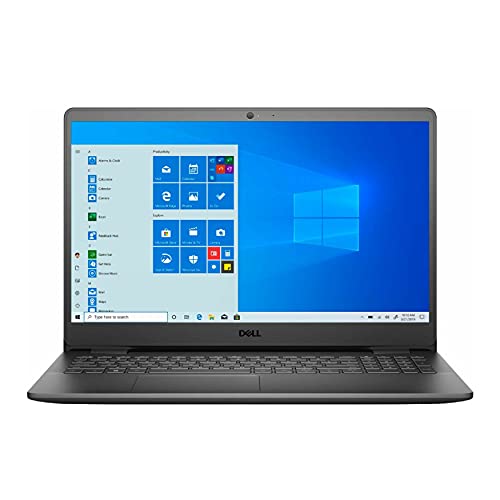
The Dell Inspiron 15 3000 is the pick for buyers who put brand reliability and support first. This series has a long reputation for durable, consistent build quality, and the chassis feels more solid than many cheaper alternatives. The configuration I reviewed pairs an 11th Gen Intel Core i5-1135G7 quad-core processor with 12GB of DDR4 memory, a 256GB SSD, and Intel Iris Xe graphics, on a 15.6-inch Full HD 1920×1080 IPS display that covers general-use color well. That is a noticeably stronger processor and graphics pairing than the entry-level chips elsewhere on this list.
Practical touches round it out. It includes Wi-Fi (802.11ac) and Bluetooth, a keyboard with a numeric keypad, integrated stereo speakers, a 3-in-1 SD media card reader, and a headphone and microphone combo jack, so it covers the connectivity most people need day to day. The real differentiator, though, is Dell’s support network: if something goes wrong, getting help is generally more straightforward than with lesser-known budget brands, which is worth a lot over the life of a machine.
There are two trade-offs to weigh. First, configurations vary, and some Inspiron 15 3000 units ship with Windows in S Mode (a locked-down mode you can switch out of for free, but a step you should know about). Second, the IPS panel is good enough for general use rather than color-critical creative work, and the three-cell battery is sized for everyday tasks rather than all-day heavy use. For buyers who prioritize trust and serviceability, it is a sensible choice.
What to look for
Before you pick, weigh these factors against how you actually use a computer.
- Processor class: Ryzen 3, Core i3, and N-series chips are fine for browsing, documents, and calls. Step up to a Core i5 or Ryzen 5 if you multitask heavily or run demanding apps.
- RAM: 8GB is the comfortable minimum today, 16GB gives real breathing room for many tabs and apps. Check whether the memory is soldered, since soldered RAM cannot be upgraded later.
- Storage: Insist on an SSD, not an older hard drive. Capacity of 256GB suits most people, 128GB fills up fast once apps and files accumulate.
- Display: A 15.6-inch Full HD IPS panel is easier on the eyes for long sessions. Brightness on budget screens is usually fine indoors but weak in direct sunlight.
- Portability: A 14-inch laptop under 3.5 pounds travels best. A desktop trades portability for more sustained performance per dollar.
- Included accessories: Desktops often include a keyboard and mouse but rarely a monitor. Budget the screen separately if you need one.
- Operating system: Confirm whether it ships with Windows 11 or an older or S Mode version, and whether you will need to switch modes after setup.
- Configuration honesty: Many budget listings vary by seller in RAM, storage, and even processor. Read the exact specification of the unit you are buying, especially with reseller-upgraded units.
The verdict
If you want one balanced recommendation, the Acer Aspire 3 A315 is my default for students and everyday users: enough speed for coursework and calls, an SSD, a clear Full HD screen, and all-day battery in a light body. For the most portable option for light daily tasks, the HP 14 Laptop AMD is the easiest to carry and, in the upgraded configuration, comes with generous RAM. For sustained performance per dollar at a desk, the Lenovo IdeaCentre 3 Desktop wins, just remember it usually arrives without a monitor.
For productivity, the ASUS VivoBook 15 earns its spot with a fingerprint reader, backlit ErgoSense keyboard, and a roomy Full HD screen, making long workdays more comfortable. And if brand trust and support matter most to you, the Dell Inspiron 15 3000 brings a solid chassis, a stronger Core i5 and Iris Xe pairing, and a support network that pays off if anything goes wrong. Match the machine to your real use, accept the one trade-off it asks of you, and any of these five is a sound budget choice.
Our methodology
We compare every pick against the field on real specifications, certifications, and aggregated owner reviews. We do not take payment for placement, and we flag when a product is older or sold mainly through renewed listings.
Side by side
The full reviews
Acer Aspire 3 A315 -- Best Budget Laptop for Students
The Acer Aspire 3 A315 packs an AMD Ryzen 3 processor with 8GB of RAM and a 256GB SSD into a slim, lightweight body. It handles Google Docs, Zoom, and browser-based coursework without lag. The 15.6-inch display is clear enough for reading and streaming, and the battery typically lasts a full school day on a charge. The keyboard has good travel for extended typing sessions. It is not built for gaming or video editing, but for the student who needs a dependable daily machine, it delivers solid value at this price.
In its favor
- Purposeful Design: Travel with ease and look great doing it with the Aspire's 3 thin, ligh
- Ready-to-Go Performance: The Aspire 3 is ready-to-go with the latest AMD Ryzen 3 7320U Pro
- Visibly Stunning: Experience sharp details and crisp colors on the 15.6" Full HD IPS displ
- Internal Specifications: 8GB LPDDR5 Onboard Memory; 128GB NVMe solid-state drive storage t
- The HD front-facing camera uses Acer’s TNR (Temporal Noise Reduction) technology for high-

HP 14 Laptop AMD -- Best for Light Daily Tasks
The HP 14 with AMD processor is one of the lightest options on this list, weighing under 3.5 pounds. Its AMD dual-core chip handles email, video calls, and light document work fine. The 14-inch form factor makes it easy to slip into a bag. It comes with Windows 11 Home and a 128GB or 256GB SSD depending on the configuration. The display brightness is adequate for indoor use. If you primarily browse the web, stream content, or handle administrative tasks, the HP 14 checks all the boxes without unnecessary extras driving up the cost.
In its favor
- 【Upgraded】Seal is opened for upgrade only, 1-Year warranty on Upgraded RAM/SSD from SnowBe
- 【Intel Processor N150】Delivers efficient, reliable performance for everyday computing, pro
- 【16GB DDR4 RAM】Seamlessly tackle resource-intensive tasks, smoothly run multiple applicati
- 【Intel Graphics】Delivers efficient, dependable visual performance with smooth rendering an
- 【Windows 11】Item dimension: 12.76 x 8.86 x 0.71 inches, 3.24 lbs.【Ports】1x USB Type-C, 2x

Lenovo IdeaCentre 3 Desktop -- Best Desktop Value
For stationary use, the Lenovo IdeaCentre 3 outperforms most laptops at the same price. Its AMD Ryzen 5 processor and 8GB of RAM handle multitasking smoothly, and the 256GB SSD keeps boot times quick. The small tower footprint fits easily on or under a desk. Note that it typically ships without a monitor, keyboard, or mouse, so factor those in if buying from scratch. If you already have peripherals, this desktop is one of the strongest performers in the under- range and can handle productivity software, light photo editing, and multiple open applications simultaneously.
In its favor
- 【Processor】Powered by the Intel Core Ultra 5 225 Processor, featuring a 10-core, 10-thread
- 【RAM and Storage】Supports up to 64GB DDR5 RAM, allowing smooth multitasking and efficient
- 【Operating system】Pre-installed with Windows 11 Home, 64-bit (English), offering a modern
- 【Keyboard and Mouse】Includes a Lenovo black wired keyboard and mouse, designed for reliabl
- 【Tech Specs】Features 7 USB ports for connecting multiple peripherals, along with HDMI and

ASUS VivoBook 15 -- Best for Productivity
The ASUS VivoBook 15 bridges the gap between budget and mid-range with a full-HD display and a fingerprint reader for quick logins. Its Intel Core i3 or AMD Ryzen 3 configuration (depending on variant) provides enough headroom for spreadsheets, presentations, and light coding. The backlit keyboard is a welcome addition at this price. The 15.6-inch screen real estate makes side-by-side window work practical. Battery life sits around 6-7 hours under typical use. For anyone who does real work on their machine rather than just casual browsing, the VivoBook 15 earns its place on this list.
In its favor
- Reliable Performance for Everyday Life , Handle work, play, and entertainment on Windows 1
- Clearly Superior Display , Enjoy bright, sharp visuals on a slim-bezel NanoEdge touchscree
- Immersive, Balanced Sound , Experience clear, rich, and full audio with a system tuned by
- ASUS ErgoSense Keyboard with Numeric Keys , Type comfortably with an ErgoSense keyboard de
- Charge with Speed , Vivobook 15 supports fast charging which allows you to charge a low ba
Dell Inspiron 15 3000 -- Best Brand Reliability
Dell's Inspiron 15 3000 series has a long reputation for durability and consistent build quality. The current configuration includes an AMD processor, 8GB RAM, and a 256GB SSD. The display covers sRGB well enough for general use, and the chassis feels solid compared to cheaper alternatives. Dell's support network is a real advantage if something goes wrong. For buyers who prioritize brand trust, long-term availability of replacement parts, and proven after-sales service, the Inspiron 15 3000 is the safe pick in this price bracket.
In its favor
- 11th Gen Intel Core i5-1135G7 Quad-Core Processor 2.4Ghz / 12GB 2666 DDR4 SDRAM / 256GB So
- 15.6-inch Full HD 1920x1080 IPS Display / Intel Iris Xe Graphics
- 802.11ac Wireless and Bluetooth / Integrated Stereo Speakers / Keyboard with numeric keypa
- Digital Media Reader / Headphone/microphone combo jack / 3-in-1 SD media card reader / 2 x
- 3-cell Lithium Battery / Microsoft Windows 10 operating system (S Mode) / Finish: Black
What matters most
What to consider
Focus on three specs above everything else: RAM, storage type, and processor generation. Always choose 8GB RAM over 4GB even if it means a slightly smaller SSD. An SSD is non-negotiable at this price -- a machine with a hard disk drive will feel painfully slow in 2026. Look for a processor released within the last two to three years, specifically AMD Ryzen 3/5 or Intel Core i3 (12th gen or newer). Avoid anything marketed primarily on screen size or thin design at the expense of these core specs. If buying a desktop, confirm what peripherals are included, since some bundles omit the monitor.
What to consider
Choosing between a laptop and desktop comes down to whether you need portability. Desktops consistently outperform laptops at the same budget.
What to consider
Whether you need a portable option or a fixed home setup, these picks represent the strongest value available. For more budget buying guides, see our [best computer ](/articles/best-computer-under-600) roundup for the next tier up, or our [best computer desktop](/articles/best-computer-under-300-desktop) guide if you want to go lower. All picks are selected using our [methodology](/methodology) for consistent, bias-free recommendations.
Frequently asked
Yes. Most modern computers come with enough RAM and processing power for video conferencing, document editing, web browsing, and light multitasking. Look for at least 8GB RAM and an SSD to keep things responsive. Avoid options with only 4GB RAM if you plan to have multiple browser tabs open at once.
It depends on your needs. Desktops at this price point typically offer better performance per dollar, with more storage and faster processors. Laptops give you portability. If you work from a fixed desk, a budget desktop will outperform a same-priced laptop. If you move around frequently, a laptop is the better trade-off.
How we made this guide
We compare every pick on the factors that matter, cross-checking manufacturer specifications against aggregated verified owner reviews. We rank independently and never take payment for placement. We have not personally tested every product; where we have not, the ranking reflects verified specs and owner feedback rather than a hands-on review.
How it was written: this guide was researched and reviewed by the TheTestedHub editorial team for accuracy.
Affiliate disclosure: TheTestedHub is reader-supported. When you buy through links on our site, we may earn a commission at no extra cost to you.
You might also like

Your Docking Station Match: CalDigit TS4 and More

Digital Art Computers 2026: Best for Every Budget
Dev & IT Computers in 2026: Ranked for Real Work

Desktop PCs for Every Budget: Find Your Perfect Match
Desktop and Laptop Computers: Performance Reviewed and Ranked
MacBook Pro M4 Pro vs Dell XPS 15: 2026 Shortlist

Buy the Best DIY Computer in 2026: Corsair One i300
