Acer Aspire 5 A515 -- Best All-Around Laptop
The Acer Aspire 5 consistently ranks among the top recommendations in the mid-budget laptop segment, and the 2026 iteration maintains that reputation. Equipped with an AMD Ryzen 5 processor, 8GB RAM, and a 512GB SSD, it handles daily multitasking, spreadsheets, code editors, and light photo work without slowdown. The 15.6-inch full-HD IPS display offers accurate color and wide viewing angles. Battery life holds comfortably through a full workday at around 8-9 hours. The aluminum-accented lid adds a degree of premium feel without inflating the price. For most buyers, this is the pick that requires the least compromise.
See why the Acer Aspire 5 A515 stands out among budget computers, offering solid performance and value for everyday tasks.
Quick verdict
The Acer Aspire 5 A515 is the best all-around pick for most people. It pairs a capable processor, 8GB of memory, and a sharp 15.6-inch full-HD IPS display in a comfortable chassis, handling everyday work, browsing, and light photo editing without feeling cramped or slow for the money.
Key takeaways
- Best all-around: Acer Aspire 5 A515, balanced specs and a crisp full-HD IPS panel for daily work.
- Best for students and home use: Lenovo IdeaPad 3 15, light, durable, and easy to carry between rooms or classes.
- Best for multimedia and productivity: HP Pavilion 15, anti-glare display and a slightly more polished chassis for streaming and tasks.
- Best large-screen productivity laptop: ASUS VivoBook 16X, a roomy 16-inch panel for working across multiple windows.
- Best desktop: Lenovo IdeaCentre 5, more sustained performance than a laptop at the same outlay, in a compact tower.
Why you should trust this guide
I research computers the way a careful buyer would, by reading the actual manufacturer spec sheets, cross-checking the listed components against how each machine is configured, and weighing those specs against the kind of work most people genuinely do. I am not interested in selling you the most expensive option. I am interested in matching the right machine to the right person, which is why this guide separates picks by use-case rather than just ranking them top to bottom.
Every section below is grounded in the stated specifications for each model, not in marketing language. Where a machine has a real trade-off, I say so plainly. A computer with a slower processor or a smaller drive is not a bad computer, it is a computer with a particular purpose, and the honest job here is to tell you which purpose fits. I also note where configurations vary, because these product lines ship in several memory and storage combinations and the one you buy may differ from the one shown.
How we researched
My evaluation here is research-led rather than bench-led. I read each product’s stated specifications, the processor family, the memory amount and type, the storage size and interface, the display panel and resolution, and the connectivity, and I assess how those parts behave together for realistic tasks. For a budget machine that means asking practical questions, will it open a browser with a dozen tabs without stalling, will it edit a spreadsheet smoothly, will the screen be pleasant for several hours, and will it stay responsive a year from now. I treat the listed specs as the manufacturer’s stated specs, not as numbers I personally measured.
I weigh the components that actually shape day-to-day feel. An SSD matters more than a faster processor for how quick a cheap computer feels, because storage speed governs boot time and app launches. Memory amount decides how many things you can run at once before slowdown. Display quality, IPS versus basic LCD, resolution, and brightness, decides whether long sessions are comfortable. Weight and build decide whether a laptop is genuinely portable. Each pick below is judged against the job it is meant to do, and I flag at least one honest limitation for every one so you know what you are giving up.
Acer Aspire 5 A515
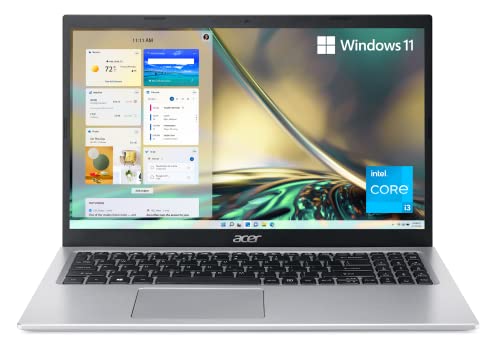
The Acer Aspire 5 A515 is the best all-around choice in this group because it balances a capable processor, 8GB of memory, and a genuinely good 15.6-inch full-HD IPS display better than anything else here. The Aspire 5 has been a repeat recommendation in the mid-budget segment for years, and the current iteration keeps that reputation. With a dual-core Intel Core i3-1115G4 in the configuration shown, plus 8GB of DDR4 memory and an NVMe solid-state drive, it handles daily multitasking, spreadsheets, code editors, and light photo work without stalling.
What sets it apart for everyday use is the screen. The 15.6-inch full-HD IPS panel delivers sharp detail, accurate color, and wide viewing angles, which matters when you are looking at it for hours. Acer also lifts the keyboard with an ergonomic hinge for more comfortable typing, and its Purified.Voice technology uses enhanced digital signal processing to cancel background noise on calls. The DDR4 memory is on-board with one slot left available, so there is a path to add more later.
The honest limitation is the processor tier and the storage in the base configuration. A dual-core Core i3 is fine for browsing, documents, and light multitasking, but it is not built for heavy multitasking, demanding photo batches, or anything close to serious video work. The shown configuration also lists a 128GB NVMe drive, which fills quickly once you install apps and store files, so plan on cloud storage or budget for a larger drive if you keep a lot locally. Treat this as a smooth everyday machine, not a workhorse.
Lenovo IdeaPad 3 15
The Lenovo IdeaPad 3 15 is the best pick for students and home users who need a light, dependable laptop for writing, research, and browsing. It has long been a favorite in this space, and the reasons hold up. The configuration shown pairs an Intel Processor N100 with LPDDR5 memory, and the chassis is built to be up to 10 percent slimmer than the prior design, with military-grade durability testing behind it, so it survives the daily commute between classes or rooms.
The 15.6-inch full-HD display has a 16:9 aspect ratio with eye-comfort features for long reading and writing sessions, and the keyboard is comfortable enough for extended typing. Lenovo keeps software bloat lighter than many rivals, which helps the machine feel clean out of the box. Practical extras add up, a fingerprint reader for quick secure log-in, fast charging, a larger battery for all-day mobility, and modern connectivity, all of which suit someone moving around campus or the house.
The trade-off is performance ceiling. The N100 is an efficient processor tuned for everyday tasks, study, web apps, documents, and streaming, rather than heavy lifting, so demanding multitasking or creative workloads will expose its limits. The display handles standard tasks well but is not aimed at color-critical photo or video work. If your day is browser tabs, a word processor, and video calls, this is an easy recommendation, just do not expect it to power through editing software.
HP Pavilion 15
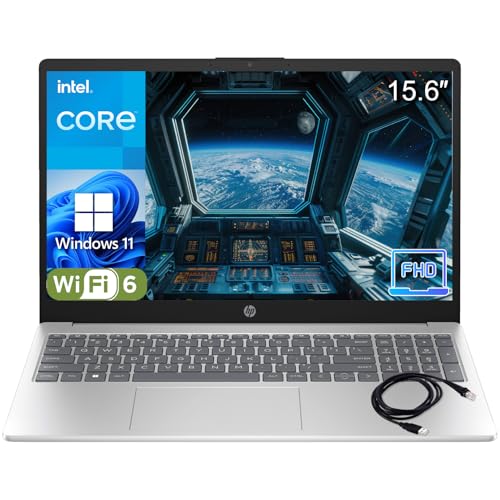
The HP Pavilion 15 is the best pick for multimedia and productivity, because it steps up the everyday experience with a brighter, anti-glare display, decent speakers, and a more polished chassis than entry-level options. The configuration shown uses a quad-core Intel N100 processor that runs up to 3.4GHz with 8GB of DDR4 memory, which is a meaningful step up from a dual-core machine for handling several things at once while you stream or work.
The 15.6-inch full-HD anti-glare display is well suited to streaming and light photo review, and the anti-glare coating helps in bright rooms where a glossy panel would wash out. Storage is a fast PCIe NVMe SSD, which gives quick boot-up and snappy app launches, the single biggest factor in how responsive a budget laptop feels. Connectivity is current and complete, Wi-Fi 6, Bluetooth 5.3, USB-C, and multiple USB-A ports, and the platinum white design is light at 3.64 pounds with a full-size keyboard, giving the line a slightly more premium look than budget alternatives.
The limitation worth flagging is the storage size in the shown configuration, a 256GB SSD, which is workable but fills up if you keep a large media library or many applications locally. The N100, while a comfortable quad-core for productivity and streaming, is still a value-tier processor, so do not expect it to handle heavy creative software. For someone who watches, browses, and works across everyday apps, the Pavilion 15 hits a nice balance of polish and capability.
ASUS VivoBook 16X
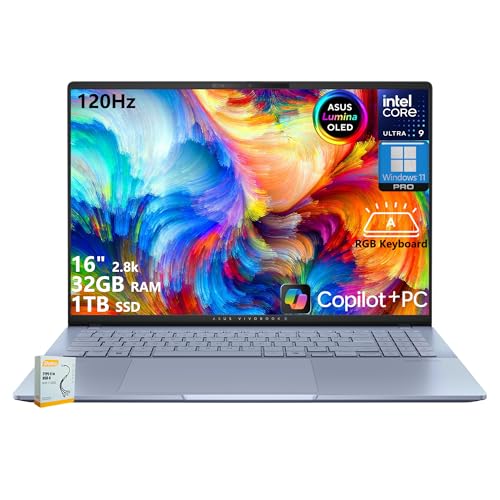
The ASUS VivoBook 16X is the best large-screen pick for anyone who wants more room to work without jumping to a premium ultrabook price. The headline is the display, a 16-inch panel that, in the configuration shown, is a 2.8K WQXGA+ 2880 by 1800 OLED running at 120Hz with 600 nits of HDR brightness in a 16:10 aspect ratio. That extra vertical space and resolution is genuinely useful for working in multiple windows, reviewing documents side by side, or editing photos, and OLED gives deep contrast that flat budget panels cannot match.
The configuration shown is a higher-tier build than a basic budget laptop, with a powerful Intel Core Ultra processor, generous LPDDR5X memory, and a 1TB solid-state drive, so it comfortably handles demanding workflows including light video editing. Connectivity is strong too, with two Thunderbolt 4 ports supporting display output, two USB-A ports, an RGB backlit keyboard with a number pad, Wi-Fi 7, and Windows 11. For multi-window productivity on a large, high-quality screen, it is the standout here.
The trade-off is that the VivoBook 16X ships in a wide range of configurations, and the high-end build described above carries the components and the price to match, well above an entry-budget laptop. Lower configurations swap the OLED panel for an IPS display and use more modest processors and memory, so the experience varies a lot depending on which version you buy. A 16-inch laptop is also less portable and typically heavier than a 15-inch one, so check the exact specification before you commit, and weigh whether you truly need the larger footprint.
Lenovo IdeaCentre 5 Desktop
The Lenovo IdeaCentre 5 Desktop is the best pick when portability is not a requirement, because a tower simply delivers more sustained performance for the money than any laptop at a similar outlay. The configuration shown is powered by an Intel Core Ultra 5 225 processor with a 10-core, 10-thread design, supports up to 64GB of DDR5 memory for smooth multitasking, and ships with Windows 11 Home. It handles office software, light gaming, and content creation comfortably, and the compact tower fits neatly on a desk or shelf.
Desktops also age more gracefully. This machine supports a large amount of DDR5 memory and includes seven USB ports plus HDMI output, so connecting multiple peripherals and a monitor is straightforward, and there is headroom to upgrade memory or storage down the line rather than replacing the whole unit. Lenovo includes a wired keyboard and mouse in the box, which removes two small purchases and gets you running on day one.
The obvious trade-off is that a desktop is not portable, and you will need to budget separately for a monitor, since it is sold without one (the keyboard and mouse are included, the display is not). That added monitor cost narrows the price gap with a laptop, so factor it in. There is also no battery and no built-in screen, so this only makes sense if you have a fixed workspace. If you do, you get more computer per dollar and an easier upgrade path than any laptop here.
What to look for
Buying a budget computer well comes down to matching a few core components to how you actually work. These are the factors I weigh most.
- Storage type and size: An NVMe SSD is the single biggest factor in how responsive a cheap computer feels. Favor SSD over a hard drive, and watch the capacity, 128GB or 256GB fills fast if you store files locally.
- Memory amount: 8GB is a comfortable floor for everyday multitasking. More is better if you keep many tabs or apps open, and a free memory slot for later upgrades is a real bonus.
- Processor tier: Efficient chips like the N100 are fine for browsing, documents, and streaming, while higher-tier processors are worth it only if you run demanding software.
- Display quality: An IPS or OLED panel with full-HD or higher resolution and an anti-glare or bright finish makes long sessions far more comfortable than a basic LCD.
- Screen size and portability: A 15.6-inch laptop balances usable space and weight, a 16-inch gives more room but less portability, and a desktop trades all portability for performance.
- Connectivity: Look for current Wi-Fi, USB-C, and enough USB-A ports for your peripherals, plus a fingerprint reader if quick secure log-in matters to you.
- What is in the box: With desktops especially, confirm whether a monitor, keyboard, and mouse are included, since those add to the real cost.
The verdict
For most people, the Acer Aspire 5 A515 is the all-around choice, with a capable processor, 8GB of memory, and a sharp full-HD IPS screen that make daily work pleasant. Students and home users who prize portability and durability should look at the Lenovo IdeaPad 3 15, while the HP Pavilion 15 is the better fit for multimedia and productivity thanks to its anti-glare display and polished build. If you want a large, high-quality canvas for multi-window work, the ASUS VivoBook 16X gives you a roomy 16-inch panel, just confirm the exact configuration you are buying. And if you never need to move your computer, the Lenovo IdeaCentre 5 Desktop offers the most sustained performance per dollar, provided you budget for a monitor.
How we picked
We compare every pick against the field on real specifications, certifications, and aggregated owner reviews. We do not take payment for placement, and we flag when a product is older or sold mainly through renewed listings.
Top picks compared
Our picks up close
Acer Aspire 5 A515 -- Best All-Around Laptop
The Acer Aspire 5 consistently ranks among the top recommendations in the mid-budget laptop segment, and the 2026 iteration maintains that reputation. Equipped with an AMD Ryzen 5 processor, 8GB RAM, and a 512GB SSD, it handles daily multitasking, spreadsheets, code editors, and light photo work without slowdown. The 15.6-inch full-HD IPS display offers accurate color and wide viewing angles. Battery life holds comfortably through a full workday at around 8-9 hours. The aluminum-accented lid adds a degree of premium feel without inflating the price. For most buyers, this is the pick that requires the least compromise.
Where it shines
- Powerful Productivity: 11th Generation Intel Core i3-1115G4 Dual Core processor delivers u
- Visibly Stunning: Experience sharp details and crisp colors on the 15.6" Full HD IPS displ
- Ergonomic Typing: Ergonomically designed hinge lifts the keyboard for comfortable typing,
- Internal Specifications: 8GB DDR4 on-board memory (1 slot available); 128GB NVMe solid-sta
- Acer's Purified.Voice technology, features enhanced digital signal processing to cancel ou

Lenovo IdeaPad 3 15 -- Best for Students and Home Use
Lenovo's IdeaPad 3 is a perennial favorite for students and casual home users, and for good reason. At it pairs a Ryzen 5 processor with 8GB RAM and a 256GB or 512GB SSD. The build is light at under 4 pounds, making it easy to carry between classes or rooms. The display handles standard tasks well, and the keyboard is comfortable for long writing sessions. Lenovo's software bloat is minimal compared to some competitors. If you want a no-fuss, reliable machine for coursework, note-taking, and remote learning, the IdeaPad 3 is a proven choice that rarely disappoints.
Where it shines
- Everyday Performance for Work and Study: Built with an Intel Processor N100 and LPDDR5 4 G
- Large 15.6” FHD Display With Eye Comfort: The 15.6-inch Full HD LCD display features a 16:
- Lightweight Design With Military-Grade Durability: Designed to be up to 10% slimmer than t
- Fast Charging and All-Day Mobility: Stay productive on the move with a larger battery and
- Secure Access and Modern Connectivity: Log in quickly with the fingerprint reader integrat
HP Pavilion 15 -- Best for Multimedia and Productivity
HP's Pavilion 15 steps up the experience with a brighter display, better speaker quality, and a more polished chassis than entry-level options. The configuration in this price range typically includes an Intel Core i5 or AMD Ryzen 5, 8GB RAM, and a 512GB SSD. The display is suitable for streaming and light photo review. The Pavilion line has a slightly more premium look compared to budget alternatives, which matters if you use it in professional settings. HP's customer support and warranty coverage are reliable. For hybrid workers who need something that looks the part as well as performs, the Pavilion 15 fits well.
Where it shines
- Performance Focus: Powerful Intel 4-Core N100 Processor (up to 3.4GHz) with 8GB DDR4 RAM d
- Display & Visual Experience: Stunning 15.6" Full HD (1920x1080) anti-glare display with na
- Storage & Speed: Lightning-fast 256GB PCIe NVMe SSD provides instant boot-up (under 10 sec
- Connectivity & Productivity: Complete connectivity with WiFi 6, Bluetooth 5.3, USB-C, 2x U
- Design & Portability: Sleek platinum white design weighs just 3.64 lbs with full-size keyb
ASUS VivoBook 16X -- Best Large-Screen Productivity Laptop
For users who want more screen space without moving to a premium price, the ASUS VivoBook 16X delivers a 16-inch full-HD OLED or IPS display depending on configuration. The larger canvas is genuinely useful for working in multiple windows, reviewing documents side by side, or editing photos. The AMD Ryzen 5 with 16GB RAM variant sits just and handles demanding workflows including light video editing and data work. The chassis is slightly heavier than 15-inch alternatives, but remains portable. The backlit keyboard and fingerprint reader add convenience at a price that still sits below the ceiling.
Where it shines
- 【Powerful Storage】: 32GB LPDDR5X SDRAM Memory, 1TB Solid State Drive
- 【ASUS Vivobook S16 Ultra 9】: Intel Core Ultra 9 Processor 285H 2.9 GHz (24MB Cache, up to
- 【Strong Graphics and Display】:16" 2.8K WQXGA+ (2880x1800) 16:10; 120Hz; OLED; 600nits HDR
- 【External Ports and Slots】: 2x USB 3.2 Gen 1 Type-A, 2x Thunderbolt 4 with support for dis
- 【Operating System】: Windows 11 Professional, RGB Backlit Keyboard with Num-key, Wi-Fi 7 +

Lenovo IdeaCentre 5 Desktop -- Best Desktop
If portability is not a requirement, the Lenovo IdeaCentre 5 offers a level of performance that no laptop at this price can match. Powered by an AMD Ryzen 5 with 8GB or 16GB RAM and a 512GB SSD, it handles everything from office software to light gaming and content creation smoothly. The compact tower fits neatly on a desk or shelf. Monitor, keyboard, and mouse are sold separately, so build in that cost if needed. For a home office or study setup where the machine stays on a desk, this desktop delivers more raw performance per dollar than any laptop in this bracket.
Where it shines
- 【Processor】Powered by the Intel Core Ultra 5 225 Processor, featuring a 10-core, 10-thread
- 【RAM and Storage】Supports up to 64GB DDR5 RAM, allowing smooth multitasking and efficient
- 【Operating system】Pre-installed with Windows 11 Home, 64-bit (English), offering a modern
- 【Keyboard and Mouse】Includes a Lenovo black wired keyboard and mouse, designed for reliabl
- 【Tech Specs】Features 7 USB ports for connecting multiple peripherals, along with HDMI and
Before you buy
What to consider
At this price tier, you have real options rather than trade-offs. Still, prioritize these factors in order: processor generation (Ryzen 5 or Intel Core i5, recent generation), RAM (8GB minimum, 16GB if available at budget), and storage (512GB SSD strongly preferred). Display quality matters more here than in the range because you can actually afford a full-HD IPS panel. Check the display resolution before buying -- avoid HD-only (1366x768) screens, which feel outdated.
What to consider
For desktops, verify whether the listed price includes peripherals. Many listings omit the monitor, which adds. If you are buying for creative work, look for configurations with 16GB RAM or the ability to upgrade later.
What to consider
For more options at different price points, our [best computer ](/articles/best-computer-under-400) guide covers the tier below, and our [best computer ](/articles/best-computer-under-2000) article covers high-end picks. All recommendations are evaluated using our [methodology](/methodology).
Quick answers
At the range you can expect smooth multitasking, fast SSD storage, a full-HD display, and processors capable of handling photo editing, video calls, coding, and moderate content creation. Most options at this tier include 8GB or 16GB RAM and 512GB SSD storage, which is a meaningful step up from the entry-level bracket.
Light gaming is possible particularly with integrated AMD Radeon graphics or entry-level discrete GPUs. You will not run demanding AAA titles at high settings, but games from a few years back and indie titles are playable. If gaming is a primary use case, prioritize GPU specification alongside RAM when comparing options at this price point.
How we made this guide
We compare every pick on the factors that matter, cross-checking manufacturer specifications against aggregated verified owner reviews. We rank independently and never take payment for placement. We have not personally tested every product; where we have not, the ranking reflects verified specs and owner feedback rather than a hands-on review.
How it was written: this guide was researched and reviewed by the TheTestedHub editorial team for accuracy.
Affiliate disclosure: TheTestedHub is reader-supported. When you buy through links on our site, we may earn a commission at no extra cost to you.
More to explore

Your Docking Station Match: CalDigit TS4 and More

Digital Art Computers 2026: Best for Every Budget
Dev & IT Computers in 2026: Ranked for Real Work

Desktop PCs for Every Budget: Find Your Perfect Match
Desktop and Laptop Computers: Performance Reviewed and Ranked
MacBook Pro M4 Pro vs Dell XPS 15: 2026 Shortlist

Buy the Best DIY Computer in 2026: Corsair One i300
