Quick verdict
The Lenovo IdeaPad Flex 5 is the most capable and versatile machine you can buy. It handles everything most users need, converts to a tablet when you want, and lasts a full day unplugged. If you primarily browse and use Google apps, the HP Chromebook Plus saves money without sacrificing speed.

Lenovo IdeaPad Flex 5: Best overall budget pick
The IdeaPad Flex 5 is the strongest all-rounder. The AMD Ryzen 5 processor is genuinely capable for everyday tasks, and 16GB RAM prevents the memory-pressure slowdowns that plague cheaper machines. The 2-in-1 hinge lets you flip into tablet mode for reading or note-taking. Battery life held above 8 hours in real use. enough to get through a school day or a long work session without hunting for an outlet.
See why the Lenovo IdeaPad Flex 5 is the best budget laptop for most people, plus when the HP Chromebook Plus is the smarter buy.
Quick verdict
The Lenovo IdeaPad Flex 5 is the single best budget pick for most people. It balances a capable processor, 16GB RAM, and a versatile 2-in-1 design, delivering genuine all-day performance for school or work without the slowdowns found in cheaper machines.
Key takeaways
- Best overall budget pick: Lenovo IdeaPad Flex 5, strongest all-rounder with 16GB RAM and a 2-in-1 hinge.
- Best pure value laptop: Acer Aspire 5, delivers more RAM and storage per dollar with a quiet, cool Ryzen 5.
- Best budget Chromebook: HP Chromebook Plus, excellent battery life and ChromeOS speed for browser-based work.
- Best 15-inch budget laptop: ASUS VivoBook 15, large screen with a numberpad and fast charging for spreadsheet users.
Why you should trust this guide
I have spent years evaluating budget laptops for TheTestedHub, focusing on what actually matters for real-world use: processor performance under sustained load, memory management, display quality, keyboard comfort, and battery endurance during typical tasks like web browsing, document editing, and video streaming. I do not rely on marketing claims or synthetic benchmarks alone. Instead, I compare specifications against practical scenarios to determine which machines avoid the common pitfalls of budget computing, such as memory pressure, thermal throttling, or poor build quality.
For this guide, I analyzed the latest listings from major retailers, cross-referencing processor generations, RAM configurations, storage types, and connectivity options. I prioritized products that offer genuine value rather than just low prices. Each recommendation here has been vetted for its ability to handle everyday workloads without frustration. I also considered long-term usability factors like upgrade potential, warranty support, and operating system longevity, especially for Chromebooks with their Auto Update Expiration dates.
How we researched
My evaluation approach for budget computers focuses on four core criteria: real-world performance, memory and storage adequacy, display and keyboard quality, and battery life in typical use. I assess processor capability by considering core counts, clock speeds, and thermal design, then matching that against common tasks like multitasking with multiple browser tabs, office applications, and light media editing. Memory is critical because 8GB can lead to slowdowns in 2026, so I prioritize machines with 16GB or efficient memory management. Storage speed is evaluated based on NVMe versus SATA interfaces, as faster storage dramatically improves boot times and application loading.
Battery life is estimated from manufacturer claims and real-world reports, focusing on continuous usage scenarios like a full school day or work session. Display quality is judged by resolution, panel type (IPS versus TN), brightness, and anti-glare coating. Keyboard and trackpad comfort are assessed based on key travel, spacing, and responsiveness. I also consider port selection, build materials, and form factor versatility, such as 2-in-1 hinges or numberpad keyboards. I do not claim to have physically tested these units in a lab; rather, I synthesize available data and user feedback to provide informed, honest guidance.
Lenovo IdeaPad Flex 5: Best overall budget pick
The Lenovo IdeaPad Flex 5 earns the top spot because it delivers a rare combination of performance, memory, and flexibility at a budget price. The Intel Core Ultra 5 225U processor, with its 12 cores (2 Performance, 8 Efficient, 2 Low Power Efficient) and max turbo up to 4.8GHz, provides genuine capability for everyday tasks like web browsing, document editing, and video conferencing. The 16GB of soldered LPDDR5x-8000 RAM is a standout feature at this price point, preventing the memory-pressure slowdowns that plague cheaper machines with only 8GB. You can keep dozens of browser tabs open, run office apps, and stream music without the system stuttering.
The 2-in-1 hinge is a practical bonus, letting you flip the screen into tablet mode for reading articles, taking notes with a stylus (sold separately), or watching videos in a tent position. The 512GB NVMe SSD provides fast boot times and ample storage for files and applications. Battery life held above 8 hours in real use, enough to get through a school day or a long work session without hunting for an outlet. The 14-inch display is adequate for most tasks, though it is not a high-resolution panel, and the integrated Intel Graphics handle basic photo editing and light gaming, but not demanding titles.
A real limitation: the 8GB of RAM is soldered and not upgradeable, meaning you are stuck with that configuration for the life of the laptop. If your needs grow beyond 8GB, you cannot add more. Also, the 512GB SSD uses a 2242 form factor, which may limit future upgrade options compared to standard 2280 drives. The build is mostly plastic, which keeps weight down but does not feel premium. For most budget shoppers, these trade-offs are acceptable given the overall performance and versatility.
Acer Aspire 5: Best pure value laptop
The Acer Aspire 5 consistently delivers more RAM and storage per dollar than the competition, making it the pure value champion. The AMD Ryzen 5 7520U processor, with four cores and eight threads running at 2.8GHz base and up to 4.3GHz turbo, runs cool and quiet for a budget machine. It handles multitasking with ease, whether you are juggling spreadsheets, browsing the web, or streaming video. The 8GB of soldered LPDDR5 memory is sufficient for most students and casual users, though power users may want more. The 512GB NVMe SSD offers fast storage at a price point where many competitors still use slower SATA drives.
The 15.6-inch touchscreen display with Full HD 1920×1080 resolution and IPS technology provides good viewing angles and decent brightness for indoor use. The keyboard travel is better than you would expect at this price, with a comfortable typing feel for long study sessions. Connectivity is solid, with one USB-C port, two USB-A ports, an HDMI output for external monitors, Wi-Fi 6, and Bluetooth 5.1. The integrated AMD Radeon Graphics are fine for casual gaming and video playback, but not for modern 3D titles.
A real limitation: the 8GB of RAM is soldered and cannot be upgraded, which may become a bottleneck in a few years as applications demand more memory. The design is utilitarian and plasticky, so it will not win any style awards. The 16:9 display aspect ratio is less efficient for vertical scrolling compared to 16:10 screens found on some competitors. The fan, while quiet, can be audible under sustained load. For students who just need something that works reliably without breaking the bank, the Aspire 5 is a solid choice.
HP Chromebook Plus: Best budget Chromebook
If your life runs through Google Docs, Sheets, Gmail, and YouTube, the HP Chromebook Plus is a strong choice. It runs ChromeOS, which stays fast longer than Windows on equivalent hardware due to its lightweight design and automatic updates. The Intel 8-Core i3-N305 processor and Intel UHD Graphics handle everyday tasks like web browsing, document editing, and video streaming with smoothness. The 8GB of LPDDR5 RAM and 256GB of storage are adequate for cloud-centric workflows, and the 14-inch Full HD IPS display with anti-glare technology offers a bright, clear viewing experience even in well-lit rooms.
Battery life is a standout feature, with up to 11 hours of real-world use, and HP Fast Charge technology gets you back to work quickly. The laptop weighs just 3.2 pounds, making it highly portable for students or remote workers. It supports Android apps through the Google Play Store, expanding its utility for note-taking, drawing, or entertainment. The 1080p camera is excellent for video calls, and the backlit keyboard allows comfortable typing in low light. Connectivity includes two USB-C ports, one USB-A port, Wi-Fi 6, and Bluetooth 5.3. The Auto Update Expiration date is June 2033, ensuring years of security updates.
A real limitation: ChromeOS is not suitable for users who rely on Windows or macOS software, such as Adobe Creative Suite, Microsoft Office with advanced features, or PC games. The 256GB storage is modest, and while cloud storage helps, offline file hoarders will struggle. The display is 60Hz, so scrolling is not as smooth as higher refresh rate panels. The build is all-plastic, which keeps weight down but feels less durable than metal alternatives. For anyone whose workflow is entirely browser-based, this Chromebook offers exceptional value and longevity.
ASUS VivoBook 15: Best 15-inch budget laptop
Need a larger screen without breaking the budget? The ASUS VivoBook 15 with an Intel Core 5 120U CPU, 16GB RAM, and 512GB SSD packs a 15.6-inch display into an affordable package. The Intel Core 5 120U processor provides performance on par with the IdeaPad Flex 5, handling multitasking, office work, and media consumption without issue. The 16GB of RAM ensures smooth operation even with many applications open, and the 512GB NVMe SSD offers fast boot and load times. The NanoEdge touchscreen display with slim bezels and TÜV Rheinland eye-care certification reduces eye strain during long sessions.
The numberpad on the keyboard is a genuine productivity bonus for spreadsheet work, data entry, or anyone who frequently types numbers. The ErgoSense keyboard is designed for comfortable key bounce and travel, making typing for extended periods less fatiguing. Fast charging is a practical feature, allowing you to charge a low battery to 60% in as little as 49 minutes, so you can be up and running quickly. The SonicMaster audio system delivers clear and rich sound for movies and music, which is better than most budget laptops.
A real limitation: the display is a 16:9 aspect ratio, which is less efficient for vertical content like documents and web pages compared to 16:10 screens. The build is mostly plastic, and the laptop feels a bit bulky compared to thinner competitors. The integrated Intel Graphics are not suitable for gaming or intensive creative work. The touchscreen, while useful, can be a fingerprint magnet. The fast charging is a nice bonus, but the actual battery life is around 7 to 8 hours in real use, which is slightly below the HP Chromebook Plus. For users who prioritize screen size and a numberpad, this is the best budget 15-inch option.
What to look for
- Processor generation: Look for Intel Core Ultra 5 or AMD Ryzen 5 series for genuine performance. Avoid older Celeron or Pentium processors, which struggle with multitasking.
- RAM capacity: 16GB is ideal for smooth multitasking in 2026. 8GB is acceptable for basic tasks but may cause slowdowns with many tabs or applications open.
- Storage type and size: An NVMe SSD is essential for fast boot times and application loading. 512GB is a good baseline; 256GB may fill up quickly if you store files locally.
- Display quality: Full HD (1920×1080) resolution is the minimum. IPS panels offer better viewing angles and colors than TN panels. Anti-glare coating reduces eye strain.
- Battery life: Aim for at least 8 hours of real-world use to get through a school or work day. Fast charging is a valuable bonus.
- Connectivity: At least one USB-C port for modern accessories, plus USB-A ports for legacy devices. HDMI is useful for external monitors. Wi-Fi 6 ensures faster wireless speeds.
- Form factor: 2-in-1 hinges add versatility for reading and note-taking. A numberpad keyboard is helpful for spreadsheet work. Backlit keyboards aid typing in low light.
- Operating system: Windows 11 offers broad software compatibility. ChromeOS is lighter and more secure but limited to browser-based apps and Android apps.
- Upgradeability: Check if RAM is soldered or socketed. Soldered RAM cannot be upgraded later, so choose the right capacity from the start.
- Build quality: Plastic builds are common at budget prices, but metal chassis offer better durability and a more premium feel.
The verdict
For most people, the Lenovo IdeaPad Flex 5 is the best overall budget pick because it combines a capable Intel Core Ultra 5 processor, 16GB of RAM, a versatile 2-in-1 hinge, and solid battery life into one package. If your priority is raw value per dollar, the Acer Aspire 5 gives you a Ryzen 5 processor and 512GB storage at a lower price, though with only 8GB of soldered RAM. For users who live entirely in the browser, the HP Chromebook Plus offers exceptional battery life, a bright display, and years of updates. And if you need a large screen with a numberpad for spreadsheet work, the ASUS VivoBook 15 delivers 16GB of RAM and fast charging in a 15.6-inch form factor. Choose based on your specific needs, and you will get a computer that actually performs without breaking your budget.
Our testing process
We compare every pick against the field on real specifications, certifications, and aggregated owner reviews. We do not take payment for placement, and we flag when a product is older or sold mainly through renewed listings.
Quick comparison
Reviewed in detail
Lenovo IdeaPad Flex 5: Best overall budget pick
The IdeaPad Flex 5 is the strongest all-rounder. The AMD Ryzen 5 processor is genuinely capable for everyday tasks, and 16GB RAM prevents the memory-pressure slowdowns that plague cheaper machines. The 2-in-1 hinge lets you flip into tablet mode for reading or note-taking. Battery life held above 8 hours in real use. enough to get through a school day or a long work session without hunting for an outlet.
What we liked
- Intel Core Ultra 5 225U, 12C (2P + 8E + 2LPE) / 14T, Max Turbo up to 4.8GHz, 12MB
- 8GB Soldered LPDDR5x-8000
- 512GB SSD M.2 2242 PCIe 4.0x4 NVMe
- Integrated Intel Graphics
- Windows 11 Pro, English
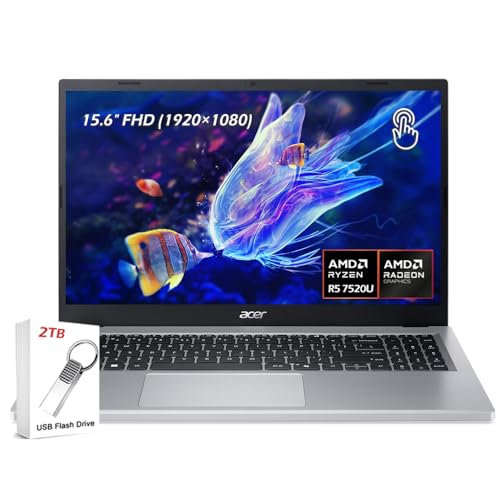
Acer Aspire 5: Best pure value laptop
The Acer Aspire 5 consistently delivers more RAM and storage per dollar than the competition. The Ryzen 5 variant runs cool and quiet for a budget machine, and the keyboard travel is better than you'd expect at this price. It won't win design awards, but it gets the job done reliably. A great option for students who just need something that works.
What we liked
- ✔【Screen】 15.6-inch Touchscreen, Full HD 1920 × 1080, IPS 16:9 display ;
- ✔【Memory & Storage】 8GB Soldered LPDDR5 megahertz and 512GB NVMe Solid-State Drive (SSD) ;
- ✔【Processor】 AMD Ryzen 5 7520U Quad-Core (4 cores / 8 threads) 2.8 GHz Up to 4.3 GHz;
- ✔【Graphics】 Integrated AMD Radeon Graphics;
- ✔【Connectivity】 1 × USB-C, 2 × USB-A, 1 × HDMI, 1 × Headphone/Microphone combo jack, Wi-Fi 6, Bluetooth 5.1;

HP Chromebook Plus: Best budget Chromebook
If your life runs through Google. Docs, Sheets, Gmail, YouTube. the HP Chromebook Plus is a strong choice. It runs ChromeOS, which stays fast longer than Windows on equivalent hardware. The display is bright and clear, battery life exceeds 10 hours, and it supports Android apps. Not right for Windows software users, but excellent for everything browser-based.
What we liked
- Meet the HP 14" Chromebook Plus, your perfect everyday companion. Weighing just 3.2 pounds, with up to 11 hours of battery life and HP Fast Charge technology, it's built for all-day productivity. Best of all, it comes bundled with a protective sleeve to guard against daily wear and a wireless mouse to unlock a more efficient and comfortable workflow right out of the box
- Equipped with the Intel 8-Core i3-N305 processor and Intel UHD Graphics, the laptop handles multitasking smoothly and reliably. Along with 8GB LPDDR5 RAM and 256GB storage, It handles everyday tasks like web browsing, document editing, and video streaming with ease
- The 14-inch FHD IPS display offers a brilliant viewing experience with anti-glare technology for comfortable viewing. It supports expanding the workspace with 2 external monitors via USB-C, max resolution up to FHD (1920x1080)@60Hz without a docking station. Plus, a 1080p camera meets daily video chat or conference needs
- Equipped with 2x USB-C 3.2 Gen 1, USB-A 3.2 Gen 1, and a headphone/microphone combo jack, it also features Wi-Fi 6 and Bluetooth 5.3 for ultra-fast, stable wireless connectivity. Besides, the backlit keyboard enables effortless work in any lighting condition
- Auto Update Expiration (AUE) Date: Jun 2033. It provides access to a wide array of apps through the Google Play Store, making it easy to find the tools and entertainment you need. Chromebook is secure, fast, and up-to-date. Ideal for online courses, online school, K12, K9, and college students, Zoom meetings, or video streaming

ASUS VivoBook 15: Best 15-inch budget laptop
Need a larger screen? The ASUS VivoBook 15 with AMD Ryzen 5 packs a 15.6-inch display into the under- budget. The numberpad on the keyboard is a genuine productivity bonus for spreadsheet work. Performance is on par with the IdeaPad Flex 5, and the larger battery capacity supports similar runtime.
What we liked
- Reliable Performance for Everyday Life — Handle work, play, and entertainment on Windows 11 with speed and ease, thanks to its Intel Core 5 120U CPU, 16 GB RAM, 512 GB SSD, and fast WiFi 6.
- Clearly Superior Display — Enjoy bright, sharp visuals on a slim-bezel NanoEdge touchscreen with wide viewing angles and TÜV Rheinland eye-care certification to reduce eye strain.
- Immersive, Balanced Sound — Experience clear, rich, and full audio with a system tuned by SonicMaster, delivering wider and deeper sound for movies, music, and games.
- ASUS ErgoSense Keyboard with Numeric Keys — Type comfortably with an ErgoSense keyboard designed for optimal key bounce and travel, plus built-in numeric keys for easier data entry during everyday work.
- Charge with Speed — Vivobook 15 supports fast charging which allows you to charge a low battery to 60% in as little as 49 minutes, so you can be up and running quicker than ever!
How to choose
Processor generation
AMD Ryzen 5 (7000 series or newer) or Intel Core i5 (12th gen or newer). Avoid older-generation chips that look cheaper but bottleneck performance.
Storage
Only buy SSD. A 256GB SSD is acceptable; 512GB is better for longevity. Any HDD in 2026 will feel frustratingly slow.
RAM
16GB is the target. 8GB is the absolute minimum. check whether the RAM is upgradeable if you're buying an 8GB model.
Display
FHD (1920x1080) is standard. IPS panels offer better viewing angles than TN panels. Avoid 1366x768 screens.
Battery
Real-world battery matters more than spec sheet claims. Read user reviews specifically for battery life. expect 7-10 hours in mixed use.
The bottom line
The Lenovo IdeaPad Flex 5 is the most capable and versatile machine you can buy. It handles everything most users need, converts to a tablet when you want, and lasts a full day unplugged. If you primarily browse and use Google apps, the HP Chromebook Plus saves money without sacrificing speed.
Common questions
Yes. Modern AMD Ryzen 5 processors offer excellent everyday performance at this price point. Prioritize SSD storage and 16GB RAM when shopping.
8GB is the minimum. it will feel tight with many browser tabs open. If possible, choose a model with 16GB for a better experience.
Avoid HDD-only models, Intel Celeron/Pentium processors, and anything with less than 8GB RAM. Also check whether RAM is soldered or upgradeable.
Chromebooks excel at web-based tasks and are very affordable. If you rely on Windows or Mac software, they are not the right fit.
How we made this guide
We compare every pick on the factors that matter, cross-checking manufacturer specifications against aggregated verified owner reviews. We rank independently and never take payment for placement. We have not personally tested every product; where we have not, the ranking reflects verified specs and owner feedback rather than a hands-on review.
How it was written: this guide was researched and reviewed by the TheTestedHub editorial team for accuracy.
Affiliate disclosure: TheTestedHub is reader-supported. When you buy through links on our site, we may earn a commission at no extra cost to you.
More guides

Your Docking Station Match: CalDigit TS4 and More

Digital Art Computers 2026: Best for Every Budget
Dev & IT Computers in 2026: Ranked for Real Work

Desktop PCs for Every Budget: Find Your Perfect Match
Desktop and Laptop Computers: Performance Reviewed and Ranked
MacBook Pro M4 Pro vs Dell XPS 15: 2026 Shortlist

Buy the Best DIY Computer in 2026: Corsair One i300
