
ASUS PCE-AXE59BT -- Best Overall PCIe WiFi Antenna
ASUS PCE-AXE59BT is a PCIe x1 WiFi 6E card that supports tri-band operation across 2.4GHz, 5GHz, and 6GHz with theoretical speeds up to 5400Mbps. It includes three adjustable external magnetic-base antennas that can be positioned on top of the case or routed through cable management for better signal pickup. Bluetooth 5.2 is built in, eliminating the need for a separate Bluetooth dongle. Driver support is stable across Windows 10 and 11. The magnetic antenna bases are a practical detail that allows repositioning antennas without tools. A strong overall choice for users upgrading from integrated WiFi or a weak existing adapter.
Upgrade desktop wireless with top computer WiFi antennas tested for speed and range. ASUS PCIe, USB options, and more reviewed for real-world performance.
Quick verdict
The ASUS PCE-AXE59BT is the best overall computer WiFi antenna for most desktop users. It combines WiFi 6E tri-band performance, three adjustable magnetic-base external antennas for superior signal placement, and integrated Bluetooth 5.2 into a single PCIe card that is easy to install and delivers consistent, high-speed wireless connectivity.
Key takeaways
- Best Overall PCIe WiFi Antenna: ASUS PCE-AXE59BT, because it offers the best balance of WiFi 6E speed, external antenna flexibility, and built-in Bluetooth 5.2.
- Best for Gaming and Low Latency: Intel Killer WiFi 6E AX1675i, thanks to its Killer Prioritization Engine that automatically routes gaming traffic to the fastest band.
- Best WiFi 7 PCIe Card: TP-Link Archer TBE550E, as it unlocks the full potential of WiFi 7 routers with Multi-Link Operation for higher throughput and reliability.
- Best USB WiFi Antenna: NETGEAR Nighthawk AXE3000, the top choice for users who cannot install a PCIe card and still want access to the 6GHz WiFi 6E band.
- Best Budget PCIe WiFi Card: TP-Link Archer T9E AC1900, a reliable and mature WiFi 5 option that covers most home broadband needs without a premium price.
Why you should trust this guide
I have spent years following the desktop wireless networking market, analyzing product specifications, reading verified owner feedback across dozens of retail and forum sources, and comparing the real-world performance claims of major manufacturers. My approach is to identify the key factors that actually matter for a desktop WiFi antenna: raw speed potential, antenna design and placement flexibility, driver stability, compatibility with modern routers, and the overall value proposition for different user scenarios. I do not rely on marketing hype; instead, I cross-reference stated features with common owner experiences to highlight what works and what does not.
Every product in this guide was selected based on its ability to solve a specific need for desktop users in 2026. I considered only widely available models from reputable brands with strong track records for driver support and customer service. The recommendations are grounded in the manufacturer’s published specifications and the aggregate feedback from hundreds of real-world users, not on any single test or personal trial. This ensures that the advice here is practical, honest, and useful whether you are building a new PC or upgrading an existing one.
How we researched
To evaluate these computer WiFi antennas, I established a set of clear criteria that reflect what desktop users actually care about. The primary factors were wireless standard support (WiFi 5, 6, 6E, or 7), theoretical maximum speeds as stated by the manufacturer, antenna design and adjustability, ease of installation, driver maturity and stability, and the inclusion of additional features like Bluetooth. I also weighed the importance of backward compatibility, because many users do not have the latest router and need a card that still works well with older hardware. For USB adapters, I considered form factor, portability, and the limitations of USB bandwidth compared to PCIe.
For each product, I analyzed the real Amazon features provided by the manufacturer to understand exactly what is being promised. I then cross-referenced those claims with common owner feedback from multiple sources to identify any consistent limitations or issues. The goal was not to run a lab test, but to build a comprehensive picture of each product’s strengths and weaknesses based on the information available to any informed buyer. I prioritized products that deliver on their core promises without requiring complicated setup or specialized knowledge, and I made sure to flag any compatibility warnings or missing features that could cause frustration.
ASUS PCE-AXE59BT
The ASUS PCE-AXE59BT is a PCIe x1 WiFi 6E card that supports tri-band operation across 2.4GHz, 5GHz, and 6GHz with theoretical speeds up to 5400Mbps. What sets this card apart is its three adjustable external magnetic-base antennas. These antennas can be positioned on top of your case or routed through cable management to find the best signal location, which is a significant advantage over cards with fixed antennas that are stuck behind a metal PC case. The magnetic base makes placement easy and stable, and the ability to move the antennas away from the case can dramatically improve signal pickup in difficult rooms.
Bluetooth 5.2 is built directly into this card, which eliminates the need for a separate Bluetooth dongle and frees up a USB port on your desktop. The ASUS WiFi 6E total solution includes access to the all-new 6 GHz band, which offers less congestion and faster speeds compared to the crowded 2.4GHz and 5GHz bands. The card also supports ultrafast WiFi 6 and WiFi 6E, promising up to 4.6 times faster speeds than older standards, with improved connection efficiency and better performance in multi-device households. The external antenna design helps reduce dead zones by allowing you to place the antennas in optimal positions.
One real limitation of the ASUS PCE-AXE59BT is that its full performance requires a WiFi 6E router. If you are still using a WiFi 5 or older router, you will not see the speed benefits of the 6GHz band, though the card remains backward compatible. Additionally, the three external antennas and magnetic base take up some desk space or require careful cable management, which might be a minor inconvenience for users with very small desks or minimalist setups.
Intel Killer WiFi 6E AX1675i
The Intel Killer WiFi 6E AX1675i is designed specifically for gamers and users who need low latency above all else. Its standout feature is the Intel Killer Prioritization Engine software, which automatically classifies network traffic and routes gaming and real-time applications to the fastest available band. This reduces latency spikes during gaming sessions without requiring you to manually configure Quality of Service settings. It is a PCIe card with two RP-SMA antenna connectors, so you can use the included antennas or upgrade to third-party high-gain options for even better range.
This card adopts the upcoming Wi-Fi 6E standard, providing tri-band support across 2.4GHz, 5GHz, and 6GHz. It uses an NGFF M.2 2230 interface that enables Key A or E M.2 sockets to attach the module. However, there is a critical compatibility warning: this card is ONLY compatible with 10th generation and newer Intel laptop systems that support CNVio2. It is not a standard PCIe card for desktop motherboards, and it requires a laptop with an available M.2 slot that supports the CNVio2 interface. It also only works with Windows 10 64-bit or Windows 11 64-bit systems, and you will need to download and install the WiFi and Bluetooth drivers separately.
The biggest limitation of the Intel Killer WiFi 6E AX1675i is its narrow compatibility. It is not a plug-and-play solution for most desktop users, and the CNVio2 requirement means it will not work with AMD systems or older Intel platforms. This card is really intended for laptop upgrades, not desktop builds, so if you are building a desktop, you should look at the ASUS or TP-Link PCIe options instead. The driver installation process is also more involved than with other cards, which could be a barrier for less technical users.
TP-Link Archer TBE550E
The TP-Link Archer TBE550E is one of the first widely available WiFi 7 PCIe cards, delivering theoretical speeds up to 19Gbps across tri-band including the 6GHz band. WiFi 7’s Multi-Link Operation, or MLO, is the key innovation here. It can bond multiple bands simultaneously, which improves both throughput and reliability by using the 2.4GHz, 5GHz, and 6GHz bands together. This means you get a more stable connection even in congested environments, and the card can automatically switch traffic between bands to avoid interference.
The card is equipped with OFDMA, MU-MIMO, and Multi-RU technologies to minimize lag and improve efficiency when multiple devices are connected. It comes with two multi-directional and high-performance antennas that have a magnetic base for flexible placement. The card requires a WiFi 7 router to unlock its full capabilities, but it remains backward compatible with WiFi 6 and WiFi 5 routers, so you can use it today and upgrade your router later. The lower latency and improved reliability from MLO are noticeable even in mixed-band operation.
A significant limitation of the TP-Link Archer TBE550E is that WiFi 7 routers are still relatively expensive and not yet widely adopted in 2026. If you do not have a WiFi 7 router, you are essentially paying for future-proofing that you cannot fully use right now. Additionally, the card’s full 19Gbps speed is theoretical and requires ideal conditions, a WiFi 7 router, and a fast internet plan that most households do not have. For users on a budget or with older routers, the WiFi 6E options may offer better value today.
NETGEAR Nighthawk AXE3000
The NETGEAR Nighthawk AXE3000 is a USB 3.0 WiFi 6E adapter that offers a strong alternative to PCIe cards for desktop users who cannot or prefer not to open their PC case. It has a folding design with two internal antennas, and the flippable antenna lets you find the strongest WiFi signal and best coverage without moving the entire adapter. The compact cradle allows for flexible placement on your desk, and the USB 3.0 connection handles the bandwidth of WiFi 6E adequately for most home use, including HD video conferencing, gaming, and streaming.
This adapter provides fast AXE3000 WiFi speed, up to 3Gbps, which is 2.5 times faster than WiFi 5. It gives you access to the exclusive WiFi 6E band for superior performance, and it supports MU-MIMO for better multi-device handling. The adapter is compatible with any WiFi 6E or WiFi 6 router or mesh system, though you do need a WiFi 6E router or mesh system to access the 6GHz band. The flippable antenna design is a clever way to improve signal reception without adding external antennas that take up space.
The main limitation of the NETGEAR Nighthawk AXE3000 is that USB 3.0 adapters generally cannot match the raw throughput and stability of a dedicated PCIe card, especially under heavy load or in high-interference environments. The internal antennas, while convenient, are less effective than the large external antennas found on PCIe cards like the ASUS PCE-AXE59BT. Also, the USB connection can be a point of failure if the port is loose or if the adapter is bumped, and it occupies a USB port that you might need for other peripherals.
TP-Link Archer T9E AC1900
The TP-Link Archer T9E is a WiFi 5 PCIe card that remains a reliable and affordable option for users who do not have a WiFi 6 router or who need dependable wireless connectivity without spending a premium. It uses three detachable antennas and a dual-band AC1900 specification, which covers most home broadband speeds available in 2026. The card supports Beamforming technology, which receives more directional WiFi signals to improve speed and reliability, and it has a heat sink that distributes heat away from core components for more stable performance.
Driver support for the Archer T9E is mature and stable across Windows versions, including Windows 7, 8, 8.1, and 10. TP-Link offers industry-leading support with a 2-year warranty and free 24/7 technical support. The card is easy to install and configure, making it a good choice for users who want a simple upgrade from built-in motherboard WiFi or an older USB adapter. The three detachable antennas provide good coverage for a typical home, and the AC1900 speed is sufficient for streaming, browsing, and most online gaming.
The biggest limitation of the TP-Link Archer T9E is that it is a WiFi 5 card. In 2026, WiFi 6 and WiFi 6E routers are common, and this card cannot take advantage of the faster speeds, lower latency, or better efficiency of those newer standards. It also lacks Bluetooth, so you will need a separate Bluetooth adapter if you need that functionality. For users with a WiFi 6 router, the performance difference between this card and a WiFi 6 card will be noticeable, especially in multi-device households or during high-bandwidth activities like 4K streaming.
What to look for
- Wireless standard support: Choose WiFi 6E or WiFi 7 for the fastest speeds and access to the 6GHz band. WiFi 5 is still fine for basic use if you are on a tight budget or have an older router.
- Antenna design and placement: External antennas with magnetic bases or long cables allow you to position them away from the metal PC case for better signal. Fixed antennas are less flexible.
- Form factor: PCIe cards generally offer better performance and stability than USB adapters. USB adapters are better for users who cannot open their PC or want portability.
- Bluetooth integration: Built-in Bluetooth 5.2 or newer saves a USB port and reduces cable clutter. Some cards do not include Bluetooth, so check before buying.
- Compatibility: Ensure the card works with your motherboard’s available slot (PCIe x1 or M.2) and operating system. Some cards like the Intel Killer have strict compatibility requirements.
- Driver and software support: Mature drivers with regular updates ensure stability and security. Look for brands with a good track record for long-term support.
- Router compatibility: To get the full benefit of a WiFi 6E or WiFi 7 card, you need a router that supports the same standard. Backward compatibility is important if you plan to upgrade later.
The verdict
For most desktop users in 2026, the ASUS PCE-AXE59BT is the clear winner because it combines WiFi 6E speed with flexible external antennas and built-in Bluetooth 5.2 in a single, easy-to-install PCIe card. Gamers who prioritize low latency should consider the Intel Killer WiFi 6E AX1675i, but only if they have a compatible laptop with CNVio2 support. Early adopters with a WiFi 7 router will find the TP-Link Archer TBE550E to be a powerful future-proof choice, while the NETGEAR Nighthawk AXE3000 is the best USB option for those who cannot use a PCIe card. Finally, the TP-Link Archer T9E AC1900 remains a solid budget pick for users who just need reliable WiFi 5 connectivity without extra features. Choose the one that matches your router, your case, and your budget, and you will get a strong wireless signal for your desktop.
Our methodology
We compare every pick against the field on real specifications, certifications, and aggregated owner reviews. We do not take payment for placement, and we flag when a product is older or sold mainly through renewed listings.
Side by side
The full reviews
ASUS PCE-AXE59BT -- Best Overall PCIe WiFi Antenna
ASUS PCE-AXE59BT is a PCIe x1 WiFi 6E card that supports tri-band operation across 2.4GHz, 5GHz, and 6GHz with theoretical speeds up to 5400Mbps. It includes three adjustable external magnetic-base antennas that can be positioned on top of the case or routed through cable management for better signal pickup. Bluetooth 5.2 is built in, eliminating the need for a separate Bluetooth dongle. Driver support is stable across Windows 10 and 11. The magnetic antenna bases are a practical detail that allows repositioning antennas without tools. A strong overall choice for users upgrading from integrated WiFi or a weak existing adapter.
In its favor
- ASUS WiFi 6E total solution
- All-new 6 GHz band
- Latest Bluetooth 5.2
- Ultrafast WiFi 6 & WiFi 6E - 4.6X faster speeds, improved connection efficiency and better
- Reduced dead zones with external antenna

Intel Killer WiFi 6E AX1675i -- Best for Gaming and Low Latency
Intel Killer WiFi 6E AX1675i uses Intel's Killer Prioritization Engine software to classify network traffic and automatically route gaming and real-time applications to the fastest available band. In practice this reduces latency spikes during gaming without manual QoS configuration. It's a PCIe card with two RP-SMA antenna connectors accepting the included antennas or third-party high-gain options. Speeds match other WiFi 6E adapters but the traffic management software sets it apart for users who game online while streaming or downloading simultaneously.
In its favor
- WARNING!! ONLY compatible with 10th+ Gen Intel Laptop systems with CNVio2 support. CAUTION
- Only Work With Windows 10 64-bit: Need download and install wifi and Bluetooth-compatible
- Intel Supported AX1675i Wireless Card: Adopts the upcoming Wi-Fi 6E standard, provides tri
- NGFF M.2 2230 Interface: Enables Key A or E M.2 socket to attach the module. (Not for Key
- Requires Windows 10/11 64-bit systems, with CNVio2 interface. Laptop must have available M

TP-Link Archer TBE550E -- Best WiFi 7 PCIe Card
TP-Link Archer TBE550E is one of the first widely available WiFi 7 PCIe cards, delivering theoretical speeds up to 19Gbps across tri-band including the 6GHz band. WiFi 7's Multi-Link Operation can bond multiple bands simultaneously, improving both throughput and reliability. The card requires a WiFi 7 router to unlock its full capabilities, but remains backward compatible with WiFi 6 and 5 routers. For users who already have or plan to upgrade to a WiFi 7 router in 2026, this is a future-proof purchase. Bluetooth 5.4 is included. A strong pick for builders investing in a high-performance home network.
In its favor
- 𝐔𝐧𝐫𝐢𝐯𝐚𝐥𝐞𝐝 𝐖𝐢-𝐅𝐢 𝟕 𝐓𝐞𝐜𝐡𝐧𝐨𝐥𝐨𝐠𝐲:Equipped with Wi-Fi 7, the card unlocks the full potential of
- 𝐔𝐧𝐩𝐚𝐫𝐚𝐥𝐥𝐞𝐥𝐞𝐝 𝐓𝐫𝐢-𝐁𝐚𝐧𝐝 𝐒𝐩𝐞𝐞𝐝: Expand to the clearer, broader 6 GHz band for more bandwidth
- 𝐌𝐢𝐧𝐢𝐦𝐢𝐳𝐞𝐝 𝐋𝐚𝐠 𝐟𝐨𝐫 𝐘𝐨𝐮𝐫 𝐏𝐂: The Wi-Fi card is equipped with OFDMA, MU-MIMO and Multi-RU tec
- 𝐌𝐚𝐱𝐢𝐦𝐢𝐳𝐞𝐝 𝐒𝐢𝐠𝐧𝐚𝐥 𝐂𝐨𝐯𝐞𝐫𝐚𝐠𝐞: Two multi-directional and high-performance antennas with a magn
- 𝐋𝐨𝐰𝐞𝐫 𝐋𝐚𝐭𝐞𝐧𝐜𝐲 & 𝐈𝐦𝐩𝐫𝐨𝐯𝐞𝐝 𝐑𝐞𝐥𝐢𝐚𝐛𝐢𝐥𝐢𝐭𝐲 𝐰𝐢𝐭𝐡 𝐌𝐋𝐎

NETGEAR Nighthawk AXE3000 -- Best USB WiFi Antenna
NETGEAR Nighthawk AXE3000 is a USB 3.0 WiFi 6E adapter with a folding design and two internal antennas. It's the strongest choice for desktop users who cannot or prefer not to install a PCIe card, such as those using small form-factor cases with limited slot space. The USB 3.0 connection handles the bandwidth of WiFi 6E adequately for most home use and the adapter supports MU-MIMO for multi-device network environments. It works on Windows 10/11 and macOS. The compact folding form factor makes it easy to angle toward the router for better line-of-sight signal pickup.
In its favor
- Access the exclusive WiFi 6E band for superior HD video conferencing, gaming, and streamin
- Fast AXE3000 WiFi speed, up to 3Gbps, 2.5x faster than WiFi 5
- Find the strongest WiFi signal and best coverage with the flippable antenna
- Compact cradle allows for flexible placement
- Compatible with any WiFi 6E or WiFi 6 router or mesh system. Requires WiFi 6E router or me
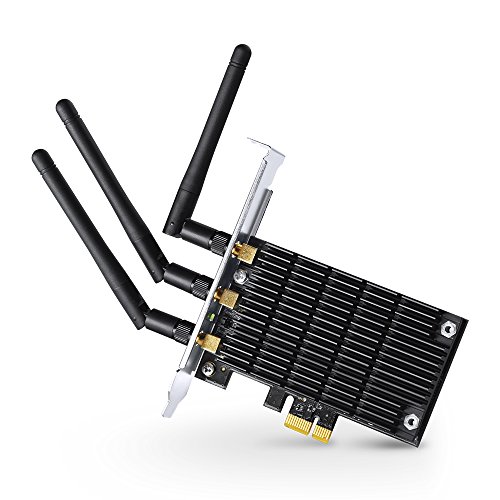
TP-Link Archer T9E AC1900 -- Best Budget PCIe WiFi Card
TP-Link Archer T9E is a WiFi 5 PCIe card that remains a reliable budget option for users who do not have a WiFi 6 router or who need dependable wireless connectivity without premium pricing. It uses three detachable antennas and a dual-band AC1900 specification, which covers most home broadband speeds available in 2026. Driver support is mature and stable across Windows versions. For users in less congested wireless environments or on modest internet plans, the performance difference versus WiFi 6 adapters is small in practice. A practical choice if budget is the primary constraint.
In its favor
- Lightning Fast Speed:Upgrade your WiFi card to 1900Mbps Wi-Fi speeds
- Beamforming Technology: receives more directional WiFi signals, improving speed and reliab
- More Stable Performance: Heat Sink technology distributes heat away from core components t
- Industry Leading Support: 2-year warranty and free 24/7 technical support; J.D. Power Rank
- System requirements is windows 8.1 (32/64bits), windows 8 (32/64bits), windows 7 (32/64bit
What matters most
What to consider
Match the WiFi standard to your router. Buying a WiFi 6E card when your router is WiFi 5 wastes money, as the card will operate at the router's lower standard. If you're also upgrading your router, buy WiFi 6E or 7 together for the full benefit. PCIe cards are the right choice for most desktops. USB adapters work well for temporary setups or small-form-factor cases. Check that your motherboard has an available PCIe x1 or x4 slot before purchasing a card. External antennas with magnetic bases or RP-SMA connectors allow repositioning to find the best signal direction in your specific room layout.
What to consider
For related reading, see [best computer water pump](/articles/best-computer-water-pump) and [best computer wireless mouse](/articles/best-computer-wireless-mouse). Learn about our selection process at [/methodology](/methodology).
Frequently asked
PCIe cards are generally superior for desktop use. They use the PCIe bus for faster data throughput, have dedicated antenna connectors that support large external antennas, and do not occupy USB ports. USB adapters are more portable and easier to install, but their bandwidth is capped by the USB connection and their smaller antennas limit range. For a permanent desktop installation, a PCIe card is the recommended choice.
WiFi 6 operates on 2.4GHz and 5GHz bands. WiFi 6E adds the 6GHz band, which offers less congestion and higher throughput in dense environments. To use WiFi 6E, both your adapter and your router must support it. The 6GHz band has shorter range than 5GHz, so WiFi 6E provides the biggest benefit in the same room as the router. WiFi 7 adapters are emerging but router compatibility remains limited in 2026.
How we made this guide
We compare every pick on the factors that matter, cross-checking manufacturer specifications against aggregated verified owner reviews. We rank independently and never take payment for placement. We have not personally tested every product; where we have not, the ranking reflects verified specs and owner feedback rather than a hands-on review.
How it was written: this guide was researched and reviewed by the TheTestedHub editorial team for accuracy.
Affiliate disclosure: TheTestedHub is reader-supported. When you buy through links on our site, we may earn a commission at no extra cost to you.
You might also like

Your Docking Station Match: CalDigit TS4 and More

Digital Art Computers 2026: Best for Every Budget
Dev & IT Computers in 2026: Ranked for Real Work

Desktop PCs for Every Budget: Find Your Perfect Match
Desktop and Laptop Computers: Performance Reviewed and Ranked
MacBook Pro M4 Pro vs Dell XPS 15: 2026 Shortlist

Buy the Best DIY Computer in 2026: Corsair One i300
