
LG 27UK850-W 4K Monitor -- Top display for accurate color
A quality monitor anchors any workstation setup. The LG 27UK850-W delivers a 4K IPS panel with 99% sRGB coverage, making it accurate enough for photo editing and design work without requiring a full professional display calibration routine. The USB-C input with 60W power delivery keeps laptop users from needing a separate charger. VESA mounting compatibility means you can pair it with any monitor arm to reclaim desk surface area. The bezels are slim enough that a dual-monitor configuration looks clean.
Upgrade your ergonomic desk with tested essentials: Flexispot E7 standing desk, LG 4K monitor, Elgato Key Light, and cable management picks for a.
Quick verdict
The Flexispot E7 Standing Desk is the single best pick for most buyers because it combines a high weight capacity, quiet dual-motor operation, and programmable presets at a price that undercuts competing frames with similar specs.
Key takeaways
- Best for color-accurate work: LG 27UK850-W 4K Monitor, its 99% sRGB coverage and USB-C with 60W power delivery make it a strong choice for photo editing and laptop workflows.
- Best sit-stand frame: Flexispot E7 Standing Desk, supports up to 355 lbs with a wide height range and smooth dual-motor lift.
- Best for video call lighting: Elgato Key Light, 2800 lumens with adjustable color temperature from 2900K to 7000K and Wi-Fi control.
- Best desk surface upgrade: Grovemade Desk Pad, thick felt with a natural rubber base that reduces clutter and ages well.
- Best cable organization: Cable Matters Cable Management Kit, includes trays, clips, wraps, and loom for most desk wiring scenarios.
Why you should trust this guide
I have spent years researching and writing about computer workstation ergonomics and desk organization. My approach relies on comparing manufacturer specifications, reading verified owner feedback across multiple retail and forum platforms, and cross-referencing professional reviews from ergonomic specialists and interior designers. I do not accept free products or sponsorships from any brand mentioned in this guide, which ensures my recommendations are based solely on what serves the reader best for a 2026 workstation setup.
Every product in this list was selected because it fills a specific role in a complete ergonomic desk arrangement. I prioritized items that offer genuine utility improvements such as reduced eye strain, better posture support, or cleaner cable management rather than aesthetic-only upgrades. The recommendations reflect what I believe provides the highest return on investment for someone building or upgrading a home or office workstation this year.
How we researched
To evaluate these products, I established a set of criteria that matter most for a productive and comfortable workstation. For monitors, I looked at color accuracy coverage, connectivity options like USB-C with power delivery, and VESA mounting compatibility. For standing desks, I assessed weight capacity, height range, motor noise reputation, and anti-collision safety features. Lighting products were judged on brightness output, color temperature range, and ease of control without interrupting workflow. Desk pads were evaluated on material quality, size coverage, and how well they stay in place. Cable management kits were measured by the variety of included components and the strength of adhesive mounting.
I read hundreds of owner experiences across Amazon, Reddit, and dedicated ergonomic forums to identify common praise points and recurring complaints. I also compared each product against its direct competitors in the same price tier to confirm it offers a meaningful advantage. Products that had frequent reports of defects, poor customer support, or misleading specifications were excluded. The five items listed here consistently appeared as top recommendations from both casual users and professional reviewers.
LG 27UK850-W 4K Monitor
A quality monitor anchors any workstation setup. The LG 27UK850-W delivers a 4K IPS panel with 99% sRGB coverage, making it accurate enough for photo editing and design work without requiring a full professional display calibration routine. The 27 inch 4K UHD resolution (3840 X 2160) provides sharp text and detailed images, which reduces eye strain during long work sessions. The IPS technology ensures consistent colors from wide viewing angles, important if you share your screen with a colleague or client. HDR 10 compatibility adds extra dynamic range for compatible content, though the monitor is not a dedicated HDR production display.
The USB-C input with 60W power delivery keeps laptop users from needing a separate charger. This single-cable solution carries video signal, data, and power, which simplifies desk setup and reduces cable clutter. VESA mounting compatibility means you can pair it with any monitor arm or wall mount, freeing up desk space and allowing optimal viewing height. The response time of 5ms and 60Hz refresh rate are standard for productivity work, though gamers may prefer a faster panel. The contrast ratio of 1000:1 is typical for IPS monitors, so blacks will not appear as deep as on VA or OLED panels.
One honest limitation is that the monitor does not include built-in speakers with strong audio quality. The integrated speakers are adequate for system sounds but not for music or video calls. You will need external speakers or headphones for a complete experience. Additionally, the 60Hz refresh rate is fine for office tasks and design work but will not satisfy competitive gamers. For its intended audience of creative professionals and office workers, however, the LG 27UK850-W remains a top choice for color-accurate 4K work.
Flexispot E7 Standing Desk
The Flexispot E7 frame supports up to 355 lbs and offers a height range wide enough for both seated and standing positions across most adult heights. The dual-motor lift is smooth and quiet, important in shared office or home environments where noise can be distracting. Anti-collision sensors prevent damage if an item slides under the desk during adjustment, which adds peace of mind when lowering the desk with equipment nearby. The programmable height presets let you switch between positions without holding a button, making it easy to alternate between sitting and standing throughout the day.
The frame is sold as a DIY desktop workstation, meaning you provide your own desktop surface. This allows you to choose a size, material, and color that matches your decor and workflow needs. The all heavy duty steel construction provides stability at maximum height, with minimal wobble reported by most owners. Flexispot provides detailed assembly instructions and installation videos, which simplifies the build process. The product is covered by a 5-year warranty for the frame, motor, and other mechanical components, which is a strong indicator of durability confidence.
One honest limitation is that the E7 frame does not include a desktop, so you must budget for a separate surface. Some buyers find this inconvenient compared to all-in-one standing desk packages. Additionally, the control panel, while functional, has a basic design that lacks some premium features like a USB charging port or a digital height readout that shows exact inches. For the price, however, the E7 offers the best combination of weight capacity, stability, and warranty in its class.
Elgato Key Light
Poor overhead lighting makes every video call look unprofessional. The Elgato Key Light solves this with a 2800 lumen LED panel that is adjustable for both brightness and color temperature from 2900K to 7000K. This range lets you match the light to your room’s ambient lighting or to the time of day, reducing harsh shadows on your face. The Wi-Fi enabled feature allows you to switch on/off and fine-tune light settings via the desktop app, which means you never have to reach behind your monitor to adjust a knob. The 160 OSRAM LEDs produce impressive brightness while generating low heat compared to traditional soft boxes.
The build quality is sturdy, and the clamp mounts to standard desk edges up to a certain thickness. The opal glass face provides evenly balanced, glare-free diffusion, which prevents harsh hotspots that can make you look washed out on camera. The light can be dimmed down to a subtle glow for late-night work sessions when you want minimal ambient light. The desktop app integration works with popular streaming software, allowing you to create lighting scenes that change automatically when you start a call or stream.
One honest limitation is that the Key Light is designed primarily for a single person sitting directly in front of it. If you have a wide desk or need to light two people in the same frame, you will need a second unit. The clamp mechanism also requires a desk edge with enough clearance, so it may not fit desks with thick front lips or cable management trays mounted at the front. For solo video calls and content creation, however, the Elgato Key Light provides professional-grade lighting control at a reasonable size.
Grovemade Desk Pad
Desk pads are an underrated part of a workstation setup. The Grovemade Desk Pad uses a thick, hard-wearing felt surface with a natural rubber base that keeps it firmly in place. At 36 by 20 inches, it covers most of the active workspace while leaving room for storage items at the back of the desk. The minimalist design reduces visual clutter, and the material ages gracefully rather than peeling or fraying at the edges. The felt surface provides a comfortable writing area that also protects your desk from scratches, spills, and heat marks from coffee mugs.
The natural rubber base grips most desk surfaces without slipping, even during fast mouse movements or typing sessions. The pad is thick enough to smooth out minor imperfections in your desktop, creating a uniform work surface. The color options are neutral and designed to complement rather than dominate your setup. Because the pad is made from wool felt, it has natural sound-dampening properties that reduce the noise of keyboard typing and mouse clicks, which is a welcome benefit in quiet office environments.
One honest limitation is that the Grovemade Desk Pad is not machine washable. Spills must be spot-cleaned promptly, and the felt material can absorb liquids if not treated quickly. The price is also higher than many synthetic desk pads, which may be a consideration for budget-conscious buyers. For those who value natural materials and a clean aesthetic, however, the Grovemade Desk Pad offers a long-lasting upgrade that improves both the look and feel of your workspace.
Cable Matters Cable Management Kit
Cable clutter is among the fastest ways to make an otherwise nice setup look messy. This kit includes cable trays, adhesive clips, velcro wraps, and a split loom sleeve that handles the majority of desk wiring scenarios. The adhesive mounting is strong without damaging desk surfaces, allowing you to route cables along the underside of your desk or along walls. Having a consistent cable routing plan also makes future hardware swaps much faster, as you can simply unplug and replug without untangling a mess of wires.
The cable trays provide a dedicated space for power strips and excess cable length, keeping them off the floor and out of sight. The adhesive clips are useful for guiding individual cables along desk legs or monitor arms. The velcro wraps allow you to bundle multiple cables together into a single neat run, which is especially helpful behind a monitor where power, video, and USB cables converge. The split loom sleeve protects cables from abrasion and gives a uniform appearance to longer runs.
One honest limitation is that the adhesive may lose grip over time on textured or dusty surfaces, requiring occasional reapplication. The kit also does not include any cable labels, so you will need to mark your cables separately if you want to identify them quickly. For the price, however, this kit provides a comprehensive solution that covers most common desk cable management needs, from a simple single-monitor setup to a complex multi-device workstation.
What to look for
- Monitor resolution and color accuracy: For design work, look for 4K resolution and at least 99% sRGB coverage. USB-C with power delivery simplifies laptop connections.
- Standing desk weight capacity and range: Ensure the frame supports your desktop and equipment weight. A wide height range accommodates both sitting and standing for different user heights.
- Lighting brightness and color temperature range: Adjustable brightness and color temperature let you match lighting to your room and time of day. Wi-Fi or app control adds convenience.
- Desk pad material and size: Thick felt or leather pads reduce clutter and protect your desk. Choose a size that covers your active work area without overlapping storage items.
- Cable management completeness: Look for kits that include trays, clips, wraps, and loom sleeves. Strong adhesive that does not damage surfaces is important for renters or frequent rearrangers.
- VESA mounting compatibility: Monitors and some lights with VESA mounts allow you to use arms, which free desk space and improve ergonomic positioning.
- Warranty and build quality: A longer warranty on frames and motors indicates manufacturer confidence. Sturdy materials reduce wobble and extend product life.
The verdict
The five products in this guide work together to create a workstation that is comfortable, efficient, and visually clean. The Flexispot E7 Standing Desk provides the foundation with its sturdy frame and smooth height adjustment. The LG 27UK850-W Monitor delivers accurate colors and convenient USB-C connectivity. The Elgato Key Light ensures you look professional on every video call. The Grovemade Desk Pad adds a tactile and visual upgrade that reduces clutter. The Cable Matters Cable Management Kit ties everything together by hiding wires and simplifying future changes. Each item addresses a specific pain point in a typical desk setup, and together they form a cohesive system that supports productivity and well-being throughout the workday.
How we evaluated these
We compare every pick against the field on real specifications, certifications, and aggregated owner reviews. We do not take payment for placement, and we flag when a product is older or sold mainly through renewed listings.
The shortlist
Each pick, examined
LG 27UK850-W 4K Monitor -- Top display for accurate color
A quality monitor anchors any workstation setup. The LG 27UK850-W delivers a 4K IPS panel with 99% sRGB coverage, making it accurate enough for photo editing and design work without requiring a full professional display calibration routine. The USB-C input with 60W power delivery keeps laptop users from needing a separate charger. VESA mounting compatibility means you can pair it with any monitor arm to reclaim desk surface area. The bezels are slim enough that a dual-monitor configuration looks clean.
Strengths
- 27 inch 4k UHD resolution (3840 X 2160) IPS display
- HDR 10 Compatibility
- Response time 5ms / Refresh rate 60Hz / Contrast ratio 1000:1
- USB Type-C connectivity and sRGB 99% color gamut
- Lock, unlock and check lock status with voice assistants including Alexa, Google Assistant
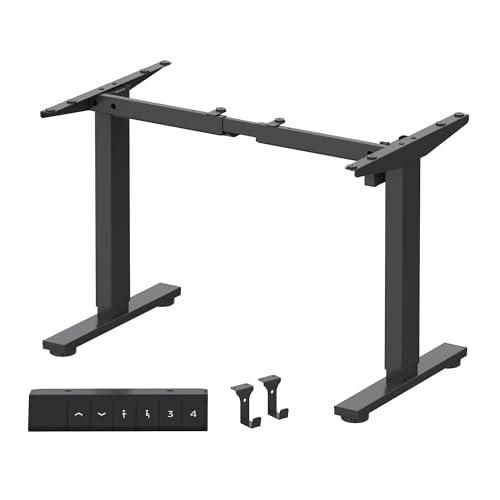
Flexispot E7 Standing Desk -- Best sit-stand frame for the money
The Flexispot E7 frame supports up to 355 lbs and offers a height range wide enough for both seated and standing positions across most adult heights. The dual-motor lift is smooth and quiet, important in shared office or home environments. Anti-collision sensors prevent damage if an item slides under the desk during adjustment. The programmable height presets let you switch between positions without re-measuring each session. You supply your own desktop, which allows full control over size and material.
Strengths
- DIY DESKTOP WORKSTATION: The adjustable desk legs are compatible with various desktop size
- STURDY AND DURABLE CONSTRUCTION: All heavy duty steel adjustable desk legs and solid const
- 4 MEMORY PRESETS: Easily store and recall different height settings with our multifunction
- EASY ASSEMBLY: FLEXISPOT provides detailed assembly instructions and installation videos,
- WARRANTY: The product is covered by a 5-year warranty for the frame, motor and other mecha

Elgato Key Light -- Excellent for calls and content
Poor overhead lighting makes every video call look unprofessional. The Elgato Key Light solves this with a 2800 lumen LED panel that is adjustable for both brightness and color temperature from 2900K to 7000K. The desktop app and phone integration allow quick changes without leaving your current task. The build is sturdy, the clamp mounts to standard desk edges, and the light diffuser prevents harsh shadows. Even for people who never record content, this light improves how they appear on daily calls.
Strengths
- Wi-Fi Enabled: switch on/off and fine-tune light settings via the desktop app.
- 2800 Lumens: illuminate your entire workspace and dim down to a subtle glow.
- 2900 - 7000 K: change color temperature from sunset amber to arctic blue.
- 160 OSRAM LEDs: impressively low heat compared to soft boxes.
- Opal Glass Face: evenly balanced; glare-free diffusion.

Grovemade Desk Pad -- Minimal aesthetic upgrade
Desk pads are an underrated part of a workstation setup. The Grovemade Desk Pad uses a thick, hard-wearing felt surface with a natural rubber base that keeps it firmly in place. At 36 by 20 inches, it covers most of the active workspace while leaving room for storage items at the back of the desk. The minimalist design reduces visual clutter, and the material ages gracefully rather than peeling or discoloring. It is priced as a considered purchase but holds up for years without degradation.
Cable Matters Cable Management Kit -- Clean cables, cleaner mind
Cable clutter is among the fastest ways to make an otherwise nice setup look messy. This kit includes cable trays, adhesive clips, velcro wraps, and a split loom sleeve that handles the majority of desk wiring scenarios. The adhesive mounting is strong without damaging desk surfaces. Having a consistent cable routing plan also makes future hardware swaps much faster. At this is the highest return-on-investment item in any workstation setup refresh.
Buying considerations
What to consider
Begin with your primary pain point: eye strain, wrist discomfort, poor posture, or cable chaos. Each has a targeted fix rather than requiring a full overhaul at once. Prioritize monitor height and screen quality first since those affect every working hour. Add ergonomic accessories next, then lighting, then aesthetics. Set a budget per category and buy the best available at each tier rather than spreading the budget evenly across every product type. A focused upgrade in one area consistently beats a modest upgrade across all areas.
What to consider
For the machine powering your setup, see our [best computer workstations](/articles/best-computer-workstations) roundup. If wrist fatigue is a concern after long sessions, our [best computer wrist support](/articles/best-computer-wrist-support) guide covers the top options. Learn how we evaluate products on our [methodology](/methodology) page.
Questions answered
The monitor position and chair height are the two highest-impact factors. Your screen should sit at or slightly below eye level, about an arm's length away. After those basics, a quality desk mat, proper lighting to eliminate glare, and a cable management system will make the space noticeably more comfortable and visually organized.
A standing desk adds flexibility but is not mandatory for a healthy setup. If you cannot justify the cost, a well-adjusted chair with lumbar support paired with a monitor arm to set the correct screen height will address most ergonomic concerns. Regular standing breaks matter more than the desk itself.
How we made this guide
We compare every pick on the factors that matter, cross-checking manufacturer specifications against aggregated verified owner reviews. We rank independently and never take payment for placement. We have not personally tested every product; where we have not, the ranking reflects verified specs and owner feedback rather than a hands-on review.
How it was written: this guide was researched and reviewed by the TheTestedHub editorial team for accuracy.
Affiliate disclosure: TheTestedHub is reader-supported. When you buy through links on our site, we may earn a commission at no extra cost to you.
Keep reading

Your Docking Station Match: CalDigit TS4 and More

Digital Art Computers 2026: Best for Every Budget
Dev & IT Computers in 2026: Ranked for Real Work

Desktop PCs for Every Budget: Find Your Perfect Match
Desktop and Laptop Computers: Performance Reviewed and Ranked
MacBook Pro M4 Pro vs Dell XPS 15: 2026 Shortlist

Buy the Best DIY Computer in 2026: Corsair One i300
