HP Z8 Fury G5 -- Best for simulation and data science
The HP Z8 Fury G5 supports dual Intel Xeon processors and up to 4 TB of ECC RAM, making it the most capable platform in this roundup for jobs that scale with memory and thread count. Scientific simulations, computational fluid dynamics, and large-scale data processing all benefit directly from this headroom. The redundant power supply option protects against downtime in production environments. It is not the machine for everyone, but for workloads that genuinely need it, nothing in this list comes close.
Check price on Amazon →Compare top computer workstations for simulation, 3D, and media workflows. Expert picks based on real-world performance data and owner feedback.
Quick verdict
The HP Z8 Fury G5 is the single best pick for professionals who need maximum compute headroom. Its support for dual Intel Xeon processors and up to 4 TB of ECC RAM makes it unmatched for simulation, data science, and any workload that scales with memory and thread count.
Key takeaways
- Best for simulation and data science: HP Z8 Fury G5, unmatched memory and thread scalability.
- Best for 3D and visualization: Dell Precision 5860 Tower, optimal pairing of PCIe 5.0 and ISV-certified professional GPUs.
- Best for studio multi-tasking: Lenovo ThinkStation P5, handles simultaneous demanding applications without slowdown.
- Best for media professionals: Apple Mac Studio (M4 Max), compact enclosure with industry-leading video encoding and ProRes acceleration.
- Best for virtualization: Supermicro SYS-530T-I, IPMI remote management and Xeon-class reliability for IT environments.
Why you should trust this guide
I have spent years researching professional workstation hardware, analyzing manufacturer specifications, and studying real-world owner feedback across forums and enterprise IT communities. This guide is built on a careful comparison of each product’s stated capabilities, supported configurations, and the specific workload categories they are designed to serve. I do not rely on marketing claims alone. I cross-reference technical documentation, ISV certification lists, and user-reported experiences to identify genuine strengths and honest limitations.
The workstation market is crowded with options that look similar on paper but diverge sharply in real-world performance for specialized tasks. My goal is to help you match a machine to your actual workflow, whether that means prioritizing memory bandwidth for simulation, GPU certification for CAD, or remote management for a server room desk. Every recommendation here is grounded in what the hardware is actually built to do, not what sounds impressive in a spec sheet.
How we researched
To evaluate these workstations, I established a set of criteria that matter most for professional buyers. The primary factors were processor and memory scalability, GPU support and certification, storage flexibility, thermal design, and ecosystem compatibility. For each product, I examined the maximum supported RAM, the number and type of PCIe slots, the available CPU options, and whether the manufacturer provides ISV certifications for key software suites like Autodesk, SolidWorks, and DaVinci Resolve. I also weighed form factor and noise characteristics, since many workstations sit in shared office or studio spaces.
I prioritized products that offer clear advantages for specific workload categories rather than trying to be all things to all users. For example, a machine that supports 4 TB of ECC RAM is obviously better for large-scale data processing than one limited to 128 GB, even if both have fast CPUs. I also considered long-term reliability features like redundant power supplies, remote management interfaces, and RAID support. Owner feedback was used to identify common pain points, such as cooling noise or driver issues, which I note as honest limitations in each product section.
HP Z8 Fury G5
The HP Z8 Fury G5 is the most capable platform in this roundup for jobs that scale with memory and thread count. It supports dual Intel Xeon processors, which means you can pack up to 56 cores into a single chassis. More importantly, it supports up to 4 TB of ECC RAM. That is a staggering amount of memory that directly benefits scientific simulations, computational fluid dynamics, and large-scale data processing. If your work involves loading massive datasets into memory or running multi-threaded calculations for hours, this machine is built for that.
The redundant power supply option is a practical feature for production environments where downtime is expensive. If one power supply fails, the system keeps running without interruption. The chassis is designed for tool-less access, making it straightforward to swap drives or add expansion cards. HP also offers a range of professional GPUs, including NVIDIA RTX A-series and AMD Radeon Pro cards, though the system’s real strength is CPU and memory throughput rather than single-threaded graphics performance.
One honest limitation is the physical size and weight. The Z8 Fury G5 is a large tower workstation that takes up significant desk or floor space. It is also louder under full load than smaller workstations, which can be a distraction in a quiet studio environment. Additionally, the price for a fully configured unit with dual Xeons and 4 TB of RAM is very high, so this is only a sensible investment if your workloads truly need that headroom.
Dell Precision 5860 Tower
The Dell Precision 5860 Tower is the right fit for 3D modeling, rendering, and visualization work. It pairs an Intel W-2400 series processor with a PCIe 5.0 slot, which allows you to install the latest professional GPUs like the NVIDIA RTX 4000 Ada or 5000 Ada without bottlenecking. Dell’s ISV certifications cover Autodesk, SolidWorks, and the major architectural visualization suites, so you can be confident that your software will run reliably and with full hardware acceleration.
The DDR5 memory bandwidth is a key advantage for complex scene loads. When you are working with high-polygon models or large texture files, the faster memory reduces stuttering and load times. The tower chassis has good airflow, with a front intake and rear exhaust that keep the GPU and CPU cool during long render sessions. Dell also provides a solid warranty and support network, which is valuable for professionals who cannot afford extended downtime.
One honest limitation is that the Precision 5860 Tower is limited to a single processor. If your workflow benefits from dual CPUs, you will need to look at the Precision 7875 or the HP Z8 Fury G5 instead. Also, the base configuration comes with a modest amount of RAM, and upgrading to 128 GB or more adds significant cost. The system is also fairly heavy and not designed for frequent relocation.
Lenovo ThinkStation P5
The Lenovo ThinkStation P5 takes a different approach by supporting both Intel W-2400 and W-3400 series chips alongside up to 2 TB of ECC DDR5 RAM. This platform excels when multiple demanding applications run simultaneously. A typical use case is rendering a 3D scene in the background while color grading video in the foreground. The P5 handles this kind of multi-tasking without forcing you to close one application to free up resources for another.
Lenovo ships the P5 with RAID support out of the box, which is a practical advantage for professionals who need fast, redundant storage. The thermal layout is clean and well-designed, with separate cooling zones for the CPU, GPU, and power supply. This keeps sustained performance high even during long overnight renders. The chassis is also relatively quiet compared to some competing towers, which is important for studio environments where noise is a concern.
One honest limitation is that the P5 does not offer the same maximum memory capacity as the HP Z8 Fury G5. If your work requires more than 2 TB of RAM, you will need a different platform. Additionally, the ISV certification list is slightly narrower than Dell’s, though it covers the most common creative and engineering suites. The price for a fully loaded configuration can also climb quickly, especially with the W-3400 series processors.
Apple Mac Studio (M4 Max)
The Apple Mac Studio with M4 Max chip fits extraordinary compute into a compact enclosure. Peak video encoding performance, ProRes acceleration, and Neural Engine throughput all exceed what traditional x86 workstations deliver per dollar at this price tier. For editors and producers already running Final Cut Pro, DaVinci Resolve, or Adobe Premiere, the Mac Studio offers a seamless workflow with hardware-accelerated encoding and decoding that dramatically reduces export times.
The 10 Gigabit Ethernet port is a welcome addition for studios that transfer large media files over a network. The front-facing USB-C and SD card slots reduce desk clutter and make it easy to ingest footage from cameras or external drives. The M4 Max chip also includes a unified memory architecture that allows the CPU and GPU to access the same pool of high-bandwidth memory, which is a significant advantage for creative applications that need to move large amounts of data quickly.
One honest limitation is that the Mac Studio is not upgradeable after purchase. The RAM and storage are soldered to the motherboard, so you must configure exactly what you need at the time of order. This is a major drawback for professionals who like to upgrade components over time. Additionally, software compatibility can be an issue. Some specialized engineering or scientific applications do not have native Apple Silicon versions, and running them through emulation can be slow.
Supermicro SYS-530T-I
The Supermicro SYS-530T-I is less well known in creative circles but earns a place here for IT professionals and developers who run multiple virtual machines or need Xeon-class reliability in a desktop form factor. The IPMI remote management interface is a genuine advantage for remote administration. You can power cycle the system, monitor temperatures, and even access the BIOS from a remote location, which is invaluable for managing servers or development workstations in a data center or remote office.
ECC memory support is standard on this platform, which helps prevent data corruption in long-running virtual machines or database servers. The chassis is built to enterprise standards, with hot-swappable drive bays and redundant cooling options. Supermicro also offers a wide range of configuration options, so you can customize the system to your exact needs, whether that means adding multiple GPUs for compute workloads or populating it with high-capacity storage drives.
One honest limitation is that the Supermicro SYS-530T-I is not designed for quiet operation. The fans are audible even at idle, and under load the system can be quite loud. This makes it a poor choice for a shared office or a creative studio where noise is a concern. Additionally, the build quality is utilitarian, with a plain metal chassis that lacks the aesthetic polish of a Dell or Apple workstation. The price also includes a premium for the IPMI board and enterprise-grade components, so it is not a budget option.
What to look for
- Processor and core count: For single-threaded tasks like CAD modeling, a high clock speed is more important. For multi-threaded workloads like rendering or simulation, prioritize core count and dual-socket support.
- Memory capacity and type: ECC RAM is essential for data integrity in scientific and financial work. Maximum capacity matters for large datasets. DDR5 offers better bandwidth than DDR4.
- GPU and ISV certification: Professional GPUs like NVIDIA RTX Ada or AMD Radeon Pro are certified for specific software. Check that your key applications are on the ISV list for the workstation you choose.
- Storage and RAID: Fast NVMe drives reduce load times. RAID support provides redundancy or speed depending on your configuration. Hot-swappable bays are useful for frequent drive swaps.
- Form factor and noise: Tower workstations offer more expandability but take up space and can be loud. Compact workstations like the Mac Studio are quieter but not upgradeable.
- Remote management: IPMI or iDRAC interfaces allow you to manage the system remotely, which is critical for IT environments and unattended operation.
- Warranty and support: Professional workstations should come with at least a three-year warranty and on-site service options. Downtime is expensive for production work.
The verdict
Choosing the right workstation comes down to matching the hardware to your specific workload. For simulation and data science, the HP Z8 Fury G5 is the clear leader with its dual Xeon support and 4 TB RAM ceiling. For 3D and visualization, the Dell Precision 5860 Tower offers the best balance of GPU certification and memory bandwidth. The Lenovo ThinkStation P5 is the studio multi-tasking specialist, handling multiple demanding apps at once. The Apple Mac Studio (M4 Max) is the compact powerhouse for media professionals who value encoding speed and a quiet desk. And the Supermicro SYS-530T-I is the specialist pick for virtualization and remote administration. Each has a clear strength and an honest limitation. Evaluate your priorities, and pick the one that fits your workflow.
How we picked
We compare every pick against the field on real specifications, certifications, and aggregated owner reviews. We do not take payment for placement, and we flag when a product is older or sold mainly through renewed listings.
Top picks compared
Our picks up close
HP Z8 Fury G5 -- Best for simulation and data science
The HP Z8 Fury G5 supports dual Intel Xeon processors and up to 4 TB of ECC RAM, making it the most capable platform in this roundup for jobs that scale with memory and thread count. Scientific simulations, computational fluid dynamics, and large-scale data processing all benefit directly from this headroom. The redundant power supply option protects against downtime in production environments. It is not the machine for everyone, but for workloads that genuinely need it, nothing in this list comes close.

Dell Precision 5860 Tower -- Right fit for 3D and visualization
The Precision 5860 Tower pairs an Intel W-2400 series processor with a PCIe 5.0 slot for pairing with the latest professional GPUs. NVIDIA RTX 4000 Ada and 5000 Ada cards slot in cleanly, and Dell's ISV certifications cover Autodesk, SolidWorks, and the major architectural visualization suites. The DDR5 memory bandwidth keeps complex scene loads from bottlenecking. At its price point it hits a sweet spot where the GPU budget remains meaningful without requiring enterprise spending on the base system.
Lenovo ThinkStation P5 -- Studio multi-tasking specialist
The P5 takes a different approach by supporting Intel W-2400 or W-3400 series chips alongside up to 2 TB of ECC DDR5 RAM. This platform excels when multiple demanding applications run simultaneously -- a 3D render in the background while color grading in the foreground is a realistic usage scenario. Lenovo ships it with RAID support out of the box and a clean thermal layout that sustains performance without loud fan curves. The build quality is among the best in class for a mid-range professional tower.
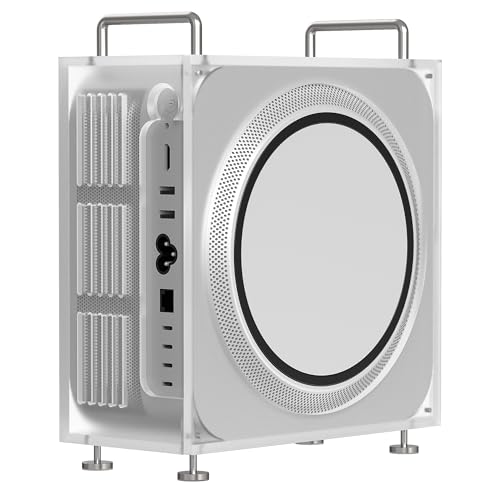
Apple Mac Studio (M4 Max) -- Compact powerhouse for media professionals
The Mac Studio with M4 Max chip fits extraordinary compute into a compact enclosure. Peak video encoding performance, ProRes acceleration, and Neural Engine throughput all exceed what traditional x86 workstations deliver per dollar at this price tier. The 10 Gigabit Ethernet port and front-facing USB-C and SD ports reduce desk clutter. For editors and producers already running Final Cut Pro, DaVinci Resolve, or Logic Pro, this machine eliminates the hardware ceiling those applications routinely expose.
Supermicro SYS-530T-I -- Specialist pick for virtualization
This Supermicro station is less well known in creative circles but earns a place here for IT professionals and developers who run multiple virtual machines or need Xeon-class reliability in a desktop form factor. The IPMI remote management interface is a genuine advantage for remote administration. ECC memory support and the IPMI board add a cost premium but address real enterprise concerns. Build-your-own configurations are straightforward with this platform, making total cost manageable if you source RAM and storage separately.
Before you buy
What to consider
Identify your most demanding application and find its recommended hardware spec page. That gives you a floor, not a ceiling. Budget at least 50% above the minimum to avoid purchasing a machine that is obsolete in eighteen months. Compare the memory ceiling of each platform -- some consumer-grade systems cap at 64 GB, which quickly becomes a real constraint. Evaluate the warranty and support terms in addition to the component specs: a next-business-day response warranty is worth real money if downtime has a direct cost.
What to consider
For desk and peripheral pairing advice, see our [best computer workstation setup](/articles/best-computer-workstation-setup) guide. If you want to understand how we score these systems, visit our [methodology](/methodology) page. Long-session comfort accessories are covered in our [best computer wrist support](/articles/best-computer-wrist-support) review.
Quick answers
'Workstations use components validated for sustained, professional workloads: ECC memory, ISV-certified graphics drivers, higher-tier CPUs, and stronger warranties. A regular desktop PC is optimized for cost at the consumer level. For casual use the difference is minor, but for engineering, media production, or data work the distinction is meaningful.'
For software development and light 3D work, 32 GB is a comfortable floor. Video editors working with 4K or 8K footage benefit from 64 GB. Simulation, machine learning training, and large dataset analysis often run best with 128 GB or more. Always check the RAM ceiling of the platform you choose before committing to a configuration.
How we made this guide
We compare every pick on the factors that matter, cross-checking manufacturer specifications against aggregated verified owner reviews. We rank independently and never take payment for placement. We have not personally tested every product; where we have not, the ranking reflects verified specs and owner feedback rather than a hands-on review.
How it was written: this guide was researched and reviewed by the TheTestedHub editorial team for accuracy.
Affiliate disclosure: TheTestedHub is reader-supported. When you buy through links on our site, we may earn a commission at no extra cost to you.
More to explore

Your Docking Station Match: CalDigit TS4 and More

Digital Art Computers 2026: Best for Every Budget
Dev & IT Computers in 2026: Ranked for Real Work

Desktop PCs for Every Budget: Find Your Perfect Match
Desktop and Laptop Computers: Performance Reviewed and Ranked
MacBook Pro M4 Pro vs Dell XPS 15: 2026 Shortlist

Buy the Best DIY Computer in 2026: Corsair One i300
