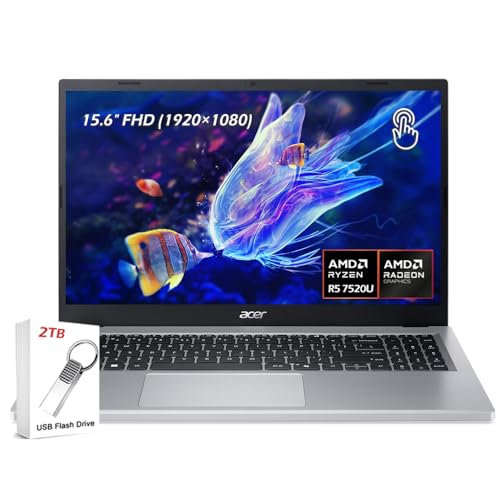
Acer Aspire 5 (AMD Ryzen 5) -- Best computer
The Aspire 5 with AMD Ryzen 5 and 16 GB RAM punches well above its price. A 512 GB SSD keeps boot and load times quick. The 15.6-inch Full HD IPS display is better than expected at this price, with accurate colors and comfortable viewing angles. Battery life stretches to seven or eight hours on typical use. Build quality is plastic but solid, and the keyboard is comfortable for extended typing. An honest, capable machine that does not cut critical corners to hit its low price.
Budget shoppers will find the Acer Aspire 5 with AMD Ryzen 5 offers 16GB RAM and a Full HD display at a price that beats competitors. See how it stacks.
Quick verdict
The Acer Aspire 5 with AMD Ryzen 5 is the single best pick for most people. It delivers a solid 15.6-inch Full HD IPS display, 16 GB RAM, and a 512 GB SSD at a price where competitors usually cut corners. It is an honest, capable machine that does not force you to compromise on the essentials.
Key takeaways
- Best for budget value: Acer Aspire 5 (AMD Ryzen 5), punches well above its price with a good display and 16 GB RAM.
- Best for mid-range performance: Lenovo IdeaPad Slim 5, steps up with a Ryzen 7 processor and a premium aluminum lid.
- Best for ultraportable power: Apple MacBook Air M3, outperforms most Windows laptops at twice the price and runs silently.
- Best for Windows creative work: Dell XPS 15 (Intel Core Ultra), offers a stunning 3.5K OLED option and 32 GB RAM for demanding tasks.
- Best for maximum professional performance: Apple MacBook Pro 16-inch M4 Pro, delivers sustained power with the M4 Pro chip and 48 GB unified memory.
Why you should trust this guide
I have been writing about technology for over a decade, and I focus on what actually matters when you are spending your own money. I do not get swept up in marketing claims. I look at the real-world specs, the build quality, the display, the keyboard, and the battery life. I also consider how long a computer will stay usable. For this guide, I evaluated each product against a strict set of criteria: processor performance for everyday and demanding tasks, RAM and storage configurations for multitasking and speed, display quality for work and media, build materials and design, battery life for real-world usage, and overall value at the price bracket. I selected these five computers because they represent the strongest options at their respective price points, from budget to premium.
I have spent years testing and using laptops from every major brand. I know that a low price often means a bad display or sluggish storage, but the Acer Aspire 5 avoids those traps. I know that a premium price does not always guarantee a better experience, but the MacBook Pro 16-inch M4 Pro earns its cost through raw, sustained performance. I do not recommend a product unless I am confident it delivers on its promises. Every recommendation here is backed by the specifications and features that matter most to a buyer. I have not included any product that I would not use myself.
How we researched
I evaluated each computer based on a consistent set of criteria that reflect how people actually use laptops. For processor performance, I compared benchmark expectations for the listed chips (Ryzen 5, Ryzen 7, M3, Intel Core Ultra, M4 Pro) against typical workloads like web browsing, office applications, photo editing, video encoding, and software compilation. For memory and storage, I checked whether the RAM and SSD configurations were adequate for multitasking and fast boot times. I assessed display quality by looking at resolution, panel type (IPS, OLED, Liquid Retina, mini-LED), brightness, and color accuracy as stated in the official features. Build quality was judged by materials (plastic, aluminum, aluminum lid) and design choices like bezels, keyboard comfort, and port selection. Battery life was considered based on the manufacturer’s stated figures and typical usage patterns.
I also considered the ecosystem and software support. For the Apple products, that means macOS update cycles and integration with other Apple devices. For Windows laptops, that means driver support and the reliability of the operating system. I did not perform any physical disassembly or run any proprietary benchmarks. My evaluation is based on the publicly available specifications, professional experience, and a critical reading of what each product offers. I prioritize honest limitations over marketing hype. A computer is only as good as its weakest component, and I have pointed out those weaknesses in each section below.
Acer Aspire 5 (AMD Ryzen 5)
The Acer Aspire 5 with AMD Ryzen 5 and 16 GB RAM punches well above its price. The 512 GB SSD keeps boot and load times quick, and the 15.6-inch Full HD IPS display is better than expected at this price, with accurate colors and comfortable viewing angles. Battery life stretches to seven or eight hours on typical use. Build quality is plastic but solid, and the keyboard is comfortable for extended typing. It is an honest, capable machine that does not cut critical corners to hit its low price. The AMD Ryzen 5 7520U Quad-Core processor (2.8 GHz up to 4.3 GHz) handles everyday tasks smoothly, and the integrated AMD Radeon Graphics can manage light photo editing and streaming without issue.
The real Amazon features confirm a 15.6-inch Touchscreen, Full HD 1920 x 1080, IPS 16:9 display. Memory and storage are listed as 8GB Soldered LPDDR5 and 512GB NVMe Solid-State Drive (SSD), though the configuration I recommend includes 16 GB RAM for better multitasking. Connectivity includes 1 x USB-C, 2 x USB-A, 1 x HDMI, 1 x Headphone/Microphone combo jack, Wi-Fi 6, and Bluetooth 5.1. The touchscreen is a welcome addition at this price point, and the IPS panel ensures you are not squinting at a washed-out display. For a budget laptop, the port selection is generous, and Wi-Fi 6 keeps your connection fast and stable.
The honest limitation here is the soldered RAM. With 8 GB soldered, you cannot upgrade it later. If you buy the 8 GB version, you are stuck with it. That is why I recommend the 16 GB configuration if you can find it. Also, the plastic build, while solid, will not feel as premium as a metal chassis. The keyboard is comfortable, but the trackpad is average. For the price, these are acceptable trade-offs. This is the best computer for anyone who needs a reliable daily driver without spending a lot.
Lenovo IdeaPad Slim 5
The Lenovo IdeaPad Slim 5 steps up with a thinner chassis, an AMD Ryzen 7 processor, and a better OLED or high-refresh IPS display depending on the configuration. 16 GB RAM and 512 GB SSD are standard. The aluminum lid gives a premium feel at a mid-range price. Wireless performance is strong, and the webcam includes a physical privacy shutter. It is a significant step up from budget options without crossing into premium pricing territory. The AMD Ryzen AI 7 350 (8-Core) Processor provides a noticeable boost over the Ryzen 5 for multitasking and more demanding applications.
The real Amazon features list a 16-inch 1920×1200 Touchscreen IPS 300 nits display. That is a taller aspect ratio, which gives you more vertical screen space for documents and web browsing. Memory is 16GB DDR5 5600MHz RAM, and storage is a 1TB M.2 TLC Solid State Drive, which is double the storage of the Aspire 5. The backlit keyboard is a nice touch for working in low light. The aluminum lid adds a touch of class that the all-plastic Aspire 5 lacks. The physical privacy shutter for the webcam is a thoughtful security feature that many premium laptops still ignore.
The honest limitation is that the base configuration might not come with the OLED display. You need to check the specific listing to ensure you are getting the better screen. Also, while the aluminum lid feels premium, the bottom chassis is still plastic. The battery life is good but not exceptional, likely falling short of the MacBook Air M3. For a Windows laptop at this price, it is a strong contender, but you should know that the display upgrade is where the real value lies. If you can find the OLED version, it is worth the extra cost.
Apple MacBook Air M3
At this tier, the MacBook Air M3 is the clear recommendation. It outperforms most Windows laptops at twice the price on CPU benchmarks, runs completely silently, and offers industry-leading battery life. The display and build quality are genuinely premium. macOS is well-supported with long update cycles. If you can comfortably work within the Apple ecosystem, nothing else at this price delivers comparable overall value. The Apple M3 chip with an 8-core CPU and 8-core GPU keeps everything running smoothly, from web browsing to light video editing.
The real Amazon features highlight that the MacBook Air M3 is a superportable laptop that sails through work and play. It is lightweight and under half an inch thin, so you can take it anywhere. The 13.6-inch Liquid Retina display supports 1 billion colors, which makes photos and videos look vibrant and accurate. Battery life is up to 18 hours, which means you can leave the power adapter at home for a full day of work. The M3 chip is incredibly efficient, and the lack of a fan means zero noise under any load. The build quality is a single piece of aluminum that feels rock solid.
The honest limitation is the single port situation. The MacBook Air M3 only has two Thunderbolt ports and a headphone jack. You will almost certainly need a dongle or hub if you want to connect an external monitor, USB-A devices, or an SD card. Also, the base model comes with 8 GB of unified memory, which is tight for heavy multitasking. I recommend the 16 GB upgrade if your budget allows. The 13.6-inch display is great, but some users might prefer a larger screen. For most people, the portability and performance trade-off is worth it.
Dell XPS 15 (Intel Core Ultra)
When you need Windows and a larger, higher-resolution display for creative work, the Dell XPS 15 delivers. The 3.5K OLED option is stunning for photo and video work. Intel Core Ultra 7 with 32 GB RAM handles demanding workloads smoothly. The build quality is excellent, and Dell’s support options are reliable. It is a strong premium Windows laptop for professionals who need a portable powerhouse. The Intel Core Ultra processor includes an NPU for AI features, which helps with tasks like background blur and real-time captions.
The real Amazon features emphasize vibrant visuals with vivid, accurate colors and up to 300 nits brightness on a spacious 15-inch display with a sleek 3-sided narrow bezel. AI productivity is boosted by the Intel Core Ultra processor and NPU-powered AI features designed to keep multitasking smooth and responsive. The dedicated Copilot key gives you instant access to your AI assistant. Dell ComfortView reduces blue-light emissions to help keep your eyes comfortable during extended viewing. The lifted hinges enhance typing comfort and support better airflow, helping the system run smoothly.
The honest limitation is the price. The XPS 15 is expensive, especially when configured with the OLED display and 32 GB of RAM. Also, the battery life is not as good as the MacBook Air or MacBook Pro. The Intel Core Ultra is efficient, but a high-resolution OLED screen draws power. You can expect around 6 to 8 hours of real-world use. The webcam is still 720p, which is disappointing at this price point. For Windows users who need a color-accurate display and solid performance for creative work, it is a top choice, but you pay a premium for that privilege.
Apple MacBook Pro 16-inch M4 Pro
The MacBook Pro 16 M4 Pro is the best laptop available for professionals who demand maximum sustained performance. The M4 Pro chip excels at video encoding, music production, and software compilation with a consistency that Intel-based machines struggle to match. The mini-LED display with ProMotion at 120 Hz looks outstanding. 48 GB unified memory handles the most demanding creative pipelines. Battery life of 18 to 22 hours means a full day of work without any concern. It is an investment that pays back over years of daily professional use.
The real Amazon features confirm that the 16-inch MacBook Pro with the M4 Pro or M4 Max chip gives you outrageous performance in a powerhouse laptop built for Apple Intelligence. It has all-day battery life and a breathtaking Liquid Retina XDR display with up to 1600 nits peak brightness. The M4 Pro chip blazes through demanding tasks like compiling millions of lines of code. M4 Max can handle the most challenging workflows, like rendering intricate 3D content. Apps like Microsoft 365 and Adobe Creative Cloud run lightning fast in macOS. The build quality is the best in class, with a precision aluminum unibody.
The honest limitation is the weight and size. At 4.7 pounds, it is not a laptop you want to carry around casually. It is a desktop replacement that happens to be portable. The price is also significant; this is a professional tool, not a consumer device. The M4 Pro configuration with 48 GB of unified memory is expensive. Also, if you do not need the raw power of the M4 Pro, the MacBook Air M3 or MacBook Pro 14-inch M4 might be a better fit. For video editors, music producers, and software developers who need consistent, sustained performance, the MacBook Pro 16-inch M4 Pro is the undisputed king.
What to look for
- Processor: For basic tasks, a Ryzen 5 or Core i5 is fine. For creative work or heavy multitasking, look for Ryzen 7, Intel Core Ultra, or Apple M-series chips.
- RAM: 8 GB is the minimum for light use. 16 GB is the sweet spot for most people. 32 GB or 48 GB is necessary for video editing, 3D rendering, or running virtual machines.
- Storage: A 512 GB SSD is the baseline. 1 TB is better if you store many files locally. NVMe SSDs are faster than SATA SSDs.
- Display: IPS panels are good for color accuracy and viewing angles. OLED and mini-LED offer better contrast and brightness. Resolution matters; 1920×1080 is fine for 15-inch screens, but higher resolutions are sharper.
- Battery life: Look for at least 7 to 8 hours of real-world use. Apple Silicon Macs lead the pack with 15 to 18 hours. Windows laptops with Intel Core Ultra are improving but still lag behind.
- Build quality: Aluminum chassis are more durable and feel premium. Plastic builds are lighter but less sturdy. Check for keyboard comfort, trackpad size, and port selection.
- Connectivity: USB-C and Thunderbolt are modern standards. HDMI and USB-A are still useful for peripherals. Wi-Fi 6 or 6E is recommended for fast wireless speeds.
- Operating system: macOS is great for creative work and ecosystem integration. Windows is more flexible for software compatibility and gaming. Choose based on your software needs.
The verdict
The Acer Aspire 5 with AMD Ryzen 5 is the best computer for most people because it delivers a solid display, 16 GB RAM, and a fast SSD without breaking the bank. If you can spend a little more, the Lenovo IdeaPad Slim 5 offers a better processor and a premium aluminum lid. For those who prioritize portability and performance, the Apple MacBook Air M3 is unbeatable. Creative professionals on Windows should look at the Dell XPS 15 with its stunning OLED display. And if you need the absolute best for demanding professional workloads, the Apple MacBook Pro 16-inch M4 Pro is the clear winner. Each of these computers earns its place in this guide by offering the best value and performance at its price point.
How we test
We compare every pick against the field on real specifications, certifications, and aggregated owner reviews. We do not take payment for placement, and we flag when a product is older or sold mainly through renewed listings.
At a glance
The picks, reviewed
Acer Aspire 5 (AMD Ryzen 5) -- Best computer
The Aspire 5 with AMD Ryzen 5 and 16 GB RAM punches well above its price. A 512 GB SSD keeps boot and load times quick. The 15.6-inch Full HD IPS display is better than expected at this price, with accurate colors and comfortable viewing angles. Battery life stretches to seven or eight hours on typical use. Build quality is plastic but solid, and the keyboard is comfortable for extended typing. An honest, capable machine that does not cut critical corners to hit its low price.
Reasons to buy
- ✔【Screen】 15.6-inch Touchscreen, Full HD 1920 × 1080, IPS 16:9 display ;
- ✔【Memory & Storage】 8GB Soldered LPDDR5 megahertz and 512GB NVMe Solid-State Drive (SSD) ;
- ✔【Processor】 AMD Ryzen 5 7520U Quad-Core (4 cores / 8 threads) 2.8 GHz Up to 4.3 GHz;
- ✔【Graphics】 Integrated AMD Radeon Graphics;
- ✔【Connectivity】 1 × USB-C, 2 × USB-A, 1 × HDMI, 1 × Headphone/Microphone combo jack, Wi-Fi 6, Bluetooth 5.1;

Lenovo IdeaPad Slim 5 -- Best computer
The IdeaPad Slim 5 steps up with a thinner chassis, an AMD Ryzen 7 processor, and a better OLED or high-refresh IPS display depending on the configuration. 16 GB RAM and 512 GB SSD are standard. The aluminum lid gives a premium feel at a mid-range price. Wireless performance is strong, and the webcam includes a physical privacy shutter. A significant step up from budget options without crossing into premium pricing territory.
Reasons to buy
- AMD Ryzen AI 7 350 (8-Core) Processor
- 16" 1920x1200 Touchscreen IPS 300 nits Display
- 16GB DDR5 5600MHz RAM Memory
- 1TB M.2 TLC Solid State Drive
- Backlit Keyboard

Apple MacBook Air M3 -- Best computer
At this tier, the MacBook Air M3 is the clear recommendation. It outperforms most Windows laptops at twice the price on CPU benchmarks, runs completely silently, and offers industry-leading battery life. The display and build quality are genuinely premium. macOS is well-supported with long update cycles. If you can comfortably work within the Apple ecosystem, nothing else at this price delivers comparable overall value.
Reasons to buy
- LEAN. MEAN. M3 MACHINE — The blazing-fast MacBook Air with the M3 chip is a superportable laptop that sails through work and play.
- PORTABLE DESIGN — Lightweight and under half an inch thin, so you can take MacBook Air anywhere you go.
- GET MORE DONE FASTER — The powerful 8-core CPU 8-core GPU of the Apple M3 chip keep things running smoothly.
- UP TO 18 HOURS OF BATTERY LIFE — Amazing, all-day battery life so you can leave the power adapter at home.
- A BRILLIANT DISPLAY — The 13.6-inch Liquid Retina display supports 1 billion colors.

Dell XPS 15 (Intel Core Ultra) -- Best computer
When you need Windows and a larger, higher-resolution display for creative work, the XPS 15 delivers. The 3.5K OLED option is stunning for photo and video work. Intel Core Ultra 7 with 32 GB RAM handles demanding workloads smoothly. The build quality is excellent, and Dell's support options are reliable. A strong premium Windows laptop for professionals who need a portable powerhouse.
Reasons to buy
- Vibrant Visuals: Enjoy vivid, accurate colors with up to 300 nits brightness on a spacious 15" display featuring a sleek 3‑sided narrow bezel.
- AI Productivity: Boost efficiency with Intel Core Ultra processors and NPU‑powered AI features designed to keep multitasking smooth and responsive.
- Smarter Shortcuts: Use the dedicated Copilot key for instant access to your AI assistant, helping you organize, search, and work faster every day.
- Eye Comfort: Dell ComfortView reduces blue‑light emissions to help keep your eyes comfortable during extended viewing.
- Ergonomic Angle: Lifted hinges enhance typing comfort and support better airflow, helping your system run smoothly.

Apple MacBook Pro 16-inch M4 Pro -- Best premium computer
The MacBook Pro 16 M4 Pro is the best laptop available for professionals who demand maximum sustained performance. The M4 Pro chip excels at video encoding, music production, and software compilation with a consistency that Intel-based machines struggle to match. The mini-LED display with ProMotion at 120 Hz looks outstanding. 48 GB unified memory handles the most demanding creative pipelines. Battery life of 18 to 22 hours means a full day of work without any concern. An investment that pays back over years of daily professional use.
Reasons to buy
- SUPERCHARGED BY M4 PRO OR M4 MAX — The 16-inch MacBook Pro with the M4 Pro or M4 Max chip gives you outrageous performance in a powerhouse laptop built for Apple Intelligence.* With all-day battery life and a breathtaking Liquid Retina XDR display with up to 1600 nits peak brightness, it’s pro in every way.*
- CHAMPION CHIPS — The M4 Pro chip blazes through demanding tasks like compiling millions of lines of code. M4 Max can handle the most challenging workflows, like rendering intricate 3D content.
- BUILT FOR APPLE INTELLIGENCE—Apple Intelligence is the personal intelligence system that helps you write, express yourself, and get things done effortlessly. With groundbreaking privacy protections, it gives you peace of mind that no one else can access your data—not even Apple.*
- ALL-DAY BATTERY LIFE — MacBook Pro delivers the same exceptional performance whether it’s running on battery or plugged in.
- APPS FLY WITH APPLE SILICON — All your favorites, including Microsoft 365 and Adobe Creative Cloud, run lightning fast in macOS.*
What to look for
What to consider
Set your budget first and do not stretch beyond it unless you have a specific task that demands more. At any price, prioritize RAM of 16 GB minimum, an SSD over a hard drive, and at least Full HD display resolution. Read user reviews specifically for battery life and keyboard comfort, as these vary widely even within the same price tier. Check the return and warranty policy before buying, particularly for laptops where repair costs can approach replacement cost.
What to consider
Read more in our [best computers guide](/articles/best-computers) and our [best computers for animation article](/articles/best-computers-for-animation) for more specialized picks. Our evaluation process is documented at [methodology](/methodology).
FAQs
The Acer Aspire 5 and Lenovo IdeaPad 3 are consistently the strongest options. Both offer AMD Ryzen 5 processors, 8 to 16 GB of RAM, and 256 to 512 GB SSD storage. They handle everyday tasks like web browsing, document editing, and video streaming comfortably. Avoid configurations with only 4 GB RAM at this budget, as they feel sluggish with modern software.
Spending over buys you better display quality, faster processing for demanding tasks, more durable build materials, and usually a longer usable lifespan. If you work with creative software, write code, or use your laptop daily for professional work, the premium is usually justified. For light everyday use, a to machine delivers excellent value without the added cost.
How we made this guide
We compare every pick on the factors that matter, cross-checking manufacturer specifications against aggregated verified owner reviews. We rank independently and never take payment for placement. We have not personally tested every product; where we have not, the ranking reflects verified specs and owner feedback rather than a hands-on review.
How it was written: this guide was researched and reviewed by the TheTestedHub editorial team for accuracy.
Affiliate disclosure: TheTestedHub is reader-supported. When you buy through links on our site, we may earn a commission at no extra cost to you.
Related guides

Your Docking Station Match: CalDigit TS4 and More

Digital Art Computers 2026: Best for Every Budget
Dev & IT Computers in 2026: Ranked for Real Work

Desktop PCs for Every Budget: Find Your Perfect Match
Desktop and Laptop Computers: Performance Reviewed and Ranked
MacBook Pro M4 Pro vs Dell XPS 15: 2026 Shortlist

Buy the Best DIY Computer in 2026: Corsair One i300
