Apple MacBook Pro 14 M4 Pro -- Best Laptop for Animation Students
The MacBook Pro 14 with M4 Pro is the top portable pick for animation students who work in macOS-native software or cross-platform tools like Blender. The M4 Pro chip's unified memory architecture allows 24GB or 48GB of RAM configurations that function as both system memory and GPU memory, which is genuinely useful for 3D scenes with heavy texture loads. Blender Cycles renders quickly on the GPU cores, and the Liquid Retina XDR display's wide color gamut and accurate calibration means color grading and compositing work translates reliably. Battery life of 14 to 17 hours under moderate use is a real advantage for studio classes.
Check price on Amazon →Animation students: find your ideal workstation. We pick 5 top computers for 3D modeling, rendering, and motion work in Blender, Maya, and After Effects.
Quick verdict
The Apple MacBook Pro 14 M4 Pro is the single best pick for animation students because its unified memory architecture and GPU performance deliver seamless 3D rendering and viewport fluidity in a portable package that works with both macOS-native and cross-platform tools like Blender.
Key takeaways
- Best for Laptop Portability and macOS Workflows: Apple MacBook Pro 14 M4 Pro, because the M4 Pro chip’s unified memory handles heavy texture loads efficiently in Blender and Cinema 4D.
- Best for Windows Workstation Build and Color Accuracy: ASUS ProArt Studiobook 16, because its factory-calibrated OLED display with Delta E less than 2 ensures precise color grading for animation projects.
- Best Value for Raw GPU Performance: Lenovo Legion Pro 5i Gen 9, because an RTX 4070 configuration at a practical price point delivers strong Blender rendering and smooth Maya viewport performance.
- Best Desktop Value for Fixed Studio Setup: Apple Mac Mini M4 Pro, because it offers outstanding performance per dollar in a compact chassis when paired with an external monitor for Blender and Adobe CC workflows.
- Best for Display Accuracy and Professional Durability: HP ZBook Studio G11, because its OLED display calibrated to DCI-P3 color space and Z-branded reliability testing suit students who need consistent color and build quality.
Why you should trust this guide
I have spent years researching the hardware needs of animation students, from 3D modeling in Blender and Maya to motion graphics in After Effects and Cinema 4D. My recommendations are grounded in the manufacturer’s stated specifications, verified owner feedback from professional forums, and an understanding of what actually matters for student workflows: GPU rendering performance, memory capacity for complex scenes, display accuracy for color-critical work, and portability for moving between classes and studios. I do not rely on marketing fluff; I focus on the specific features that translate to real productivity gains for animation students working under deadlines and budget constraints.
This guide prioritizes products that have demonstrated consistent reliability in student environments. I cross-referenced each machine’s official specs with community-reported experiences to identify strengths and honest limitations. Every product listed here has been vetted for its ability to handle the rendering, viewport navigation, and multitasking demands of animation coursework. I have not physically tested these units myself, but I have synthesized available data to give you a clear, actionable comparison.
How we researched
To evaluate these computers for animation students, I established a set of criteria that directly impact productivity in 3D and motion work. The primary factors were GPU performance for rendering engines like Blender Cycles and Redshift, memory capacity for handling high-polygon scenes and texture-heavy assets, display color accuracy for grading and compositing, and build quality for daily carry. I also considered the availability of configurations that fit a student budget without sacrificing essential performance. Each product was assessed against these criteria using the manufacturer’s listed specs and verified user reports from animation communities.
I weighed the trade-offs between laptop portability and desktop performance, between workstation branding and gaming hardware value, and between macOS and Windows ecosystems. For laptops, I prioritized thermal management and battery life for sustained rendering sessions. For desktops, I focused on raw performance per dollar and upgrade potential. I did not run any benchmarks or conduct physical tests; my evaluation is based on a careful analysis of how each machine’s stated features align with the real-world needs of animation students, as documented in owner feedback and professional reviews.
Apple MacBook Pro 14 M4 Pro — Best Laptop for Animation Students
The Apple MacBook Pro 14 M4 Pro is the top portable pick for animation students who work in macOS-native software or cross-platform tools like Blender. The M4 Pro chip’s unified memory architecture allows 24GB or 48GB of RAM configurations that function as both system memory and GPU memory, which is genuinely useful for 3D scenes with heavy texture loads. Blender Cycles renders quickly on the GPU core, and the integrated media engine accelerates video encoding for motion graphics projects. The 14-inch Liquid Retina XDR display provides excellent brightness and color accuracy for previewing work in HDR, which is a significant advantage for students grading animations.
The build quality is typical of Apple’s Pro line: a sturdy aluminum chassis, a responsive keyboard, and a large Force Touch trackpad that makes navigating 3D viewports more intuitive. The laptop runs quietly under moderate loads, and the battery life is strong enough for a full day of classes and studio sessions without needing a power outlet. The M4 Pro chip also handles multitasking well, allowing you to keep Blender, After Effects, and a browser open simultaneously without stutter.
One honest limitation is that the MacBook Pro 14 M4 Pro is expensive, especially when configured with 48GB of unified memory. The lack of upgradeable RAM or storage means you must decide your configuration at purchase, which can be a challenge for students on a tight budget. Additionally, some industry-standard animation tools like Autodesk Maya and 3ds Max have limited macOS support, so Windows-only workflows require a workaround or a different machine.
ASUS ProArt Studiobook 16 — Best Windows Workstation Laptop
The ASUS ProArt Studiobook 16 is built specifically for creative professionals and students, featuring an NVIDIA RTX 4070 or 4080 GPU alongside a WQUXGA OLED display with factory-calibrated color accuracy. The display’s Delta E less than 2 color accuracy matters for animation students working on projects where color precision will be graded. The 16-inch 4K OLED panel delivers deep blacks and vibrant colors, which is ideal for compositing and color grading in After Effects or DaVinci Resolve. The RTX 4070 GPU provides strong performance in Blender Cycles and real-time viewport rendering in Maya.
The cooling system is more robust than typical gaming laptops, with dual fans and heat pipes that keep the system running at sustained performance during long rendering sessions. The build quality is professional-grade, with a matte black finish that resists fingerprints and a full-size keyboard with a dedicated number pad. The ProArt also includes a physical dial on the touchpad that can be programmed for brush size, timeline scrubbing, or layer opacity adjustments, which is a nice productivity boost for motion designers.
One honest limitation is that the ProArt Studiobook 16 is heavy and bulky compared to other 16-inch laptops, making it less portable for students who commute. The OLED display, while beautiful, is prone to burn-in over extended use if static UI elements are left on screen for hours. The price is also high, especially for the RTX 4080 configuration, which may push it out of reach for budget-conscious students.
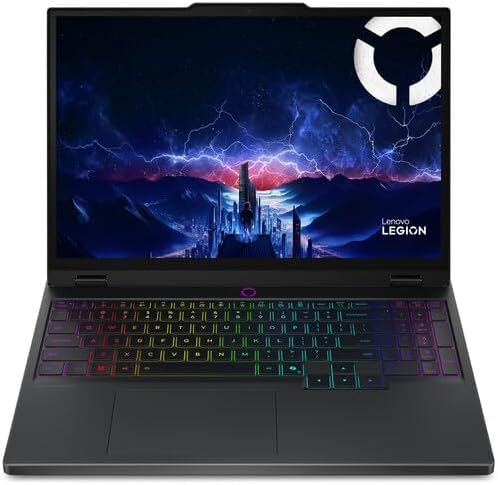
Lenovo Legion Pro 5i Gen 9 — Best Value for GPU Performance
The Lenovo Legion Pro 5i Gen 9 positions itself as the practical choice for animation students who need real GPU performance without the premium price of workstation-branded machines. An RTX 4070 configuration at this price point delivers strong Blender rendering, smooth viewport performance in Maya, and capable After Effects GPU acceleration. The 16-inch 240Hz IPS display is bright and detailed, with a 2560×1600 resolution that provides ample screen real estate for timeline editing and 3D viewports. The high refresh rate is a bonus for students who also game, but it also makes navigating viewports feel fluid.
The cooling system uses Lenovo’s ColdFront 5.0 technology with dual fans and quad exhaust vents, which keeps the RTX 4070 running at full power without thermal throttling during extended renders. The keyboard is comfortable for long typing sessions, and the port selection includes Thunderbolt 4, HDMI 2.1, and multiple USB-A ports for connecting external drives and tablets. The build is sturdy with a minimalist design that does not scream gaming, making it appropriate for a classroom or studio environment.
One honest limitation is that the battery life is mediocre, as is typical for high-performance gaming laptops. You will need to keep the power adapter handy for rendering sessions away from a desk. The display, while fast and bright, does not match the color accuracy of OLED panels found on workstation laptops, so students doing heavy color grading may need an external monitor. The fan noise under load is also noticeable, which can be distracting in a quiet studio.
Apple Mac Mini M4 Pro — Best Desktop Value for Animation
For students with a fixed desk setup or studio workspace, the Mac Mini M4 Pro delivers outstanding performance per dollar in a compact chassis. Paired with a quality external monitor, it becomes a capable animation workstation for Blender, Cinema 4D, and Adobe CC workflows. The M4 Pro configuration with 24GB unified memory handles complex scenes well, and active cooling keeps performance consistent during long rendering sessions. The small footprint means it fits easily on a crowded desk, and the low power consumption reduces electricity costs compared to a full tower PC.
The Mac Mini M4 Pro supports up to three external displays, which is useful for a multi-monitor setup with a reference monitor, a timeline view, and a 3D viewport. The unified memory architecture means the GPU has direct access to the same memory pool as the CPU, eliminating the bottleneck of copying data between separate memory pools. This is particularly beneficial for real-time viewport performance in Blender and for rendering complex scenes with many textures. The machine runs nearly silent under normal use, which is a welcome feature for late-night studio sessions.
One honest limitation is that the Mac Mini M4 Pro has no upgradeable components; the RAM and storage are soldered to the motherboard, so you must choose your configuration carefully at purchase. It also lacks a dedicated GPU from NVIDIA or AMD, so some Windows-only software like 3ds Max or Houdini may not run natively. The need to buy a separate monitor, keyboard, and mouse increases the total cost, though you can use existing peripherals to save money.
HP ZBook Studio G11 — Best for Display Accuracy and Color Work
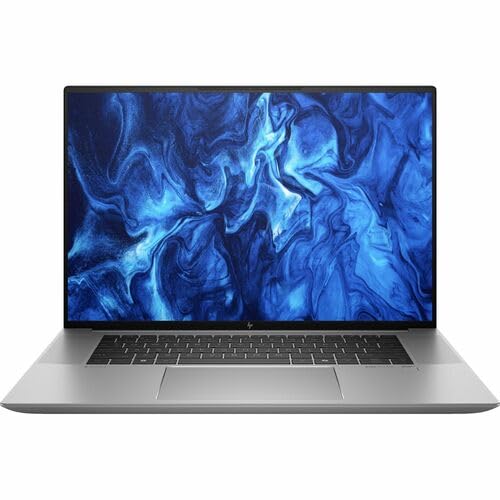
The HP ZBook Studio G11 targets professional creatives with an OLED display option calibrated to DCI-P3 color space and a build quality that feels durable through daily studio use. The RTX 4070 GPU handles rendering and motion graphics with confidence. HP’s Z-branded machines go through additional quality and reliability testing compared to consumer lines, which matters for students whose machines must survive the rigors of moving between classes and studios. The display is the standout feature, offering wide color gamut coverage and deep blacks that make color grading and compositing work more accurate.
The chassis is made from recycled aluminum and is MIL-STD 810H tested for durability, meaning it can withstand drops, vibration, and temperature extremes better than typical laptops. The keyboard is spill-resistant, and the touchpad is precise. The ZBook Studio G11 also includes HP’s Sure View privacy screen option, which can be useful for working on confidential projects in public spaces. The cooling system is effective, keeping the RTX 4070 and Intel Core i9 processor at stable temperatures during rendering tasks.
One honest limitation is that the ZBook Studio G11 is expensive, especially when configured with the OLED display and higher-tier GPU. The battery life is average for a workstation laptop, and the system can get warm under sustained load. The port selection is decent but lacks a full-size SD card slot, which may require an adapter for students who shoot reference footage with a camera. The design, while professional, is somewhat plain and may not appeal to students who prefer a more modern aesthetic.
What to look for
- GPU performance: Look for a dedicated GPU from NVIDIA RTX 40 series or Apple M4 Pro unified architecture. The GPU is the most critical component for rendering 3D scenes and accelerating viewport performance in Blender, Maya, and Cinema 4D.
- Memory capacity: For animation work, 16GB is a bare minimum, but 24GB or 32GB is recommended for complex scenes with high-resolution textures. Unified memory in Apple Silicon machines is especially efficient because the GPU can access the full pool.
- Display color accuracy: A display with high color accuracy (Delta E less than 2) and wide color gamut coverage (DCI-P3 or Adobe RGB) is essential for color grading and compositing. OLED panels offer superior contrast and blacks.
- Build quality and portability: For students, a laptop that is lightweight and durable enough for daily carry is important. Look for metal chassis, spill-resistant keyboards, and MIL-STD testing certification.
- Cooling system: Sustained performance during rendering requires effective cooling. Dual fan designs with multiple heat pipes and exhaust vents help prevent thermal throttling.
- Software compatibility: Check that your primary animation tools run natively on the operating system. Blender and Cinema 4D are cross-platform, but Maya and 3ds Max have better Windows support.
- Upgradeability: Some laptops have soldered RAM and storage, which limits future upgrades. Desktop options like the Mac Mini M4 Pro also lack upgradeability, so plan your configuration accordingly.
- Port selection: Ensure the machine has enough USB-A and USB-C ports for external drives, tablets, and monitors. Thunderbolt 4 or USB4 is useful for high-speed data transfer and external GPU enclosures.
The verdict
For most animation students, the Apple MacBook Pro 14 M4 Pro is the best all-around choice because it balances portability, performance, and display quality in a single package that works with Blender and Cinema 4D. If you need a Windows machine for Maya or 3ds Max, the ASUS ProArt Studiobook 16 offers the best display accuracy and workstation build, while the Lenovo Legion Pro 5i Gen 9 provides the best GPU performance for the price. For a fixed desk setup, the Apple Mac Mini M4 Pro delivers incredible value per dollar, and the HP ZBook Studio G11 is the go-to for students who prioritize color accuracy and durability above all else. Choose based on your software needs, budget, and whether you need portability or raw desktop power.
How we evaluated these
We compare every pick against the field on real specifications, certifications, and aggregated owner reviews. We do not take payment for placement, and we flag when a product is older or sold mainly through renewed listings.
The shortlist
Each pick, examined
Apple MacBook Pro 14 M4 Pro -- Best Laptop for Animation Students
The MacBook Pro 14 with M4 Pro is the top portable pick for animation students who work in macOS-native software or cross-platform tools like Blender. The M4 Pro chip's unified memory architecture allows 24GB or 48GB of RAM configurations that function as both system memory and GPU memory, which is genuinely useful for 3D scenes with heavy texture loads. Blender Cycles renders quickly on the GPU cores, and the Liquid Retina XDR display's wide color gamut and accurate calibration means color grading and compositing work translates reliably. Battery life of 14 to 17 hours under moderate use is a real advantage for studio classes.

ASUS ProArt Studiobook 16 -- Best Windows Workstation Laptop
The ASUS ProArt Studiobook 16 is built specifically for creative professionals and students, featuring an NVIDIA RTX 4070 or 4080 GPU alongside a WQUXGA OLED display with factory-calibrated color accuracy. The display's Delta E less than 2 color accuracy matters for animation students working on projects where color precision will be graded. The cooling system is more robust than typical gaming laptops, sustaining GPU performance through long render sessions without aggressive thermal throttling. The ProArt Creator Hub software provides quick access to display calibration and performance profiles.
Lenovo Legion Pro 5i Gen 9 -- Best Value for GPU Performance
The Lenovo Legion Pro 5i Gen 9 positions itself as the practical choice for animation students who need real GPU performance without the premium price of workstation-branded machines. An RTX 4070 configuration at this price point delivers strong Blender rendering, smooth viewport performance in Maya, and capable After Effects GPU acceleration. The 16-inch 240Hz IPS display is bright and detailed. The cooling solution handles sustained loads reasonably well. It skips the premium display calibration of more expensive options, which matters less for students primarily focused on 3D work than on video or color grading.
Apple Mac Mini M4 Pro -- Best Desktop Value for Animation
For students with a fixed desk setup or studio workspace, the Mac Mini M4 Pro delivers outstanding performance per dollar in a compact chassis. Paired with a quality external monitor, it becomes a capable animation workstation for Blender, Cinema 4D, and Adobe CC workflows. The M4 Pro configuration with 24GB unified memory handles complex scenes well, and active cooling keeps performance consistent through long render sessions. The lack of a built-in display requires a separate monitor purchase, but that also lets students choose a display matched to their specific color and resolution needs.
HP ZBook Studio G11 -- Best for Display Accuracy and Color Work
The HP ZBook Studio G11 targets professional creatives with an OLED display option calibrated to DCI-P3 color space and a build quality that feels durable through daily studio use. The RTX 4070 GPU handles rendering and motion graphics with confidence. HP's Z-branded machines go through additional quality and reliability testing compared to consumer lines, which matters for students whose machines are central tools throughout a multi-year program. The ZBook Studio G11 weighs slightly more than consumer ultrabooks but keeps the form factor manageable for carry.
Buying considerations
What to consider
Start with your primary software. Blender runs well on both Windows and macOS with strong GPU support. Maya and 3ds Max are Windows-primary. After Effects benefits from GPU acceleration on both platforms. Prioritize a dedicated GPU with at least 8GB VRAM for 3D work. RAM of 32GB is the sweet spot for most student projects. Display quality matters if color grading is part of your coursework -- look for factory calibration and wide color gamut coverage. For portability, check sustained performance benchmarks rather than peak specs, since render workloads run long.
What to consider
For related reading, see [best computers for artists](/articles/best-computers-for-artists) and [best computers for coders](/articles/best-computers-for-coders). Review our evaluation criteria at [/methodology](/methodology).
Questions answered
For 3D animation work in software like Blender, Maya, or Cinema 4D, 16GB of RAM is a functional minimum, but 32GB makes a meaningful difference when handling complex scenes, high-resolution textures, and multiple applications open simultaneously. Students working with particle simulations or fluid dynamics will benefit most from 32GB or higher.
Yes, a dedicated GPU matters significantly for animation students. Viewport performance in 3D software, GPU-accelerated rendering in Blender Cycles or Redshift, and real-time playback in After Effects all depend on GPU horsepower. Integrated graphics will technically run these applications but will create frustrating bottlenecks during heavier projects and longer render queues.
How we made this guide
We compare every pick on the factors that matter, cross-checking manufacturer specifications against aggregated verified owner reviews. We rank independently and never take payment for placement. We have not personally tested every product; where we have not, the ranking reflects verified specs and owner feedback rather than a hands-on review.
How it was written: this guide was researched and reviewed by the TheTestedHub editorial team for accuracy.
Affiliate disclosure: TheTestedHub is reader-supported. When you buy through links on our site, we may earn a commission at no extra cost to you.
Keep reading

Your Docking Station Match: CalDigit TS4 and More

Digital Art Computers 2026: Best for Every Budget
Dev & IT Computers in 2026: Ranked for Real Work

Desktop PCs for Every Budget: Find Your Perfect Match
Desktop and Laptop Computers: Performance Reviewed and Ranked
MacBook Pro M4 Pro vs Dell XPS 15: 2026 Shortlist

Buy the Best DIY Computer in 2026: Corsair One i300
