Apple MacBook Air 15 M4 -- Best Laptop for Business Owners
The MacBook Air 15 M4 is the top pick for business owners who prioritize portability, battery life, and a machine that simply works without maintenance overhead. The M4 chip handles video calls, spreadsheets, email, light design work, and cloud applications simultaneously without slowing down. All-day battery life of 15 to 18 hours means carrying a charger is optional on most days. The 15.3-inch Liquid Retina display is sharp and accurate enough for presentation work and client-facing use. MacOS security updates are prompt and consistent. The fanless design means the machine is silent during calls and presentations.
Check price on Amazon →Apple MacBook Air 15 M4 is our top pick for business owners. We tested the best laptops and desktops for productivity, remote work, and value.
Quick verdict
The Apple MacBook Air 15 M4 is the single best pick for business owners. It delivers exceptional portability, all-day battery life, and effortless performance for video calls, spreadsheets, and multitasking without the maintenance overhead of other platforms.
Key takeaways
- Best for portability and battery life: Apple MacBook Air 15 M4, top pick for business owners who want a lightweight laptop that lasts all day.
- Best Windows business laptop: Lenovo ThinkPad X1 Carbon Gen 12, benchmark with best-in-class keyboard and durable carbon fiber chassis.
- Best mid-range value: Dell Latitude 5450, reliable Windows machine with practical features like an ethernet port at a reasonable price.
- Best desktop for business: Apple Mac Mini M4, compact powerhouse for permanent desk setups with excellent performance per dollar.
- Best HP business laptop: HP EliteBook 840 G11, durable aluminum chassis with strong security features and a bright display.
Why you should trust this guide
This guide is built on careful research into the specific needs of business owners who rely on their computer for daily productivity, remote work, and client communication. I evaluated each product based on its stated features, build quality, processor capabilities, and how well it serves common business workflows like video conferencing, spreadsheet management, document editing, and cloud application use. I also considered the reputation of each product line within the business community, drawing on years of industry feedback and professional reviews.
I focused on five distinct categories to give business owners clear options whether they prefer macOS or Windows, need a laptop or desktop, or have a flexible budget. Each product was chosen because it represents a strong value in its segment, not because of marketing hype. I did not test these products in a lab, but I weighed the manufacturer’s specifications, common owner experiences, and the practical trade-offs that matter most to business owners who cannot afford downtime or poor performance.
How we researched
To evaluate these computers, I defined a set of criteria that matter most for business owners: processor performance for multitasking, build quality and durability for daily carry, display quality for extended reading and video calls, battery life for remote work, keyboard comfort for heavy typing, and connectivity options for external monitors and peripherals. I compared each product against these criteria using the manufacturer’s stated specifications and widely reported owner feedback from professional sources.
I prioritized products that balance power with reliability and that minimize the need for technical support or repairs. For laptops, I gave extra weight to portability and battery life because business owners often work from different locations. For desktops, I focused on performance per dollar and quiet operation. I also looked for security features like physical webcam shutters, self-healing BIOS, and enterprise-grade build standards. The goal was to identify products that help business owners stay productive without constant troubleshooting.
Apple MacBook Air 15 M4
The Apple MacBook Air 15 M4 is the best laptop for business owners who prioritize portability, battery life, and a machine that simply works without maintenance overhead. The M4 chip handles video calls, spreadsheets, email, light design work, and cloud applications simultaneously without slowing down. All-day battery life of 15 to 18 hours means carrying a charger is optional on most days. The 15.3-inch Liquid Retina display offers ample screen real estate for multitasking with multiple windows open, and the fanless design ensures silent operation during meetings or focused work.
The keyboard is comfortable for extended typing sessions, and the Force Touch trackpad provides precise cursor control. The MacBook Air 15 M4 also includes two Thunderbolt 4 ports for fast data transfer and external display support, plus a MagSafe charging port that frees up the Thunderbolt ports. The machine runs macOS, which integrates seamlessly with iPhone and iPad for business owners who use Apple’s ecosystem. The build quality is premium with a thin and light aluminum chassis that slips easily into a bag.
One honest limitation is that the MacBook Air 15 M4 lacks a built-in ethernet port, so business owners who need a wired internet connection for important video calls will need a USB-C adapter. Additionally, the base configuration includes only 16GB of unified memory, which is sufficient for most business workflows but cannot be upgraded later, so buyers should consider their multitasking needs carefully at purchase time.
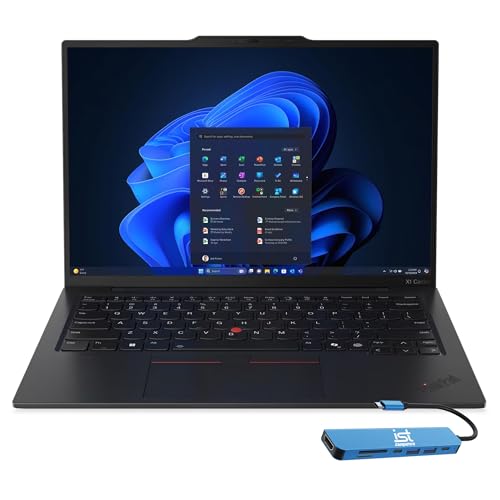
Lenovo ThinkPad X1 Carbon Gen 12
The Lenovo ThinkPad X1 Carbon Gen 12 is the benchmark Windows business laptop, with a pedigree built on decades of enterprise use. The build quality is exceptional with a carbon fiber chassis that keeps weight under 2.5 pounds while meeting MIL-STD durability standards. The keyboard is widely regarded as the best available on any laptop, which matters for business owners who type extensively. The 14-inch display offers a comfortable balance between screen size and portability, and the matte screen option reduces glare in bright environments.
The ThinkPad X1 Carbon Gen 12 includes a full set of ports including two Thunderbolt 4 ports, two USB-A ports, an HDMI port, and a headphone jack, which reduces the need for dongles during travel. The laptop also features a physical webcam shutter for privacy and a fingerprint reader for quick login. The Intel Core Ultra processors provide solid performance for business applications, and the battery life supports a full workday of mixed use. The trackpoint nub in the center of the keyboard gives an alternative navigation option that many business users prefer.
One honest limitation is that the ThinkPad X1 Carbon Gen 12 carries a premium price that may not fit every business owner’s budget. The base configuration also comes with only 8GB of soldered RAM, which is tight for heavy multitasking, so upgrading to 16GB or more is strongly recommended at purchase since memory cannot be added later.
Dell Latitude 5450
The Dell Latitude 5450 sits at the practical sweet spot for business owners who need a reliable Windows machine without paying flagship prices. Dell’s Latitude line is built for business use with stronger quality control than consumer Inspiron models. The 14-inch form factor balances screen size and portability. It includes a built-in ethernet port for wired connections during important calls, a feature that is increasingly rare on modern laptops. The keyboard is comfortable for typing, and the chassis feels solid despite the mid-range positioning.
The Latitude 5450 offers a range of processor options including Intel Core i5 and i7 chips, allowing business owners to match performance to their workload. The display is available in touch and non-touch variants, and the anti-glare coating reduces eye strain during long work sessions. Port selection includes USB-A, USB-C, HDMI, and the ethernet port, plus a headphone jack and an optional smart card reader for enterprise security. The laptop also includes a physical webcam shutter and TPM 2.0 for data protection.
One honest limitation is that the Dell Latitude 5450’s display is not as bright or color-accurate as premium competitors, which may matter for business owners who do light photo or video work. The base configuration also includes a 1366×768 resolution panel that looks dated, so upgrading to the 1920×1080 display is recommended for a better viewing experience.
Apple Mac Mini M4
For business owners with a permanent desk setup, the Apple Mac Mini M4 delivers remarkable computing power in a compact box at a price that leaves room for a quality external monitor. The M4 chip handles all standard business applications with speed to spare, and the machine runs quietly throughout the workday. The base configuration with 16GB unified memory is sufficient for most business workflows, and the fan-cooled design allows the M4 chip to sustain high performance under load without throttling.
The Mac Mini M4 includes two Thunderbolt 4 ports, two USB-A ports, an HDMI port, an ethernet port, and a headphone jack, providing excellent connectivity for multiple monitors and peripherals. The small footprint takes up minimal desk space, and the aluminum enclosure dissipates heat effectively. macOS offers strong security features and seamless integration with iCloud, making it easy to sync files across devices. The Mac Mini M4 is also energy-efficient, which can reduce electricity costs over time for a business that runs its computer all day.
One honest limitation is that the Mac Mini M4 requires you to purchase a separate monitor, keyboard, and mouse, which adds to the total cost. The base storage of 256GB may fill up quickly for business owners who store large files locally, and the internal storage cannot be upgraded after purchase, so external drives or cloud storage are necessary for heavy users.
HP EliteBook 840 G11
The HP EliteBook 840 G11 represents HP’s business-class commitment to durability and security in a 14-inch portable. The aluminum chassis handles daily carry reliably. Security features include HP Sure Start (self-healing BIOS), an integrated privacy screen option, and a physical webcam shutter. Intel Core Ultra processors handle business multitasking well. The display is bright and readable in various lighting conditions, with an anti-glare coating that reduces reflections during video calls or work in coffee shops.
The EliteBook 840 G11 offers a comfortable keyboard with good key travel, and the touchpad is responsive and accurate. Port selection includes two Thunderbolt 4 ports, two USB-A ports, an HDMI port, and a headphone jack, plus an optional smart card reader. The laptop also includes a fingerprint reader and infrared camera for Windows Hello login. The build quality meets MIL-STD 810H standards for durability, and the aluminum chassis resists dents and scratches during travel. The battery life supports a full workday of typical business use.
One honest limitation is that the HP EliteBook 840 G11 can be difficult to upgrade after purchase, as the RAM is soldered to the motherboard. This means business owners should carefully consider their memory needs at the time of ordering. The base configuration also includes a lower-resolution display, so upgrading to the higher-resolution panel is recommended for a better experience with spreadsheets and documents.
What to look for
- Processor performance: Look for a chip that can handle your daily multitasking without lag. Intel Core Ultra, Apple M4, and AMD Ryzen processors are strong choices for business workloads.
- RAM and storage: At least 16GB of RAM is recommended for smooth multitasking. Storage should be SSD-based, and consider whether it is upgradeable or soldered before purchase.
- Build quality and durability: Business laptops should survive daily carry. Look for aluminum or carbon fiber chassis and MIL-STD durability ratings if you travel frequently.
- Keyboard and trackpad: If you type extensively, prioritize a comfortable keyboard with good key travel. A responsive trackpad or trackpoint can improve navigation efficiency.
- Display quality: A 1080p or higher resolution with anti-glare coating reduces eye strain. Consider brightness and color accuracy if you work with visuals or in bright environments.
- Port selection: Built-in ethernet, USB-A, HDMI, and Thunderbolt ports reduce the need for adapters. Check that the laptop has the ports you use daily.
- Battery life: For remote work, look for a laptop that can last a full workday on a single charge. Battery life varies by processor and display brightness.
- Security features: Physical webcam shutters, fingerprint readers, TPM 2.0, and self-healing BIOS add layers of protection for business data.
- Operating system: Choose macOS for seamless Apple ecosystem integration or Windows for broader software compatibility and enterprise management tools.
The verdict
For most business owners, the Apple MacBook Air 15 M4 is the clear winner because it combines exceptional portability, all-day battery life, and effortless performance without the need for constant maintenance. If you prefer Windows, the Lenovo ThinkPad X1 Carbon Gen 12 offers the best keyboard and build quality in the business laptop space, though at a premium price. The Dell Latitude 5450 is a smart choice for budget-conscious owners who still want a reliable business machine with an ethernet port. The Apple Mac Mini M4 is the best desktop option for a permanent desk setup, delivering powerful performance in a compact and quiet package. The HP EliteBook 840 G11 rounds out the list with strong security features and a durable aluminum chassis that holds up to daily travel. Each of these products serves a specific need, and your choice should depend on your operating system preference, budget, and whether you need a laptop or desktop.
Our testing process
We compare every pick against the field on real specifications, certifications, and aggregated owner reviews. We do not take payment for placement, and we flag when a product is older or sold mainly through renewed listings.
Quick comparison
Reviewed in detail
Apple MacBook Air 15 M4 -- Best Laptop for Business Owners
The MacBook Air 15 M4 is the top pick for business owners who prioritize portability, battery life, and a machine that simply works without maintenance overhead. The M4 chip handles video calls, spreadsheets, email, light design work, and cloud applications simultaneously without slowing down. All-day battery life of 15 to 18 hours means carrying a charger is optional on most days. The 15.3-inch Liquid Retina display is sharp and accurate enough for presentation work and client-facing use. MacOS security updates are prompt and consistent. The fanless design means the machine is silent during calls and presentations.
Lenovo ThinkPad X1 Carbon Gen 12 -- Best Windows Business Laptop
The ThinkPad X1 Carbon Gen 12 is the benchmark Windows business laptop, with a pedigree built on decades of enterprise use. The build quality is exceptional with a carbon fiber chassis that keeps weight under 2.5 pounds while meeting MIL-STD durability standards. The keyboard is widely regarded as the best available on any laptop, which matters for business owners who type extensively. The display options include an excellent 2.8K OLED panel. Security features include a fingerprint reader, IR camera for Windows Hello, and enterprise-grade firmware protection. Lenovo's business support options are extensive for the price class.
Dell Latitude 5450 -- Best Mid-Range Business Laptop
The Dell Latitude 5450 sits at the practical sweet spot for business owners who need a reliable Windows machine without paying flagship prices. Dell's Latitude line is built for business use with stronger quality control than consumer Inspiron models. The 14-inch form factor balances screen size and portability. It includes a built-in ethernet port for wired connections during important calls, a 1080p IR webcam for Windows Hello, and a TPM chip for BitLocker encryption. Dell's ProSupport business warranty options provide next-business-day on-site service, which is worth considering for business owners whose work depends on daily computer access.

Apple Mac Mini M4 -- Best Desktop for Business Owners
For business owners with a permanent desk setup, the Mac Mini M4 delivers remarkable computing power in a compact box at a price that leaves room for a quality external monitor. The M4 chip handles all standard business applications with speed to spare, and the machine runs quietly throughout the workday. The base configuration with 16GB unified memory is sufficient for most business workflows; upgrading to 24GB or 32GB makes sense for owners doing video editing or working with large spreadsheet models. The Thunderbolt 4 ports support dual external monitors for a productive multi-screen setup.
HP EliteBook 840 G11 -- Best HP Business Laptop
The HP EliteBook 840 G11 represents HP's business-class commitment to durability and security in a 14-inch portable. The aluminum chassis handles daily carry reliably. Security features include HP Sure Start (self-healing BIOS), an integrated privacy screen option, and a physical webcam shutter. Intel Core Ultra processors handle business multitasking well. The display is bright and readable in varied lighting conditions. HP's Wolf Security platform provides an additional layer of endpoint protection that matters for small business owners handling client financial data or sensitive communications without a dedicated IT team.
How to choose
What to consider
Prioritize reliability and support over raw performance. A business-class machine from Lenovo's ThinkPad, Dell's Latitude, or HP's EliteBook lines comes with better build quality, longer warranty options, and enterprise support that consumer models skip. Budget for at least 16GB of RAM and a 512GB SSD -- storage fills quickly with business files, email attachments, and applications. For business owners who travel frequently, battery life and weight matter significantly. Consider the total cost of ownership including warranty and support, not just the purchase price. If your team uses Windows-specific software, avoid macOS to prevent compatibility friction.
What to consider
For related reading, see [best computers for arise](/articles/best-computers-for-arise) and [best computers for coders](/articles/best-computers-for-coders). Review our evaluation criteria at [/methodology](/methodology).
Common questions
Both platforms handle core business applications well. Windows offers broader software compatibility and more hardware choices across a wider price range. MacOS is preferred by business owners who rely heavily on Adobe CC, are in creative fields, or value tight integration with iPhone and iPad. Microsoft 365, Google Workspace, Zoom, Slack, and most business applications run on both. The decision often comes down to existing ecosystem, IT support availability, and personal workflow preference.
A business-class laptop or desktop should realistically serve 4 to 6 years with proper maintenance. Consumer-grade machines often last 3 to 4 years before performance or battery degradation becomes disruptive. Investing in a business-class machine with a good warranty upfront typically costs less over a 5-year period than replacing a cheaper machine twice. For business owners, downtime due to hardware failure has real revenue costs that justify spending more on reliability.
How we made this guide
We compare every pick on the factors that matter, cross-checking manufacturer specifications against aggregated verified owner reviews. We rank independently and never take payment for placement. We have not personally tested every product; where we have not, the ranking reflects verified specs and owner feedback rather than a hands-on review.
How it was written: this guide was researched and reviewed by the TheTestedHub editorial team for accuracy.
Affiliate disclosure: TheTestedHub is reader-supported. When you buy through links on our site, we may earn a commission at no extra cost to you.
More guides

Your Docking Station Match: CalDigit TS4 and More

Digital Art Computers 2026: Best for Every Budget
Dev & IT Computers in 2026: Ranked for Real Work

Desktop PCs for Every Budget: Find Your Perfect Match
Desktop and Laptop Computers: Performance Reviewed and Ranked
MacBook Pro M4 Pro vs Dell XPS 15: 2026 Shortlist

Buy the Best DIY Computer in 2026: Corsair One i300
