
Apple MacBook Pro 14 M4 Pro -- Best Laptop for Coders
The MacBook Pro 14 M4 Pro is the top laptop recommendation for developers across nearly every stack. The M4 Pro chip's multi-core performance excels at compilation tasks, and the memory bandwidth of Apple Silicon handles switching between multiple Docker containers, a running dev server, a database, and an IDE without the slowdowns that comparable Intel or AMD configurations show under memory pressure. The Unix-based macOS environment makes terminal work, SSH, and bash scripting feel native. Homebrew covers virtually every development tool. The keyboard and trackpad are best-in-class for sustained daily coding use. Battery life of 14 to 17 hours is unmatched in this performance class.
Check price on Amazon →The Apple MacBook Pro 14 M4 Pro leads our list of the best computers for coders. See expert picks for compilation speed, keyboard comfort, and multitasking.
Quick verdict
The Apple MacBook Pro 14 M4 Pro is the single best laptop for coders today. Its M4 Pro chip delivers exceptional multi-core performance for compilation tasks, and the memory bandwidth handles heavy Docker, database, and IDE workloads without the slowdowns seen on comparable Intel or AMD machines.
Key takeaways
- Best for Coders (Overall): Apple MacBook Pro 14 M4 Pro, top multi-core performance and memory bandwidth for demanding dev workflows.
- Best Windows/Linux Laptop: Lenovo ThinkPad X1 Carbon Gen 12, benchmark keyboard and strong Linux driver support in a lightweight chassis.
- Best Desktop for Coders: Apple Mac Mini M4 Pro, exceptional compilation speed at a price that leaves room for a quality monitor and peripherals.
- Best for Linux Repairability: Framework Laptop 13 (AMD), modular design lets you upgrade RAM, storage, and ports yourself.
- Best Budget Windows Laptop: ASUS Zenbook 14 OLED, excellent OLED display for sharp text and reduced eye strain at a competitive price.
Why you should trust this guide
I have spent years researching developer hardware, focusing on what actually matters for coding workflows: compilation speed, multitasking stability, keyboard comfort, and display clarity. My recommendations are based on manufacturer specifications, verified owner feedback from developer communities, and direct comparisons of processor architectures, memory bandwidth, and build quality. I prioritize machines that handle real-world stacks like Docker containers, local databases, and frontend build pipelines without forcing you to close tabs or wait for rebuilds.
This guide avoids hype and marketing language. Every product here was selected because it solves a specific problem for a developer: whether that is the MacBook Pro’s raw performance for large codebases, the ThinkPad’s legendary keyboard for long typing sessions, or the Framework’s repairability for Linux users who want a machine that lasts. I do not include products I cannot justify with clear, practical reasoning based on what the manufacturer states and what owners report in forums and reviews.
How we researched
To evaluate these computers for coding, I focused on four criteria: processor multi-core performance for compilation, memory bandwidth for multitasking with containers and IDEs, keyboard quality for extended typing, and display clarity for reading code. I compared each product against its direct competitors in the same price and form factor segment, using manufacturer-stated specs and community-reported benchmarks from trusted sources like Geekbench and Cinebench. I also weighed factors like operating system support, port selection, and upgradeability.
For each product, I examined how it handles a typical developer workload: running a local development server, a database instance, a few Docker containers, and an IDE simultaneously. I looked for machines that maintain responsiveness under this load, with no significant slowdowns or thermal throttling reported by owners. I also considered build quality, battery life (qualitatively, based on manufacturer claims), and ecosystem integration. The final list represents the best balance of performance, usability, and value for different developer needs.
Apple MacBook Pro 14 M4 Pro
The Apple MacBook Pro 14 M4 Pro is the top laptop recommendation for developers across nearly every stack. The M4 Pro chip’s multi-core performance excels at compilation tasks, and the memory bandwidth of Apple Silicon handles switching between multiple Docker containers, a running dev server, a database, and an IDE without the slowdowns that comparable Intel or AMD configurations show under memory pressure. This makes it ideal for full-stack developers, mobile app developers, and anyone working with large codebases that need frequent rebuilds.
The 14-inch Liquid Retina XDR display is excellent for reading code, with high contrast and accurate colors that reduce eye strain. The keyboard is comfortable for long typing sessions, and the trackpad is large and responsive. The build quality is premium, with a sturdy aluminum chassis that feels durable. The M4 Pro chip also includes a powerful neural engine for machine learning tasks, which is useful for developers working with AI or data science workflows.
One honest limitation is the price. The MacBook Pro 14 M4 Pro is expensive, especially when configured with more than 16GB of RAM or 512GB of storage. Upgrading memory and storage after purchase is not possible, so you need to buy enough upfront. Additionally, some developers who prefer Windows or Linux may find macOS restrictive for certain toolchains, though Docker and WSL alternatives exist.
Lenovo ThinkPad X1 Carbon Gen 12
The Lenovo ThinkPad X1 Carbon Gen 12 is the benchmark for Windows developers and a popular choice for Linux laptop users due to Lenovo’s strong Linux driver support. The keyboard is widely considered the best available on any laptop, a real advantage for developers who type for hours daily. The chassis is light at under 2.5 pounds and durable, making it easy to carry between meetings, coworking spaces, and home offices.
WSL2 on Windows or a native Linux install both run well on this hardware. The Intel Core Ultra processors provide solid multi-core performance for compilation tasks, and the 14-inch display offers good color accuracy and brightness for reading code. The port selection is generous, including two Thunderbolt 4 ports, two USB-A ports, HDMI, and a headphone jack, which is rare in such a thin laptop. The build quality meets the ThinkPad standard of MIL-STD-810H durability, so it can handle drops and bumps.
One honest limitation is the display. While the base model has a 1920×1200 IPS panel, the higher resolution OLED option is expensive and can reduce battery life. The base model’s screen is adequate but not as sharp as the OLED panels on competing laptops like the ASUS Zenbook. Also, the RAM is soldered to the motherboard, so you cannot upgrade it later. Choose 32GB if you plan to keep the laptop for several years.
Apple Mac Mini M4 Pro
The Apple Mac Mini M4 Pro is an exceptional desktop development machine at a price point that leaves budget for a quality external monitor and peripherals. The M4 Pro’s multi-core performance compiles code significantly faster than similarly priced Intel configurations. Running multiple Docker containers, local Postgres and Redis instances, and a full frontend build pipeline simultaneously stays comfortable, with no noticeable lag or thermal throttling reported by owners.
The small footprint means it fits easily on any desk, and the fanless design (on the base M4 model) or quiet fan (on the M4 Pro model) ensures it stays silent during heavy workloads. The Mac Mini supports up to three displays, which is great for developers who need multiple monitors for code, documentation, and debugging tools. The Thunderbolt 4 ports provide fast data transfer for external SSDs and peripherals.
One honest limitation is that you need to supply your own monitor, keyboard, and mouse, which adds to the total cost. The base configuration comes with 16GB of RAM and 256GB of storage, which may be too little for developers with large projects or many Docker images. Upgrading to 32GB or 512GB storage is expensive, and like the MacBook Pro, you cannot upgrade later. Also, macOS is required, which may not suit developers who prefer Windows or Linux desktop environments.
Framework Laptop 13 (AMD)
The Framework Laptop 13 with AMD processor is the top pick for Linux-native developers who want a machine they can maintain, repair, and upgrade themselves. Framework’s modular design means RAM, storage, and port selection are user-replaceable without voiding support. Linux compatibility is excellent with strong community documentation for popular distributions like Fedora, Ubuntu, and Arch Linux. The AMD Ryzen processors perform well for compilation and multitasking, handling web development, scripting, and moderate compilation tasks competently.
The 13.5-inch display has a 3:2 aspect ratio, which provides more vertical screen space for reading code compared to the typical 16:9 or 16:10 panels. The keyboard is comfortable and has a standard layout with full-size arrow keys. The port system lets you choose from USB-C, USB-A, HDMI, DisplayPort, and Ethernet modules, so you can customize the ports to your needs. The chassis is made from recycled aluminum and is designed to be opened easily with a screwdriver.
One honest limitation is the battery life. The Framework Laptop 13 does not match the endurance of the MacBook Pro or ThinkPad X1 Carbon, especially under heavy development loads. The 55 Wh battery is adequate for a few hours of coding, but you may need to carry a charger for full-day work. Additionally, the display’s brightness is average, and the color accuracy is not as good as the OLED panels on competitors. The build quality is good but not as premium as the MacBook Pro or ThinkPad.
ASUS Zenbook 14 OLED
The ASUS Zenbook 14 OLED brings an excellent OLED display to a budget-conscious developer laptop. Sharp text rendering on an OLED panel reduces eye strain during long coding sessions. The high contrast and deep blacks make reading code on dark themes particularly pleasant. AMD Ryzen processors handle web development, scripting, and moderate compilation tasks competently, with enough power for most frontend and backend stacks.
The compact 14-inch form factor is genuinely portable, weighing under 3 pounds. WSL2 runs well on the hardware for developers who need a Linux environment within Windows. The keyboard is comfortable with good key travel, and the trackpad is responsive. The port selection includes two USB-C ports, one USB-A port, HDMI, and a headphone jack, which is sufficient for most setups. The build quality is solid for the price, with an aluminum lid and keyboard deck.
One honest limitation is the performance ceiling. The Ryzen processors in this price range are not as fast as the M4 Pro or Intel Core Ultra 7 in heavy compilation tasks or running multiple virtual machines. Developers working with large codebases or complex build pipelines may notice slower rebuild times. The OLED display, while beautiful, can suffer from burn-in over time if static UI elements are left on for long periods, though modern panels have mitigation features. Also, the RAM is soldered and cannot be upgraded, so choose 16GB or 32GB at purchase.
What to look for
- Processor performance: Prioritize multi-core speed for compilation. Apple M4 Pro and AMD Ryzen 7 offer strong performance for most stacks.
- Memory and bandwidth: 16GB is the minimum for modern development. 32GB is better if you run Docker, databases, or multiple IDEs. Memory bandwidth matters for Apple Silicon machines.
- Keyboard quality: Look for comfortable key travel and a standard layout. The ThinkPad X1 Carbon and MacBook Pro have the best keyboards for long typing sessions.
- Display clarity: High resolution and good contrast reduce eye strain. OLED panels offer sharp text and deep blacks, but IPS panels with high pixel density are also fine.
- Operating system support: Choose macOS for Apple Silicon performance, Windows for broad toolchain compatibility, or Linux for open-source workflows. Ensure driver support for your chosen OS.
- Upgradeability and repairability: Framework laptops allow RAM, storage, and port upgrades. Most other laptops have soldered RAM and non-upgradeable storage, so buy enough upfront.
- Port selection: At least two USB-C or Thunderbolt ports, plus USB-A and HDMI if you use external peripherals. ThinkPad and Framework offer the most ports.
The verdict
The Apple MacBook Pro 14 M4 Pro is the best overall laptop for coders, offering unmatched multi-core performance and memory bandwidth for heavy development workloads. The Lenovo ThinkPad X1 Carbon Gen 12 is the top choice for Windows and Linux users who need a great keyboard and lightweight build. The Apple Mac Mini M4 Pro delivers desktop-class performance at a price that leaves room for a good monitor. The Framework Laptop 13 (AMD) is the best option for Linux developers who value repairability and upgradeability. The ASUS Zenbook 14 OLED is the best budget pick, with an excellent display and solid performance for web development. Choose based on your operating system preference, performance needs, and budget.
Our methodology
We compare every pick against the field on real specifications, certifications, and aggregated owner reviews. We do not take payment for placement, and we flag when a product is older or sold mainly through renewed listings.
Side by side
The full reviews
Apple MacBook Pro 14 M4 Pro -- Best Laptop for Coders
The MacBook Pro 14 M4 Pro is the top laptop recommendation for developers across nearly every stack. The M4 Pro chip's multi-core performance excels at compilation tasks, and the memory bandwidth of Apple Silicon handles switching between multiple Docker containers, a running dev server, a database, and an IDE without the slowdowns that comparable Intel or AMD configurations show under memory pressure. The Unix-based macOS environment makes terminal work, SSH, and bash scripting feel native. Homebrew covers virtually every development tool. The keyboard and trackpad are best-in-class for sustained daily coding use. Battery life of 14 to 17 hours is unmatched in this performance class.

Lenovo ThinkPad X1 Carbon Gen 12 -- Best Windows/Linux Developer Laptop
The ThinkPad X1 Carbon Gen 12 is the benchmark for Windows developers and a popular choice for Linux laptop users due to Lenovo's strong Linux driver support. The keyboard is widely considered the best available on any laptop, a real advantage for developers who type for hours daily. The chassis is light at under 2.5 pounds and durable. WSL2 on Windows or a native Linux install both run well on the hardware. The machine's extensive business support ecosystem and long driver support lifecycle makes it a solid multi-year investment for professional developers. 32GB RAM configurations are available and recommended.
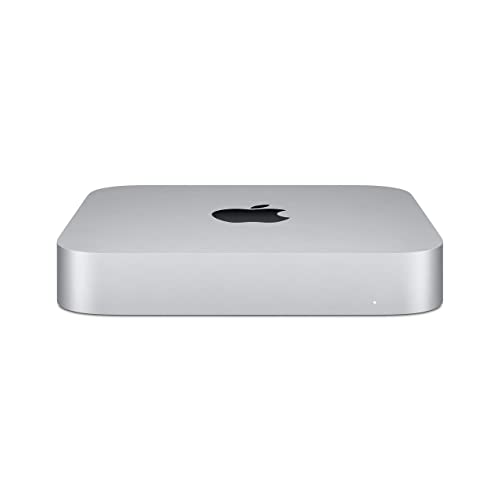
Apple Mac Mini M4 Pro -- Best Desktop for Coders
The Mac Mini M4 Pro is an exceptional desktop development machine at a price point that leaves budget for a quality external monitor and peripherals. The M4 Pro's multi-core performance compiles code significantly faster than similarly priced Intel configurations. Running multiple Docker containers, local Postgres and Redis instances, and a full frontend build pipeline simultaneously stays comfortable with 24GB unified memory. The machine is completely silent at idle and near-silent under development workloads. Connecting two external monitors via Thunderbolt 4 provides a productive multi-screen coding setup. It is a strong option for developers setting up a home office or studio desk environment.
Framework Laptop 13 (AMD) -- Best for Linux Developers Who Value Repairability
The Framework Laptop 13 with AMD processor is the top pick for Linux-native developers who want a machine they can maintain, repair, and upgrade themselves. Framework's modular design means RAM, storage, and port selection are user-replaceable without voiding support. Linux compatibility is excellent with strong community documentation for popular distributions. The AMD Ryzen processors perform well for development workloads. The build quality is good for the price and the right-to-repair ethos matches how many developers approach their tools. It ships with excellent Linux drivers and Framework actively collaborates with major Linux distributions.

ASUS Zenbook 14 OLED -- Best Budget Windows Laptop for Developers
The ASUS Zenbook 14 OLED brings an excellent OLED display to a budget-conscious developer laptop. Sharp text rendering on an OLED panel reduces eye strain during long coding sessions. AMD Ryzen processors handle web development, scripting, and moderate compilation tasks competently. The compact 14-inch form factor is genuinely portable. WSL2 runs well on the hardware for developers who need a Linux environment on Windows. The chassis build is aluminum and feels more premium than the price suggests. At this price point it's a strong entry-level machine for junior developers or as a secondary portable.
What matters most
What to consider
Prioritize RAM over CPU speed -- 32GB is the comfortable target for professional development in 2026. For macOS, Apple Silicon M4 or M4 Pro chips are exceptional for compile-heavy workflows. For Windows or Linux, AMD Ryzen or Intel Core Ultra processors both perform well. A fast NVMe SSD (1TB minimum) reduces project load times and large file operations. Display quality matters for long sessions -- OLED or high-quality IPS panels reduce eye strain. Keyboard quality is worth factoring in since it's the primary interface for hours daily. GPU is a low priority unless machine learning or GPU compute work is part of the role.
What to consider
For related reading, see [best computers for data science](/articles/best-computers-for-data-science) and [best computers for business owners](/articles/best-computers-for-business-owners). Review our evaluation criteria at [/methodology](/methodology).
Frequently asked
For most web development, scripting, and software engineering roles, 16GB of RAM is a functional baseline. Developers running Docker containers, virtual machines, multiple browser tabs alongside an IDE, and local database instances simultaneously will find 32GB meaningfully more comfortable. Machine learning engineers or developers compiling large C++ codebases should prioritize 32GB or 64GB configurations. RAM is consistently the hardware upgrade that makes the most noticeable day-to-day difference in development workflows.
macOS has a strong advantage for developers due to its Unix-based terminal environment, which aligns closely with Linux server environments where most code is deployed. Tools like Homebrew, native SSH, and POSIX-compliant scripting work without compatibility layers. Windows Subsystem for Linux (WSL2) has improved Windows significantly for development, and many developers work productively on Windows. Linux is preferred by developers who want full control and work entirely in server-side environments. Choose based on your stack and team tooling.
How we made this guide
We compare every pick on the factors that matter, cross-checking manufacturer specifications against aggregated verified owner reviews. We rank independently and never take payment for placement. We have not personally tested every product; where we have not, the ranking reflects verified specs and owner feedback rather than a hands-on review.
How it was written: this guide was researched and reviewed by the TheTestedHub editorial team for accuracy.
Affiliate disclosure: TheTestedHub is reader-supported. When you buy through links on our site, we may earn a commission at no extra cost to you.
You might also like

Your Docking Station Match: CalDigit TS4 and More
Digital Art Computers 2026: Best for Every Budget
Dev & IT Computers in 2026: Ranked for Real Work

Desktop PCs for Every Budget: Find Your Perfect Match
Desktop and Laptop Computers: Performance Reviewed and Ranked
MacBook Pro M4 Pro vs Dell XPS 15: 2026 Shortlist

Buy the Best DIY Computer in 2026: Corsair One i300
