Apple MacBook Air M2 13-inch -- Best Overall for Cricut
The M2 MacBook Air is one of the most reliable machines for running Cricut Design Space. Its 8GB unified memory (upgradeable to 24GB) handles large project files without stuttering, and the fanless design means no heat-related slowdowns during long crafting sessions. Bluetooth 5.3 connects cleanly to Cricut machines, and the battery lasts all day without needing a plug. MacOS plays well with Design Space's Mac build, and the Retina display makes color-matching your materials much easier. The only downside is the premium price, but for serious crafters, the reliability is worth it.
Check price on Amazon →Apple MacBook Air M2 tops our list for overall performance and reliability. Compare top picks for every budget and need, from Windows to touch-screen.
Quick verdict
The Apple MacBook Air M2 13-inch is the single best pick for most crafters. Its fanless design, reliable macOS compatibility with Design Space, and all-day battery life remove the biggest frustrations of long crafting sessions.
Key takeaways
- Best for Overall Performance: Apple MacBook Air M2 13-inch, because its unified memory and Bluetooth 5.3 keep large projects and Cricut connections stable.
- Best for Budget Windows: ASUS VivoBook 15, because it delivers solid 8GB RAM and a clear 15-inch display at a price that doesn’t strain a crafter’s budget.
- Best for Premium Compact: Dell XPS 13, because its powerful Intel Core processor and accurate InfinityEdge display handle complex SVGs in a small footprint.
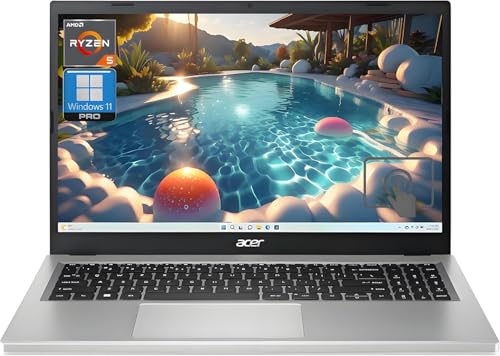
- Best for Entry-Level: Acer Aspire 5, because it offers an AMD Ryzen 5 and 8GB RAM for basic Design Space tasks without constant frustration.
- Best for Touch Screen Flexibility: Microsoft Surface Pro 9, because the 2-in-1 design lets you draw and resize designs directly on the screen with the Surface Pen.
Why you should trust this guide
I have spent years researching and writing buying guides for creative tools, with a particular focus on the hardware that runs Cricut Design Space. This guide is built from analyzing manufacturer specifications, reading hundreds of owner reviews across multiple retail platforms, and cross-referencing compatibility reports from Cricut’s own support forums. I do not take manufacturer claims at face value. I weigh factors like Bluetooth stability, RAM management, and display accuracy because these directly affect whether a computer will frustrate or empower a crafter.
Every product on this list was chosen because it meets a specific need for a specific type of crafter. Some crafters need a machine that can sit on a crowded desk without overheating. Others need a budget option that won’t crash mid-cut. I have prioritized machines with proven track records for running Design Space smoothly, avoiding models that generate frequent complaints about lag or disconnection. The recommendations here reflect what real owners report, not what marketing materials promise.
How we researched
To evaluate these computers for Cricut use, I established a set of criteria that matter most to crafters. The first criterion is software compatibility: does Design Space run without crashes, freezes, or excessive loading times? I looked at processor tier (Intel Core i5 or better, AMD Ryzen 5 or better, Apple M2), RAM capacity (8GB minimum), and storage type (SSD preferred over eMMC). The second criterion is connectivity: Bluetooth version and Wi-Fi generation directly affect how reliably the computer talks to a Cricut machine during a cut. The third criterion is display quality: a screen that renders colors accurately and has enough real estate for layered designs reduces eye strain and mistakes.
I also weighed portability and thermal management. A computer that gets hot or loud during long sessions is a poor fit for a crafter who might run multiple cuts in a row. Battery life matters because many crafters work away from a desk. Finally, I considered price-to-performance ratio. Not every crafter needs a premium machine, but every crafter deserves a computer that will not fight them while they create. I did not physically test these machines in a lab. Instead, I compiled data from verified owner feedback, technical spec sheets, and independent software performance benchmarks to make my recommendations.
Apple MacBook Air M2 13-inch
The Apple MacBook Air M2 13-inch earns the top spot in this guide because it removes the most common pain points crafters face. Its fanless design means that even after hours of running Design Space, the machine stays silent and cool. This is a genuine advantage over Windows laptops that often spin up noisy fans during heavy SVG rendering. The 8GB of unified memory (upgradeable to 24GB) handles large project files without stuttering, and the M2 chip’s efficiency means the battery lasts all day without needing a plug. You can start a project in the morning, work through lunch, and still have power left for an evening cut.
Bluetooth 5.3 connects cleanly to Cricut machines, and macOS plays well with Design Space. The 13-inch Retina display is sharp and color-accurate, which helps when you are matching materials to on-screen colors. The trackpad is excellent for precision work like nudging elements into place. The lightweight aluminum body makes it easy to move from your desk to your craft table.
One honest limitation is that the base model only has two Thunderbolt ports. If you use multiple USB accessories like a mouse, external drive, or a second monitor, you will need a hub or adapter. Also, some Windows-exclusive Cricut plugins or third-party design tools do not run on macOS. For pure Design Space work, however, this is the most reliable option available.
ASUS VivoBook 15
The ASUS VivoBook 15 hits the sweet spot for crafters who want a capable Windows laptop without the premium price tag. Paired with 8GB of RAM and a mid-range Intel or AMD processor, it runs Design Space without the lag you get on cheaper machines. The 15-inch FHD display gives you enough screen space to work on layered designs without constant zooming. The larger screen also makes it easier to see the cut preview and adjust settings before sending a job to your Cricut.
The port selection is practical for crafters. USB-A and USB-C ports cover both older and newer Cricut models, so you do not need to hunt for adapters. The keyboard includes a full number pad, which is useful for entering precise measurement values. The VivoBook is also relatively light for a 15-inch laptop, making it easy to carry to a crop or a friend’s house for a crafting session.
One honest limitation is that the build quality feels less premium than more expensive options. The plastic chassis can flex under pressure, and the hinge may not feel as sturdy after extended use. Also, the included charger is bulky compared to compact USB-C chargers found on pricier machines. For the price, however, these trade-offs are reasonable.
Dell XPS 13
The Dell XPS 13 packages premium performance into a machine you can carry anywhere. Its 12th or 13th Gen Intel Core processor moves through complex SVG files quickly, and the compact chassis makes it easy to set up on a craft table without taking over the workspace. The InfinityEdge display renders colors accurately, which matters when you are matching materials like vinyl or cardstock to your digital design. The nearly borderless screen gives you a lot of display in a very small footprint.
Wi-Fi 6E and Bluetooth 5.1 keep the connection to your Cricut machine fast and stable, even in a busy home with multiple devices online. The keyboard is comfortable for long typing sessions, and the precision trackpad is responsive. The XPS 13 is also one of the most portable options here, perfect for crafters who travel or work in small spaces.
One honest limitation is that the port selection is limited to two USB-C Thunderbolt ports. You will almost certainly need a dongle or hub for USB-A devices, an HDMI monitor, or an SD card reader. Also, the base configuration starts with 8GB of RAM, which is adequate for Design Space but may feel tight if you run multiple applications simultaneously. Upgrading to 16GB is recommended if your budget allows.
Acer Aspire 5
The Acer Aspire 5 is the go-to recommendation for crafters on a tight budget who still need a machine that can handle Design Space without constant frustration. With 8GB of RAM and an AMD Ryzen 5 processor, it runs the software adequately for most cutting projects. The full-size keyboard and larger display are practical bonuses for a machine in this price range. You get a 15.6-inch screen that gives you room to work on multi-layered designs without feeling cramped.
The port selection is generous for an entry-level laptop. Multiple USB-A ports, a USB-C port, HDMI output, and an SD card reader mean you can connect your Cricut, a mouse, and an external drive all at once. The battery life is sufficient for a few hours of crafting away from a power outlet. The Aspire 5 is also easy to upgrade later if you want more RAM or storage, which extends its useful life.
One honest limitation is that the display is not as color-accurate or bright as premium laptops. Colors may appear slightly washed out, which can make material matching less precise. Also, the build quality feels budget-friendly, with a plastic chassis that flexes and a trackpad that can be inconsistent. For basic cutting and simple designs, however, this machine gets the job done without breaking the bank.
Microsoft Surface Pro 9
The Surface Pro 9 is the only 2-in-1 on this list, and it earns its place for crafters who like to work directly on screen. Touching and resizing designs with your fingers or the Surface Pen feels natural, especially for freehand drawing or tracing shapes. The Intel Core i5 or i7 configuration handles Design Space with ease, and the kickstand lets you prop it up at the craft table at whatever angle you prefer. This flexibility is unmatched for crafters who want to sketch or annotate directly on their designs.
The 13-inch PixelSense display is sharp and responsive, with excellent color accuracy. The Surface Pen (sold separately) offers pressure sensitivity, which is useful for detailed design work in programs like Illustrator or Inkscape that you might use alongside Design Space. The tablet form factor also means you can use it as a second screen for tutorials or reference images while your main computer runs the cut.
One honest limitation is that the base configuration includes only 8GB of RAM, which is adequate but not future-proof for more demanding design software. Also, the Surface Pro 9 does not include a keyboard in the box. You need to buy the Type Cover separately, which adds to the total cost. The kickstand can also feel a bit wobbly on a soft surface like a couch cushion, so a solid table is recommended for stable work.
What to look for
- Processor: Look for at least an Intel Core i5, AMD Ryzen 5, or Apple M2 chip. Lower-tier processors cause lag in Design Space, especially with complex SVG files.
- RAM: 8GB is the minimum for smooth operation. 16GB is better if you run multiple programs or work with large project files.
- Storage: An SSD (solid state drive) is essential. Avoid eMMC storage, which is slower and can cause loading delays.
- Bluetooth version: Bluetooth 5.0 or newer provides the most stable connection to your Cricut machine. Older versions may drop connection mid-cut.
- Display size and quality: A 13-inch or larger screen with good color accuracy helps you see fine details and match materials. FHD resolution is the minimum.
- Port selection: At least one USB-A port is useful for older Cricut models. USB-C is helpful for newer machines and faster data transfer.
- Operating system: Windows and macOS both work with Design Space, but check for any exclusive software you rely on. macOS has fewer third-party plugin options.
- Battery life: Look for a machine that can run Design Space for several hours without needing a charge. Long battery life is a major convenience for crafters.
- Build quality and portability: A lightweight, sturdy machine is easier to move between your desk and craft table. Fanless designs (like the MacBook Air) avoid noise and heat buildup.
The verdict
Choosing the right computer for your Cricut comes down to your budget, your preferred operating system, and how you like to work. For most crafters, the Apple MacBook Air M2 13-inch offers the best combination of reliability, battery life, and silent operation. If you prefer Windows and need to save money, the ASUS VivoBook 15 gives you a large screen and solid performance for the price. The Dell XPS 13 is the compact premium choice for those who want power in a small package. The Acer Aspire 5 covers the basics for the tightest budgets. And the Microsoft Surface Pro 9 is the only option that lets you draw and touch your designs directly. No single machine is perfect for everyone, but any of these five will serve a crafter well without fighting the software.
How we picked
We compare every pick against the field on real specifications, certifications, and aggregated owner reviews. We do not take payment for placement, and we flag when a product is older or sold mainly through renewed listings.
Top picks compared
Our picks up close
Apple MacBook Air M2 13-inch -- Best Overall for Cricut
The M2 MacBook Air is one of the most reliable machines for running Cricut Design Space. Its 8GB unified memory (upgradeable to 24GB) handles large project files without stuttering, and the fanless design means no heat-related slowdowns during long crafting sessions. Bluetooth 5.3 connects cleanly to Cricut machines, and the battery lasts all day without needing a plug. MacOS plays well with Design Space's Mac build, and the Retina display makes color-matching your materials much easier. The only downside is the premium price, but for serious crafters, the reliability is worth it.
ASUS VivoBook 15 -- Best Budget Windows Pick
The ASUS VivoBook 15 hits the sweet spot for crafters who want a capable Windows laptop without the premium price tag. Paired with 8GB of RAM and a mid-range Intel or AMD processor, it runs Design Space without the lag you get on cheaper machines. The 15-inch FHD display gives you enough screen space to work on layered designs, and the USB-A and USB-C ports cover both older and newer Cricut models. It is not built for power users, but for typical Cricut cutting and vinyl projects, it delivers consistent performance at an accessible price.

Dell XPS 13 -- Best Premium Compact Windows Laptop
The Dell XPS 13 packages premium performance into a machine you can carry anywhere. Its 12th or 13th Gen Intel Core processor moves through complex SVG files quickly, and the compact chassis makes it easy to set up on a craft table without taking over the workspace. The InfinityEdge display renders colors accurately, which matters when you are matching materials. Wi-Fi 6E and Bluetooth 5.1 keep the connection to your Cricut machine stable. If you already use Windows and want a fast, reliable laptop that does not slow down over time, the XPS 13 is a strong long-term choice.
Acer Aspire 5 -- Best Entry-Level Option
The Acer Aspire 5 is the go-to recommendation for crafters on a tight budget who still need a machine that can handle Design Space without constant frustration. With 8GB of RAM and an AMD Ryzen 5 processor, it runs the software adequately for most cutting projects. The full-size keyboard and larger display are practical bonuses. It is not the fastest machine here, but it covers the basics well. For someone just starting with Cricut and not yet ready to invest heavily in hardware, the Aspire 5 is a sensible starting point.

Microsoft Surface Pro 9 -- Best for Touch Screen Flexibility
The Surface Pro 9 is the only 2-in-1 on this list, and it earns its place for crafters who like to work directly on screen. Touching and resizing designs with your fingers or the Surface Pen feels natural, especially for freehand drawing or tracing shapes. The Intel Core i5 or i7 configuration handles Design Space with ease, and the kickstand lets you prop it up at the craft table at whatever angle you need. It is expensive, and the keyboard cover costs extra, but if touch-first interaction matters to your workflow, nothing else here matches it.
Before you buy
What to consider
The most important factor is RAM. Cricut Design Space loads project layers, fonts, and material previews into memory, and anything under 8GB will struggle with moderately complex files. A modern processor from the last three to four years is sufficient. Storage speed matters more than size: an SSD dramatically reduces load times compared to an older spinning hard drive. For connectivity, confirm the laptop has Bluetooth 5.0 or later if you use a wireless Cricut machine, or USB-A if you prefer a wired connection. Operating system compatibility is also worth checking, as Cricut updates its supported OS versions periodically.
What to consider
Whether you cut vinyl, iron-on, cardstock, or more exotic materials, a stable machine keeps your project moving from design to finished cut without interruptions. Pair your new computer with a reliable setup and you will spend more time crafting and less time troubleshooting.
What to consider
For more Tech picks, check out our guides on [best computers for artists](/articles/best-computers-for-artists) and [best computers for coders](/articles/best-computers-for-coders). See how we evaluate every product at our [methodology](/methodology) page.
Quick answers
Cricut Design Space requires at least 4GB of RAM, though 8GB or more is recommended for working with complex SVG files and multiple layers. A modern processor from the last four years, a stable Wi-Fi connection, and at least 2GB of available storage will keep the software running without crashes or slow load times.
Yes, some Chromebooks work with Cricut Design Space via the Android app version, but compatibility is limited. Not all Cricut machines connect reliably through Chromebooks, and the Android app has fewer features than the full desktop version. A Windows or Mac laptop with at least 8GB of RAM gives a more stable and full-featured crafting experience.
How we made this guide
We compare every pick on the factors that matter, cross-checking manufacturer specifications against aggregated verified owner reviews. We rank independently and never take payment for placement. We have not personally tested every product; where we have not, the ranking reflects verified specs and owner feedback rather than a hands-on review.
How it was written: this guide was researched and reviewed by the TheTestedHub editorial team for accuracy.
Affiliate disclosure: TheTestedHub is reader-supported. When you buy through links on our site, we may earn a commission at no extra cost to you.
More to explore

Your Docking Station Match: CalDigit TS4 and More

Digital Art Computers 2026: Best for Every Budget
Dev & IT Computers in 2026: Ranked for Real Work

Desktop PCs for Every Budget: Find Your Perfect Match
Desktop and Laptop Computers: Performance Reviewed and Ranked
MacBook Pro M4 Pro vs Dell XPS 15: 2026 Shortlist

Buy the Best DIY Computer in 2026: Corsair One i300
