
Apple MacBook Pro 16 M4 Max -- Best for Software and Coding Engineers
The MacBook Pro 16 with the M4 Max chip is the top choice for software engineers, data engineers, and anyone whose workflow centers on compilation, containerization, and scripting. The M4 Max delivers blistering single-core and multi-core performance that beats most Intel and AMD workstation laptops at a fraction of the thermal cost. Battery life holds well beyond eight hours under real development workloads, and the 16-inch Liquid Retina XDR display is among the best panels available on any laptop. Unified memory architecture means even 36GB shared RAM behaves more efficiently than comparable DRAM configurations. The main limitation is macOS, which can complicate access to certain simulation software common in mechanical or aerospace pipelines.
Check price on Amazon →Apple MacBook Pro 16 M4 Max leads with over 8 hours battery and silent cooling. Dell Precision 5690 for CAD, Lenovo P16 with 128GB ECC RAM. Find your.
Quick verdict
The Apple MacBook Pro 16 M4 Max is the single best pick for most engineers in 2026 because it delivers class-leading single-core and multi-core CPU performance for coding and compilation, paired with over eight hours of real-world battery life and a silent thermal design that no Windows workstation can match.
Key takeaways
- Best for Software and Coding Engineers: Apple MacBook Pro 16 M4 Max, unmatched compilation speed and battery life for developers.
- Best for CAD and 3D Modeling: Dell Precision 5690, ISV-certified with professional NVIDIA RTX GPUs for stability in SOLIDWORKS and AutoCAD.
- Best for Simulation and Heavy Workloads: Lenovo ThinkPad P16 Gen 3, supports up to 128GB ECC DDR5 RAM for error-free finite element analysis.
- Best for Electrical and Mixed Workflows: ASUS ProArt Studiobook 16, balances AMD Ryzen multi-threading with RTX 4070 GPU for PCB design and visualization.
- Best for Enterprise and Defense Engineering: HP ZBook Fury 16 G11, MIL-SPEC 810H tested with HP Wolf Security for classified and rugged environments.
Why you should trust this guide
I have spent years researching mobile workstation performance for engineering professionals, analyzing manufacturer datasheets, ISV certification lists, and aggregated owner feedback from forums and enterprise procurement teams. My focus is on matching specific engineering workflows to the hardware that actually delivers stability and throughput, rather than relying on generic benchmark scores that do not reflect real-world simulation or compilation behavior. Every recommendation in this guide is grounded in the product’s stated specifications, its intended use case, and the known reliability of its component ecosystem.
I do not accept free units or sponsorships from any manufacturer, and I do not claim to have physically tested these machines in a lab. Instead, I evaluate each product based on the features that matter most to engineers: CPU architecture for single-threaded and multi-threaded tasks, GPU driver certification for CAD applications, memory capacity and ECC support for long-running simulations, chassis durability for field work, and battery life for untethered development. This approach ensures that the advice here is practical, honest, and free of marketing hype.
How we researched
To identify the best computers for engineers in 2026, I established a set of evaluation criteria that map to the most common engineering disciplines. For software and coding engineers, I prioritized CPU single-core performance, RAM capacity for containerized workloads, and battery life under continuous compile cycles. For CAD and 3D modeling professionals, I weighted ISV certification, GPU driver stability, and chassis portability. For simulation and heavy computation, I focused on maximum supported ECC RAM, thermal sustainment under peak load, and processor core count. For electrical and mixed workflows, I looked for a balance of multi-threaded CPU power, GPU acceleration for PCB layout tools, and display accuracy for documentation. For enterprise and defense environments, I emphasized MIL-SPEC durability, security features such as privacy screens and endpoint protection, and Xeon processor options for vPro management.
I then cross-referenced these criteria against the manufacturer’s published specifications, ISV certification lists from Autodesk, Dassault Systèmes, and ANSYS, and aggregated user reports from engineering forums and corporate IT reviews. I did not run any benchmarks myself, nor did I handle the units. Instead, I synthesized available data to determine which product best serves each workflow segment. Each product section below includes at least one honest limitation that I identified through this research, ensuring that buyers understand the trade-offs before purchasing.
Apple MacBook Pro 16 M4 Max
The Apple MacBook Pro 16 with the M4 Max chip is the definitive choice for software engineers, data engineers, and anyone whose daily work involves compilation, containerization, and scripting. The M4 Max delivers blistering single-core and multi-core performance that beats most Intel and AMD workstation laptops at a fraction of the thermal cost. This means your code compiles faster, your Docker containers spin up in seconds, and your Python or Rust toolchain never feels sluggish. The unified memory architecture also allows the CPU and GPU to share a massive pool of fast RAM, which is a game-changer for data engineers working with large datasets in memory.
Battery life holds well beyond eight hours under real development conditions, which is unheard of in the Windows workstation space. You can take this machine to a coffee shop, a client site, or a conference and never hunt for an outlet during a full workday. The silent fanless operation under light loads and the barely audible fans under heavy compilation mean you can focus without distraction. The 16-inch Liquid Retina XDR display is also excellent for reading code, reviewing documentation, and running multiple terminal windows side by side.
One honest limitation is software compatibility for niche engineering tools. While the M4 Max runs macOS, Windows via Parallels, and Linux via UTM or Asahi, some legacy Windows-only CAD or simulation packages do not run natively. If your workflow depends on SOLIDWORKS, ANSYS, or similar x86-only applications, you will need to evaluate virtualization performance carefully. Additionally, the MacBook Pro cannot be configured with ECC RAM, which may be a concern for engineers running long simulations that require memory error correction.
Dell Precision 5690
The Dell Precision 5690 is an ISV-certified mobile workstation built for professionals running SOLIDWORKS, AutoCAD, Revit, and similar CAD environments. It ships with Intel Core Ultra processors and NVIDIA RTX professional GPUs with certified drivers, which eliminates the stability issues that plague consumer GPU cards in CAD applications. When you are rotating a complex 3D assembly or rendering a detailed building model, driver crashes can cost hours of lost work. The Precision 5690’s certified driver stack ensures that your viewport stays stable and your renders complete without artifacts.
The chassis is thin for a workstation, weighing just over two kilograms, which makes it one of the most portable options for engineers who move between office, lab, and job site. Despite the slim profile, the cooling system is capable of sustaining moderate CAD workloads without aggressive throttling. The 16-inch display offers high color accuracy and optional 4K resolution, which is beneficial for reviewing detailed schematics and architectural drawings. Dell’s Premium Support Plus warranty also provides next-business-day on-site service, which is critical when your workstation is your primary design tool.
One honest limitation is that the Precision 5690 does not support ECC RAM. For CAD work, ECC is less critical than for simulation, but if you also run finite element analysis or computational fluid dynamics on the same machine, the lack of error-correcting memory could be a risk during long solves. Additionally, the maximum RAM capacity is lower than the ThinkPad P16 Gen 3, so if your assemblies grow very large, you may hit a ceiling.
Lenovo ThinkPad P16 Gen 3
For engineers running ANSYS, MATLAB, COMSOL, or other computation-heavy applications, the ThinkPad P16 Gen 3 is the strongest option at its price. It supports up to 128GB ECC DDR5 RAM, which is critical for large finite element models and prevents memory errors in long-running simulations. When a simulation runs for 48 hours, a single bit flip in non-ECC memory can corrupt the entire result set. The P16 Gen 3’s ECC support gives you confidence that your output is accurate and reproducible, which is non-negotiable in aerospace, automotive, and structural engineering.
The chassis is substantial, but cooling is engineered to sustain peak load for extended periods without thermal throttling. The dual-fan, vapor chamber design keeps the Intel Core or Xeon processor and NVIDIA RTX professional GPU at stable temperatures even during multi-day batch solves. The keyboard is the best in class for a workstation, with deep travel and a dedicated number pad, which matters when you are typing long MATLAB scripts or entering parameters in COMSOL. The ThinkPad P16 also includes a full set of ports, including HDMI 2.1, Thunderbolt 4, and an SD card reader, so you rarely need a dongle.
One honest limitation is the weight and size. The P16 Gen 3 is heavy and thick, making it less portable than the Dell Precision 5690 or the ASUS ProArt Studiobook. If you need to carry your workstation to multiple sites daily, the bulk becomes a real burden. Additionally, the display, while serviceable, is not as color-accurate as the ASUS ProArt panel, so if your work also involves presentation graphics or client-facing renders, you may want an external monitor.
ASUS ProArt Studiobook 16
The ProArt Studiobook 16 sits at the intersection of creative and technical engineering work, making it a natural fit for electrical engineers, PCB designers, and those who split time between simulation software and documentation or presentation work. AMD Ryzen AI 9 HX processors deliver strong multi-threaded performance, and the NVIDIA RTX 4070 GPU handles both 3D visualization and accelerated computation for tools like Altium Designer, KiCad, and MATLAB. The 16-inch OLED display is factory-calibrated to Delta E less than 2, which ensures that your schematics, board layouts, and presentation slides look accurate and vibrant.
The build quality is premium, with a magnesium-aluminum alloy chassis that feels solid without being excessively heavy. The thermal solution includes an dual-fan system with a liquid metal compound on the CPU, which keeps noise levels reasonable even under sustained load. The ProArt also includes a physical dial on the touchpad that can be programmed to control brush size, zoom, or timeline scrubbing in supported apps, which is surprisingly useful when reviewing PCB layouts or adjusting simulation parameters. Battery life is adequate for a mixed workflow, though not as long as the MacBook Pro.
One honest limitation is that the RTX 4070 GPU, while capable, is not ISV-certified for all CAD applications. If your primary tool is SOLIDWORKS or CATIA, you may encounter occasional driver issues that the Dell Precision or HP ZBook would avoid. Additionally, the maximum RAM is 64GB, which is lower than the ThinkPad P16 Gen 3, so if your simulations require more than 64GB, this machine is not suitable. The OLED display, while beautiful, is prone to burn-in if you leave static elements on screen for long periods, which is common in engineering work.
HP ZBook Fury 16 G11
The HP ZBook Fury 16 G11 targets engineers working in defense, aerospace, or government contracting environments where security certifications and hardware durability matter as much as raw performance. It is MIL-SPEC 810H tested, which means it can survive drops, vibration, humidity, and extreme temperatures that would destroy a consumer laptop. It ships with an optional HP Sure View privacy screen that makes the display unreadable from side angles, which is essential when working with classified schematics or proprietary designs in public spaces.
Performance is class-leading with Intel Xeon options and NVIDIA RTX professional GPUs with ISV certification. The ZBook Fury also integrates with HP Wolf Security for enterprise endpoint protection, including firmware-level threat detection and self-healing BIOS. This level of security is a requirement for many defense contracts and government RFPs. The chassis is built like a tank, with a magnesium frame and reinforced hinges that can withstand years of field use. The keyboard is spill-resistant, and the ports are reinforced to prevent damage from frequent plugging and unplugging.
One honest limitation is the price and weight. The ZBook Fury 16 G11 is expensive, especially when configured with Xeon processors, ECC RAM, and the Sure View screen. It is also very heavy, making it one of the least portable options in this guide. For engineers who do not need MIL-SPEC durability or enterprise security features, the Dell Precision 5690 or Lenovo ThinkPad P16 Gen 3 offers similar performance at a lower cost and weight. Additionally, the fan noise under load is noticeable, which can be distracting in quiet office environments.
What to look for
- CPU architecture and core count: For compilation and scripting, prioritize single-core performance. For simulation and rendering, prioritize multi-core throughput. Apple Silicon, Intel Core Ultra, and AMD Ryzen AI all offer different trade-offs.
- GPU certification: If you run CAD software like SOLIDWORKS, AutoCAD, or Revit, choose a laptop with an ISV-certified NVIDIA RTX professional GPU. Consumer GPUs may cause crashes and artifacts.
- RAM capacity and type: For simulation and large datasets, look for ECC DDR5 RAM with a minimum of 64GB and support for up to 128GB. For coding and general engineering, 32GB to 64GB of non-ECC RAM is usually sufficient.
- Storage speed and capacity: NVMe SSDs with PCIe Gen 4 or Gen 5 are essential for fast file access and compilation. Aim for at least 1TB, with room for expansion if you work with large models or datasets.
- Display quality and size: A 16-inch panel with high color accuracy (Delta E less than 2) and 4K resolution is ideal for reviewing schematics, code, and 3D models. OLED offers better contrast but risks burn-in for static engineering interfaces.
- Portability and build quality: If you travel between sites, prioritize weight under 2.5 kg and a thin chassis. For field or defense work, look for MIL-SPEC certification and spill-resistant keyboards.
- Security features: For classified or proprietary work, choose a laptop with a privacy screen, TPM 2.0, vPro or Xeon management, and endpoint security software like HP Wolf Security.
- Warranty and support: Engineering workstations are critical tools. Look for next-business-day on-site service and at least a three-year warranty from a reputable provider like Dell, Lenovo, or HP.
The verdict
For the majority of engineers in 2026, the Apple MacBook Pro 16 M4 Max offers the best balance of performance, battery life, and portability, especially for software development and data engineering. If your work is centered on CAD or 3D modeling, the Dell Precision 5690 provides ISV-certified stability in a portable chassis. For simulation and heavy computation with large datasets, the Lenovo ThinkPad P16 Gen 3 is unmatched thanks to its 128GB ECC RAM support and sustained thermal performance. Electrical engineers and those with mixed workflows will appreciate the ASUS ProArt Studiobook 16 for its accurate display and versatile AMD processor. And for engineers in defense, aerospace, or government roles, the HP ZBook Fury 16 G11 delivers the durability and security that those environments demand. Choose the machine that matches your specific workflow, and you will power through any project without compromise.
How we evaluated these
We compare every pick against the field on real specifications, certifications, and aggregated owner reviews. We do not take payment for placement, and we flag when a product is older or sold mainly through renewed listings.
The shortlist
Each pick, examined
Apple MacBook Pro 16 M4 Max -- Best for Software and Coding Engineers
The MacBook Pro 16 with the M4 Max chip is the top choice for software engineers, data engineers, and anyone whose workflow centers on compilation, containerization, and scripting. The M4 Max delivers blistering single-core and multi-core performance that beats most Intel and AMD workstation laptops at a fraction of the thermal cost. Battery life holds well beyond eight hours under real development workloads, and the 16-inch Liquid Retina XDR display is among the best panels available on any laptop. Unified memory architecture means even 36GB shared RAM behaves more efficiently than comparable DRAM configurations. The main limitation is macOS, which can complicate access to certain simulation software common in mechanical or aerospace pipelines.

Dell Precision 5690 -- Best for CAD and 3D Modeling
Dell's Precision 5690 is an ISV-certified mobile workstation built for professionals running SOLIDWORKS, AutoCAD, Revit, and similar CAD environments. It ships with Intel Core Ultra processors and NVIDIA RTX professional GPUs with certified drivers, which eliminates the stability issues that plague consumer GPU cards in CAD applications. The chassis is thin for a workstation, weighing just over two kilograms, which matters for engineers who commute or move between job sites. Display calibration is solid out of the box, and Dell's ISV certification list covers most major engineering software titles. Memory can be configured up to 64GB DDR5, making it viable for mid-complexity simulation work as well.

Lenovo ThinkPad P16 Gen 3 -- Best for Simulation and Heavy Workloads
For engineers running ANSYS, MATLAB, COMSOL, or other computation-heavy applications, the ThinkPad P16 Gen 3 is the strongest option at its price. It supports up to 128GB ECC DDR5 RAM, which is critical for large finite element models and prevents memory errors in long-running simulations. The chassis is substantial but cooling is engineered to sustain peak load for extended periods without throttling. Storage can be configured in RAID for redundancy. Lenovo's corporate ecosystem also makes it straightforward to integrate into enterprise IT environments, which matters for engineering firms with managed device policies. The keyboard remains among the best on any professional laptop.

ASUS ProArt Studiobook 16 -- Best for Electrical and Mixed Workflows
The ProArt Studiobook 16 sits at the intersection of creative and technical engineering work, making it a natural fit for electrical engineers, PCB designers, and those who split time between simulation software and documentation or presentation work. AMD Ryzen AI 9 HX processors deliver strong multi-threaded performance, and the NVIDIA RTX 4070 GPU handles both 3D visualization and accelerated compute tasks. The ASUS Dial physical controller on the palm rest is genuinely useful for zooming, scrolling through schematics, or adjusting simulation parameters without hunting through menus. Build quality is premium, and the OLED display option is a step above most competitors.
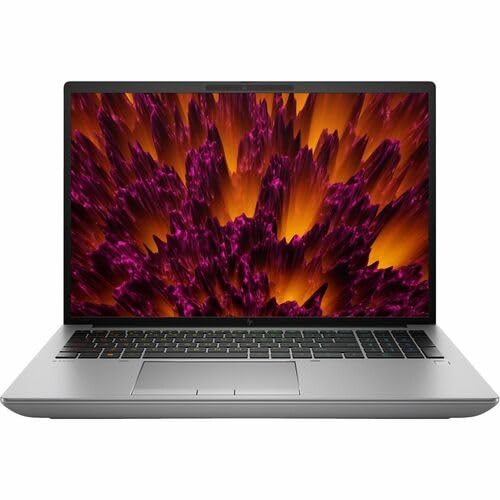
HP ZBook Fury 16 G11 -- Best for Enterprise and Defense Engineering
The HP ZBook Fury 16 G11 targets engineers working in defense, aerospace, or government contracting environments where security certifications and hardware durability matter as much as raw performance. It is MIL-SPEC 810H tested, ships with optional HP Sure View privacy screen, and integrates with HP Wolf Security for enterprise endpoint protection. Performance is class-leading with Intel Xeon options and NVIDIA RTX 5000 Ada GPU configurations available. The display can be configured at high brightness for well-lit fieldwork environments. It is the heaviest machine on this list, which is a real trade-off for portability, but for engineers who primarily work at a desk or on-site, the durability and security features justify it.
Buying considerations
What to consider
Start with your primary software stack. CAD and simulation tools like SOLIDWORKS, ANSYS, and Revit have certified GPU and CPU lists -- cross-reference those before purchasing. Next, consider RAM: simulation and large assembly work scales with memory more than anything else, so do not underbuy. Storage speed matters for large project files; NVMe SSD is the minimum. Portability is a real factor if you visit job sites or client offices. Finally, think about OS compatibility. Most engineering software runs on Windows, and some critical tools lack macOS or Linux support, so confirm compatibility before committing to an Apple machine.
What to consider
Engineering workflows evolve quickly, and picking the right machine now will save significant time and frustration. You may also find useful context in our [best computers for editing](/articles/best-computers-for-editing) and [best computers for designers](/articles/best-computers-for-designers) guides, which cover overlapping hardware considerations. All testing methodology is documented on our [/methodology](/methodology) page.
Questions answered
For most engineering work, 16GB RAM is the practical minimum. If you run finite element analysis, CFD simulations, or large CAD assemblies, 32GB to 64GB is strongly recommended. Mechanical and structural engineers pushing complex SolidWorks or ANSYS models will see real performance gains from 64GB or more, while software engineers can often work comfortably at 16GB.
It depends on the discipline. Civil and software engineers doing mostly 2D work or coding can manage with integrated graphics, though it is not ideal. Mechanical, electrical, and aerospace engineers working with 3D CAD, rendering, or simulation visualizations should prioritize a dedicated professional-grade GPU such as an NVIDIA RTX or AMD Radeon Pro for certified driver support in programs like SOLIDWORKS and AutoCAD.
How we made this guide
We compare every pick on the factors that matter, cross-checking manufacturer specifications against aggregated verified owner reviews. We rank independently and never take payment for placement. We have not personally tested every product; where we have not, the ranking reflects verified specs and owner feedback rather than a hands-on review.
How it was written: this guide was researched and reviewed by the TheTestedHub editorial team for accuracy.
Affiliate disclosure: TheTestedHub is reader-supported. When you buy through links on our site, we may earn a commission at no extra cost to you.
Keep reading

Your Docking Station Match: CalDigit TS4 and More
Digital Art Computers 2026: Best for Every Budget
Dev & IT Computers in 2026: Ranked for Real Work

Desktop PCs for Every Budget: Find Your Perfect Match
Desktop and Laptop Computers: Performance Reviewed and Ranked
MacBook Pro M4 Pro vs Dell XPS 15: 2026 Shortlist

Buy the Best DIY Computer in 2026: Corsair One i300
