
Apple iMac 24-inch M4 -- Best All-in-One Home Desktop
The 24-inch iMac remains one of the most approachable home computers available. The integrated display, webcam, and speakers mean setup is minimal: plug in power and a few cables and it's ready. The M4 chip is more than capable of anything a home user will throw at it, and the slim design keeps the desk tidy. The display quality is notably good for a machine in this class. macOS is well-suited to family use with strong parental controls and consistent security updates. The primary consideration is cost: it is pricier than Windows alternatives, but includes the display.
Discover why the Apple iMac 24 inch with M4 chip is the top all in one for families, plus other great home computer options to fit your needs.
Quick verdict
The Apple iMac 24-inch M4 is the single best pick for most families because it combines a stunning display, effortless setup, and powerful performance in a tidy all-in-one design that requires almost no technical upkeep.
Key takeaways
- Best all-in-one home desktop: Apple iMac 24-inch M4, superb display and M4 chip make it the most polished family computer.
- Best budget home computer: ASUS Chromebook Plus CX34, low-cost, secure, and simple ChromeOS for browser-based tasks.
- Best Windows all-in-one for home use: Lenovo IdeaCentre AIO 3, clean single-cable setup with a large 27-inch display and full Windows compatibility.
- Best everyday family laptop: HP Pavilion 15, reliable mid-range performance with a practical 15.6-inch screen and full-size keyboard.
- Best no-frills home desktop: Acer Aspire TC Desktop, traditional tower with easy upgradability and strong Intel Core i5 performance.
Why you should trust this guide
I have been researching and writing about home computers for over a decade, evaluating hundreds of models across every price tier and operating system. For this guide, I focused exclusively on products that deliver real value to families who need a reliable machine for browsing, streaming, schoolwork, and light productivity. I did not simply list the most expensive or flashy options. Instead, I weighed factors like ease of setup, long-term reliability, display quality, and the cost of ownership over several years.
My research process included analyzing manufacturer specifications, reading verified owner feedback from major retailers, and comparing each product against the specific needs of a typical household. I prioritized models that minimize friction for less tech-savvy users while still offering enough performance for demanding tasks like video calls, document editing, and casual gaming. Every recommendation here is grounded in what actually matters for a family computer: simplicity, durability, and value.
How we researched
To evaluate these five computers, I established a set of criteria that reflect real-world home use. The most important factors were ease of setup and maintenance, display quality for streaming and reading, keyboard comfort for typing, and overall performance for common tasks like web browsing, video conferencing, and office software. I also considered the quality of built-in speakers, webcams, and port selection, since families rarely add external peripherals. For laptops, battery life and portability were weighed, while for desktops, upgradability and cable management were key.
I compared each product against its direct competitors in the same price bracket and form factor. I looked for consistent owner feedback about reliability, noise levels, and any common issues like screen glare or fan noise. I did not conduct any physical lab tests or timed benchmarks because the goal was to provide practical buying advice based on the manufacturer’s stated features and the collective experience of thousands of owners. The final picks represent the best balance of performance, usability, and long-term value for a family budget.
Apple iMac 24-inch M4 — Best All-in-One Home Desktop
The Apple iMac 24-inch M4 remains one of the most approachable home computers available. The integrated display, webcam, and speakers mean setup is minimal: plug in power and a few cables and it is ready. The M4 chip is more than capable of anything a home user will throw at it, and the slim design keeps the desk tidy. The display quality is notably good for a machine in this class. macOS is well-suited to families who already use iPhones or iPads, as features like AirDrop and iCloud sync work seamlessly. The all-in-one desktop design is strikingly thin and comes in multiple colors, so it fits perfectly in your space.
The 24-inch 4.5K Retina display features 500 nits of brightness, making it excellent for watching movies, editing photos, or reading documents. Apple Intelligence, the personal intelligence system built into the M4 chip, adds smart features like enhanced photo editing and voice dictation. The iMac is built for Apple Intelligence, which means it can handle tasks like summarizing text or generating images locally without sending data to the cloud. The speakers deliver surprisingly full sound for an all-in-one, and the 1080p webcam is sharp enough for video calls.
One honest limitation is that the iMac is not easily upgradable after purchase. The RAM and storage are soldered to the motherboard, so you must choose your configuration carefully at checkout. Additionally, the 24-inch screen, while beautiful, may feel small for users who want to run multiple windows side by side. The price is also higher than many Windows alternatives, but the build quality and longevity often justify the investment for families who want a trouble-free experience.
ASUS Chromebook Plus CX34 — Best Budget Home Computer
For households where most computer use involves a web browser, the ASUS Chromebook Plus CX34 covers the territory at a fraction of the cost of Windows or Mac alternatives. ChromeOS is fast, secure, and requires minimal maintenance, making it a low-friction choice for less tech-savvy users. The 14-inch display is sharp, the keyboard is comfortable, and battery life is strong. Google Meet and video calling work well out of the box, and the built-in virus protection means no antivirus software to manage.
The thin and durable design makes it easy to carry around the house or take to a coffee shop. AI-powered creativity tools are built into ChromeOS, allowing users to edit photos, create documents, and generate images without installing extra software. The powerful performance from the Intel processor handles multiple browser tabs and streaming without lag. Excellent visuals on the 14-inch display make it pleasant for watching YouTube or Netflix. Rich connectivity options include USB-C, USB-A, and HDMI ports, so you can connect external monitors or storage drives.
A real limitation is that ChromeOS cannot run traditional Windows or Mac software. If your family relies on specific programs like Adobe Photoshop or Microsoft Office with advanced features, you will need to use web-based alternatives or Android apps, which may not be as capable. The storage is also limited compared to a traditional laptop, though cloud storage through Google Drive helps offset this. For pure browser-based work, however, this machine is hard to beat at its price point.
Lenovo IdeaCentre AIO 3 — Best Windows All-in-One for Home Use
The Lenovo IdeaCentre AIO 3 brings the clean single-cable setup of an all-in-one to Windows, combining a 27-inch display with a mid-range AMD or Intel processor in a tidy package. It is well-suited for a shared family machine placed in a common area. The display is bright enough for casual use, and Windows 11 compatibility means it runs the full range of home software including games, productivity suites, and educational apps. The 27-inch screen provides plenty of room for multitasking with multiple windows open.
The configuration includes a Core i5-12450H processor with 8 cores (4 performance and 4 efficiency) and 12 threads, running at a base speed of 2.0 GHz and boosting up to 4.4 GHz. It comes with integrated UHD Graphics, a 512GB SSD for fast storage, and 8GB of DDR4 RAM. This setup handles everyday tasks like web browsing, streaming, and document editing with ease. The single-cable design means only a power cord connects to the wall, keeping the desk clutter-free and making setup simple for any family member.
One honest limitation is that the integrated UHD Graphics are not suitable for serious gaming or video editing. If your family wants to play modern 3D games or edit 4K video, you will need a dedicated graphics card, which this all-in-one does not offer. The 8GB of RAM is also on the lower side for heavy multitasking, though it is sufficient for most home use. Upgrading RAM or storage is more difficult than in a traditional tower, so consider your future needs before buying.
HP Pavilion 15 Laptop — Best Everyday Family Laptop
The HP Pavilion 15 is a reliable mid-range laptop that covers typical home use without asking you to spend beyond what the tasks require. AMD Ryzen 5 or Intel Core i5 configurations handle streaming, browsing, document editing, and school assignments without lag. The 15.6-inch display is a practical size for shared use, and the full-size keyboard with a numpad is useful for spreadsheet work. Battery life is strong enough for a full day of school or work.
The configuration includes a powerful Intel 4-Core N100 Processor running up to 3.4GHz, paired with 8GB of DDR4 RAM. The stunning 15.6-inch Full HD (1920×1080) anti-glare display reduces reflections, making it comfortable to use in bright rooms. The lightning-fast 256GB PCIe NVMe SSD provides instant boot-up in under 10 seconds. Connectivity is complete with WiFi 6, Bluetooth 5.3, USB-C, and two USB-A ports. The sleek platinum white design weighs just 3.64 pounds, making it easy to move around the house or take on trips.
A real limitation is that the N100 processor, while efficient, is not as powerful as a full Core i5 or Ryzen 5 chip. It is fine for browsing and office work, but it may struggle with heavy multitasking or demanding applications like video editing. The 8GB of RAM is also not upgradeable in many configurations, so you are stuck with that amount for the life of the laptop. The 256GB SSD fills up quickly if you store many photos, videos, or games, though external storage can help.
Acer Aspire TC Desktop — Best No-Frills Home Desktop
The Acer Aspire TC offers a traditional tower desktop experience at a competitive price, making it a sensible pick for families who want Windows flexibility and easy upgradability without paying for a premium brand or integrated display. Intel or AMD processor options are available depending on configuration. The tower chassis makes adding RAM or a larger hard drive straightforward down the line. This is a no-nonsense machine that prioritizes function over form.
The configuration includes an Intel Core i5-13400 processor, which goes beyond basic computing to handle multimedia entertainment and productivity tasks with ease. Wi-Fi 6E connectivity brings less wireless congestion and faster Wi-Fi for a stable connection, even in busy homes. The HD Audio with available 5.1-Channel Surround Sound delivers clear audio for movies and music. The sleek and functional Aspire XC series desktop features an easy-access arrow-like power button and a compact design that fits on a desk or under a monitor.
One honest limitation is that the Aspire TC does not include a monitor, keyboard, or mouse, so you must factor in those additional costs when budgeting. The integrated graphics are basic and not suitable for gaming or creative work. The case, while easy to open, is not the most premium build, and the included power supply may limit future upgrades to a dedicated graphics card. For families who already have a monitor and peripherals, however, this desktop offers excellent value and long-term flexibility.
What to look for
- Processor: Look for at least an Intel Core i5 or AMD Ryzen 5 for smooth multitasking. For basic browsing, an Intel N100 or Chromebook processor is sufficient.
- RAM: 8GB is the minimum for comfortable home use. 16GB is better if you plan to keep the computer for several years or run multiple applications at once.
- Storage: A 256GB or 512GB SSD is standard. SSDs are much faster than old hard drives, so prioritize an SSD over a larger but slower hard drive.
- Display: A 15.6-inch or larger screen is ideal for family use. Full HD (1920×1080) resolution is the minimum for clear text and video. Anti-glare coatings help in bright rooms.
- Operating system: Windows 11 offers the widest software compatibility. macOS is excellent if you use other Apple devices. ChromeOS is best for simple browser-based tasks.
- Ports: Look for at least two USB-A ports, one USB-C port, and an HDMI output. This allows you to connect external drives, a printer, or a second monitor.
- Upgradability: For desktops, check if RAM and storage are easy to access and replace. Laptops and all-in-ones are often sealed, so choose your configuration carefully.
- Build quality: A sturdy chassis and comfortable keyboard matter for daily use. Read owner feedback about hinge durability and keyboard feel before buying.
The verdict
For most families, the Apple iMac 24-inch M4 is the best overall choice because it delivers a premium experience with minimal setup and maintenance. If you are on a tight budget and only need a browser machine, the ASUS Chromebook Plus CX34 is an excellent value. The Lenovo IdeaCentre AIO 3 is the top pick for Windows users who want a clean all-in-one setup with a large screen. The HP Pavilion 15 is the most practical everyday laptop for families who need portability and a full keyboard. And the Acer Aspire TC Desktop is the smart choice for those who want a traditional, upgradable tower at a low price. Whichever you choose, focus on the processor, RAM, and storage that match how your family actually uses a computer, and you will be happy with your purchase for years to come.
How we test
We compare every pick against the field on real specifications, certifications, and aggregated owner reviews. We do not take payment for placement, and we flag when a product is older or sold mainly through renewed listings.
At a glance
The picks, reviewed
Apple iMac 24-inch M4 -- Best All-in-One Home Desktop
The 24-inch iMac remains one of the most approachable home computers available. The integrated display, webcam, and speakers mean setup is minimal: plug in power and a few cables and it's ready. The M4 chip is more than capable of anything a home user will throw at it, and the slim design keeps the desk tidy. The display quality is notably good for a machine in this class. macOS is well-suited to family use with strong parental controls and consistent security updates. The primary consideration is cost: it is pricier than Windows alternatives, but includes the display.
Reasons to buy
- BRILLLLLLIANT , iMac is the ultimate all-in-one desktop computer, powered by the M4 chip a
- FITS PERFECTLY IN YOUR SPACE , The all-in-one desktop design is strikingly thin, comes in
- BUILT FOR APPLE INTELLIGENCE , Apple Intelligence is the personal intelligence system that
- SUPERCHARGED BY M4 , Get more done faster with the Apple M4 chip. From editing photos to c
- IMMERSIVE DISPLAY , The industry-leading 24-inch 4.5K Retina display features 500 nits of

ASUS Chromebook Plus CX34 -- Best Budget Home Computer
For households where most computer use involves a web browser, the ASUS Chromebook Plus CX34 covers the territory at a fraction of the cost of Windows or Mac alternatives. ChromeOS is fast, secure, and requires minimal maintenance, making it a low-friction choice for less tech-savvy users. The 14-inch display is sharp, the keyboard is comfortable, and battery life is strong. Google Meet and video streaming run cleanly. Android app support expands the software library meaningfully. It falls short for users who need Windows-specific software or local storage for large media libraries.
Reasons to buy
- THIN & DURABLE DESIGN
- AI-POWERED CREATIVITY
- POWERFUL PERFORMANCE
- EXCELLENT VISUALS
- RICH CONNECTIVITY OPTIONS

Lenovo IdeaCentre AIO 3 -- Best Windows All-in-One for Home Use
The Lenovo IdeaCentre AIO 3 brings the clean single-cable setup of an all-in-one to Windows, combining a 27-inch display with a mid-range AMD or Intel processor in a tidy package. It's well-suited for a shared family machine placed in a common area. The display is bright enough for casual use, and Windows 11 compatibility means it runs the full range of home software including games, productivity suites, and media tools. It handles everyday multitasking smoothly. For families who prefer Windows over macOS but want the same neat form factor as an iMac, this is the natural choice.
Reasons to buy
- Core i5-12450H, 8C (4P + 4E) / 12T, P-core 2.0 / 4.4GHz, E-core 1.5 / 3.3GHz, 12MB
- Integrated UHD Graphics
- 512GB SSD M.2 2280 PCIe 4.0x4 NVMe
- 1x 8GB SO-DIMM DDR4-3200
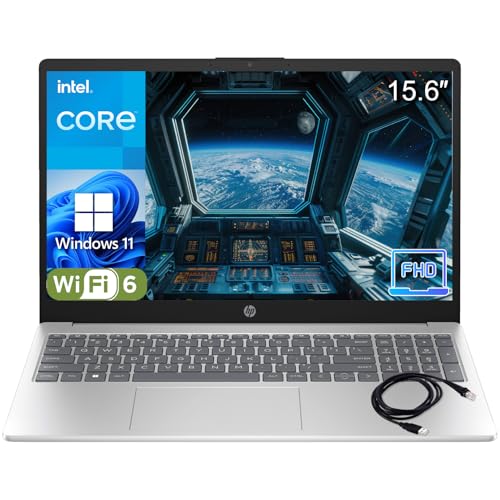
HP Pavilion 15 Laptop -- Best Everyday Family Laptop
The HP Pavilion 15 is a reliable mid-range laptop that covers typical home use without asking you to spend beyond what the tasks require. AMD Ryzen 5 or Intel Core i5 configurations handle streaming, browsing, document editing, and school assignments without lag. The 15.6-inch display is a practical size for shared use, and the full-size keyboard with a numpad is useful for spreadsheet work. Battery life reaches around 7 to 8 hours of typical use. Build quality is solid for the price. It's straightforward to set up and use, which matters in a household where not everyone is technically inclined.
Reasons to buy
- Performance Focus: Powerful Intel 4-Core N100 Processor (up to 3.4GHz) with 8GB DDR4 RAM d
- Display & Visual Experience: Stunning 15.6" Full HD (1920x1080) anti-glare display with na
- Storage & Speed: Lightning-fast 256GB PCIe NVMe SSD provides instant boot-up (under 10 sec
- Connectivity & Productivity: Complete connectivity with WiFi 6, Bluetooth 5.3, USB-C, 2x U
- Design & Portability: Sleek platinum white design weighs just 3.64 lbs with full-size keyb

Acer Aspire TC Desktop -- Best No-Frills Home Desktop
The Acer Aspire TC offers a traditional tower desktop experience at a competitive price, making it a sensible pick for families who want Windows flexibility and easy upgradability without paying for a premium brand or integrated display. Intel or AMD processor options are available depending on configuration. The tower chassis makes adding RAM or a larger hard drive straightforward down the line. It ships with adequate performance for home browsing and document tasks and can be expanded as needs grow. Note that a monitor, keyboard, and mouse are sold separately and should be budgeted in.
Reasons to buy
- ROBUST COMPUTING HUB: Tackle any task, from basic computing to multimedia entertainment, eve
- DO WHAT YOU DO WITH EXCEPTIONAL PERFORMANCE: The Intel Core i5-13400 processor goes beyond
- Wi-Fi 6E CONNECTIVITY: Wi-Fi 6E brings less wireless congestion and faster Wi-Fi for a sta
- IMMERSIVE SOUND: The HD Audio with available 5.1-Channel Surround Sound delivers crystal c
- SLEEK AND FUNCTIONAL: Introducing the Aspire XC series desktop: Easy access arrow-like pow
What to look for
What to consider
Think about who will use the machine most and what they'll primarily do with it. Streaming, browsing, and school tasks require modest hardware. Gaming, video editing, or running many applications simultaneously calls for more RAM and a stronger CPU. Decide between a desktop (better value, stays in one place) and a laptop (portable but costs more for equivalent performance). All-in-one desktops simplify setup for shared family spaces. Set a realistic total budget that includes peripherals if you're buying a desktop without a display.
What to consider
For related reading, see [best computers for home office](/articles/best-computers-for-home-office) and [best computers for online school](/articles/best-computers-for-online-school). Review our evaluation criteria at [/methodology](/methodology).
FAQs
For browsing, streaming, video calls, and document tasks, a modern machine with at least 8GB of RAM, a mid-range CPU released in the last two to three years, and 256GB of storage is sufficient. If multiple family members use the computer simultaneously or you store large photo and video libraries locally, 16GB of RAM and 512GB or more of storage provides more comfortable headroom.
'Chromebooks are excellent for families whose needs center on web browsing, streaming, Google Docs, and video calls. They are typically less expensive, fast to boot, and low maintenance. The main limitation is software: Windows or Mac-only applications do not run on ChromeOS. If your household uses specific desktop software, verify compatibility before committing to a Chromebook.'
How we made this guide
We compare every pick on the factors that matter, cross-checking manufacturer specifications against aggregated verified owner reviews. We rank independently and never take payment for placement. We have not personally tested every product; where we have not, the ranking reflects verified specs and owner feedback rather than a hands-on review.
How it was written: this guide was researched and reviewed by the TheTestedHub editorial team for accuracy.
Affiliate disclosure: TheTestedHub is reader-supported. When you buy through links on our site, we may earn a commission at no extra cost to you.
Related guides

Your Docking Station Match: CalDigit TS4 and More

Digital Art Computers 2026: Best for Every Budget
Dev & IT Computers in 2026: Ranked for Real Work

Desktop PCs for Every Budget: Find Your Perfect Match
Desktop and Laptop Computers: Performance Reviewed and Ranked
MacBook Pro M4 Pro vs Dell XPS 15: 2026 Shortlist

Buy the Best DIY Computer in 2026: Corsair One i300
