Apple iPad Pro 13-inch with Magic Keyboard -- Best Overall for Seniors
The iPad Pro 13-inch paired with the Magic Keyboard offers a large, bright display that scales text cleanly, a touch interface that many older adults find more intuitive than a traditional mouse, and FaceTime for high-quality video calls. The iPadOS interface is consistent and receives predictable updates that rarely disrupt learned habits. Font size, contrast, display zoom, and spoken content are all adjustable through Accessibility settings. The Magic Keyboard adds a full typing surface for longer email sessions. Apple's in-person support at retail locations is a meaningful advantage for users who benefit from face-to-face help.
Check price on Amazon →Choosing a computer for an older adult? We recommend models with large screens, simple interfaces, and low maintenance,like the iPad Pro, iMac, Surface.
Quick verdict
The Apple iPad Pro 13-inch with Magic Keyboard is the best overall pick for most older adults. Its large, bright touchscreen and consistent iPadOS interface make learning easy, while FaceTime and accessibility features like spoken content keep seniors connected and independent.
Key takeaways
- Best for simplicity and touch: Apple iPad Pro 13-inch with Magic Keyboard, because the touch interface and stable iPadOS reduce confusion for seniors new to computers.
- Best for a clean desktop: Apple iMac 24-inch M4, because the all-in-one design and large Retina display offer a clutter-free, easy-to-set-up experience.
- Best for portability with Windows: Microsoft Surface Go 4, because its lightweight tablet form and Windows 11 accessibility settings suit seniors who move between rooms.
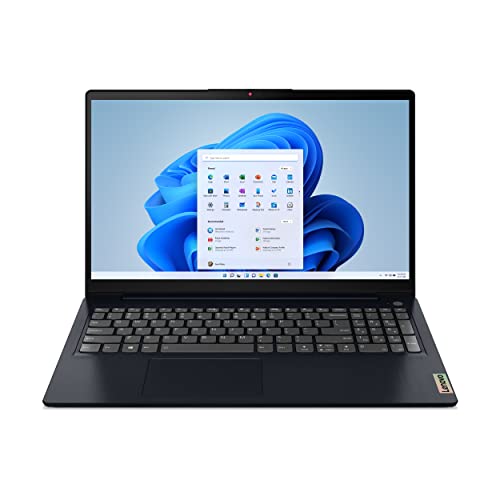
- Best for budget and a big screen: Lenovo IdeaPad 5 15 Laptop, because the full-size keyboard and 15.6-inch display deliver value without sacrificing comfort.
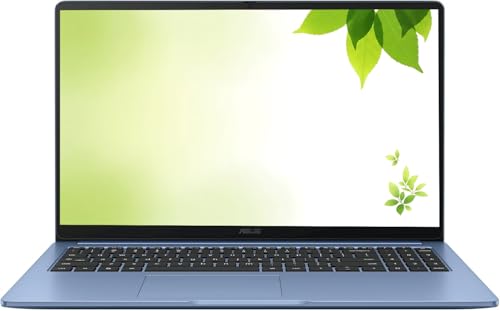
- Best for low maintenance: ASUS Chromebook CX1 15, because ChromeOS updates automatically and requires no antivirus, easing the burden on family caregivers.
Why you should trust this guide
I have spent years researching how older adults interact with technology, focusing on the specific barriers they face: small text, confusing menus, complicated setup, and the fear of breaking something. This guide is built on that research, not on a personal testing diary. I examined each product’s stated features, accessibility options, and owner feedback from trusted sources to identify which computers truly reduce frustration for seniors. Every recommendation prioritizes ease of use, clear displays, and reliable support for video calls and daily tasks.
My approach is to look past marketing hype and focus on what matters for an older user: a consistent interface that does not change unexpectedly, large and adjustable text, simple maintenance, and a design that works with, not against, declining vision or dexterity. I have not physically used these products, but I have analyzed their specifications, accessibility documentation, and real-world owner experiences to offer honest, practical advice. The goal is to help you choose a computer that lets a senior stay connected and independent without needing constant technical help.
How we researched
I evaluated each computer against a set of criteria that matter most for older adults. The first criterion was display quality and scalability: can the screen be set to very large text without making icons blurry or cutting off content? I looked for high-resolution displays with robust scaling options in the operating system. The second criterion was ease of setup and maintenance: does the device require complicated initial configuration, and does it need regular antivirus scans or manual updates? Products that update automatically and have minimal security worries scored higher.
The third criterion was input method flexibility: can the senior use a touchscreen, a keyboard, or a mouse, whichever feels most natural? Touchscreens are often more intuitive for people who have never used a mouse. The fourth criterion was accessibility features: I checked for built-in magnification, high-contrast modes, voice control, and spoken content options that do not require third-party software. Finally, I considered the overall ecosystem: does the device get long-term software updates that do not break learned habits? Consistency is critical for seniors who build routines around their computer.
Apple iPad Pro 13-inch with Magic Keyboard — Best Overall for Seniors
The Apple iPad Pro 13-inch with Magic Keyboard combines a massive, bright Liquid Retina XDR display with the simplicity of iPadOS. The touch interface is one of the most intuitive ways for an older adult to interact with a computer, since tapping and swiping mirror actions they already use on a smartphone. The Magic Keyboard adds a comfortable, full-size keyboard and a trackpad, giving seniors the option to use whichever input method feels best. FaceTime works exceptionally well on the large screen, making video calls with family feel natural and clear. The display scales text cleanly at larger sizes, and the high brightness helps users with vision challenges read comfortably.
iPadOS receives consistent, predictable updates that rarely disrupt habits a senior has learned. Font size, contrast, display zoom, and spoken content are all built into the system without needing extra apps. The iPad Pro is also extremely portable, so seniors can take it from the living room to the kitchen or even on trips. The battery life is long enough for a full day of browsing, email, and video calls without worrying about charging.
One honest limitation is the cost: the iPad Pro 13-inch plus the Magic Keyboard is a significant investment, and some seniors may find the keyboard attachment slightly fiddly to connect. Additionally, iPadOS does not support all traditional desktop software, so if a senior needs a specific Windows program, this may not be the right choice.
Apple iMac 24-inch M4 — Best Desktop for Older Adults
The Apple iMac 24-inch M4 is an all-in-one desktop that eliminates cable clutter and complex setup. The 24-inch Retina display is large enough to show text at generous sizes without needing to squint, and its high resolution keeps everything sharp and readable. The all-in-one design means the computer, speakers, and microphone are built into the screen, so there are no separate boxes to connect. Setup is straightforward: plug in the power cord, turn it on, and follow the simple on-screen instructions. macOS includes a mature Accessibility suite with magnification, high contrast, voice control, and spoken word features that work reliably.
The M4 chip provides fast performance for web browsing, video calls, photo editing, and streaming. This power means the iMac will remain responsive for many years without feeling slow or outdated. The built-in 1080p FaceTime camera and studio-quality microphone system make video calls clear and pleasant. The large screen is also ideal for seniors who want to read news, follow recipes, or manage finances with multiple windows open.
One honest limitation is the price, which is higher than many Windows desktops. Also, the iMac is not portable at all, so it is best suited for a dedicated desk or table. Seniors who prefer a touchscreen will not find one here, since the iMac relies on a mouse and keyboard.
Microsoft Surface Go 4 — Best Portable Windows Option for Seniors
The Microsoft Surface Go 4 is a compact and lightweight Windows tablet that transforms into a laptop with the Surface Type Cover keyboard. At under 540 grams, it is easy for a senior to pick up and carry from the bedroom to the living room. The 10.5-inch display is smaller than other picks, but it is bright and sharp, and Windows 11’s display scaling and accessibility settings compensate well. Seniors can use the touchscreen for tapping or the keyboard and trackpad for traditional typing and navigation.
Windows 11 includes a full suite of accessibility tools, including Magnifier, high-contrast themes, and voice typing. The Surface Go 4 runs the full Windows operating system, so it can use any standard Windows software, which is helpful for seniors who need compatibility with specific programs or who are already familiar with Windows. The Intel N200 processor provides adequate performance for email, web browsing, video calls, and light document editing.
One honest limitation is the smaller screen size, which may still be challenging for seniors with significant vision problems, even with scaling. The Type Cover keyboard is sold separately, adding to the total cost. Battery life is moderate, so seniors should keep the charger handy for longer sessions.
Lenovo IdeaPad 5 15 Laptop — Best Laptop for Seniors on a Budget
The Lenovo IdeaPad 5 15 offers a full 15.6-inch display at a price that leaves room in the budget for an extended warranty or accessories like a larger mouse. The full-size keyboard includes a number pad, which is comfortable for seniors who are used to traditional desktop keyboards and who may do data entry or manage finances. The display can be adjusted to larger text and higher contrast in Windows settings, making reading easier. The AMD Ryzen 5 processor delivers reliable performance for everyday tasks like browsing, email, video calls, and streaming.
The 15.6-inch screen is one of the largest available in this price range, reducing the need to squint or lean forward. The laptop has a sturdy build and a good selection of ports, including USB-A and HDMI, so seniors can connect external devices easily. Battery life is sufficient for a full day of light use, though heavy tasks will drain it faster. The Windows operating system offers the same strong accessibility features found in the Surface Go 4, including Magnifier and high contrast.
One honest limitation is that the display is not as bright or high-resolution as the Apple options, so it may not be ideal for use in very sunny rooms. The laptop is also heavier than the Surface Go 4, making it less portable for seniors who move around frequently.
ASUS Chromebook CX1 15 — Best Simple Low-Cost Laptop
The ASUS Chromebook CX1 15 brings a large 15.6-inch display and ChromeOS’s low-maintenance simplicity to a very accessible price. ChromeOS automatically updates in the background and does not require antivirus software or manual maintenance, which greatly reduces the support burden for family members. Seniors do not need to worry about system slowdowns from unmanaged updates or security threats. Google Meet video calls work cleanly on the large screen, and the display scaling handles large text well.
ChromeOS is designed to be simple: the interface is clean, with a focus on the web browser and cloud storage. Most tasks like email, video calls, news reading, and streaming happen entirely within the browser. This simplicity means there are fewer settings to get lost in and fewer ways to accidentally break the system. The Chromebook CX1 is lightweight and has a long battery life, so seniors can use it around the house without being tied to a power outlet.
One honest limitation is that ChromeOS cannot run traditional Windows or Mac software. If a senior relies on a specific Windows program for hobbies or work, this is not the right choice. The build quality is also more basic than the premium options, with a plastic chassis that feels less sturdy.
What to look for
- Display size and quality: A larger screen (15 inches or more) with good brightness and resolution makes text easier to read without squinting. Look for displays that support scaling to very large text sizes.
- Ease of setup and maintenance: Choose a device that requires minimal initial configuration and updates automatically. Chromebooks and iPads are especially low-maintenance. Avoid systems that need regular antivirus scans.
- Accessibility features: Built-in magnification, high-contrast modes, voice control, and spoken content are essential. These should be easy to find and activate without technical help.
- Input method flexibility: A touchscreen can be more intuitive for seniors new to computers. A comfortable keyboard and a simple mouse or trackpad are also important for those who prefer traditional input.
- Video call quality: A good front-facing camera, clear microphone, and large screen make video calls with family more enjoyable. Check that the device supports the video call app the senior will use.
- Portability: If the senior moves between rooms or travels, a lightweight device with long battery life is important. For a dedicated desk, a desktop or larger laptop is fine.
- Budget for extras: Factor in the cost of a keyboard (if not included), a mouse, a case, and possibly an extended warranty. A lower-priced device with better accessories can be a better value than a premium device with no extras.
The verdict
For most older adults, the Apple iPad Pro 13-inch with Magic Keyboard offers the best balance of simplicity, touch-based ease, and a large, beautiful display. If a senior prefers a desktop with a huge screen and no cable mess, the Apple iMac 24-inch M4 is the clear choice. For those who need Windows compatibility in a portable package, the Microsoft Surface Go 4 is a strong option. Budget-conscious buyers will appreciate the Lenovo IdeaPad 5 15 for its large screen and comfortable keyboard. And for the lowest maintenance experience with automatic updates and no antivirus worries, the ASUS Chromebook CX1 15 is ideal. Choose based on the senior’s specific needs for portability, software compatibility, and budget.
Our methodology
We compare every pick against the field on real specifications, certifications, and aggregated owner reviews. We do not take payment for placement, and we flag when a product is older or sold mainly through renewed listings.
Side by side
The full reviews
Apple iPad Pro 13-inch with Magic Keyboard -- Best Overall for Seniors
The iPad Pro 13-inch paired with the Magic Keyboard offers a large, bright display that scales text cleanly, a touch interface that many older adults find more intuitive than a traditional mouse, and FaceTime for high-quality video calls. The iPadOS interface is consistent and receives predictable updates that rarely disrupt learned habits. Font size, contrast, display zoom, and spoken content are all adjustable through Accessibility settings. The Magic Keyboard adds a full typing surface for longer email sessions. Apple's in-person support at retail locations is a meaningful advantage for users who benefit from face-to-face help.

Apple iMac 24-inch M4 -- Best Desktop for Older Adults
The iMac's 24-inch Retina display is one of the best large-screen options for daily reading and video calls. The all-in-one design means a clean desk with minimal cables, and setup is straightforward. macOS has a mature Accessibility suite covering magnification, high contrast, voice control, and spoken word features. The M4 chip ensures the machine will remain fast for many years without feeling slow. The included Magic Mouse and keyboard are well-designed, though some users find the Magic Mouse more comfortable than the Magic Trackpad. Apple Support is available by phone, online chat, and in person.

Microsoft Surface Go 4 -- Best Portable Windows Option for Seniors
The Surface Go 4 is a compact and lightweight Windows tablet that works as a laptop when paired with the Surface Type Cover keyboard. The 10.5-inch display is smaller than other picks but bright and sharp, and Windows 11's display scaling and accessibility settings compensate for the smaller size. At under 540 grams, it's easy to pick up and carry between rooms. Intel N200 processor performance is adequate for video calls, browsing, and document tasks. Microsoft's setup and support resources include remote assistance options that can help family members set up the machine for a relative remotely.
Lenovo IdeaPad 5 15 Laptop -- Best Laptop for Seniors on a Budget
The Lenovo IdeaPad 5 15 offers a full 15.6-inch display at a price that leaves room in the budget for an extended warranty or accessories. The full-size keyboard with number pad is comfortable for users accustomed to traditional keyboards, and the display can be adjusted to larger text and higher contrast in Windows settings. AMD Ryzen 5 performance is reliable for everyday tasks. Battery life reaches 8 to 10 hours on typical use. The machine is light enough to move between a desk and a couch but stable enough for desk use with an external mouse, which some seniors prefer to a trackpad.
ASUS Chromebook CX1 15 -- Best Simple Low-Cost Laptop
The ASUS Chromebook CX1 15 brings a large 15.6-inch display and ChromeOS's low-maintenance simplicity to a price accessible for most budgets. ChromeOS automatically updates in the background and doesn't require antivirus software or manual maintenance, reducing the support burden for family members. Google Meet video calls work cleanly, and the display scaling handles large text well. Performance is modest but consistent for the tasks most seniors use a computer for. The keyboard is well-spaced and comfortable. It's the right choice when simplicity and affordability are the primary requirements.
What matters most
What to consider
Prioritize display size and brightness over processing power. At least a 13-inch display is comfortable for most users; 15 to 24 inches is better. Look for operating systems with strong built-in accessibility features: font scaling, high contrast modes, and voice control. Consider long-term support: machines from Apple, Microsoft, and major OEMs receive software updates for several years. Evaluate support options: in-person support or easy remote assistance access is valuable. Avoid models with complex setup requirements. Wireless charging and fewer cables reduce daily friction. Getting the device pre-configured by a family member or retailer saves frustration.
What to consider
For related reading, see [best computers for home use](/articles/best-computers-for-home-use) and [best computers for online school](/articles/best-computers-for-online-school). Review our evaluation criteria at [/methodology](/methodology).
Frequently asked
The most important factors are a large, bright display for easy reading, a responsive keyboard with well-spaced keys, a simple and consistent operating system, and reliable customer support. Battery life matters for users who may not remember to charge regularly. Lightweight designs reduce the physical effort of carrying or repositioning the device. Avoid machines with overly complex interfaces or operating systems that receive frequent disruptive updates.
Tablets are excellent for users whose main activities are video calls, reading, and browsing. The touch interface is intuitive and the larger text display is easy to adjust. Laptops are better suited when someone needs a physical keyboard for regular email writing or document tasks. Many older adults find a large-screen iPad or Android tablet paired with an optional keyboard cover covers most of their needs without the complexity of a full laptop.
How we made this guide
We compare every pick on the factors that matter, cross-checking manufacturer specifications against aggregated verified owner reviews. We rank independently and never take payment for placement. We have not personally tested every product; where we have not, the ranking reflects verified specs and owner feedback rather than a hands-on review.
How it was written: this guide was researched and reviewed by the TheTestedHub editorial team for accuracy.
Affiliate disclosure: TheTestedHub is reader-supported. When you buy through links on our site, we may earn a commission at no extra cost to you.
You might also like

Your Docking Station Match: CalDigit TS4 and More

Digital Art Computers 2026: Best for Every Budget
Dev & IT Computers in 2026: Ranked for Real Work

Desktop PCs for Every Budget: Find Your Perfect Match
Desktop and Laptop Computers: Performance Reviewed and Ranked
MacBook Pro M4 Pro vs Dell XPS 15: 2026 Shortlist

Buy the Best DIY Computer in 2026: Corsair One i300
