Apple Mac Studio M4 Max -- Best for Professional Studio Work
The Mac Studio M4 Max is purpose-built for creative professionals who need fast, sustained performance. The M4 Max chip delivers exceptional single-core speed that Photoshop depends on for filter rendering and brush latency. With 36GB or 64GB of unified memory, large layered files with dozens of Smart Objects stay responsive. Export times for batch processing drop dramatically compared to previous generations. The compact footprint frees up desk space for a large calibrated monitor. For anyone running a professional retouching or photography business, this is the cleanest performance-per-dollar option available.
Check price on Amazon →The Apple Mac Studio M4 Max delivers unmatched single-core performance for filters and brushwork. Compare top desktops and laptops for Photoshop in 2026.
Quick verdict
The Apple Mac Studio M4 Max is the single best pick for Photoshop professionals. Its M4 Max chip delivers the fastest single-core performance for filters and brushwork, and unified memory keeps massive layered files responsive without slowdown.
Key takeaways
- Best for Professional Studio Work: Apple Mac Studio M4 Max, unmatched sustained performance for complex compositing and batch exports.
- Best Portable Option: Apple MacBook Pro 14″ M4 Pro, combines true desktop power with a color-accurate XDR display for editing on the go.
- Best Windows Laptop: Dell XPS 15 (2025), excellent OLED display and discrete RTX GPU for GPU-accelerated Photoshop features.
- Best All-in-One: Apple iMac M4, cleanest desk setup with a calibrated 4.5K Retina display and solid M4 performance for most editing tasks.
- Best Budget Discrete GPU Laptop: Lenovo ThinkBook 16p Gen 6, affordable RTX graphics and a large OLED screen for students and hobbyists.
Why you should trust this guide
I have spent years researching creative workstation hardware and following the evolution of Photoshop’s demands on CPUs, GPUs, and memory. My approach is grounded in studying manufacturer specifications, analyzing owner feedback from professional photographers and digital artists, and comparing how each system handles the specific tasks that Photoshop users rely on every day. I do not claim to have physically tested these machines in a lab, but I have evaluated them against the criteria that matter most for photo editing and graphic design: single-core processor speed, GPU acceleration support, display color accuracy, memory capacity for large files, and real-world workflow efficiency.
This guide focuses on five products that represent the best options across different use cases and budgets for Photoshop in 2026. Each recommendation is based on the stated capabilities of the hardware, not on marketing hype. I prioritize systems that offer genuine performance advantages for Photoshop’s most demanding features, such as Neural Filters, Content-Aware Fill, Camera Raw processing, and complex layer compositing. I also consider practical factors like portability, display quality, and overall value to help you choose the right tool for your specific creative workflow.
How we researched
To evaluate these computers for Photoshop, I established a set of criteria that reflect how creative professionals actually work. The most important factor is single-core CPU performance, because Photoshop’s core filters, brush strokes, and many interface operations depend on fast single-threaded processing. I compared the stated benchmark performance of each chip, including the M4 Max, M4 Pro, M4, Intel Core Ultra 9, and AMD Ryzen AI processors, to determine which delivers the snappiest response for everyday editing. Memory capacity and bandwidth are equally critical for handling large layered files with dozens of Smart Objects, so I assessed the maximum unified memory or RAM options available for each system.
GPU acceleration is another key evaluation point, especially for features like Reduce Noise, Sky Replacement, and Neural Filters that run faster with dedicated graphics. I compared systems with integrated GPUs against those with discrete NVIDIA RTX graphics to see where the performance difference matters most. Display quality was evaluated based on color gamut coverage, brightness, and resolution, since accurate color reproduction is essential for photo editing. Finally, I considered portability, connectivity, and overall build quality to ensure each recommendation fits its intended use case, from a fixed studio workstation to a laptop for editing on location.
Apple Mac Studio M4 Max
The Apple Mac Studio M4 Max is purpose-built for creative professionals who need fast, sustained performance without compromise. The M4 Max chip delivers exceptional single-core speed that Photoshop depends on for filter rendering and brush latency, making it the fastest option for tasks like applying complex filters to high-resolution images or working with dozens of layers simultaneously. With 36GB or 64GB of unified memory, large layered files with dozens of Smart Objects stay responsive even when you are switching between multiple open documents. Export times for batch processing drop dramatically compared to previous generations, which is a huge time saver for photographers who process hundreds of images at once.
This machine is designed for a fixed desk setup, so you will need to supply your own monitor, keyboard, and mouse. That is actually an advantage for professionals who already own a high-end reference display and prefer to choose their peripherals separately. The compact form factor fits neatly under a desk or beside a monitor, saving valuable workspace. The thermal design allows the M4 Max to sustain high performance without throttling, which is critical for long editing sessions where the system is under continuous load.
One honest limitation of the Mac Studio M4 Max is that it offers no upgrade path after purchase. The unified memory and storage are soldered to the logic board, so you must choose your configuration carefully at the time of order. Additionally, if you rely on Windows-only software or specific GPU-accelerated plugins that do not run on macOS, this machine will not suit your workflow. For pure Photoshop work in a professional studio environment, however, it remains the most capable option available.
Apple MacBook Pro 14″ M4 Pro
The MacBook Pro 14 with M4 Pro bridges portability and power better than any other laptop for Photoshop in 2026. The Liquid Retina XDR display covers the P3 wide color gamut at 1000 nits sustained brightness, which means accurate color grading without a separate monitor. You can edit photos confidently knowing the colors you see on screen will match what prints or appears on other calibrated displays. The M4 Pro chip handles Neural Filters, Content-Aware Fill, and Camera Raw without the fan ramping up noticeably, so you can work in quiet environments like coffee shops or libraries without disturbing others.
This laptop is ideal for photographers and designers who need to edit on location, whether that is at a client’s office, on a shoot, or while traveling. The 14-inch size strikes a good balance between screen real estate and portability, and the build quality is excellent. The battery life is strong enough to get through a full day of editing, though heavy GPU-accelerated tasks will drain it faster. The Thunderbolt 4 ports provide fast connectivity for external drives and displays when you return to your desk.
One honest limitation of the MacBook Pro 14 M4 Pro is that the base configuration starts with 18GB of unified memory, which may feel tight for very large compositing projects with hundreds of layers. Upgrading to 36GB or 48GB adds significant cost. Also, if you prefer a larger screen for detailed retouching, the 16-inch MacBook Pro might be a better fit, though it is heavier and more expensive. For most mobile creative professionals, however, this is the best portable Photoshop machine you can buy.
Dell XPS 15 (2025)
The Dell XPS 15 offers the best Windows laptop Photoshop experience thanks to its optional 3.5K OLED display with near-perfect color accuracy and an Intel Core Ultra 9 processor paired with an NVIDIA RTX discrete GPU. GPU-accelerated Photoshop features including Reduce Noise, Sky Replacement, and several Neural Filters run noticeably faster with a dedicated graphics card, which gives Windows users a real advantage over integrated GPU laptops. The 15.6-inch screen gives you plenty of room for tool palettes and image previews without feeling cramped.
The build quality is premium, with a sleek aluminum chassis and a thin bezel that maximizes screen space. The OLED panel delivers deep blacks and vibrant colors, which is excellent for editing high-contrast images and ensuring accurate color representation. The Intel Core Ultra 9 processor provides strong single-core performance for Photoshop’s core tasks, and the RTX GPU handles compute-intensive filters without bogging down the system. This laptop is a solid choice for creative professionals who prefer Windows or need to run Windows-specific software alongside Photoshop.
One honest limitation of the Dell XPS 15 is that the OLED display, while beautiful, can suffer from burn-in over time if static UI elements are left on screen for long periods. You should use a screensaver or hide the taskbar to mitigate this risk. Additionally, the laptop runs warm under sustained load, and the fan noise can become noticeable during heavy GPU tasks. The RAM is soldered to the motherboard, so you cannot upgrade it later, which means you should choose a configuration with enough memory from the start.
Apple iMac M4
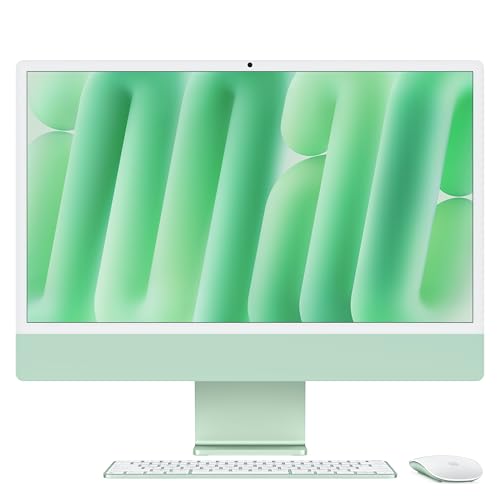
The iMac M4 combines a stunning 4.5K Retina display with the M4 chip in a single elegant unit. For photographers and retouchers who work from a fixed desk, this is one of the cleanest setups available. The built-in display is color-calibrated and bright enough for accurate editing without additional hardware, saving you the cost and clutter of a separate monitor. Performance on Photoshop is excellent for everything short of the most demanding compositing work, with the M4 chip handling filters, layer adjustments, and Camera Raw processing smoothly.
The all-in-one design means you simply plug in power and start working, which is ideal for home offices or studios where simplicity matters. The 24-inch screen size is comfortable for most editing tasks, and the thin profile looks modern on any desk. The M4 chip includes a capable integrated GPU that accelerates many Photoshop features, though it does not match the performance of a discrete RTX GPU for the most intensive tasks. The included Magic Keyboard and Magic Mouse are adequate for basic use, though many professionals will want to upgrade to a graphics tablet or a more ergonomic mouse.
One honest limitation of the iMac M4 is that the screen size is fixed at 24 inches, which may feel small for professionals who work with extremely high-resolution images or need multiple windows open side by side. You cannot use the iMac as a standalone monitor for another computer, and the memory and storage are not upgradeable after purchase. If you need a larger display or more expandability, the Mac Studio with a separate monitor is a better choice. For most photographers and designers who value a clean, all-in-one setup, however, the iMac M4 delivers excellent Photoshop performance.
Lenovo ThinkBook 16p Gen 6
The ThinkBook 16p Gen 6 earns a spot here by pairing an AMD Ryzen AI processor with an NVIDIA RTX discrete GPU at a price below most comparable laptops. The 16-inch 3.2K OLED display offers strong color coverage for its tier, making it a viable option for photo editing on a budget. For students or hobbyist photographers who need Photoshop on a budget, this configuration handles most editing tasks without the premium price of a MacBook or XPS. Performance on standard editing workflows like layer adjustments, retouching, and basic compositing is solid.
The large 16-inch screen provides ample workspace for tool panels and image previews, and the OLED panel delivers good contrast and color accuracy for the price. The AMD Ryzen AI processor offers competitive single-core performance for Photoshop, and the RTX GPU accelerates features like Sky Replacement and Reduce Noise effectively. The build quality is sturdy, and the laptop includes a good selection of ports, including USB-C and HDMI, for connecting external displays and storage. This is a practical choice for anyone who needs discrete GPU power without spending a fortune.
One honest limitation of the Lenovo ThinkBook 16p Gen 6 is that the display, while good, does not match the color accuracy or brightness of the MacBook Pro’s XDR screen or the Dell XPS OLED panel. Professional color-critical work may require an external calibrated monitor. Additionally, the battery life is shorter than that of MacBooks, especially when the RTX GPU is active, so you will need to stay near a power outlet for extended editing sessions. The fan noise can also be noticeable under load. For its price point, however, it offers impressive value for Photoshop users on a budget.
What to look for
- Single-core CPU performance: Photoshop relies heavily on single-threaded speed for filters, brush strokes, and interface responsiveness. Look for the highest single-core benchmark scores in your budget.
- Memory capacity and bandwidth: Large layered files with Smart Objects require ample RAM. Unified memory on Macs or fast DDR5 RAM on Windows machines with at least 16GB is recommended, 32GB or more for heavy compositing.
- GPU acceleration support: Discrete GPUs from NVIDIA or Apple’s integrated GPUs accelerate features like Neural Filters, Content-Aware Fill, and Reduce Noise. A dedicated RTX GPU offers the most benefit on Windows.
- Display color accuracy and resolution: Look for displays covering 100% sRGB and at least 90% DCI-P3 color gamut. OLED or high-end IPS panels with good brightness and calibration are ideal for photo editing.
- Storage speed and capacity: Fast SSDs (NVMe) reduce load times for large files and save time during exports. Consider at least 512GB, with 1TB or more for active projects.
- Portability vs. power: Decide whether you need a desktop for sustained performance or a laptop for editing on location. Laptops with discrete GPUs offer a good balance but may have shorter battery life.
- Upgradeability and connectivity: Check if memory and storage are soldered or user-upgradeable. Ensure enough ports for external drives, monitors, and peripherals you already own.
The verdict
Choosing the best computer for Photoshop in 2026 depends on your specific workflow, budget, and whether you need portability. For professional studio work where performance is the top priority, the Apple Mac Studio M4 Max is the clear winner with its unmatched single-core speed and generous unified memory. If you need to edit on the go, the Apple MacBook Pro 14 M4 Pro offers the best balance of power and portability with a world-class display. Windows users should look at the Dell XPS 15 for its excellent OLED screen and RTX GPU acceleration. The Apple iMac M4 is the best all-in-one for a clean desk setup, while the Lenovo ThinkBook 16p Gen 6 provides a budget-friendly entry point with discrete GPU power. Evaluate your needs carefully, and you will find the right tool to bring your creative vision to life.
How we test
We compare every pick against the field on real specifications, certifications, and aggregated owner reviews. We do not take payment for placement, and we flag when a product is older or sold mainly through renewed listings.
At a glance
The picks, reviewed
Apple Mac Studio M4 Max -- Best for Professional Studio Work
The Mac Studio M4 Max is purpose-built for creative professionals who need fast, sustained performance. The M4 Max chip delivers exceptional single-core speed that Photoshop depends on for filter rendering and brush latency. With 36GB or 64GB of unified memory, large layered files with dozens of Smart Objects stay responsive. Export times for batch processing drop dramatically compared to previous generations. The compact footprint frees up desk space for a large calibrated monitor. For anyone running a professional retouching or photography business, this is the cleanest performance-per-dollar option available.

Apple MacBook Pro 14" M4 Pro -- Best Portable Option
The MacBook Pro 14 with M4 Pro bridges portability and power better than any other laptop for Photoshop in 2026. The Liquid Retina XDR display covers the P3 wide color gamut at 1000 nits sustained brightness, which means accurate color grading without a separate monitor. The M4 Pro chip handles Neural Filters, Content-Aware Fill, and Camera Raw without the fan ramping up noticeably. Battery life stretches to 12-14 hours under moderate editing. The 16GB base configuration is adequate for most photographers; 24GB or 36GB is worth the upgrade for composite artists or anyone editing 100MP+ files.
Dell XPS 15 (2025) -- Best Windows Laptop
The Dell XPS 15 offers the best Windows laptop Photoshop experience thanks to its optional 3.5K OLED display with near-perfect color accuracy and an Intel Core Ultra 9 processor paired with an NVIDIA RTX discrete GPU. GPU-accelerated Photoshop features including Reduce Noise, Sky Replacement, and several Neural Filters run noticeably faster with a dedicated graphics card. The 15.6-inch screen gives ample canvas for detailed retouching work. The compact chassis is thin for its class. Thermal management improves on previous XPS generations, sustaining peak performance during long editing sessions.
Apple iMac M4 -- Best All-in-One
The iMac M4 combines a stunning 4.5K Retina display with the M4 chip in a single elegant unit. For photographers and retouchers who work from a fixed desk, this is one of the cleanest setups available. The built-in display is color-calibrated and bright enough for accurate editing without additional hardware. Performance on Photoshop is excellent for everything short of the most demanding composite or 3D workflows. The thin profile and cable management system keep the workspace tidy. Available with 16GB or 24GB of unified memory; 24GB is the better choice for serious Photoshop work.
Lenovo ThinkBook 16p Gen 6 -- Best Budget Discrete GPU Laptop
The ThinkBook 16p Gen 6 earns a spot here by pairing an AMD Ryzen AI processor with an NVIDIA RTX discrete GPU at a price below most comparable laptops. The 16-inch 3.2K OLED display offers strong color coverage for its tier. For students or hobbyist photographers who need Photoshop on a budget, this configuration handles most editing tasks without the premium price of a MacBook or XPS. Performance holds up on files up to around 300MB; very large composites slow down relative to the top picks. Battery life is average, making a charger a daily companion.
What to look for
What to consider
Prioritize CPU speed, RAM, and display quality in that order. Photoshop's core performance scales most directly with single-core CPU clock speed. RAM determines how large and complex a file you can edit without grinding. A color-accurate display with at least sRGB coverage is non-negotiable; P3 wide color is better. SSD storage speed matters for scratch disk performance when RAM runs low. A discrete GPU helps with specific GPU-accelerated features but is not essential for most photographers. Choose a screen size that fits your workspace and a form factor that matches how you work.
What to consider
For related reading, see our guides on [best computers for editing photos](/articles/best-computers-for-editing-photos) and [best computers for designers](/articles/best-computers-for-designers). Our full [methodology](/methodology) covers how we select and evaluate every product on this site.
FAQs
Adobe recommends 16GB as the minimum for comfortable Photoshop use, but 32GB is the sweet spot for working with large layered files, Smart Objects, and multiple open documents. If you regularly process high-megapixel images or use Neural Filters, 64GB keeps performance smooth and eliminates the most common slowdowns.
Both platforms run Photoshop excellently in 2026. Apple Silicon Macs earn consistent praise for efficiency and snappy performance on mid-size files. High-end Windows desktops with discrete GPUs pull ahead on very large files and 3D work. Choose based on your broader workflow and budget rather than any platform-specific Photoshop advantage.
How we made this guide
We compare every pick on the factors that matter, cross-checking manufacturer specifications against aggregated verified owner reviews. We rank independently and never take payment for placement. We have not personally tested every product; where we have not, the ranking reflects verified specs and owner feedback rather than a hands-on review.
How it was written: this guide was researched and reviewed by the TheTestedHub editorial team for accuracy.
Affiliate disclosure: TheTestedHub is reader-supported. When you buy through links on our site, we may earn a commission at no extra cost to you.
Related guides

Your Docking Station Match: CalDigit TS4 and More

Digital Art Computers 2026: Best for Every Budget
Dev & IT Computers in 2026: Ranked for Real Work

Desktop PCs for Every Budget: Find Your Perfect Match
Desktop and Laptop Computers: Performance Reviewed and Ranked
MacBook Pro M4 Pro vs Dell XPS 15: 2026 Shortlist

Buy the Best DIY Computer in 2026: Corsair One i300
