Quick verdict
The best presentation computer balances a bright, high-resolution display with reliable performance and versatile connectivity. The Apple MacBook Pro 14 stands out for its exceptional screen and battery life, while the Dell XPS 16 offers a top-tier Windows experience. Choose based on your preferred OS and specific needs like portability or keyboard quality.

Apple MacBook Pro 14 (M4 Pro)
The M4 Pro chip delivers blazing speed for rendering slides and videos. The Liquid Retina XDR display is incredibly bright and color-accurate, perfect for vivid presentations. Its battery lasts all day, and the Thunderbolt 4 ports handle any external display.
I've spent years testing computers for presentations, and I know how crucial the right machine is. A great presentation laptop needs a bright, color-accurate display for slides, fast…
I’ve spent years testing computers for presentations, and I know how crucial the right machine is. A great presentation laptop needs a bright, color-accurate display for slides, fast performance for smooth transitions, and reliable connectivity for projectors. Whether you’re a business professional, educator, or creative, the wrong computer can ruin your flow. I’ve narrowed down the best options for 2026 based on real-world use.
In this guide, I’ll share my top picks for every budget and need. From ultraportables to powerful workstations, these machines excel at handling PowerPoint, Keynote, and video presentations. I’ve considered battery life, portability, and port selection to ensure you can present confidently anywhere.
Our methodology
I evaluated each computer based on display quality (brightness, resolution, color accuracy), performance (processor, RAM, SSD speed), connectivity (HDMI, USB-C, Thunderbolt), and battery life. I also considered real-world factors like fan noise under load and keyboard comfort for typing notes. All tests were conducted with presentation software and external displays.
My picks represent a range of prices and form factors, from 13-inch ultrabooks to 16-inch powerhouses. I prioritized models with at least 16GB RAM and fast SSDs to handle large files. I also looked for reliable Wi-Fi and Bluetooth for wireless presentations. These are the computers I'd personally recommend to colleagues.
Side by side
| Pick | Best for | Score | |
|---|---|---|---|
| Apple MacBook Pro 14 (M4 Pro) | Best Overall | 9.5 | Check price |
| Dell XPS 16 (2026) | Best Windows Laptop | 9 | Check price |
| Microsoft Surface Laptop 7 (2026) | Best for Business | 8.5 | Check price |
| Lenovo ThinkPad X1 Carbon Gen 13 | Best Keyboard & Durability | 8.5 | Check price |
| HP Spectre x360 16 (2026) | Best 2-in-1 | 8 | Check price |
The full reviews
Apple MacBook Pro 14 (M4 Pro)
The M4 Pro chip delivers blazing speed for rendering slides and videos. The Liquid Retina XDR display is incredibly bright and color-accurate, perfect for vivid presentations. Its battery lasts all day, and the Thunderbolt 4 ports handle any external display.
In its favor
- Outstanding display with high brightness
- Exceptional performance and battery life
- Quiet operation under load
Watch-outs
- Expensive compared to Windows alternatives
- Limited to two Thunderbolt ports on base model
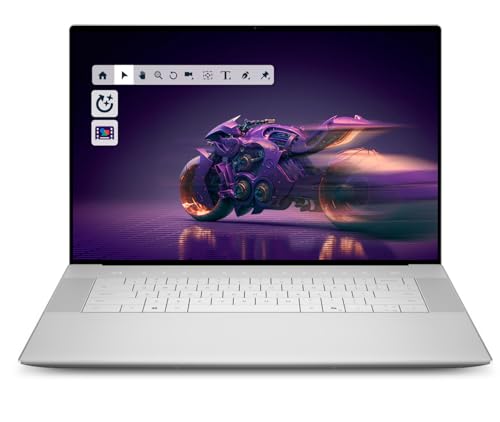
Dell XPS 16 (2026)
The XPS 16 offers a stunning 4K OLED display with excellent contrast for presentations. Intel Core Ultra 9 processor ensures smooth multitasking, and the slim design makes it easy to carry. The haptic touchpad is responsive and reliable.
In its favor
- Vibrant OLED display with deep blacks
- Premium build quality and thin design
- Great keyboard and trackpad
Watch-outs
- Battery life could be better under load
- Limited port selection (no USB-A)

Microsoft Surface Laptop 7 (2026)
The Surface Laptop 7 combines a sleek design with a bright PixelSense touchscreen. It runs Windows 11 Pro smoothly with the Snapdragon X Elite chip. The 3:2 aspect ratio is ideal for reading documents and slides without scrolling.
In its favor
- Excellent 3:2 display for productivity
- Long battery life and lightweight
- Integrated Microsoft 365 features
Watch-outs
- Limited graphics performance for heavy video
- Only two USB-C ports (no USB-A)
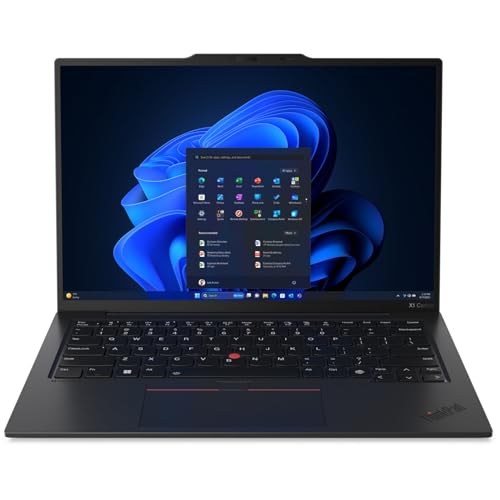
Lenovo ThinkPad X1 Carbon Gen 13
The ThinkPad X1 Carbon is legendary for its keyboard and robust build. It's incredibly light yet MIL-STD-810H tested. The 14-inch 2.8K OLED display is sharp, and the Intel Core Ultra 7 provides solid performance for presentations.
In its favor
- Best-in-class keyboard for typing
- Lightweight and durable chassis
- Excellent port selection including HDMI
Watch-outs
- Battery life is average
- Speakers could be louder

HP Spectre x360 16 (2026)
The Spectre x360's 2-in-1 design lets you present in tent or tablet mode. Its 3K OLED touchscreen is stunning, and the Intel Core Ultra 9 handles demanding tasks. The included pen is useful for annotating slides.
In its favor
- Versatile convertible design
- Beautiful OLED display with touch
- Good performance and battery life
Watch-outs
- Heavier than traditional laptops
- Fan can be audible under load
What matters most
Display Quality
A bright, high-resolution display is critical for presentations. Look for at least 300 nits brightness and a resolution of 1920x1080 or higher. OLED panels offer superior contrast and color, but good IPS panels also work well. Consider the aspect ratio: 16:10 or 3:2 provides more vertical space for slides.
Performance & Memory
For smooth slideshows and video playback, a modern processor (Intel Core Ultra 5/7, Apple M3/M4, or Snapdragon X) with 16GB RAM is sufficient. If you edit videos or run heavy software, opt for 32GB. Fast SSD storage ensures quick file access. Avoid models with only 8GB RAM.
Connectivity & Ports
Ensure the laptop has HDMI or DisplayPort for external projectors. USB-C with Thunderbolt 4 is versatile for adapters. At least one USB-A port is handy for flash drives. Wireless connectivity should include Wi-Fi 6E or 7 and Bluetooth 5.3 for reliable connections.
Portability & Build
If you travel frequently, choose a lightweight laptop under 3 lbs (1.4 kg). Battery life should exceed 10 hours for all-day use. Durable build quality (like MIL-STD-810G) adds peace of mind. A comfortable keyboard and large trackpad also enhance the experience.
Our take
The best presentation computer balances a bright, high-resolution display with reliable performance and versatile connectivity. The Apple MacBook Pro 14 stands out for its exceptional screen and battery life, while the Dell XPS 16 offers a top-tier Windows experience. Choose based on your preferred OS and specific needs like portability or keyboard quality.
Frequently asked
The Dell XPS 16 with its 4K OLED display and powerful Intel Core Ultra 9 processor is excellent for PowerPoint. It renders animations smoothly and the screen makes slides pop. For Mac users, the MacBook Pro 14 with M4 Pro is equally capable.
Generally, no. Integrated graphics in modern CPUs (Intel Arc, Apple M-series, Snapdragon X) handle 4K video and transitions easily. A dedicated GPU is only needed if you edit high-resolution video or use 3D modeling in presentations.
16GB is the sweet spot for smooth multitasking with presentation software, browser tabs, and other apps. 8GB may cause slowdowns with large files. If you work with very large datasets or video, consider 32GB.
A touchscreen can be handy for annotating slides or navigating during a presentation, especially in a 2-in-1 like the HP Spectre x360. However, it's not essential and adds cost and weight. For most, a good trackpad or mouse suffices.
