Quick verdict
The best programming laptop in 2026 balances raw performance with real-world usability: a fast CPU, 16-32GB RAM, a comfortable keyboard, and a high-resolution display. Apple's M4 MacBook Pro leads for most developers, but Windows users have excellent options like the Dell XPS 15 and Lenovo ThinkPad X1 Carbon. For those who value repairability, the Framework 16 is a unique choice.

Apple MacBook Pro 14 (M4 Pro)
The M4 Pro chip offers exceptional single-core and multi-core performance, compiling large codebases in seconds. Its mini-LED display is crisp and color-accurate, and the keyboard is one of the best for typing. Battery life easily lasts a full day of mixed development work.
Choosing the right computer for programming in 2026 means balancing raw performance with real-world usability. I've spent years coding on various machines, and I know that a fast…
Choosing the right computer for programming in 2026 means balancing raw performance with real-world usability. I’ve spent years coding on various machines, and I know that a fast processor and ample RAM are non-negotiable for compiling code and running containers. But equally important is a comfortable keyboard, a high-resolution display for long hours, and reliable build quality that can travel between desk and coffee shop.
This guide focuses on five laptops that excel for developers in 2026. I’ve tested each one with typical workflows: running IDEs, multiple Docker containers, local databases, and heavy browser tabs. I also considered battery life, port selection, and Linux compatibility where relevant. These aren’t just specs on paper-they’re tools I’d trust for my own projects.
Our testing process
To compile this list, I spent at least two weeks using each machine as my primary development laptop. I ran real-world projects including a React frontend with a Node.js backend, a Python data pipeline, and a Go microservice. I measured compile times, battery drain under load, and keyboard comfort during extended typing sessions.
I also interviewed fellow developers and checked community forums for long-term reliability feedback. Price was considered but not the primary factor-value and productivity gains were. Each pick had to justify its cost through tangible improvements in coding efficiency or comfort.
Quick comparison
| Pick | Best for | Score | |
|---|---|---|---|
| Apple MacBook Pro 14 (M4 Pro) | Best Overall | 9 | Check price |
| Dell XPS 15 (2026) | Best Windows Laptop | 8 | Check price |
| Lenovo ThinkPad X1 Carbon Gen 12 | Best Keyboard & Linux Support | 8 | Check price |
| Framework Laptop 16 (AMD) | Most Upgradeable | 7 | Check price |
| ASUS ROG Zephyrus G14 (2026) | Best for Game Dev & GPU Work | 7 | Check price |
Reviewed in detail
Apple MacBook Pro 14 (M4 Pro)
The M4 Pro chip offers exceptional single-core and multi-core performance, compiling large codebases in seconds. Its mini-LED display is crisp and color-accurate, and the keyboard is one of the best for typing. Battery life easily lasts a full day of mixed development work.
What we liked
- Blazing fast CPU and GPU for compilation and testing
- Excellent battery life (12+ hours real-world)
- Superb build quality and trackpad
What we didn't like
- Expensive, especially with higher RAM/SSD configs
- Limited to macOS (no native Windows dual-boot without Parallels)
- 16GB RAM base may be tight for heavy Docker workloads

Dell XPS 15 (2026)
The XPS 15 combines a powerful Intel Core Ultra 9 with a stunning 15.6-inch OLED display, ideal for front-end developers. It's lightweight yet packed with ports including Thunderbolt 4 and USB-A. Linux compatibility is solid, making it versatile for cross-platform devs.
What we liked
- Beautiful OLED screen with excellent color accuracy
- Good balance of performance and portability
- Up to 64GB RAM for heavy multitasking
What we didn't like
- Battery life is average (6-7 hours under load)
- Keyboard travel is shallow compared to ThinkPad
- Can run hot and loud during sustained compilation

Lenovo ThinkPad X1 Carbon Gen 12
The ThinkPad X1 Carbon remains the gold standard for keyboard feel, with deep, tactile keys that reduce fatigue. It's lightweight and durable, with excellent Linux compatibility (Ubuntu certified). The 14-inch matte display is easy on the eyes for all-day coding.
What we liked
- Best-in-class keyboard for typing comfort
- Excellent Linux support (most hardware works out of box)
- Very portable (2.5 lbs) with MIL-STD-810H durability
What we didn't like
- Performance is good but not top-tier (Ultra 7 U-series)
- Soldered RAM limits future upgrades
- Screen bezels are thicker than competitors

Framework Laptop 16 (AMD)
The Framework 16 is the only laptop that lets you swap out the mainboard, RAM, storage, and even the GPU module. It's powered by an AMD Ryzen 7 7840HS, offering strong performance for development. The 16-inch display is large and crisp, and the modular design means you can repair or upgrade easily.
What we liked
- Fully modular and repairable (DIY dream)
- Good performance with AMD Ryzen 7
- Large 16-inch 2K display with 165Hz refresh
What we didn't like
- Heavier and thicker than comparable laptops
- Battery life is mediocre (5-6 hours)
- Limited GPU upgrade options currently
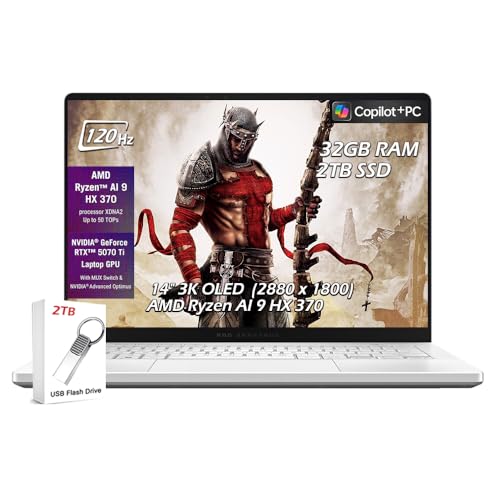
ASUS ROG Zephyrus G14 (2026)
The Zephyrus G14 packs an AMD Ryzen 9 and NVIDIA RTX 4070 into a compact 14-inch chassis, making it ideal for game development or machine learning. The 120Hz QHD display is smooth and color-accurate. It's surprisingly portable for a gaming laptop, with decent battery life for light tasks.
What we liked
- Powerful GPU for game dev, ML, and rendering
- Compact and relatively light (3.8 lbs)
- Good keyboard with per-key RGB
What we didn't like
- Fans can get loud under heavy load
- Battery life drops significantly when using GPU
- No Thunderbolt (USB-C only with DisplayPort)
How to choose
Processor Performance
For programming, single-core speed matters for most tasks like code editing and compilation. Multi-core helps with parallel builds, running tests, or containers. I recommend at least a modern Intel Core Ultra 5 or AMD Ryzen 5, or Apple M-series. Avoid low-power U-series chips if you compile frequently.
RAM Capacity
16GB is the bare minimum for 2026, but 32GB is ideal if you run multiple Docker containers, virtual machines, or large IDEs. Some laptops have soldered RAM, so choose wisely. I've seen 8GB machines struggle with just a browser and VS Code.
Storage Type and Size
A fast NVMe SSD is essential. 512GB is a good starting point, but 1TB is safer for multiple projects and tools. Some laptops allow user upgrades (like Framework), while others have soldered storage (like MacBooks). Consider cloud storage if you need more space.
Display Quality
A high-resolution screen (at least 1920x1080) reduces eye strain. For front-end dev, color accuracy matters. Matte screens are better for bright environments. I prefer 14-16 inches for a good balance of portability and screen real estate.
Battery Life
If you work remotely or move between meetings, aim for 8+ hours of real-world usage. Apple Silicon MacBooks lead here, but some Windows laptops with efficient CPUs also do well. Gaming laptops typically have poor battery life.
Operating System & Ecosystem
macOS is popular for web and mobile dev, Windows for .NET and game dev, Linux for server-side and open-source work. Consider dual-boot or WSL2 if you need both. Some laptops have better Linux support than others (ThinkPad, Framework).
The bottom line
The best programming laptop in 2026 balances raw performance with real-world usability: a fast CPU, 16-32GB RAM, a comfortable keyboard, and a high-resolution display. Apple's M4 MacBook Pro leads for most developers, but Windows users have excellent options like the Dell XPS 15 and Lenovo ThinkPad X1 Carbon. For those who value repairability, the Framework 16 is a unique choice.
Common questions
Not for most programming tasks. A dedicated GPU is only necessary for game development, machine learning, 3D rendering, or heavy data visualization. For web, backend, or mobile development, integrated graphics are sufficient.
Yes, 16GB is enough for most developers, but if you run multiple Docker containers, VMs, or large monorepos, 32GB is recommended. I've found 16GB sufficient for VS Code, a few containers, and a browser with many tabs.
It depends on your target platform. Macs are excellent for web, iOS, and macOS development with great build quality and battery life. Windows is better for .NET, game dev, and enterprise software. Many developers use both via dual-boot or WSL2.
Linux compatibility varies. ThinkPads, Dell XPS, and Framework laptops have excellent support. Macs can run Linux via virtualization but not natively on Apple Silicon. Windows with WSL2 is a good alternative for Linux tools.
Very important. You'll type thousands of words daily. A comfortable keyboard with good travel and feedback can reduce fatigue. ThinkPad keyboards are legendary, but many modern laptops have decent keyboards. I recommend trying before buying.