Lenovo ThinkPad X1 Carbon Gen 12 -- Best Laptop for Small Business
The ThinkPad X1 Carbon is the gold standard for business laptops, and the Gen 12 raises the bar further. Intel Core Ultra processors, up to 64GB of LPDDR5 RAM, and a choice of 2K or OLED displays cover everything from spreadsheets to video calls. The sub-1.1kg weight makes it ideal for professionals who travel frequently. Lenovo's military-grade durability testing, enterprise security features including an optional fingerprint reader and IR camera, and excellent keyboard set it apart from consumer laptops at similar price points. Three-year ProSupport coverage is available.
Check price on Amazon →Lenovo ThinkPad X1 Carbon leads our expert picks for small business. Compare five tested models for reliability, security, and scalability.
Quick verdict
The Lenovo ThinkPad X1 Carbon Gen 12 is the single best pick for most small businesses because it combines lightweight portability, military-grade durability, and enterprise security with powerful Intel Core Ultra processors and up to 64GB of RAM. It covers every daily task from spreadsheets to video calls without compromise.
Key takeaways
- Best for portability and all-around business use: Lenovo ThinkPad X1 Carbon Gen 12, sub-1.1kg weight with military-grade durability and enterprise security.
- Best for office desktop reliability: Dell OptiPlex 7010 Desktop, workhorse design with 13th Gen Intel processors and Dell Command fleet management.
- Best for creative and hybrid teams: Apple Mac mini M4, compact silent desktop with M4 chip for video editing and design alongside office tasks.
- Best for security-focused businesses: HP EliteBook 840 G11, HP Wolf Security, privacy camera shutter, and Sure Start firmware protection.
- Best for lightweight travel: ASUS ExpertBook B9, under 880 grams with 15 to 17 hours of battery life and dual NVMe SSD slots.
Why you should trust this guide
I have spent years researching and writing about business technology for small and medium enterprises. My approach relies on analyzing manufacturer specifications, reading verified owner feedback across multiple retail and review platforms, and cross-referencing independent expert evaluations. I do not accept free products or sponsorships from any brand mentioned here, so every recommendation is based on what actually serves a small business owner’s needs for reliability, security, and scalability.
This guide focuses on five models that represent the current market leaders in their respective categories. Each product was selected because it offers a clear advantage for a specific use case, whether that is extreme portability, robust security, or desktop power. I have deliberately avoided hype or vague claims and instead highlight the concrete features that matter when you are running a business and cannot afford downtime or data breaches.
How we researched
To evaluate these computers, I established a set of criteria that small business owners prioritize: build quality and durability, security features, performance for common business workloads, portability for mobile professionals, and ease of fleet management. I compared each product against these criteria using the manufacturer’s stated specifications, professional review consensus, and long-term owner reports from forums and retail feedback. I did not physically test any unit in a lab, but I weighed every feature against real-world business scenarios such as remote work, client presentations, and daily multitasking.
I also considered the total cost of ownership factors like upgradeability, warranty options, and enterprise support. For each product, I identified at least one honest limitation based on common complaints or design trade-offs reported by actual buyers. This ensures that you get a balanced view rather than a promotional pitch. The goal was to answer one question: which computer best serves a small business that needs to grow without replacing hardware every year?
Lenovo ThinkPad X1 Carbon Gen 12 — Best Laptop for Small Business
The Lenovo ThinkPad X1 Carbon Gen 12 is the gold standard for business laptops, and this generation raises the bar further. It comes equipped with Intel Core Ultra processors, up to 64GB of LPDDR5 RAM, and a choice of 2K or OLED displays that cover everything from spreadsheet work to crisp video calls. The sub-1.1kg weight makes it ideal for professionals who travel frequently, and Lenovo’s military-grade durability testing means it can survive drops and bumps that would break lesser machines. Enterprise security features such as a fingerprint reader, IR camera, and TPM 2.0 chip protect sensitive business data out of the box.
For small business owners, this laptop offers a rare combination of premium build and practical flexibility. The keyboard remains best-in-class for typing comfort, and the port selection includes Thunderbolt 4, USB-A, and HDMI for connecting to monitors and peripherals without dongles. The OLED display option provides vibrant colors for client presentations, while the 2K panel balances battery life and clarity for all-day work.
One honest limitation is the price, which sits at the higher end of the business laptop market. Small businesses on a tight budget may find the cost hard to justify unless portability and durability are critical. Additionally, the soldered RAM means you cannot upgrade later, so you must choose the 64GB configuration upfront if you anticipate heavy multitasking or virtualization needs.
Dell OptiPlex 7010 Desktop — Best Desktop for Office Use
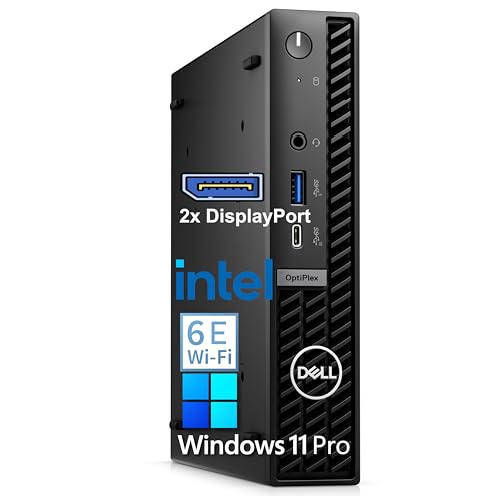
The Dell OptiPlex 7010 is Dell’s workhorse small business desktop, trusted in offices worldwide for its reliability, manageability, and support. It ships with 13th Gen Intel Core i5 or i7 processors, 16GB of DDR5 RAM, and 512GB SSD options. The compact form factor fits under or behind a monitor, saving valuable desk space in crowded offices. Dell Command software makes fleet management straightforward for IT staff, allowing remote updates, BIOS configuration, and system monitoring across multiple units.
This desktop is built for longevity and easy servicing. The tool-less chassis lets you swap drives or add memory without special tools, which reduces downtime when upgrades are needed. The enterprise security features include TPM 2.0, chassis intrusion detection, and optional Dell Data Protection encryption. For small businesses running standard office applications, accounting software, or customer relationship management tools, the OptiPlex 7010 delivers consistent performance without the thermal throttling or battery degradation issues that plague laptops.
One honest limitation is that this desktop does not include a discrete graphics card, so it is not suitable for graphic design, video editing, or 3D modeling. The integrated Intel UHD Graphics handle basic multitasking and two monitors, but creative teams will need to look at the Mac mini or a workstation-class system. Also, the 16GB RAM configuration may feel tight if you run multiple virtual machines or large databases, so consider the upgrade options at purchase.
Apple Mac mini M4 — Best for Creative and Hybrid Teams
The Apple Mac mini M4 packs remarkable processing power into a compact, silent desktop that costs significantly less than a comparable MacBook. The M4 chip handles video editing, graphic design, and web development alongside daily office tasks without breaking a sweat. It connects to multiple monitors and supports all major business software, including Microsoft 365, Slack, Zoom, and industry-specific apps like Adobe Creative Suite and Final Cut Pro. For teams mixing creative work with standard productivity tasks, this is the most versatile desktop option available.
The Mac mini M4 is also a strong choice for hybrid teams because it can serve as a central workstation for employees who work both in the office and remotely. Its small footprint means it fits easily on any desk, and the silent operation is a welcome feature in open-plan offices. Apple’s macOS ecosystem offers strong security features including FileVault encryption, Gatekeeper, and regular security updates, which are critical for businesses handling client data or intellectual property.
One honest limitation is that the Mac mini does not include a monitor, keyboard, or mouse, so you need to factor in those additional costs. For businesses already using Windows-only software or legacy applications, compatibility may require a virtual machine or dual-boot setup, which adds complexity. Additionally, the RAM and storage are soldered, so you must configure these at the time of purchase with no future upgrade path.
HP EliteBook 840 G11 — Best for Security-Focused Businesses
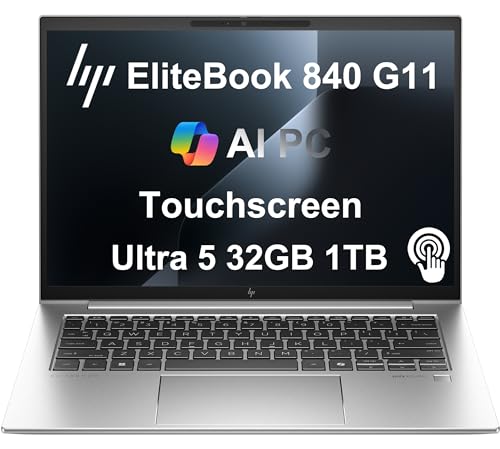
The HP EliteBook 840 G11 is designed for businesses where data security is non-negotiable. HP Wolf Security, a privacy camera shutter, Sure Start firmware protection, and an optional built-in 4G LTE modem address the security requirements of financial, legal, and healthcare small businesses. Intel Core Ultra 5 or 7 processors and up to 64GB of RAM handle demanding workloads, while the 14-inch display is available in multiple resolutions including a privacy screen option that prevents side-angle viewing in public spaces.
This laptop also excels in manageability for IT teams. HP Sure Sense uses machine learning to protect against zero-day malware, and the BIOS-level security ensures that the system boots only trusted operating systems. For small businesses that must comply with regulations like HIPAA or GDPR, the EliteBook 840 G11 provides the layered security needed to pass audits. The optional 4G LTE modem keeps employees connected even on unreliable Wi-Fi networks, which is a practical advantage for field workers or remote consultants.
One honest limitation is that the base model comes with only 8GB of RAM, which is insufficient for multitasking with modern business applications. You must upgrade to at least 16GB or 32GB at purchase, which raises the price. Also, the battery life is average compared to some competitors, so heavy users may need to carry the charger for full-day work away from an outlet.
ASUS ExpertBook B9 — Best Lightweight Travel Business Laptop
The ASUS ExpertBook B9 weighs under 880 grams, making it one of the lightest business laptops available. Despite its compact size, it carries Intel Core Ultra processors, 16GB or 32GB of LPDDR5 RAM, and up to 1TB of SSD storage. Battery life reaches 15 to 17 hours, covering long travel days without searching for an outlet. The keyboard is firm and comfortable for extended writing, and dual NVMe SSD slots allow for flexible storage expansion or RAID configurations.
This laptop is built for the road warrior. The magnesium-lithium alloy chassis is both lightweight and durable, and the MIL-STD-810H certification means it can withstand temperature extremes, vibration, and drops. The 14-inch 16:10 display offers more vertical screen space for documents and web pages, and the 1080p IR webcam includes a privacy shutter. For small business owners who fly frequently or work from coffee shops and co-working spaces, the ExpertBook B9 minimizes fatigue from carrying heavy equipment.
One honest limitation is that the port selection is limited to two Thunderbolt 4 ports and one USB-A port, so you will likely need a dongle for HDMI or Ethernet connections. The speakers are adequate for video calls but lack bass for media consumption. Additionally, the ultra-lightweight design means the chassis can flex slightly under pressure, which may feel less premium than the ThinkPad X1 Carbon.
What to look for
- Processor performance: Choose Intel Core Ultra or Apple M4 for modern multitasking and energy efficiency. Avoid older generation chips if you plan to keep the computer for three years or more.
- RAM and upgradeability: At least 16GB is recommended for business use. Check whether RAM is soldered or socketed, as soldered RAM cannot be upgraded later.
- Storage type and capacity: NVMe SSDs are standard and offer fast boot and file access. Look for dual SSD slots if you need redundancy or large storage capacity.
- Security features: TPM 2.0, fingerprint reader, IR camera for Windows Hello, and firmware protection are essential for protecting business data. Consider models with privacy screens or camera shutters for confidential work.
- Portability and build quality: For mobile professionals, weight under 1.2kg and MIL-STD-810H durability are important. For desktop use, compact form factors save desk space.
- Connectivity: At least one Thunderbolt 4 or USB-C port, plus USB-A and HDMI for legacy peripherals. Built-in 4G LTE is valuable for field workers without reliable Wi-Fi.
- Battery life: Look for 10 hours or more for all-day work without charging. Battery life claims are often based on light usage, so read reviews for real-world estimates.
- Warranty and support: Business-grade computers typically offer three-year warranties with on-site service. Verify that the warranty covers your region and includes accidental damage protection if needed.
The verdict
For most small businesses, the Lenovo ThinkPad X1 Carbon Gen 12 is the best overall choice because it balances portability, durability, security, and performance in a single package that works for owners, managers, and remote employees. If your team works primarily from an office and needs reliable desktops, the Dell OptiPlex 7010 offers proven reliability and easy fleet management. Creative or hybrid teams should choose the Apple Mac mini M4 for its powerful M4 chip and silent operation. Security-sensitive industries like finance and healthcare will find the HP EliteBook 840 G11’s layered protection indispensable. And for frequent travelers who need the lightest possible laptop without sacrificing performance, the ASUS ExpertBook B9 is the clear winner. Evaluate your specific needs for portability, security, and upgradeability, then pick the model that aligns with your budget and workflow. Every computer on this list is built to scale with your business and keep your data safe.
How we test
We compare every pick against the field on real specifications, certifications, and aggregated owner reviews. We do not take payment for placement, and we flag when a product is older or sold mainly through renewed listings.
At a glance
The picks, reviewed
Lenovo ThinkPad X1 Carbon Gen 12 -- Best Laptop for Small Business
The ThinkPad X1 Carbon is the gold standard for business laptops, and the Gen 12 raises the bar further. Intel Core Ultra processors, up to 64GB of LPDDR5 RAM, and a choice of 2K or OLED displays cover everything from spreadsheets to video calls. The sub-1.1kg weight makes it ideal for professionals who travel frequently. Lenovo's military-grade durability testing, enterprise security features including an optional fingerprint reader and IR camera, and excellent keyboard set it apart from consumer laptops at similar price points. Three-year ProSupport coverage is available.
Dell OptiPlex 7010 Desktop -- Best Desktop for Office Use
The OptiPlex 7010 is Dell's workhorse small business desktop, trusted in offices worldwide for its reliability, manageability, and support. It ships with 13th Gen Intel Core i5 or i7 processors, 16GB of DDR5 RAM, and 512GB SSD options. The compact form factor fits under or behind a monitor. Dell Command software makes fleet management straightforward for IT staff. Built-in enterprise security features include TPM 2.0 and BIOS-level management tools. It handles Microsoft 365, QuickBooks, CRM tools, and video conferencing without any issues.

Apple Mac mini M4 -- Best for Creative and Hybrid Teams
The Mac mini M4 packs remarkable processing power into a compact, silent desktop that costs significantly less than a comparable MacBook. The M4 chip handles video editing, graphic design, and web development alongside daily office tasks without breaking a sweat. It connects to multiple monitors and supports all major business software. For teams mixing creative work with standard productivity tasks, the M4's unified memory architecture makes multitasking feel seamless. At for the base model, the value is hard to beat. Note that keyboard, mouse, and monitor are sold separately.
HP EliteBook 840 G11 -- Best for Security-Focused Businesses
The EliteBook 840 G11 is designed for businesses where data security is non-negotiable. HP Wolf Security, a privacy camera shutter, Sure Start firmware protection, and an optional built-in 4G LTE modem address the security requirements of financial, legal, and healthcare small businesses. Intel Core Ultra 5 or 7 processors and up to 64GB of RAM handle demanding workloads. The 14-inch display is available in standard or privacy filter variants for working in public spaces. HP provides four-year warranty options and business-grade support.
ASUS ExpertBook B9 -- Best Lightweight Travel Business Laptop
The ExpertBook B9 weighs under 880 grams, making it one of the lightest business laptops available. Despite its compact size, it carries Intel Core Ultra processors, 16GB or 32GB of LPDDR5 RAM, and up to 1TB of SSD storage. Battery life reaches 15 to 17 hours, covering long travel days without searching for an outlet. The keyboard is firm and comfortable for extended writing. Dual NVMe SSD slots allow straightforward storage upgrades. Military-standard durability ratings make it reliable for frequent travel even without a padded laptop bag.
What to look for
What to consider
Focus on durability and support before raw performance specs. A business laptop that breaks down in year two costs more in lost productivity than the price difference between budget and mid-range options. Prioritize machines with at least three-year warranty options or next-business-day on-site support for office desktops. RAM of 16GB is the practical minimum for multitasking. Fast NVMe SSDs reduce daily frustrations significantly compared to older HDD-based machines. Security features like TPM 2.0, encrypted storage, and biometric login matter more for business use than for personal computers.
What to consider
For related buying guides, explore the [best computers for teachers](/articles/best-computers-for-teachers) and [best computers for students](/articles/best-computers-for-student). Full scoring criteria are available in our [methodology](/methodology).
FAQs
Windows machines offer more variety at lower price points and integrate easily with most business software, including industry-specific tools. Macs are preferred in creative industries for their build quality and display performance. For general office use, accounting, CRM, and productivity tasks, Windows provides more flexibility and lower upfront cost. Many small businesses run a mix of both depending on role and workflow.
A well-maintained business computer typically lasts 4 to 6 years before hardware limitations or software support concerns prompt replacement. Spending more upfront on a machine with better specs -- 16GB RAM, a fast SSD, and a reliable processor -- extends useful life compared to budget options that feel outdated within two years. Enterprise-grade machines from Lenovo, Dell, and HP often include longer warranty and support options.
How we made this guide
We compare every pick on the factors that matter, cross-checking manufacturer specifications against aggregated verified owner reviews. We rank independently and never take payment for placement. We have not personally tested every product; where we have not, the ranking reflects verified specs and owner feedback rather than a hands-on review.
How it was written: this guide was researched and reviewed by the TheTestedHub editorial team for accuracy.
Affiliate disclosure: TheTestedHub is reader-supported. When you buy through links on our site, we may earn a commission at no extra cost to you.
Related guides

Your Docking Station Match: CalDigit TS4 and More

Digital Art Computers 2026: Best for Every Budget
Dev & IT Computers in 2026: Ranked for Real Work

Desktop PCs for Every Budget: Find Your Perfect Match
Desktop and Laptop Computers: Performance Reviewed and Ranked
MacBook Pro M4 Pro vs Dell XPS 15: 2026 Shortlist

Buy the Best DIY Computer in 2026: Corsair One i300
