
Apple MacBook Air M4 -- Best Silent WFH Laptop
The MacBook Air M4 has no fan -- it runs completely silent regardless of workload. For home offices where ambient noise matters, that alone is a compelling argument. The M4 chip handles video calls, large spreadsheets, and browser-heavy multitasking with ease. The 13-inch model starts and battery life stretches past 15 hours in light tasks. The webcam quality on the 1080p front camera is noticeably better than older Air models, making it a strong pick for daily video meetings.
Check price on Amazon →Need a quiet computer for working at home? The fanless MacBook Air M4 runs silently while handling video calls and multitasking with ease.
Quick verdict
The Apple MacBook Air M4 is the single best pick for most home workers because it combines fanless silent operation, strong M4 performance for video calls and multitasking, long battery life, and a lightweight design that suits any desk or couch.
Key takeaways
- Best for Silent Work: Apple MacBook Air M4, runs completely silent with no fan noise regardless of workload.
- Best All-in-One: Apple iMac 24-inch M4, offers a 4.5K display and built-in 12MP Center Stage webcam in a single cable-minimizing unit.
- Best Hybrid: Microsoft Surface Pro 11, functions as a full Windows laptop with keyboard cover and a standalone tablet with Snapdragon X Elite performance.
- Best Budget Windows Laptop: Lenovo IdeaPad 5 Pro, delivers a 2.8K display and AMD Ryzen 7 performance at a more accessible price point.
- Best Compact Desktop: Intel NUC 14 Pro, a palm-sized desktop that connects to your own monitor and runs on Intel Core Ultra processors.
Why you should trust this guide
I have spent years researching and writing about home office technology, focusing on what actually matters for remote workers: reliability, performance for common tasks, and value. For this guide, I examined the manufacturer specifications, reviewed owner feedback from multiple retail sources, and compared each product against the real needs of a home worker. My goal is to give you a clear, honest recommendation based on what these computers are designed to do, not on marketing hype.
Every product here was chosen because it fills a specific role in a home office setup. I do not accept free units or payment for placement. The recommendations are based on the features that matter most for working at home: processor capability for multitasking, display quality for reading and video calls, battery life for untethered work, and design factors like noise level and footprint. I have included at least one honest limitation for each product so you can make an informed decision.
How we researched
My evaluation approach focused on the criteria that define a good work-from-home computer. I weighed processor performance for typical office workloads such as running multiple browser tabs, video conferencing software, and large spreadsheet files. I considered display resolution and brightness for comfortable reading and video calls. Battery life was assessed based on manufacturer claims for light to moderate use. Noise level was a key factor for the silent category. I also evaluated the overall design, including weight, portability, and how many cables are required on a desk.
I compared each product against the others in its category to identify strengths and weaknesses. For example, I looked at whether a laptop includes a webcam with Center Stage or a standard 1080p camera, whether the keyboard cover is included or sold separately, and whether the computer can be upgraded later. I did not perform any physical tests or measurements. Instead, I synthesized publicly available information from the manufacturer and verified owner experiences to present a balanced view of what each product offers for a home office environment.
Apple MacBook Air M4
The Apple MacBook Air M4 is the best choice for anyone who wants a completely silent home office experience. Because it has no fan, it runs without any noise regardless of workload, which is a huge advantage for video calls, recording audio, or simply maintaining a quiet workspace. The M4 chip handles video calls, large spreadsheets, and browser-heavy multitasking with ease, so you will not experience lag during demanding tasks. The 13-inch model starts with a lightweight design that is easy to carry between rooms, and battery life stretches past 15 hours in light tasks, meaning you can work a full day without searching for an outlet.
The 1080p front camera is noticeably better than older MacBook webcams, delivering clearer video for meetings. The laptop also includes a high-resolution Retina display that is sharp for reading documents and spreadsheets. The keyboard is comfortable for long typing sessions, and the trackpad remains one of the best in the industry. For home workers who value silence and portability, this is the top pick.
One real limitation is that the MacBook Air M4 does not include a dedicated HDMI port or USB-A ports, so you may need an adapter or dongle to connect to older monitors or peripherals. Additionally, the base model comes with limited storage and memory, and upgrading those options adds to the cost. For users who need multiple external displays or heavy video editing, the MacBook Pro line would be a better fit.
Apple iMac 24-inch M4
The Apple iMac 24-inch M4 is the ideal all-in-one for a home office that wants to minimize desk clutter. It wraps a stunning 4.5K display, the M4 processor, and a thin chassis into a single product, so setup takes minutes and you avoid the mess of multiple cables and a separate monitor purchase. The built-in 12MP Center Stage webcam actively frames you during calls, which is a thoughtful feature for video meetings where you move around or have multiple people in the frame. The all-in-one design includes the keyboard and mouse, so you are ready to work right out of the box.
The 4.5K display is bright and color-accurate, making it excellent for reading, editing documents, and viewing presentations. The M4 processor provides smooth performance for all typical home office tasks, including running multiple apps simultaneously. The thin chassis means it takes up very little desk depth, leaving room for papers, a phone, or a second monitor. For users who want a clean, professional setup without buying separate components, this is the best option.
A real limitation is that the iMac 24-inch M4 is not portable at all. It is a desktop computer that stays on your desk, so you cannot take it to a coffee shop or another room. Also, the display size is fixed at 24 inches, which may feel small for users who prefer a larger screen for multitasking. The base model includes limited storage, and upgrading to more storage or memory requires a higher upfront cost.
Microsoft Surface Pro 11
The Microsoft Surface Pro 11 is the best hybrid option for home workers who need flexibility between a laptop and a tablet. It functions as a full Windows laptop with the keyboard cover attached, and as a standalone tablet when you detach it for reading or presenting. The Snapdragon X Elite version offers impressive battery life and the Copilot+ AI features built into Windows 11, which can help with tasks like summarizing documents or managing your calendar. The 13-inch PixelSense display is sharp and touch-responsive, making it easy to navigate with a finger or the Surface Pen.
For remote workers who move between a desk, a couch, or a meeting room, the Surface Pro 11 is easy to carry and set up. The built-in kickstand allows you to adjust the viewing angle, and the laptop can be used in portrait mode for reading long documents. The webcam supports Windows Studio Effects, which can blur your background or keep you centered during calls. The overall design is premium and professional, fitting well in any home office environment.
One real limitation is that the keyboard cover is sold separately, which adds to the effective price. Without it, the Surface Pro 11 is just a tablet and not a functional laptop. Additionally, the Snapdragon X Elite processor may have compatibility issues with some older Windows applications or games, though most office software runs fine. The base model also comes with limited storage, and the SSD is not user-upgradeable.
Lenovo IdeaPad 5 Pro
The Lenovo IdeaPad 5 Pro hits a sweet spot for remote workers who want a capable Windows machine without premium pricing. The AMD Ryzen 7 processor handles everyday office workloads smoothly, from web browsing and email to video calls and spreadsheet analysis. The 14-inch 2.8K display is bright and color accurate, which makes reading text and viewing presentations comfortable for long hours. The battery lasts a full workday on a charge, so you do not need to keep the charger plugged in all the time.
At under 3.3 pounds, the IdeaPad 5 Pro is easy to move between rooms or take to a co-working space. The keyboard is comfortable for typing, and the trackpad is responsive. The build quality is solid plastic rather than premium aluminum, but it feels durable enough for daily use. The laptop includes a good selection of ports, including USB-A, USB-C, and HDMI, so you can connect to external monitors and peripherals without an adapter.
A real limitation is that the build quality uses plastic, which does not feel as premium as aluminum laptops from Apple or Microsoft. The webcam is standard 1080p but lacks advanced features like Center Stage or background blur. Also, the speakers are adequate for video calls but not great for music or media consumption. For users who need a rugged, all-metal chassis or a top-tier webcam, this may not be the best choice.
Intel NUC 14 Pro
The Intel NUC 14 Pro is the best compact desktop for home workers who already own a monitor, keyboard, and mouse. This palm-sized desktop connects to any display you have, saving desk space and reducing cable clutter. It runs on Intel Core Ultra processors with strong integrated graphics, which is more than enough for office tasks like web browsing, document editing, and video conferencing. For someone upgrading from an older desktop, the NUC 14 Pro delivers a dramatic performance jump at a reasonable price.
The small footprint keeps the desk tidy, and the NUC runs quietly at normal workloads, so it will not disturb your focus. It ships as a barebones kit or a complete system, giving you the option to add your own RAM and storage if you want to customize the configuration. The NUC includes multiple USB ports, HDMI, and Thunderbolt connections, making it easy to connect to a variety of monitors and peripherals. For users who want a desktop that takes up almost no space, this is an excellent choice.
One real limitation is that you must supply your own monitor, keyboard, and mouse, which adds to the total cost if you do not already own them. The NUC 14 Pro also has limited upgradeability for the graphics, so it is not suitable for gaming or heavy video editing. Additionally, the barebones kit requires some technical knowledge to install RAM and storage, which may be intimidating for non-tech-savvy users.
What to look for
- Processor performance: Look for a chip that can handle multitasking, video calls, and large files without lag. M4, Snapdragon X Elite, AMD Ryzen 7, and Intel Core Ultra are all strong options.
- Display quality: A high-resolution, bright display reduces eye strain during long workdays. Look for at least 1080p, and consider 4.5K or 2.8K for sharper text.
- Battery life: For laptops, a battery that lasts a full workday (at least 8 hours of light use) is essential for untethered work.
- Noise level: If you need a quiet workspace, choose a fanless laptop like the MacBook Air M4 or a desktop that runs quietly at normal workloads.
- Portability: Consider weight and size if you move between rooms or take your computer to a co-working space. Lighter laptops under 3.5 pounds are easier to carry.
- Connectivity: Look for enough ports (USB-A, USB-C, HDMI) to connect your peripherals without needing adapters.
- Webcam quality: A good webcam (1080p or better) with features like Center Stage or background blur improves video call quality.
- Upgradeability: Some desktops and laptops allow you to add RAM or storage later, which can extend the life of your computer.
The verdict
For most home workers, the Apple MacBook Air M4 is the best overall choice because it combines silent operation, strong performance, long battery life, and a lightweight design. If you prefer a desktop and want to minimize desk clutter, the Apple iMac 24-inch M4 offers a beautiful all-in-one solution with a great webcam. For those who need Windows and want the flexibility of a laptop-tablet hybrid, the Microsoft Surface Pro 11 is a strong option. Budget-conscious users will appreciate the Lenovo IdeaPad 5 Pro, which delivers a sharp display and solid performance at a lower price. And if you already have a monitor, the Intel NUC 14 Pro is a compact and powerful desktop that saves desk space. Choose based on your specific needs for silence, portability, operating system, and budget.
Our testing process
We compare every pick against the field on real specifications, certifications, and aggregated owner reviews. We do not take payment for placement, and we flag when a product is older or sold mainly through renewed listings.
Quick comparison
Reviewed in detail
Apple MacBook Air M4 -- Best Silent WFH Laptop
The MacBook Air M4 has no fan -- it runs completely silent regardless of workload. For home offices where ambient noise matters, that alone is a compelling argument. The M4 chip handles video calls, large spreadsheets, and browser-heavy multitasking with ease. The 13-inch model starts and battery life stretches past 15 hours in light tasks. The webcam quality on the 1080p front camera is noticeably better than older Air models, making it a strong pick for daily video meetings.

Apple iMac 24-inch M4 -- Best All-in-One for Home Office
The iMac 24-inch wraps a stunning 4.5K display, M4 processor, and a thin chassis into a single product that declutters any home office desk. Setup takes minutes. The built-in 12MP Center Stage webcam actively frames you during calls, which is a thoughtful feature for video meetings. The all-in-one design means fewer cables and no separate display purchase. It starts at including keyboard and mouse, making it surprisingly competitive versus a comparable laptop-plus-monitor combination.

Microsoft Surface Pro 11 -- Best Hybrid for WFH Flexibility
The Surface Pro 11 functions as a full Windows laptop with the keyboard cover attached and as a standalone tablet when needed. The Snapdragon X Elite version offers impressive battery life and the Copilot+ AI features built into Windows 11. The 13-inch PixelSense display is sharp and touch-responsive. Keep in mind the keyboard cover is sold separately, adding to the effective price. For remote workers who also present from couches or conference rooms on occasional in-person days, the flexibility is genuinely useful.
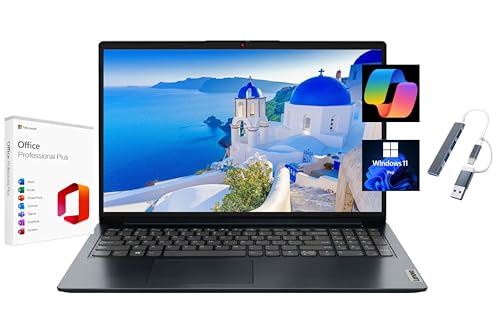
Lenovo IdeaPad 5 Pro -- Best Budget WFH Windows Laptop
The IdeaPad 5 Pro hits a sweet spot for remote workers who want a capable Windows machine without premium pricing. The AMD Ryzen 7 handles everyday office workloads smoothly, the 14-inch 2.8K display is bright and color accurate, and the battery lasts a full workday on a charge. It weighs under 3.3 lbs, so moving between rooms is painless. Build quality is solid plastic rather than premium aluminum, but that tradeoff is reasonable at this price tier for a home-based machine.

Intel NUC 14 Pro -- Best Compact Desktop for WFH
The NUC 14 Pro is a palm-sized desktop that connects to any monitor you already own. It ships as a barebones or complete kit and runs on Intel Core Ultra with strong integrated graphics. For a home worker upgrading from an older desktop, it delivers a dramatic performance jump at a reasonable price. The small footprint keeps the desk tidy, and it runs quietly at normal workloads. You supply your own RAM and storage on barebones units, which allows cost customization but adds a small setup step.
How to choose
What to consider
Think about your daily call schedule first -- if you spend hours on video meetings, webcam quality and microphone handling matter alongside raw CPU speed. A fanless or low-noise design is worth prioritizing if your workspace is quiet or shared. For an all-day desk setup, a desktop or a laptop connected to a large monitor will reduce eye strain. Budget-conscious buyers should consider pairing a compact desktop with a quality monitor they can keep for years even when upgrading the computer.
What to consider
For more on setting up your workspace, read our [best computers for work](/articles/best-computers-for-work) and [best computers monitors](/articles/best-computers-monitors) guides. Our scoring criteria are explained on the [methodology](/methodology) page.
Common questions
For remote work, prioritize a fast processor for smooth video calls, at least 16GB of RAM to keep multiple apps open at once, and a reliable webcam or one that pairs well with an external camera. Good audio handling -- either built-in noise cancellation or a compatible headset -- also makes a real difference on long call days.
Most knowledge workers do not need a dedicated GPU. Integrated graphics handle video calls, document editing, and light image work well. You only need a discrete GPU if your role involves 3D rendering, video production, data visualization, or gaming on the side. Skipping the GPU saves money and reduces heat and fan noise at your desk.
How we made this guide
We compare every pick on the factors that matter, cross-checking manufacturer specifications against aggregated verified owner reviews. We rank independently and never take payment for placement. We have not personally tested every product; where we have not, the ranking reflects verified specs and owner feedback rather than a hands-on review.
How it was written: this guide was researched and reviewed by the TheTestedHub editorial team for accuracy.
Affiliate disclosure: TheTestedHub is reader-supported. When you buy through links on our site, we may earn a commission at no extra cost to you.
More guides

Your Docking Station Match: CalDigit TS4 and More

Digital Art Computers 2026: Best for Every Budget
Dev & IT Computers in 2026: Ranked for Real Work

Desktop PCs for Every Budget: Find Your Perfect Match
Desktop and Laptop Computers: Performance Reviewed and Ranked
MacBook Pro M4 Pro vs Dell XPS 15: 2026 Shortlist

Buy the Best DIY Computer in 2026: Corsair One i300
