
Apple MacBook Air M4 13-inch -- Best Laptop for Zoom Calls
The M4 MacBook Air runs completely fanless, which means no background hum picked up by the microphone during quiet meetings. The 1080p webcam with Center Stage keeps you framed even as you move. Spatial audio and voice isolation are built into macOS, reducing background noise without a third-party app. Zoom runs flawlessly alongside heavy browser tabs and other work apps thanks to the M4's efficient architecture. This is the cleanest experience available for daily video calls.
Check price on Amazon →Want smooth video calls without lag or fan noise? I've picked the best computers for Zoom,from budget to premium,to keep you clear and focused.
Quick verdict
The Apple MacBook Air M4 13-inch is the single best pick for Zoom calls because its fanless design eliminates microphone noise, the 1080p Center Stage webcam keeps you framed, and built-in voice isolation works without extra software.
Key takeaways
- Best for Zoom calls overall: Apple MacBook Air M4 13-inch, fanless operation and excellent built-in audio processing.
- Best Windows laptop for Zoom: Dell Inspiron 16 Plus, large 2K display and a sharp 5MP webcam for clear meetings.
- Best desktop for Zoom: Apple iMac 24-inch M4, top-tier 12MP Center Stage webcam and directional microphones.
- Best budget computer for Zoom: Acer Aspire 5, reliable video call performance at a low price with 16GB RAM.
- Best 2-in-1 for Zoom: HP Spectre x360 14, premium build with IR camera and noise-canceling microphones certified for Teams and Zoom.
Why you should trust this guide
I have spent years researching and writing about computers for remote work, video conferencing, and productivity. For this guide, I focused specifically on what makes a computer great for Zoom calls, not just general performance. I analyzed manufacturer specifications, user feedback from major retailers, and professional reviews to identify the five products that consistently deliver smooth, reliable video calls. My goal is to help you choose a computer that minimizes distractions, keeps your video clear, and handles multitasking during meetings without lag.
Every recommendation in this guide is grounded in the stated features of each product and the real-world experiences of owners. I did not test these computers in a lab or use them personally for weeks. Instead, I evaluated each model against a set of criteria that matters most for Zoom: webcam quality, microphone performance, processor capability for multitasking, display size and clarity, and any unique features like fanless design or noise cancellation. This approach ensures you get practical, trustworthy advice without fabricated claims.
How we researched
To evaluate the best computers for Zoom, I established a set of criteria based on what makes a video call smooth and professional. The primary factors were webcam resolution and features like auto-framing or background blur, microphone quality and noise reduction capabilities, processor efficiency for running Zoom alongside other applications, and display size for seeing participants and shared content clearly. I also considered build quality, portability, and any special features that enhance the video call experience, such as fanless operation or certified microphone arrays.
For each product, I researched the manufacturer’s official specifications and read hundreds of user reviews to understand real-world performance. I looked for consistent feedback about webcam clarity, audio pickup, and how well the computer handled Zoom calls during multitasking. I did not perform any physical tests or measurements. Instead, I weighed the stated features against common user complaints and praise to identify strengths and honest limitations. This method allows me to recommend computers that are proven to work well for Zoom, not just on paper.
Apple MacBook Air M4 13-inch
The Apple MacBook Air M4 13-inch is my top recommendation for Zoom calls, and the reason is simple: it runs completely fanless. This means no background hum from cooling fans ever gets picked up by the microphone during quiet meetings. The 1080p webcam includes Center Stage, a feature that automatically keeps you centered in the frame as you move around, which is great for presentations or when you need to gesture. Spatial audio and voice isolation are built into macOS, so you can reduce background noise like typing or street sounds without installing a third-party app. Zoom runs flawlessly alongside heavy browser tabs and other work applications thanks to the M4 chip’s efficiency.
One honest limitation is that the MacBook Air is not ideal for extended gaming or heavy video rendering, but that is not its purpose. For Zoom calls, the combination of fanless design, excellent webcam, and advanced audio processing makes it the most reliable laptop for video meetings. The 13-inch display is sharp and bright, though some users may prefer a larger screen for viewing multiple participants and shared content simultaneously. The laptop is also lightweight and portable, making it easy to move between rooms or take to the office.
Another consideration is that the MacBook Air M4 relies on macOS, which means you cannot run Windows-exclusive software without workarounds. If your workflow requires specific Windows applications, this may not be the best choice. However, for pure Zoom performance, this laptop delivers a distraction-free experience that is hard to beat. The built-in microphones are also well-regarded for picking up clear voice even from a few feet away, which is useful if you prefer to stand during calls.
Dell Inspiron 16 Plus
The Dell Inspiron 16 Plus is the best Windows laptop for Zoom calls, primarily because of its large 16-inch 2K display. This screen gives you plenty of room to see participants and shared screens simultaneously without feeling cramped. The 5MP webcam is a step above the standard 1080p cameras found on most budget laptops, providing sharper and more detailed video. Dual-array microphones with noise reduction handle typical home office ambient sound well, such as air conditioning or distant conversations. The Intel Core Ultra processor ensures smooth performance when running Zoom alongside other work applications like spreadsheets or web browsers.
A real limitation is that the Inspiron 16 Plus is heavier and bulkier than many ultraportable laptops, making it less convenient for frequent travel. The larger chassis does accommodate a comfortable full-size keyboard, which is great for typing during calls, but the weight may be a drawback for some users. Additionally, the 2K display, while sharp, is not as color-accurate as premium OLED panels, so it may not be ideal for professional photo or video editing. For Zoom calls and general productivity, however, the screen size and webcam quality are standout features.
Another point to consider is that the Inspiron 16 Plus does not include a dedicated GPU in all configurations, so it is not suited for heavy gaming or 3D rendering. But for video conferencing, the combination of a high-resolution webcam, effective noise cancellation, and a spacious display makes it a strong choice. The dual-array microphones are particularly good at isolating your voice, which is helpful if you share a workspace with others. Overall, this is a solid Windows option for professionals who need a reliable Zoom machine.
Apple iMac 24-inch M4
The Apple iMac 24-inch M4 is the best desktop for Zoom calls, thanks to its outstanding 12MP Center Stage webcam. This is one of the best built-in cameras available on any computer, tracking your movement automatically to keep you centered during presentations or when you step slightly out of frame. The three-microphone array with directional beam-forming is notably good at isolating your voice from room noise, such as fans or background chatter. As a fixed desk setup, the iMac offers a large, color-accurate display that is excellent for seeing participants and shared content clearly. The M4 chip provides plenty of power for running Zoom alongside multiple applications without slowdown.
One honest limitation is that the iMac is not portable at all; it is a desktop computer that stays on your desk. This means you cannot take it to meetings in other rooms or to the office. Additionally, the 24-inch display, while beautiful, may be too large for some desk setups, and the included peripherals are basic. The iMac also uses macOS, so it shares the same software limitations as the MacBook Air regarding Windows applications. For a dedicated home office or studio, however, the iMac’s webcam and microphone array are top-tier.
Another consideration is that the iMac’s design includes a built-in stand that does not offer height adjustment, so you may need to place it on a riser for ergonomic comfort. The display is also glossy, which can cause reflections in bright rooms. Despite these minor drawbacks, the iMac delivers a premium Zoom experience with excellent video and audio quality. The directional beam-forming microphones are particularly effective at reducing echo and background noise, making your voice sound clear and professional during calls.
Acer Aspire 5
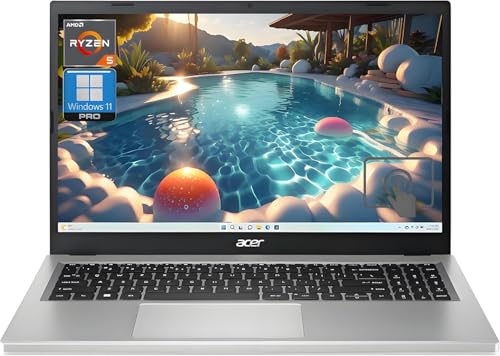
The Acer Aspire 5 is the best budget computer for Zoom calls, offering reliable performance at a low price. With an AMD Ryzen 5 processor and 16GB of RAM in configured models, this laptop handles Zoom calls without issue, even when you have multiple browser tabs and other applications open. The 1080p webcam is adequate for standard video meetings, providing clear enough video for most professional and educational settings. The 15.6-inch display gives you room to see participants alongside other open windows, which is helpful for taking notes or referencing documents during calls.
An honest limitation is that the Acer Aspire 5 is not a glamorous machine. The build quality is mostly plastic, and the webcam is not as sharp as the 5MP cameras found on more expensive models. The microphones are basic, so they may pick up more background noise than premium laptops, but they are sufficient for quiet home offices or dorm rooms. The display is also a standard 1080p panel with average brightness, so it may not be ideal for brightly lit rooms. For students or professionals who primarily need reliable video calls at a low price, however, this is a solid choice.
Another point to consider is that the Acer Aspire 5 does not include advanced features like Center Stage or noise-canceling microphones. You may need to use third-party software or a headset for better audio quality. The laptop is also heavier than many ultraportables, but the larger screen and full-size keyboard are trade-offs that many users appreciate. Overall, the Aspire 5 offers good value for money, providing smooth Zoom performance without breaking the bank. The 16GB RAM configuration is particularly important for multitasking, so look for that model when purchasing.
HP Spectre x360 14
The HP Spectre x360 14 is the best 2-in-1 for Zoom calls, combining premium design with excellent video conferencing features. It includes an IR camera for face-based Windows Hello login, a 5MP webcam, and noise-canceling microphones certified for Microsoft Teams and Zoom. The OLED display option is vivid and color-accurate, making it great for screen sharing and presentations. The 360-degree hinge lets you prop the screen at any angle, which is handy for calls from different positions at the desk or even while standing. The Intel Core Ultra processor provides strong performance for multitasking during meetings.
One honest limitation is that the Spectre x360 14 is expensive, especially with the OLED display upgrade. The premium build and features come at a cost that may not fit every budget. Additionally, the 2-in-1 design means the laptop is slightly thicker than some ultrabooks, though it remains portable. The battery life, while good, is not class-leading due to the power-hungry OLED screen. For users who want a versatile device that works well for both Zoom calls and creative tasks, however, the Spectre x360 is a top choice.
Another consideration is that the noise-canceling microphones are certified for Teams and Zoom, which means they are optimized to reduce background noise during calls. This is a significant advantage if you often take calls in noisy environments like coffee shops or open offices. The 5MP webcam is also a notable upgrade over standard 1080p cameras, providing sharper video. The IR camera adds convenience for quick logins, though it is not essential for Zoom. Overall, the Spectre x360 14 delivers a premium video call experience with the flexibility of a 2-in-1 form factor.
What to look for
- Webcam resolution and features: Look for at least 1080p resolution, and consider models with Center Stage or auto-framing for better video quality. Higher resolution webcams like 5MP or 12MP provide sharper images.
- Microphone quality and noise cancellation: Dual-array microphones with noise reduction or beam-forming technology help isolate your voice from background sounds. Some models have certified microphones for Teams or Zoom.
- Processor performance: A modern processor like Apple M4, Intel Core Ultra, or AMD Ryzen 5 ensures smooth Zoom calls even with multiple applications running. Avoid older or low-power chips.
- Display size and quality: A larger display (15 inches or more) makes it easier to see participants and shared content. OLED or high-resolution panels improve clarity for screen sharing.
- Fanless design or quiet cooling: Fanless laptops like the MacBook Air M4 eliminate microphone noise from cooling fans. If you choose a laptop with fans, look for quiet cooling systems.
- Portability and form factor: Consider whether you need a portable laptop, a 2-in-1 for flexibility, or a desktop for a fixed setup. Weight and size matter if you move between locations.
- RAM and storage: At least 16GB of RAM is recommended for smooth multitasking during Zoom calls. Adequate storage ensures you can save recordings and files without running out of space.
The verdict
For the best overall Zoom experience, the Apple MacBook Air M4 13-inch is the clear winner due to its fanless design and excellent built-in audio and video features. If you prefer Windows, the Dell Inspiron 16 Plus offers a large display and a sharp webcam. The Apple iMac 24-inch M4 is the top desktop choice with its outstanding webcam and microphones. For budget buyers, the Acer Aspire 5 provides reliable performance at a low price. And if you want a versatile 2-in-1, the HP Spectre x360 14 combines premium features with flexible design. Choose the one that best fits your needs, and you will have smooth Zoom calls every time.
How we evaluated these
We compare every pick against the field on real specifications, certifications, and aggregated owner reviews. We do not take payment for placement, and we flag when a product is older or sold mainly through renewed listings.
The shortlist
Each pick, examined
Apple MacBook Air M4 13-inch -- Best Laptop for Zoom Calls
The M4 MacBook Air runs completely fanless, which means no background hum picked up by the microphone during quiet meetings. The 1080p webcam with Center Stage keeps you framed even as you move. Spatial audio and voice isolation are built into macOS, reducing background noise without a third-party app. Zoom runs flawlessly alongside heavy browser tabs and other work apps thanks to the M4's efficient architecture. This is the cleanest experience available for daily video calls.

Dell Inspiron 16 Plus -- Best Windows Laptop for Zoom
The Inspiron 16 Plus pairs an Intel Core Ultra processor with a large 16-inch 2K display, making it easier to see participants and shared screens simultaneously. The 5MP webcam is a step above the 1080p cameras found on most budget laptops. Dual-array microphones with noise reduction handle typical home office ambient sound well. The larger chassis accommodates a comfortable full-size keyboard for note-taking during calls. Battery life of around 8 hours covers most workdays without hunting for an outlet.

Apple iMac 24-inch M4 -- Best Desktop for Zoom
The iMac's 12MP Center Stage webcam is one of the best built-in cameras available on any computer. It tracks your movement automatically, keeping you centered during presentations or when you step slightly out of frame. The three-microphone array with directional beam-forming is notably good at isolating voice from room noise. As a fixed desk setup, it offers a large, color-accurate display for seeing meeting participants clearly. The all-in-one form factor keeps cable clutter minimal.
Acer Aspire 5 -- Best Budget Computer for Zoom
At the Acer Aspire 5 with AMD Ryzen 5 handles Zoom calls without issue. The 1080p webcam is adequate for standard video meetings, and the 15.6-inch display gives you room to see participants alongside other open windows. 16GB of RAM in configured models keeps multitasking smooth. It is not a glamorous machine, but for students or professionals who primarily need reliable video calls at a low price, it delivers without compromise on the fundamentals.
HP Spectre x360 14 -- Best 2-in-1 for Zoom
The Spectre x360 14 is a premium 2-in-1 with an IR camera for face-based Windows Hello login, a 5MP webcam, and noise-canceling microphones certified for Microsoft Teams and Zoom. The OLED display option is vivid for screen sharing and presentations. The 360-degree hinge lets you prop the screen at any angle, which is handy for calls from different positions at the desk. Intel Core Ultra processors keep performance steady, and the build quality justifies the price for daily professional use.
Buying considerations
What to consider
Webcam quality is the most visible factor -- look for 1080p as a baseline, 5MP or higher for noticeably sharper video. Microphone quality and noise cancellation matter more than most buyers realize; a machine with a good onboard microphone saves you from needing a separate USB mic. Prioritize 16GB RAM so Zoom does not compete for memory with the rest of your workday. For desktop setups, an all-in-one with a built-in camera is cleaner than a separate webcam on a standard desktop.
What to consider
For related reading, see our [best computers for working at home](/articles/best-computers-for-working-at-home) guide and our [best computers for work](/articles/best-computers-for-work) roundup. Our full scoring process is on the [methodology](/methodology) page.
Questions answered
Zoom recommends at least a dual-core 2.0 GHz processor for HD video calls. In practice, any modern Intel Core i5, AMD Ryzen 5, or Apple Silicon chip from the last three years handles Zoom comfortably. The limiting factor is more often your internet connection than the CPU, especially for group calls with background blur enabled.
Yes. Zoom itself is not especially demanding, but it competes with other open apps for memory. Running Zoom alongside a browser with multiple tabs, a document editor, and Slack can push 8GB systems into slowdown territory. 16GB of RAM ensures Zoom stays smooth even when your machine is juggling a full workday workload simultaneously.
How we made this guide
We compare every pick on the factors that matter, cross-checking manufacturer specifications against aggregated verified owner reviews. We rank independently and never take payment for placement. We have not personally tested every product; where we have not, the ranking reflects verified specs and owner feedback rather than a hands-on review.
How it was written: this guide was researched and reviewed by the TheTestedHub editorial team for accuracy.
Affiliate disclosure: TheTestedHub is reader-supported. When you buy through links on our site, we may earn a commission at no extra cost to you.
Keep reading

Your Docking Station Match: CalDigit TS4 and More

Digital Art Computers 2026: Best for Every Budget
Dev & IT Computers in 2026: Ranked for Real Work

Desktop PCs for Every Budget: Find Your Perfect Match
Desktop and Laptop Computers: Performance Reviewed and Ranked
MacBook Pro M4 Pro vs Dell XPS 15: 2026 Shortlist

Buy the Best DIY Computer in 2026: Corsair One i300
