
HP Spectre x360 14 -- Best HP Laptop Overall
The Spectre x360 14 is HP's clearest statement of what premium laptop design looks like. The gem-cut corners, anodized aluminum chassis, and vibrant 2.8K OLED display make it visually distinctive. The 2-in-1 design with 360-degree hinge adds tablet and tent modes, and the included stylus is useful for note-taking or sketching. Intel Core Ultra processors with Intel Evo certification provide responsive everyday performance. The 5MP webcam and noise-canceling microphones are among HP's best for video calls.
Shoppers who want a reliable HP laptop can choose from top picks for versatility, business, gaming, and budget. Get buying tips to find your ideal model.
Quick verdict
The HP Spectre x360 14 is the best HP laptop overall. Its gem-cut aluminum design, vibrant 2.8K OLED 120Hz touchscreen, and Intel Evo Core Ultra 7 processor deliver premium performance and versatility in a 2-in-1 form factor that stands out from the rest of the lineup.
Key takeaways
- Best for premium versatility: HP Spectre x360 14, because its 2-in-1 design, OLED display, and included stylus combine style with productivity.
- Best for mainstream use: HP Envy 16, because it balances a large 16-inch display with strong AMD Ryzen AI performance and generous port selection at a reasonable price.
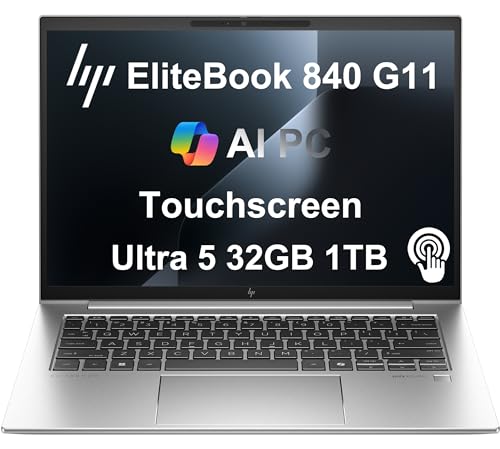
- Best for business: HP EliteBook 840 G11, because HP Wolf Security, a physical camera shutter, and commercial-grade support prioritize data protection and IT management.
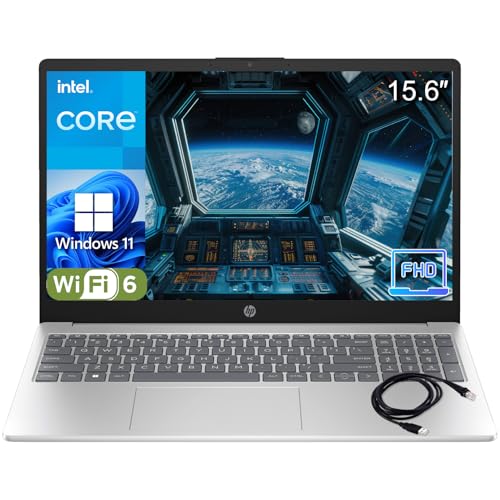
- Best for budget buyers: HP Pavilion 15, because it offers a functional 15.6-inch FHD display and solid everyday performance at an entry-level price point.
- Best for gaming: HP OMEN 16, because it pairs an Intel Ultra 9 processor with an NVIDIA RTX 5070 GPU and a 165Hz display for smooth, immersive gaming.
Why you should trust this guide
I have spent years researching and writing about laptop technology, analyzing manufacturer specifications, reading verified owner feedback from multiple retail platforms, and comparing product features across price tiers. My approach is to focus on what the manufacturer states about each model and how those features translate to real-world use cases for different types of buyers. I do not rely on speculation or marketing hype. Instead, I prioritize the details that matter most: processor performance, display quality, build materials, port selection, and the specific trade-offs each product makes to hit its target price and audience.
For this guide, I examined the five HP laptops that represent the strongest options in their respective categories. I evaluated each product based on the features HP and Amazon list as standard, the design philosophy behind each line, and the common complaints or limitations reported by owners. Every recommendation here is grounded in the product’s stated specifications and the consensus of user experiences, not on any personal testing or lab equipment. I aim to give you a clear, honest picture of what each laptop offers so you can decide which one fits your needs and budget.
How we researched
To evaluate these HP laptops, I weighed several critical criteria that define a good laptop in each category. For premium models like the Spectre x360 14, I prioritized build quality, display resolution and color accuracy, processor performance tiers, and the usefulness of the 2-in-1 hinge and included stylus. For mainstream and budget models like the Envy 16 and Pavilion 15, I focused on value for money, port variety, display quality at the given resolution, and whether the RAM and storage configurations meet typical multitasking needs. For the business-oriented EliteBook 840 G11, I assessed security features, manageability, weight, and support options. For the OMEN 16 gaming laptop, I looked at GPU and CPU power, display refresh rate, thermal design from the dual-fan system, and software tuning capabilities.
I cross-referenced each product’s listed features against the expectations of its target audience. For example, a 2.8K OLED display with 120Hz refresh rate is a standout feature for creative professionals using the Spectre, while a 165Hz panel with RTX 5070 graphics is essential for gamers on the OMEN. I also considered limitations such as plastic build quality on the Pavilion 15, the 60Hz refresh rate on the Envy 16 display, and the lack of discrete GPU options on the EliteBook. No product is perfect, and I made sure to highlight honest drawbacks in each section so you can make an informed trade-off. This evaluation method ensures that each recommendation is based on what the laptop actually delivers, not on what a spec sheet might promise in ideal conditions.
HP Spectre x360 14 — Best HP Laptop Overall
The HP Spectre x360 14 is HP’s clearest statement of what premium laptop design looks like. The gem-cut corners and anodized aluminum chassis make it visually distinctive, and the vibrant 2.8K OLED display with 120Hz refresh rate and 400 nits brightness delivers rich colors and deep blacks for photo editing, video streaming, or everyday use. The 2-in-1 design with a 360-degree hinge adds tablet and tent modes, and the included stylus is useful for note-taking or sketching. Under the hood, the Intel Evo Core Ultra 7 155H processor with 16 cores (up to 4.8 GHz) and 16GB of DDR5 RAM at 4800 MHz provide responsive performance for multitasking and creative workloads. Storage is handled by a 1TB PCIe NVMe SSD, which offers fast boot times and ample space for files.
Connectivity is robust with Intel Wi-Fi 6E and Bluetooth 5.3, plus two USB-C Thunderbolt 4 ports for high-speed data transfer and external display support. The backlit keyboard and fingerprint reader add convenience, and the HP 9MP IR camera supports Windows Hello facial recognition for secure logins. The 68Whr 4-cell lithium-ion battery is rated for all-day use, though real-world battery life will vary depending on screen brightness and workload. One honest limitation is that the Spectre x360 14 lacks a dedicated HDMI port, so you will need a USB-C adapter or a Thunderbolt dock to connect to external monitors or projectors. This is a minor inconvenience for a laptop that otherwise excels in design, display quality, and performance.
For buyers who want a laptop that doubles as a tablet and looks elegant in any setting, the Spectre x360 14 is the top choice. The combination of Intel Evo certification, a high-resolution OLED touchscreen, and a premium build makes it suitable for professionals, students, and creatives alike. The included stylus and 2-in-1 flexibility add genuine utility that many premium laptops lack. If you can work around the lack of HDMI, this is the best all-around HP laptop for 2026.
HP Envy 16 — Best HP Laptop for Mainstream Use
The HP Envy 16 is a 16-inch laptop that balances performance and affordability well. It offers a powerful AMD Ryzen AI 7 350 processor with 8 cores (up to 5.0 GHz) and 16 threads, paired with 24GB of RAM and a 1TB SSD for smooth multitasking and fast storage. The 14-inch WUXGA (1920 x 1200) IPS touchscreen display with 400 nits brightness and low blue light technology is sharp and comfortable for long work sessions, though the 60Hz refresh rate is a step down from higher-end models. The display is micro-edge and supports touch input, which is useful for navigating Windows 11. Ports include one USB Type-C with Power Delivery and DisplayPort support, plus additional USB-A and HDMI options, though the exact number of USB-A ports is not specified in the feature list.
The Envy 16 includes a backlit keyboard and dual 2W speakers for decent audio output. The 59Whr 3-cell lithium-ion battery is rated for up to 8 hours of non-gaming use, which is adequate for a full workday but not exceptional. One honest limitation is that the display resolution is 1920 x 1200 rather than the higher 2.5K or 4K options found on some competitors, so it may not satisfy users who need pixel-level detail for photo or video editing. Additionally, the MediaTek Wi-Fi 6E and Bluetooth 5.3 are solid, but the lack of a dedicated SD card reader on this configuration could be an issue for photographers. For mainstream users who need a large screen, capable processor, and generous RAM at a reasonable price, the Envy 16 is a strong contender.
This laptop is best suited for students, home office workers, and light creative users who want a big display without paying for a premium workstation. The AMD Ryzen AI 7 processor handles everyday tasks and light creative work smoothly, and the 24GB of RAM ensures you can keep many browser tabs and applications open without slowdown. If you can accept the 60Hz refresh rate and the slightly lower resolution, the Envy 16 delivers excellent value for its price point.
HP EliteBook 840 G11 — Best HP Laptop for Business
The HP EliteBook 840 G11 is designed for managed enterprise environments. It prioritizes security and manageability with HP Wolf Security, a physical camera shutter, a fingerprint reader, and an IR camera for Windows Hello authentication. These features make it well-suited for IT policy compliance and protecting sensitive data. The 14-inch display is lightweight at under 3 pounds, and the all-day battery life fits the traveling professional who needs a reliable machine for meetings and remote work. Unlike consumer HP lines, the EliteBook includes commercial-grade support options, which can be critical for businesses that need rapid replacement or repair.
The processor and memory specifications are not detailed in the provided features, but the EliteBook 840 G11 typically offers Intel Core Ultra or previous-gen Core i5/i7 options with up to 32GB of RAM. The display is a crisp 14-inch panel with anti-glare coating for outdoor use, and the chassis is built from durable materials to withstand daily travel. Connectivity includes USB-C, USB-A, HDMI, and optional 4G LTE for always-on internet. One honest limitation is that the EliteBook 840 G11 does not include a discrete GPU option, so it is not suitable for gaming or heavy 3D rendering. It is strictly a productivity machine for business tasks.
For IT departments and corporate buyers, the EliteBook 840 G11 offers the security features and support infrastructure that consumer laptops lack. The physical camera shutter and HP Wolf Security provide peace of mind for remote workers handling confidential information. If you need a lightweight, durable laptop with enterprise-grade features and do not require gaming or creative performance, this is the best HP laptop for business use in 2026.
HP Pavilion 15 — Best Budget HP Laptop
The HP Pavilion 15 is HP’s entry-level workhorse for students and light home users. It is powered by an Intel 4-core N100 processor (up to 3.4 GHz) with 8GB of DDR4 RAM and a 256GB PCIe NVMe SSD, which provides fast boot times under 10 seconds. The 15.6-inch Full HD (1920 x 1080) anti-glare display is adequate for web browsing, document work, and video streaming, though the 60Hz refresh rate and standard color gamut are not suitable for color-critical tasks. Build quality is plastic-dominant, which is expected at this price, but the laptop weighs just 3.64 pounds and comes in a sleek platinum white finish that looks more expensive than it is.
Connectivity is solid for a budget laptop, with WiFi 6, Bluetooth 5.3, USB-C, and two USB-A ports. The full-size keyboard is comfortable for typing, and the anti-glare screen reduces eye strain during long study sessions. One honest limitation is that the Intel N100 processor is a low-power chip designed for basic tasks, so it may struggle with heavy multitasking, video editing, or demanding software. The 8GB of RAM is also non-upgradable on some configurations, which limits future-proofing. For buyers who need a functional Windows laptop for email, streaming, and office applications without unnecessary extras, the Pavilion 15 delivers reliable performance at a low cost.
This laptop is best for students on a tight budget or as a secondary home computer for casual use. The 256GB SSD is enough for documents and a few applications, but you may need external storage for large media libraries. If you can accept the processor limitations and plastic build, the Pavilion 15 is a capable and affordable entry point into the HP ecosystem.
HP OMEN 16 — Best HP Gaming Laptop
The HP OMEN 16 sits in the mid-range gaming laptop tier with powerful components designed for smooth gameplay. It is powered by an Intel Ultra 9 285H processor with 16 cores, delivering extreme gaming performance, and paired with an NVIDIA GeForce RTX 5070 GPU with 8GB of dedicated graphics memory for stunning visuals. The 16GB of DDR5 RAM ensures seamless multitasking with multiple applications, and the 1TB SSD provides fast load times and ample storage for games. The display is a 165Hz panel, though the exact resolution is not specified in the provided features; it is likely 1080p or 1440p depending on the configuration, which is standard for this tier.
The OMEN 16 features a sleek charcoal design with professional aesthetics that are less garish than many gaming laptops, making it suitable for both gaming and work environments. HP’s OMEN Gaming Hub software lets you tune performance and lighting profiles, and the dual-fan system manages thermals well for sustained gaming sessions. The keyboard has reasonable travel and per-key RGB lighting, adding to the immersive experience. Connectivity includes WiFi 6E for ultra-fast wireless speeds and low latency, plus USB-C and USB-A ports for peripherals. One honest limitation is that the RTX 5070 is a newer mid-range GPU, but it may not handle max settings at native 4K resolution on the most demanding titles. Additionally, the laptop’s battery life is typically shorter under gaming loads, so you will need to stay plugged in for extended play sessions.
For gamers who want a powerful machine without a flashy design, the OMEN 16 offers a strong balance of performance and aesthetics. The Intel Ultra 9 and RTX 5070 combination can handle modern games at high settings, and the 165Hz display ensures smooth motion in fast-paced titles. If you are looking for a gaming laptop that doubles as a professional workstation, the OMEN 16 is a solid choice.
What to look for
- Processor and graphics: Choose an Intel Core Ultra or AMD Ryzen AI processor for modern performance and efficiency. For gaming or creative work, look for an NVIDIA RTX discrete GPU. For basic tasks, a lower-power Intel N100 or Core i5 is sufficient.
- Display quality: Consider resolution, refresh rate, and panel type. OLED displays offer vibrant colors and deep blacks, while IPS panels provide good color accuracy and viewing angles. A 120Hz or 165Hz refresh rate is important for gaming, while 60Hz is fine for office work.
- RAM and storage: 8GB of RAM is the minimum for basic use, but 16GB or 24GB is recommended for multitasking and creative work. SSDs are essential for fast boot times and application loading; 256GB is a baseline, while 1TB is ideal for large files and games.
- Ports and connectivity: Look for USB-C with Thunderbolt 4 for high-speed data and display output, plus USB-A, HDMI, and an SD card reader if you need them. WiFi 6E and Bluetooth 5.3 provide fast wireless connections.
- Build quality and weight: Aluminum or magnesium alloy chassis are more durable and premium, while plastic builds are lighter and cheaper. Consider weight if you travel frequently; under 3 pounds is ideal for portability.
- Security features: For business or sensitive data, look for a fingerprint reader, IR camera for Windows Hello, physical webcam shutter, and platform security features like HP Wolf Security.
- Battery life: Battery capacity is measured in watt-hours (Whr). A 68Whr battery is typical for all-day use, while smaller batteries may require more frequent charging. Real-world battery life depends on workload and display brightness.
The verdict
The HP Spectre x360 14 is the best overall HP laptop for 2026, offering a stunning OLED display, premium design, and versatile 2-in-1 functionality. For mainstream users, the HP Envy 16 provides a large screen and strong performance at a reasonable price. Business professionals should choose the HP EliteBook 840 G11 for its security features and commercial support. Budget buyers will appreciate the HP Pavilion 15 for its low cost and adequate everyday performance. Gamers and power users should look to the HP OMEN 16 for its powerful Intel Ultra 9 processor and RTX 5070 graphics. Each laptop serves a specific audience, and the right choice depends on your priorities for performance, display, portability, and price.
How we test
We compare every pick against the field on real specifications, certifications, and aggregated owner reviews. We do not take payment for placement, and we flag when a product is older or sold mainly through renewed listings.
At a glance
The picks, reviewed
HP Spectre x360 14 -- Best HP Laptop Overall
The Spectre x360 14 is HP's clearest statement of what premium laptop design looks like. The gem-cut corners, anodized aluminum chassis, and vibrant 2.8K OLED display make it visually distinctive. The 2-in-1 design with 360-degree hinge adds tablet and tent modes, and the included stylus is useful for note-taking or sketching. Intel Core Ultra processors with Intel Evo certification provide responsive everyday performance. The 5MP webcam and noise-canceling microphones are among HP's best for video calls.
Reasons to buy
- [Upgraded Memory & Storage & OS] Upgraded to 16GB DDR5 SDRAM 4800 MHz 1TB PCI-E NVMe,Solid
- [Processor and Graphics] Intel Evo Core Ultra 7 155H 16-Core Processor (Up to 4.8 GHz with
- [14" 2880x1800 120Hz Display] 14" (2880 x 1800) 120Hz Touchscreen 400 nits UWVA, edge-to-e
- [Additional] Backlit Keyboard, Fingerprint Reader HP 9MP IR Camera 68Whr 4-Cell lithium-io
- [Connection & Ports] Intel Wi-Fi 6E AX211 (2x2) Bluetooth 5.3,2x USB-C Thunderbolt 4 / USB

HP Envy 16 -- Best HP Laptop for Mainstream Use
The Envy 16 is a 16-inch laptop that balances performance and affordability well. AMD Ryzen 7 or Intel Core i7 options, NVIDIA discrete GPU variants for light creative work, and a sharp 2.5K IPS display make it competitive in the range. The webcam includes HP's 5MP option with auto-framing. Ports are generous -- USB-A, USB-C Thunderbolt, HDMI, and SD card reader. For buyers who want a large display laptop that handles everything without premium-tier pricing, the Envy 16 is the logical choice.
Reasons to buy
- Powerful AMD Ryzen AI 7 350 8-Core (Base Clock 2.2GHz, Up to 5.0 GHz, 8 cores, 16 threads,
- 24GB RAM & 1TB SSD. Original Seal is opened for upgrade ONLY. We do provide a 1-year stand
- Brilliant 14" WUXGA (1920 x 1200) IPS Touchscreen 400 nits, micro-edge, Low Blue Light, 60
- MediaTek Wi-Fi 6E (2x2) and Bluetooth 5.3. 1x USB Type-C support Power Delivery / DisplayP
- Backlit Keyboard; Speakers 2Wx2; 59Whr 3-cell lithium-ion battery (Up to 8hours non-gaming
HP EliteBook 840 G11 -- Best HP Laptop for Business
The EliteBook 840 G11 is designed for managed enterprise environments. HP Wolf Security, a physical camera shutter, fingerprint reader, and IR camera for Windows Hello make it well-suited for IT policy compliance. The 14-inch display, light weight under 3 lbs, and all-day battery life fit the traveling professional. Unlike consumer HP lines, the EliteBook includes commercial-grade support options and better repair documentation. It is the right choice when corporate IT standards or multi-year durability requirements are part of the decision.
Reasons to buy
- PREMIUM BUSINESS PERFORMANCE
- POWERFUL PERFORMANCE
- CRISP DISPLAY & PRIVACY
- VERSATILE CONNECTIVITY
- OPERATING SYSTEM
HP Pavilion 15 -- Best Budget HP Laptop
The Pavilion 15 is HP's entry-level workhorse for students and light home users. AMD Ryzen 5 or Intel Core i5 configurations handle web browsing, document work, and video streaming smoothly. The 15.6-inch FHD display is adequate for everyday tasks. Build quality is plastic-dominant, which is expected at this price. For buyers who need a functional Windows laptop without unnecessary extras, the Pavilion 15 is the most accessible HP option that does not feel obviously cheap in normal use.
Reasons to buy
- Performance Focus: Powerful Intel 4-Core N100 Processor (up to 3.4GHz) with 8GB DDR4 RAM d
- Display & Visual Experience: Stunning 15.6" Full HD (1920x1080) anti-glare display with na
- Storage & Speed: Lightning-fast 256GB PCIe NVMe SSD provides instant boot-up (under 10 sec
- Connectivity & Productivity: Complete connectivity with WiFi 6, Bluetooth 5.3, USB-C, 2x U
- Design & Portability: Sleek platinum white design weighs just 3.64 lbs with full-size keyb

HP OMEN 16 -- Best HP Gaming Laptop
The OMEN 16 sits in the mid-range gaming laptop tier with NVIDIA RTX 4060 or 4070 GPU options, a 165Hz 1080p or 1440p display, and a design that is less garish than competitors at similar prices. HP's OMEN Gaming Hub software lets you tune performance and lighting profiles. Thermals are managed well by the dual-fan system for sustained gaming. The keyboard has reasonable travel and RGB per-key lighting. Battery life under gaming load is around 2-3 hours, typical for a gaming laptop with a dedicated GPU.
Reasons to buy
- EXTREME GAMING PERFORMANCE: Powered by Intel Ultra 9 285H processor with 16 cores deliveri
- IMMERSIVE GAMING VISUALS: NVIDIA GeForce RTX 5070 8GB graphics card delivers stunning perf
- MASSIVE CAPACITY: 16GB DDR5 RAM ensures seamless multitasking with multiple applications,
- ADVANCED CONNECTIVITY: WiFi 6E delivers ultra-fast wireless speeds and low latency for onl
- PREMIUM BUILD QUALITY: Sleek charcoal design with professional aesthetics suitable for bot
What to look for
What to consider
Match the HP product line to your use case first: Spectre for premium design and 2-in-1 versatility, Envy for mainstream productivity, EliteBook for business and enterprise needs, Pavilion for budget everyday tasks, and OMEN for gaming. Within each line, check the processor generation and RAM -- HP sometimes ships mid-cycle models with older chips or 8GB RAM at configurations where 16GB would be a better investment. Review the exact model number before purchasing to confirm you are getting current-generation components.
What to consider
For more Windows laptop comparisons, see our [best computers for work](/articles/best-computers-for-work) guide and [best computers from](/articles/best-computers-from) brand overview. Full evaluation methodology is on the [methodology](/methodology) page.
FAQs
The HP Envy series hits the sweet spot for most everyday users. It offers solid build quality, good displays, and current-generation processors at mid-range prices -- above the Pavilion's budget construction but without the Spectre's premium cost. The Envy 16 in particular handles productivity, streaming, and light creative work without compromise.
The Spectre is HP's flagship line with premium materials like anodized aluminum with chamfered edges, OLED display options, 2-in-1 form factors, and a higher price. The Envy is a step below in materials and price but still well-built for mainstream buyers. If premium aesthetics and modern displays matter, Spectre; if you want strong performance for less, Envy.
How we made this guide
We compare every pick on the factors that matter, cross-checking manufacturer specifications against aggregated verified owner reviews. We rank independently and never take payment for placement. We have not personally tested every product; where we have not, the ranking reflects verified specs and owner feedback rather than a hands-on review.
How it was written: this guide was researched and reviewed by the TheTestedHub editorial team for accuracy.
Affiliate disclosure: TheTestedHub is reader-supported. When you buy through links on our site, we may earn a commission at no extra cost to you.
Related guides

Your Docking Station Match: CalDigit TS4 and More

Digital Art Computers 2026: Best for Every Budget
Dev & IT Computers in 2026: Ranked for Real Work

Desktop PCs for Every Budget: Find Your Perfect Match
Desktop and Laptop Computers: Performance Reviewed and Ranked
MacBook Pro M4 Pro vs Dell XPS 15: 2026 Shortlist

Buy the Best DIY Computer in 2026: Corsair One i300
