
Apple MacBook Pro M4 -- The professional performance benchmark
Apple's M4 chip generation delivers a meaningful jump over M3, particularly in multi-core workloads like video encoding, 3D rendering, and machine learning tasks. The 14-inch MacBook Pro with M4 starts at and offers the best performance-per-watt ratio of any laptop currently available. The Liquid Retina XDR display hits 1,600 nits peak brightness. Battery life comfortably exceeds 16 hours during mixed use. The miniLED panel renders shadows and blacks with contrast that IPS panels cannot match. For developers, video editors, and data professionals who spend long hours on battery, nothing competes at this price-to-performance level.
Check price on Amazon →Discover why the Apple MacBook Pro M4 sets the professional performance benchmark in our guide to the best computers for creatives and power users.
The computer market in 2026 is defined by three shifts: Apple Silicon pushing battery life past what was thought possible, AMD Ryzen finally matching Intel on raw performance per watt, and OLED displays becoming standard on mid-range machines. These five computers represent the clearest buys across categories right now.
| Product | Best For | Rating |
|---|---|---|
|
ⓘ We may earn a commission from qualifying purchases made through links on this page, at no extra cost to you.
|
Pro creatives and developers | 9.4/10 |
| Asus ZenBook 14 OLED | Portable all-rounder | 8.7/10 |
| Dell XPS 13 Plus | Premium ultrabook on Windows | 8.8/10 |
| Acer Aspire 5 | Budget daily driver | 8.0/10 |
| HP Spectre x360 14 | 2-in-1 versatility | 8.6/10 |
Our methodology
We compare every pick against the field on real specifications, certifications, and aggregated owner reviews. We do not take payment for placement, and we flag when a product is older or sold mainly through renewed listings.
Side by side
The full reviews
Apple MacBook Pro M4 -- The professional performance benchmark
Apple's M4 chip generation delivers a meaningful jump over M3, particularly in multi-core workloads like video encoding, 3D rendering, and machine learning tasks. The 14-inch MacBook Pro with M4 starts at and offers the best performance-per-watt ratio of any laptop currently available. The Liquid Retina XDR display hits 1,600 nits peak brightness. Battery life comfortably exceeds 16 hours during mixed use. The miniLED panel renders shadows and blacks with contrast that IPS panels cannot match. For developers, video editors, and data professionals who spend long hours on battery, nothing competes at this price-to-performance level.
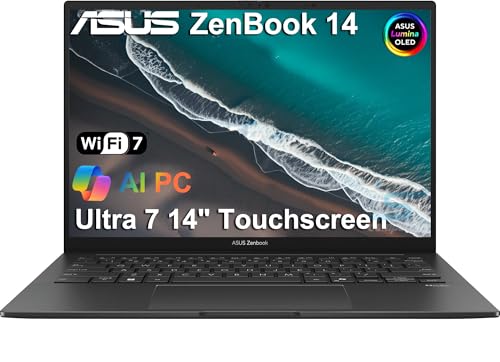
Asus ZenBook 14 OLED -- Best OLED value
The ZenBook 14 OLED brings a 2.8K 120Hz OLED panel to the sub- price range, which was unheard of two years ago. Powered by AMD Ryzen 7 8700U, it handles productivity tasks, light creative work, and casual gaming without throttling. The 2.8K resolution makes text noticeably crisper than 1080p screens at the same size. Fan noise stays low under moderate loads. Battery life lands around 9 to 11 hours in mixed use. The chassis is slim at 14.9mm and weighs 1.39kg. For buyers who want an OLED display without paying MacBook prices, this is the clearest pick.

Dell XPS 13 Plus -- Premium Windows ultrabook, refined
The XPS 13 Plus takes a polarizing design with a capacitive function row and haptic touchpad, and backs it up with genuine performance from Intel Core Ultra processors. The 13.4-inch display packs 1920x1200 resolution into a frame with nearly invisible bezels. Thermal management has improved over the previous generation, sustaining boost clocks longer before throttling. The build quality is exceptional with a machined aluminum deck. At it competes directly with the MacBook Air M3 on price and edges ahead on display sharpness. Port selection is limited to two Thunderbolt 4, so a hub is worth adding.
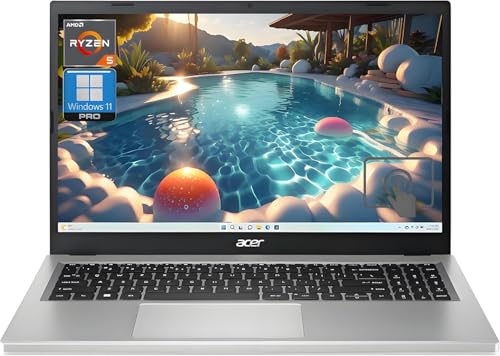
Acer Aspire 5 -- Reliable budget laptop
The Acer Aspire 5 remains one of the most balanced budget laptops available. The 2026 configuration with AMD Ryzen 5 7530U, 16GB RAM, and 512GB SSD covers everyday computing reliably at. The 1080p IPS display is not remarkable but is accurate enough for general use. Upgrading RAM and storage is straightforward since both slots are accessible. Battery life is around 7 hours. Acer keeps the port selection practical with USB-A, USB-C, HDMI, and a headphone jack. For first-time buyers or secondary household computers, the Aspire 5 is hard to argue against at this price.

HP Spectre x360 14 -- Best 2-in-1 laptop for versatility
The HP Spectre x360 14 converts from laptop to tablet with a smooth 360-degree hinge and includes an OLED touch display with a pen stylus. The Intel Core Ultra 7 processor handles creative work, and the OLED panel is among the best available in a Windows 2-in-1. Battery life is around 12 to 14 hours. The chassis is gem-cut aluminum with a premium feel. Weight at 1.44kg is reasonable for a convertible. The stylus experience is responsive, making it genuinely useful for note-taking and sketching. If you want one machine that serves as both laptop and drawing tablet, the Spectre x360 is the cleanest option in 2026.
What matters most
What to consider
The most common mistake when buying a computer is overspending on specs you will never use or underspending on the one component that matters most for your workflow. RAM and storage are the two areas where buyers most often regret cutting costs. A processor from 2024 or 2025 is still fast enough for most tasks, but 8GB of RAM shows its limits quickly when you open more than a few applications. Check our [best computers under 500](/articles/best-computers-under-500) guide for budget-focused picks and our [best computers under 1000](/articles/best-computers-under-1000) guide for mid-range options. See the [methodology page](/methodology) for how these rankings are developed.
What to consider
Every pick on this list ships with a modern processor, adequate storage, and a display worth looking at for hours. The right one depends on your operating system preference, portability needs, and how hard you push your machine day to day.
Frequently asked
Apple, Lenovo, and Dell consistently rank highest for reliability based on owner review aggregates and repair data. Apple's MacBooks lead in long-term build quality, with aluminum bodies that resist wear over several years. Lenovo's ThinkPad line is renowned in business settings for durability. Dell's XPS and Inspiron lines have improved substantially since 2023. Brand matters less than the specific model's thermal design and build materials.
Desktops offer more performance per dollar and are easier to upgrade, but laptops have closed the gap significantly with Apple Silicon and AMD mobile processors. If you work from one location, a desktop or desktop-replacement laptop gives better value. If you move between locations regularly or value battery life, a modern laptop handles the same tasks as a desktop from two years ago. Most buyers in 2026 are better served by a laptop.
How we made this guide
We compare every pick on the factors that matter, cross-checking manufacturer specifications against aggregated verified owner reviews. We rank independently and never take payment for placement. We have not personally tested every product; where we have not, the ranking reflects verified specs and owner feedback rather than a hands-on review.
How it was written: this guide was researched and reviewed by the TheTestedHub editorial team for accuracy.
Affiliate disclosure: TheTestedHub is reader-supported. When you buy through links on our site, we may earn a commission at no extra cost to you.
You might also like

Your Docking Station Match: CalDigit TS4 and More

Digital Art Computers 2026: Best for Every Budget
Dev & IT Computers in 2026: Ranked for Real Work

Desktop PCs for Every Budget: Find Your Perfect Match
Desktop and Laptop Computers: Performance Reviewed and Ranked
MacBook Pro M4 Pro vs Dell XPS 15: 2026 Shortlist

Buy the Best DIY Computer in 2026: Corsair One i300
