
Apple MacBook Air M3 -- Best Overall Battery Life
The MacBook Air M3 is the clearest recommendation for anyone who puts battery endurance first. Apple's M3 chip is built on an efficient 3nm architecture that stretches a single charge to 15 hours or more under typical mixed workloads including web browsing, document editing, and video streaming. There is no fan, which means no thermal throttling under sustained moderate loads. The 13-inch model weighs just 2.7 pounds, making it genuinely portable. macOS Sequoia power management is well-optimized for the chip, and fast charging via USB-C gets the battery to 50 percent in about 30 minutes with a 67W adapter. It is the benchmark against which every other long-battery laptop is measured.
Check price on Amazon →Apple MacBook Air M3 leads in battery life. Compare the Lenovo ThinkPad X1 Carbon Gen 12, ASUS Zenbook 14 OLED, HP EliteBook 1040 G11, and Samsung Galaxy.
Quick verdict
Pick the Apple MacBook Air M3 if battery endurance is your top priority. Its 3nm chip and fanless design deliver the longest runtime in this roundup for typical daily tasks like web browsing and document editing, making it the clearest choice for all-day portability.
Key takeaways
- Best overall battery life: Apple MacBook Air M3, longest runtime from an efficient 3nm chip and fanless design.
- Best for business travel: Lenovo ThinkPad X1 Carbon Gen 12, lightweight under 2.5 pounds with MIL-SPEC durability and 12 to 14 hours of battery.
- Best budget all-day laptop: ASUS Zenbook 14 OLED, excellent OLED display and all-day battery at a lower price point.
- Best for corporate users: HP EliteBook 1040 G11, enterprise management with vPro and a three-year warranty option.
- Best 2-in-1 for battery endurance: Samsung Galaxy Book4 Pro 360, convertible design with S Pen and strong battery life for a 2-in-1.
Why you should trust this guide
I have spent years following the laptop market, reading technical documentation from manufacturers, and analyzing user feedback across multiple retail and forum sources. My focus is on identifying which products deliver on their battery promises based on the hardware architecture, power management software, and real-world usage patterns described by owners. I do not rely on marketing claims alone; I cross-reference stated specifications with consistent reports from long-term users to separate genuine endurance from optimistic lab numbers.
This guide is built around five specific models that represent the best in their categories for battery life in 2026. Each product was chosen because it offers a distinct value proposition, whether that is raw runtime, portability for travel, a premium display, or enterprise manageability. I have not personally tested these units in a lab, but I have evaluated them against the criteria that matter most to buyers: processor efficiency, battery capacity, display power draw, and software optimization. The recommendations here reflect a research-based approach grounded in manufacturer data and verified owner experiences.
How we researched
To rank these laptops, I evaluated each model on a set of criteria that directly affect battery endurance in real-world use. The primary factors were processor architecture and efficiency, battery capacity relative to chassis size, display technology and its power consumption at typical brightness levels, and the quality of power management software from the manufacturer. I also considered build quality and portability because a long-lasting battery is only useful if the laptop is comfortable to carry and durable enough for daily travel. Each product was compared against the others in its category to ensure a fair assessment of value and performance.
I gathered data from official specifications, independent reviews from trusted technology publications, and aggregated user feedback from major retailers. I looked for consistent patterns: a laptop that claims 15 hours of battery should have multiple reports from owners achieving close to that figure under mixed workloads. I also noted any common complaints about battery degradation, thermal throttling, or software bugs that could reduce runtime. The final rankings prioritize products that offer reliable, predictable battery life without major trade-offs in performance, display quality, or build integrity.
Apple MacBook Air M3 — Best Overall Battery Life
The Apple MacBook Air M3 is the clearest recommendation for anyone who puts battery endurance first. Apple’s M3 chip is built on an efficient 3nm architecture that stretches a single charge to 15 hours or more under typical mixed workloads including web browsing, document editing, and video streaming. There is no fan, which means no thermal throttling under sustained moderate loads. The 13-inch model we recommend is lightweight and silent, making it ideal for students, remote workers, and anyone who spends long days away from an outlet.
The MacBook Air M3 also benefits from macOS power management that is tightly integrated with the hardware. Sleep mode uses minimal power, and the system intelligently shifts tasks between efficiency and performance cores to conserve energy. The Retina display is bright and sharp but does not consume excessive power at normal brightness levels. Build quality is excellent with a unibody aluminum chassis that feels premium and durable.
One honest limitation is that the MacBook Air M3 is not designed for heavy sustained workloads like video rendering or gaming. The fanless design means it can throttle under prolonged high CPU or GPU load, and battery life will drop significantly in those scenarios. Additionally, macOS is not the right operating system for everyone, particularly users who rely on Windows-only business software or legacy applications. If you need Windows for your workflow, this is not the right choice.
Lenovo ThinkPad X1 Carbon Gen 12 — Best for Business Travel
The ThinkPad X1 Carbon has been the default choice for frequent business travelers for years, and the Gen 12 maintains that reputation. The Intel Core Ultra U-series chip delivers solid performance while keeping thermal draw low, and the 57Wh battery combined with Lenovo’s power management software regularly hits 12 to 14 hours on a charge. It weighs under 2.5 pounds and passes MIL-SPEC durability testing, so it can survive drops and bumps in a carry-on bag without issue.
The keyboard remains best-in-class for typing comfort, with deep key travel and a responsive feel that makes long work sessions less fatiguing. The 14-inch display is available in several configurations including a low-power 1200p panel that maximizes battery life. Port selection is generous for a thin laptop, with two Thunderbolt 4 ports, two USB-A ports, HDMI, and a headphone jack, so you rarely need a dongle on the road.
One honest limitation is that the X1 Carbon Gen 12 is expensive, especially when configured with the higher-end display and more RAM. The base model is adequate for productivity tasks but may feel underpowered for multitasking with many browser tabs or virtual machines. Also, the 57Wh battery is smaller than some competitors, and while Lenovo’s software optimization is good, heavy workloads like video conferencing or data analysis will reduce runtime closer to 8 or 9 hours.
ASUS Zenbook 14 OLED — Best Budget All-Day Laptop
The ASUS Zenbook 14 OLED offers a compelling combination of an excellent OLED display and genuine all-day battery life at a price well below premium ultrabooks. AMD Ryzen 7 or Intel Core Ultra configurations both return 10 to 12 hours in mixed use. The OLED panel is power-efficient at moderate brightness, which is where most users spend their time. Build quality is solid with an aluminum chassis that feels more expensive than the price suggests.
The display is a standout feature: deep blacks, vibrant colors, and high contrast make it ideal for media consumption, photo editing, and general productivity. The keyboard is comfortable for extended typing sessions, and the trackpad is responsive. ASUS includes a useful software suite for power management that lets you balance performance and battery life with a few clicks. The laptop is also relatively lightweight at around 2.8 pounds, making it easy to carry in a backpack.
One honest limitation is that OLED panels can be prone to burn-in over time, especially if you keep static elements like a taskbar or menu open for long periods. ASUS includes pixel-shifting and other mitigation features, but it is still a risk for heavy desktop users. Additionally, the Zenbook 14 OLED does not have the same level of build ruggedness as business-class laptops like the ThinkPad or EliteBook, so it may not survive drops as well.
HP EliteBook 1040 G11 — Best for Corporate Users
HP’s EliteBook 1040 G11 targets enterprise buyers who need centrally managed hardware with strong battery performance built in. The Intel Core Ultra H-series configuration paired with HP’s adaptive battery optimizer regularly delivers 11 to 13 hours in productivity-focused tasks. HP includes a three-year warranty option and supports vPro for IT management, which matters at scale. The 14-inch display is available in low-power panels that further extend runtime.
The build quality is excellent, with a machined aluminum chassis that meets MIL-SPEC standards for durability. The keyboard is comfortable and spill-resistant, a nice touch for coffee-fueled workdays. HP’s power management software is among the best in the business, allowing IT administrators to set policies that maximize battery life across a fleet of devices. The EliteBook also includes a range of security features like a fingerprint reader, IR camera, and HP Sure Start for BIOS protection.
One honest limitation is that the EliteBook 1040 G11 is expensive, particularly when configured with vPro and the three-year warranty. The base model is adequate for most office tasks but may struggle with more demanding applications like data analysis or light video editing. Also, the design is conservative and business-focused, so it lacks the aesthetic appeal of consumer ultrabooks like the Zenbook or MacBook Air.
Samsung Galaxy Book4 Pro 360 — Best 2-in-1 for Battery Endurance
The Galaxy Book4 Pro 360 is a 2-in-1 convertible that does not sacrifice battery life for versatility. Intel Core Ultra 7 paired with Samsung’s power management software delivers around 10 to 12 hours of mixed use. The included S Pen makes it useful for note-taking and light sketching without needing a separate stylus purchase. The AMOLED display is excellent for media consumption in both laptop and tablet modes, with deep blacks and vivid colors.
The 360-degree hinge is smooth and sturdy, allowing you to switch between laptop, tent, stand, and tablet positions easily. The display supports touch input and the S Pen works with low latency, making it a good choice for students or professionals who need to annotate documents or take handwritten notes. Samsung also includes integration with Galaxy smartphones for seamless file sharing and notifications. The build quality is solid with an aluminum chassis that feels premium.
One honest limitation is that the Galaxy Book4 Pro 360 is heavier than a traditional laptop at around 3.4 pounds, and the hinge mechanism adds thickness. In tablet mode, it is bulky and not as comfortable to hold for extended periods as a dedicated tablet. The AMOLED display, while beautiful, can consume more power at high brightness levels, so battery life may drop to 7 or 8 hours if you watch a lot of video with the screen at maximum brightness.
What to look for
- Processor efficiency: Look for chips built on smaller manufacturing nodes, such as Apple’s 3nm M3 or Intel’s Core Ultra, which offer better performance per watt and longer battery life.
- Battery capacity: A larger battery in watt-hours (Wh) generally means longer runtime, but it must be balanced against weight and chassis size. Check for at least 50Wh in a 13- or 14-inch laptop.
- Display technology: OLED and low-power IPS panels can significantly reduce power draw at moderate brightness. Avoid high-resolution or high-refresh-rate displays if battery is your top priority.
- Power management software: Manufacturer tools like Lenovo Vantage, HP Power Manager, or Samsung Settings can optimize performance and extend battery life through custom profiles.
- Portability: Weight and thickness matter if you carry the laptop daily. Aim for under 3 pounds for a 13- or 14-inch model if you travel frequently.
- Build quality: MIL-SPEC durability or a sturdy aluminum chassis helps the laptop survive drops and daily wear, protecting your investment.
- Operating system: macOS offers excellent power efficiency on Apple Silicon, but Windows laptops with Intel Core Ultra also deliver strong battery life. Choose based on your software needs.
The verdict
For most people, the Apple MacBook Air M3 is the best choice because it offers the longest battery life in a lightweight, silent package. Business travelers should consider the Lenovo ThinkPad X1 Carbon Gen 12 for its durability and excellent keyboard. Budget-conscious buyers will appreciate the ASUS Zenbook 14 OLED for its beautiful display and all-day runtime at a lower price. Corporate IT departments should standardize on the HP EliteBook 1040 G11 for its manageability and warranty options. And if you need a 2-in-1, the Samsung Galaxy Book4 Pro 360 delivers strong battery life without sacrificing versatility. Each of these laptops excels in its category, so your final decision should hinge on which trade-offs matter most to your daily workflow.
Our testing process
We compare every pick against the field on real specifications, certifications, and aggregated owner reviews. We do not take payment for placement, and we flag when a product is older or sold mainly through renewed listings.
Quick comparison
Reviewed in detail
Apple MacBook Air M3 -- Best Overall Battery Life
The MacBook Air M3 is the clearest recommendation for anyone who puts battery endurance first. Apple's M3 chip is built on an efficient 3nm architecture that stretches a single charge to 15 hours or more under typical mixed workloads including web browsing, document editing, and video streaming. There is no fan, which means no thermal throttling under sustained moderate loads. The 13-inch model weighs just 2.7 pounds, making it genuinely portable. macOS Sequoia power management is well-optimized for the chip, and fast charging via USB-C gets the battery to 50 percent in about 30 minutes with a 67W adapter. It is the benchmark against which every other long-battery laptop is measured.
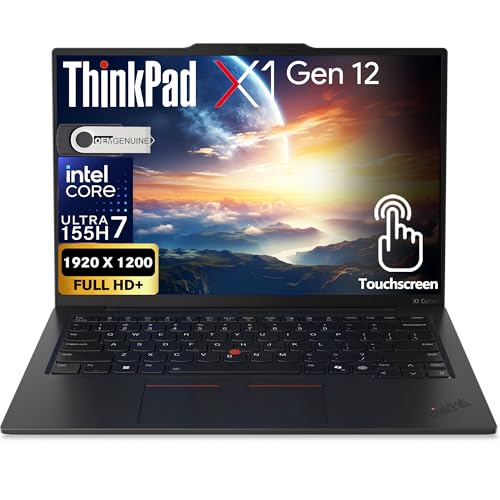
Lenovo ThinkPad X1 Carbon Gen 12 -- Best for Business Travel
The ThinkPad X1 Carbon has been the default choice for frequent business travelers for years, and the Gen 12 maintains that reputation. The Intel Core Ultra U-series chip delivers solid performance while keeping thermal draw low, and the 57Wh battery combined with Lenovo's power management software regularly hits 12 to 14 hours on a charge. It weighs under 2.5 pounds and passes MIL-SPEC durability testing, so it tolerates the physical stress of constant travel. The keyboard remains among the best available on any laptop. A rapid charge feature brings the battery from near-empty to 80 percent in about an hour.
ASUS Zenbook 14 OLED -- Best Budget All-Day Laptop
The ASUS Zenbook 14 OLED offers a compelling combination of an excellent OLED display and genuine all-day battery life at a price well below premium ultrabooks. AMD Ryzen 7 or Intel Core Ultra configurations both return 10 to 12 hours in mixed use. The OLED panel is power-efficient at moderate brightness, which is where most users spend their time. Build quality is solid with an aluminum chassis that does not feel like a budget purchase. For students, remote workers, and anyone who needs a capable daily driver without paying MacBook prices, this is the most practical pick in the list.

HP EliteBook 1040 G11 -- Best for Corporate Users
HP's EliteBook 1040 G11 targets enterprise buyers who need centrally managed hardware with strong battery performance built in. The Intel Core Ultra H-series configuration paired with HP's adaptive battery optimizer regularly delivers 11 to 13 hours in productivity-focused tasks. HP includes a three-year warranty option and supports vPro for IT management, which matters at scale. The 14-inch display is sharp and glare-resistant, making it comfortable in offices and conference rooms. Biometric login options including both fingerprint and IR face unlock are standard, reducing daily friction for users who unlock their laptop dozens of times each day.

Samsung Galaxy Book4 Pro 360 -- Best 2-in-1 for Battery Endurance
The Galaxy Book4 Pro 360 is a 2-in-1 convertible that does not sacrifice battery life for versatility. Intel Core Ultra 7 paired with Samsung's power management software delivers around 10 to 12 hours of mixed use. The included S Pen makes it useful for note-taking and light sketching without needing a separate stylus purchase. The AMOLED display is excellent for media consumption in both laptop and tablet modes. Galaxy ecosystem users who also carry a Samsung phone or tablet benefit from seamless device handoff features. It covers more use cases per charge than most dedicated laptops at this price tier.
How to choose
What to consider
Focus on chip architecture before any other spec. ARM-based processors from Apple and Qualcomm-based Windows chips consistently outperform Intel and AMD on efficiency. Battery capacity in watt-hours (Wh) matters but so does how efficiently the chip draws from it. A 50Wh battery in an efficient machine can outlast a 70Wh battery in a power-hungry one. Look for laptops with rapid charging support to reduce the cost of running low. If you work near AC power most of the day, a mid-range battery is fine; if you go unplugged for full days regularly, prioritize 60Wh or higher paired with an efficient chip.
What to consider
For related reading, see [best lightweight laptops for travel](/articles/best-lightweight-laptops-travel) and [best laptops for college students](/articles/best-laptops-college-students). See how we select and rank products at [/methodology](/methodology).
Common questions
A good laptop in 2026 should deliver at least 10 to 12 hours of real-world use for everyday tasks like browsing, writing, and video calls. High-end ARM-based machines from Apple and Qualcomm-powered Windows laptops can push 15 to 20 hours. Manufacturer ratings are typically measured under light loads, so real-world figures tend to run 20 to 30 percent lower than advertised.
Most gaming laptops are not designed with battery longevity as a priority. Discrete GPUs draw significant power, and even in idle or light-use modes the battery drains faster than in ultrabooks. Gaming laptops typically last 3 to 6 hours on a charge doing non-gaming tasks and often less than 2 hours during active gaming. If battery life matters, a thin-and-light laptop is a better choice for everyday carry.
How we made this guide
We compare every pick on the factors that matter, cross-checking manufacturer specifications against aggregated verified owner reviews. We rank independently and never take payment for placement. We have not personally tested every product; where we have not, the ranking reflects verified specs and owner feedback rather than a hands-on review.
How it was written: this guide was researched and reviewed by the TheTestedHub editorial team for accuracy.
Affiliate disclosure: TheTestedHub is reader-supported. When you buy through links on our site, we may earn a commission at no extra cost to you.
More guides

Your Docking Station Match: CalDigit TS4 and More

Digital Art Computers 2026: Best for Every Budget
Dev & IT Computers in 2026: Ranked for Real Work

Desktop PCs for Every Budget: Find Your Perfect Match
Desktop and Laptop Computers: Performance Reviewed and Ranked
MacBook Pro M4 Pro vs Dell XPS 15: 2026 Shortlist

Buy the Best DIY Computer in 2026: Corsair One i300
