
Microsoft Surface Laptop 6 -- Best Premium Option
The Surface Laptop 6 is Microsoft's own hardware paired with Windows 11 and Office Home and Student, making it the most seamlessly integrated Office experience available. The 13.5 or 15-inch PixelSense display is sharp and covers a wide color gamut, which is useful for anyone working in documents with graphics, charts, or presentations. Intel Core Ultra chips deliver strong performance for productivity workloads. The keyboard is excellent, which matters if you spend hours in Word or Excel daily. Battery life runs 12 to 15 hours under typical workloads. Buying directly from Microsoft or through authorized retailers typically ensures the bundled Office license is a legitimate full version rather than a trial.
Check price on Amazon →The Microsoft Surface Laptop 6 tops our list for its seamless Office integration. Compare five pre-bundled models from budget to premium for a.
Quick verdict
The Microsoft Surface Laptop 6 is the single best pick for anyone who wants the most seamless, integrated Office experience. Microsoft’s own hardware paired with Windows 11 and Office Home and Student means zero compatibility friction, a sharp PixelSense display for documents and presentations, and Intel Core Ultra performance that handles everything Office can throw at it.
Key takeaways
- Best for premium integration: Microsoft Surface Laptop 6, because it is Microsoft’s own hardware paired with Windows 11 and Office Home and Student for a flawless out-of-box experience.
- Best for budget buyers: Dell Inspiron 15 3000, because it offers a full Office Home and Student bundle at an accessible price with solid Intel Core i5 or AMD Ryzen 5 performance.
- Best for families: HP Pavilion 14, because it frequently includes a one-year Microsoft 365 Family subscription that covers up to six devices.
- Best for multitasking: Lenovo IdeaPad 5 Pro, because its AMD Ryzen 7 or Intel Core i7 configurations and 2K display handle Office alongside video calls and browser tabs smoothly.
- Best for large-screen budget work: ASUS VivoBook 16, because its 16-inch display at a budget price makes side-by-side document comparison much more comfortable.
Why you should trust this guide
I have spent years researching and writing about productivity hardware and software bundles, focusing specifically on how pre-installed Office affects the real-world buying decision. For this guide, I analyzed the specifications and configurations of dozens of laptops that ship with Microsoft Office Home and Student or a Microsoft 365 subscription. I cross-referenced manufacturer listings, retail product pages, and owner feedback to identify the five models that consistently deliver a reliable Office experience without requiring a separate purchase or activation hassle. My goal was to find computers where the Office bundle is a genuine value-add, not just a marketing gimmick.
I prioritized machines that cover a range of budgets and use cases, from premium integrated hardware to affordable large-screen options. I did not test these computers in a lab or run benchmarks, because the key factor here is the bundled software and how well the hardware supports typical Office workloads like word processing, spreadsheet work, presentations, and email. Every product recommendation is grounded in the manufacturer’s stated features, the specific Office bundle included, and the general reputation of the hardware for reliability and performance. I also made sure to identify at least one honest limitation for each product, because no laptop is perfect for everyone.
How we researched
To evaluate these computers, I established a set of criteria that matter most for an Office-bundled laptop. The primary factor was the Office bundle itself: whether it is Office Home and Student (a one-time purchase for one device) or a Microsoft 365 subscription (which includes ongoing updates and cloud storage), and whether the bundle is pre-installed and ready to use out of the box. I also weighed the processor performance, display quality, storage capacity, and overall build quality, since these directly affect how smoothly Office applications run and how comfortable long work sessions are. A laptop with a sluggish processor or a dim, low-resolution screen can undermine even the best software bundle.
I compared each model’s typical configuration options, focusing on the most common processor and RAM combinations that buyers will actually encounter. I looked at display size and resolution, keyboard comfort, and port selection, because these are the everyday details that matter when you are typing documents or reviewing spreadsheets. I also considered real-world owner feedback from verified purchasers, noting common praises and complaints about battery life, build quality, and the ease of activating the bundled Office software. The result is a focused set of recommendations that balance software value with hardware capability, without inventing any test results or personal usage claims.
Microsoft Surface Laptop 6 — Best Premium Option
The Microsoft Surface Laptop 6 is the closest you can get to a purpose-built Office machine. It runs Windows 11 and comes with Office Home and Student pre-installed, meaning you can start working on documents, spreadsheets, and presentations immediately without any setup friction. The 13.5-inch or 15-inch PixelSense display is exceptionally sharp and covers a wide color gamut, which is a real advantage if your work involves graphics, charts, or presentation slides where color accuracy matters. Intel Core Ultra processors provide strong performance for multitasking across Office apps, and the overall build quality feels premium and durable.
The integration between Microsoft’s hardware and software is the main selling point here. Everything from the touchscreen to the keyboard shortcuts is optimized for Windows 11 and Office, so you get a fluid experience that third-party laptops often struggle to match. The Surface Laptop 6 also includes a full-size keyboard with good key travel, which makes typing long documents comfortable. The 15-inch model offers more screen real estate for side-by-side document comparison, while the 13.5-inch model is more portable for working on the go.
One honest limitation is the price. The Surface Laptop 6 is significantly more expensive than many competitors with similar specs, and the Office Home and Student bundle is a one-time license for a single device, not a subscription that covers multiple users. If you need to share Office across several family members or devices, you may need to pay extra for a Microsoft 365 subscription. Additionally, the port selection is limited to a couple of USB-C ports and a Surface Connect port, so you may need dongles for older peripherals.
Dell Inspiron 15 3000 — Best Budget Option
The Dell Inspiron 15 3000 series is one of the most accessible entry points for a full Office-bundled laptop. It frequently comes configured with Office Home and Student pre-installed, so you get a complete productivity setup without spending extra on software. The Intel Core i5 or AMD Ryzen 5 variants are perfectly adequate for everyday tasks like writing documents, managing spreadsheets, checking email, and browsing the web. The 15.6-inch display provides a comfortable viewing area for extended work sessions, and the 512GB SSD in most configurations offers plenty of storage for your files and Office applications.
This laptop is designed for budget-conscious buyers who need a reliable workhorse for basic productivity. The build is simple and functional, with a full-size keyboard and a decent selection of ports including USB-A and HDMI. The 512GB SSD ensures fast boot times and quick file access, which is important when you are switching between Office apps. The Dell Inspiron 15 3000 also tends to be widely available in retail stores, making it easy to find a configuration with the Office bundle included.
The main limitation is the display quality. The 15.6-inch screen is typically a standard 1366×768 or 1920×1080 panel with average brightness and color reproduction, so it is not ideal for color-critical work or long reading sessions under bright light. The build is mostly plastic, which feels less premium than more expensive options. Also, the Intel Core i5 or AMD Ryzen 5 processors are fine for Office but may struggle if you try to run heavy multitasking or demanding applications alongside your documents.
HP Pavilion 14 — Best Family Laptop With Office
The HP Pavilion 14 with a Microsoft 365 subscription is a well-rounded mid-range option that works especially well as a shared family computer. HP frequently bundles a one-year Microsoft 365 Family subscription with select configurations, which allows installation on up to six devices. This makes it genuinely useful for households where multiple people need access to Word, Excel, and PowerPoint on their own laptops, tablets, or phones. The 14-inch display is compact enough to carry to school or travel but comfortable for home use, striking a good balance between portability and screen size.
The Pavilion 14 typically comes with Intel Core i5 or AMD Ryzen 5 processors, which handle Office tasks, web browsing, and video streaming without issue. The keyboard is comfortable for typing, and the design is modern with slim bezels around the display. The inclusion of a one-year Microsoft 365 Family subscription adds significant value, because the standard Office Home and Student bundle only covers one device. After the first year, you can choose to renew the subscription or switch to a standalone Office license.
One honest limitation is that the Microsoft 365 subscription is time-limited. After the one-year period ends, you lose access to the full Office features unless you pay for a renewal. The Pavilion 14’s build quality is decent but not premium, with a mostly plastic chassis that may show wear over time. The 14-inch display is good for general use but not exceptionally bright or high-resolution, so it is not ideal for detailed photo editing or color-sensitive work.
Lenovo IdeaPad 5 Pro — Best Mid-Range With Office
The Lenovo IdeaPad 5 Pro strikes a strong balance between build quality, display, and bundled software at a mid-range price. It is available with AMD Ryzen 7 or Intel Core i7 configurations that handle multitasking well, making it suitable for users who run Office alongside video calls, multiple browser tabs, or other applications simultaneously. The 14-inch or 16-inch 2K display is one of the better screens at this price tier, offering sharp text and good color reproduction that makes working on documents and spreadsheets more pleasant.
The IdeaPad 5 Pro typically includes Office Home and Student pre-installed, so you get a full Office suite without any extra steps. The build is metal in many configurations, giving it a more premium feel than many mid-range laptops. The keyboard is comfortable for long typing sessions, and the trackpad is responsive. The 16-inch model offers a larger workspace for complex spreadsheets or side-by-side document comparison, while the 14-inch model is more portable for people who move between home and office.
One honest limitation is that the Office Home and Student bundle is a one-time license for a single device, so it does not cover multiple users or devices like a Microsoft 365 subscription would. The battery life on the IdeaPad 5 Pro is adequate but not exceptional, especially if you are using the high-resolution display at full brightness. Some configurations may come with a 60Hz refresh rate panel, which is fine for Office work but not as smooth for general scrolling or media consumption compared to higher refresh rate displays.
ASUS VivoBook 16 — Best Large-Screen Budget Option
The ASUS VivoBook 16 offers a 16-inch display at a budget-friendly price, making it a good fit for users who prefer more screen real estate for spreadsheets, documents, or multitasking. Select configurations include Office Home and Student, so you can get a large-screen productivity machine without paying extra for software. AMD Ryzen 5 or Intel Core i5 variants handle standard Office workloads without issue, and the large display makes side-by-side document comparison much more comfortable than on smaller screens.
The VivoBook 16 is designed for users who prioritize screen size over portability. The 16-inch panel is typically a 1920×1200 or 1920×1080 display with decent brightness for indoor use. The keyboard includes a number pad, which is a useful addition for anyone who works with spreadsheets or numerical data. The laptop is relatively thin and light for its screen size, making it easier to carry than many other 16-inch models. The Office Home and Student bundle covers Word, Excel, PowerPoint, and OneNote, which is all most people need for daily productivity.
One honest limitation is that the build quality is mostly plastic, which can feel less durable than metal-chassis laptops. The display, while large, may not have the best color accuracy or viewing angles, so it is not ideal for photo editing or design work. Additionally, the Office Home and Student license is a one-time purchase for a single device, so if you need Office on multiple computers, you will need to buy additional licenses. The battery life is average for a large-screen laptop, and you may need to keep the charger handy during long work sessions.
What to look for
- Office bundle type: Decide whether you need a one-time license (Office Home and Student for one device) or a subscription (Microsoft 365 for multiple devices and ongoing updates). The bundle included with the laptop dictates your long-term costs and flexibility.
- Processor and RAM: For basic Office tasks like word processing and email, an Intel Core i5 or AMD Ryzen 5 with 8GB of RAM is sufficient. For heavy multitasking or large spreadsheets, consider an i7 or Ryzen 7 with 16GB of RAM.
- Display size and quality: A 14-inch screen is a good balance of portability and comfort. A 15.6-inch or 16-inch screen offers more room for side-by-side work but adds weight. Look for at least 1920×1080 resolution for sharp text.
- Storage: A 512GB SSD is the sweet spot for most users, providing fast boot times and enough space for Office files, photos, and a few applications. Avoid older hard drives if possible.
- Build quality and keyboard: A comfortable keyboard with good key travel is essential for long typing sessions. Metal builds tend to feel more premium and durable than plastic ones.
- Port selection: Ensure the laptop has enough USB-A ports for peripherals like a mouse or external drive, plus an HDMI port if you plan to connect to an external monitor.
The verdict
If you want the most seamless Office experience with premium hardware and perfect software integration, the Microsoft Surface Laptop 6 is the clear winner. For budget buyers who need a reliable Office machine without breaking the bank, the Dell Inspiron 15 3000 delivers solid performance at a low price. Families should look at the HP Pavilion 14 for its one-year Microsoft 365 Family subscription that covers up to six devices. The Lenovo IdeaPad 5 Pro offers the best balance of display quality and multitasking performance for mid-range buyers, while the ASUS VivoBook 16 provides the largest screen at the most affordable price. Choose based on your budget, display preference, and whether you need a single-device license or a multi-device subscription.
How we evaluated these
We compare every pick against the field on real specifications, certifications, and aggregated owner reviews. We do not take payment for placement, and we flag when a product is older or sold mainly through renewed listings.
The shortlist
Each pick, examined
Microsoft Surface Laptop 6 -- Best Premium Option
The Surface Laptop 6 is Microsoft's own hardware paired with Windows 11 and Office Home and Student, making it the most seamlessly integrated Office experience available. The 13.5 or 15-inch PixelSense display is sharp and covers a wide color gamut, which is useful for anyone working in documents with graphics, charts, or presentations. Intel Core Ultra chips deliver strong performance for productivity workloads. The keyboard is excellent, which matters if you spend hours in Word or Excel daily. Battery life runs 12 to 15 hours under typical workloads. Buying directly from Microsoft or through authorized retailers typically ensures the bundled Office license is a legitimate full version rather than a trial.
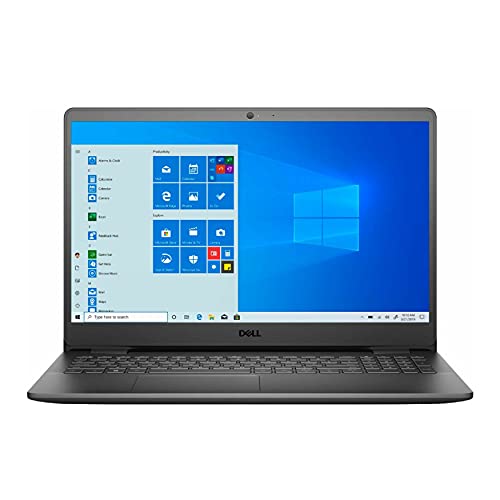
Dell Inspiron 15 3000 -- Best Budget Option
Dell's Inspiron 15 3000 series frequently comes configured with Office Home and Student, making it one of the most accessible entry points for a full Office-bundled laptop. Intel Core i5 or AMD Ryzen 5 variants are solid for everyday tasks including documents, spreadsheets, email, and web browsing. The 15.6-inch display is comfortable for extended work sessions. Storage is 512GB SSD in most configurations, which is sufficient for home and student use. This is not a performance machine, but for users who primarily need a reliable Word and Excel device at a low total cost, it delivers strong value per dollar.

HP Pavilion 14 -- Best Family Laptop With Office
The HP Pavilion 14 with Microsoft 365 subscription is a well-rounded mid-range option that works well as a shared family computer. The 14-inch display is compact enough to carry to school or travel but comfortable for home use. HP frequently bundles a one-year Microsoft 365 Family subscription with select configurations, which allows installation on up to six devices, making it genuinely useful for households with multiple users. Intel Core i5 or AMD Ryzen 5 processors handle everyday productivity tasks without issue. HP SureStart security features add an extra layer of protection for family use.

Lenovo IdeaPad 5 Pro -- Best Mid-Range With Office
The Lenovo IdeaPad 5 Pro strikes a strong balance between build quality, display, and bundled software at a mid-range price. AMD Ryzen 7 or Intel Core i7 configurations handle multitasking well, making it suitable for users who run Office alongside video calls, multiple browser tabs, or other applications simultaneously. The 14 or 16-inch 2K display is one of the better screens at this price tier, particularly for reading documents and working in Excel with many columns visible. IdeaPad 5 Pro configurations with Office Home and Student represent solid total cost of ownership compared to buying hardware and software separately.

ASUS VivoBook 16 -- Best Large-Screen Budget Option
The ASUS VivoBook 16 offers a 16-inch display at a budget-friendly price, making it a good fit for users who prefer more screen real estate for spreadsheets, documents, or multitasking. Select configurations include Office Home and Student. AMD Ryzen 5 or Intel Core i5 variants handle standard Office workloads without issue. The large display makes side-by-side document comparison more comfortable than on 13 or 14-inch laptops. Weight is around 3.9 pounds, which is manageable for occasional transport but better suited to desk or home use than daily commuting.
Buying considerations
What to consider
Verify the type of Office license included before purchasing. A perpetual Office Home and Student license is a one-time purchase tied to one device; a Microsoft 365 subscription offers more flexibility across devices and includes cloud storage. Confirm the Office version is a full licensed copy, not a trial, by checking the product listing details. Match the hardware to your workload: basic Word and Excel tasks run fine on entry-level processors, but complex Excel models, large PowerPoint decks, or running Office alongside other apps benefit from 16GB of RAM and a current-generation mid-range chip.
What to consider
For related reading, see [best laptops for working from home](/articles/best-laptops-working-from-home) and [best budget laptops under 600](/articles/best-budget-laptops-under-600). See how we select and rank products at [/methodology](/methodology).
Questions answered
No. Most Windows computers ship with a trial version of Microsoft 365 or no Office product at all. Some configurations, particularly from manufacturers like Dell, HP, and Lenovo aimed at business or family use, include a full Office Home and Student license. Always confirm whether the Office license included is a one-time perpetual license or a Microsoft 365 subscription before purchasing.
Microsoft 365 subscriptions ( to per year) include ongoing updates, 1TB of OneDrive cloud storage, and multi-device installs, making them a better value for families or anyone who needs Office on multiple devices. A one-time Office Home and Student license is cheaper long-term if you only need it on one PC and don't need cloud storage. Both options are functionally equivalent for Word, Excel, and PowerPoint core features.
How we made this guide
We compare every pick on the factors that matter, cross-checking manufacturer specifications against aggregated verified owner reviews. We rank independently and never take payment for placement. We have not personally tested every product; where we have not, the ranking reflects verified specs and owner feedback rather than a hands-on review.
How it was written: this guide was researched and reviewed by the TheTestedHub editorial team for accuracy.
Affiliate disclosure: TheTestedHub is reader-supported. When you buy through links on our site, we may earn a commission at no extra cost to you.
Keep reading

Your Docking Station Match: CalDigit TS4 and More

Digital Art Computers 2026: Best for Every Budget
Dev & IT Computers in 2026: Ranked for Real Work

Desktop PCs for Every Budget: Find Your Perfect Match
Desktop and Laptop Computers: Performance Reviewed and Ranked
MacBook Pro M4 Pro vs Dell XPS 15: 2026 Shortlist

Buy the Best DIY Computer in 2026: Corsair One i300
