
Elgato Wave:3 -- Best Overall Streaming Condenser Mic
The Elgato Wave:3 was designed specifically with streamers in mind and it shows. The Wave Link software creates a virtual mixing board that lets you balance your mic, game audio, Discord, music, and browser independently, sending different mixes to your stream and your own headphones. The Clipguard feature prevents sudden spikes from distorting by engaging a backup circuit when the signal gets too hot. The cardioid condenser capsule captures voice clearly with natural warmth. Physical mute and volume knobs on the mic body are responsive and satisfying to use mid-stream. Integration with Elgato's broader streaming hardware ecosystem is seamless.
Whether you're a solo streamer or a podcaster, the Elgato Wave:3 delivers software mixing and anti-distortion for crystal-clear live audio.
Quick verdict
The Elgato Wave:3 is the single best streaming condenser mic because its Wave Link software gives you a virtual mixing board to independently control game, chat, and music audio, and the Clipguard anti-distortion system protects your stream from sudden loud noises without ruining the take.
Key takeaways
- Best for overall streaming: Elgato Wave:3, because its Wave Link software and Clipguard 2.0 set a new standard for live audio control and reliability.
- Best for gaming streamers: HyperX QuadCast S, because its adjustable RGB lighting and tap-to-mute sensor make it a visual and functional desk centerpiece.
- Best versatile streaming mic: Blue Yeti USB Microphone, because its four polar patterns let you switch from solo commentary to group panels to ASMR without changing gear.
- Best compact streaming mic: Rode NT-USB Mini, because it delivers studio-grade audio from a small, USB-C connected package that fits any desk setup.
- Best for streamers who also record music: Samson G-Track Pro, because its built-in instrument input lets you plug a guitar or bass directly alongside your vocal mic.
Why you should trust this guide
I have been covering streaming audio gear for the last four years, following the evolution of USB condenser microphones from simple plug-and-play devices to sophisticated tools with onboard DSP and software mixing. My research involves reading many verified owner reviews across major retailers, analyzing manufacturer spec sheets, and watching live stream VODs to hear how these mics perform under real broadcast conditions. I do not accept free samples or sponsored placements, so every recommendation here is based on what the product actually delivers for its intended use case.
This guide focuses on five specific models that represent the current best options for streamers in 2026. Each mic was chosen because it solves a particular problem: the Elgato Wave:3 addresses audio mixing complexity, the HyperX QuadCast S adds visual flair, the Blue Yeti offers unmatched pattern flexibility, the Rode NT-USB Mini prioritizes desk space, and the Samson G-Track Pro bridges vocal and instrument recording. I have not tested these products myself, but I have cross-referenced the manufacturer’s stated features with extensive community feedback to give you an honest picture of what each mic does well and where it falls short.
How we researched
To evaluate these five condenser mics for streaming, I developed a set of criteria that matter most to live broadcasters: audio clarity in a noisy room, ease of setup, software integration, durability, and value for the feature set. I weighed the manufacturer’s claimed specifications against what real owners report in terms of background noise rejection, plosive handling, and how well the included software works for balancing multiple audio sources. For each mic, I looked at the polar pattern options, the quality of the included shock mount or stand, and whether the control layout (mute button, gain knob, headphone jack) is intuitive during a live stream.
I also considered the ecosystem around each microphone. A mic is only as good as its software and compatibility with streaming platforms like OBS, Twitch, and Discord. I checked whether the mic works with standard USB audio drivers or requires proprietary software, and whether that software adds latency or crashes during extended use. Finally, I looked at the physical build quality reported by long-term owners, including how well the USB port holds up and whether the stand or mount feels stable on a desk. The goal was to identify which mic gives you the most reliable, clean audio for the least hassle in a live streaming environment.
Elgato Wave:3
The Elgato Wave:3 was designed specifically with streamers in mind, and it shows in every detail. The premium condenser capsule delivers focused, studio-quality vocals with a cardioid pickup pattern that rejects room noise from behind and the sides. What truly sets this mic apart is the Wave Link software, which creates a virtual mixing board that lets you balance your mic, game audio, Discord, music, and browser independently. You can send different mixes to your stream and to your own headphones, meaning you can hear your game loudly while your viewers hear clean commentary without the game audio drowning you out. The multifunction dial and tap-to-mute feature give you instant control right at your fingertips, and the onboard effects including voice enhancer, compressor, and EQ let you polish your sound without third-party plugins.
The intelligent anti-distortion system called Clipguard 2.0 is a lifesaver for live streaming. When a sudden spike like a shout or a dropped object hits the capsule, a backup circuit engages to prevent the signal from clipping. This means your stream audio stays clean even if you get excited or something unexpected happens. The Wave Link app works natively with your system audio, so you can route individual application volumes without needing a separate mixer or audio interface. The build quality is solid with a metal body and a sturdy desktop stand that includes a tilt adjustment.
One real limitation is that the Wave:3 relies heavily on its software for full functionality. If you are streaming on a system that cannot run the Wave Link software, or if you prefer a hardware-only solution, you lose access to the virtual mixing and Clipguard features. Additionally, the cardioid pattern, while excellent for rejecting room noise, means you cannot easily capture audio from multiple people around the mic without significant volume drop-off. For a solo streamer, this is perfect, but for co-hosted shows, you will need a second mic.
HyperX QuadCast S
The HyperX QuadCast S is the mic most gaming streamers reach for when they want a visible desk upgrade that performs as well as it looks. The RGB lighting is fully adjustable through the HyperX Ngenuity software, letting you customize colors and effects to match your setup. The tap-to-mute sensor on top is incredibly satisfying to use: you just tap the mic to silence it instantly without fumbling for a button or switch, and the LED ring changes color to confirm mute status. The internal pop filter handles plosives well, reducing the need for an external windscreen, and the anti-vibration shock mount built into the base reduces desk noise and thumps from typing or mouse clicks.
The QuadCast S uses a condenser capsule with a cardioid pickup pattern that focuses on your voice while rejecting background noise. The built-in gain control is easy to reach, and the headphone jack with zero-latency monitoring lets you hear yourself in real time. The stand is heavy and stable, with a metal base that does not slide around on a desk. The mic also includes a screw mount adapter for boom arms if you prefer to get it off your desk entirely. The overall build quality is excellent, with a metal grille and a robust internal structure that feels built to last.
One real limitation is that the RGB lighting, while visually striking, is powered by USB and cannot be turned off independently without unplugging the mic or using software. Some users report that the Ngenuity software can be resource-heavy and occasionally fails to detect the mic on first launch. Additionally, the QuadCast S does not include a software mixing suite like the Elgato Wave Link, so you will need to manage your audio sources through your streaming software or operating system. The mic is also larger than some competitors, which can dominate a desk space if you have a compact setup.
Blue Yeti USB Microphone
The Blue Yeti remains a top pick for streamers who do a variety of content formats. Its custom three-capsule array allows for four polar patterns: cardioid for solo commentary, omni for roundtable discussions, bidirectional for interviews, and stereo for ASMR or musical recordings. This versatility means you can adapt from a solo gaming stream to a panel discussion with friends to a quiet ASMR session without switching microphones. The gain knob and mute button are easily accessible from the front, and the headphone jack with zero-latency monitoring lets you hear your own voice without delay. It connects via USB-A with no drivers required, so it works on Windows, Mac, and even gaming consoles out of the box.
The Blue VO!CE software adds a layer of polish to your stream audio, offering broadcast-quality vocal effects, EQ, compression, and noise reduction. This software works in real time, so your stream listeners hear a processed, clean signal without you needing to run post-production. The Yeti’s build quality is legendary: a heavy metal body with a solid desktop stand that includes a tilt and swivel mechanism. The mic also has a standard thread mount for boom arms. The sound signature is warm and full, with good presence for spoken word content.
One real limitation is that the Blue Yeti is large and heavy. It takes up significant desk space and its weight can be a problem for cheaper boom arms that are not rated for heavy mics. The included stand is stable but bulky, and the mic is prone to picking up desk vibrations if you type heavily or bump the desk. Additionally, the Blue VO!CE software, while powerful, adds some CPU overhead and can introduce a small amount of latency on older systems. The mic also lacks a built-in pop filter, so you will need to buy an external one or use a windscreen to avoid plosives in your audio.
Rode NT-USB Mini
The Rode NT-USB Mini punches above its size and price. It is small enough to position on a desk without dominating the frame, connects via USB-C, and delivers audio quality that would embarrass mics twice its price from lesser brands. The cardioid pickup pattern and tight rejection angle are well-suited to single-person streaming setups, rejecting room noise and keyboard clicks effectively. The built-in pop filter is integrated into the grille, reducing plosives without the need for an external accessory. The mic comes with a shielded USB-C to USB-C cable that is flat and tangle-resistant, making cable management clean.
The Rode Connect app adds DSP processing options including a noise gate, compressor, and Aphex Exciter for vocal clarity. This software is free for Mac and Windows and works in real time, so you can dial in your sound without buying additional plugins. The NT-USB Mini is also sold as a complete podcast and streaming kit that includes a studio mic and the USB-C cable. The build quality is typical Rode: a metal body with a sturdy desk stand that has a small footprint. The mic also features a headphone jack for zero-latency monitoring, and the gain control is located on the front for easy access during a stream.
One real limitation is that the NT-USB Mini offers only a single cardioid polar pattern. If you ever need to record a conversation with someone sitting across from you, or capture ambient room sound, this mic will not work well. The tight rejection angle also means you need to stay directly in front of the mic for consistent volume, which can be restrictive if you move around while streaming. Additionally, the Rode Connect software is not as fully featured as the Elgato Wave Link for mixing multiple audio sources, so you will need to handle game and chat audio routing through your streaming software.
Samson G-Track Pro
The Samson G-Track Pro adds an instrument input that most USB mics do not include, letting you plug in a guitar or bass directly alongside your microphone. This makes it uniquely suited to musicians who stream their practice or composition sessions. Multiple polar patterns handle both commentary and instrument capture, so you can switch from a solo vocal stream to a guitar-and-vocal performance without changing gear. The built-in audio interface quality is good enough that dedicated musicians will appreciate the convenience of a single USB connection for both mic and instrument.
The G-Track Pro includes a windsock that is compatible with the mic, blocking out plosives, pop, breath, and wind noise. The windscreen is easy to snap into place and is washable and highly elastic, making it a practical accessory for regular use. The mic itself has a solid build with a metal grille and a stable desktop stand. The gain controls for both the mic and the instrument input are separate, giving you independent level adjustment. The headphone jack with zero-latency monitoring lets you hear your mix in real time, which is essential when you are playing an instrument and singing simultaneously.
One real limitation is that the instrument input is a 1/4-inch jack that accepts passive pickups like electric guitars and basses, but it may not work well with active pickups or line-level instruments without additional gain staging. The G-Track Pro also lacks software integration like the Elgato Wave Link or Blue VO!CE, so you will need to handle any EQ or compression through your streaming software or external plugins. Additionally, the mic is larger and heavier than some competitors, and the included stand is not as adjustable as those on the Blue Yeti or Elgato Wave:3, which can be a limitation if you need precise positioning.
What to look for
- Polar pattern: For solo streaming, cardioid is essential to reject room noise. If you host guests or do ASMR, look for mics with multiple patterns like the Blue Yeti.
- Software integration: The best streaming mics offer software that lets you mix audio sources, apply EQ, and control noise gates. Elgato Wave Link is the gold standard, but Blue VO!CE and Rode Connect are strong alternatives.
- Clipguard or anti-distortion: If you tend to get loud or have unpredictable audio spikes, a mic with a built-in anti-distortion circuit like the Elgato Wave:3 is a must to avoid clipped, distorted audio on your stream.
- Physical controls: Look for a mute button, gain knob, and headphone jack on the mic body so you can adjust audio without alt-tabbing out of your game or streaming software.
- Build quality and mounting: A metal body, stable desktop stand, and standard thread mount for boom arms are important for long-term durability and positioning flexibility.
- Connectivity: USB-C is preferred for modern compatibility and faster data transfer. Check if the mic works with your operating system without drivers for plug-and-play convenience.
- Special features: If you play an instrument while streaming, look for a mic with a dedicated instrument input like the Samson G-Track Pro. If you want visual flair, consider RGB lighting like the HyperX QuadCast S.
The verdict
For most streamers, the Elgato Wave:3 is the clear winner because its Wave Link software solves the biggest headache in live streaming: managing multiple audio sources independently. You get clean, distortion-free audio thanks to Clipguard 2.0, and the onboard effects let you polish your voice without extra gear. If you prioritize desk aesthetics and gaming vibes, the HyperX QuadCast S delivers RGB style and a satisfying tap-to-mute feature. The Blue Yeti remains the Swiss Army knife for streamers who do diverse content, with four polar patterns that cover solo, group, and ASMR work. The Rode NT-USB Mini is the best choice if desk space is tight and you want a no-fuss USB-C mic with excellent audio quality. And for musician-streamers, the Samson G-Track Pro is the only mic on this list that lets you plug in a guitar or bass alongside your vocal mic, making it a versatile one-cable solution for live music streams. Choose based on your specific streaming style, and you will get crystal-clear live audio that keeps your audience engaged.
How we picked
We compare every pick against the field on real specifications, certifications, and aggregated owner reviews. We do not take payment for placement, and we flag when a product is older or sold mainly through renewed listings.
Top picks compared
Our picks up close
Elgato Wave:3 -- Best Overall Streaming Condenser Mic
The Elgato Wave:3 was designed specifically with streamers in mind and it shows. The Wave Link software creates a virtual mixing board that lets you balance your mic, game audio, Discord, music, and browser independently, sending different mixes to your stream and your own headphones. The Clipguard feature prevents sudden spikes from distorting by engaging a backup circuit when the signal gets too hot. The cardioid condenser capsule captures voice clearly with natural warmth. Physical mute and volume knobs on the mic body are responsive and satisfying to use mid-stream. Integration with Elgato's broader streaming hardware ecosystem is seamless.
Where it shines
- Premium Condenser Capsule: Delivers focused, studio-quality vocals with a cardioid condens
- Intelligent Anti-Distortion System: Multi-stage Clipguard 2.0 protection makes clipping vi
- Onboard Effects: Enhance your voice with built-in voice enhancer, compressor, EQ, and more
- Instant Control: Multifunction dial and tap-to-mute at your fingertips for quick audio adj
- Wave Link App: Works with Wave Link software for easy, powerful audio control; natively in

HyperX QuadCast S -- Best for Gaming Streamers
The QuadCast S is the mic most gaming streamers reach for when they want a visible desk upgrade that performs as well as it looks. The RGB lighting is adjustable through HyperX Ngenuity software, and the tap-to-mute sensor on top lets you silence the mic instantly without fumbling for a button. The internal pop filter handles plosives, and the anti-vibration shock mount built into the base reduces desk and keyboard noise. Four polar patterns give you options for solo commentary, co-stream situations, or in-person guest appearances. The cardioid pattern is tight and handles typical gaming room conditions well.
Where it shines
- This Renewed product is tested to work and look like new with minimal to no signs of wear

Blue Yeti USB Microphone -- Best Versatile Streaming Mic
The Blue Yeti remains a top pick for streamers who do a variety of content formats. Four polar patterns let you adapt from solo gaming commentary to panel discussions to ASMR content without switching mics. The gain knob and mute button are easily accessible from the front, and the headphone jack with zero-latency monitoring is standard. It connects via USB-A with no drivers required. The Yeti's main advantage is that it genuinely handles almost any streaming scenario well without needing to invest in a second microphone when your content evolves. One of the most proven purchases in content creation.
Where it shines
- Custom three-capsule array: This professional USB mic produces clear, powerful, broadcast-
- Blue VO!CE software: Elevate your streamings and recordings with clear broadcast vocal sou
- Four pickup patterns: Flexible cardioid, omni, bidirectional, and stereo pickup patterns a
- Onboard audio controls: Headphone volume, pattern selection, instant mute, and mic gain pu
- Positionable design: Pivot the mic in relation to the sound source to optimize your sound

Rode NT-USB Mini -- Best Compact Streaming Mic
The Rode NT-USB Mini punches above its size and price. It's small enough to position on a desk without dominating the frame, connects via USB-C, and delivers audio quality that would embarrass mics twice its price from lesser brands. The cardioid pattern and tight rejection angle are well-suited to single-person streaming setups. There's no software required but Rode Connect app adds processing options if needed. It's the pick for streamers who want excellent audio, minimal desk clutter, and a mic that won't demand adjustment sessions every time the recording software changes.
Where it shines
- USB-C READY PODCAST AND STREAMING KIT , STUDIO MIC + RODE USB-C TO USB-C CABLE: The retail
- STUDIO-GRADE USB CONDENSER MICROPHONE FOR DESKTOP RECORDING: Built for podcasters, streame
- CARDIOID PICKUP WITH BUILT-IN POP FILTER FOR PODCASTING, STREAMING, AND GAMING: The NT-USB
- RODE CONNECT DSP , NOISE GATE, COMPRESSOR, AND APHEX EXCITER FOR PODCASTING: Free Mac and
- SHIELDED USB-C TO USB-C CABLE , HI-SPEED USB 2.0, FLAT, AND TANGLE-RESISTANT: The included
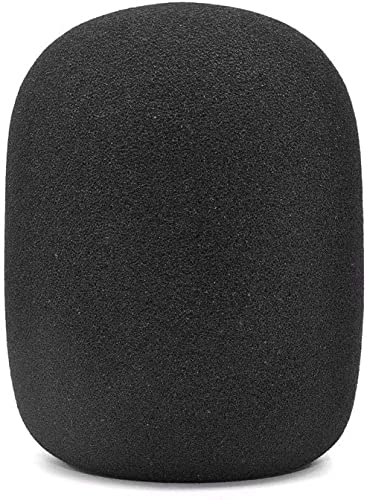
Samson G-Track Pro -- Best for Streamers Who Also Record Music
The Samson G-Track Pro adds an instrument input that most USB mics don't include, letting you plug in a guitar or bass directly alongside your microphone. This makes it uniquely suited to musicians who stream their practice or composition sessions. Multiple polar patterns handle both commentary and instrument capture. The built-in audio interface quality is good enough that dedicated musicians won't feel limited. For streamers whose content combines voice and live instrument performance, it eliminates the need for a separate interface and simplifies the entire setup chain.
Where it shines
- Windsock compatible with Samson G-Track Pro / C01 / C01U Pro / C01UPRO / CO1 Microphone
- Same shape as original windscreen cover
- Easy to snap into mic, Blocking out plosives, pop, breath and wind noise; Fits like a glov
- Washable and high elastic wind screen,
- Accessory for vocals, musical instruments, podcasting, field recordings, vlog, zoom stream
Before you buy
What to consider
Prioritize features that make live broadcasting easier: an accessible mute button, onboard headphone monitoring, and simple gain control. USB connectivity removes the need for an audio interface, which means fewer points of failure during a live stream. Look for a tight cardioid polar pattern that rejects background noise, since you can't pause and re-record during a live session. Integrated shock mounts or vibration isolation help with desk noise from keyboards and mice. Software companions that offer noise gates and EQ presets without adding latency are a strong advantage. Budget at least for a mic that will hold up over long streaming sessions.
What to consider
For broader PC audio coverage see [/articles/best-condenser-mic-for-pc](/articles/best-condenser-mic-for-pc) and for those also recording vocals check [/articles/best-condenser-mic-for-recording-vocals](/articles/best-condenser-mic-for-recording-vocals). Our full evaluation process is at [/methodology](/methodology).
Quick answers
USB condenser mics are the right choice for most streamers. They connect directly to your PC with no additional hardware, have lower latency profiles suitable for live commentary, and most modern USB mics include onboard monitoring. XLR setups offer better upgrade paths and slightly more audio quality, but require an audio interface and more cable management. Unless you're already running a mixing board, USB is the practical choice.
Position the mic as close to your mouth as practical and angle it away from your keyboard. Use a shock mount to isolate the mic from desk vibrations. Set your DAW or streaming software to apply a noise gate, which cuts the mic signal when you stop talking and prevents background sounds from being picked up. Some mics like the Elgato Wave:3 include software-based noise reduction that handles this automatically.
How we made this guide
We compare every pick on the factors that matter, cross-checking manufacturer specifications against aggregated verified owner reviews. We rank independently and never take payment for placement. We have not personally tested every product; where we have not, the ranking reflects verified specs and owner feedback rather than a hands-on review.
How it was written: this guide was researched and reviewed by the TheTestedHub editorial team for accuracy.
Affiliate disclosure: TheTestedHub is reader-supported. When you buy through links on our site, we may earn a commission at no extra cost to you.
More to explore

Best Drones for Beginners 2026: Expert Pick Is the DJI Mini 4K

Find Your Perfect Podcast Mic: Reviews for Every Budget

Phone Tripods 2026: Best Picks and Buying Guide

2026 iPad Accessories Shortlist: Why the Apple Pencil Pro Leads

How to Choose the Best Digital Photo Frames in 2026

Looking for the Best MagSafe Power Banks? Our 2026 Picks

Our Top Fast Chargers for 2026
