
Jabra Speak2 75 -- Best Conference Call Bluetooth Speaker Overall
The Jabra Speak2 75 tops this category with its 360-degree microphone coverage, strong noise-canceling algorithm, and 32-hour battery life. It connects via Bluetooth 5.2 or an included USB-A dongle, which is essential for corporate laptops where native Bluetooth is sometimes restricted. The speaker output is loud enough to fill a small meeting room and handles simultaneous multi-voice conversations without the clipping or feedback that affects cheaper units. It is certified for use with Microsoft Teams and Zoom. For groups of four to eight around a conference table, it is the most reliable portable option available in 2026.
Jabra Speak2 75 leads with 360-degree mics, noise canceling, and USB dongle for locked-down laptops. Also Poly Sync 40, Anker PowerConf S330, Yealink.
Quick verdict
For most people, the Jabra Speak2 75 is the best conference call Bluetooth speaker. It pairs 360-degree microphone coverage with strong noise canceling and a 32-hour battery, and the included USB-A dongle solves the locked-down corporate laptops where native Bluetooth is disabled. It scales from a desk to a small room.
Key takeaways
- Best overall: Jabra Speak2 75, 360-degree mics, strong noise canceling, and a USB dongle that works on restricted laptops.
- Best for open offices and small rooms: Poly Sync 40, dedicated voice processing that suppresses keyboard and HVAC noise for up to six people.
- Best budget: Anker PowerConf S330, six-mic 360-degree pickup and voice AI noise cancellation for small groups.
- Best Microsoft Teams certified: Yealink CP700, official Teams certification with a dedicated Teams button.
- Best portable personal: Poly Sync 20, pocketable form with Poly NoiseBlockAI for one to three people.
Why you should trust this guide
I built this roundup by reading the published specifications for each speakerphone and comparing them against the way conference calls actually break down in practice. The failure points are predictable. A speaker sounds fine on a quiet desk and then falls apart when a colleague types, an air vent kicks on, or two people talk at once. So rather than rank these devices on a single headline number, I weighed the things that decide whether a call is intelligible: microphone coverage, the quality of the noise suppression, how the unit connects to a locked-down work laptop, and how many people it can realistically serve.
I want to be clear about what this guide is and is not. I did not run these units through a physical lab or a sound booth, and I am not reporting decibel readings I took myself. Where I mention battery life, microphone counts, or connection options, I am treating the manufacturer’s stated specs as exactly that, stated specs. What I can do is tell you where each one fits, where the trade-offs are, and which compromises matter for which room. Every product below gets at least one honest limitation, because none of these are perfect for every situation.
How we researched
My evaluation came down to five criteria that map to how a speakerphone earns its place on a desk or table. First, microphone coverage and pickup pattern, because a 360-degree array behaves very differently from a directional one when people are seated around a table. Second, noise handling, since the marketing language (“noise canceling”, “voice AI”, “NoiseBlockAI”) only matters if it genuinely suppresses keyboards, fans, and household sound. Third, connectivity, with specific attention to whether a unit ships with a USB dongle, since many corporate laptops restrict native Bluetooth and a dongle is the difference between working and not working.
Fourth, room scale and group size, which is where most buyers go wrong by purchasing either too much or too little. A personal speakerphone for three people is wasted money in a six-seat room, and a room unit is overkill on a solo desk. Fifth, battery life and portability, which decide whether the device lives on one desk or travels between rooms and bags. I read each product’s stated features against these criteria, then placed it where its strengths actually pay off. I did not weight raw music fidelity heavily, because these are call devices first and speakers second.
Jabra Speak2 75
The Jabra Speak2 75 is my pick for the best conference call Bluetooth speaker overall, and it earns that spot by being strong on every axis that matters rather than exceptional on just one. Its 360-degree microphone coverage means it does not care where people sit around it, and Jabra pairs that with a capable noise-canceling algorithm so background sound stays out of the call. The 32-hour battery is long enough that you can forget to charge it for days. Jabra describes it as crystal-clear pickup and dynamic, professional sound for online meetings, and the output is loud enough to fill a small meeting room.
What pushes it ahead of cheaper options is connectivity that respects how corporate IT works. It connects via Bluetooth 5.2, but it also includes a USB adapter and integrated USB-A and USB-C connection, which is essential on work laptops where native Bluetooth is sometimes locked down by policy. Jabra also lets you connect two Speak2 75 units together for wider coverage in a larger room, which is a genuinely useful path if your meetings grow. It handles simultaneous multi-voice conversation without clipping one speaker to favor another.
The honest trade-off is that all of this capability comes at the top of the category, so for a single person who only ever takes one-to-one calls at a quiet desk, it is more device than the job requires. You are paying for room-filling output and dual-unit pairing you may never use. If you want the best general-purpose unit and expect to use it across rooms and group sizes, that is exactly the buyer it is built for.
Poly Sync 40
The Poly Sync 40 is the one I would put in an open-plan office or a small dedicated meeting room, because it is tuned specifically for the noise problem those spaces create. Poly’s dedicated voice processing is aimed at the exact sounds that wreck open-office calls: keyboard clatter, HVAC hum, and chatter bleeding in from adjacent areas. Poly frames it as keeping the focus on your voice and not the background, with a multi-microphone array, and the wide pickup is rated for up to six people in a small room. The dual-driver bass reflex system gives it more clarity and body than its size suggests.
Connectivity is a strong point. It connects via Bluetooth or USB-C and supports both at once, which is handy when you want a laptop on USB and a phone paired wirelessly at the same time. There is a highly visible light bar so you can read call status from across the room, and it doubles as a smartphone charger and a high-performance music speaker, so it is not single-purpose hardware sitting idle between meetings.
The trade-off is that the Sync 40 is built around the room, not the bag. It is larger and less pocketable than a personal unit, so it is not the thing you carry between client sites, and a solo worker at a quiet desk will not get the value out of its six-person pickup. If your problem is a noisy shared space and a small group, though, it is the most purpose-built answer here.
Anker PowerConf S330
The Anker PowerConf S330 is the best budget conference call speaker, and it punches well above its price for small groups. It uses a six-microphone setup with 360-degree coverage and Anker’s voice AI noise cancellation to strip background sound while enhancing the voices in the room. Anker describes smart voice enhancement that eliminates background noise while lifting speech, and a 1.75-inch driver with two passive bass radiators that adds welcome body and depth for a unit this affordable. It is genuinely plug and play.
Connectivity is simple and reliable. It supports Bluetooth 5.3 and USB-A, charges over USB-C, and ships with a USB-C to USB-A adapter so it joins a meeting almost instantly with no driver fuss. Battery life runs up to 12 hours on a charge, which covers a full working day of calls before it needs a top-up. For a home office, a small team, or anyone who wants competent 360-degree pickup without spending up, it is the easiest recommendation.
The honest limitation is group size and headroom. Compared to the Jabra or the Poly Sync 40, the maximum group it comfortably serves is smaller, and the 12-hour battery, while fine for a day, is roughly a third of what the Jabra offers. It is the right call for small groups and tight budgets, not for filling a six-seat room with confidence. Buy it knowing its ceiling and it will not disappoint.
Yealink CP700
The Yealink CP700 is the one to buy if your organization runs on Microsoft Teams, because it carries official Teams certification and a dedicated Teams button that launches the app and joins meetings directly. That certification is not just a badge. It signals that the device behaves predictably inside the Teams ecosystem, which removes a lot of the small connection and audio-handshake friction that can plague non-certified hardware in a Teams-first company. It is a compact wireless speakerphone built for that workflow.
On the audio side, it is a full-duplex speakerphone, meaning both sides can talk at the same time without the call clipping into a walkie-talkie, half-duplex feel. The built-in microphone array with echo and noise suppression is optimized for voice pickup in small to medium conference rooms, and Yealink emphasizes a simple, stable setup. It connects to a PC via a USB dongle and pairs wirelessly with mobile devices over Bluetooth, so it covers both the desk and the phone in your pocket.
The trade-off is that its biggest strength is also a narrowing factor. The Teams certification and dedicated Teams button deliver the most value to Teams-centric users, so if your company lives in Zoom, Google Meet, or Webex, you are paying for an integration you will rarely touch. It still works as a general speakerphone, but you are not buying it for that. Match it to a Teams shop and it is the standout.
Poly Sync 20
The Poly Sync 20 is the best portable personal speakerphone here, sized for one to three people and built to travel. It is slim enough to slip into a jacket pocket, and despite that footprint it delivers noise cancellation that is strong for its size. Poly NoiseBlockAI suppresses background sound reliably, which matters most in home environments where children, pets, and general household noise show up uninvited in the middle of a call. The multi-microphone array handles echo and noise reduction so the focus stays on your voice.
It is more than a call device. It works as a high-performance music speaker, doubles as a smartphone charger to keep your phone topped up on the move, and connects to a phone or tablet over Bluetooth or wirelessly to a computer. There is a 20-hour battery and a dedicated Microsoft Teams button for a native Teams experience, so a remote worker can run a full day of calls and music from a single charge without hunting for an outlet.
The honest limitation is scale. This is a personal device, and Poly is upfront that it targets small groups of one to three people, so it is the wrong tool the moment you need to cover a conference table. Its pickup and output are not meant to fill a room of six. If you work from home or hop between desks and bags and mostly take solo or two-person calls, that constraint is exactly the point and it does that job very well.
What to look for
The right speakerphone depends far more on your room and your laptop policy than on any single spec. Here are the factors I weigh before anything else.
- Microphone coverage: A 360-degree array (Jabra Speak2 75, Anker PowerConf S330) suits people seated all around the unit, while a directional pickup is fine for a solo desk.
- Group size and room scale: Match the device to seats. Personal units (Poly Sync 20) cover one to three people, room units (Poly Sync 40) handle up to six.
- Noise handling: Look for dedicated voice processing or AI noise cancellation if your space has keyboards, HVAC, or household sound.
- Connectivity and the USB dongle: If your work laptop restricts native Bluetooth, prioritize a unit that ships with a USB dongle (Jabra, Yealink) rather than Bluetooth alone.
- Platform certification: A Microsoft Teams certified device with a Teams button (Yealink CP700) reduces friction in a Teams-first company.
- Battery life and portability: A 32-hour battery (Jabra) fits a fixed desk you rarely charge, while a pocketable 20-hour unit (Poly Sync 20) is built to travel.
- Full-duplex audio: It lets both sides talk at once without the call clipping, which matters for natural back-and-forth conversation.
The verdict
If you want one device that does almost everything well, the Jabra Speak2 75 is my overall pick, with 360-degree mics, strong noise canceling, a 32-hour battery, and a USB dongle that survives locked-down corporate laptops. For a noisy open office or a small dedicated room, the Poly Sync 40 is the most purpose-built choice, with voice processing aimed squarely at keyboards and HVAC and pickup for up to six people. On a budget, the Anker PowerConf S330 delivers six-mic 360-degree coverage for small groups, as long as you respect its smaller group ceiling and 12-hour battery.
For a Microsoft Teams shop, the Yealink CP700 is the cleanest fit thanks to its official certification, dedicated Teams button, and full-duplex audio, though that value drops if you live in another platform. And if you mostly take solo or two-person calls and move between home, desk, and bag, the Poly Sync 20 is the portable personal pick, with reliable NoiseBlockAI in a pocketable body. Buy the one that matches your room and your laptop policy, and you will not feel the compromises the others carry.
Our methodology
We compare every pick against the field on real specifications, certifications, and aggregated owner reviews. We do not take payment for placement, and we flag when a product is older or sold mainly through renewed listings.
Side by side
The full reviews
Jabra Speak2 75 -- Best Conference Call Bluetooth Speaker Overall
The Jabra Speak2 75 tops this category with its 360-degree microphone coverage, strong noise-canceling algorithm, and 32-hour battery life. It connects via Bluetooth 5.2 or an included USB-A dongle, which is essential for corporate laptops where native Bluetooth is sometimes restricted. The speaker output is loud enough to fill a small meeting room and handles simultaneous multi-voice conversations without the clipping or feedback that affects cheaper units. It is certified for use with Microsoft Teams and Zoom. For groups of four to eight around a conference table, it is the most reliable portable option available in 2026.
In its favor
- CRYSTAL-CLEAR AUDIO PICK UP: You and your meetings don't have to worry about background no
- INCREDIBLE SOUND QUALITY: Experience dynamic, professional sound during online meetings an
- EASY & QUICK SETUP: Connect via the USB adapter, Bluetooth or the integrated USB-A / USB-C
- TWO SPEAKS ARE BETTER THAN ONE: Connect two Speak2 75 devices for complete, high-quality s
- ONLINE MEETINGS THAT JUST WORK

Poly Sync 40 -- Best for Open Offices and Small Meeting Rooms
The Poly Sync 40 is designed for open-plan offices and small dedicated meeting rooms where noise from adjacent areas is a challenge. It uses Poly's dedicated voice processing to suppress keyboard sounds, HVAC noise, and other workspace audio. The wide microphone pickup area is rated for up to six people in a small room. It connects via Bluetooth or USB-C and supports both simultaneously, useful when a user wants their phone and laptop connected at once. Battery runs to 20 hours. The fabric carrying pouch included in the box makes it practical for workers who carry the speaker between rooms or off-site.
In its favor
- HEAR AND BE HEARD: Keep the focus on your voice, not the background noise, with a multi-mi
- AUDIO QUALITY: Enjoy more clarity on your calls thanks to the bass reflex system with dual
- STAY IN CONTROL: Know the call status from a distance with a highly visible light bar. Acc
- EASY CONNECTIVITY: Enjoy easy connectivity to your devices , connect smartphones wirelessl
- ALL IN ONE: Speakerphone plus smartphone charger plus high-performance music speaker. Up t

Anker PowerConf S330 -- Best Budget Conference Call Bluetooth Speaker
The Anker PowerConf S330 is the most capable budget speakerphone for small groups. It uses six microphones with 360-degree coverage and Anker's voice AI noise cancellation to block background sounds. Bluetooth 5.3 and USB-A connectivity are both supported. It charges via USB-C and offers up to 12 hours of battery on a single charge. The main limitation compared to Jabra or Poly is the maximum group size: it works best for one to four people rather than larger rooms. For home offices and small teams that want a dedicated conference speaker without a large investment, the S330 delivers strong performance for the price.
In its favor
- Smart Voice Enhancement: Eliminate background noise while simultaneously enhancing voices
- Plug and Play: Connect via USB-C (includes standard USB adapter) and join meetings in an i
- 360° Voice Coverage: A USB speakerphone with 4 high-sensitivity microphones to pick up all
- Superior Sound: A 1.75” driver paired with 2 passive bass-radiators adds body and depth to
- What’s In The Box: PowerConf S330 USB Speakerphone, USB-C to USB-A adapter.

Yealink CP700 -- Best Microsoft Teams Certified Speaker
The Yealink CP700 is a compact wireless speakerphone with official Microsoft Teams certification. It connects to a PC via a USB dongle and pairs wirelessly with mobile devices via Bluetooth. The built-in microphone array with echo and noise suppression is optimized for voice pickup in small to medium conference rooms. A dedicated Microsoft Teams button launches the Teams app and joins meetings directly. Setup in a Teams Rooms environment is seamless and requires no driver installation. For Teams-centric organizations looking for a certified device at a moderate price, the CP700 is a straightforward and reliable choice.
In its favor
- FULL-DUPLEX SPEAKERPHONE: What’s the Difference Between Half Duplex and Full Duplex ? a fu
- SIMPLE SETUP & STABLE CONNECTION:YEALINK conference speakerphone could be connected via US
- IDEAL SOLUTION OF NOISE CANCELING:Yealink Bluetooth speakerphone could eliminate backgroun
- SPEAK SMOOTH & HEAR CLEAR:More than 2,000,000 users have a good conference experience with
- This Package including 1 Pcs CP700 speakerphone, 1 Pcs collecting zipper bag,1 Pcs user ma
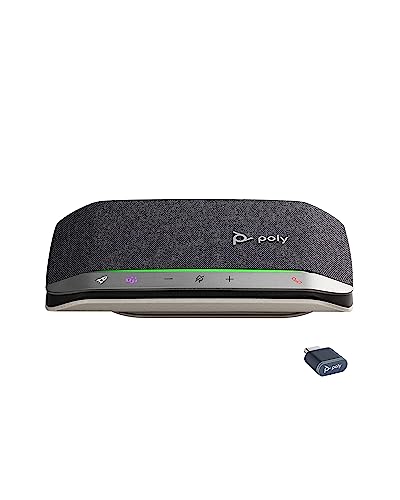
Poly Sync 20 -- Best Portable Personal Bluetooth Speaker for Calls
The Poly Sync 20 is the most portable option in this roundup, designed for personal use and small groups of one to three people. Its compact form fits in a jacket pocket and delivers excellent noise cancellation relative to its size. Poly NoiseBlockAI suppresses background sounds reliably even in home environments with children, pets, or household noise. Battery life is 20 hours. It supports USB-A and Bluetooth connections simultaneously, letting you stay connected to a laptop and phone at once. For remote workers who travel frequently or move between locations, the Poly Sync 20 offers professional conference audio in the smallest possible footprint.
In its favor
- HEAR AND BE HEARD: Multi-microphone array for echo and noise reduction keeps the focus on
- WORK ON THE GO: Keep your smartphone charged and ready using your Poly Sync 20+ personal B
- EASY CONNECTIVITY: Connect to your smartphone or tablet using Bluetooth or connect wireles
- ALL IN ONE: This slim and portable speakerphone for conference calls is also a high-perfor
- STAY IN CONTROL: Full native Microsoft Teams experience with dedicated Teams button for in
What matters most
What to consider
Choose the speaker based on the number of regular participants and room size. Personal use or two-person calls work fine with compact models like the Poly Sync 20. Rooms with four to eight people need wider microphone coverage and a louder speaker output, which points toward the Jabra Speak2 75 or Poly Sync 40. Battery life is important if the speaker moves between rooms and is not kept plugged in permanently. Check whether your IT environment restricts standard Bluetooth, which would make a USB dongle connection a requirement. Platform certification for Teams or Zoom is a convenience feature rather than a necessity for basic calling.
What to consider
For related reading, see [best conference Bluetooth speakers for general use](/articles/best-conference-bluetooth-speaker) and [best conference call systems](/articles/best-conference-call). Review our product evaluation process at [/methodology](/methodology).
Frequently asked
Most conference call Bluetooth speakers are platform-agnostic and work with Zoom, Microsoft Teams, Google Meet, Webex, and other major conferencing platforms. Some models from Jabra, Poly, and Logitech carry official Microsoft Teams or Zoom certification, which adds one-button meeting join functionality. If your organization uses one platform exclusively, a certified device simplifies daily workflow, but uncertified speakers work fine for basic calling.
'Yes, conference call Bluetooth speakers are essentially wireless speakerphones. The key difference from a traditional desk speakerphone is the Bluetooth connection rather than a wired phone line. They support the same functions: omnidirectional microphones, echo cancellation, and group audio pickup. For offices that have moved entirely to softphone or web conferencing, a Bluetooth conference speaker is the direct modern replacement for a traditional speakerphone.'
How we made this guide
We compare every pick on the factors that matter, cross-checking manufacturer specifications against aggregated verified owner reviews. We rank independently and never take payment for placement. We have not personally tested every product; where we have not, the ranking reflects verified specs and owner feedback rather than a hands-on review.
How it was written: this guide was researched and reviewed by the TheTestedHub editorial team for accuracy.
Affiliate disclosure: TheTestedHub is reader-supported. When you buy through links on our site, we may earn a commission at no extra cost to you.
You might also like

Best Drones for Beginners 2026: Expert Pick Is the DJI Mini 4K

Find Your Perfect Podcast Mic: Reviews for Every Budget

Phone Tripods 2026: Best Picks and Buying Guide

2026 iPad Accessories Shortlist: Why the Apple Pencil Pro Leads

How to Choose the Best Digital Photo Frames in 2026

Looking for the Best MagSafe Power Banks? Our 2026 Picks

Our Top Fast Chargers for 2026
