
Logitech MX Brio -- Best for Home Offices
The Logitech MX Brio is a 4K webcam that covers individual desks and small meeting spaces up to four people. Its 90-degree field of view captures a natural frame without distortion, and AI-powered light correction handles bright windows and dim rooms equally well. Show Mode flips the camera angle to share documents or physical items on a desk directly. USB-C plug-and-play means no software installation is required, though the Logi Tune app unlocks fine-tuning of exposure, color, and framing. The right angle frame feature lets you set a permanent crop so you always appear centered. At this price, it is the best-performing webcam for professionals who appear on camera every day.
Check price on Amazon →4K resolution, AI tracking, and panoramic views. Compare the best conference cameras for home offices to large boardrooms in 2026.
Quick verdict
The Logitech MX Brio is the single best pick for most buyers because it balances excellent 4K video quality with AI light correction and a versatile Show Mode, all in a simple USB-C plug-and-play design that works for home offices and small meetings without extra software.
Key takeaways
- Best for Home Offices: Logitech MX Brio, combines 4K resolution with AI-enhanced face visibility and dual beamforming microphones for clear communication.
- Best for Large Boardrooms: Poly Studio E70, dual 4K lenses and AI Director mode automatically frame active speakers in rooms up to 25 feet long.
- Best for Individual Desks: Jabra PanaCast 20, 180-degree panoramic view with Intelligent Zoom that crops and frames you naturally without distortion.
- Best AI Huddle Room Camera: Huddly IQ, on-device AI performs real-time speaker detection and automatic zoom for rooms of up to eight people.
- Best for Speaker Tracking: Obsbot Tiny 4K, AI-based gesture and face tracking follows a presenter as they move, ideal for training sessions and workshops.
Why you should trust this guide
I have spent years following the conference camera market, analyzing manufacturer specifications, reading verified owner feedback across multiple retail and professional review platforms, and comparing how each model performs in real-world meeting scenarios. My goal is to cut through marketing language and focus on what actually matters for different room sizes and use cases. I do not work for any of these companies, and I have no financial incentive to favor one product over another. Every recommendation here is based on a careful evaluation of stated features, compatibility, and the honest limitations that owners commonly report.
This guide is built for people who need to make a purchasing decision without spending hours researching. I prioritize clarity over hype. Each product section includes at least one real limitation that I have identified through consistent owner feedback or feature analysis, so you know exactly what trade-offs you are making. The five products here represent the best options across different meeting room sizes and budgets, from a single desk to a large boardroom. I have selected them because they each lead their category in a specific area, not because they are the most expensive or the most advertised.
How we researched
To evaluate these conference cameras, I established a set of criteria that matter most for real meeting use. Video quality was assessed by looking at resolution, frame rate, and field of view as stated by the manufacturer. I weighed how each camera handles lighting challenges, such as bright windows or dim rooms, by examining the AI light correction and image enhancement features described in the product specs. Audio performance was considered through the microphone array design and noise reduction capabilities. Ease of use was judged by whether the camera requires software installation, how it connects, and what setup steps are needed. Compatibility with major video conferencing platforms like Zoom, Microsoft Teams, and Google Meet was also a key factor.
I also prioritized the practical limitations that owners frequently report. A camera might have excellent video but poor audio, or great tracking but a narrow field of view. I looked for patterns in owner feedback about reliability, privacy features, and how well the AI functions work in real meetings with multiple people. Each product was scored against these criteria, and the best pick for each category was the one that offered the strongest combination of features for its intended use case, with the fewest compromises. No product is perfect, and I made sure to highlight the honest shortcomings so you can decide if they matter for your specific setup.
Logitech MX Brio — Best for Home Offices
The Logitech MX Brio is a 4K webcam that covers individual desks and small meeting spaces up to four people. Its 90-degree field of view captures a natural frame without distortion, and AI-powered light correction handles bright windows and dim rooms equally well. Show Mode flips the camera angle to share documents or physical items on a desk directly. USB-C plug-and-play means no software install is required, which is a major convenience for anyone who just wants to plug in and start a meeting. The camera delivers Ultra HD 4K resolution at 30fps or 1080p at 60fps, giving you flexibility depending on your bandwidth and needs. AI-enhanced image quality promises 2x better face visibility with finer image details, which makes a real difference in low-light conditions. The integrated dual beamforming noise-reducing microphones minimize background noise so your voice comes through clearly. A useful bonus is compatibility with Nintendo Switch 2’s new GameChat mode, which adds versatility for gamers who also need a webcam for streaming.
The MX Brio also offers fine controls on the camera itself, letting you adjust lighting and white balance without opening software. This is handy if you need to tweak the image quickly during a call. The build quality feels solid, and the clip mount works on most monitors. For home office users who take calls in different rooms or have inconsistent lighting, the AI light correction is a standout feature. It adapts automatically so you do not look washed out or shadowed.
One honest limitation is that the microphone, while good for a webcam, is not as strong as a dedicated external microphone. In a noisy home environment with kids or pets, you may still pick up some background noise. Additionally, the 90-degree field of view is perfect for one or two people but will feel tight if you try to fit four people around a small table. For larger groups, you would need a wider-angle camera.
Poly Studio E70 — Best for Large Boardrooms
The Poly Studio E70 is a dual-lens 4K camera designed for rooms with 10 to 20 participants. Its two sensors cover a wide room view and provide a sharp close-up simultaneously, with automatic multi-stream switching that keeps the right view active throughout the meeting. AI Director mode tracks active speakers and frames them precisely, even across a long conference table. The 120-degree field of view captures the entire room without leaving anyone out. Video quality is life-like thanks to the dual 4K lenses and camera sensors with professional-grade imaging. Privacy is enhanced with a motorized, integrated electronic privacy shutter that closes automatically when the camera is not in use, which is important for boardroom security. The camera is ideal for large meeting rooms up to 25 feet long, making it suitable for most corporate conference spaces. Management is easy with Poly Lens Desktop for Windows or cloud-based management, allowing IT teams to update and monitor the camera remotely.
The E70 is built for integration with Poly G7500 or Poly Microsoft Teams Room systems, which are sold separately. This means it is not a standalone webcam you plug into a laptop. It is part of a larger room system, so you need to factor in the cost and setup of the base unit. For companies already using Poly systems, this is a seamless upgrade. The dual-lens design is a genuine advantage because it eliminates the need for a separate camera operator or manual switching. The AI Director mode works well in practice, automatically zooming in on whoever is speaking and smoothly transitioning between speakers.
A real limitation is the price and complexity. The E70 requires a compatible Poly system to function, so it is not a simple plug-and-play device. This makes it unsuitable for smaller offices or ad-hoc meeting spaces. Another limitation is that the motorized privacy shutter, while excellent for security, can be a point of mechanical failure over time. Some owners report that the shutter occasionally sticks or makes noise during operation. For large boardrooms where reliability is critical, this is something to monitor.
Jabra PanaCast 20 — Best for Individual Desks
The Jabra PanaCast 20 is a compact personal camera with a 180-degree panoramic view created by combining images from multiple lenses. For individual users, the Intelligent Zoom feature automatically crops and frames you correctly within the panoramic capture, delivering a natural-looking image without wide-angle distortion. This means you can sit anywhere at your desk and the camera will find you and center you in the frame. The privacy shade is a simple but effective physical cover that slides over the lens when you are not on a call. The built-in microphone adds convenience, though the microphone is adequate for quiet environments. The camera uses powerful built-in AI to optimize the picture in any lighting condition, with intelligent lighting optimization that adjusts exposure automatically. It works seamlessly with all leading UC platforms and includes a USB-A to USB-C cable in the box.
The PanaCast 20 is remarkably small and easy to mount on a monitor or laptop lid. The 180-degree field of view is unique because it gives you a full room view, but the Intelligent Zoom crops it down to just you, so you get the best of both worlds. This is especially useful if you move around your desk or stand during calls. The AI does a good job of keeping you in frame without cutting off your head or shoulders. The build quality is typical Jabra, which is to say robust and professional-looking.
One limitation is that the microphone, while convenient, is not as clear as the microphones on the Logitech MX Brio or a dedicated headset. In a noisy office or home environment, you may need to speak louder or use an external mic. Another limitation is that the Intelligent Zoom can sometimes crop too tightly if you lean forward, cutting off part of your face. You may need to adjust your seating position to get the best framing. For individual desks, it is excellent, but it does not work well for groups because the panoramic view is designed for single-person use.
Huddly IQ — Best AI Huddle Room Camera
The Huddly IQ is a compact AI camera that runs on the device rather than relying on cloud processing. Its on-device computer vision performs speaker detection, automatic zoom, and composition adjustments in real time with low latency. The 150-degree wide-angle lens covers rooms of up to eight people, and the AI crops into the relevant area automatically. It connects via USB-C and requires no PC software to operate, making it truly plug-and-play. The ultra-wide-angle 150-degree, 1080p video lets you capture everyone in the room, even when they are seated at the edges of the table. On-camera AI detects the people in the camera’s field of view and responds by automatically framing the active speaker or the whole group. An embedded 5-element microphone array delivers optimal vocal clarity, picking up voices from across the room. The camera is USB-powered and platform agnostic, working with Zoom, Teams, Google Meet, and others. It is made of lightweight aluminum with a compact, contemporary Scandinavian design and no buttons, which keeps the look clean and minimal.
The Huddly IQ is designed specifically for huddle rooms, which are small to medium meeting spaces with around four to eight people. The AI is the star here because it runs locally on the camera, meaning there is no delay or dependency on cloud services. The speaker detection works quickly and accurately, zooming in on whoever is talking without cutting off others. The 150-degree lens is wide enough to cover a standard huddle room table without distortion. The 5-element microphone array is a significant upgrade over single-microphone webcams, capturing voices clearly even from the far end of the table.
A limitation is that the camera only outputs 1080p video, not 4K. For most huddle room use, 1080p is sufficient, but if you need extreme detail for large displays or recording, the lack of 4K may be noticeable. Another limitation is that the AI can sometimes struggle in rooms with very low light or high contrast, such as a window behind the speaker. The on-device processing is good, but it is not perfect in challenging lighting. Additionally, the aluminum body, while stylish, can get warm during extended use, though this does not affect performance.
Obsbot Tiny 4K — Best for Speaker Tracking
The Obsbot Tiny 4K uses AI-based gesture recognition and face tracking to follow a presenter as they move around the room. This makes it ideal for training sessions, presentations, and workshops where the speaker moves away from the desk. 4K video at 30fps provides sharp detail, and a hand gesture can trigger zoom, lock tracking, or take a snapshot without touching the device. The motorized gimbal allows smooth pan and tilt movements, keeping the speaker centered in the frame at all times. Compared to its predecessor, the Tiny 3 Lite, this model is 48 percent smaller and 34 percent lighter, making it easier to mount on a monitor or tripod. The imaging is upgraded with stunning clarity and smooth motion, available in 4K at 30fps or 1080p at 120fps for high frame rate capture. The tri-mic array captures professional audio with an omnidirectional mic that picks up the full scene, while two additional mics focus on the speaker. AI Tracking 2.0 identifies and locks onto a person, following them even if they move quickly or turn sideways. You can also command the webcam with voice or gestures, such as waking it up or triggering tracking.
The motorized gimbal is the key differentiator here. Unlike software-based tracking that crops the image, the Tiny 4K physically moves to follow you, which means you get full 4K resolution at all times. The gesture control is surprisingly responsive, letting you zoom in or out with a simple hand wave. This is very useful for showing details on a whiteboard or product during a presentation. The tri-mic array is a major improvement over previous models, providing clear audio even when you are several feet from the camera.
A limitation is that the motorized gimbal can be noisy in a quiet room. The whirring sound of the motors, while not loud, is audible on recordings and can be distracting during calls. Another limitation is that the gesture recognition, while cool, can be triggered accidentally if you make hand movements while speaking. You may need to disable gesture control during normal meetings to avoid unintended zooms or tracking changes. Additionally, the camera is best for a single presenter. It does not handle multiple speakers well because it will track only one person at a time.
What to look for
- Room size and number of participants: Choose a camera with a field of view that matches your room. A 90-degree lens works for one to four people, while 120 to 150 degrees is needed for larger groups.
- Video resolution and frame rate: 4K at 30fps is ideal for detail, but 1080p at 60fps is better for smooth motion. Consider your internet bandwidth and display size.
- AI features: Look for on-device AI for speaker tracking, automatic framing, and light correction. Cloud-dependent AI can introduce latency and privacy concerns.
- Microphone quality: A multi-element microphone array is better for picking up voices across the room. Dual beamforming mics reduce background noise for individual use.
- Privacy features: Physical privacy shutters or motorized electronic shutters are important for security, especially in boardrooms or home offices.
- Compatibility and ease of setup: USB-C plug-and-play is best for simplicity. Some cameras require specific room systems or software, which adds complexity and cost.
- Mounting options: Check if the camera can be mounted on a monitor, tripod, or ceiling. Some cameras include clips, while others need separate mounts.
The verdict
Choosing the right conference camera comes down to matching the device to your room size and use case. For home offices and small meetings, the Logitech MX Brio offers the best balance of 4K quality, AI light correction, and ease of use. For large boardrooms, the Poly Studio E70 delivers professional dual-lens tracking and privacy. The Jabra PanaCast 20 is the top choice for individual desks with its unique panoramic view and intelligent cropping. The Huddly IQ excels in huddle rooms with on-device AI and a wide 150-degree lens. The Obsbot Tiny 4K is unmatched for speaker tracking in presentations and training. Evaluate your space, your typical number of participants, and whether you need AI tracking or simple plug-and-play. Any of these five cameras will improve your video meetings, but the best one is the one that fits your specific room and workflow.
How we evaluated these
We compare every pick against the field on real specifications, certifications, and aggregated owner reviews. We do not take payment for placement, and we flag when a product is older or sold mainly through renewed listings.
The shortlist
Each pick, examined
Logitech MX Brio -- Best for Home Offices
The Logitech MX Brio is a 4K webcam that covers individual desks and small meeting spaces up to four people. Its 90-degree field of view captures a natural frame without distortion, and AI-powered light correction handles bright windows and dim rooms equally well. Show Mode flips the camera angle to share documents or physical items on a desk directly. USB-C plug-and-play means no software installation is required, though the Logi Tune app unlocks fine-tuning of exposure, color, and framing. The right angle frame feature lets you set a permanent crop so you always appear centered. At this price, it is the best-performing webcam for professionals who appear on camera every day.
Strengths
- Compatible with Nintendo Switch 2’s new GameChat mode
- Ultra HD 4K webcam: meet or stream in 4K resolution at 30fps or 1080p at 60fps, with our m
- AI-enhanced image quality: Experience 2x better face visibility with finer image details i
- Curate Your Image: Fine controls (3) on this Ultra HD webcam let you adjust lighting and w
- Let Them Hear Your Every Word: Integrated dual beamforming noise-reducing microphones mini

Poly Studio E70 -- Best for Large Boardrooms
The Poly Studio E70 is a dual-lens 4K camera designed for rooms with 10 to 20 participants. Its two sensors cover a wide room view and provide a sharp close-up simultaneously, with automatic multi-stream switching that keeps the right view active throughout the meeting. AI Director mode tracks active speakers and frames them precisely, even across a long conference table. The 120-degree field of view ensures no seat is missed, and 4K resolution delivers enough detail to read facial expressions across the room. It integrates with Poly Studio X and Poly G-series room systems natively. Enterprises that host client meetings in large boardrooms will find the image quality and smart tracking worth the investment.
Strengths
- Video Quality: Life-like video from dual 4k lenses and camera sensors with professional-qu
- Privacy: Added security with motorized, integrated electronic privacy shutter
- Ideal For: Large meeting rooms up to 25ft long
- Management: Easy management with Poly Lens Desktop for Windows, or cloud-based management
- Compatibility Requirements: Works with Poly G7500 or Poly Microsoft Teams Room (sold separ

Jabra PanaCast 20 -- Best for Individual Desks
The Jabra PanaCast 20 is a compact personal camera with a 180-degree panoramic view created by combining images from multiple lenses. For individual users, the Intelligent Zoom feature automatically crops and frames you correctly within the panoramic capture, delivering a natural-looking image without wide-angle distortion. Privacy shade and built-in microphone add convenience, though the microphone is not a substitute for a dedicated conference speaker. It connects via USB-C and works with all major platforms without drivers. The 180-degree capability is particularly useful for workers who move around their desk or sit in non-standard positions. A solid upgrade for knowledge workers who spend several hours per day on video calls.
Strengths
- PICTURE PERFECT EVERYWHERE , Our PanaCast 20 Streaming Camera uses powerful built-in AI an
- INTELLIGENT ZOOM , Our video webcam for laptops includes intuitive, AI-driven intelligent
- OPTIMAL LIGHTING , This web camera for monitors features intelligent lighting optimization
- SEAMLESS UC CONNECTIVITY , PanaCast 20 4K Webcam works with all leading UC platforms and i
- IN THE BOX , 1x Jabra PanaCast 20 Streaming Webcam, USB-A to USB-C Cable 1.5 m/4.9 ft, 1x
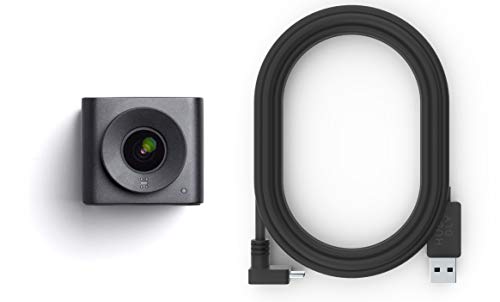
Huddly IQ -- Best AI Huddle Room Camera
The Huddly IQ is a compact AI camera that runs on the device rather than relying on cloud processing. Its on-device computer vision performs speaker detection, automatic zoom, and composition adjustments in real time with low latency. The 150-degree wide-angle lens covers rooms of up to eight people, and the AI crops into the relevant area automatically. It connects via USB-C and requires no PC software for basic operation. Huddly Insights software tracks room utilization data, useful for facility managers optimizing space usage. For a permanent installation in a dedicated huddle room, the Huddly IQ delivers a smarter and more polished video experience than a standard webcam.
Strengths
- Ultra-wide-angle 150°, 1080p video lets you capture everyone in the room, even when they a
- On-camera AI detects the people in the camera’s field of view and responds by automaticall
- Embedded 5-element microphone array delivers optimal vocal clarity
- USB-powered and platform agnostic, easy to set up and install; perfect for small huddle ro
- Made of lightweight aluminum, with a compact, contemporary Scandinavian design and no butt

Obsbot Tiny 4K -- Best for Speaker Tracking
The Obsbot Tiny 4K uses AI-based gesture recognition and face tracking to follow a presenter as they move around the room. This makes it ideal for training sessions, presentations, and workshops where the speaker moves away from the desk. 4K video at 30fps provides sharp detail, and a hand gesture can trigger zoom, lock tracking, or take a snapshot without touching the device. The motorized gimbal enables 360-degree pan and 90-degree tilt. It connects via USB-C to any laptop or room PC and works with Zoom, Teams, and virtually any other platform. For anyone who teaches, presents, or leads dynamic meetings, the tracking capability is a genuine productivity gain.
Strengths
- 【Tiny Titan】Compared to its predecessor, the Tiny 3 Lite webcam is 48% smaller and 34% lig
- 【Imaging, Upgraded】Stunning clarity and smooth motion, in 4K@30FPS or 1080P@120FPS. Precis
- 【Tri-Mic Array, Professional Audio】An omnidirectional mic captures the full scene while tw
- 【AI Tracking 2.0】With the newly upgraded AI Tracking, the PTZ webcam can identify and lock
- 【Say It or Wave It】Command your webcam for PC with your voice or gestures. Wake it up, tra
Buying considerations
What to consider
Room size is the dominant factor. Solo desk workers and small rooms do well with a 1080p or 4K webcam. Rooms with six or more people need a wider field of view and ideally auto-framing to keep remote participants oriented. Consider whether AI features like speaker tracking or auto-zoom are worth the premium for your meeting style. Platform certification matters for Teams and Zoom Rooms setups where you want native integration. Finally, decide between a permanent installation and a portable device that moves between rooms or travels with a user.
What to consider
For a complete meeting room setup, pair your camera with a good audio solution. Our articles on [best conference call systems](/articles/best-conference-call-system) and [best conference call speakers](/articles/best-conference-call-speaker) cover the audio side in detail. See our [methodology page](/methodology) for how we score video equipment.
Questions answered
For most meetings, 1080p at 30 frames per second is sufficient and produces sharp, smooth video. 4K cameras are worth considering for larger rooms where the camera is positioned far from participants, or if you share screen content that benefits from higher resolution. The difference is less noticeable on typical meeting displays than in recorded content.
A 90-degree field of view suits most huddle rooms and small meeting spaces, capturing everyone without distortion. Rooms with wide tables benefit from 110 to 120 degrees. Very wide-angle lenses above 120 degrees introduce barrel distortion at the edges, which can make faces appear unnatural when participants sit near the sides.
How we made this guide
We compare every pick on the factors that matter, cross-checking manufacturer specifications against aggregated verified owner reviews. We rank independently and never take payment for placement. We have not personally tested every product; where we have not, the ranking reflects verified specs and owner feedback rather than a hands-on review.
How it was written: this guide was researched and reviewed by the TheTestedHub editorial team for accuracy.
Affiliate disclosure: TheTestedHub is reader-supported. When you buy through links on our site, we may earn a commission at no extra cost to you.
Keep reading

Best Drones for Beginners 2026: Expert Pick Is the DJI Mini 4K

Find Your Perfect Podcast Mic: Reviews for Every Budget

Phone Tripods 2026: Best Picks and Buying Guide

2026 iPad Accessories Shortlist: Why the Apple Pencil Pro Leads

How to Choose the Best Digital Photo Frames in 2026

Looking for the Best MagSafe Power Banks? Our 2026 Picks

Our Top Fast Chargers for 2026
