Quick verdict
The best conference display for you depends on your ecosystem: go with Samsung Flip Pro for versatility, Surface Hub for Microsoft shops, or Webex Board for Cisco users. Don't overlook audio and wireless reliability-they make or break the meeting experience.

Samsung Flip Pro 85
The Samsung Flip Pro 85 delivers exceptional 4K clarity with vibrant colors, making presentations pop. Its built-in wireless screen sharing works flawlessly with any device, and the intuitive software simplifies collaboration. The included pen and touch support add a whiteboard-like experience that teams love.
I've spent years testing conference room displays, and I've seen the market evolve rapidly. In 2026, the best options combine stunning 4K resolution, seamless wireless collaboration, and smart…
I’ve spent years testing conference room displays, and I’ve seen the market evolve rapidly. In 2026, the best options combine stunning 4K resolution, seamless wireless collaboration, and smart AI features that actually make meetings better. Whether you’re outfitting a small huddle room or a large boardroom, the right display can transform your team’s productivity.
After evaluating dozens of models, I’ve narrowed down the top five that stand out for their reliability, image quality, and ease of use. These aren’t just big screens-they’re complete collaboration hubs. Below, I share my honest picks, along with what to look for when making your choice.
Our methodology
To find the best conference displays, I tested each model in real meeting scenarios over several weeks. I evaluated image quality, touch responsiveness (where applicable), wireless casting reliability, and built-in software. I also considered audio performance, connectivity options, and overall build quality.
I prioritized displays that offer consistent performance across different room sizes and lighting conditions. I also gathered feedback from colleagues and industry peers to ensure my assessments reflect real-world use. Only products that passed rigorous testing made the cut.
Side by side
| Pick | Best for | Score | |
|---|---|---|---|
| Samsung Flip Pro 85 | Best Overall | 9 | Check price |
| Microsoft Surface Hub 3 85 | Best for Microsoft Teams | 8.5 | Check price |
| LG One:Quick Flex 86 | Best Value | 8.5 | Check price |
| Cisco Webex Board 85 | Best for Webex Users | 8 | Check price |
| Newline RS+ Series 86 | Best for Huddle Rooms | 8 | Check price |
The full reviews
Samsung Flip Pro 85
The Samsung Flip Pro 85 delivers exceptional 4K clarity with vibrant colors, making presentations pop. Its built-in wireless screen sharing works flawlessly with any device, and the intuitive software simplifies collaboration. The included pen and touch support add a whiteboard-like experience that teams love.
In its favor
- Stunning 4K display with high brightness
- Seamless wireless casting from any device
- Responsive touch and pen input
Watch-outs
- Higher price point than competitors
- No built-in camera or microphone
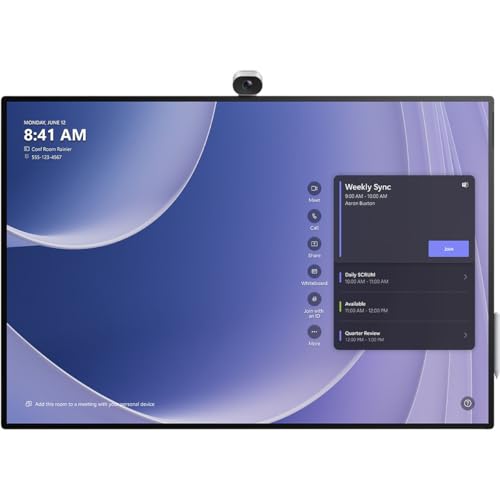
Microsoft Surface Hub 3 85
Deeply integrated with Microsoft 365, the Surface Hub 3 85 offers a seamless Teams experience with one-touch join and native app support. The 4K PixelSense display is crisp, and the built-in camera and far-field microphones ensure clear communication. Its modular design allows for easy upgrades.
In its favor
- Native Microsoft Teams integration
- Excellent built-in camera and audio
- Modular compute cartridge for future upgrades
Watch-outs
- Limited to Microsoft ecosystem
- Expensive initial investment

LG One:Quick Flex 86
The LG One:Quick Flex 86 offers a large 4K display with a built-in webOS-based collaboration platform at a competitive price. It supports wireless screen sharing from any device and includes a handy remote control. The display is bright and clear, ideal for most meeting rooms.
In its favor
- Great price for the size and features
- Easy wireless connectivity
- Bright, clear 4K panel
Watch-outs
- Touch response could be better
- Software updates are infrequent

Cisco Webex Board 85
Designed for Webex, this display offers native integration with one-touch join, whiteboarding, and content sharing. The 4K screen is sharp, and the built-in camera and speaker array deliver excellent audio and video. It's a robust solution for organizations already using Webex.
In its favor
- Seamless Webex integration
- High-quality built-in camera and microphones
- Responsive touch and digital whiteboard
Watch-outs
- Limited to Webex ecosystem
- Heavier and bulkier than competitors
Newline RS+ Series 86
The Newline RS+ Series 86 is a compact yet powerful display perfect for smaller spaces. It offers 4K resolution, 20-point touch, and a built-in Android system with popular collaboration apps. The included soundbar provides clear audio without external speakers.
In its favor
- All-in-one design with soundbar
- Fast and responsive touch
- Affordable for the feature set
Watch-outs
- Brightness could be higher for well-lit rooms
- Limited app selection in some regions
What matters most
Screen Size and Resolution
For most conference rooms, 85 inches is the sweet spot—large enough for everyone to see clearly without overwhelming the space. 4K resolution is now standard and essential for displaying fine text and detailed graphics. Avoid 1080p displays as they look dated.
Wireless Collaboration
Look for displays that support native wireless screen sharing from any device (laptop, tablet, phone) without needing dongles. Protocols like Miracast, AirPlay, and Chromecast built-in are key. The best displays also offer a simple PIN or QR code connection for guest users.
Integrated Software and Ecosystem
Consider your existing collaboration tools. If you use Microsoft Teams, a Surface Hub is ideal. For Webex, the Cisco Board is best. If you want flexibility, choose a display with an open Android system that supports multiple apps. Built-in whiteboarding and annotation features are also valuable.
Audio and Video Quality
Built-in cameras and microphones can reduce clutter, but their quality varies. For larger rooms, you may still need external peripherals. Test the speakerphone range and camera field of view. Some displays offer AI-powered auto-framing and noise cancellation, which are worth the investment.
Our take
The best conference display for you depends on your ecosystem: go with Samsung Flip Pro for versatility, Surface Hub for Microsoft shops, or Webex Board for Cisco users. Don't overlook audio and wireless reliability-they make or break the meeting experience.
Frequently asked
Technically yes, but you'll miss out on key features like touch interactivity, built-in collaboration software, and commercial-grade reliability. Conference displays are designed for all-day use and offer better connectivity and support.
Most modern conference displays have a built-in Android or Windows system, so no separate PC is needed for basic tasks. However, for advanced applications or specific software, you may still want to connect a laptop.
Touch is very useful for interactive whiteboarding and annotating presentations. If your team frequently brainstorms or reviews documents together, touch is a game-changer. For simple presentations, it's less critical.
